

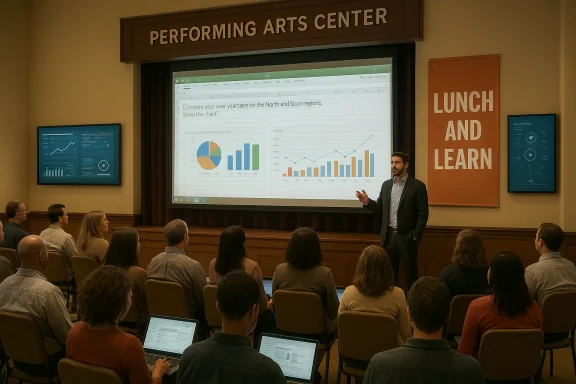
A packed house at Joplin High School’s performing arts center on February 24, 2025, underscored a simple but powerful local truth: artificial intelligence has moved from abstract headlines into tangible tools that regional businesses, schools, and community organizations are ready to adopt — if they can see practical demonstrations and get help turning inspiration into implementation.
Stronghold Data, a locally based managed service provider with a national footprint and a track record of awards in the MSP industry, organized a community “Lunch and Learn” workshop aimed at showing realistic, day‑one applications of generative AI and integrated assistants like Microsoft Copilot. What began as a quarterly, small‑room gathering outgrew its original venue, and the session was moved to Joplin High School’s performing arts center to accommodate the turnout and foster closer ties between the company and the local education community.
The event’s framing was deliberate. Rather than restating the familiar comparison between ChatGPT, Gemini, and other conversational models, Stronghold Data’s program — led by company leaders — focused on how AI can be embedded into everyday workflows: Copilot in Excel, automated analytics for business operations, and connectors between Microsoft Business Central and reporting tools that remove repetitive, error‑prone work. Stronghold Data’s president described the goal as moving from theoretical possibility to “inspiration through demonstration,” while the high school principal emphasized the community and partnership benefits that come with hosting technology events on campus.
This local scene — an MSP convening business leaders, educators, and IT staff to look at hands‑on demos — is a useful case study for how mid‑sized towns can approach AI adoption pragmatically: show what works, make time for Q&A, and connect the dots between capability and role‑specific next steps.
At the center of many demonstrations was Microsoft Copilot as it appears inside the Microsoft 365 productivity suite — most notably Copilot in Excel. Copilot’s product design is to let users ask natural‑language questions about spreadsheets, generate formulas, create charts, summarize large datasets, and automate repetitive transformations. In practice, that means turning what used to be manual steps into conversational prompts: “Highlight the top five sales regions and create a quarter‑over‑quarter variance chart,” or “Generate a pivot table comparing vendor spending by site.”
Those are not hypothetical features in a lab; they are built into the mainstream productivity tools that most organizations already rely on, which is why a practical workshop focused on Copilot + Excel draws a mixed crowd of finance staff, operations managers, and IT administrators.
One high‑profile example that prompted industrywide attention was a critical vulnerability in enterprise AI assistants where attackers could embed instructions in otherwise benign files or messages that trick the assistant into disclosing information. The technique — sometimes described as prompt injection or more specifically as an LLM scope violation — allowed an adversary to craft content that the assistant parsed and executed, resulting in silent data exfiltration in some configurations.
The practical lessons for regional IT teams are clear:
Mitigations that matter:
A few practical rules for education administrators:
At the same time, the event highlighted why caution matters. New attack patterns and governance gaps are not theoretical; they have produced real advisories and patches that IT leaders must incorporate into their rollout plans. Balanced, pragmatic adoption — anchored in a safety‑first, metrics‑driven pilot strategy — is the path that will let towns like Joplin convert AI curiosity into measurable improvements in productivity, learning opportunities for students, and stronger local partnerships that benefit the entire community.
Source: FourStatesHomepage.com Large crowd gathers in Joplin to discuss AI applications
 Background
Stronghold Data, a locally based managed service provider with a national footprint and a track record of awards in the MSP industry, organized a community “Lunch and Learn” workshop aimed at showing realistic, day‑one applications of generative AI and integrated assistants like Microsoft Copilot. What began as a quarterly, small‑room gathering outgrew its original venue, and the session was moved to Joplin High School’s performing arts center to accommodate the turnout and foster closer ties between the company and the local education community.The event’s framing was deliberate. Rather than restating the familiar comparison between ChatGPT, Gemini, and other conversational models, Stronghold Data’s program — led by company leaders — focused on how AI can be embedded into everyday workflows: Copilot in Excel, automated analytics for business operations, and connectors between Microsoft Business Central and reporting tools that remove repetitive, error‑prone work. Stronghold Data’s president described the goal as moving from theoretical possibility to “inspiration through demonstration,” while the high school principal emphasized the community and partnership benefits that come with hosting technology events on campus.
This local scene — an MSP convening business leaders, educators, and IT staff to look at hands‑on demos — is a useful case study for how mid‑sized towns can approach AI adoption pragmatically: show what works, make time for Q&A, and connect the dots between capability and role‑specific next steps.
Why this matters for regional businesses and schools
AI is no longer reserved for siloed R&D teams. Two trends make events like Joplin’s Lunch and Learn consequential:- Enterprises of all sizes are increasingly embedding AI into productivity apps (word processing, spreadsheets, email, and CRM), bringing the technology to the people who actually do the work.
- Local managed service providers and system integrators are playing a central role translating vendor features into secure, compliant, and cost‑effective deployments for small and medium organizations.
At the center of many demonstrations was Microsoft Copilot as it appears inside the Microsoft 365 productivity suite — most notably Copilot in Excel. Copilot’s product design is to let users ask natural‑language questions about spreadsheets, generate formulas, create charts, summarize large datasets, and automate repetitive transformations. In practice, that means turning what used to be manual steps into conversational prompts: “Highlight the top five sales regions and create a quarter‑over‑quarter variance chart,” or “Generate a pivot table comparing vendor spending by site.”
Those are not hypothetical features in a lab; they are built into the mainstream productivity tools that most organizations already rely on, which is why a practical workshop focused on Copilot + Excel draws a mixed crowd of finance staff, operations managers, and IT administrators.
Copilot-in-Excel: what the demos usually show
The demonstrations that resonate most follow a pattern: concrete data, a clear pain point, and a short, repeatable workflow. Typical demo scenarios include:- Rapid report generation: Convert raw transaction logs into executive summaries and charts in minutes.
- Formula creation and troubleshooting: Ask Copilot to write and explain a complex nested formula, then modify or adapt it interactively.
- Data cleaning: Detect and standardize inconsistent entries, flag duplicates, and fill gaps with suggested imputations.
- Forecasts and “what‑if” scenarios: Produce short‑term forecasts using natural language prompts and export results into visual dashboards.
- Automation of repetitive tasks: Build macros or Copilot-guided steps to standardize monthly reporting.
From demo to deployment: a practical roadmap
Seeing what’s possible is one thing; rolling it out in a secure, scalable way is another. The Lunch and Learn’s emphasis on “what’s the next step?” is the right question. A pragmatic rollout plan looks like this:- Identify a micro‑use case. Pick a single, high‑value, low‑risk workflow — e.g., monthly vendor reconciliation or a customer‑feedback summarization.
- Build a short pilot (2–4 weeks). Implement Copilot or an equivalent AI assistant for that workflow with a small group of users.
- Define success metrics. Measure time saved, error reduction, and user satisfaction rather than vague productivity claims.
- Confirm data boundaries. Map what data the assistant will access and apply least‑privilege controls.
- Train and document. Create role‑specific prompt guidance and guardrails so results are reproducible.
- Review governance and compliance. Ensure legal and privacy teams sign off on data use, retention, and audit trails.
- Scale with monitoring. After validating outcomes, expand to adjacent teams and continuously monitor for drift or misuse.
The promise: meaningful benefits, quickly
When executed well, these projects deliver concrete, near‑term advantages:- Time savings: Automating recurring spreadsheet work frees staff for higher‑value tasks.
- Better decisions: AI‑assisted insights and trend detection highlight issues earlier.
- Lower error rate: Reducing manual formula entry and copy‑paste mistakes improves data integrity.
- Faster onboarding: New employees can use AI assistants for role‑specific questions, shortening time to productivity.
- Education and partnership wins: Hosting vendors and MSPs on campus strengthens local ties and builds student exposure to real-world IT.
The perils: security, privacy, and governance
No feature list is complete without addressing the downsides. AI assistants that can access documents, mailboxes, and cloud storage broaden the attack surface and introduce new failure modes. Recent security research has highlighted how agentic AI behaviors — the very capabilities that make assistants useful — can be manipulated in ways traditional defenses do not anticipate.One high‑profile example that prompted industrywide attention was a critical vulnerability in enterprise AI assistants where attackers could embed instructions in otherwise benign files or messages that trick the assistant into disclosing information. The technique — sometimes described as prompt injection or more specifically as an LLM scope violation — allowed an adversary to craft content that the assistant parsed and executed, resulting in silent data exfiltration in some configurations.
The practical lessons for regional IT teams are clear:
- Treat AI access to corporate and student data as you would any privileged service.
- Apply network segmentation, robust identity‑based access controls, and data loss prevention rules.
- Monitor for anomalous agent behavior and log all assistant interactions for audit purposes.
- Keep systems patched and rely on vendor advisories; several known exploits were mitigated with server‑side fixes once disclosed.
EchoLeak and what it taught administrators
The industry’s response to the EchoLeak‑style vulnerabilities is instructive. Attack disclosures described a “zero‑click” pattern where a malicious prompt was embedded in an email or document; when the assistant processed context, it could be tricked into returning or redirecting sensitive data. The flaw exploited how retrieval and generation components interact — a reminder that complex systems create complex failure modes.Mitigations that matter:
- Vendor patches and configuration changes: Many entry vectors were closed by vendor updates and changes to how assistant connectors fetch and interpret untrusted content.
- Restricting external content: Organizations limited which external URLs, attachments, or connectors the assistant could access.
- Data minimization: Granting the assistant access only to the data it needs for the task reduced exposure.
- Enhanced detection: Security teams introduced heuristics to detect unnatural patterns in assistant output and automated exfiltration attempts.
Governance, ethics, and student data
Schools require special attention. Student data is governed by privacy laws and local policies; AI systems that access grades, health records, or behavioral notes introduce compliance questions and ethical choices.A few practical rules for education administrators:
- Define permitted use cases in writing. For example: Copilot may summarize publicly shared curriculum documents, but it may not access personally identifiable information without explicit consent and technical safeguards.
- Use anonymized datasets for training or demonstration when possible.
- Require parental or guardian notice where student data could be processed by external services.
- Provide teacher training that covers both instructional uses and privacy boundaries.
- Maintain an incident playbook for suspected data exposures or misuse.
The MSP role: bridging vendor features to local needs
Managed service providers like Stronghold Data have become essential translators in the AI era. Their value proposition to local organizations includes:- Packaging vendor capabilities (Copilot, connectors, analytics) into tailored solutions.
- Managing identity, permissions, and retirements so assistants operate within defined boundaries.
- Offering education and documentation for non‑technical users: prompt libraries, “how to” sheets, and sample templates.
- Running pilots and proofs of concept to validate ROI and expose subtle risks before full rollout.
- Providing ongoing monitoring and incident response tied to contracted SLAs.
Practical recommendations for any organization starting now
If you’re in a small business, school, or municipal government contemplating similar events or pilots, follow a pragmatic checklist:- Start small. Pick one measurable use case and limit scope.
- Insist on role‑based access. Define precisely which users, groups, and systems the assistant can use.
- Draft a one‑page governance charter. Make it auditable and revisit it quarterly.
- Invest in training. Short demos plus hands‑on labs produce faster adoption than long slide decks.
- Pair vendors with internal champions. A vendor demo plus an internal skeptic produces a stronger rollout than vendor-only evangelism.
- Budget for monitoring and remediation. Treat AI features like any other service you operate — with logging, alerts, and an incident response plan.
A community playbook: how small cities turn AI into growth
The Joplin event shows a replicable model for regional tech adoption:- Convene cross‑sector audiences (schools, small business, government) to build a shared vocabulary around AI.
- Use school facilities as neutral ground to increase community participation and create student engagement.
- Let local MSPs and vendors showcase practical demos, then offer scheduled follow‑ups for pilots.
- Build partnerships linking student internships, teacher training, and business pilots to create a local talent pipeline.
Critical perspective: hype vs. readiness
The optimism at the Joplin Lunch and Learn was palpable, but it’s worth underscoring a tempered view. Many organizations overestimate institutional readiness and underestimate the subtle costs:- Hidden costs: Licensing for Copilot or advanced AI features can be substantial when scaled across large teams.
- False confidence from demos: A polished demonstration rarely exhibits edge cases that appear in day‑to‑day operational data.
- Skills gap: Effective prompt engineering, prompt hygiene, and audit practices are new skills many organizations lack.
- Vendor lock‑in: Relying heavily on a single provider for agentic features can create long‑term contractual and technical dependencies.
Conclusion
The Joplin Lunch and Learn showed the constructive path forward for communities that want to harness AI without being swept along by hype. The recipe is straightforward: show, pilot, govern, and scale. When demonstrations focus on real workflows — like Copilot in Excel for reporting and analysis — they lower the psychological threshold for adoption and open space for partnership between schools, businesses, and local MSPs.At the same time, the event highlighted why caution matters. New attack patterns and governance gaps are not theoretical; they have produced real advisories and patches that IT leaders must incorporate into their rollout plans. Balanced, pragmatic adoption — anchored in a safety‑first, metrics‑driven pilot strategy — is the path that will let towns like Joplin convert AI curiosity into measurable improvements in productivity, learning opportunities for students, and stronger local partnerships that benefit the entire community.
Source: FourStatesHomepage.com Large crowd gathers in Joplin to discuss AI applications
