

Microsoft’s July 14, 2026 cumulative updates will permanently remove Windows domain controllers’ Kerberos RC4 rollback control, while administrators must separately verify that Microsoft Malware Protection Engine version 1.1.26060.3008 or later reached every Defender endpoint. A third deadline is already overdue: every on-premises SharePoint farm server must be checked against Microsoft’s May out-of-band update for CVE-2026-45659.
These are independent security changes delivered through different mechanisms, but they collide in one maintenance window. Installing July’s cumulative update does not prove that Defender’s engine was updated, that service accounts are ready for Kerberos enforcement, or that every SharePoint farm member received the May fix.
The July decision is therefore evidence-based: verify Defender first, resolve or formally escalate RC4 dependencies before domain-controller deployment, and compare every SharePoint server with Microsoft’s published May update and build information.
Pass:
Fail: The command returns an earlier version, no version, an error, or no result from a device that should run the Microsoft Malware Protection Engine.
For failed systems, use the organization’s approved Defender security-intelligence and engine-update channel, then rerun the command and retain the resulting version as deployment evidence. Do not treat successful installation of the July Windows cumulative update as evidence that the Defender engine passed this check.
Select Filter Current Log, enter
The equivalent PowerShell collection command is:
Run the query across all domain controllers or collect the System log centrally. Export the events and assign each identified dependency to an application or identity owner.
Pass: Event review is complete across every domain controller, identified dependencies have owners, and critical authentication paths have passed validation under the intended encryption configuration.
Fail: Event ID 205 identifies an unresolved dependency, one or more domain controllers have not been queried, an account has no owner, or a critical application has not been tested.
The absence of Event ID 205 is not, by itself, a pass. Dormant jobs, rarely used appliances, disaster-recovery systems, and infrequently executed services may not have generated relevant traffic during the observation period.
The output must be reviewed with application owners rather than interpreted as a self-contained compatibility test.
Relevant
A blank attribute can indicate reliance on defaults; it must not automatically be classified as AES-ready. Account configuration, password history, domain behavior, client capability, and observed ticket activity must all be considered.
Confirm the attribute:
Coordinate a password reset so Active Directory can generate current key material:
Update the credential everywhere it is consumed, including Windows services, scheduled tasks, application configuration, middleware, appliances, scripts, and secret stores. Restart or reinitialize affected services as required by the application vendor.
Validate the change by:
If an application still requires RC4, stop the normal remediation workflow and escalate it to the Active Directory owner, application owner, security team, and vendor support. Record the affected account, application version, business owner, vendor case, required encryption types, compensating controls, and retirement date. Any account-level RC4 exception must be treated as a documented compatibility exception, not as the default fix for a failed test.
Use this list as the authoritative verification worksheet. Do not check only the server hosting Central Administration or one web front end.
For the exact SharePoint product installed in the farm, obtain the May out-of-band update’s KB number, package requirements, and target build from Microsoft’s CVE-2026-45659 advisory, the applicable SharePoint update history, and the Microsoft Update Catalog. Record those Microsoft-published values in the change ticket. Do not substitute a build number copied from another SharePoint edition.
In Central Administration, open:
Compare the reported patch state for every server with the May out-of-band update and target build recorded from Microsoft’s documentation.
Also record the farm build from the SharePoint Management Shell:
After installing any missing package, run the SharePoint Products Configuration Wizard or the organization’s approved
Pass: Every active farm server is present in the inventory, its installed patch state matches Microsoft’s May out-of-band requirements for that exact SharePoint edition, configuration upgrade work is complete, and the farm reports no missing required update.
Fail: A server is absent from the worksheet, reports a missing update, remains in an upgrade-required state, runs an earlier build than Microsoft specifies, or cannot be conclusively verified.
Those timelines demand different evidence:
The common failure mode is assumption. Update approval is not evidence of engine state. An empty event search is not a complete application inventory. A patched SharePoint front end does not prove that another farm member received the same package.
July’s work must therefore be managed as verified security outcomes rather than as a list of approved packages.
The delivery mechanism creates a reporting challenge. An engine update can arrive independently of a conventional Windows cumulative update, so a successful operating-system deployment record does not prove that the vulnerable engine was replaced. Devices using restricted update paths, offline repositories, delayed synchronization, or tightly controlled endpoint policies require the same version check as directly connected systems.
The verification rule is straightforward:
Anything below
The engine update closes the vulnerable condition going forward, but version verification does not answer whether activity occurred before correction. Organizations with suitable endpoint telemetry should preserve and review the relevant period according to their incident-response procedures. The supplied facts do not establish a definitive process tree, invocation path, execution identity, or detection signature, so administrators should not build an investigation around unsupported assumptions. Instead, they should correlate unusual privileged activity, file changes, persistence, security-control modifications, and user context using the telemetry their environment actually collects.
RoguePlanet’s 29-day public-disclosure period increases the importance of that review, but it does not establish that a particular organization was compromised. The operational response should distinguish clearly between exposure, suspicious activity, and confirmed incident evidence.
The consequence requires precise wording. Installing the July updates does not make account repair impossible. Administrators can still correct encryption attributes, rotate credentials, generate current key material, update applications, and document narrowly scoped exceptions where necessary.
What disappears is the domain-wide rollback mechanism. If several applications fail after enforcement, administrators cannot use that control to restore the previous posture across the domain while they investigate. Each remaining dependency becomes an account-, client-, or application-level incident.
Organizations that used the rollback control after an earlier enforcement phase should treat that history as direct evidence of unresolved work. Before July deployment, they need to identify why the control was used, which systems depended on it, whether those systems were remediated, and whether the rollback value remains configured.
Check the value on each domain controller according to Microsoft’s published Kerberos hardening guidance and record the result in the change ticket. The July approval decision should not be based only on whether the value exists; it should be based on whether the dependencies that caused its use have been removed or formally escalated.
Start with the SPN-bearing user-account inventory:
For an application confirmed to support both AES types, configure the account value as decimal
Then coordinate and perform the password reset, update every consumer, restart services where required, and conduct a real transaction. Merely observing that a Windows service entered the Running state is not sufficient evidence that its database connection, web request, batch process, or downstream authentication succeeded.
Review tickets with
If the application fails with AES, do not change random domain settings during the incident. Confirm the service principal name, account being used, encryption attribute, client and server support, key availability, and password-reset completion. If the vendor states that RC4 remains required, escalate through the documented exception process and obtain a supported migration plan.
There is no domain-wide rollback after the July transition. That limitation makes predeployment testing the principal recovery strategy.
Filter the current log for Event ID
Every domain controller must be included. Querying one domain controller can miss activity handled by another site or authentication path.
Each event should produce an accountable work item: affected identity, source system, application or device, owner, required action, test plan, and deadline. Events without owners are not remediation evidence.
A quiet log also requires a test plan. A quarterly job or standby system may not have authenticated during the collection period. The evidence matrix therefore pairs event review with service-account inventory and application testing. None of the three is complete alone.
A KEV listing is a high-priority operational signal, but the listing alone should not be presented as independent proof of a particular exploitation claim unless the supporting basis is also supplied. For the July maintenance decision, the necessary conclusion is narrower: the federal remediation deadline has passed, and affected farms require immediate verification.
“Verify SharePoint patch status” is not a usable instruction. Administrators need to establish the exact farm inventory, retrieve Microsoft’s baseline for their edition, and compare every server against it.
Start with:
Then obtain the applicable May package’s KB number and target build directly from Microsoft’s CVE advisory, SharePoint update history, and Update Catalog. SharePoint Server Subscription Edition, SharePoint Server 2019, and SharePoint Enterprise Server 2016 do not necessarily share one package or build number, so the baseline must match the installed product.
In Central Administration, open:
Review every server returned by
Record the farm build with:
If a package is missing, follow Microsoft’s update sequencing guidance, install it on the required farm members, and complete the SharePoint configuration process. A binary installation without the required configuration step is not a completed deployment.
Finally, repeat the server inventory, patch-status review, and build check. A partially patched farm remains a failed result even if normal user traffic reaches only updated front ends. Disabled, standby, search, application, distributed-cache, and disaster-recovery-related members must either be verified or removed from scope through an approved architectural decision.
April 2026 — The rollout moves toward enforcement while retaining the
May 2026 — Microsoft makes the out-of-band SharePoint update for CVE-2026-45659 available.
June 10, 2026 — RoguePlanet proof-of-concept material becomes public, beginning the stated 29-day interval before the corrected engine release.
July 1, 2026 — CISA adds SharePoint CVE-2026-45659 to the Known Exploited Vulnerabilities catalog.
July 4, 2026 — The stated federal SharePoint remediation deadline passes.
July 8–9, 2026 — Microsoft releases the out-of-band RoguePlanet engine correction.
July 14, 2026 — Microsoft’s cumulative updates remove support for the Kerberos RC4 domain-wide rollback control.
The supplied record supports three operational facts: proof-of-concept material was public before the corrected Defender engine arrived; the correction was delivered outside the normal cumulative-update mechanism; and administrators need direct version evidence to know whether endpoints are protected.
It does not support claims that the previously named disclosures were used in confirmed attacks merely because CISA assigned a remediation deadline. It also does not support a specific RoguePlanet detection signature, execution identity, exploitation sequence, or Defender invocation path. Those claims should remain outside the runbook unless evidence is supplied and validated.
Security teams should avoid converting uncertainty into either reassurance or alarm. A public proof of concept establishes exposure and investigative relevance. It does not establish compromise. An updated engine establishes present version compliance. It does not establish that no earlier activity occurred.
The correct response is to retain telemetry, investigate anomalies using the organization’s normal incident criteria, and document what the available evidence does and does not show.
The three workstreams should also remain separate in reporting. A single “July patches complete” status hides the distinctions that matter:
Microsoft’s July 14 window is therefore not defined by the number of bulletins released. It is defined by three independent deadlines with three different forms of proof. Organizations that reduce the event to cumulative-update deployment risk overlooking the Defender engine, discovering Kerberos dependencies only after rollback disappears, or carrying an unverified SharePoint node into another month.
The WindowsForum-ready decision is direct: do not approve July as complete until the evidence matrix is complete. Verify the Defender engine numerically, resolve or escalate Kerberos dependencies account by account, and compare every SharePoint server with Microsoft’s exact May package and build baseline. The update packages matter, but the publishable result is the verified security state they leave behind.
These are independent security changes delivered through different mechanisms, but they collide in one maintenance window. Installing July’s cumulative update does not prove that Defender’s engine was updated, that service accounts are ready for Kerberos enforcement, or that every SharePoint farm member received the May fix.
The July decision is therefore evidence-based: verify Defender first, resolve or formally escalate RC4 dependencies before domain-controller deployment, and compare every SharePoint server with Microsoft’s published May update and build information.
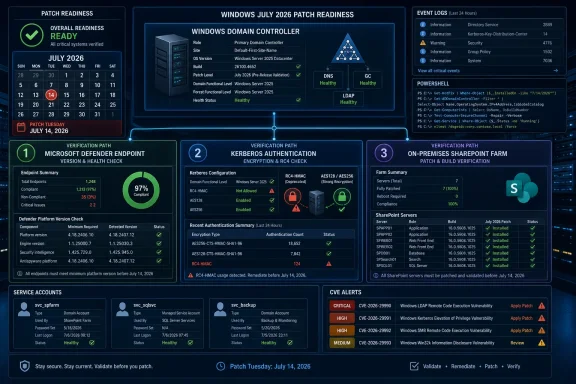 Execute This Checklist Before July 14
1. Verify the Defender engine on every endpoint
Run this command locally or through the organization’s endpoint-management platform:Get-MpComputerStatus | Select-Object AMEngineVersionPass:
AMEngineVersion is 1.1.26060.3008 or later.Fail: The command returns an earlier version, no version, an error, or no result from a device that should run the Microsoft Malware Protection Engine.
For failed systems, use the organization’s approved Defender security-intelligence and engine-update channel, then rerun the command and retain the resulting version as deployment evidence. Do not treat successful installation of the July Windows cumulative update as evidence that the Defender engine passed this check.
2. Collect Kerberos Event ID 205 from every domain controller
On each domain controller, open:Event Viewer > Windows Logs > SystemSelect Filter Current Log, enter
205 in All Event IDs, apply the filter, and review the results for affected accounts, services, clients, and encryption settings.The equivalent PowerShell collection command is:
Code:
Get-WinEvent -FilterHashtable @{
    LogName = 'System'
    Id      = 205
} | Select-Object TimeCreated, MachineName, Id, LevelDisplayName, MessagePass: Event review is complete across every domain controller, identified dependencies have owners, and critical authentication paths have passed validation under the intended encryption configuration.
Fail: Event ID 205 identifies an unresolved dependency, one or more domain controllers have not been queried, an account has no owner, or a critical application has not been tested.
The absence of Event ID 205 is not, by itself, a pass. Dormant jobs, rarely used appliances, disaster-recovery systems, and infrequently executed services may not have generated relevant traffic during the observation period.
3. Inventory service accounts and their encryption attributes
From a management system with the Active Directory PowerShell module, inventory user accounts that have service principal names:
Code:
Get-ADUser -LDAPFilter '(&(objectCategory=person)(objectClass=user)(servicePrincipalName=*))' `
    -Properties servicePrincipalName,msDS-SupportedEncryptionTypes,PasswordLastSet,Enabled |
    Select-Object SamAccountName,Enabled,PasswordLastSet,
        msDS-SupportedEncryptionTypes,servicePrincipalName |
Export-Csv .\KerberosServiceAccounts.csv -NoTypeInformationRelevant
msDS-SupportedEncryptionTypes bit values include:| Value | Meaning |
|---|---|
0x4 / 4 | RC4 |
0x8 / 8 | AES 128-bit |
0x10 / 16 | AES 256-bit |
0x18 / 24 | AES 128-bit and AES 256-bit |
0x1C / 28 | RC4, AES 128-bit, and AES 256-bit |
4. Complete account-level remediation and validation
For a conventional service account whose application supports AES, coordinate a maintenance window with every system that stores or uses its password. Then configure the account for AES 128-bit and AES 256-bit encryption:
Code:
Set-ADUser -Identity 'svcExample' `
    -Replace @{msDS-SupportedEncryptionTypes = 24}
Code:
Get-ADUser -Identity 'svcExample' `
    -Properties msDS-SupportedEncryptionTypes |
    Select-Object SamAccountName,msDS-SupportedEncryptionTypes
Code:
Set-ADAccountPassword -Identity 'svcExample' -Reset `
-NewPassword (Read-Host -AsSecureString 'Enter the coordinated new password')Validate the change by:
- Purging cached tickets from the designated test session where operationally appropriate.
- Restarting or signing in to the affected service.
- Running a real application transaction rather than merely checking that a process started.
- Confirming that Kerberos authentication succeeds.
- Inspecting the resulting ticket with:
klist- Rechecking domain-controller System logs for Event ID 205 and related authentication failures.
RC4DefaultDisablementPhase rollback control; there will be no general registry switch that restores the earlier audit posture.If an application still requires RC4, stop the normal remediation workflow and escalate it to the Active Directory owner, application owner, security team, and vendor support. Record the affected account, application version, business owner, vendor case, required encryption types, compensating controls, and retirement date. Any account-level RC4 exception must be treated as a documented compatibility exception, not as the default fix for a failed test.
5. Verify every SharePoint farm server
First inventory the farm from the SharePoint Management Shell:
Code:
Get-SPServer |
    Select-Object Address,Role,Status |
Sort-Object AddressFor the exact SharePoint product installed in the farm, obtain the May out-of-band update’s KB number, package requirements, and target build from Microsoft’s CVE-2026-45659 advisory, the applicable SharePoint update history, and the Microsoft Update Catalog. Record those Microsoft-published values in the change ticket. Do not substitute a build number copied from another SharePoint edition.
In Central Administration, open:
Central Administration > Upgrade and Migration > Check product and patch installation statusCompare the reported patch state for every server with the May out-of-band update and target build recorded from Microsoft’s documentation.
Also record the farm build from the SharePoint Management Shell:
(Get-SPFarm).BuildVersionAfter installing any missing package, run the SharePoint Products Configuration Wizard or the organization’s approved
PSConfig procedure on every required farm server, following Microsoft’s sequencing guidance for that update. Reopen Check product and patch installation status, confirm that no farm member remains missing the required update, and run:
Code:
Get-SPServer |
    Select-Object Address,Role,Status |
Sort-Object AddressFail: A server is absent from the worksheet, reports a missing update, remains in an upgrade-required state, runs an earlier build than Microsoft specifies, or cannot be conclusively verified.
The Evidence Matrix
| System population | Required evidence | Owner | Deadline | Failed-evidence action |
|---|---|---|---|---|
| Endpoints running the Microsoft Malware Protection Engine | AMEngineVersion from Get-MpComputerStatus; must be 1.1.26060.3008 or later | Endpoint security | Before July cumulative-update deployment begins | Deliver the approved engine update, rerun the command, and investigate devices that cannot report |
| All domain controllers | Exported System-log review for Event ID 205, plus confirmation that every DC was queried | Active Directory operations | Before July 14 deployment approval | Identify affected accounts and clients, assign owners, remediate, and repeat testing |
| SPN-bearing service accounts | msDS-SupportedEncryptionTypes, password-reset status, application owner, and validation result | Identity team and application owner | Before patching the domain controllers that authenticate the service | Configure supported AES values, coordinate password reset, update consumers, and test |
| Critical Kerberos applications and devices | Successful end-to-end transaction under the intended encryption configuration | Application or device owner | Before production enforcement | Open a vendor escalation; document and approve any temporary account-level exception |
| Every server in every affected SharePoint farm | Server inventory, Microsoft-published May KB/build baseline, Central Administration patch report, and completed configuration status | SharePoint farm administrator | Immediately; the stated federal deadline has passed | Remove the node from service if appropriate, install the required update, complete configuration, and revalidate |
| Systems that cannot produce required evidence | Named owner, documented reason, isolation or compensating control, and escalation ticket | Business owner and security | Before change approval | Treat as a failed control rather than assuming compliance |
Patch Tuesday Has Become Three Different Deadlines
Calling July 14 “Patch Tuesday” understates the operational problem. Administrators are managing three timelines: the Defender engine update released ahead of the monthly cycle, Kerberos enforcement embedded in the July cumulative updates, and a SharePoint vulnerability whose federal remediation deadline has already passed.Those timelines demand different evidence:
| Security workstream | Systems in scope | Required state | Primary operational risk | Completion evidence |
|---|---|---|---|---|
| RoguePlanet, CVE-2026-50656 | Systems running the Microsoft Malware Protection Engine | Engine 1.1.26060.3008 or later | A vulnerable engine remains installed even though Windows appears fully patched | Per-device engine-version result |
| Kerberos RC4 enforcement, CVE-2026-20833 | Domain controllers, service accounts, applications, and Kerberos clients | Critical dependencies tested without reliance on the domain-wide rollback control | Authentication failure after enforcement | DC event review, account inventory, owner sign-off, and application transaction test |
| SharePoint, CVE-2026-45659 | Affected on-premises SharePoint editions | May out-of-band update installed and configured on every farm member | A partially patched farm retains vulnerable code | Microsoft KB/build comparison and per-server patch report |
July’s work must therefore be managed as verified security outcomes rather than as a list of approved packages.
RoguePlanet Requires Version Evidence, Not Package Assumptions
Microsoft addressed RoguePlanet, tracked as CVE-2026-50656, through an out-of-band Microsoft Malware Protection Engine update released before the July cumulative-update cycle. The protected threshold supplied for this change is engine version1.1.26060.3008.The delivery mechanism creates a reporting challenge. An engine update can arrive independently of a conventional Windows cumulative update, so a successful operating-system deployment record does not prove that the vulnerable engine was replaced. Devices using restricted update paths, offline repositories, delayed synchronization, or tightly controlled endpoint policies require the same version check as directly connected systems.
The verification rule is straightforward:
Get-MpComputerStatus | Select-Object AMEngineVersionAnything below
1.1.26060.3008, anything that cannot return a version, and anything absent from the inventory is a failure requiring follow-up.The engine update closes the vulnerable condition going forward, but version verification does not answer whether activity occurred before correction. Organizations with suitable endpoint telemetry should preserve and review the relevant period according to their incident-response procedures. The supplied facts do not establish a definitive process tree, invocation path, execution identity, or detection signature, so administrators should not build an investigation around unsupported assumptions. Instead, they should correlate unusual privileged activity, file changes, persistence, security-control modifications, and user context using the telemetry their environment actually collects.
RoguePlanet’s 29-day public-disclosure period increases the importance of that review, but it does not establish that a particular organization was compromised. The operational response should distinguish clearly between exposure, suspicious activity, and confirmed incident evidence.
Kerberos Enforcement Removes the Domain-Wide Safety Valve
The July cumulative updates remove support for theRC4DefaultDisablementPhase control that allowed administrators to return domain controllers to the earlier phase of Microsoft’s Kerberos hardening rollout.The consequence requires precise wording. Installing the July updates does not make account repair impossible. Administrators can still correct encryption attributes, rotate credentials, generate current key material, update applications, and document narrowly scoped exceptions where necessary.
What disappears is the domain-wide rollback mechanism. If several applications fail after enforcement, administrators cannot use that control to restore the previous posture across the domain while they investigate. Each remaining dependency becomes an account-, client-, or application-level incident.
Organizations that used the rollback control after an earlier enforcement phase should treat that history as direct evidence of unresolved work. Before July deployment, they need to identify why the control was used, which systems depended on it, whether those systems were remediated, and whether the rollback value remains configured.
Check the value on each domain controller according to Microsoft’s published Kerberos hardening guidance and record the result in the change ticket. The July approval decision should not be based only on whether the value exists; it should be based on whether the dependencies that caused its use have been removed or formally escalated.
Service Accounts Need a Supported Remediation Procedure
An encryption inventory is useful only if it leads to an executable change plan. The account-level procedure must include an owner, attribute review, password-reset coordination, an application transaction test, and an exception route.Start with the SPN-bearing user-account inventory:
Code:
Get-ADUser -LDAPFilter '(&(objectCategory=person)(objectClass=user)(servicePrincipalName=*))' `
    -Properties servicePrincipalName,msDS-SupportedEncryptionTypes,PasswordLastSet,Enabled |
    Select-Object SamAccountName,Enabled,PasswordLastSet,
msDS-SupportedEncryptionTypes,servicePrincipalName24, equivalent to hexadecimal 0x18:
Code:
Set-ADUser -Identity 'svcExample' `
-Replace @{msDS-SupportedEncryptionTypes = 24}Review tickets with
klist, check domain-controller events, and retain the test result with the change record. Where a managed service account or group managed service account is used, follow the account type’s supported password-management procedure rather than treating it as a conventional manually managed credential.If the application fails with AES, do not change random domain settings during the incident. Confirm the service principal name, account being used, encryption attribute, client and server support, key availability, and password-reset completion. If the vendor states that RC4 remains required, escalate through the documented exception process and obtain a supported migration plan.
There is no domain-wide rollback after the July transition. That limitation makes predeployment testing the principal recovery strategy.
Event ID 205 Is Evidence, Not the Whole Inventory
Microsoft directs administrators to the domain-controller System log for Kerberos audit information, including Event ID 205. The correct manual path is:Event Viewer > Windows Logs > SystemFilter the current log for Event ID
205, or collect it using:
Code:
Get-WinEvent -FilterHashtable @{
    LogName = 'System'
    Id      = 205
}Each event should produce an accountable work item: affected identity, source system, application or device, owner, required action, test plan, and deadline. Events without owners are not remediation evidence.
A quiet log also requires a test plan. A quarterly job or standby system may not have authenticated during the collection period. The evidence matrix therefore pairs event review with service-account inventory and application testing. None of the three is complete alone.
SharePoint Requires a Per-Server Build Comparison
CVE-2026-45659 affects the specified on-premises SharePoint editions and was addressed through a May out-of-band update. CISA added the vulnerability to the Known Exploited Vulnerabilities catalog and assigned a federal remediation deadline of July 4.A KEV listing is a high-priority operational signal, but the listing alone should not be presented as independent proof of a particular exploitation claim unless the supporting basis is also supplied. For the July maintenance decision, the necessary conclusion is narrower: the federal remediation deadline has passed, and affected farms require immediate verification.
“Verify SharePoint patch status” is not a usable instruction. Administrators need to establish the exact farm inventory, retrieve Microsoft’s baseline for their edition, and compare every server against it.
Start with:
Code:
Get-SPServer |
    Select-Object Address,Role,Status |
Sort-Object AddressIn Central Administration, open:
Upgrade and Migration > Check product and patch installation statusReview every server returned by
Get-SPServer. Record whether the applicable update is installed, whether configuration work remains, and whether any server reports a missing package.Record the farm build with:
(Get-SPFarm).BuildVersionIf a package is missing, follow Microsoft’s update sequencing guidance, install it on the required farm members, and complete the SharePoint configuration process. A binary installation without the required configuration step is not a completed deployment.
Finally, repeat the server inventory, patch-status review, and build check. A partially patched farm remains a failed result even if normal user traffic reaches only updated front ends. Disabled, standby, search, application, distributed-cache, and disaster-recovery-related members must either be verified or removed from scope through an approved architectural decision.
Timeline
January 2026 — Microsoft begins the cited Kerberos RC4 audit phase associated with CVE-2026-20833.April 2026 — The rollout moves toward enforcement while retaining the
RC4DefaultDisablementPhase rollback control.May 2026 — Microsoft makes the out-of-band SharePoint update for CVE-2026-45659 available.
June 10, 2026 — RoguePlanet proof-of-concept material becomes public, beginning the stated 29-day interval before the corrected engine release.
July 1, 2026 — CISA adds SharePoint CVE-2026-45659 to the Known Exploited Vulnerabilities catalog.
July 4, 2026 — The stated federal SharePoint remediation deadline passes.
July 8–9, 2026 — Microsoft releases the out-of-band RoguePlanet engine correction.
July 14, 2026 — Microsoft’s cumulative updates remove support for the Kerberos RC4 domain-wide rollback control.
Disclosure Policy Is Secondary to Operational Evidence
RoguePlanet’s public-disclosure interval raises legitimate questions about coordination between researchers and Microsoft, but that dispute does not change the administrator’s immediate duties.The supplied record supports three operational facts: proof-of-concept material was public before the corrected Defender engine arrived; the correction was delivered outside the normal cumulative-update mechanism; and administrators need direct version evidence to know whether endpoints are protected.
It does not support claims that the previously named disclosures were used in confirmed attacks merely because CISA assigned a remediation deadline. It also does not support a specific RoguePlanet detection signature, execution identity, exploitation sequence, or Defender invocation path. Those claims should remain outside the runbook unless evidence is supplied and validated.
Security teams should avoid converting uncertainty into either reassurance or alarm. A public proof of concept establishes exposure and investigative relevance. It does not establish compromise. An updated engine establishes present version compliance. It does not establish that no earlier activity occurred.
The correct response is to retain telemetry, investigate anomalies using the organization’s normal incident criteria, and document what the available evidence does and does not show.
July’s Change Approval Should Be Conditional
The domain-controller update decision should be based on explicit gates:- Defender endpoints report engine version
1.1.26060.3008or later, or have named remediation tickets. - Every domain controller has been queried for Event ID 205.
- SPN-bearing service accounts have been inventoried and assigned to owners.
- Critical Kerberos applications have passed real transaction tests.
- Any remaining RC4 dependency has a vendor escalation, approved exception, compensating controls, and retirement plan.
- Every affected SharePoint farm member has been compared with Microsoft’s May KB and build baseline.
- SharePoint configuration work is complete after package installation.
- Systems without evidence are classified as failures rather than silently counted as compliant.
The three workstreams should also remain separate in reporting. A single “July patches complete” status hides the distinctions that matter:
- Defender is a version-verification task.
- Kerberos is a compatibility and identity-remediation task.
- SharePoint is a per-server out-of-band patch and build-verification task.
Microsoft’s July 14 window is therefore not defined by the number of bulletins released. It is defined by three independent deadlines with three different forms of proof. Organizations that reduce the event to cumulative-update deployment risk overlooking the Defender engine, discovering Kerberos dependencies only after rollback disappears, or carrying an unverified SharePoint node into another month.
The WindowsForum-ready decision is direct: do not approve July as complete until the evidence matrix is complete. Verify the Defender engine numerically, resolve or escalate Kerberos dependencies account by account, and compare every SharePoint server with Microsoft’s exact May package and build baseline. The update packages matter, but the publishable result is the verified security state they leave behind.
References
- Primary source: Tech Times
Published: Sat, 11 Jul 2026 11:17:33 GMT
July Patch RoguePlanet Tuesday Kills Windows Kerberos RC4 Rollback: Service Accounts Face No-Recovery Deadline
July 2026 Patch Tuesday permanently removes the Kerberos RC4 rollback registry key on July 14, leaving service accounts with RC4-only material unable to authenticate. Administrators must also verifywww.techtimes.com - Official source: support.microsoft.com
- Related coverage: arstechnica.com
Patch for Windows Defender 0-day could allow attackers to fill hard disk - Ars Technica
The feud between NightmareEclipse and Microsoft shows no signs of resolving soon.arstechnica.com - Related coverage: darkreading.com
Microsoft Reins in RoguePlanet Zero-Day Threat
The researcher known as "Nightmare-Eclipse" published a proof-of-concept (PoC) exploit for the Windows Defender vulnerability in early June.www.darkreading.com - Related coverage: bleepingcomputer.com
- Related coverage: securityweek.com
Microsoft Working on Patch for ‘RoguePlanet’ Zero-Day
The public PoC code exploits a race condition in Microsoft Defender to spawn a command prompt with System privileges.www.securityweek.com

- Related coverage: hackerstorm.com

Weekly CISA KEV Updates: 06 July 2026 - One New Known Exploited Vulnerabilities Added
Weekly CISA KEV analysis for July 2026. One new Known Exploited Vulnerability added this week with remediation guidance for security teams.
www.hackerstorm.com
- Official source: techcommunity.microsoft.com
- Related coverage: tomshardware.com
Microsoft's bug-hunting nemesis extends vendetta with more zero-day attacks — Nightmare Eclipse publishes RoguePlanet and GreatXML local privilege escalation exploits | Tom's Hardware
I don't have any more room in my Windows bingo card for 2026.www.tomshardware.com - Related coverage: windowscentral.com
A critical exploit bypasses Microsoft Defender in Windows 11 and Windows 10 — so much for "everyday risk protection without additional software" | Windows Central
RoguePlanet flaw in Windows Defender gives hackers full control of Windows 10 and Windows 11 devices.www.windowscentral.com - Related coverage: techradar.com
Microsoft says it's hard at work on a patch for this worrying Defender zero-day | TechRadar
RoguePlanet now has a CVE and a patch in the workswww.techradar.com - Related coverage: crowdstrike.com
June 2026 Patch Tuesday: Updates and Analysis | CrowdStrike
Microsoft patches 206 vulnerabilities in June 2026 Patch Tuesday, including three publicly disclosed zero-days.www.crowdstrike.com
- Related coverage: therecord.media
Microsoft ships largest Patch Tuesday on record, with one bug under active attack | The Record from Recorded Future News
The release comes after Microsoft’s security leadership acknowledged last month that AI tools are driving a surge in vulnerability discovery across the industry.therecord.media - Related coverage: theregister.com
AI is making Patch Tuesday (kinda) fun again
Unless you're an admin or vulnerability manager – then you're totally screwedwww.theregister.com - Related coverage: rapid7.com
Patch Tuesday - June 2026
Microsoft is publishing 200 vulnerabilities on June 2026 Patch Tuesday, including an HTTP/2 denial of service vulnerability and an elevation of privilege vulnerability in PowerToys.www.rapid7.com - Related coverage: tech.yahoo.com
Microsoft patches record 206 Windows bugs in June update - and 3 are zero days
Among the 206 vulnerabilities are 32 critical ones and three publicly disclosed zero-day flaws, so you'll want to install this update ASAP.tech.yahoo.com - Related coverage: csoonline.com
June Patch Tuesday marks a ‘new normal’ with over 200 CVEs, 32 rated ‘critical’ | CSO Online
AI discovery is unleashing the flood of zero days and other CVEs, so enterprises should prepare for larger Patch Tuesdays in future.www.csoonline.com
- Related coverage: easternherald.com
Microsoft June 2026 Patch Tuesday: Record 206 CVEs, 3 Zero-Days
Microsoft's June 2026 Patch Tuesday fixes a record 206 flaws, including BitLocker bypass, wormable DHCP RCE, and the GreenPlasma SYSTEM privilege zero-day.easternherald.com - Related coverage: tomsguide.com
Microsoft's first Patch Tuesday of 2026 fixes over 100 bugs and one active zero-day flaw — don't wait to update your PC | Tom's Guide
Microsoft if back with its first round of Patch Tuesday updates for the new year which fix 114 security flaws in total.www.tomsguide.com