

Microsoft’s June 2026 Patch Tuesday update, released on June 9 for supported Windows PCs and Microsoft software, fixes a record-size batch of roughly 200 security vulnerabilities, including dozens rated critical and several publicly disclosed zero-day flaws that administrators should patch promptly. The tabloid phrasing practically writes itself: “restart now or else.” The reality is less cinematic but more important. This is not a single emergency door being kicked open; it is Microsoft’s monthly reminder that Windows security is now a permanent race between discovery, disclosure, exploitability, and operational tolerance.
The headline number is the hook: 206 flaws, depending on how researchers count Microsoft-only CVEs, third-party components, and republished advisories. Security vendors have described it as Microsoft’s largest Patch Tuesday release on record, and even if the precise accounting varies between 198, 200, 206, or 211 fixes, the practical conclusion does not. This is a very large security release.
But size alone is not the same thing as immediate compromise. A 200-CVE Patch Tuesday can be less dangerous to a given home user than a two-CVE Patch Tuesday with one wormable bug already being exploited across the internet. The hard work is separating “big” from “urgent,” because the former makes headlines and the latter determines whether an IT department spends the night in change-control purgatory.
Microsoft’s June drop includes critical remote code execution issues, elevation-of-privilege bugs, security feature bypasses, and publicly disclosed vulnerabilities. Those categories matter because they map to different attacker opportunities. A remote code execution flaw may allow an attacker to run malicious code from afar under the right conditions, while an elevation-of-privilege bug may turn an already-compromised foothold into administrator-level access.
The more honest message to Windows users is this: install the update, reboot, and do not postpone it casually. The less honest message is that every Windows PC is seconds away from takeover unless the user drops everything. Security reporting too often oscillates between boredom and apocalypse, and Patch Tuesday deserves a better middle ground.
In this month’s case, the widely reported Windows zero-days were publicly known before Microsoft’s June updates landed. Reporting around the release indicates that Microsoft did not say those specific flaws were being actively exploited in the wild at the time of the Patch Tuesday publication. That distinction matters: public proof-of-concept code changes the risk curve, but it is not identical to confirmed criminal exploitation.
Public disclosure still raises the temperature. Once technical details or demonstration code are available, defenders lose the comfort of obscurity and attackers gain a head start in weaponizing the bug. Even a flaw that requires local access or special conditions can become valuable when chained with phishing, malware, stolen credentials, or physical theft.
So no, “zero-day” should not automatically mean “your machine is already hacked.” It should mean “the clock has started.” For home users, that means letting Windows Update finish and rebooting rather than sleeping the machine for a week. For enterprises, it means moving from routine deployment to active prioritization, especially on exposed servers, developer workstations, domain-joined laptops, and systems that handle sensitive data.
That distinction is more than pedantry. Full-disk encryption is only as strong as the chain of trust that gets the machine from powered-off to unlocked. If an attacker with physical access can manipulate recovery behavior, boot flow, or trusted pre-boot assumptions, the disk may still be encrypted while the system around it is persuaded to hand over more than it should.
For consumers, this is most relevant to stolen laptops, shared devices, and machines left unattended in semi-public spaces. For enterprises, it is relevant to executive laptops, field devices, traveling staff, regulated data, and any fleet that relies on default device encryption as a compliance checkbox. Physical access requirements reduce mass internet exploitability, but they do not make the bug irrelevant.
The larger lesson is that security features are not magic shields. BitLocker, Secure Boot, TPM-backed keys, virtualization-based security, and Windows Recovery Environment policy all form a system. Attackers do not have to defeat every layer in the abstract; they only have to find the seam where one layer assumes another layer has done the hard work.
The uncomfortable truth is that many Microsoft flaws do not become famous because they are patched before they are widely exploited. That is the system working. But it also means defenders often have to make deployment decisions before there is a catchy malware name, a crisis dashboard, or a board-level incident call.
This is why severity ratings are necessary but insufficient. A critical CVSS score tells you something about theoretical impact and exploitability, but it does not know your environment. A remote code execution flaw on a disabled feature is less urgent than a “merely important” privilege escalation bug present on every endpoint where users routinely run risky attachments.
For Windows administrators, June’s release is less a single alarm than a dense map. Internet-facing Windows servers, remote access infrastructure, domain controllers, management servers, VDI hosts, developer boxes, and high-value user endpoints deserve faster treatment than lightly used lab machines. The old “patch everything eventually” approach is not a strategy; it is a hope that attackers will respect your backlog.
If AI tools help researchers find more flaws faster, Microsoft and every other major vendor will face a disclosure pipeline problem. More reports mean more triage, more patch engineering, more regression testing, and more pressure to decide what ships now versus what waits. The public sees a number on Patch Tuesday; inside the vendor, that number represents weeks or months of engineering debt being converted into customer risk reduction.
Defenders will feel the same pressure in reverse. More fixes mean more test cycles, more reboot windows, more application compatibility checks, and more exceptions for fragile systems that never seem to have an owner until they break. Patch management was already one of the least glamorous jobs in IT. It is now becoming one of the places where the future of automated offense and defense collides first.
This is also where Microsoft’s messaging has to improve. Windows Update has trained consumers to see patches as interruptions and trained many admins to expect occasional collateral damage. When the company ships a record-breaking security release, it needs to communicate not merely that patches exist, but which risks deserve immediate action, which mitigations remain relevant, and which known issues might slow deployment.
That sounds simple, but Windows users have been trained to defer reboots because reboots arrive at the wrong time. They interrupt games, meetings, render jobs, schoolwork, and the browser tab hoard that somehow became a filing system. Microsoft has improved restart scheduling over the years, but the basic conflict remains: security wants closure, users want continuity.
The best advice is not to panic-reboot in the middle of unsaved work. Save what matters, close what you can, make sure important files are synced or backed up, and then let the update complete. If the PC is a laptop, plug it in. If it is a work machine, follow organizational policy rather than improvising around management tools.
Users on Windows 10 should also keep the calendar in mind. Mainstream support for most Windows 10 editions is nearing its October 14, 2025 end date, with paid Extended Security Updates and certain long-term servicing editions following different timelines. That does not mean every Windows 10 machine becomes a pumpkin overnight, but it does mean patching discipline and upgrade planning are no longer separate conversations.
Yet every large release still lands like a weather event. Consumers see alarming headlines. Help desks prepare for update anxiety. Admins scan CVE lists while waiting for early reports of broken VPN clients, failed installs, boot loops, printer weirdness, or application regressions. The cycle is familiar enough to be boring and important enough to be dangerous.
A mature Windows environment treats Patch Tuesday as an operational rhythm. Test groups get updates early. High-risk assets have accelerated deployment rings. Known issues are monitored. Failed installs are tracked. Reboots are enforced with enough warning to preserve trust but not so much leniency that devices drift into permanent noncompliance.
The problem is that many environments are not mature. Small businesses may have no dedicated IT staff. Home users may not know whether their PC installed the update or merely downloaded it. Enthusiasts may pause updates because they fear bugs more than attackers. That fear is not irrational; bad updates do happen. But indefinite delay turns quality risk into security risk.
Admins should pay particular attention to assets exposed to untrusted networks, systems used by privileged staff, machines that store sensitive data, and endpoints where BitLocker posture matters. If a device can leave the building, the physical-access dimension of the BitLocker issue becomes more relevant. If a server can be reached from the internet, critical remote code execution issues deserve top billing.
It is also worth validating that security controls are not merely present but configured as intended. BitLocker recovery keys should be escrowed properly. Windows Recovery Environment should not be neglected as an afterthought. Endpoint detection should be watching for post-exploitation behavior, not just known malware hashes. Vulnerability management tools should confirm installation, not assume success because a deployment job was launched.
The old security cliché says patching is foundational. June’s update shows why the cliché survives. Attackers do not need novelty when exposed, unpatched systems are still abundant. The best exploit is often the one defenders already had the fix for.
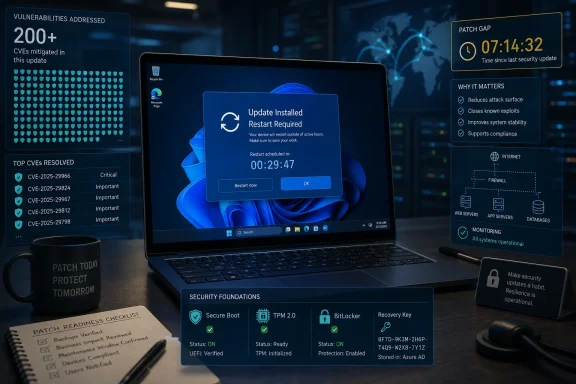 The Biggest Patch Tuesday Is a Warning About Scale, Not Panic
The headline number is the hook: 206 flaws, depending on how researchers count Microsoft-only CVEs, third-party components, and republished advisories. Security vendors have described it as Microsoft’s largest Patch Tuesday release on record, and even if the precise accounting varies between 198, 200, 206, or 211 fixes, the practical conclusion does not. This is a very large security release.But size alone is not the same thing as immediate compromise. A 200-CVE Patch Tuesday can be less dangerous to a given home user than a two-CVE Patch Tuesday with one wormable bug already being exploited across the internet. The hard work is separating “big” from “urgent,” because the former makes headlines and the latter determines whether an IT department spends the night in change-control purgatory.
Microsoft’s June drop includes critical remote code execution issues, elevation-of-privilege bugs, security feature bypasses, and publicly disclosed vulnerabilities. Those categories matter because they map to different attacker opportunities. A remote code execution flaw may allow an attacker to run malicious code from afar under the right conditions, while an elevation-of-privilege bug may turn an already-compromised foothold into administrator-level access.
The more honest message to Windows users is this: install the update, reboot, and do not postpone it casually. The less honest message is that every Windows PC is seconds away from takeover unless the user drops everything. Security reporting too often oscillates between boredom and apocalypse, and Patch Tuesday deserves a better middle ground.
Zero-Day Does Not Always Mean Active Exploitation
The word zero-day has become a gravity well for fear. In Microsoft’s terminology, a vulnerability can be treated as a zero-day if it was publicly disclosed or exploited before a patch was available. Those are not the same condition, and confusing them leads to bad prioritization.In this month’s case, the widely reported Windows zero-days were publicly known before Microsoft’s June updates landed. Reporting around the release indicates that Microsoft did not say those specific flaws were being actively exploited in the wild at the time of the Patch Tuesday publication. That distinction matters: public proof-of-concept code changes the risk curve, but it is not identical to confirmed criminal exploitation.
Public disclosure still raises the temperature. Once technical details or demonstration code are available, defenders lose the comfort of obscurity and attackers gain a head start in weaponizing the bug. Even a flaw that requires local access or special conditions can become valuable when chained with phishing, malware, stolen credentials, or physical theft.
So no, “zero-day” should not automatically mean “your machine is already hacked.” It should mean “the clock has started.” For home users, that means letting Windows Update finish and rebooting rather than sleeping the machine for a week. For enterprises, it means moving from routine deployment to active prioritization, especially on exposed servers, developer workstations, domain-joined laptops, and systems that handle sensitive data.
BitLocker’s Bad Month Shows Why Physical Attacks Still Matter
The most unsettling item for many WindowsForum readers will be the BitLocker-related vulnerability widely discussed under the name YellowKey and tracked as CVE-2026-45585. The concern is not that BitLocker’s encryption math has suddenly fallen apart. The concern is that the surrounding boot and recovery environment can become the attack surface.That distinction is more than pedantry. Full-disk encryption is only as strong as the chain of trust that gets the machine from powered-off to unlocked. If an attacker with physical access can manipulate recovery behavior, boot flow, or trusted pre-boot assumptions, the disk may still be encrypted while the system around it is persuaded to hand over more than it should.
For consumers, this is most relevant to stolen laptops, shared devices, and machines left unattended in semi-public spaces. For enterprises, it is relevant to executive laptops, field devices, traveling staff, regulated data, and any fleet that relies on default device encryption as a compliance checkbox. Physical access requirements reduce mass internet exploitability, but they do not make the bug irrelevant.
The larger lesson is that security features are not magic shields. BitLocker, Secure Boot, TPM-backed keys, virtualization-based security, and Windows Recovery Environment policy all form a system. Attackers do not have to defeat every layer in the abstract; they only have to find the seam where one layer assumes another layer has done the hard work.
The Critical Bugs Are the Ones Administrators Cannot Wave Away
The consumer headline centers on “restart your PC now,” but the enterprise story is broader and less forgiving. Critical remote code execution vulnerabilities in Windows components, network-facing services, and server roles can become patch-management triage events. The people who need to care most are not just individual PC owners; they are the administrators responsible for what happens when a single missed patch becomes a lateral-movement opportunity.The uncomfortable truth is that many Microsoft flaws do not become famous because they are patched before they are widely exploited. That is the system working. But it also means defenders often have to make deployment decisions before there is a catchy malware name, a crisis dashboard, or a board-level incident call.
This is why severity ratings are necessary but insufficient. A critical CVSS score tells you something about theoretical impact and exploitability, but it does not know your environment. A remote code execution flaw on a disabled feature is less urgent than a “merely important” privilege escalation bug present on every endpoint where users routinely run risky attachments.
For Windows administrators, June’s release is less a single alarm than a dense map. Internet-facing Windows servers, remote access infrastructure, domain controllers, management servers, VDI hosts, developer boxes, and high-value user endpoints deserve faster treatment than lightly used lab machines. The old “patch everything eventually” approach is not a strategy; it is a hope that attackers will respect your backlog.
Microsoft’s Monthly Ritual Is Becoming an AI-Era Stress Test
Several researchers have argued that the sheer volume of recent vulnerability reports reflects a world where bug discovery is being accelerated by automation and AI-assisted analysis. That claim should be handled carefully; not every vulnerability in this release was found by a machine, and not every large Patch Tuesday proves a new era by itself. But the direction of travel is difficult to ignore.If AI tools help researchers find more flaws faster, Microsoft and every other major vendor will face a disclosure pipeline problem. More reports mean more triage, more patch engineering, more regression testing, and more pressure to decide what ships now versus what waits. The public sees a number on Patch Tuesday; inside the vendor, that number represents weeks or months of engineering debt being converted into customer risk reduction.
Defenders will feel the same pressure in reverse. More fixes mean more test cycles, more reboot windows, more application compatibility checks, and more exceptions for fragile systems that never seem to have an owner until they break. Patch management was already one of the least glamorous jobs in IT. It is now becoming one of the places where the future of automated offense and defense collides first.
This is also where Microsoft’s messaging has to improve. Windows Update has trained consumers to see patches as interruptions and trained many admins to expect occasional collateral damage. When the company ships a record-breaking security release, it needs to communicate not merely that patches exist, but which risks deserve immediate action, which mitigations remain relevant, and which known issues might slow deployment.
The Restart Is the Most Boring Part, and Still the One Users Skip
For home users, the advice is refreshingly mundane: go to Windows Update, install the latest cumulative update, and restart the PC. The restart matters because many Windows security fixes do not fully take effect until replaced files, drivers, services, or kernel components are loaded at boot. A machine that has downloaded an update but not restarted may still be sitting in a half-secured state.That sounds simple, but Windows users have been trained to defer reboots because reboots arrive at the wrong time. They interrupt games, meetings, render jobs, schoolwork, and the browser tab hoard that somehow became a filing system. Microsoft has improved restart scheduling over the years, but the basic conflict remains: security wants closure, users want continuity.
The best advice is not to panic-reboot in the middle of unsaved work. Save what matters, close what you can, make sure important files are synced or backed up, and then let the update complete. If the PC is a laptop, plug it in. If it is a work machine, follow organizational policy rather than improvising around management tools.
Users on Windows 10 should also keep the calendar in mind. Mainstream support for most Windows 10 editions is nearing its October 14, 2025 end date, with paid Extended Security Updates and certain long-term servicing editions following different timelines. That does not mean every Windows 10 machine becomes a pumpkin overnight, but it does mean patching discipline and upgrade planning are no longer separate conversations.
The Real Security Failure Is Treating Patch Tuesday as a Surprise
Patch Tuesday has existed for more than two decades. Its predictability is the point. Microsoft concentrates most security fixes into a monthly cadence so organizations can plan testing, deployment, and user communication instead of reacting to a random stream of patches every few days.Yet every large release still lands like a weather event. Consumers see alarming headlines. Help desks prepare for update anxiety. Admins scan CVE lists while waiting for early reports of broken VPN clients, failed installs, boot loops, printer weirdness, or application regressions. The cycle is familiar enough to be boring and important enough to be dangerous.
A mature Windows environment treats Patch Tuesday as an operational rhythm. Test groups get updates early. High-risk assets have accelerated deployment rings. Known issues are monitored. Failed installs are tracked. Reboots are enforced with enough warning to preserve trust but not so much leniency that devices drift into permanent noncompliance.
The problem is that many environments are not mature. Small businesses may have no dedicated IT staff. Home users may not know whether their PC installed the update or merely downloaded it. Enthusiasts may pause updates because they fear bugs more than attackers. That fear is not irrational; bad updates do happen. But indefinite delay turns quality risk into security risk.
The Sensible Response Is Faster Than Usual, Not Reckless
There is a responsible way to act on this release without turning every Windows machine into a lab rat. For most individuals, that means updating promptly through Windows Update and rebooting when ready. For organizations, it means compressing the normal patch cycle for the highest-risk systems while still watching for known issues and deployment failures.Admins should pay particular attention to assets exposed to untrusted networks, systems used by privileged staff, machines that store sensitive data, and endpoints where BitLocker posture matters. If a device can leave the building, the physical-access dimension of the BitLocker issue becomes more relevant. If a server can be reached from the internet, critical remote code execution issues deserve top billing.
It is also worth validating that security controls are not merely present but configured as intended. BitLocker recovery keys should be escrowed properly. Windows Recovery Environment should not be neglected as an afterthought. Endpoint detection should be watching for post-exploitation behavior, not just known malware hashes. Vulnerability management tools should confirm installation, not assume success because a deployment job was launched.
The old security cliché says patching is foundational. June’s update shows why the cliché survives. Attackers do not need novelty when exposed, unpatched systems are still abundant. The best exploit is often the one defenders already had the fix for.
The June Patch Leaves Users With a Short To-Do List
For all the noise around the record count, the practical answer is compact. This is a month to be prompt, not theatrical; deliberate, not complacent.- Windows users should install the June 2026 security updates through Windows Update or their organization’s managed update system and complete the required restart.
- Administrators should prioritize internet-facing systems, privileged endpoints, domain infrastructure, remote access servers, and devices that store sensitive or regulated data.
- BitLocker users should verify that encryption, recovery-key escrow, Secure Boot, TPM settings, and recovery-environment configuration match their security expectations.
- Organizations should monitor Microsoft’s known-issues notes and early enterprise feedback, but they should not use possible regressions as a reason for open-ended delay.
- Unsupported or soon-to-be-unsupported Windows installations should be treated as a migration problem, not merely a patching problem.
References
- Primary source: Daily Express
Published: 2026-06-12T06:43:06.636840
Loading…
www.express.co.uk - Related coverage: techradar.com

Microsoft breaks Patch Tuesday record with fixes for over 200 security flaws | TechRadar
AI use is really starting to showwww.techradar.com - Related coverage: hackread.com

Microsoft June 2026 Patch Tuesday Fixes 206 Flaws and 3 Zero-Days
Microsoft’s June 2026 patch Tuesday resolves 206 vulnerabilities, including 3 critical zero-days and severe 9.8 CVSS kernel, network and HTTP.sys flaws.hackread.com - Related coverage: britec.com

Microsoft June 2026 Patch Tuesday Fixes 206 Vulnerabilities
Microsoft has released a record 206 security fixes, including critical remote code execution vulnerabilities and three publicly disclosed zero-days. Learn what businesses need to know.britec.com - Related coverage: thehackernews.com
Loading…
thehackernews.com - Related coverage: windowscentral.com

Windows 11’s June update shuts down an intentional BitLocker backdoor with full file access — here’s what changed | Windows Central
Microsoft’s June 2026 Patch Tuesday update fixes a controversial BitLocker flaw.www.windowscentral.com
- Related coverage: malwarebytes.com
Loading…
www.malwarebytes.com - Related coverage: pcworld.com

Microsoft patches a record 206 flaws—and one is already being exploited | PCWorld
Microsoft's June Patch Tuesday fixed a record 206 vulnerabilities, including an actively exploited Windows Defender flaw.www.pcworld.com - Related coverage: techbuzz.ai
Loading…
www.techbuzz.ai - Related coverage: tweaktown.com
Loading…
www.tweaktown.com - Related coverage: cyberscoop.com

Microsoft breaks Patch Tuesday record with 206 vulnerabilities | CyberScoop
Fears and warnings about a roaring flood of error-riddled software have materialized. And the disease is spreading.cyberscoop.com - Related coverage: socradar.io
Loading…
socradar.io - Related coverage: absolute.com

Patch Tuesday June 2026: 211 Fixes, Critical CVEs | Absolute Security Blog
Microsoft Patch Tuesday June 2026 delivers 211 fixes and 37 critical vulnerabilities. Learn key risks, CVEs, and how to prioritize enterprise patching.www.absolute.com - Related coverage: easternherald.com

Microsoft June 2026 Patch Tuesday: Record 206 CVEs, 3 Zero-Days
Microsoft's June 2026 Patch Tuesday fixes a record 206 flaws, including BitLocker bypass, wormable DHCP RCE, and the GreenPlasma SYSTEM privilege zero-day.easternherald.com - Related coverage: tomsguide.com
Microsoft's first Patch Tuesday of 2026 fixes over 100 bugs and one active zero-day flaw — don't wait to update your PC | Tom's Guide
Microsoft if back with its first round of Patch Tuesday updates for the new year which fix 114 security flaws in total.www.tomsguide.com - Related coverage: pcgamer.com
Microsoft says public sharing of Windows 11 vulnerability violates 'best practices'
The king in yellow.www.pcgamer.com
- Related coverage: sra.io
- Related coverage: encyb.com
- Related coverage: techrepublic.com

Microsoft Warns: Windows Zero-Day ‘YellowKey’ Can Bypass BitLocker
Microsoft has released a temporary mitigation for YellowKey, a Windows zero-day that can reportedly bypass BitLocker protections.www.techrepublic.com
- Related coverage: tenable.com

June 2026 Microsoft Patch Tuesday | Tenable®
Microsoft addresses 198 CVEs in the largest Patch Tuesday release, including three zero-day vulnerabilities.www.tenable.com
- Security advisory: msrc.microsoft.com
Loading…
msrc.microsoft.com - Related coverage: rapid7.com
Loading…
www.rapid7.com - Related coverage: threataft.com
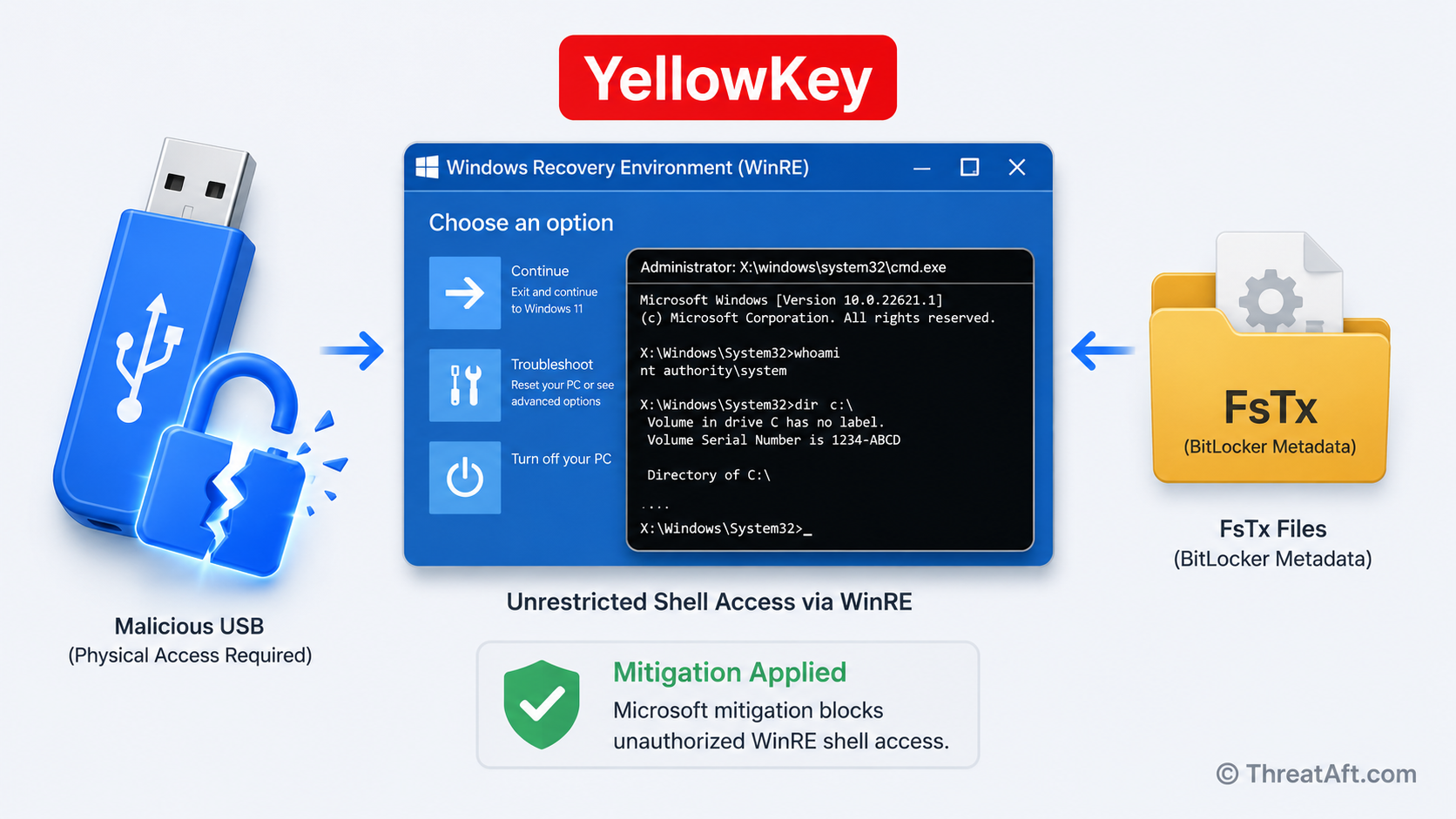
CVE-2026-45585 (YellowKey): BitLocker Bypass via USB | ThreatAft
CVE-2026-45585 (YellowKey) — a USB FsTx file unlocks BitLocker-encrypted drives without the password. Microsoft has patches and workarounds. Apply now.threataft.com - Related coverage: dailysecurityreview.com
Loading…
dailysecurityreview.com