

Microsoft’s June 2026 Power Platform update, published June 11, adds closed-loop learning for Power Apps MCP-connected agents, a release-planner code app sample, desktop-flow version comparison, a preview action to launch Power Apps from desktop flows, and broader connector governance and inventory visibility.
The headline is not any single feature. It is the direction of travel: Microsoft is pushing Power Platform from a low-code productivity suite into a governed automation and agent platform, where apps, flows, agents, connectors, and tenant inventory are treated as parts of the same operational system.
That shift matters because the old Power Platform bargain was simple: let business users build faster, then ask IT to tidy up later. The June update suggests Microsoft knows that bargain has reached its limit. AI agents, desktop automations, custom connectors, Dataverse-backed state, and Microsoft 365 Copilot integrations do not merely create more artifacts; they create more relationships between artifacts, and those relationships are now the governance problem.
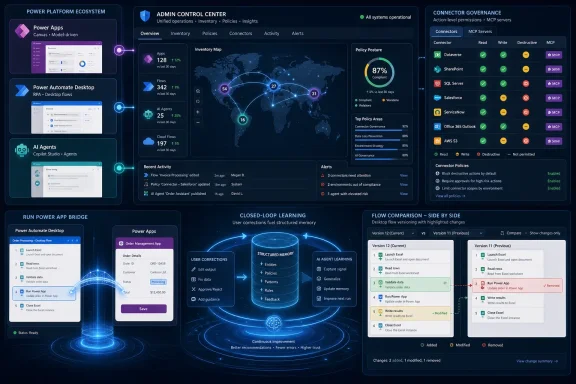
The most strategically important update is closed-loop learning for agents connected to the Power Apps MCP server, starting with the data entry tool. Microsoft says corrections made by users through the agent feed persist as structured memory, are retrieved in later runs, and can consolidate into organization-wide patterns.
That sounds like a small workflow improvement until you consider what agents have lacked in enterprise deployments: not just access to data, but the ability to learn how a specific business actually behaves. Documents and instructions can tell a model what a policy says. User corrections tell it what happens when a policy meets a messy invoice, an incomplete field, a regional exception, or a line-of-business convention nobody wrote down.
The important phrase is structured memory. If this works as Microsoft describes, the agent is not merely keeping a chat transcript or relying on a user’s improvised prompt. It is accumulating reusable operational guidance from production interactions, which means the system learns from the same place enterprise software has always learned: exceptions, corrections, and repetition.
That also raises the stakes. A self-improving agent loop is valuable only if the organization trusts the provenance, scope, retention, and governance of what the agent learns. If corrections become institutional memory, admins will eventually need to know whose corrections count, how conflicting patterns are resolved, and whether a bad correction can be audited or undone.
Microsoft’s pitch is that there is “nothing to configure” and no data pipeline to build. That is attractive for makers and app owners, but IT pros should hear both promise and warning in that sentence. Automation that learns without a formal project plan is still automation that changes behavior over time.
The more interesting part is architectural. Microsoft is using a release-plan viewer to advertise what Power Apps code apps are becoming: a bridge between low-code governance and mainstream web development patterns. React, custom connectors, external APIs, card views, calendar views, and timeline views are not the vocabulary of classic citizen-development demos.
This is Microsoft acknowledging a reality many enterprise teams already live with. Serious Power Platform deployments are rarely pure drag-and-drop. They involve ALM, APIs, JavaScript, Dataverse, identity, environments, telemetry, and custom user experiences that must satisfy users who compare every internal tool to polished SaaS products.
The release planner sample is therefore less about release plans than about permission. Microsoft is telling professional developers that Power Apps can host more conventional enterprise app patterns without abandoning the platform’s admin, connector, and environment model.
That is a smart move, but it also complicates the story. The more Power Platform looks like a pro-dev surface, the less credible it becomes to govern it as a toy department for small departmental apps. Code apps, custom connectors, and AI-assisted development belong in the same lifecycle conversation as other production software.
For anyone who has had to troubleshoot robotic process automation in production, this is not cosmetic. Desktop flows often automate brittle UI paths, legacy apps, file dialogs, selectors, images, and local system behavior. A small change can break a business process in ways that are hard to diagnose from a generic “the bot failed” error.
Version control for desktop flows arrived as a foundation; version comparison makes it operationally useful. Drafts, published versions, version history, and restore options are helpful, but the ability to answer “what changed?” is the difference between governance theater and root-cause analysis.
Microsoft says versions are stored in Dataverse and retained for up to 12 months, with the latest published version preserved beyond that aging behavior. That gives organizations a better audit trail without forcing every maker to become a Git user. It also aligns desktop automation more closely with the rest of Power Platform’s lifecycle model.
The caveat is that this is not a substitute for real release discipline. Version comparison helps teams see differences; it does not decide whether a desktop flow should be promoted to production, whether credentials are safe, whether selectors are resilient, or whether a bot has been tested against edge cases. It gives teams a better instrument panel, not an autopilot.
That matters because attended automation has always had a user-experience problem. The automation may run locally, but the human still needs a clean way to supply context, confirm exceptions, enter missing information, or decide which branch to follow. Historically, teams solved this with UI workarounds, forms bolted onto other systems, or awkward handoffs between app and automation layers.
A native communication channel between desktop flows and Power Apps makes the app the front end and the desktop automation the local execution engine. That is a much cleaner pattern for guided forms, operator-assist workflows, and event-driven automation where user choices determine what happens next.
The preview requires Power Automate for desktop version 2.68 or later. That version detail matters for admins because desktop automation fleets are often unevenly updated across devices, virtual machines, and managed endpoints. A preview feature that depends on a recent desktop client needs deployment hygiene before it becomes a standard design pattern.
The feature also nudges Power Apps and Power Automate into a tighter runtime relationship. For makers, that is convenient. For IT, it means app ownership and flow ownership can no longer be treated as separate inventory lines when the user experience and automation behavior depend on each other.
Traditional data loss prevention policies often focused on which connectors could be used together. Advanced connector policies move deeper into the connector surface, including actions and MCP servers used by AI tools. That is a crucial distinction because “allow this connector” is too blunt a control when agents can use a connector as a tool, a knowledge source, or a path into sensitive operations.
The admin problem has shifted from “which apps exist?” to “what can these apps, flows, and agents actually do?” A connector is not a single risk unit. Its read operations, write operations, destructive actions, authentication context, and agent-facing capabilities may have very different consequences.
General availability is a milestone because it signals Microsoft believes the feature is ready for production governance. But the broader story is that Power Platform’s governance model is being forced to catch up with agentic automation. Once agents can call tools and learn from user corrections, connector permissions become a runtime safety boundary, not a compliance checkbox.
This also changes how organizations should think about adoption. Encouraging makers to build with AI is easy. Giving security teams enough precision to say “yes, but not that operation in that environment for that class of agent” is the hard part. Advanced connector policies are Microsoft’s attempt to make that yes possible.
In plain English: inventory is no longer just a catalog of things. It is becoming a map of dependencies.
That is a major operational change. If a connector is deprecated, reclassified, compromised, restricted by licensing, or flagged by security, admins need to know what will break or what must be reviewed. Without connector-operation visibility, that turns into a manual hunt across apps, flows, owners, environments, and exports.
Microsoft says the inventory data includes trigger connector and trigger operation details for flows, plus richer metadata about how agents use connectors as tools or knowledge sources. The Power Platform admin center gains a connectors column across inventory grids, and the same data can be queried through the Power Platform for admins V2 connector, the Power Platform inventory API, and Azure Resource Graph.
That programmatic angle is critical. Large tenants do not govern by clicking through grids. They govern by queries, reports, risk scoring, exception workflows, and policy automation. If connector inventory can be queried consistently, admins can build repeatable controls instead of one-off spreadsheet exercises.
The best part is that Microsoft says no opt-in action is required; connector data flows into inventory automatically. The tradeoff is that automatic visibility may surprise organizations that have been relying on obscurity, fragmented ownership, or incomplete environment documentation. The platform is making hidden dependencies less hidden.
The new and updated learning material leans heavily into AI-first solutions, Power Automate, Power Apps, Power Platform administration, Dataverse, connectors, Power Pages, and developer content. There is also notable attention to Python SDK material for Dataverse, Power Apps code apps, Power Platform APIs, governance, SAP templates, and inventory sample queries.
That mix tells a clear story. Microsoft is not merely training business users to build apps. It is training hybrid teams that include makers, developers, admins, architects, process owners, and security-minded operators. The platform’s center of gravity is moving from isolated app creation to governed, API-connected business systems.
The breadth of updated documentation also reflects a downside of the Power Platform universe: the surface area is enormous. A tenant can contain canvas apps, model-driven apps, Power Pages sites, cloud flows, desktop flows, Dataverse tables, custom connectors, copilots, agent flows, Microsoft 365 agents, SAP templates, Fabric integrations, and multiple admin APIs. Keeping skills current is not optional overhead; it is part of operating the platform safely.
For WindowsForum readers who live in endpoint management, identity, and operations, this is the familiar SaaS sprawl problem with a low-code twist. Users can create business-critical tools quickly, but the surrounding skill model must mature just as quickly.
That trust cannot be created by feature announcements alone. It depends on whether the platform gives admins enough observability and control to understand what is happening after builders start building. In this update, Microsoft is clearly trying to close that gap.
Closed-loop learning asks enterprises to trust adaptive behavior. Advanced connector policies ask them to trust granular controls. Inventory connector visibility asks them to trust that they can identify exposure and blast radius quickly. Desktop-flow version comparison asks them to trust that local automation changes can be reviewed rather than guessed at.
The risk is fragmentation. Each feature improves a slice of the system, but real-world tenants do not fail in slices. They fail at the seams: an agent uses a connector in an unexpected way, a desktop flow launches an app maintained by another team, a custom connector changes behavior, or an owner leaves and the artifact becomes orphaned but still business-critical.
That is why the inventory and policy improvements may age better than the flashier agent updates. AI features sell the future, but governance features determine whether the future survives contact with enterprise IT.
The new connector inventory column is a good example. It does not stop a maker from building. It gives admins visibility after the fact and, paired with advanced connector policies, a path toward enforcement based on observed usage. That is a more realistic governance model than pretending every workflow can be preapproved.
Still, “visibility after the fact” is not the same as preventive security. Organizations will need to decide which environments are experimental, which are production-like, and which are governed tightly enough for agents, external data, and desktop automation. Microsoft can expose the data, but the tenant strategy remains an organizational responsibility.
The same applies to the Power Apps MCP closed-loop learning feature. If agent memory becomes part of production behavior, then admins will eventually need memory governance: visibility into what was learned, scoping rules, rollback mechanisms, and review workflows. The June announcement emphasizes convenience. The next maturity step must emphasize control.
Microsoft is betting that it can make Power Platform both more autonomous and more governable. That is the right bet, but it is not an easy one.
The run Power App action, in particular, makes local automation feel less isolated. A user-facing Power App can now guide or trigger desktop activity, which means endpoint state, app installation, client version, identity context, and local permissions become part of the business process. That is familiar territory for Windows admins, but the initiator may now be a low-code app rather than a traditional packaged application.
Version comparison also matters to endpoint teams because desktop flows are often sensitive to UI changes. A Windows update, browser update, application redesign, screen-scaling change, or selector mismatch can break an automation. Being able to inspect the flow’s own version changes does not solve environmental drift, but it gives teams one side of the comparison.
The operational lesson is simple: desktop automation should be treated like software running on managed Windows infrastructure. That means update rings, test machines, rollback planning, credential discipline, logging, and ownership records. Low-code does not eliminate endpoint management; it creates new workloads that depend on it.
The biggest near-term win is likely inventory. If admins can query connector usage across apps, flows, and agents, they can finally answer questions that used to take days: which resources use a soon-to-be-restricted connector, which agents rely on a sensitive operation, which environments have the most connector exposure, and which owners need to be contacted before a policy change.
The second win is desktop-flow version comparison. Teams managing attended or unattended automation should enable and operationalize version review as part of change management. It will not make fragile automations robust, but it will make failures less mysterious.
The agent-learning feature is more ambitious and should be piloted deliberately. The promise is significant: agents that improve from user corrections without bespoke training infrastructure. The governance questions are equally significant, especially in regulated or heavily audited environments.
The headline is not any single feature. It is the direction of travel: Microsoft is pushing Power Platform from a low-code productivity suite into a governed automation and agent platform, where apps, flows, agents, connectors, and tenant inventory are treated as parts of the same operational system.
That shift matters because the old Power Platform bargain was simple: let business users build faster, then ask IT to tidy up later. The June update suggests Microsoft knows that bargain has reached its limit. AI agents, desktop automations, custom connectors, Dataverse-backed state, and Microsoft 365 Copilot integrations do not merely create more artifacts; they create more relationships between artifacts, and those relationships are now the governance problem.
 Microsoft Moves the Low-Code Stack Into the Agent Era
The most strategically important update is closed-loop learning for agents connected to the Power Apps MCP server, starting with the data entry tool. Microsoft says corrections made by users through the agent feed persist as structured memory, are retrieved in later runs, and can consolidate into organization-wide patterns.That sounds like a small workflow improvement until you consider what agents have lacked in enterprise deployments: not just access to data, but the ability to learn how a specific business actually behaves. Documents and instructions can tell a model what a policy says. User corrections tell it what happens when a policy meets a messy invoice, an incomplete field, a regional exception, or a line-of-business convention nobody wrote down.
The important phrase is structured memory. If this works as Microsoft describes, the agent is not merely keeping a chat transcript or relying on a user’s improvised prompt. It is accumulating reusable operational guidance from production interactions, which means the system learns from the same place enterprise software has always learned: exceptions, corrections, and repetition.
That also raises the stakes. A self-improving agent loop is valuable only if the organization trusts the provenance, scope, retention, and governance of what the agent learns. If corrections become institutional memory, admins will eventually need to know whose corrections count, how conflicting patterns are resolved, and whether a bad correction can be audited or undone.
Microsoft’s pitch is that there is “nothing to configure” and no data pipeline to build. That is attractive for makers and app owners, but IT pros should hear both promise and warning in that sentence. Automation that learns without a formal project plan is still automation that changes behavior over time.
The Release Planner Sample Is Really a Developer Signal
The new release planner code app is a sample application from Microsoft’s Power CAT team, built with Power Apps code apps, React, and custom connectors. Its practical purpose is straightforward: give users a richer way to explore Microsoft release plans across Power Platform, Dynamics 365, and Microsoft Copilot, with filtering by product, release wave, cloud availability, and release status.The more interesting part is architectural. Microsoft is using a release-plan viewer to advertise what Power Apps code apps are becoming: a bridge between low-code governance and mainstream web development patterns. React, custom connectors, external APIs, card views, calendar views, and timeline views are not the vocabulary of classic citizen-development demos.
This is Microsoft acknowledging a reality many enterprise teams already live with. Serious Power Platform deployments are rarely pure drag-and-drop. They involve ALM, APIs, JavaScript, Dataverse, identity, environments, telemetry, and custom user experiences that must satisfy users who compare every internal tool to polished SaaS products.
The release planner sample is therefore less about release plans than about permission. Microsoft is telling professional developers that Power Apps can host more conventional enterprise app patterns without abandoning the platform’s admin, connector, and environment model.
That is a smart move, but it also complicates the story. The more Power Platform looks like a pro-dev surface, the less credible it becomes to govern it as a toy department for small departmental apps. Code apps, custom connectors, and AI-assisted development belong in the same lifecycle conversation as other production software.
Desktop Automation Finally Gets a Paper Trail Worth Having
Power Automate for desktop now includes side-by-side version comparison as part of built-in version control. Makers can compare subflows, actions, variables, UI elements, and images, and they can search within the comparison view to locate specific changes.For anyone who has had to troubleshoot robotic process automation in production, this is not cosmetic. Desktop flows often automate brittle UI paths, legacy apps, file dialogs, selectors, images, and local system behavior. A small change can break a business process in ways that are hard to diagnose from a generic “the bot failed” error.
Version control for desktop flows arrived as a foundation; version comparison makes it operationally useful. Drafts, published versions, version history, and restore options are helpful, but the ability to answer “what changed?” is the difference between governance theater and root-cause analysis.
Microsoft says versions are stored in Dataverse and retained for up to 12 months, with the latest published version preserved beyond that aging behavior. That gives organizations a better audit trail without forcing every maker to become a Git user. It also aligns desktop automation more closely with the rest of Power Platform’s lifecycle model.
The caveat is that this is not a substitute for real release discipline. Version comparison helps teams see differences; it does not decide whether a desktop flow should be promoted to production, whether credentials are safe, whether selectors are resilient, or whether a bot has been tested against edge cases. It gives teams a better instrument panel, not an autopilot.
The New Desktop-to-App Bridge Makes Attended Automation Less Awkward
The public preview of the new “run Power App” action in Power Automate for desktop is one of those features that sounds obvious only after it exists. Desktop flows can now open a Power App directly, pass inputs into it, receive outputs back from it, and trigger callable subflows from app events.That matters because attended automation has always had a user-experience problem. The automation may run locally, but the human still needs a clean way to supply context, confirm exceptions, enter missing information, or decide which branch to follow. Historically, teams solved this with UI workarounds, forms bolted onto other systems, or awkward handoffs between app and automation layers.
A native communication channel between desktop flows and Power Apps makes the app the front end and the desktop automation the local execution engine. That is a much cleaner pattern for guided forms, operator-assist workflows, and event-driven automation where user choices determine what happens next.
The preview requires Power Automate for desktop version 2.68 or later. That version detail matters for admins because desktop automation fleets are often unevenly updated across devices, virtual machines, and managed endpoints. A preview feature that depends on a recent desktop client needs deployment hygiene before it becomes a standard design pattern.
The feature also nudges Power Apps and Power Automate into a tighter runtime relationship. For makers, that is convenient. For IT, it means app ownership and flow ownership can no longer be treated as separate inventory lines when the user experience and automation behavior depend on each other.
Connector Governance Becomes the Center of the Platform
Advanced connector policies are now generally available, and this is where the June update stops being merely maker-friendly. Microsoft frames the feature as a response to a tenant reality in which Copilot, agents, and AI-first projects have multiplied both the number of builders and the number of places they build.Traditional data loss prevention policies often focused on which connectors could be used together. Advanced connector policies move deeper into the connector surface, including actions and MCP servers used by AI tools. That is a crucial distinction because “allow this connector” is too blunt a control when agents can use a connector as a tool, a knowledge source, or a path into sensitive operations.
The admin problem has shifted from “which apps exist?” to “what can these apps, flows, and agents actually do?” A connector is not a single risk unit. Its read operations, write operations, destructive actions, authentication context, and agent-facing capabilities may have very different consequences.
General availability is a milestone because it signals Microsoft believes the feature is ready for production governance. But the broader story is that Power Platform’s governance model is being forced to catch up with agentic automation. Once agents can call tools and learn from user corrections, connector permissions become a runtime safety boundary, not a compliance checkbox.
This also changes how organizations should think about adoption. Encouraging makers to build with AI is easy. Giving security teams enough precision to say “yes, but not that operation in that environment for that class of agent” is the hard part. Advanced connector policies are Microsoft’s attempt to make that yes possible.
Inventory Finally Starts Showing the Blast Radius
The companion update to advanced connector policies may be even more important for day-to-day administrators. Power Platform inventory is rolling out in public preview with connector and connector-operation visibility for canvas apps, model-driven apps, cloud flows, agent flows, Microsoft 365 agent flows, and agents authored in Copilot Studio or Microsoft 365 Copilot Agent Builder.In plain English: inventory is no longer just a catalog of things. It is becoming a map of dependencies.
That is a major operational change. If a connector is deprecated, reclassified, compromised, restricted by licensing, or flagged by security, admins need to know what will break or what must be reviewed. Without connector-operation visibility, that turns into a manual hunt across apps, flows, owners, environments, and exports.
Microsoft says the inventory data includes trigger connector and trigger operation details for flows, plus richer metadata about how agents use connectors as tools or knowledge sources. The Power Platform admin center gains a connectors column across inventory grids, and the same data can be queried through the Power Platform for admins V2 connector, the Power Platform inventory API, and Azure Resource Graph.
That programmatic angle is critical. Large tenants do not govern by clicking through grids. They govern by queries, reports, risk scoring, exception workflows, and policy automation. If connector inventory can be queried consistently, admins can build repeatable controls instead of one-off spreadsheet exercises.
The best part is that Microsoft says no opt-in action is required; connector data flows into inventory automatically. The tradeoff is that automatic visibility may surprise organizations that have been relying on obscurity, fragmented ownership, or incomplete environment documentation. The platform is making hidden dependencies less hidden.
Learning Updates Reveal Where Microsoft Thinks the Skills Gap Is
The learning-update section of the monthly blog is long, sprawling, and easy to ignore. That would be a mistake. Microsoft’s training updates often reveal where the company thinks customers are struggling or where it expects adoption to move next.The new and updated learning material leans heavily into AI-first solutions, Power Automate, Power Apps, Power Platform administration, Dataverse, connectors, Power Pages, and developer content. There is also notable attention to Python SDK material for Dataverse, Power Apps code apps, Power Platform APIs, governance, SAP templates, and inventory sample queries.
That mix tells a clear story. Microsoft is not merely training business users to build apps. It is training hybrid teams that include makers, developers, admins, architects, process owners, and security-minded operators. The platform’s center of gravity is moving from isolated app creation to governed, API-connected business systems.
The breadth of updated documentation also reflects a downside of the Power Platform universe: the surface area is enormous. A tenant can contain canvas apps, model-driven apps, Power Pages sites, cloud flows, desktop flows, Dataverse tables, custom connectors, copilots, agent flows, Microsoft 365 agents, SAP templates, Fabric integrations, and multiple admin APIs. Keeping skills current is not optional overhead; it is part of operating the platform safely.
For WindowsForum readers who live in endpoint management, identity, and operations, this is the familiar SaaS sprawl problem with a low-code twist. Users can create business-critical tools quickly, but the surrounding skill model must mature just as quickly.
The June Update Is Really About Trusting the Platform at Scale
The common thread across the June update is trust. Microsoft wants organizations to trust agents that learn, desktop automations that can be compared and rolled back, app-and-flow integrations that behave like native experiences, and governance controls that operate at connector-operation level.That trust cannot be created by feature announcements alone. It depends on whether the platform gives admins enough observability and control to understand what is happening after builders start building. In this update, Microsoft is clearly trying to close that gap.
Closed-loop learning asks enterprises to trust adaptive behavior. Advanced connector policies ask them to trust granular controls. Inventory connector visibility asks them to trust that they can identify exposure and blast radius quickly. Desktop-flow version comparison asks them to trust that local automation changes can be reviewed rather than guessed at.
The risk is fragmentation. Each feature improves a slice of the system, but real-world tenants do not fail in slices. They fail at the seams: an agent uses a connector in an unexpected way, a desktop flow launches an app maintained by another team, a custom connector changes behavior, or an owner leaves and the artifact becomes orphaned but still business-critical.
That is why the inventory and policy improvements may age better than the flashier agent updates. AI features sell the future, but governance features determine whether the future survives contact with enterprise IT.
The Admin Console Becomes the New Control Plane
Power Platform has long had a tension between empowerment and control. Microsoft’s commercial instinct is to make creation as frictionless as possible. Enterprise IT’s instinct is to add friction until risk is understood. The June update tries to reconcile those instincts by moving more intelligence into the admin plane.The new connector inventory column is a good example. It does not stop a maker from building. It gives admins visibility after the fact and, paired with advanced connector policies, a path toward enforcement based on observed usage. That is a more realistic governance model than pretending every workflow can be preapproved.
Still, “visibility after the fact” is not the same as preventive security. Organizations will need to decide which environments are experimental, which are production-like, and which are governed tightly enough for agents, external data, and desktop automation. Microsoft can expose the data, but the tenant strategy remains an organizational responsibility.
The same applies to the Power Apps MCP closed-loop learning feature. If agent memory becomes part of production behavior, then admins will eventually need memory governance: visibility into what was learned, scoping rules, rollback mechanisms, and review workflows. The June announcement emphasizes convenience. The next maturity step must emphasize control.
Microsoft is betting that it can make Power Platform both more autonomous and more governable. That is the right bet, but it is not an easy one.
Where Windows and Endpoint Teams Should Pay Attention
Power Platform is often discussed as a business-app platform, but the desktop-flow updates bring it squarely into the Windows operations world. Power Automate for desktop runs on endpoints, virtual desktops, and automation hosts that IT teams must patch, monitor, secure, and support.The run Power App action, in particular, makes local automation feel less isolated. A user-facing Power App can now guide or trigger desktop activity, which means endpoint state, app installation, client version, identity context, and local permissions become part of the business process. That is familiar territory for Windows admins, but the initiator may now be a low-code app rather than a traditional packaged application.
Version comparison also matters to endpoint teams because desktop flows are often sensitive to UI changes. A Windows update, browser update, application redesign, screen-scaling change, or selector mismatch can break an automation. Being able to inspect the flow’s own version changes does not solve environmental drift, but it gives teams one side of the comparison.
The operational lesson is simple: desktop automation should be treated like software running on managed Windows infrastructure. That means update rings, test machines, rollback planning, credential discipline, logging, and ownership records. Low-code does not eliminate endpoint management; it creates new workloads that depend on it.
The Practical Read Before You Flip the Switches
For organizations already invested in Power Platform, June’s update is less about whether to adopt and more about how quickly to standardize. The features are valuable, but they reward tenants with mature environment strategy, role design, connector policies, and lifecycle discipline.The biggest near-term win is likely inventory. If admins can query connector usage across apps, flows, and agents, they can finally answer questions that used to take days: which resources use a soon-to-be-restricted connector, which agents rely on a sensitive operation, which environments have the most connector exposure, and which owners need to be contacted before a policy change.
The second win is desktop-flow version comparison. Teams managing attended or unattended automation should enable and operationalize version review as part of change management. It will not make fragile automations robust, but it will make failures less mysterious.
The agent-learning feature is more ambitious and should be piloted deliberately. The promise is significant: agents that improve from user corrections without bespoke training infrastructure. The governance questions are equally significant, especially in regulated or heavily audited environments.
The June Build Sheet for Power Platform Tenants
This month’s update is a useful reminder that Power Platform adoption is no longer a maker-only conversation. It is a tenant-management, security, endpoint, and software-lifecycle conversation wrapped in a low-code interface.- Closed-loop learning for Power Apps MCP-connected agents turns user corrections into reusable structured memory, beginning with the data entry tool.
- The release planner code app shows Microsoft pushing Power Apps code apps toward React-based, API-connected enterprise experiences.
- Power Automate for desktop version comparison gives teams a clearer way to inspect changes across subflows, actions, variables, UI elements, and images.
- The preview run Power App action links desktop flows and Power Apps through a native communication path, which is especially relevant for attended automation.
- Advanced connector policies are now generally available, giving admins more granular control over connector actions and agent-facing capabilities.
- Power Platform inventory is gaining connector and connector-operation visibility across apps, flows, and agents, making blast-radius analysis far more practical.
References
- Primary source: Microsoft
Published: 2026-06-11T15:50:07.923641
What’s new in Power Platform: June 2026 feature update
Get the latest news in Power Platform from the last month, so you can find a summary of product, community, and learning updates from Power Platform in one easy place.www.microsoft.com
