

Windows administrators preparing for the June 2026 Secure Boot certificate deadline should treat this as a managed endpoint migration, not a last-minute patch. The direct checklist is:
Microsoft’s guidance says the Secure Score recommendation is intended to help organizations track devices that have not deployed the Windows UEFI CA 2023 certificates and the 2023-signed boot manager. Microsoft Secure Score is the posture view. Intune and Windows Autopatch reporting are the device-management view. Everything else in this article — the triage order, rollout sequence, and exception-handling advice — is an author recommendation for WindowsForum readers trying to turn Microsoft’s guidance into an operational plan.
The first move for Microsoft Defender for Endpoint admins is to open Microsoft Secure Score and look for the Secure Boot 2023 certificate and boot manager recommendation. If it appears in your tenant, use it as the top-level work queue rather than trying to build the entire project from scratch.
That does not mean Secure Score should be treated as the only source of truth. It is the scoreboard. It tells security leadership that there is a readiness gap and whether that gap is shrinking. It does not replace device-level investigation, firmware validation, or change control.
From there, separate devices into practical buckets:
The concrete playbook is therefore short but disciplined. Start with Microsoft Secure Score for the executive-level posture item. Use Intune or Windows Autopatch reporting for device-level triage where available. Validate uncertain devices locally or through your endpoint tooling. Remediate firmware and certificate gaps in staged rings. Then return to Secure Score and device-level reporting to show that the fleet moved.
The Secure Score recommendation changes the politics of the work. Microsoft Defender for Endpoint and Microsoft Secure Score are often watched by security leadership, compliance teams, and managed service providers. When a recommendation appears there, it becomes visible in a way a single firmware advisory often does not.
That visibility is useful if endpoint teams use it properly. Secure Boot certificate migration requires coordination among Windows admins, security teams, desktop engineering, infrastructure teams, and sometimes OEM support. A Secure Score recommendation gives those groups a common artifact: a named posture item, an affected device population, and a way to show progress.
But there is a risk in confusing score movement with actual readiness. A higher Secure Score is not the goal by itself. The goal is that Secure Boot-enabled devices have the relevant 2023 certificate and boot manager state needed for the next phase of Microsoft’s Secure Boot trust transition.
That distinction matters because Secure Boot readiness is not just a cloud dashboard issue. It depends on firmware behavior, boot components, certificate trust, device configuration, and whether the endpoint is reporting accurately.
Secure Boot readiness touches UEFI trust, boot components, BitLocker behavior, and model-specific firmware behavior. The first week should be spent discovering the shape of the estate.
Your initial inventory should answer:
WindowsForum’s own coverage has already been tracking the Secure Boot certificate transition from multiple angles. Forum reports have highlighted Microsoft’s 2024–2026 certificate update effort, the Windows Security Secure Boot status dashboard, enterprise guidance for the 2023 certificate migration, and the practical need to check readiness before the June 2026 certificate pressure becomes urgent. The common thread in those reports is not alarmism; it is that Secure Boot readiness is now something administrators and power users can actually see, measure, and act on.
For enterprise admins, the move now is narrower than the broad security story: turn those signals into a short operational checklist before the deadline compresses everyone’s options.
What deserves more attention is the stubborn minority of machines that do not neatly comply.
Some devices remain unready because they have not yet received the required Secure Boot certificate updates. Some are held back by outdated firmware. Some may have reporting gaps rather than actual boot-chain gaps. Some are configured in ways that make certificate applicability different from what a simple checklist expects.
This is where WindowsForum’s value is practical rather than theoretical. In forum-style troubleshooting, the machines that matter most are rarely the clean examples. They are the developer workstation with a custom boot setup, the executive laptop that has not rebooted properly in weeks, the aging fleet model with inconsistent firmware, the lab machine that dual-boots, or the remote user’s system that reports once and then disappears.
A useful triage order for those cases is:
Microsoft’s device-level reporting is meant to help admins understand Secure Boot readiness across managed devices. Use it to identify devices that appear ready, devices that still require action, and devices that need investigation because the status is unclear or stale.
Avoid inventing precision that Microsoft has not confirmed in the guidance you are using. If your documentation does not directly confirm an exact report field name, path, scoring formula, or timing behavior, do not build operational promises around it. It is enough to say that Intune and Windows Autopatch provide device-level Secure Boot status reporting and that admins should use Microsoft’s current documentation in their tenant to navigate to the relevant report.
The most important distinction is this:
Success criteria:
Success criteria:
Success criteria:
Success criteria:
Firmware comes before bravado. Microsoft’s guidance has repeatedly emphasized the importance of OEM firmware compatibility in Secure Boot scenarios. For admins, that should be read as a warning: if you have a long tail of stale BIOS or UEFI versions, the Secure Boot certificate project may reveal debt that monthly Windows patching has been quietly tolerating.
For organizations using Intune, the remediation work should be tracked as a controlled rollout with rings. Pilot first. Then expand to known-good model families. Then tackle ambiguous or lower-confidence hardware with more caution. The goal is not simply to finish fast; it is to avoid turning a certificate transition into a BitLocker recovery event across a remote workforce.
This is also where ownership matters. Security teams may own the Secure Score number, but endpoint engineering usually owns the rollout. Desktop support may own user disruption. Infrastructure teams may own firmware baselines. Procurement may own the uncomfortable truth that some hardware is too old or too poorly supported to deserve heroic remediation.
A practical ownership model looks like this:
Build a reporting window into the runbook:
Admins should also verify the plumbing that lets reporting work. If a device is not checking in, not sending the required management data, or not visible to the relevant service, its Secure Boot status may be less useful than it appears. Fix reporting before declaring the Secure Boot update failed.
This matters for proving Secure Score improvement. If your migration plan promises immediate dashboard movement after remediation, it is probably overpromising. The safer language is: remediate, restart, confirm check-in, allow reporting to refresh, then measure progress.
But the recommendation should not be treated as a complete certificate-forensics platform. It is a management signal, not a substitute for engineering judgment.
The practical reading is that Microsoft is giving organizations visibility into readiness, not removing the need for local validation. Secure Score can tell stakeholders that there is a posture gap and whether the gap is shrinking. Intune and Windows Autopatch reporting can help identify devices needing action. Local troubleshooting, firmware review, and support processes are still needed when reports are unclear.
Admins should not invent precision Microsoft has not provided. If the public documentation you are using does not state the exact point value, weighting, scoring formula, reporting delay, or backend classification rule for this recommendation, do not build executive promises around those details. Say what can be proven: the recommendation exists, it tracks Secure Boot 2023 readiness, and progress should be reflected as devices update and report correctly.
That may sound cautious, but it is the correct posture. Security scorecards are useful when they drive the right work. They become harmful when teams optimize the visible number while ignoring edge cases, reporting gaps, or devices that need exception handling.
Consumers and power users are unlikely to manage this through Defender for Endpoint. They may instead see Secure Boot readiness surfaced through Windows Security or related Windows update behavior. WindowsForum’s recent user-facing reports have emphasized that Microsoft is making Secure Boot certificate status more visible in Windows Security so users can check whether a PC is ready for the 2023 certificate transition.
The caveat is that enthusiasts often run the least standard configurations. Dual-boot setups, custom firmware settings, manual Secure Boot key changes, older boards, and aggressive tweaking can all complicate what is otherwise expected to be a largely automatic transition for ordinary Windows devices. If you have customized Secure Boot trust, treat the June 2026 transition as a reason to document what you changed.
For admins, those enthusiast edge cases often show up as executive laptops, lab machines, developer workstations, or unmanaged stragglers. They are easy to dismiss until they belong to someone important or run something business-critical. Inventory is how you find them before the deadline finds you.
The June 2026 deadline is close enough that waiting for perfect clarity is now its own risk, but far enough away that careful admins can still avoid a scramble. Microsoft has given defenders a useful posture signal in Secure Score and a more practical device view through Intune and Windows Autopatch reporting. The organizations that benefit most will be the ones that inventory first, remediate in rings, and treat every stubborn device as a signal rather than an inconvenience.
- Start in Microsoft Secure Score and look for Microsoft’s recommendation to update devices to the Secure Boot 2023 certificates and 2023-signed boot manager.
- Use Intune or Windows Autopatch reporting where available to separate devices that are ready, not ready, unknown, stale, or out of scope.
- Validate uncertain devices before remediating them, especially older models, devices with stale reporting, and systems with nonstandard firmware or Secure Boot configuration.
- Update firmware baselines before pushing broadly, particularly on older or inconsistent hardware families.
- Pilot on representative hardware, then expand in rings.
- Return to Secure Score and device-level reporting to prove progress and document exceptions.
Microsoft’s guidance says the Secure Score recommendation is intended to help organizations track devices that have not deployed the Windows UEFI CA 2023 certificates and the 2023-signed boot manager. Microsoft Secure Score is the posture view. Intune and Windows Autopatch reporting are the device-management view. Everything else in this article — the triage order, rollout sequence, and exception-handling advice — is an author recommendation for WindowsForum readers trying to turn Microsoft’s guidance into an operational plan.
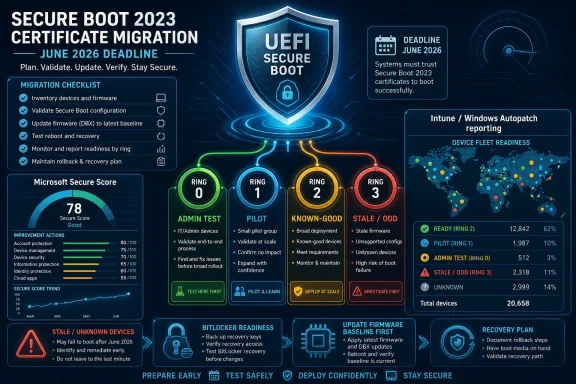 The Migration Starts With a Checklist, Not a Panic
The first move for Microsoft Defender for Endpoint admins is to open Microsoft Secure Score and look for the Secure Boot 2023 certificate and boot manager recommendation. If it appears in your tenant, use it as the top-level work queue rather than trying to build the entire project from scratch.That does not mean Secure Score should be treated as the only source of truth. It is the scoreboard. It tells security leadership that there is a readiness gap and whether that gap is shrinking. It does not replace device-level investigation, firmware validation, or change control.
From there, separate devices into practical buckets:
- Ready devices: leave them alone except for normal monitoring.
- Devices needing action: plan remediation through supported management channels.
- Unknown or stale devices: confirm whether the device is reporting correctly before assuming it is broken.
- Older or unusual devices: check firmware baseline and Secure Boot configuration before broad rollout.
- Unsupported or blocked devices: document the exception, owner, and next action.
The concrete playbook is therefore short but disciplined. Start with Microsoft Secure Score for the executive-level posture item. Use Intune or Windows Autopatch reporting for device-level triage where available. Validate uncertain devices locally or through your endpoint tooling. Remediate firmware and certificate gaps in staged rings. Then return to Secure Score and device-level reporting to show that the fleet moved.
What To Do Now If Devices Are Stale or Unknown
If your reports show stale, unknown, or ambiguous Secure Boot status, do not jump straight to remediation.This is the point where many migrations either become orderly or become noisy. Unknown does not always mean noncompliant. Stale does not always mean failed. Treat unclear status as a triage problem first and a remediation problem second.Admin action box
- Confirm reporting first: make sure the device is active, managed, and able to send the required management and diagnostic signals used by your reporting stack.
- Check firmware baseline: compare the device model and firmware version against your current OEM-approved baseline.
- Pilot on representative hardware: include that model, firmware branch, BitLocker state, and user profile in a controlled test group.
- Stage the rollout: expand only after the pilot confirms successful boot, no unexpected recovery prompts, and updated reporting.
Microsoft Has Turned Secure Boot Readiness Into an Audit Trail
Secure Boot has always been one of those technologies that matters most when it fails. It sits below Windows, below endpoint detection, and below most of the tooling administrators touch every day. That makes it easy to ignore until a certificate, a boot manager, a firmware quirk, or a recovery prompt drags it into the change-management meeting.The Secure Score recommendation changes the politics of the work. Microsoft Defender for Endpoint and Microsoft Secure Score are often watched by security leadership, compliance teams, and managed service providers. When a recommendation appears there, it becomes visible in a way a single firmware advisory often does not.
That visibility is useful if endpoint teams use it properly. Secure Boot certificate migration requires coordination among Windows admins, security teams, desktop engineering, infrastructure teams, and sometimes OEM support. A Secure Score recommendation gives those groups a common artifact: a named posture item, an affected device population, and a way to show progress.
But there is a risk in confusing score movement with actual readiness. A higher Secure Score is not the goal by itself. The goal is that Secure Boot-enabled devices have the relevant 2023 certificate and boot manager state needed for the next phase of Microsoft’s Secure Boot trust transition.
That distinction matters because Secure Boot readiness is not just a cloud dashboard issue. It depends on firmware behavior, boot components, certificate trust, device configuration, and whether the endpoint is reporting accurately.
The Best First Week Is Inventory, Not Remediation
The temptation will be to treat this like a normal backlog item: find noncompliant machines, push the fix, close the recommendation. That is the wrong order for a firmware-sensitive project.Secure Boot readiness touches UEFI trust, boot components, BitLocker behavior, and model-specific firmware behavior. The first week should be spent discovering the shape of the estate.
Your initial inventory should answer:
- Which devices have Secure Boot enabled?
- Which devices are managed by Intune, Windows Autopatch, or another endpoint platform?
- Which devices appear updated to the 2023 Secure Boot certificate and boot manager state?
- Which devices have stale, missing, or ambiguous reporting?
- Which hardware models and firmware versions are most common?
- Which device groups are business-critical, remote, BitLocker-protected, or difficult to recover physically?
- Which devices are old enough that OEM firmware support may be the real blocker?
WindowsForum’s own coverage has already been tracking the Secure Boot certificate transition from multiple angles. Forum reports have highlighted Microsoft’s 2024–2026 certificate update effort, the Windows Security Secure Boot status dashboard, enterprise guidance for the 2023 certificate migration, and the practical need to check readiness before the June 2026 certificate pressure becomes urgent. The common thread in those reports is not alarmism; it is that Secure Boot readiness is now something administrators and power users can actually see, measure, and act on.
For enterprise admins, the move now is narrower than the broad security story: turn those signals into a short operational checklist before the deadline compresses everyone’s options.
The Devices That Stay Noncompliant Are Usually Telling You Something
By now, most admins understand the broad deadline. Microsoft has been preparing organizations for the transition from older Secure Boot certificate infrastructure to the 2023 certificate generation, with June 2026 as the date that makes readiness difficult to ignore.What deserves more attention is the stubborn minority of machines that do not neatly comply.
Some devices remain unready because they have not yet received the required Secure Boot certificate updates. Some are held back by outdated firmware. Some may have reporting gaps rather than actual boot-chain gaps. Some are configured in ways that make certificate applicability different from what a simple checklist expects.
This is where WindowsForum’s value is practical rather than theoretical. In forum-style troubleshooting, the machines that matter most are rarely the clean examples. They are the developer workstation with a custom boot setup, the executive laptop that has not rebooted properly in weeks, the aging fleet model with inconsistent firmware, the lab machine that dual-boots, or the remote user’s system that reports once and then disappears.
A useful triage order for those cases is:
- Is the device still active and reporting? If not, solve management visibility first.
- Is Secure Boot enabled and in scope? If not, classify it correctly before chasing certificate state.
- Is firmware current enough for the model? If not, update firmware before blaming Windows.
- Is BitLocker enabled? If yes, plan recovery-key readiness and user-impact handling before pilot changes.
- Is the device using a standard boot path? If not, identify dual-boot, custom keys, third-party bootloaders, or other nonstandard trust changes.
- Does Microsoft reporting classify it differently than a local check or custom script? If yes, reconcile the assumptions before taking mass action.
Autopatch and Intune Give Admins the Workbench
Secure Score is the scoreboard. It is not the workbench. For device-level triage, Intune and Windows Autopatch reporting are the more useful places to spend time, assuming the environment uses the relevant Microsoft management stack.Microsoft’s device-level reporting is meant to help admins understand Secure Boot readiness across managed devices. Use it to identify devices that appear ready, devices that still require action, and devices that need investigation because the status is unclear or stale.
Avoid inventing precision that Microsoft has not confirmed in the guidance you are using. If your documentation does not directly confirm an exact report field name, path, scoring formula, or timing behavior, do not build operational promises around it. It is enough to say that Intune and Windows Autopatch provide device-level Secure Boot status reporting and that admins should use Microsoft’s current documentation in their tenant to navigate to the relevant report.
The most important distinction is this:
- Microsoft Secure Score tells you that Secure Boot readiness is a visible security posture item.
- Intune and Windows Autopatch help you identify and manage affected devices.
- Your endpoint engineering process decides how to pilot, stage, remediate, pause, and document exceptions.
A WindowsForum Triage Pattern That Works
For WindowsForum readers managing real fleets, the most practical value is a repeatable triage pattern. Here is a field-friendly order that avoids the two classic mistakes: remediating unknown devices too early and ignoring firmware debt too long.Ring 0: Admin-owned test devices
Start with IT-owned systems that represent the fleet. Include multiple OEMs, multiple firmware versions, BitLocker-enabled systems, and at least one older model. These are not “friendly” devices; they are sacrificial test hardware chosen to expose problems early.Success criteria:
- Device boots normally after remediation.
- BitLocker does not unexpectedly interrupt normal startup.
- Secure Boot remains enabled where expected.
- Management reporting updates as expected.
- Rollback or recovery steps are documented.
Ring 1: Representative pilot users
Move next to a small set of technically tolerant users across departments. Include remote users only if your support process can handle recovery scenarios. If your help desk cannot confidently walk a remote user through firmware or BitLocker recovery, do not make remote-first devices your first real pilot.Success criteria:
- No widespread boot failures.
- No unexpected recovery-key surge.
- Reporting improves after the expected management cycle.
- Support tickets are understandable and limited.
- Model-specific issues are documented.
Ring 2: Known-good hardware families
Expand to hardware models that performed cleanly in Rings 0 and 1. This is where automation can become more reasonable, but only for devices that are reporting properly and have firmware within the baseline you tested.Success criteria:
- Readiness improves at scale.
- Failure rate remains low.
- Exceptions are isolated to known models, stale devices, or unusual configurations.
Ring 3: Stale, unknown, and oddball devices
Leave the messy group for deliberate handling. That includes devices with stale reporting, low confidence in management data, old firmware, unusual boot configuration, inconsistent check-in behavior, or unclear ownership.Success criteria:
- Each device gets a disposition: remediate, firmware update, user contact, retire, replace, exclude, or investigate.
- No device remains “unknown” without an owner.
- Exceptions are documented before the deadline becomes a crisis.
The Staging Plan Should Follow Hardware Reality
A Secure Boot certificate migration should be staged by risk, not by alphabet. Start with a pilot group that represents the hardware estate: multiple OEMs, different firmware versions, BitLocker-enabled systems, and the older models most likely to behave differently.Firmware comes before bravado. Microsoft’s guidance has repeatedly emphasized the importance of OEM firmware compatibility in Secure Boot scenarios. For admins, that should be read as a warning: if you have a long tail of stale BIOS or UEFI versions, the Secure Boot certificate project may reveal debt that monthly Windows patching has been quietly tolerating.
For organizations using Intune, the remediation work should be tracked as a controlled rollout with rings. Pilot first. Then expand to known-good model families. Then tackle ambiguous or lower-confidence hardware with more caution. The goal is not simply to finish fast; it is to avoid turning a certificate transition into a BitLocker recovery event across a remote workforce.
This is also where ownership matters. Security teams may own the Secure Score number, but endpoint engineering usually owns the rollout. Desktop support may own user disruption. Infrastructure teams may own firmware baselines. Procurement may own the uncomfortable truth that some hardware is too old or too poorly supported to deserve heroic remediation.
A practical ownership model looks like this:
- Security team: tracks Secure Score, risk acceptance, and executive reporting.
- Endpoint engineering: owns Intune, Autopatch, deployment rings, and remediation policy.
- Desktop support: prepares user communications, BitLocker recovery handling, and escalation paths.
- Infrastructure or platform team: validates firmware baselines and OEM update channels.
- Asset management or procurement: identifies devices that should be replaced rather than rescued.
- Business owners: approve downtime windows for sensitive or critical devices.
Reporting Freshness Can Fool the Impatient
One of the easiest ways to waste time in this project is to remediate a machine and immediately declare failure because a dashboard has not changed. Endpoint reporting is not the same thing as instantaneous local state.Build a reporting window into the runbook:
- Apply the approved remediation.
- Restart the device when required.
- Confirm the device checks in to management.
- Wait for the relevant reporting pipeline to refresh.
- Re-check Secure Score and device-level status.
- Investigate only after the management data has had a reasonable chance to update.
Admins should also verify the plumbing that lets reporting work. If a device is not checking in, not sending the required management data, or not visible to the relevant service, its Secure Boot status may be less useful than it appears. Fix reporting before declaring the Secure Boot update failed.
This matters for proving Secure Score improvement. If your migration plan promises immediate dashboard movement after remediation, it is probably overpromising. The safer language is: remediate, restart, confirm check-in, allow reporting to refresh, then measure progress.
The Secure Score Mechanics Are Useful, But Still Incomplete
The Secure Score recommendation is useful because it makes Secure Boot readiness visible. It gives security leadership a posture item they can track and gives endpoint teams a reason to prioritize work that might otherwise look like low-level firmware maintenance.But the recommendation should not be treated as a complete certificate-forensics platform. It is a management signal, not a substitute for engineering judgment.
The practical reading is that Microsoft is giving organizations visibility into readiness, not removing the need for local validation. Secure Score can tell stakeholders that there is a posture gap and whether the gap is shrinking. Intune and Windows Autopatch reporting can help identify devices needing action. Local troubleshooting, firmware review, and support processes are still needed when reports are unclear.
Admins should not invent precision Microsoft has not provided. If the public documentation you are using does not state the exact point value, weighting, scoring formula, reporting delay, or backend classification rule for this recommendation, do not build executive promises around those details. Say what can be proven: the recommendation exists, it tracks Secure Boot 2023 readiness, and progress should be reflected as devices update and report correctly.
That may sound cautious, but it is the correct posture. Security scorecards are useful when they drive the right work. They become harmful when teams optimize the visible number while ignoring edge cases, reporting gaps, or devices that need exception handling.
The Windows Enthusiast Angle Is Smaller but Still Real
For individual Windows enthusiasts, the enterprise Secure Score piece may be irrelevant, but the underlying migration is not. Secure Boot still depends on firmware trust, boot manager signing, and certificates stored below the operating system.Consumers and power users are unlikely to manage this through Defender for Endpoint. They may instead see Secure Boot readiness surfaced through Windows Security or related Windows update behavior. WindowsForum’s recent user-facing reports have emphasized that Microsoft is making Secure Boot certificate status more visible in Windows Security so users can check whether a PC is ready for the 2023 certificate transition.
The caveat is that enthusiasts often run the least standard configurations. Dual-boot setups, custom firmware settings, manual Secure Boot key changes, older boards, and aggressive tweaking can all complicate what is otherwise expected to be a largely automatic transition for ordinary Windows devices. If you have customized Secure Boot trust, treat the June 2026 transition as a reason to document what you changed.
For admins, those enthusiast edge cases often show up as executive laptops, lab machines, developer workstations, or unmanaged stragglers. They are easy to dismiss until they belong to someone important or run something business-critical. Inventory is how you find them before the deadline finds you.
Common Failure Patterns To Watch
WindowsForum readers tend to care less about posture slogans and more about what breaks. For this migration, the likely pain points are practical:Stale devices that look worse than they are
A laptop that has not checked in recently may appear unknown or unresolved even if the underlying configuration is fine. Before remediating, confirm the device is active, online, and reporting.Firmware debt hiding inside a security project
Older systems may need firmware updates before Secure Boot certificate remediation behaves predictably. Treat stale firmware as a first-class blocker, not as a footnote.BitLocker recovery surprises
Any change near boot trust deserves a BitLocker recovery plan. Make sure recovery keys are escrowed and support staff know what users may see.Custom boot paths
Dual-boot systems, custom Secure Boot keys, nonstandard bootloaders, and lab configurations may not behave like managed corporate laptops. Put them in a separate exception or manual-test track.Dashboard impatience
Management reporting may not update instantly. Do not create false incidents because a device was remediated five minutes ago and the cloud view has not caught up.Script-versus-console disagreement
A local script, a registry check, a management report, and Secure Score may not all be measuring the same thing in the same way. When they disagree, investigate the assumptions rather than blindly trusting whichever output looks most alarming.A Short Playbook Beats a Long Advisory
The best migration plan is not elaborate. It is repeatable, auditable, and boring enough to survive handoff between teams. The Secure Boot certificate deadline is a classic case where a five-step workflow beats a 30-page wiki.- Start in Microsoft Secure Score and identify the Secure Boot 2023 certificate and boot manager recommendation.
- Use Intune or Windows Autopatch Secure Boot reporting where available to separate ready devices from devices needing action and devices with reporting uncertainty.
- Update OEM firmware first on older or higher-risk models, then pilot remediation across representative hardware and BitLocker-enabled devices.
- Roll out in rings, using device readiness, reporting freshness, hardware model, firmware baseline, and support risk to decide which devices can move automatically and which need manual handling.
- After remediation and restart, allow reporting to refresh before measuring success, then use Secure Score and device-level reports to prove progress and document exceptions.
The June 2026 deadline is close enough that waiting for perfect clarity is now its own risk, but far enough away that careful admins can still avoid a scramble. Microsoft has given defenders a useful posture signal in Secure Score and a more practical device view through Intune and Windows Autopatch reporting. The organizations that benefit most will be the ones that inventory first, remediate in rings, and treat every stubborn device as a signal rather than an inconvenience.
Frequently Asked Questions
What is the main admin action for the Secure Boot 2023 certificate migration?
Start by inventorying Secure Boot-enabled devices and checking Microsoft Secure Score for the Secure Boot 2023 certificate and boot manager recommendation. Then use Intune or Windows Autopatch reporting where available to identify devices that are ready, not ready, stale, unknown, or blocked.Is Secure Score the same as device readiness?
No. Secure Score is a security posture view. It helps show whether the organization is making progress against Microsoft’s recommendation. Device readiness still needs to be checked through management reporting, firmware review, and troubleshooting for unclear systems.Should admins remediate every unknown device immediately?
No. Unknown or stale devices should be triaged first. Confirm that the device is active, managed, reporting correctly, and running a reasonable firmware baseline before applying broad remediation.Why does firmware matter for a certificate migration?
Secure Boot depends on UEFI firmware trust behavior. Older or inconsistent firmware can create compatibility and reporting problems. Updating firmware baselines before broad rollout reduces the risk of model-specific failures.What is the safest rollout sequence?
Use rings. Start with IT-owned test devices, then representative pilot users, then known-good hardware families, and only then stale, unknown, older, or unusual systems. Keep BitLocker recovery readiness and support capacity in the plan.What should individual Windows users do?
Most individual users will not use Secure Score, Intune, or Autopatch. They should keep Windows and firmware updated and use Windows Security if Microsoft surfaces Secure Boot readiness information on their PC. Power users with dual-boot setups, custom Secure Boot keys, or older boards should document their configuration before making changes.References
- Primary source: learn.microsoft.com
Secure boot | Microsoft Learn
Provides guidance on what an OEM should do to enable Securely booting a devicelearn.microsoft.com - Independent coverage: support.microsoft.com
Surface Secure Boot Certificates | Microsoft Support
Secure Boot in UEFI firmware verifies pre-boot software using trusted certificates. Microsoft will update expiring Windows Secure Boot certificates starting June 2026 to maintain device protection.support.microsoft.com - Independent coverage: microsoft.com
Prepare your servers for Secure Boot certificate updates | Microsoft Windows Server Blog
The original Secure Boot certificates introduced in 2011 are approaching the end of their planned lifecycle, with expirations beginning in late June 2026.www.microsoft.com - Primary source: WindowsForum
Microsoft Secure Boot Certificate Update 2024: Enhance UEFI Security Before 2026 | Windows Forum
Microsoft's Secure Boot, a critical security feature introduced with Windows 8, is undergoing significant updates to its certificate infrastructure to...windowsforum.com