

Microsoft is replacing the 2011 Secure Boot certificates used by many Windows PCs before they begin expiring in late June 2026, because machines that miss the update may keep running but lose future boot-level protections, malware revocation updates, and potentially compatibility with later Windows feature upgrades. This is not a Y2K-style midnight shutdown, and Microsoft has been careful to say as much. But it is a rare moment when a background trust mechanism, normally invisible to users, becomes a deadline that home users and enterprise administrators can no longer ignore.
The short version is that Windows’ chain of trust has a sell-by date. The longer version is more interesting: Microsoft and the PC industry are trying to rotate one of the foundational security assumptions of the UEFI era without stranding the enormous installed base of Windows machines that were built around certificates issued fifteen years ago.
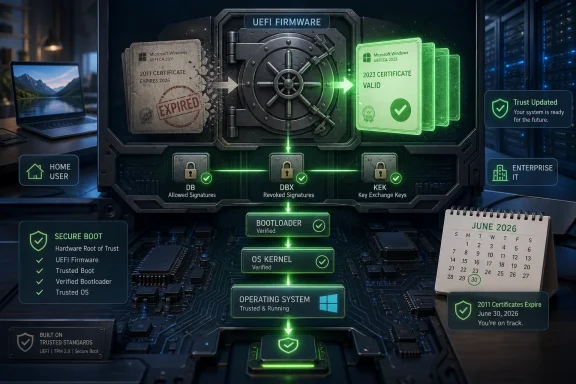
Secure Boot is easy to describe and harder to appreciate. Before Windows loads, the machine’s UEFI firmware checks whether the next thing in the boot chain is signed by a trusted authority. If the signature checks out, the Windows Boot Manager can continue; if it does not, the system is supposed to stop untrusted code from gaining control before the operating system and its defenses are awake.
That makes Secure Boot one of those security features whose success is measured by invisibility. Most users never see it, never configure it, and only learn about it when Windows 11 refuses to install on unsupported hardware or when a Linux dual-boot setup runs into signing trouble. Yet for modern Windows, it is part of the minimum-security floor, sitting alongside TPM 2.0, measured boot, BitLocker, virtualization-based security, and other technologies that assume the machine starts from a known-good state.
The certificates now causing anxiety date back to 2011, when UEFI Secure Boot moved from specification to mainstream PC reality. At the time, 2026 was comfortably distant. Microsoft, OEMs, firmware vendors, Linux distributions, recovery-tool makers, and peripheral software ecosystems all built around those trust anchors because they were the keys that made boot-time interoperability work.
That bargain is now ending. Certificates are not meant to be immortal, and security systems age badly when the same trust anchors remain in place for too long. The uncomfortable part is that rotating them is not like replacing a browser certificate or patching a DLL. These certificates live at the boundary between Windows and motherboard firmware, which means the update must touch the one layer of the PC most users are least equipped to troubleshoot.
But the reassuring phrasing also hides a more complicated technical sequence. Windows must add the new certificate material, use boot components signed with the new trust chain, and eventually stop relying on the old 2011 certificates. The system also has to preserve the ability to boot during the transition, because a botched trust update is not a failed app install; it is a machine that may no longer start cleanly.
This is why the update cannot be treated as just another cumulative patch. The Secure Boot database, the forbidden-signature database known as DBX, the Key Exchange Key database, and the Windows bootloader’s own signing chain all interact. Microsoft cannot simply revoke the old world before the new one is present and proven on the device.
The nuance matters because some headlines make the June 2026 date sound like an instant mass failure event. That is probably too dramatic for most Windows 11 PCs. The more likely failure mode is quieter and, in some ways, more dangerous: a machine that continues to run while gradually falling out of the supported boot-security ecosystem.
The bigger problem is what happens next. A PC that lacks the new 2023 certificates may be unable to trust newer boot-critical binaries signed under the updated chain. Microsoft may also stop delivering certain boot-level security updates to systems that cannot validate them properly. That includes updates to the boot path and revocation data used to block known-malicious or vulnerable bootloaders.
That last point deserves attention. DBX updates are one of the mechanisms Microsoft uses to blacklist boot components that attackers can abuse, including bootkits and vulnerable signed loaders. If a machine falls behind on those revocations, it can remain operational while becoming a more attractive target for attacks that live below Windows itself.
The difference between “won’t boot” and “boots in a degraded security state” is not comforting for administrators. A dead machine is obvious. A machine that runs normally while no longer receiving the same class of early-boot protections is the kind of problem that lingers in inventories, spare-device closets, lab benches, and remote offices until it matters.
On newer PCs, especially machines shipped recently with updated firmware and Windows 11 images, the transition may already be done or nearly invisible. On older UEFI systems, the situation is less predictable. Some machines will receive everything they need through Windows Update. Others may depend on OEM firmware readiness, vendor-specific implementation details, or administrative policy choices that delay certificate updates.
Very old BIOS-based computers are largely outside this story because Secure Boot is a UEFI feature. But that does not mean every UEFI-era machine is equally prepared. The Windows ecosystem includes consumer laptops that receive frequent firmware updates, desktops whose BIOS has not been touched in years, industrial PCs frozen on validated images, and business fleets managed with tightly controlled update rings.
The messy middle is where the risk lives. A technically supported Windows device can still be misconfigured, paused from updates, parked offline, managed by a cautious IT policy, or running in an environment where firmware changes are treated as high-risk events. Those machines are exactly the ones least likely to absorb a low-level trust migration smoothly.
That last category is easy to overlook. Recovery environments, imaging tools, preboot authentication utilities, endpoint security agents, and dual-boot setups can all intersect with Secure Boot policy. A certificate update that is boring on a standard office laptop may be more consequential on a kiosk, a lab workstation, a field device, or a machine that boots into specialized maintenance environments.
There is also a governance problem. Security teams tend to want revocations applied promptly because old trust anchors create attack surface. Operations teams tend to fear boot-chain changes because the blast radius of a mistake is physical and expensive. Microsoft’s job is to make the safe path the default, but organizations still have to decide how aggressively to test, stage, and enforce the transition.
The worst enterprise response would be to wait until late June 2026 and then discover that a subset of machines cannot take the update because they have been excluded from normal servicing. The second-worst response would be to force changes everywhere without testing BitLocker recovery behavior, firmware variance, and critical boot media. This is a maintenance event disguised as a security bulletin.
Microsoft’s broad strategy is to move the supported ecosystem onto the 2023 certificates, but Windows 10 machines outside normal servicing channels deserve scrutiny. Some will be covered through Extended Security Updates or enterprise management arrangements. Others may be aging consumer systems that are already on borrowed time from a servicing perspective.
That matters because Secure Boot is not a Windows 11-only feature. The same early-boot trust assumptions apply across modern Windows releases, and the consequences of stale certificates can affect future security updates even if the machine’s day-to-day desktop experience appears unchanged. Users who treat Windows Update as optional are exactly the users most likely to miss a transition that was designed to be automatic.
There is an irony here. Windows 11’s stricter hardware requirements were widely criticized, and often fairly, for making capable PCs feel prematurely obsolete. But the Secure Boot deadline shows why Microsoft keeps trying to raise the platform baseline: the lower layers of PC security are full of legacy assumptions that eventually become operational liabilities.
That reality complicates the transition. If the old certificates are retired too abruptly, some non-Windows boot paths can break. If they are trusted indefinitely, attackers retain more opportunities to abuse signed but vulnerable components. Secure Boot has always been a compromise between platform openness and platform control, and certificate rotation exposes the compromise.
Gaming adds another wrinkle. Anti-cheat systems increasingly care about Secure Boot because cheats and kernel-level tampering can start early. A PC that appears “fine” to Windows but sits in an outdated Secure Boot state may run into problems with games, anti-cheat enforcement, or future platform checks that assume the newer certificate chain.
None of this means users should disable Secure Boot to avoid the problem. That is usually the wrong instinct. Disabling a security boundary because maintaining it is inconvenient is how temporary workarounds become permanent exposure. The better answer is to verify status, update normally, and treat unusual boot configurations as things to test before the deadline rather than after it.
That kind of visibility is overdue. For years, Secure Boot has been a setting buried in firmware menus, a requirement screen in Windows setup, or a line item in System Information. Bringing the certificate readiness state into the Windows Security app turns an abstract trust-chain migration into something a normal user can inspect without knowing what KEK, DB, DBX, or PCA mean.
Users may see multiple restarts during the process, and that should not automatically be read as a failure. BitLocker generally should not need to be disabled merely because the Secure Boot certificates are being updated, though anyone managing sensitive systems should still ensure recovery keys are backed up before making firmware-adjacent changes. The best consumer experience is one where the user notices nothing except a green check mark.
The problem is that “boring by design” only works if users let the design run. Machines held back by metered connections, third-party update blockers, half-finished restarts, or a habit of postponing patches can turn an automatic migration into a self-inflicted support issue. The Secure Boot deadline is another reminder that modern Windows security is not a single switch; it is a service relationship.
Still, the episode undercuts the comforting myth that hardware-rooted security is simple. The more Windows depends on firmware, TPMs, virtualization features, measured boot, and pre-OS trust decisions, the more Windows servicing becomes entangled with components users do not think of as part of Windows. The operating system is no longer just the thing on the drive; it is the coordinator of a platform trust stack.
That raises accountability questions. If an OEM stops issuing firmware updates, if a device is technically capable but poorly maintained, or if a business freezes a gold image for years, who owns the resulting security gap? Microsoft can provide the servicing machinery and the new certificates, but it cannot make every PC vendor’s firmware history clean or every administrator’s inventory complete.
The answer, practically, is shared responsibility. Microsoft must make the automatic path safe. OEMs must ensure firmware does not sabotage the transition. IT departments must test and deploy before the deadline. Users must stop treating update prompts as decorative wallpaper.
The short version is that Windows’ chain of trust has a sell-by date. The longer version is more interesting: Microsoft and the PC industry are trying to rotate one of the foundational security assumptions of the UEFI era without stranding the enormous installed base of Windows machines that were built around certificates issued fifteen years ago.
 The PC Boot Process Has Become a Trust Ceremony
Secure Boot is easy to describe and harder to appreciate. Before Windows loads, the machine’s UEFI firmware checks whether the next thing in the boot chain is signed by a trusted authority. If the signature checks out, the Windows Boot Manager can continue; if it does not, the system is supposed to stop untrusted code from gaining control before the operating system and its defenses are awake.That makes Secure Boot one of those security features whose success is measured by invisibility. Most users never see it, never configure it, and only learn about it when Windows 11 refuses to install on unsupported hardware or when a Linux dual-boot setup runs into signing trouble. Yet for modern Windows, it is part of the minimum-security floor, sitting alongside TPM 2.0, measured boot, BitLocker, virtualization-based security, and other technologies that assume the machine starts from a known-good state.
The certificates now causing anxiety date back to 2011, when UEFI Secure Boot moved from specification to mainstream PC reality. At the time, 2026 was comfortably distant. Microsoft, OEMs, firmware vendors, Linux distributions, recovery-tool makers, and peripheral software ecosystems all built around those trust anchors because they were the keys that made boot-time interoperability work.
That bargain is now ending. Certificates are not meant to be immortal, and security systems age badly when the same trust anchors remain in place for too long. The uncomfortable part is that rotating them is not like replacing a browser certificate or patching a DLL. These certificates live at the boundary between Windows and motherboard firmware, which means the update must touch the one layer of the PC most users are least equipped to troubleshoot.
Microsoft’s Message Is Reassuring, but Not Relaxing
Microsoft’s public line is deliberately calming: supported Windows devices should receive the new 2023 Secure Boot certificates through Windows Update, and ordinary users should generally not need to perform a manual firmware ritual. That is the right message for the broad consumer base. Panic would create more bricked systems than the certificate rollover itself.But the reassuring phrasing also hides a more complicated technical sequence. Windows must add the new certificate material, use boot components signed with the new trust chain, and eventually stop relying on the old 2011 certificates. The system also has to preserve the ability to boot during the transition, because a botched trust update is not a failed app install; it is a machine that may no longer start cleanly.
This is why the update cannot be treated as just another cumulative patch. The Secure Boot database, the forbidden-signature database known as DBX, the Key Exchange Key database, and the Windows bootloader’s own signing chain all interact. Microsoft cannot simply revoke the old world before the new one is present and proven on the device.
The nuance matters because some headlines make the June 2026 date sound like an instant mass failure event. That is probably too dramatic for most Windows 11 PCs. The more likely failure mode is quieter and, in some ways, more dangerous: a machine that continues to run while gradually falling out of the supported boot-security ecosystem.
The Scariest Outcome Is Not Always a Black Screen
For home users, “will my PC boot?” is the natural question. Microsoft and reporting around its engineering guidance suggest that many systems with outdated certificates may still start and run after the old certificates expire. That distinction is important: expiration does not necessarily mean the firmware suddenly refuses to execute every currently installed Windows boot component.The bigger problem is what happens next. A PC that lacks the new 2023 certificates may be unable to trust newer boot-critical binaries signed under the updated chain. Microsoft may also stop delivering certain boot-level security updates to systems that cannot validate them properly. That includes updates to the boot path and revocation data used to block known-malicious or vulnerable bootloaders.
That last point deserves attention. DBX updates are one of the mechanisms Microsoft uses to blacklist boot components that attackers can abuse, including bootkits and vulnerable signed loaders. If a machine falls behind on those revocations, it can remain operational while becoming a more attractive target for attacks that live below Windows itself.
The difference between “won’t boot” and “boots in a degraded security state” is not comforting for administrators. A dead machine is obvious. A machine that runs normally while no longer receiving the same class of early-boot protections is the kind of problem that lingers in inventories, spare-device closets, lab benches, and remote offices until it matters.
The 2023 Certificates Are a Firmware Update in Windows Clothing
The most awkward part of this transition is that Microsoft is using the normal Windows servicing pipeline to update something that ultimately belongs to the firmware trust model. That is sensible; Windows Update is the only realistic way to reach hundreds of millions of machines. It is also why the rollout must be staged, conservative, and heavily dependent on device eligibility checks.On newer PCs, especially machines shipped recently with updated firmware and Windows 11 images, the transition may already be done or nearly invisible. On older UEFI systems, the situation is less predictable. Some machines will receive everything they need through Windows Update. Others may depend on OEM firmware readiness, vendor-specific implementation details, or administrative policy choices that delay certificate updates.
Very old BIOS-based computers are largely outside this story because Secure Boot is a UEFI feature. But that does not mean every UEFI-era machine is equally prepared. The Windows ecosystem includes consumer laptops that receive frequent firmware updates, desktops whose BIOS has not been touched in years, industrial PCs frozen on validated images, and business fleets managed with tightly controlled update rings.
The messy middle is where the risk lives. A technically supported Windows device can still be misconfigured, paused from updates, parked offline, managed by a cautious IT policy, or running in an environment where firmware changes are treated as high-risk events. Those machines are exactly the ones least likely to absorb a low-level trust migration smoothly.
Enterprise IT Has Seen This Movie Before
For administrators, the Secure Boot rollover is less a single deadline than an asset-management exam. The question is not merely whether Windows Update can deliver the new certificates. It is whether the organization knows which machines have Secure Boot enabled, which firmware versions are deployed, which devices are offline or in storage, which systems boot non-Windows workloads, and which recovery workflows depend on old signed media.That last category is easy to overlook. Recovery environments, imaging tools, preboot authentication utilities, endpoint security agents, and dual-boot setups can all intersect with Secure Boot policy. A certificate update that is boring on a standard office laptop may be more consequential on a kiosk, a lab workstation, a field device, or a machine that boots into specialized maintenance environments.
There is also a governance problem. Security teams tend to want revocations applied promptly because old trust anchors create attack surface. Operations teams tend to fear boot-chain changes because the blast radius of a mistake is physical and expensive. Microsoft’s job is to make the safe path the default, but organizations still have to decide how aggressively to test, stage, and enforce the transition.
The worst enterprise response would be to wait until late June 2026 and then discover that a subset of machines cannot take the update because they have been excluded from normal servicing. The second-worst response would be to force changes everywhere without testing BitLocker recovery behavior, firmware variance, and critical boot media. This is a maintenance event disguised as a security bulletin.
Windows 10 Makes the Calendar More Complicated
The Secure Boot certificate story lands in the shadow of Windows 10’s extended sunset. Although the PCWorld item focuses on Windows 11, the installed base still includes many Windows 10 systems that are technically UEFI Secure Boot machines and still depend on Microsoft’s trust infrastructure. That overlap creates confusion because “supported Windows,” “eligible for Windows 11,” and “capable of receiving Secure Boot certificate updates” are related but not identical ideas.Microsoft’s broad strategy is to move the supported ecosystem onto the 2023 certificates, but Windows 10 machines outside normal servicing channels deserve scrutiny. Some will be covered through Extended Security Updates or enterprise management arrangements. Others may be aging consumer systems that are already on borrowed time from a servicing perspective.
That matters because Secure Boot is not a Windows 11-only feature. The same early-boot trust assumptions apply across modern Windows releases, and the consequences of stale certificates can affect future security updates even if the machine’s day-to-day desktop experience appears unchanged. Users who treat Windows Update as optional are exactly the users most likely to miss a transition that was designed to be automatic.
There is an irony here. Windows 11’s stricter hardware requirements were widely criticized, and often fairly, for making capable PCs feel prematurely obsolete. But the Secure Boot deadline shows why Microsoft keeps trying to raise the platform baseline: the lower layers of PC security are full of legacy assumptions that eventually become operational liabilities.
The Linux and Anti-Cheat Edges Are Not Side Stories
Secure Boot is often discussed as a Windows feature, but the Microsoft UEFI certificate authority has long played an outsized role in the broader PC ecosystem. Many Linux distributions, third-party bootloaders, utilities, and security-sensitive applications have depended on Microsoft-signed components to work on commodity PCs with Secure Boot enabled. That is not because Microsoft owns UEFI; it is because Microsoft’s signing infrastructure became the practical compatibility layer for the Windows-dominated PC market.That reality complicates the transition. If the old certificates are retired too abruptly, some non-Windows boot paths can break. If they are trusted indefinitely, attackers retain more opportunities to abuse signed but vulnerable components. Secure Boot has always been a compromise between platform openness and platform control, and certificate rotation exposes the compromise.
Gaming adds another wrinkle. Anti-cheat systems increasingly care about Secure Boot because cheats and kernel-level tampering can start early. A PC that appears “fine” to Windows but sits in an outdated Secure Boot state may run into problems with games, anti-cheat enforcement, or future platform checks that assume the newer certificate chain.
None of this means users should disable Secure Boot to avoid the problem. That is usually the wrong instinct. Disabling a security boundary because maintaining it is inconvenient is how temporary workarounds become permanent exposure. The better answer is to verify status, update normally, and treat unusual boot configurations as things to test before the deadline rather than after it.
The Consumer Fix Is Boring by Design
For most Windows 11 users, the practical advice is deliberately unglamorous: keep Windows updated, do not block firmware-related updates without a reason, and check the Secure Boot status surfaced in Windows Security. Microsoft has been adding clearer status reporting so users can see whether their devices are prepared for the June 2026 certificate transition.That kind of visibility is overdue. For years, Secure Boot has been a setting buried in firmware menus, a requirement screen in Windows setup, or a line item in System Information. Bringing the certificate readiness state into the Windows Security app turns an abstract trust-chain migration into something a normal user can inspect without knowing what KEK, DB, DBX, or PCA mean.
Users may see multiple restarts during the process, and that should not automatically be read as a failure. BitLocker generally should not need to be disabled merely because the Secure Boot certificates are being updated, though anyone managing sensitive systems should still ensure recovery keys are backed up before making firmware-adjacent changes. The best consumer experience is one where the user notices nothing except a green check mark.
The problem is that “boring by design” only works if users let the design run. Machines held back by metered connections, third-party update blockers, half-finished restarts, or a habit of postponing patches can turn an automatic migration into a self-inflicted support issue. The Secure Boot deadline is another reminder that modern Windows security is not a single switch; it is a service relationship.
Microsoft Is Rotating Trust, Not Merely Patching Windows
The broader significance is that Microsoft is treating PC trust as something that must be renewed, not something installed once at the factory and forgotten. That is healthy security engineering. Long-lived certificates become brittle over time, and attackers have shown repeated interest in the boot path precisely because compromising it gives them leverage before endpoint defenses are fully active.Still, the episode undercuts the comforting myth that hardware-rooted security is simple. The more Windows depends on firmware, TPMs, virtualization features, measured boot, and pre-OS trust decisions, the more Windows servicing becomes entangled with components users do not think of as part of Windows. The operating system is no longer just the thing on the drive; it is the coordinator of a platform trust stack.
That raises accountability questions. If an OEM stops issuing firmware updates, if a device is technically capable but poorly maintained, or if a business freezes a gold image for years, who owns the resulting security gap? Microsoft can provide the servicing machinery and the new certificates, but it cannot make every PC vendor’s firmware history clean or every administrator’s inventory complete.
The answer, practically, is shared responsibility. Microsoft must make the automatic path safe. OEMs must ensure firmware does not sabotage the transition. IT departments must test and deploy before the deadline. Users must stop treating update prompts as decorative wallpaper.
The Green Check Mark Is the New Trust Anchor
The June 2026 Secure Boot deadline is not a reason to panic, but it is a reason to stop ignoring the part of Windows security that happens before Windows appears. The most concrete lessons are simple enough, even if the machinery behind them is not.- Windows PCs using the old 2011 Secure Boot certificates need to move to the 2023 certificate chain before the old certificates begin expiring in late June 2026.
- A PC that misses the transition may still boot, but it can fall into a degraded security state and lose access to future boot-critical protections.
- Windows Update is expected to handle the transition for many supported devices, but firmware readiness and update policy can still affect real-world outcomes.
- Administrators should inventory Secure Boot status, firmware versions, offline devices, recovery media, and unusual boot configurations before the deadline.
- Home users should check Windows Security for Secure Boot readiness and avoid postponing Windows updates through the transition period.
- Disabling Secure Boot is not a fix; it is usually a retreat from the very protection the certificate refresh is meant to preserve.
References
- Primary source: PCWorld
Published: Wed, 27 May 2026 10:30:00 GMT
Loading…
www.pcworld.com - Official source: microsoft.com

Prepare your servers for Secure Boot certificate updates | Microsoft Windows Server Blog
The original Secure Boot certificates introduced in 2011 are approaching the end of their planned lifecycle, with expirations beginning in late June 2026. www.microsoft.com
- Related coverage: windowscentral.com
Microsoft warns Secure Boot certificates will expire soon — what to expect
After 15 years, the original Secure Boot certificates that keep your PC secure during boot are expiring. Here's what you need to know. www.windowscentral.com
- Official source: techcommunity.microsoft.com
Act now: Secure Boot certificates expire in June 2026 - Windows IT Pro Blog
Get tips to prepare for the rollout of updated certificates across your organization. techcommunity.microsoft.com
- Official source: learn.microsoft.com

Update Secure Boot Certificates for Windows Devices - Windows Client
Update your Windows devices to maintain Secure Boot protection with 2023 certificates before they expire in June 2026.learn.microsoft.com - Related coverage: notebookcheck.net
Microsoft sets 2026 deadline for Secure Boot certificate expiration
Microsoft has issued new guidance warning that 2011 Secure Boot certificates begin expiring in June 2026. Windows updates are rolling out 2023 replacement certificates, with some PCs requiring OEM firmware updates. www.notebookcheck.net
- Related coverage: techspot.com
Loading…
www.techspot.com - Related coverage: tomshardware.com
Microsoft is refreshing Secure Boot certificates to plug security holes before they happen — if you bought a PC last year, you should be set
Be sure to keep Windows 11 systems updated to get refreshed security certificates.www.tomshardware.com
- Related coverage: pcgamer.com
- Related coverage: techradar.com

Microsoft's Secure Boot replacements could be bad news for Windows 10 users
Secure Boot certificate upgrades is bad news for Windows 10www.techradar.com
- Related coverage: tomsguide.com
Loading…
www.tomsguide.com