The Record Patch Count Is the Headline, but the Zero-Days Are the Clock
Patch Tuesday has always been a ritualized compromise between urgency and caution. Microsoft ships a bundle, security teams triage the blast radius, and everyone tries to decide whether the greater risk is the bug Microsoft fixed or the bug Microsoft may have introduced. June 2026 strains that bargain because the volume is not just large; it is large enough to suggest a shift in how vulnerabilities are being found.
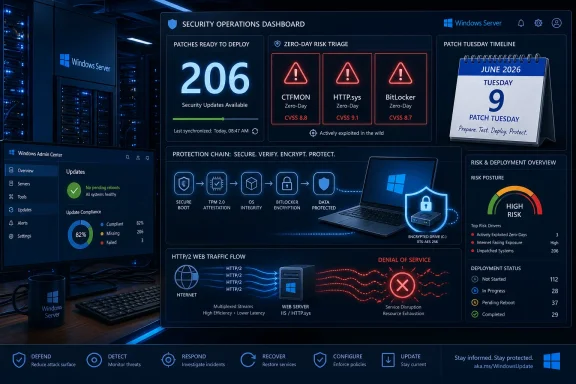
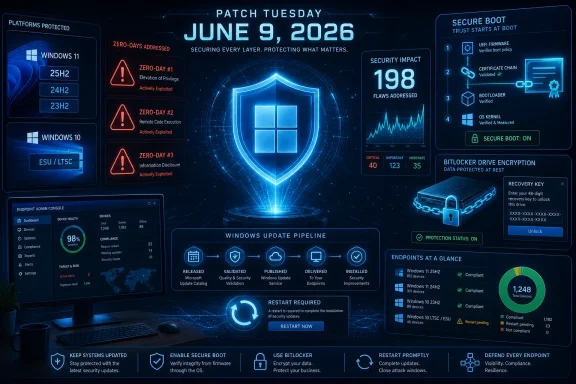
ZDNET’s Lance Whitney, citing Microsoft’s June security cycle and third-party patch advisories, puts the Windows vulnerability count at 198, with 32 rated critical and three treated as zero-days because details were public before fixes were available. Other security coverage around the same release uses a slightly higher portfolio-wide figure, generally because it counts a broader set of Microsoft products rather than Windows-specific CVEs. That distinction matters less to an endpoint admin staring at an unpatched fleet than it does to scorekeeping.
The most important phrase is not “record.” It is publicly disclosed. A zero-day that is already being exploited is obviously worse, but public disclosure still changes the timeline. Once technical details are out, defenders are no longer racing an abstract risk model; they are racing anyone capable of turning disclosure into working exploit code.
That is why this month’s update deserves a higher priority than a routine quality rollup. Microsoft’s own support pages describe the June packages as cumulative security updates, but the security context around them is unusually sharp. The three zero-days reportedly include an elevation-of-privilege flaw involving link resolution, an HTTP denial-of-service issue of particular interest to organizations, and a BitLocker security feature bypass tied to physical access scenarios.
Windows Update Is Now Carrying More Than Bug Fixes
The June update is also a reminder that Windows Update is no longer merely a patch delivery channel. It is Microsoft’s preferred mechanism for reshaping security posture at scale. This month’s payload includes the usual cumulative fixes, but it also advances Microsoft’s Secure Boot certificate transition and updates platform behaviors that sit well below the level most users ever see.
That is visible in the support notes for Windows 11 KB5094126, which applies to Windows 11 25H2 and 24H2 and moves systems to OS builds 26200.8655 and 26100.8655. Microsoft says the update includes the latest security fixes and improvements, plus non-security content from the previous optional preview release. It also updates AI components on supported Copilot+ PCs, including Image Search, Content Extraction, Semantic Analysis, and the Settings Model.
For Windows 11 23H2, KB5093998 moves systems to build 22631.7219. It is a more conservative-sounding package, but it still carries Secure Boot changes, File Explorer search improvements, and device-management fixes. For Windows 10, KB5094127 applies only to Windows 10 ESU, Windows 10 Enterprise LTSC 2021, and Windows 10 IoT Enterprise LTSC 2021, moving systems to OS builds 19045.7417 and 19044.7417.
The dividing line is worth spelling out. Ordinary Windows 10 22H2 support ended on October 14, 2025, so the June 2026 Windows 10 update is not a general-purpose lifeline for every old PC. If a Windows 10 device is not enrolled in Extended Security Updates or covered by a supported LTSC channel, it is already outside the normal free-update world.
Secure Boot Becomes the Quiet Center of the Release
The most consequential part of the June update may be the least exciting to describe: Secure Boot certificate renewal. Secure Boot depends on certificates that allow systems to verify boot components before the operating system loads. Microsoft has been warning that older Secure Boot certificates used by most Windows devices begin expiring in June 2026, and the company has been rolling newer certificates through Windows Update.
Microsoft’s support notes say devices that have not yet received newer certificates should continue to start and operate normally, and standard Windows updates should continue to install. That is a calming message, but not a reason to ignore the transition. Secure Boot is one of those technologies that fades into the background until something in the boot path changes, at which point it becomes everyone’s problem at once.
This month’s updates expand the device-targeting data Microsoft uses to decide when a system is eligible to receive the new Secure Boot certificates automatically. In plainer English, Windows Update is being used to stage trust-chain changes only after a device has produced enough successful update signals. That is conservative engineering, but it also means administrators need to understand that “patched” and “certificate-transitioned” are related but not always identical states.
Windows 10 and Windows 11 23H2 also gain or document a policy named LimitSecureBootRequiredServiceData, intended to reduce Secure Boot service data sent to Microsoft by suppressing a normal event. That matters for organizations working under restricted-traffic baselines. It is a small reminder that security modernization and telemetry minimization are often in tension, and Microsoft is trying to give managed environments a way to thread that needle.
BitLocker Is the Enterprise Tripwire
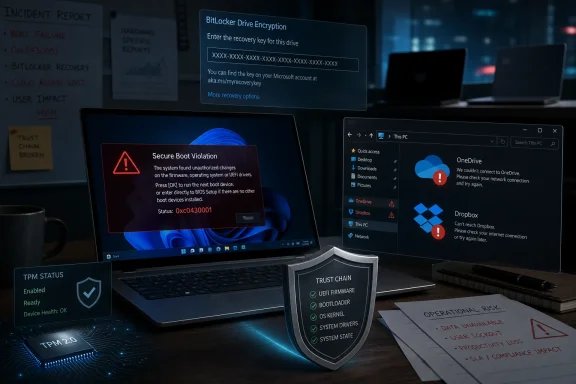
For all the attention on zero-days, the operational risk most likely to ruin an admin’s week may be BitLocker recovery. Microsoft’s Windows 10 support page for KB5094127 lists a known issue in which some devices with an unrecommended BitLocker Group Policy configuration may require the BitLocker recovery key on the first restart after installing the update. The issue is described as limited, but the conditions are exactly the kind that can exist for years in managed fleets without anyone remembering why.
The affected scenario involves BitLocker on the OS drive, a configured TPM platform validation profile for native UEFI firmware configurations, PCR7 included in the validation profile, Secure Boot State PCR7 Binding reported as “Not Possible” in System Information, and the device being eligible for the 2023-signed Windows Boot Manager. That is not a consumer-laptop problem in the normal sense. It is an IT-policy problem.
Microsoft says the recovery key should only be required once in that scenario, assuming the policy remains unchanged afterward. That is reassuring only if the organization actually has recovery-key escrow in good order. If it does not, a one-time recovery event can still become a help-desk incident factory.
The recommended enterprise move is to audit BitLocker group policies before deployment, especially explicit PCR7 inclusion. Admins should check PCR7 binding status with msinfo32.exe, confirm recovery-key availability, and decide whether to temporarily remove the risky policy configuration before rollout. This is exactly the kind of footnote that separates a clean patch wave from a long week of executive laptops asking for keys no one can find.
Windows 11 Gets Convenience Features Under a Security Umbrella
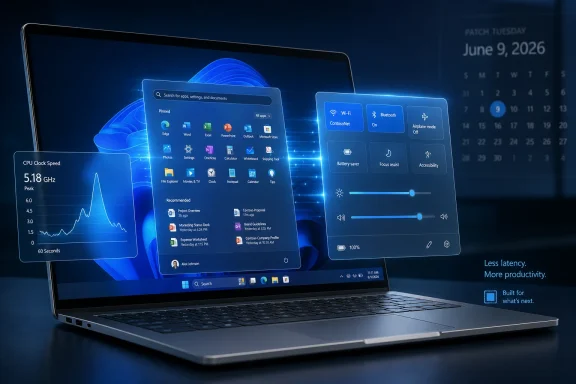
The June update is not only a security event. It also folds in several Windows 11 quality and feature improvements that users will actually notice. Microsoft’s own KB notes are restrained, but coverage from Windows-focused outlets highlights improvements such as shared Bluetooth audio, multi-app camera access, Low Latency Profile behavior, and more flexible user-folder naming during setup.
Shared audio is the kind of feature that sounds trivial until you need it. The ability to connect more than one Bluetooth audio device to a PC makes Windows better suited for casual media consumption, accessibility scenarios, and shared workspaces. It also reflects the slow migration of mobile-device expectations into the desktop OS.
Multi-app webcam access is more interesting for professionals. Modern workdays often involve video meetings, filters, streaming tools, browser-based conferencing, authentication prompts, and capture utilities all competing for camera access. Letting the camera serve more than one application reduces a familiar class of “close Zoom before Teams can see the camera” friction.
The custom user-folder name change is similarly modest but welcome. Windows has long had a habit of deriving profile-folder names in ways users dislike and administrators later regret. Allowing a custom name during setup gives users a cleaner starting point and reduces the temptation to perform unsupported profile-folder surgery after the fact.
AI-Assisted Bug Hunting Changes the Patch Tuesday Baseline
ZDNET’s article leans into a broader claim: the volume of patched bugs reflects the growing use of AI-assisted vulnerability research. That is plausible, and patch-management vendors are saying the same thing. The industry is entering a period in which code-search, static analysis, fuzzing, and vulnerability triage are all being amplified by models that can chew through patterns faster than humans can.
The Mozilla example cited in the ZDNET piece is instructive. Mozilla recently patched a very large number of Firefox flaws in a cycle reportedly assisted by an early version of Anthropic’s Claude Mythos tooling. Whether any one month’s count can be pinned cleanly on AI is harder to prove from the outside, but the directional trend is obvious enough: researchers are finding more bugs faster.
That has two implications for Windows admins. First, large Patch Tuesday drops may become less exceptional. If AI-assisted analysis lowers the cost of vulnerability discovery, vendors will increasingly face months where the count looks alarming even when the underlying engineering discipline is improving.
Second, exploit developers get access to better tooling too. The same class of model-assisted reasoning that helps a researcher identify a memory-safety issue can help an attacker understand a diff, generate a proof of concept, or prioritize targets. The asymmetry is not that only defenders get AI; it is that defenders still have to coordinate change across real systems with uptime requirements.
Windows 10’s ESU Era Is Now Real, Not Theoretical
For Windows 10 users, June 2026 is one of the first reminders that the post-support era is not a future policy document anymore. KB5094127 is available for Windows 10 ESU and LTSC systems, not for every leftover Windows 10 installation. Microsoft’s notes explicitly point users who want critical and important Windows 10 security updates toward the Extended Security Updates program.
That changes the consumer advice. A year ago, telling someone to “install the latest Windows 10 update” was straightforward. Now the better advice is conditional: if you are eligible for ESU or running supported LTSC, install the update; otherwise, your machine is no longer receiving the normal security baseline and should be upgraded, replaced, isolated, or treated as a risk exception.
The business advice is similarly blunt. Organizations that kept Windows 10 around because migrations are expensive need to make sure their inventory data matches their licensing and update reality. A device that looks managed in an endpoint dashboard but is not actually receiving ESU-backed security fixes is not “stable.” It is aging in place.
Microsoft has made the Windows 11 migration pressure obvious for years, but security events like this one make the pressure less abstract. The gap between a supported Windows 11 PC and an unmanaged Windows 10 holdout is no longer mostly about features. It is about whether the monthly defensive machinery is still attached.
The Update Pipeline Itself Needs Attention
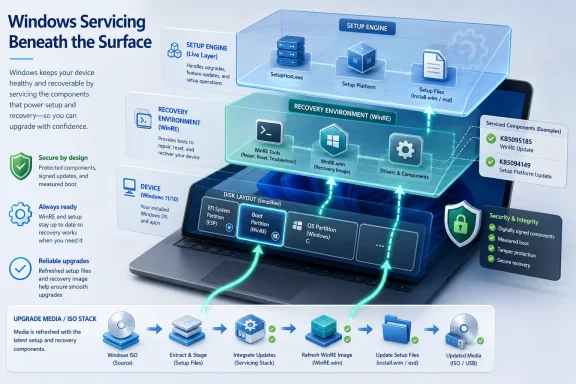
The servicing-stack portions of the June updates deserve more respect than they usually get. Servicing stack updates are the components that make Windows capable of installing future updates reliably. When Microsoft combines the latest servicing stack update with the cumulative update, it reduces a class of deployment mistakes, but it does not eliminate all prerequisites.
For Windows 11 25H2 and 24H2, the servicing stack update is KB5094135, version 26100.8648. For Windows 11 23H2, it is KB5094146, version 22621.7209. For Windows 10, KB5094145 updates the servicing stack to version 19041.7402. These are not decorative numbers; they are part of the update chain that keeps later packages installable.
Deployment teams should also note Microsoft’s repeated warning about boot.stl in updated installation media. If dynamic updates are applied to an existing Windows image, the boot.stl file must be included in the installation media. If it is missing, devices may fail to start from that media and produce error code 0xc0430001.
That warning belongs in imaging runbooks, not just KB footnotes. The Secure Boot certificate transition means boot media, boot managers, and certificate expectations are converging in ways that can punish stale assumptions. A deployment share that “worked last quarter” is not automatically safe this quarter.
The Sensible Patch Strategy Is Fast, but Not Blind
The old home-user answer still holds: open Windows Update, install the June update, and reboot. Mandatory cumulative updates will generally download automatically, but relying on “eventually” is a poor strategy when public zero-day details exist. If Windows Update is waiting on a restart, the patch is not protecting the running system yet.
For managed environments, the release should move quickly through rings, but with targeted prechecks. The point is not to freeze deployment because a BitLocker issue exists. The point is to avoid discovering during rollout that recovery keys, PCR7 bindings, Secure Boot certificate state, and imaging media are all less orderly than the spreadsheet implied.
Microsoft says it is not currently aware of known issues for KB5094126 and KB5093998, while KB5094127 documents the BitLocker recovery scenario for Windows 10. That difference is important, but not absolute. Similar Secure Boot and boot-manager changes run across the Windows estate, so organizations should use the Windows 10 known issue as a cue to audit boot-protection assumptions more broadly.
There is also a communications task. Users should be told to expect a reboot, and Windows 10 ESU users should understand that they are in a special support category. Help desks should be briefed on BitLocker recovery prompts before the first wave, not after the first wave starts calling.
The June Patch Draws a Map for the Rest of 2026
The concrete lesson of this Patch Tuesday is not simply “big update, install now.” It is that Windows security in 2026 is becoming more dynamic at the boot layer, more dependent on update health signals, and more tightly coupled to lifecycle status. The patch count grabs attention, but the surrounding platform changes tell the longer story.
- Install the June 9, 2026 cumulative updates promptly on supported Windows 11 and eligible Windows 10 systems because the release addresses publicly disclosed zero-days.
- Treat Windows 10 updates as conditional on ESU or LTSC eligibility, since ordinary Windows 10 22H2 support ended on October 14, 2025.
- Audit BitLocker recovery-key escrow and PCR7-related policy before broad deployment, especially on managed Windows 10 systems.
- Review Secure Boot certificate readiness and updated installation media, including the presence of the correct
boot.stlfile. - Expect large Patch Tuesday counts to become more common as AI-assisted vulnerability research accelerates discovery.
- Do not let the new Windows 11 convenience features distract from the fact that this is primarily a security and trust-chain update.
The June 2026 update is a useful preview of Microsoft’s next Windows maintenance era: faster vulnerability discovery, heavier reliance on Windows Update as a security-control plane, and fewer safe places for unsupported systems to hide. Patch Tuesday is still a monthly event, but the work around it is becoming continuous. For Windows users, that means rebooting sooner; for administrators, it means treating the update pipeline itself as part of the security perimeter.
References
- Microsoft patches record 198 Windows bugs in June update - and 3 are zero days - ZDNET ZDNET · Wed, 10 Jun 2026 14:31:00 GMT
- learn.microsoft.com learn.microsoft.com