

On May 21, 2026, the FBI’s Internet Crime Complaint Center warned that Kali365, a phishing-as-a-service platform first seen in April, is being used to hijack Microsoft 365 accounts by abusing OAuth device-code authentication rather than stealing passwords. The alert matters because it targets the daily workbench of modern Windows life: Outlook, Teams, OneDrive, SharePoint, and the identity fabric behind them. This is not another reminder that users should “check the link before clicking.” It is a warning that the phishing economy has learned to exploit the parts of Microsoft 365 that users have been trained to trust.
The uncomfortable part of the Kali365 story is that the victim can do what security training told them to do and still lose. The Microsoft sign-in page may be real. The MFA prompt may be real. The user may never type a password into a counterfeit form.
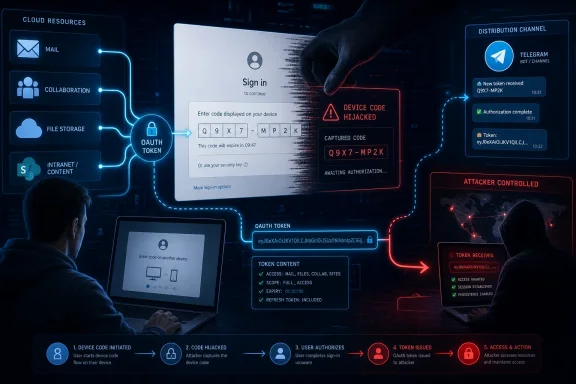
That is what makes device-code phishing so effective. The attacker initiates an OAuth device authorization flow, sends the victim a code, and persuades them to enter it at Microsoft’s legitimate verification page. Once the user completes authentication, including MFA if required, the tokens are returned to the device that started the flow — which, in this scenario, is controlled by the attacker.
The FBI’s public service announcement frames Kali365 as a platform that lowers the bar for criminals who might not otherwise be able to build a mature Microsoft 365 phishing operation. The kit reportedly offers AI-generated lures, campaign templates, tracking dashboards, and token-capture capability. That combination turns a technically subtle attack into something closer to a subscription business.
This is the same grim pattern defenders have seen across ransomware and credential theft: specialization wins. One group builds the tooling, another rents it, and a third launders or monetizes the access. Kali365 is dangerous not because device-code phishing is new, but because it packages the technique for broader use.
That is why Outlook, Teams, and OneDrive appear so often in consumer-facing headlines about the FBI warning. Those names are recognizable, and they are where users feel the pain. But the real target is the Microsoft identity layer that binds those services together.
Once an attacker has valid OAuth access and refresh tokens, the attack moves into a more dangerous phase. The intruder does not necessarily need the user’s password. They do not necessarily need to defeat MFA again. They have a way to act as the user until the token is revoked, expires, or is invalidated by policy.
That distinction matters for administrators. Password resets may be necessary after a suspected compromise, but they are not sufficient if active sessions and refresh tokens remain valid. The old mental model — “change the password and move on” — is obsolete in a cloud identity world.
Device-code flow exists for legitimate reasons. It helps users sign in on devices that lack a normal browser or comfortable input method: meeting-room hardware, shared devices, smart displays, some Teams devices, developer tools, and other constrained environments. The user completes authentication on a second device, and the original device receives the token.
Kali365 abuses that trust boundary. The user believes they are unlocking a document, joining a Teams resource, or completing a routine Microsoft verification step. In reality, they are authorizing an attacker-controlled session.
This is why the usual advice to “look for the padlock” has aged badly. The padlock only tells the user that the connection to the site is encrypted and, in this case, perhaps that the site is genuinely Microsoft’s. It does not tell the user whether the authorization request is safe, expected, or connected to the task they think they are performing.
The modern phishing kit has adapted. It does not always need to impersonate the login page anymore. It can steer the user into a real login page while manipulating the context around the login.
That shift changes the defender’s job. The question is no longer only whether users can spot a fake Microsoft page. It is whether the organization can constrain which authentication flows are allowed, which devices can receive tokens, and which sessions deserve continued trust.
Kali365 is part of a wider movement toward token theft and adversary-in-the-middle tradecraft. Attackers increasingly want the thing that appears after authentication: the session, the token, the cookie, the delegated access. The password is still useful, but it is no longer the only prize.
This is also why phishing-as-a-service platforms are so damaging. They industrialize the difficult parts: lure generation, infrastructure setup, session tracking, and evasion. A mediocre criminal can run a better campaign when the platform abstracts away the expertise.
Underground tool distribution has long followed users to platforms that offer reach, resilience, and semi-private communities. Telegram channels and groups are convenient for advertising kits, handling subscriptions, posting updates, and building a reputation. If one platform becomes less useful, the market moves.
The more important point is that phishing has become productized. Kali365 is described less like a one-off criminal script and more like software sold to operators: campaigns, templates, dashboards, automation, and capture features. That is the language of SaaS, and the irony is not accidental.
Security teams should resist the comforting belief that taking down one channel or one kit solves the problem. It may disrupt a specific operation, but the underlying demand remains. As long as Microsoft 365 accounts are valuable and authentication flows can be socially engineered, replacement services will appear.
The trouble is that every usability shortcut becomes an attacker’s question: can this be made to happen in the wrong context? Device-code authentication assumes the user understands which device they are authorizing. Phishing breaks that assumption.
In an enterprise, that assumption is especially fragile. Employees receive document links, Teams invites, SharePoint notifications, HR portals, invoice approvals, vendor requests, and meeting updates all day. A prompt that says “enter this code to continue” may feel like friction, but not necessarily like danger.
The user is not always careless. They are often busy, interrupted, and operating inside a system that constantly asks them to approve, authenticate, sync, consent, and continue. Kali365 works because it hides inside the normal tempo of cloud work.
That is a significant admission about the balance of risk. Device-code flow is useful, but for many tenants it is rarely necessary for ordinary users. If attackers use it more often than legitimate staff do, the default should change.
For Microsoft 365 administrators, the practical path is staged rather than theatrical. Inventory current device-code usage in sign-in logs. Put a Conditional Access policy into report-only mode. Identify legitimate dependencies, especially Teams Rooms and shared Teams devices. Then move toward blocking the flow broadly while maintaining narrow, documented exceptions.
The exception design matters. A sloppy exclusion can preserve the very exposure the policy is meant to close. Broadly exempting users because one device or tool needs device-code flow is the identity-management equivalent of leaving the side door unlocked because the front door has a smart lock.
That is why blocking device-code flow should not be done as a blind switch-flip across a complex organization. Microsoft’s guidance points administrators toward report-only testing and exception groups because legitimate device-code dependencies do exist. Teams devices, in particular, can require careful scoping so room systems keep working while user accounts are protected.
The operational challenge is to avoid turning exceptions into permanent blind spots. Every exception should have an owner, a reason, and a review cadence. If the exception exists because of a legacy workflow, the organization should ask whether that workflow can move to a safer authentication method.
For developers and IT staff, the lesson is equally blunt. Convenience authentication paths that made sense in a trusted environment now need to be justified. If a tool can use browser-based sign-in, brokered authentication, managed identities, or workload identity federation, it should not rely on a high-risk flow merely because that flow is familiar.
The more convincing the lure, the less fair it is to make the user the final line of defense. AI-generated phishing text can remove obvious grammar mistakes. Campaign templates can mimic familiar workflows. The use of a legitimate Microsoft page deprives users of one of the few visual cues they have been told to trust.
A better user-facing message is specific: do not enter a Microsoft device code unless you personally initiated sign-in on a device you control or are setting up. A code sent through email, chat, or a document link should be treated as hostile unless independently verified. That is sharper than “be careful with links,” because it describes the attack behavior.
Security teams should also make reporting easy. If a user suspects they entered a device code, the response window is short. The organization needs a way to revoke sessions, inspect sign-in logs, and investigate token use without turning every report into a blame exercise.
That does not mean they are powerless, but it does mean the advice becomes more behavioral and reactive. Users should be skeptical of any message that asks them to enter a device code to view a file, join a meeting, or unlock an account. They should review account activity, remove unfamiliar devices or sessions where possible, and change passwords if compromise is suspected.
For consumers, app consent and account recovery settings also matter. A compromised account can become a platform for further attacks against contacts, cloud files, and stored communications. The damage is not limited to the original sign-in.
Microsoft could do more here. Consumer experiences need clearer warnings when a device-code flow is being used, better language explaining where the authorization will land, and stronger anomaly detection when the requesting device, geography, or session context looks wrong. The safest enterprise control is policy; the safest consumer control may have to be product design.
The same mistake can happen with Conditional Access. A tenant can have impressive-looking policies and still allow a risky authentication flow for every user. It can require MFA for admins while leaving token theft detection immature. It can block legacy authentication but fail to monitor newer OAuth abuse.
Security posture is not the list of products in the stack. It is the set of assumptions that remain true when an attacker behaves creatively. Kali365 attacks the assumption that a successful Microsoft login means the right device received the resulting trust.
That is the part administrators should take personally. The problem is not that Microsoft 365 is uniquely bad; it is that identity has become the control plane, and every control plane attracts specialized attack tooling. If the organization depends on Microsoft 365, then Microsoft 365 authentication policy is not plumbing. It is frontline defense.
A serious response should include revoking refresh tokens and sessions, reviewing OAuth grants, checking mailbox rules, inspecting Teams activity, and looking for unusual OneDrive or SharePoint access. The investigation should not stop at the inbox. In Microsoft 365, lateral movement can be a document share, a Teams message, a malicious app consent, or a quiet download of sensitive files.
Sign-in logs become crucial. Administrators should look for device-code authentication, unusual locations, unfamiliar user agents, impossible travel, and access patterns that do not fit the user’s normal work. Microsoft’s newer logging around authentication flows and original transfer methods is particularly relevant because protocol tracking can reveal sessions rooted in device-code use.
The hardest incidents will be the quiet ones. An attacker with access to a mailbox and cloud files may not immediately send spam or trigger obvious alarms. They may read, search, download, and wait. That is why token theft should be treated as potential data exposure, not just account inconvenience.
Microsoft has a difficult balance to strike. Device-code flow supports real devices and workflows, and abruptly disabling it everywhere would break customers. But leaving it broadly available by default gives attackers a reliable social-engineering route into tenants that have not tuned their identity policies.
The answer likely lies in progressive hardening. Risky flows should be more constrained by default, more visibly explained to users, and easier for admins to inventory. Tenants with no observed legitimate device-code usage should be nudged more aggressively toward blocking it. Admin portals should surface high-risk authentication flow exposure as a first-class security finding, not as a buried configuration option.
Still, organizations cannot outsource this entirely. Microsoft can supply controls and warnings, but tenant owners decide whether old exceptions linger, whether logs are monitored, and whether identity policy reflects how users actually work. Kali365 is a vendor problem and a customer problem at the same time.
That is often how cloud security works now. The breach path is dramatic, but the defense is administrative hygiene. A tenant with blocked device-code flow, narrow exceptions, strong session revocation procedures, and alerting on unusual authentication behavior is in a much better position than one that merely tells employees not to click suspicious links.
The irony is that the most actionable FBI recommendation is something many administrators can begin today. They do not need to wait for a new product, a new license tier in every case, or a dramatic takedown. They need to determine whether device-code flow is necessary and, if not, turn it off.
The organizations that struggle will be the ones that do not know their own authentication dependencies. Kali365 punishes that uncertainty. If IT cannot say who uses device-code flow and why, attackers will happily answer the question first.
 The FBI Is Warning About the Login After the Login
The uncomfortable part of the Kali365 story is that the victim can do what security training told them to do and still lose. The Microsoft sign-in page may be real. The MFA prompt may be real. The user may never type a password into a counterfeit form.That is what makes device-code phishing so effective. The attacker initiates an OAuth device authorization flow, sends the victim a code, and persuades them to enter it at Microsoft’s legitimate verification page. Once the user completes authentication, including MFA if required, the tokens are returned to the device that started the flow — which, in this scenario, is controlled by the attacker.
The FBI’s public service announcement frames Kali365 as a platform that lowers the bar for criminals who might not otherwise be able to build a mature Microsoft 365 phishing operation. The kit reportedly offers AI-generated lures, campaign templates, tracking dashboards, and token-capture capability. That combination turns a technically subtle attack into something closer to a subscription business.
This is the same grim pattern defenders have seen across ransomware and credential theft: specialization wins. One group builds the tooling, another rents it, and a third launders or monetizes the access. Kali365 is dangerous not because device-code phishing is new, but because it packages the technique for broader use.
Microsoft 365 Became the Prize Because It Became the Office
For most organizations, Microsoft 365 is no longer just email plus file storage. It is the directory, the collaboration layer, the document archive, the meeting room, the chat transcript, the workflow engine, and often the first hop into sensitive line-of-business systems. A stolen Microsoft 365 session is not a stolen inbox; it is a stolen office.That is why Outlook, Teams, and OneDrive appear so often in consumer-facing headlines about the FBI warning. Those names are recognizable, and they are where users feel the pain. But the real target is the Microsoft identity layer that binds those services together.
Once an attacker has valid OAuth access and refresh tokens, the attack moves into a more dangerous phase. The intruder does not necessarily need the user’s password. They do not necessarily need to defeat MFA again. They have a way to act as the user until the token is revoked, expires, or is invalidated by policy.
That distinction matters for administrators. Password resets may be necessary after a suspected compromise, but they are not sufficient if active sessions and refresh tokens remain valid. The old mental model — “change the password and move on” — is obsolete in a cloud identity world.
MFA Did Its Job, and That Is the Problem
It is tempting to describe Kali365 as “bypassing MFA,” and that shorthand is not entirely wrong. The attacker can gain access without intercepting the password or directly stealing the MFA code. But the more precise and more troubling point is that MFA may have succeeded exactly as designed.Device-code flow exists for legitimate reasons. It helps users sign in on devices that lack a normal browser or comfortable input method: meeting-room hardware, shared devices, smart displays, some Teams devices, developer tools, and other constrained environments. The user completes authentication on a second device, and the original device receives the token.
Kali365 abuses that trust boundary. The user believes they are unlocking a document, joining a Teams resource, or completing a routine Microsoft verification step. In reality, they are authorizing an attacker-controlled session.
This is why the usual advice to “look for the padlock” has aged badly. The padlock only tells the user that the connection to the site is encrypted and, in this case, perhaps that the site is genuinely Microsoft’s. It does not tell the user whether the authorization request is safe, expected, or connected to the task they think they are performing.
The Phishing Page Is Becoming the Least Interesting Part of Phishing
For years, anti-phishing guidance focused on counterfeit login pages. The attacker cloned a Microsoft sign-in screen, harvested a password, and then tried to race past MFA or reuse the credential somewhere else. Defenders responded with MFA, passwordless authentication, domain protections, user training, and browser warnings.The modern phishing kit has adapted. It does not always need to impersonate the login page anymore. It can steer the user into a real login page while manipulating the context around the login.
That shift changes the defender’s job. The question is no longer only whether users can spot a fake Microsoft page. It is whether the organization can constrain which authentication flows are allowed, which devices can receive tokens, and which sessions deserve continued trust.
Kali365 is part of a wider movement toward token theft and adversary-in-the-middle tradecraft. Attackers increasingly want the thing that appears after authentication: the session, the token, the cookie, the delegated access. The password is still useful, but it is no longer the only prize.
This is also why phishing-as-a-service platforms are so damaging. They industrialize the difficult parts: lure generation, infrastructure setup, session tracking, and evasion. A mediocre criminal can run a better campaign when the platform abstracts away the expertise.
Telegram Is the Mall, Not the Mastermind
The FBI says Kali365 has primarily been distributed through Telegram. That detail is worth noting, but it should not become a distraction. Telegram is the storefront, not the underlying vulnerability.Underground tool distribution has long followed users to platforms that offer reach, resilience, and semi-private communities. Telegram channels and groups are convenient for advertising kits, handling subscriptions, posting updates, and building a reputation. If one platform becomes less useful, the market moves.
The more important point is that phishing has become productized. Kali365 is described less like a one-off criminal script and more like software sold to operators: campaigns, templates, dashboards, automation, and capture features. That is the language of SaaS, and the irony is not accidental.
Security teams should resist the comforting belief that taking down one channel or one kit solves the problem. It may disrupt a specific operation, but the underlying demand remains. As long as Microsoft 365 accounts are valuable and authentication flows can be socially engineered, replacement services will appear.
The Device-Code Flow Was a Usability Feature Before It Was an Attack Surface
Microsoft’s device-code flow is not a bug in the simple sense. It is a legitimate OAuth flow designed around a real usability problem. Not every device has a keyboard, a browser, or a pleasant way to enter complex credentials.The trouble is that every usability shortcut becomes an attacker’s question: can this be made to happen in the wrong context? Device-code authentication assumes the user understands which device they are authorizing. Phishing breaks that assumption.
In an enterprise, that assumption is especially fragile. Employees receive document links, Teams invites, SharePoint notifications, HR portals, invoice approvals, vendor requests, and meeting updates all day. A prompt that says “enter this code to continue” may feel like friction, but not necessarily like danger.
The user is not always careless. They are often busy, interrupted, and operating inside a system that constantly asks them to approve, authenticate, sync, consent, and continue. Kali365 works because it hides inside the normal tempo of cloud work.
The Real Fix Lives in Entra, Not in the User’s Inbox
The FBI’s most important mitigation is not a new awareness slogan. It is a configuration change: restrict or block device-code flow using Conditional Access policies. Microsoft’s own guidance has been moving in the same direction, recommending that organizations get as close as possible to a unilateral block where the flow is not needed.That is a significant admission about the balance of risk. Device-code flow is useful, but for many tenants it is rarely necessary for ordinary users. If attackers use it more often than legitimate staff do, the default should change.
For Microsoft 365 administrators, the practical path is staged rather than theatrical. Inventory current device-code usage in sign-in logs. Put a Conditional Access policy into report-only mode. Identify legitimate dependencies, especially Teams Rooms and shared Teams devices. Then move toward blocking the flow broadly while maintaining narrow, documented exceptions.
The exception design matters. A sloppy exclusion can preserve the very exposure the policy is meant to close. Broadly exempting users because one device or tool needs device-code flow is the identity-management equivalent of leaving the side door unlocked because the front door has a smart lock.
Teams Rooms and Developer Tools Are Where Good Policy Gets Messy
The cleanest security advice is usually written for a clean environment. Real tenants are not clean. They have Teams Rooms, legacy scripts, shared devices, admin tools, automation, and developers who have been using command-line sign-ins for years.That is why blocking device-code flow should not be done as a blind switch-flip across a complex organization. Microsoft’s guidance points administrators toward report-only testing and exception groups because legitimate device-code dependencies do exist. Teams devices, in particular, can require careful scoping so room systems keep working while user accounts are protected.
The operational challenge is to avoid turning exceptions into permanent blind spots. Every exception should have an owner, a reason, and a review cadence. If the exception exists because of a legacy workflow, the organization should ask whether that workflow can move to a safer authentication method.
For developers and IT staff, the lesson is equally blunt. Convenience authentication paths that made sense in a trusted environment now need to be justified. If a tool can use browser-based sign-in, brokered authentication, managed identities, or workload identity federation, it should not rely on a high-risk flow merely because that flow is familiar.
Users Still Matter, but They Are No Longer the Firewall
None of this means user training is useless. A user who recognizes a suspicious device-code prompt can stop the attack before it becomes a session. But the Kali365 warning should end the fantasy that training is the primary control.The more convincing the lure, the less fair it is to make the user the final line of defense. AI-generated phishing text can remove obvious grammar mistakes. Campaign templates can mimic familiar workflows. The use of a legitimate Microsoft page deprives users of one of the few visual cues they have been told to trust.
A better user-facing message is specific: do not enter a Microsoft device code unless you personally initiated sign-in on a device you control or are setting up. A code sent through email, chat, or a document link should be treated as hostile unless independently verified. That is sharper than “be careful with links,” because it describes the attack behavior.
Security teams should also make reporting easy. If a user suspects they entered a device code, the response window is short. The organization needs a way to revoke sessions, inspect sign-in logs, and investigate token use without turning every report into a blame exercise.
The Consumer Microsoft Account Problem Is Harder
The FBI alert is most actionable for organizations that manage Microsoft 365 through Entra ID and Conditional Access. Consumers using Outlook.com, OneDrive, or personal Microsoft accounts do not have the same policy levers. They cannot simply create a tenant-wide Conditional Access rule.That does not mean they are powerless, but it does mean the advice becomes more behavioral and reactive. Users should be skeptical of any message that asks them to enter a device code to view a file, join a meeting, or unlock an account. They should review account activity, remove unfamiliar devices or sessions where possible, and change passwords if compromise is suspected.
For consumers, app consent and account recovery settings also matter. A compromised account can become a platform for further attacks against contacts, cloud files, and stored communications. The damage is not limited to the original sign-in.
Microsoft could do more here. Consumer experiences need clearer warnings when a device-code flow is being used, better language explaining where the authorization will land, and stronger anomaly detection when the requesting device, geography, or session context looks wrong. The safest enterprise control is policy; the safest consumer control may have to be product design.
The PSA Is Also a Warning About Security Theater
The Kali365 story exposes a familiar weakness in corporate security culture: controls are often celebrated after deployment and neglected after attackers route around them. MFA was a necessary improvement, but too many organizations treated it as a finish line. It was always a checkpoint.The same mistake can happen with Conditional Access. A tenant can have impressive-looking policies and still allow a risky authentication flow for every user. It can require MFA for admins while leaving token theft detection immature. It can block legacy authentication but fail to monitor newer OAuth abuse.
Security posture is not the list of products in the stack. It is the set of assumptions that remain true when an attacker behaves creatively. Kali365 attacks the assumption that a successful Microsoft login means the right device received the resulting trust.
That is the part administrators should take personally. The problem is not that Microsoft 365 is uniquely bad; it is that identity has become the control plane, and every control plane attracts specialized attack tooling. If the organization depends on Microsoft 365, then Microsoft 365 authentication policy is not plumbing. It is frontline defense.
Token Theft Turns Incident Response Into a Session Hunt
When a password is stolen, responders know the classic steps: reset it, check for forwarding rules, review sign-ins, and look for persistence. Token theft complicates that playbook because the attacker may already have a valid session that survives the user’s belief that the account has been “secured.”A serious response should include revoking refresh tokens and sessions, reviewing OAuth grants, checking mailbox rules, inspecting Teams activity, and looking for unusual OneDrive or SharePoint access. The investigation should not stop at the inbox. In Microsoft 365, lateral movement can be a document share, a Teams message, a malicious app consent, or a quiet download of sensitive files.
Sign-in logs become crucial. Administrators should look for device-code authentication, unusual locations, unfamiliar user agents, impossible travel, and access patterns that do not fit the user’s normal work. Microsoft’s newer logging around authentication flows and original transfer methods is particularly relevant because protocol tracking can reveal sessions rooted in device-code use.
The hardest incidents will be the quiet ones. An attacker with access to a mailbox and cloud files may not immediately send spam or trigger obvious alarms. They may read, search, download, and wait. That is why token theft should be treated as potential data exposure, not just account inconvenience.
This Is a Microsoft Problem, but Not Only Microsoft’s Problem
It is fair to ask what Microsoft should do when a legitimate authentication flow becomes a favored phishing path. The company has already provided Conditional Access controls to restrict device-code flow, and it recommends blocking the flow wherever possible. That is useful, but it also shifts a great deal of responsibility onto administrators.Microsoft has a difficult balance to strike. Device-code flow supports real devices and workflows, and abruptly disabling it everywhere would break customers. But leaving it broadly available by default gives attackers a reliable social-engineering route into tenants that have not tuned their identity policies.
The answer likely lies in progressive hardening. Risky flows should be more constrained by default, more visibly explained to users, and easier for admins to inventory. Tenants with no observed legitimate device-code usage should be nudged more aggressively toward blocking it. Admin portals should surface high-risk authentication flow exposure as a first-class security finding, not as a buried configuration option.
Still, organizations cannot outsource this entirely. Microsoft can supply controls and warnings, but tenant owners decide whether old exceptions linger, whether logs are monitored, and whether identity policy reflects how users actually work. Kali365 is a vendor problem and a customer problem at the same time.
The Small Print of “Urgent” Is That Many Fixes Are Boring
Consumer headlines about the FBI issuing an “urgent PSA” are designed to produce alarm. That alarm is not misplaced, but the remedy is not cinematic. The most important fixes are the boring ones: configuration review, log analysis, Conditional Access testing, exception management, and user reporting.That is often how cloud security works now. The breach path is dramatic, but the defense is administrative hygiene. A tenant with blocked device-code flow, narrow exceptions, strong session revocation procedures, and alerting on unusual authentication behavior is in a much better position than one that merely tells employees not to click suspicious links.
The irony is that the most actionable FBI recommendation is something many administrators can begin today. They do not need to wait for a new product, a new license tier in every case, or a dramatic takedown. They need to determine whether device-code flow is necessary and, if not, turn it off.
The organizations that struggle will be the ones that do not know their own authentication dependencies. Kali365 punishes that uncertainty. If IT cannot say who uses device-code flow and why, attackers will happily answer the question first.
The Kali365 Warning Leaves Administrators With a Short Checklist and a Long Memory
The practical lesson from the FBI alert is narrower than “Microsoft users are at risk” and broader than “watch out for one phishing kit.” Kali365 is a reminder that identity controls must be reviewed as attack techniques change, especially when criminals start packaging those techniques for mass use.- Organizations should audit Microsoft Entra sign-in logs for device-code flow and related protocol-tracked sessions before deciding which exceptions are truly necessary.
- Administrators should create Conditional Access policies that block device-code flow by default, using report-only mode before enforcement in complex environments.
- Teams Rooms, shared Teams devices, developer tools, and legacy workflows should receive narrow, documented exceptions rather than broad user-based carve-outs.
- Incident responders should revoke sessions and refresh tokens after suspected compromise instead of relying only on password resets.
- Users should treat any unsolicited request to enter a Microsoft device code as suspicious, even when the verification page itself is legitimate.
- Security teams should report suspected Kali365 activity to the FBI and preserve logs quickly, because token-based intrusions can become quiet data-access incidents.
References
- Primary source: UNILAD Tech
Published: None
Loading…
www.uniladtech.com - Related coverage: techradar.com

FBI warns of Kali phishing scam hitting Microsoft OAuth tokens — warns 'Kali365 lowers the barrier of entry, providing less-technical attackers access to AI-generated phishing lures' | TechRadar
A new phishing kit is being offered on Telegramwww.techradar.com - Related coverage: techrepublic.com

FBI Warns: ‘Kali365’ Phishing Service Targets Microsoft 365 Accounts
The FBI warned that Kali365 can hijack Microsoft 365 accounts by abusing device code authentication and capturing OAuth tokens.www.techrepublic.com
- Related coverage: ebisuda.net

FBIがMicrosoft 365を狙うフィッシングサービス「Kali365」に警告——MFAをバイパスするOAuthデバイスコード認証悪用
FBIがM365を標的にするPhaaS「Kali365」を警告。OAuthデバイスコード認証を悪用してMFAを回避しセッショントークンを窃取する www.ebisuda.net
- Related coverage: cside.com
Loading…
cside.com - Related coverage: thecybersignal.com

FBI Warns of Kali365 Phishing Kit Stealing Microsoft 365 Tokens
The FBI's IC3 warned of Kali365, a Telegram-sold phishing kit that runs device-code phishing to steal Microsoft 365 OAuth tokens after victims pass MFA. www.thecybersignal.com
- Related coverage: malwarebytes.com

Kali365 phishing kit bypasses MFA and steals Microsoft logins | Malwarebytes
The FBI has warned that attackers are using a new phishing kit to gain long-term access to Microsoft Outlook, Teams, and OneDrive accounts.www.malwarebytes.com - Related coverage: cyberscoop.com

FBI warns about fast-growing phishing kit targeting Microsoft 365 users | CyberScoop
Kali365, which was first observed in April, abuses legitimate Microsoft device authorization pages to grant persistent access to cybercriminal-controlled applications. cyberscoop.com
- Related coverage: cybersecuritydive.com

FBI warns about PhaaS platform used to access Microsoft 365 environments | Cybersecurity Dive
Device code phishing enabled hackers to bypass multifactor authentication without credentials.www.cybersecuritydive.com
- Related coverage: brightnexus.com

FBI Warns of Kali365 Phishing Platform Targeting Microsoft 365 Accounts | Bright Nexus
SeverityHigh Detail The Federal Bureau of Investigation (FBI) has issued a warning regarding an emerging phishing-as-a-service (PhaaS) platform known as “Kali36www.brightnexus.com
- Related coverage: bvainc.com
New FBI Alert: Kali365 Phishing Kit Bypasses Microsoft 365 MFA - BVA Technology Services
The FBI’s Internet Crime Complaint Center (IC3) recently issued a Public Service Announcement (May 21, 2026) warning organizations about a rapidly emerging threat targeting Microsoft 365 environments: Kali365, a Phishing-as-a-Service (PhaaS) platform designed to bypass traditional security...www.bvainc.com - Related coverage: gblock.app

FBI Warns: Kali365 PhaaS Bypasses Microsoft 365 MFA Via Device Code
The FBI just warned that Kali365 is the first Microsoft 365 phishing service that bypasses MFA without ever asking for a password—victims complete the real Microsoft login flow themselves and hand over OAuth tokens that survive every additional check. www.gblock.app
- Related coverage: itpro.com

FBI warns Microsoft 365 users about another phishing as a service attack – here's how to avoid it | IT Pro
Kali365 platform is serious enough to garner a warning from the FBIwww.itpro.com - Related coverage: kiplinger.com

New Scam Targets Microsoft Users, FBI Warns. Here's How to Protect Yourself | Kiplinger
This phishing scam doesn't rely on a fake website. Instead, it tricks users into approving access themselves.www.kiplinger.com - Related coverage: as.com
Loading…
as.com - Related coverage: labs.cloudsecurityalliance.org
Loading…
labs.cloudsecurityalliance.org