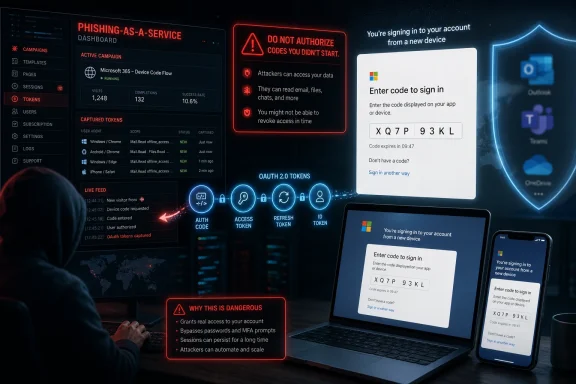
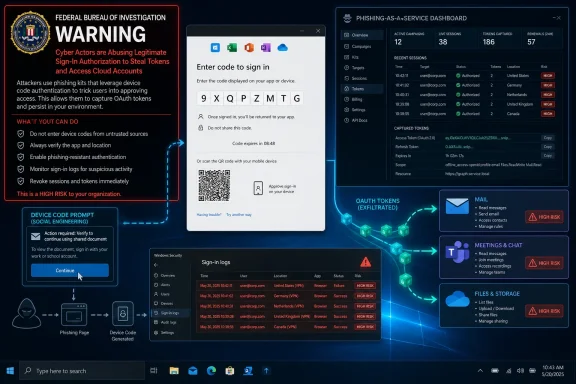
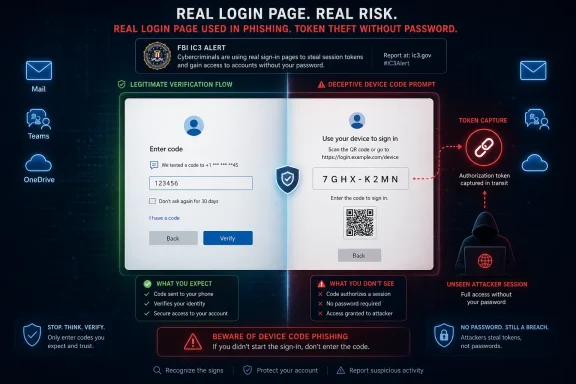
The FBI’s Internet Crime Complaint Center warned in May 2026 that Kali365, a phishing-as-a-service platform first seen in April, is targeting Microsoft 365 users by abusing OAuth device-code authentication to capture access tokens and bypass multifactor authentication without stealing passwords. The warning matters because the attack does not ask victims to type credentials into a fake login page. It asks them to do something more dangerous: complete a real Microsoft sign-in flow for an attacker’s device. That turns a familiar anti-phishing lesson—“check the URL”—into insufficient advice.

Cybersecurity graphic showing a phishing email and fraudulent MFA/device-code capture workflow.The Phishing Page Is Gone, and That Is the Point​

For years, the average Microsoft 365 phishing story had a reliable shape. A victim received a fake SharePoint notice, clicked a link, landed on a counterfeit Microsoft login page, and handed over a password. Defenders could train users to spot odd domains, block lookalike sites, and lean on multifactor authentication as the seat belt that caught failures.
Kali365 attacks are more unnerving because they remove much of that visible fakery. The victim is typically directed to a legitimate Microsoft verification page and told to enter a device code. The page is real, the Microsoft branding is real, and the authentication process behaves as designed.
That is not a bypass in the Hollywood sense of breaking Microsoft’s encryption or cracking a password database. It is an abuse of trust choreography. The attacker initiates a device authorization flow, persuades the user to complete it, and receives tokens that can open the victim’s Microsoft 365 world.
This is why the FBI warning deserves more attention than the usual “new phishing scam” headline. Kali365 is not merely another kit in the spammer toolbox. It is a reminder that modern identity systems are now so complex that the weak point is often not the password, but the user’s understanding of what they are authorizing.

OAuth Turns Consent Into the Prize​

OAuth is one of those technologies most users encounter constantly and almost never think about. It is the plumbing behind “sign in with Microsoft,” cloud app integrations, mobile app sessions, and delegated access to mail, files, calendars, and other resources. In ordinary use, it reduces password exposure by letting an app receive a token rather than the user’s raw password.
That architecture is useful precisely because tokens are powerful. A token can tell a service, in effect, that authentication has happened and that access has been granted. Depending on the token, the app, the tenant controls, and the permissions involved, that can be enough to read mail, access files, maintain sessions, and move quietly through cloud services.
Device-code authentication was built for constrained devices: televisions, conference-room systems, printers, command-line tools, and hardware that cannot comfortably display a full browser login. One device shows a code; the user enters that code on another device where signing in is easier. The security model assumes the user understands which device is being authorized.
Kali365 weaponizes the gap between that assumption and workplace reality. If a phishing email says a document, Teams notice, or cloud workflow requires entering a code, many users will treat the code like a one-time password. In fact, they may be authorizing the attacker’s session.

MFA Was Never a Magic Spell​

The most dangerous sentence in the Kali365 story is also the most easily misunderstood: attackers can bypass multifactor authentication. That does not mean MFA is useless. It means MFA can be satisfied by the victim during a legitimate sign-in flow and still result in the wrong party getting the benefit.
This distinction matters for defenders because it changes the model from credential theft to authorization abuse. In a classic phishing case, MFA may block the attacker after a stolen password is used from a new device. In device-code phishing, the victim is tricked into completing the very flow that grants the attacker’s device access.
That is why the attack can feel so unfair to ordinary users. They did not ignore MFA. They may have completed it exactly as trained. The problem is that the context of the prompt was poisoned before Microsoft’s authentication stack ever got involved.
Security teams have spent the past decade telling organizations to adopt MFA, and that advice remains correct. But Kali365 exposes the weakness of treating MFA as the finish line. Authentication proves that a user participated; it does not automatically prove that the user understood the transaction.

Phishing-as-a-Service Makes the Weird Attack Routine​

The FBI’s warning describes Kali365 as a phishing-as-a-service platform distributed through Telegram, with features that reportedly include AI-generated lures, automated campaign templates, real-time tracking dashboards, and OAuth token capture. That description is important because it shows how a once-specialized technique becomes mass-market crime.
The underground economy has learned the same lesson as legitimate software vendors: package complexity behind a subscription interface and adoption rises. A low-skilled operator no longer needs to build infrastructure, understand OAuth deeply, or write polished lures from scratch. The platform turns identity abuse into a workflow.
That is the real escalation. Device-code phishing is not brand new, and Microsoft 365 token theft has been a growing concern for years. What Kali365 represents is operational convenience. It takes a technique that requires timing, social engineering, and identity knowledge, then productizes it for a broader criminal customer base.
The reported pricing—hundreds of dollars per month rather than nation-state budgets—also tells the story. If a kit can compromise even a handful of mailboxes at a small company, the attacker may gain invoice data, internal documents, contact lists, and enough trust to launch business email compromise. The return on investment does not require a spectacular breach.

The Attack Looks Mundane Until It Is Too Late​

The typical Kali365-style attack is short, plausible, and corrosively ordinary. A user receives an email impersonating a cloud provider, collaboration tool, or document-sharing service. The message contains a device code and instructions to visit Microsoft’s verification page.
From the user’s perspective, the safety signals are confusing. The site is Microsoft’s. The code is short-lived and official-looking. The request may be wrapped in familiar workplace language: review this file, approve this Teams access, reconnect your session, open this shared document.
The moment the user enters the code and completes the required authentication, the attacker’s device is authorized. The attacker does not need the password. Depending on the token and tenant configuration, the attacker may gain persistent access to Outlook, Teams, OneDrive, SharePoint, and other services connected through Microsoft 365 identity.
The elegance of the scheme is also its defense problem. There may be no malicious attachment, no obviously fake Microsoft domain, and no password submitted to a counterfeit form. The most suspicious artifact is the business process itself: an unsolicited request to enter a device code.

Outlook Is the Beachhead, Not Just a Mailbox​

Consumer coverage often frames the risk as someone “getting into your Outlook.” For enterprise defenders, Outlook is only the starting point. A compromised mailbox is a map of the organization: invoices, vendors, internal jargon, calendar patterns, executives, HR workflows, legal discussions, and password-reset trails.
Once inside, attackers can search old mail for sensitive files, identify trusted relationships, and launch follow-on phishing from a real account. That second wave is often more convincing than the first because it comes from a known colleague or supplier. In many breaches, the first stolen mailbox is less valuable for its contents than for the legitimacy it lends to the next message.
Teams and OneDrive raise the stakes further. Teams chats may contain operational detail never meant for email retention. OneDrive and SharePoint can hold contracts, spreadsheets, customer exports, engineering documents, and credentials accidentally saved in plain sight. Microsoft 365 is not one app; it is the nervous system of many organizations.
That is why token theft is so damaging. A password reset alone may not be enough if active sessions and refresh tokens remain valid. Incident responders must think in terms of session revocation, consent review, suspicious app access, mailbox rules, forwarding settings, and lateral movement.

Microsoft’s Legitimate Convenience Became an Enterprise Liability​

It would be easy, and wrong, to say Microsoft simply created a bad feature. Device-code flow exists for real scenarios. Conference-room devices, shared Teams hardware, command-line tools, and other limited-input environments need practical ways to authenticate without forcing users through impossible interfaces.
But enterprise security is full of features that make sense in isolation and become dangerous at scale. The problem is not that device-code flow exists. The problem is that many tenants historically treated it as background plumbing rather than a high-risk authentication path that deserves explicit governance.
Microsoft’s own guidance now pushes organizations toward blocking device-code flow wherever possible, usually through Conditional Access. That recommendation is revealing. It means the safest default for most organizations is not “train users harder,” but “reduce the number of times this flow can succeed.”
The hard part is exceptions. Teams Rooms, shared devices, developers using command-line tools, and some provisioning workflows may depend on device-code authentication. Turning it off without inventory can break legitimate operations. Leaving it open everywhere turns a niche convenience into a tenant-wide phishing surface.

The Admin Fix Is Simple Until It Meets Reality​

The cleanest administrative response is to restrict or block device-code flow using Microsoft Entra Conditional Access policies. In a mature tenant, admins can place the policy in report-only mode, review sign-in logs, identify legitimate use cases, scope exceptions tightly, and then move enforcement to blocking mode. That is the theory.
In reality, many organizations still do not know where device-code flow is used. A Teams room may rely on it during registration. A service desk process may depend on it for reprovisioning. A developer tool may use it because it is easier than browser-based authentication in a terminal session.
That uncertainty is what attackers exploit indirectly. Security teams delay enforcement because they fear breaking things. Attackers do not need every tenant to be vulnerable forever; they need enough tenants to postpone cleanup long enough for campaigns to run.
The lesson is not that every organization should flip the switch blindly this afternoon. The lesson is that device-code flow deserves the same governance once applied to legacy authentication protocols. If a flow is rarely needed and frequently abused, “enabled by default because nobody complained” is not a security strategy.

User Training Needs a New Sentence​

Traditional phishing training taught users to inspect links, distrust attachments, and be wary of login pages. Those lessons still matter, but Kali365 requires a sharper instruction: never enter a device code from an unsolicited email, Teams message, chat, or document prompt unless you personally initiated the sign-in on a device in front of you.
That sentence is more useful than telling users to “watch for suspicious emails.” The whole point of the attack is that the final Microsoft page may not be suspicious. The suspicious part is the request that led the user there.
Organizations should also stop treating all MFA prompts as benign friction. Prompt fatigue attacks already trained defenders to worry when users approve sign-ins they did not initiate. Device-code phishing belongs in the same mental bucket. If the user did not start the sign-in, the correct answer is to stop.
The challenge is that workflows have taught employees to obey strange authentication rituals. Cloud software constantly asks people to reconnect accounts, approve access, confirm sessions, and follow links from automated messages. Attackers succeed because the modern workplace has normalized interruption.

The Consumer Risk Is Real but Different​

Kali365 coverage often names Outlook, Teams, and OneDrive, which naturally alarms individual Microsoft account users. The everyday-user risk is real, especially for freelancers, small-business owners, and anyone who uses Microsoft services as their primary identity hub. A stolen account can expose personal files, tax documents, contacts, photos, and recovery emails for other services.
But the bigger payoff is usually organizational. Microsoft 365 business tenants provide attackers with richer data and more ways to monetize access. A single compromised employee account may become a launchpad for invoice fraud, payroll diversion, vendor impersonation, or reconnaissance against executives.
Small businesses sit in the worst position. They use the same cloud identity machinery as enterprises but often lack dedicated identity engineers, security operations staff, and mature logging. They may have MFA enabled and assume that means the major risk is handled.
That assumption is now out of date. For small organizations, the practical advice is blunt: review tenant security defaults, use Conditional Access where licensing allows, investigate whether device-code flow can be blocked, and treat unexpected device-code prompts as account compromise attempts.

Telegram Is the Marketplace, Not the Root Cause​

Reports that Kali365 is promoted through Telegram will tempt some readers toward the usual platform-blame cycle. Telegram matters because it is a common distribution and support channel for cybercrime services. But focusing too much on the marketplace misses the larger industrial shift.
Cybercrime has become SaaS-like because SaaS won. Criminal operators borrow the language and mechanics of legitimate software: subscriptions, dashboards, templates, customer support, feature updates, and tiered pricing. Kali365 is disturbing not because criminals discovered Telegram, but because identity attacks now have product-market fit.
That industrialization changes defender economics. A technique that once appeared in targeted campaigns can be rented, copied, localized, and sprayed across industries. Once a kit abstracts away the hard parts, the limiting factor becomes social engineering reach rather than technical capability.
This is where AI-generated lures add pressure. The phrase should not be treated as magic; plenty of phishing was effective before large language models. But automated, fluent, role-specific messaging makes it easier to scale believable pretexts across languages, industries, and business functions.

The FBI Warning Is Also a Message to IT Leadership​

The FBI’s public service announcement is written for broad awareness, but its real audience includes CIOs, CISOs, managed service providers, and administrators who can change tenant policy. Users can be told not to enter codes. Administrators can make many of those codes useless.
That difference matters because responsibility for this attack cannot be pushed entirely onto employees. If a tenant allows device-code flow broadly, and if users are constantly exposed to confusing authentication prompts, then a successful phish is not merely an individual mistake. It is a predictable outcome of permissive configuration and overloaded trust signals.
A serious response starts with logs. Security teams should review device-code authentication events, especially for privileged users, unusual locations, unfamiliar devices, and unexpected applications. They should inspect active sessions, revoke suspicious tokens, review OAuth grants, and look for mailbox rules or forwarding behavior that suggests post-compromise persistence.
They should also rehearse the incident path. When a user reports that they entered a device code, the help desk should not respond as if this were a simple password reset. The right playbook is token-centric: revoke sessions, reset credentials if needed, review sign-ins, check consent and app activity, and hunt for downstream abuse.

The Passwordless Future Has Its Own Phishing Problem​

Microsoft and the broader industry have been pushing toward passwordless authentication for good reasons. Passwords are reused, phished, leaked, guessed, sprayed, and sold. Passkeys, hardware-backed credentials, and stronger device-bound authentication can remove entire categories of credential theft.
Kali365 does not disprove the passwordless project. It does, however, show that removing passwords does not remove social engineering. Attackers adapt from stealing secrets to manipulating ceremonies.
The future of identity security will depend less on whether users can memorize better passwords and more on whether authentication flows are bound to the right device, the right app, the right context, and the right intent. A user approving access for a device they do not control is still a security failure, even if no password changes hands.
That is why device-bound credentials, phishing-resistant MFA, and tighter app consent governance matter. The industry needs authentication that is not only hard to steal, but hard to misdirect. The user should not be the routing layer for an attacker’s session.
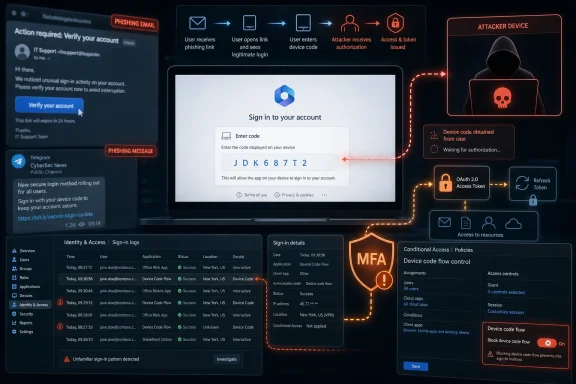
This Is Where the Code Prompt Becomes the Red Flag​

Kali365’s practical lesson is narrow enough to be teachable and broad enough to affect nearly every Microsoft 365 tenant. The code prompt is no longer an obscure login convenience. It is now a high-value social engineering object.
  • If a user did not personally start a device sign-in, they should not enter a device code, even on a real Microsoft page.
  • Microsoft 365 administrators should inventory device-code flow usage before deciding which exceptions, if any, are truly necessary.
  • Conditional Access can restrict or block device-code flow, but organizations should test policies in report-only mode before enforcement.
  • A suspected Kali365 compromise should trigger token and session revocation, not just a password reset.
  • MFA remains essential, but it should be paired with phishing-resistant methods and policies that reduce risky authentication flows.
  • Small businesses and managed service providers should treat this as a tenant-configuration issue, not merely a user-awareness campaign.
The uncomfortable truth is that Kali365 succeeds by making the secure path look routine. It does not need to defeat Microsoft 365 so much as borrow Microsoft’s own authentication choreography and persuade the victim to finish the dance. The next phase of cloud security will belong to organizations that treat identity flows as attack surfaces, not conveniences, and that design their tenants so a single copied code cannot become the front door to the business.

References​

  1. Primary source: Rolling Out
    Published: 2026-06-15T13:24:07.757535
  2. Independent coverage: Jang
    Published: 2026-06-15T13:12:07.757824
  3. Related coverage: techradar.com
  4. Related coverage: techrepublic.com
  5. Related coverage: techtimes.com
  6. Related coverage: theregister.com
  1. Related coverage: cybersecuritydive.com
  2. Related coverage: malwarebytes.com
  3. Related coverage: thecybersignal.com
  4. Related coverage: brightnexus.com
  5. Related coverage: purpleshieldsecurity.com
  6. Related coverage: cyberscoop.com
  7. Related coverage: kiplinger.com
  8. Related coverage: itpro.com
 

The FBI warned on May 21, 2026, that Kali365, a phishing-as-a-service platform distributed primarily through Telegram, is being used to hijack Microsoft 365 accounts by abusing OAuth device code authentication and stealing access tokens without capturing passwords. The warning matters because it turns a legitimate Microsoft sign-in convenience into an account-takeover path that many users have never been trained to recognize. This is not a story about gullible people clicking bad links; it is a story about attackers industrializing trust itself.

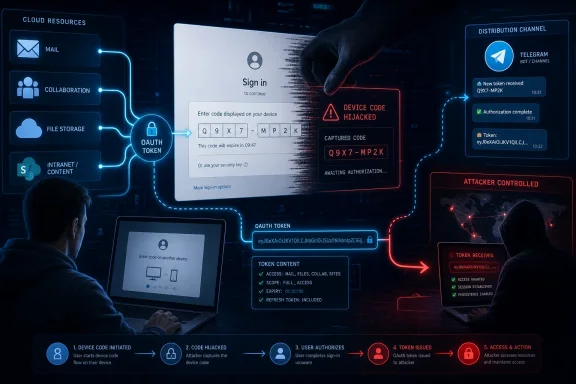
Cybersecurity phishing-as-a-service dashboard warning shows fake sign-in codes on devices and screens.Kali365 Turns Microsoft’s Legitimate Login Flow Into the Lure​

The unsettling part of the Kali365 warning is that the victim may never see a fake Microsoft login page. In the classic phishing model, defenders taught users to look for misspelled domains, broken branding, suspicious redirects, and password forms that felt just a little off. Device code phishing sidesteps much of that muscle memory by pointing the user toward a real Microsoft verification page.
The attacker starts the device authorization process on their own system, receives a short-lived code, and then persuades the victim to enter that code as if it were needed to open a document, join a meeting, review a file, or complete a security check. If the victim completes the flow, the attacker’s device receives tokens tied to the victim’s Microsoft 365 session. The password was never handed over, but access may still be granted.
That distinction is why Kali365 feels like an escalation rather than a novelty. Multifactor authentication did not necessarily “fail” in the way users understand failure. The attacker manipulated a trusted authentication workflow so the victim effectively authorized the attacker’s session.
For Microsoft 365-heavy organizations, the blast radius is obvious. Outlook is where business conversations live, Teams is where internal trust is negotiated in real time, OneDrive and SharePoint are where documents accumulate, and Entra ID sits behind much of the access model. A foothold in one account can become a foothold in the organization’s social graph.

The Scam Works Because the Microsoft Page Is Real​

Security awareness training has spent years telling users not to enter credentials on strange websites. Kali365 exploits the gap between that advice and modern identity flows. A user who sees a legitimate Microsoft page may think the danger has passed, when in this attack the real page is the mechanism.
Device code flow exists for good reasons. It helps users authenticate devices that are awkward to type on, such as shared devices, conference-room hardware, Teams devices, printers, IoT-style endpoints, and command-line tools. The problem is not that Microsoft built a reckless feature; the problem is that a workflow designed for constrained devices can be socially engineered into a remote authorization ceremony.
The attacker’s pitch is simple: here is a code, enter it to view the document. The victim does not have to type a password into a fake form. The victim does not have to approve an obviously foreign push notification. The victim is asked to do something that looks administrative, routine, and plausibly Microsoft-flavored.
That makes the attack especially dangerous in organizations where Microsoft 365 has become the default surface for everything. Users are accustomed to document permissions, Teams meeting prompts, security verification flows, and occasional reauthentication. The more normal those interruptions feel, the easier it becomes for a malicious prompt to blend into the workday.

Phishing-as-a-Service Makes the Weird Attack Repeatable​

Kali365 is significant not merely because it abuses device code flow, but because it reportedly packages the attack for broader use. Phishing-as-a-service platforms are the ransomware affiliate model applied to credential theft: the operator provides infrastructure, templates, dashboards, automation, and sometimes support, while customers bring targets and ambition.
That model lowers the skill floor. A technique that once required fluency in OAuth flows, token handling, lure construction, and campaign operations can become a subscription product. The FBI’s warning describes a marketplace dynamic in which less technical actors can obtain Microsoft 365 access tokens and bypass common protections without building the machinery themselves.
The subscription framing also matters because it encourages iteration. A one-off phishing kit may burn out quickly. A service has incentives to improve deliverability, rotate infrastructure, add templates, automate tracking, and respond to defensive changes. The criminal vendor wants churn to go down and conversion rates to go up.
Reports around Kali365 also describe artificial intelligence being used to generate more convincing lures and automate parts of campaign management. That does not mean the attack is magic, and it does not mean every message will read like it came from a trusted executive. It means the cost of producing plausible, localized, role-aware bait continues to fall.

The Password Is No Longer the Prize​

For years, the endpoint of phishing was obvious: steal the password. Then attackers adapted to MFA by stealing session cookies, proxying sign-ins through adversary-in-the-middle kits, spamming approval prompts, or tricking help desks into resets. Kali365 belongs to the next familiar stage of that evolution: go after tokens and authorization flows rather than static secrets.
Tokens are attractive because they represent already-granted access. If an attacker obtains the right token, they may not need to know the victim’s password at all. Depending on tenant configuration, token lifetime, conditional access rules, sign-in risk detection, and revocation speed, that access can be enough to read mail, enumerate files, impersonate the user, and continue the intrusion.
This is why the phrase “bypass MFA” can be both accurate and misleading. It is accurate in the practical sense that the attacker may gain access even when the victim’s account has multifactor authentication enabled. It is misleading if readers take it to mean MFA is useless. MFA remains essential, but it is not a universal shield against attacks that abuse legitimate post-authentication or delegated authorization paths.
The better lesson is that identity defense has to move beyond the password-and-prompt mental model. Administrators need to know which flows are allowed, which apps can request tokens, which sessions are being refreshed, and which authentication methods are rarely used but widely exposed. Attackers are looking for the seams between those controls.

Microsoft 365 Is the Prize Because It Is the Workplace​

The focus on Teams, Outlook, OneDrive, and related Microsoft 365 services is not incidental. Microsoft 365 is not just an application suite; for many organizations, it is the operational memory of the company. It contains meeting context, finance threads, HR documents, supplier negotiations, incident response notes, and informal signals about who trusts whom.
A compromised mailbox remains one of the most valuable assets in cybercrime. It can be searched for invoices, password reset messages, sensitive attachments, and ongoing business deals. It can be used to launch internal phishing from a trusted identity, making the next wave harder to spot than the first.
Teams adds immediacy. A message from a known colleague asking someone to review a file or approve a workflow may feel more urgent than an email from an unknown sender. If attackers can pivot into collaboration channels, they can exploit the habits that make chat useful: speed, informality, and trust.
OneDrive and SharePoint complete the loop. The lure may pretend to be a document, and the prize may be actual documents. In an era when collaboration links are routine, users have been conditioned to expect access friction and permission prompts. Kali365 exploits that conditioning.

The FBI Warning Is Really a Warning About Default Exposure​

The FBI’s public service announcement names Kali365, but the defensive lesson is broader than a single kit. Device code phishing has been observed before, including in campaigns tracked by security researchers and Microsoft. The arrival of a named phishing-as-a-service platform simply makes the risk harder to dismiss as exotic.
The core question for administrators is blunt: does your tenant need device code flow for broad populations? In many organizations, the answer is no, or at least “not for everyone.” Microsoft’s own guidance recommends getting as close as possible to a unilateral block, then carving out documented exceptions for legitimate scenarios that cannot yet move to safer methods.
That is a cultural shift for IT. Historically, compatibility often won by default: leave the flow enabled because some device, script, Teams Room, printer, or developer tool might need it. Kali365 flips the burden of proof. If attackers are actively abusing a rarely needed authentication path, the safer default is to block first, then justify exceptions.
There are caveats. Teams Rooms and other shared Teams devices may rely on device code flow during registration or reauthentication. Some developer and command-line workflows may use it as well. But those are not arguments for leaving the door open tenant-wide; they are arguments for inventory, scoping, exception groups, monitoring, and recurring review.

Blocking the Flow Is Simple Until the Business Finds Its Exceptions​

On paper, the administrative response is straightforward. Microsoft Entra Conditional Access can target authentication flows and block device code flow. Organizations can run policies in report-only mode, inspect sign-in logs, identify legitimate usage, and then enforce a block with limited exceptions.
In practice, identity plumbing is rarely clean. An organization may discover that a conference-room device, a legacy admin script, a developer tool, or a forgotten operational workflow depends on device code flow. The first week of mitigation can become a negotiation between security and availability.
That is why the right rollout is deliberate but not timid. Administrators should use report-only mode to map current use, but they should not let audit mode become a permanent parking lot. Every legitimate dependency needs an owner, a reason, a narrower scope, and a plan to revisit it.
Break-glass accounts deserve particular care. They should be excluded from policies only when necessary and monitored aggressively. A broad exclusion meant to prevent lockouts can become an attacker’s favorite path through the environment.

User Training Has to Change From “Spot the Fake Site” to “Don’t Authorize What You Didn’t Start”​

The user-facing guidance for Kali365 is deceptively simple: do not enter device codes or approve login prompts that you did not initiate. The challenge is making that sentence operational in a workplace full of legitimate prompts. Users are constantly asked to authenticate, verify, approve, consent, and continue.
Security teams should be explicit about what a legitimate device code flow looks like inside their organization. If ordinary users should almost never see one, say that plainly. If only conference-room devices, managed Teams hardware, or specific IT-led workflows use it, publish that as policy.
The phrase “verification code” is especially dangerous because users have been trained to treat codes as proof of security. In this attack, the code is not proving the user’s identity to the user; it is connecting the attacker’s session to the user’s account. That inversion needs to be explained in human language.
A useful rule is: if someone sends you a code and tells you to enter it into a Microsoft page, stop. Codes that arrive as part of a process you initiated are different from codes embedded in unsolicited messages. The distinction sounds basic, but it is exactly where device code phishing lives.

AI Makes the Lure Cheaper, Not the Defense Hopeless​

The AI angle in Kali365 reporting should be neither ignored nor inflated. AI-generated phishing is not automatically brilliant. Plenty of AI-written scams remain generic, awkward, or easy to flag. But the relevant change is scale and adaptation, not literary quality.
Attackers can generate many variants quickly, tune tone to a department, translate messages more convincingly, and test which lures work. A small criminal crew no longer needs a fluent business writer to produce credible document-sharing emails. A phishing-as-a-service operator can fold those capabilities into templates and campaign tooling.
For defenders, that means content alone is a weaker signal. Grammar, formatting, and tone still matter, but they cannot be the foundation of the program. The control plane has to assume that some lures will look good, some messages will arrive from compromised accounts, and some users will be tired at exactly the wrong moment.
The answer is not to tell users to become forensic linguists. The answer is to remove unnecessary authentication paths, restrict risky flows, monitor token activity, harden consent and app permissions, and make suspicious authorization requests easy to report. Awareness helps, but architecture decides how bad the mistake can become.

The Real Test Is Token Hygiene After the Click​

Once a device code phishing attempt succeeds, the incident is not over when the password is reset. That is one of the traps in token-centric compromise. If the attacker gained access through tokens, defenders need to revoke sessions, invalidate refresh tokens where appropriate, review sign-in logs, inspect mailbox rules, check OAuth app grants, and hunt for lateral movement.
Mailbox rules are a classic post-compromise artifact. Attackers may create forwarding rules, hide messages, delete security alerts, or monitor replies to business email compromise threads. OneDrive and SharePoint access should be reviewed for suspicious downloads, sharing changes, and access from unusual geographies or devices.
Teams activity also deserves scrutiny. If the compromised identity sent messages, posted links, or contacted colleagues, the organization may be dealing with secondary victims. A quick password reset without communications follow-up can leave the next stage of the attack alive.
The timing matters. Device code tokens are time-bound, but attackers move quickly. Automated campaign dashboards can show when a target has completed a step, allowing the operator to act while the session is fresh. Detection and response processes need to treat suspicious device code events as active account compromise, not merely failed phishing.

Windows Shops Should Treat This as an Entra ID Governance Problem​

For Windows-centric environments, the instinct may be to frame Kali365 as an email-security issue. That is only partly right. Secure email gateways, Defender for Office 365 policies, anti-phishing rules, and user-reporting buttons can reduce exposure. But the decisive control sits in identity governance.
Microsoft Entra ID is where administrators can see and restrict the authentication flows that make this attack possible. Conditional Access is where device code flow can be blocked or scoped. Sign-in logs are where teams can identify suspicious use and understand whether a session originated from device code flow even when later token refreshes do not look like the original event.
That makes Kali365 a test of whether organizations have matured beyond checkbox MFA. A tenant can have MFA enabled and still be exposed to risky flows. A tenant can have modern authentication and still leave old convenience paths open. A tenant can have great endpoint controls and still lose if identity telemetry is ignored.
Security teams should also pay attention to privileged users. Administrators, finance staff, executives, and help desk personnel are higher-value targets. Device code flow usage by those accounts should be rare, explainable, and heavily scrutinized.

The Cleanup Playbook Needs to Be Written Before the First Victim​

Organizations that wait until a user reports a strange code prompt are already behind. The Kali365 warning is a chance to write the playbook before the incident. That playbook should define prevention, detection, response, and communications in plain operational terms.
Prevention starts with policy. Block device code flow wherever possible, document exceptions, and review them. Use report-only mode to avoid avoidable outages, but set a deadline for enforcement. Make sure Teams devices and other legitimate dependencies are scoped carefully rather than granted broad user-based exemptions.
Detection requires looking for the right signals. Device code flow events, unusual locations, unfamiliar clients, unexpected resource access, token refresh activity, and impossible travel-style anomalies all matter. So do user reports of unsolicited codes and document-sharing messages that instruct recipients to complete unusual verification steps.
Response must assume account access, not just credential exposure. Revoke sessions, reset credentials where appropriate, review mailbox and file activity, inspect app grants, remove malicious rules, notify affected internal recipients, and preserve logs. The goal is to eliminate both the attacker’s current access and the persistence they may have planted.

The Defender’s Advantage Is Knowing Which Doors Should Never Open​

The practical upside is that device code flow is not a mystery feature that defenders cannot control. Microsoft has given administrators tools to restrict it, and the FBI’s warning gives security teams an executive-friendly reason to prioritize the work. Kali365 is dangerous, but it is not unstoppable.
The hard part is organizational discipline. Someone has to own the audit. Someone has to tell a department that a legacy workflow needs to change. Someone has to keep exception groups from becoming a junk drawer. These are not glamorous tasks, but they are the difference between a contained authentication risk and an evergreen intrusion path.
For smaller businesses, managed service providers have a particular role to play. Many SMB tenants inherit default settings and never revisit them until a compromise occurs. If an MSP manages multiple Microsoft 365 environments, Kali365 should trigger a fleet-wide review of device code flow exposure and incident response readiness.
For enterprises, the issue is scale and consistency. Conditional Access policies may differ across subsidiaries, test tenants, developer environments, and acquired companies. Attackers do not care whether the weak tenant is politically inconvenient to fix. They care whether it opens a path to mail, files, and trust.

The Kali365 Checklist Belongs on This Week’s Admin Calendar​

Kali365 is not just another phishing-kit name to memorize. It is a prompt to verify whether Microsoft 365 tenants still allow a high-risk authentication flow that many users do not understand and many organizations do not need. The immediate work is concrete enough to start now.
  • Organizations should inventory device code flow usage in Microsoft Entra sign-in logs before assuming the feature is unused.
  • Administrators should block device code flow with Conditional Access wherever possible and keep exceptions narrow, documented, and reviewed.
  • Security teams should train users to reject unsolicited device codes, even when the verification page is a legitimate Microsoft page.
  • Incident responders should treat successful device code phishing as token-based account compromise, not merely as a password-reset event.
  • Teams Rooms, shared devices, developer tools, and legacy scripts should be checked carefully so necessary exceptions do not become tenant-wide loopholes.
  • High-value accounts should be monitored for any device code flow activity that lacks a clear business reason.
The lesson of Kali365 is that modern phishing no longer has to counterfeit the whole front door; sometimes it only has to convince the user to unlock the real one from the inside. Microsoft 365 administrators can blunt this campaign by narrowing risky authentication paths, and users can help by refusing authorization rituals they did not initiate. The next wave of phishing will almost certainly keep moving toward tokens, consent, and trusted workflows, so the organizations that win will be the ones that treat identity configuration as living security infrastructure rather than a setup wizard completed years ago.

References​

  1. Primary source: tippinsights
    Published: 2026-06-15T21:18:08.039864
  2. Related coverage: theregister.com
  3. Related coverage: techrepublic.com
  4. Related coverage: techtimes.com
  5. Related coverage: malwarebytes.com
  6. Related coverage: techradar.com
  1. Related coverage: bvainc.com
  2. Related coverage: thecybersignal.com
  3. Related coverage: brightnexus.com
  4. Related coverage: cybersecuritydive.com
  5. Related coverage: itpro.com
  6. Related coverage: kiplinger.com
 

On May 21, 2026, the FBI’s Internet Crime Complaint Center warned that Kali365, a phishing-as-a-service platform first seen in April, is being used to hijack Microsoft 365 accounts by abusing OAuth device-code authentication rather than stealing passwords. The alert matters because it targets the daily workbench of modern Windows life: Outlook, Teams, OneDrive, SharePoint, and the identity fabric behind them. This is not another reminder that users should “check the link before clicking.” It is a warning that the phishing economy has learned to exploit the parts of Microsoft 365 that users have been trained to trust.

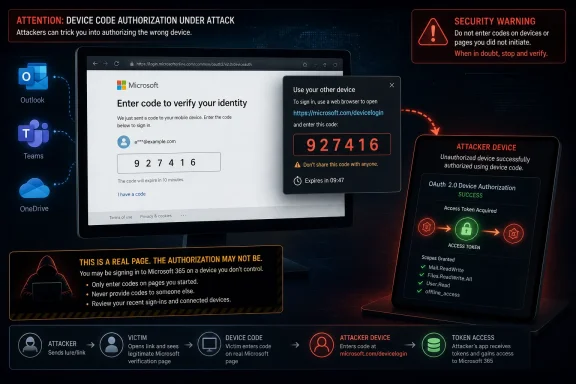
Cybersecurity-themed diagram showing a user signing in while a hacked device code enables token interception.The FBI Is Warning About the Login After the Login​

The uncomfortable part of the Kali365 story is that the victim can do what security training told them to do and still lose. The Microsoft sign-in page may be real. The MFA prompt may be real. The user may never type a password into a counterfeit form.
That is what makes device-code phishing so effective. The attacker initiates an OAuth device authorization flow, sends the victim a code, and persuades them to enter it at Microsoft’s legitimate verification page. Once the user completes authentication, including MFA if required, the tokens are returned to the device that started the flow — which, in this scenario, is controlled by the attacker.
The FBI’s public service announcement frames Kali365 as a platform that lowers the bar for criminals who might not otherwise be able to build a mature Microsoft 365 phishing operation. The kit reportedly offers AI-generated lures, campaign templates, tracking dashboards, and token-capture capability. That combination turns a technically subtle attack into something closer to a subscription business.
This is the same grim pattern defenders have seen across ransomware and credential theft: specialization wins. One group builds the tooling, another rents it, and a third launders or monetizes the access. Kali365 is dangerous not because device-code phishing is new, but because it packages the technique for broader use.

Microsoft 365 Became the Prize Because It Became the Office​

For most organizations, Microsoft 365 is no longer just email plus file storage. It is the directory, the collaboration layer, the document archive, the meeting room, the chat transcript, the workflow engine, and often the first hop into sensitive line-of-business systems. A stolen Microsoft 365 session is not a stolen inbox; it is a stolen office.
That is why Outlook, Teams, and OneDrive appear so often in consumer-facing headlines about the FBI warning. Those names are recognizable, and they are where users feel the pain. But the real target is the Microsoft identity layer that binds those services together.
Once an attacker has valid OAuth access and refresh tokens, the attack moves into a more dangerous phase. The intruder does not necessarily need the user’s password. They do not necessarily need to defeat MFA again. They have a way to act as the user until the token is revoked, expires, or is invalidated by policy.
That distinction matters for administrators. Password resets may be necessary after a suspected compromise, but they are not sufficient if active sessions and refresh tokens remain valid. The old mental model — “change the password and move on” — is obsolete in a cloud identity world.

MFA Did Its Job, and That Is the Problem​

It is tempting to describe Kali365 as “bypassing MFA,” and that shorthand is not entirely wrong. The attacker can gain access without intercepting the password or directly stealing the MFA code. But the more precise and more troubling point is that MFA may have succeeded exactly as designed.
Device-code flow exists for legitimate reasons. It helps users sign in on devices that lack a normal browser or comfortable input method: meeting-room hardware, shared devices, smart displays, some Teams devices, developer tools, and other constrained environments. The user completes authentication on a second device, and the original device receives the token.
Kali365 abuses that trust boundary. The user believes they are unlocking a document, joining a Teams resource, or completing a routine Microsoft verification step. In reality, they are authorizing an attacker-controlled session.
This is why the usual advice to “look for the padlock” has aged badly. The padlock only tells the user that the connection to the site is encrypted and, in this case, perhaps that the site is genuinely Microsoft’s. It does not tell the user whether the authorization request is safe, expected, or connected to the task they think they are performing.

The Phishing Page Is Becoming the Least Interesting Part of Phishing​

For years, anti-phishing guidance focused on counterfeit login pages. The attacker cloned a Microsoft sign-in screen, harvested a password, and then tried to race past MFA or reuse the credential somewhere else. Defenders responded with MFA, passwordless authentication, domain protections, user training, and browser warnings.
The modern phishing kit has adapted. It does not always need to impersonate the login page anymore. It can steer the user into a real login page while manipulating the context around the login.
That shift changes the defender’s job. The question is no longer only whether users can spot a fake Microsoft page. It is whether the organization can constrain which authentication flows are allowed, which devices can receive tokens, and which sessions deserve continued trust.
Kali365 is part of a wider movement toward token theft and adversary-in-the-middle tradecraft. Attackers increasingly want the thing that appears after authentication: the session, the token, the cookie, the delegated access. The password is still useful, but it is no longer the only prize.
This is also why phishing-as-a-service platforms are so damaging. They industrialize the difficult parts: lure generation, infrastructure setup, session tracking, and evasion. A mediocre criminal can run a better campaign when the platform abstracts away the expertise.

Telegram Is the Mall, Not the Mastermind​

The FBI says Kali365 has primarily been distributed through Telegram. That detail is worth noting, but it should not become a distraction. Telegram is the storefront, not the underlying vulnerability.
Underground tool distribution has long followed users to platforms that offer reach, resilience, and semi-private communities. Telegram channels and groups are convenient for advertising kits, handling subscriptions, posting updates, and building a reputation. If one platform becomes less useful, the market moves.
The more important point is that phishing has become productized. Kali365 is described less like a one-off criminal script and more like software sold to operators: campaigns, templates, dashboards, automation, and capture features. That is the language of SaaS, and the irony is not accidental.
Security teams should resist the comforting belief that taking down one channel or one kit solves the problem. It may disrupt a specific operation, but the underlying demand remains. As long as Microsoft 365 accounts are valuable and authentication flows can be socially engineered, replacement services will appear.

The Device-Code Flow Was a Usability Feature Before It Was an Attack Surface​

Microsoft’s device-code flow is not a bug in the simple sense. It is a legitimate OAuth flow designed around a real usability problem. Not every device has a keyboard, a browser, or a pleasant way to enter complex credentials.
The trouble is that every usability shortcut becomes an attacker’s question: can this be made to happen in the wrong context? Device-code authentication assumes the user understands which device they are authorizing. Phishing breaks that assumption.
In an enterprise, that assumption is especially fragile. Employees receive document links, Teams invites, SharePoint notifications, HR portals, invoice approvals, vendor requests, and meeting updates all day. A prompt that says “enter this code to continue” may feel like friction, but not necessarily like danger.
The user is not always careless. They are often busy, interrupted, and operating inside a system that constantly asks them to approve, authenticate, sync, consent, and continue. Kali365 works because it hides inside the normal tempo of cloud work.

The Real Fix Lives in Entra, Not in the User’s Inbox​

The FBI’s most important mitigation is not a new awareness slogan. It is a configuration change: restrict or block device-code flow using Conditional Access policies. Microsoft’s own guidance has been moving in the same direction, recommending that organizations get as close as possible to a unilateral block where the flow is not needed.
That is a significant admission about the balance of risk. Device-code flow is useful, but for many tenants it is rarely necessary for ordinary users. If attackers use it more often than legitimate staff do, the default should change.
For Microsoft 365 administrators, the practical path is staged rather than theatrical. Inventory current device-code usage in sign-in logs. Put a Conditional Access policy into report-only mode. Identify legitimate dependencies, especially Teams Rooms and shared Teams devices. Then move toward blocking the flow broadly while maintaining narrow, documented exceptions.
The exception design matters. A sloppy exclusion can preserve the very exposure the policy is meant to close. Broadly exempting users because one device or tool needs device-code flow is the identity-management equivalent of leaving the side door unlocked because the front door has a smart lock.

Teams Rooms and Developer Tools Are Where Good Policy Gets Messy​

The cleanest security advice is usually written for a clean environment. Real tenants are not clean. They have Teams Rooms, legacy scripts, shared devices, admin tools, automation, and developers who have been using command-line sign-ins for years.
That is why blocking device-code flow should not be done as a blind switch-flip across a complex organization. Microsoft’s guidance points administrators toward report-only testing and exception groups because legitimate device-code dependencies do exist. Teams devices, in particular, can require careful scoping so room systems keep working while user accounts are protected.
The operational challenge is to avoid turning exceptions into permanent blind spots. Every exception should have an owner, a reason, and a review cadence. If the exception exists because of a legacy workflow, the organization should ask whether that workflow can move to a safer authentication method.
For developers and IT staff, the lesson is equally blunt. Convenience authentication paths that made sense in a trusted environment now need to be justified. If a tool can use browser-based sign-in, brokered authentication, managed identities, or workload identity federation, it should not rely on a high-risk flow merely because that flow is familiar.

Users Still Matter, but They Are No Longer the Firewall​

None of this means user training is useless. A user who recognizes a suspicious device-code prompt can stop the attack before it becomes a session. But the Kali365 warning should end the fantasy that training is the primary control.
The more convincing the lure, the less fair it is to make the user the final line of defense. AI-generated phishing text can remove obvious grammar mistakes. Campaign templates can mimic familiar workflows. The use of a legitimate Microsoft page deprives users of one of the few visual cues they have been told to trust.
A better user-facing message is specific: do not enter a Microsoft device code unless you personally initiated sign-in on a device you control or are setting up. A code sent through email, chat, or a document link should be treated as hostile unless independently verified. That is sharper than “be careful with links,” because it describes the attack behavior.
Security teams should also make reporting easy. If a user suspects they entered a device code, the response window is short. The organization needs a way to revoke sessions, inspect sign-in logs, and investigate token use without turning every report into a blame exercise.

The Consumer Microsoft Account Problem Is Harder​

The FBI alert is most actionable for organizations that manage Microsoft 365 through Entra ID and Conditional Access. Consumers using Outlook.com, OneDrive, or personal Microsoft accounts do not have the same policy levers. They cannot simply create a tenant-wide Conditional Access rule.
That does not mean they are powerless, but it does mean the advice becomes more behavioral and reactive. Users should be skeptical of any message that asks them to enter a device code to view a file, join a meeting, or unlock an account. They should review account activity, remove unfamiliar devices or sessions where possible, and change passwords if compromise is suspected.
For consumers, app consent and account recovery settings also matter. A compromised account can become a platform for further attacks against contacts, cloud files, and stored communications. The damage is not limited to the original sign-in.
Microsoft could do more here. Consumer experiences need clearer warnings when a device-code flow is being used, better language explaining where the authorization will land, and stronger anomaly detection when the requesting device, geography, or session context looks wrong. The safest enterprise control is policy; the safest consumer control may have to be product design.

The PSA Is Also a Warning About Security Theater​

The Kali365 story exposes a familiar weakness in corporate security culture: controls are often celebrated after deployment and neglected after attackers route around them. MFA was a necessary improvement, but too many organizations treated it as a finish line. It was always a checkpoint.
The same mistake can happen with Conditional Access. A tenant can have impressive-looking policies and still allow a risky authentication flow for every user. It can require MFA for admins while leaving token theft detection immature. It can block legacy authentication but fail to monitor newer OAuth abuse.
Security posture is not the list of products in the stack. It is the set of assumptions that remain true when an attacker behaves creatively. Kali365 attacks the assumption that a successful Microsoft login means the right device received the resulting trust.
That is the part administrators should take personally. The problem is not that Microsoft 365 is uniquely bad; it is that identity has become the control plane, and every control plane attracts specialized attack tooling. If the organization depends on Microsoft 365, then Microsoft 365 authentication policy is not plumbing. It is frontline defense.

Token Theft Turns Incident Response Into a Session Hunt​

When a password is stolen, responders know the classic steps: reset it, check for forwarding rules, review sign-ins, and look for persistence. Token theft complicates that playbook because the attacker may already have a valid session that survives the user’s belief that the account has been “secured.”
A serious response should include revoking refresh tokens and sessions, reviewing OAuth grants, checking mailbox rules, inspecting Teams activity, and looking for unusual OneDrive or SharePoint access. The investigation should not stop at the inbox. In Microsoft 365, lateral movement can be a document share, a Teams message, a malicious app consent, or a quiet download of sensitive files.
Sign-in logs become crucial. Administrators should look for device-code authentication, unusual locations, unfamiliar user agents, impossible travel, and access patterns that do not fit the user’s normal work. Microsoft’s newer logging around authentication flows and original transfer methods is particularly relevant because protocol tracking can reveal sessions rooted in device-code use.
The hardest incidents will be the quiet ones. An attacker with access to a mailbox and cloud files may not immediately send spam or trigger obvious alarms. They may read, search, download, and wait. That is why token theft should be treated as potential data exposure, not just account inconvenience.

This Is a Microsoft Problem, but Not Only Microsoft’s Problem​

It is fair to ask what Microsoft should do when a legitimate authentication flow becomes a favored phishing path. The company has already provided Conditional Access controls to restrict device-code flow, and it recommends blocking the flow wherever possible. That is useful, but it also shifts a great deal of responsibility onto administrators.
Microsoft has a difficult balance to strike. Device-code flow supports real devices and workflows, and abruptly disabling it everywhere would break customers. But leaving it broadly available by default gives attackers a reliable social-engineering route into tenants that have not tuned their identity policies.
The answer likely lies in progressive hardening. Risky flows should be more constrained by default, more visibly explained to users, and easier for admins to inventory. Tenants with no observed legitimate device-code usage should be nudged more aggressively toward blocking it. Admin portals should surface high-risk authentication flow exposure as a first-class security finding, not as a buried configuration option.
Still, organizations cannot outsource this entirely. Microsoft can supply controls and warnings, but tenant owners decide whether old exceptions linger, whether logs are monitored, and whether identity policy reflects how users actually work. Kali365 is a vendor problem and a customer problem at the same time.

The Small Print of “Urgent” Is That Many Fixes Are Boring​

Consumer headlines about the FBI issuing an “urgent PSA” are designed to produce alarm. That alarm is not misplaced, but the remedy is not cinematic. The most important fixes are the boring ones: configuration review, log analysis, Conditional Access testing, exception management, and user reporting.
That is often how cloud security works now. The breach path is dramatic, but the defense is administrative hygiene. A tenant with blocked device-code flow, narrow exceptions, strong session revocation procedures, and alerting on unusual authentication behavior is in a much better position than one that merely tells employees not to click suspicious links.
The irony is that the most actionable FBI recommendation is something many administrators can begin today. They do not need to wait for a new product, a new license tier in every case, or a dramatic takedown. They need to determine whether device-code flow is necessary and, if not, turn it off.
The organizations that struggle will be the ones that do not know their own authentication dependencies. Kali365 punishes that uncertainty. If IT cannot say who uses device-code flow and why, attackers will happily answer the question first.

The Kali365 Warning Leaves Administrators With a Short Checklist and a Long Memory​

The practical lesson from the FBI alert is narrower than “Microsoft users are at risk” and broader than “watch out for one phishing kit.” Kali365 is a reminder that identity controls must be reviewed as attack techniques change, especially when criminals start packaging those techniques for mass use.
  • Organizations should audit Microsoft Entra sign-in logs for device-code flow and related protocol-tracked sessions before deciding which exceptions are truly necessary.
  • Administrators should create Conditional Access policies that block device-code flow by default, using report-only mode before enforcement in complex environments.
  • Teams Rooms, shared Teams devices, developer tools, and legacy workflows should receive narrow, documented exceptions rather than broad user-based carve-outs.
  • Incident responders should revoke sessions and refresh tokens after suspected compromise instead of relying only on password resets.
  • Users should treat any unsolicited request to enter a Microsoft device code as suspicious, even when the verification page itself is legitimate.
  • Security teams should report suspected Kali365 activity to the FBI and preserve logs quickly, because token-based intrusions can become quiet data-access incidents.
The FBI’s Kali365 warning is not the death of MFA, and it is not proof that Microsoft 365 cannot be defended. It is proof that attackers have moved to the space around authentication, where trust is delegated, refreshed, and reused. The next phase of Windows and Microsoft 365 security will be won less by teaching users to fear every link and more by making dangerous authentication paths rare, visible, and tightly governed before the next phishing service turns them into a commodity.

References​

  1. Primary source: UNILAD Tech
    Published: None
  2. Related coverage: techradar.com
  3. Related coverage: techrepublic.com
  4. Related coverage: ebisuda.net
  5. Related coverage: cside.com
  6. Related coverage: thecybersignal.com
  1. Related coverage: malwarebytes.com
  2. Related coverage: cyberscoop.com
  3. Related coverage: cybersecuritydive.com
  4. Related coverage: brightnexus.com
  5. Related coverage: bvainc.com
  6. Related coverage: gblock.app
  7. Related coverage: itpro.com
  8. Related coverage: kiplinger.com
  9. Related coverage: as.com
  10. Related coverage: labs.cloudsecurityalliance.org
 

The FBI warned Microsoft 365 users on May 21, 2026, that a phishing-as-a-service kit called Kali365 is abusing Microsoft’s device-code authentication flow to steal OAuth tokens and access Outlook, Teams, and OneDrive accounts without needing victims’ passwords. The alert is not just another reminder to avoid suspicious links. It is a sign that account takeover has moved deeper into the machinery of cloud authentication, where the user may be looking at a real Microsoft page and still be authorizing the wrong device. For Windows users and administrators, the old comfort phrase — “we have MFA turned on” — is no longer enough.

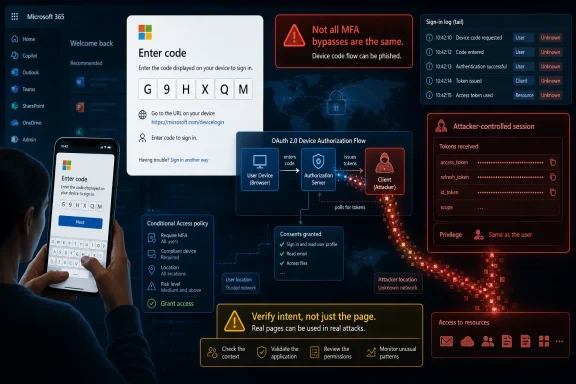
Microsoft device-login screen warns of device-code authorization attack with a displayed verification code.The Scam Works Because the Login Page Is Real​

Most phishing campaigns ask users to suspend disbelief. The email is a little too urgent, the domain is slightly wrong, the sign-in page is a convincing imitation, and the attacker hopes the victim will type a password before noticing the seams. Kali365 changes the center of gravity. The victim is not necessarily asked to enter credentials into a fake Microsoft portal at all.
Instead, the attacker abuses the OAuth device-code flow, a legitimate authentication method designed for devices that cannot easily present a full browser login. Think smart TVs, printers, command-line tools, or other input-limited hardware. One device displays a code, and the user signs in on another device to authorize it.
That design is useful when the device asking for authorization is yours. It becomes dangerous when the device waiting for approval belongs to an attacker.
In the Kali365 scenario described by the FBI, a phishing lure tells the user to visit Microsoft’s legitimate verification page and enter a device code. The page is real, the Microsoft branding is real, and the authentication process may include the organization’s usual multifactor prompt. But the code is not tied to the user’s intended session. It is tied to the attacker’s session.
That distinction is the whole attack. The victim thinks they are unlocking a shared document, voicemail, Teams file, or cloud notification. In reality, they are granting the attacker’s device access to their Microsoft 365 account.

MFA Did Its Job, and That Is the Problem​

The phrase “bypass MFA” is often used loosely in security reporting, and it can imply that multifactor authentication somehow failed cryptographically. In device-code phishing, the more unnerving truth is that MFA may work exactly as designed. The user authenticates successfully, Microsoft issues tokens to the device that requested authorization, and the attacker receives access because the user approved the wrong request.
This is why Kali365 matters. It does not need to steal the user’s password, intercept a one-time code, or defeat a FIDO key in the classic sense. It shifts the attack from credential theft to authorization trickery. The user is not handing over a secret so much as granting consent.
That is a subtler failure mode for enterprises because it slips between familiar control categories. Password hygiene does not solve it. Training users to inspect login domains helps less when the domain is legitimate. Basic MFA enrollment statistics look reassuring, even while the tenant remains exposed to token abuse.
Once OAuth access and refresh tokens are captured, the attacker may be able to interact with Microsoft 365 services as the victim. Outlook becomes a source of internal intelligence and fresh phishing targets. Teams becomes a map of relationships and projects. OneDrive and SharePoint become data stores waiting to be searched.
For administrators, the operative question is no longer merely whether a user signed in successfully. It is whether the sign-in flow, client, device, location, and resulting token behavior make sense.

Kali365 Turns a Specialist Trick Into a Subscription Product​

The FBI’s warning describes Kali365 as an emerging phishing-as-a-service platform first seen in April 2026. That timeline matters because the technique itself is not brand new, but the packaging is. Device-code phishing has been demonstrated and observed before; Kali365’s significance is that it reportedly wraps the technique in a commercial kit that lowers the skill required to run campaigns.
Phishing-as-a-service has been one of the more depressing success stories of the cybercrime economy. The same logic that made cloud software attractive to legitimate businesses — subscriptions, dashboards, automation, support, templates — has been copied by criminals. Kali365 reportedly offers AI-generated phishing lures, automated campaign tools, monitoring dashboards, and token-capture capabilities for a monthly fee.
That turns a niche authentication abuse pattern into something closer to a mass-market product. A less technical criminal no longer needs to understand every detail of OAuth, Microsoft Graph, refresh tokens, or device-code polling. The platform can abstract the complexity away, leaving the operator to choose lures, launch campaigns, and watch for successful authorizations.
The reported subscription price of about $250 per month is not high in cybercrime terms. It is small enough to be treated as a cost of doing business, especially if a single compromised mailbox can lead to invoice fraud, data theft, business email compromise, or lateral movement into a larger tenant.
This is the part of the story that should worry defenders most. Security teams can study one campaign and block its infrastructure. They can tune detections for one set of lures. But once a method becomes productized, variation accelerates. The emails get rewritten, the themes change, the targets rotate, and the underlying abuse remains.

The Microsoft 365 Account Is Now the Perimeter​

For years, enterprise security teams have been told that identity is the new perimeter. Kali365 is a practical demonstration of what that slogan means when the perimeter is a cloud productivity account used all day, across every device, in every location. Compromise the identity, and the attacker may not need to compromise the laptop first.
Microsoft 365 accounts are unusually valuable because they sit at the intersection of communication, storage, collaboration, and authentication. Outlook contains invoices, reset emails, executive conversations, HR records, and vendor threads. Teams contains informal context that rarely appears in official documents. OneDrive and SharePoint contain the work product itself.
A token-bearing attacker can often move quietly inside that world. They may search mailboxes, enumerate files, inspect Teams chats, and identify the next person to target. The attack can become recursive: one compromised account sends believable lures to colleagues, partners, or customers, and each successful authorization increases the attacker’s credibility.
This is why the FBI’s alert is relevant beyond Microsoft enthusiasts. WindowsForum readers know Microsoft 365 as the default productivity substrate for schools, small businesses, nonprofits, government offices, MSP clients, and large enterprises. The same convenience that makes the suite sticky also makes account compromise disproportionately damaging.
The practical perimeter is not the Windows login screen. It is the chain of trust between Entra ID, conditional access, OAuth tokens, cloud apps, endpoint posture, and user judgment. Kali365 attacks that chain at a point where many organizations have not applied the same scrutiny they apply to passwords.

The User Sees a Code, Not a Crime Scene​

Device-code phishing is effective because it asks the user to perform a task that feels ordinary. Enter this code to access a file. Enter this code to retrieve a message. Enter this code to continue with a cloud service. The request is simple, and the destination page may be legitimate.
That creates a training challenge. For years, security awareness programs have told users to look for misspelled domains, suspicious attachments, mismatched sender addresses, and crude formatting. Those are still useful signals, but they are not enough here. The most important warning sign may be behavioral: the user is being asked to enter a code they did not personally initiate from a device they recognize.
That phrase should become part of every Microsoft 365 security conversation: never enter a device code you did not request. It is more concrete than “be careful with phishing” and more memorable than “beware OAuth device authorization grant abuse.” It maps directly to the user action the attacker needs.
Even so, user training cannot carry the whole burden. A well-crafted lure that appears to come from a trusted colleague or known cloud service can catch careful people at the wrong moment. The attack is designed to borrow legitimacy from Microsoft’s own authentication infrastructure, and it works best when the victim is busy, distracted, or under mild pressure.
The lesson is not that users are hopeless. The lesson is that controls must assume some users will eventually enter the code.

Administrators Have to Treat Device Code Flow as an Attack Surface​

For IT teams, the immediate response should be less theatrical than the word “urgent” suggests, but more serious than another all-hands phishing reminder. The first task is inventory. Organizations need to know whether device-code authentication is actually required in their environment, which users and apps rely on it, and whether conditional access policies restrict it appropriately.
In many tenants, device-code flow is not something administrators think about until it appears in an incident report. It may be enabled because it is part of a broader default posture, because developers use command-line tools, or because legacy workflows were never reviewed. That ambiguity favors attackers.
Restricting or blocking device-code flow may be appropriate for many users, but it cannot be done blindly in every environment. Developers, administrators, kiosks, shared devices, and automation workflows may have legitimate dependencies. The right answer is not always a tenant-wide kill switch; it is a policy decision based on actual use.
Conditional access is where the story becomes operational. Administrators should be looking at authentication flows, device compliance, user risk, sign-in risk, geographic anomalies, unfamiliar clients, and token behavior. If a user in accounting authorizes a device-code sign-in from a strange location minutes after receiving a document-sharing email, that should not look routine.
Token revocation also deserves more attention. Changing a password after suspected compromise may not be sufficient if valid refresh tokens remain in circulation. Incident response needs to include revoking sessions, reviewing app consent, inspecting mailbox rules, checking forwarding settings, and searching for unusual Graph activity or file access.

Small Businesses Are the Soft Middle of This Story​

Large enterprises at least have a fighting chance. They may have identity teams, SIEM pipelines, conditional access baselines, endpoint telemetry, and incident response playbooks. Smaller organizations often have Microsoft 365 because it is easy to buy, easy to deploy, and bundled with the tools everyone already knows. They may not have anyone continuously watching authentication logs.
That makes Kali365 particularly dangerous for small and midsize businesses. A compromised Microsoft 365 account at a law firm, contractor, clinic, school, or local government office can be enough to launch invoice fraud, steal client records, or compromise partner relationships. The attacker does not need to deploy ransomware on day one. Quiet access to mail and files may be more profitable.
MSPs should read the FBI’s alert as a service-delivery problem, not just a security bulletin. If clients are paying for Microsoft 365 management, they will assume someone is handling the implications of a Microsoft 365 authentication scam. That means tenant baselines, reporting, alerting, and user guidance need to cover device-code phishing explicitly.
The temptation is to sell another tool. Sometimes another tool is justified. But the first layer is configuration hygiene: disable what is not used, restrict what is risky, monitor what remains, and make sure the help desk knows what a device-code phishing report sounds like.
In many small environments, the decisive improvement may be mundane. Users need a clear place to forward suspicious messages. Administrators need alerts for unusual sign-ins. Break-glass accounts need protection. Shared admin accounts need to disappear. Device-code flow should not be left enabled for everyone simply because no one has asked whether it is needed.

Microsoft’s Burden Is Larger Than Criminal Takedowns​

Microsoft says it works with cybersecurity agencies and has used its Digital Crimes Unit to disrupt cybercrime infrastructure. That work matters. Takedowns can raise costs for criminals, burn domains, expose operators, and interrupt campaigns. But takedowns are not the same as product hardening.
The deeper issue is that cloud identity systems are now expected to support a sprawling range of legitimate workflows while remaining intelligible to ordinary users. OAuth is powerful because it lets applications request delegated access without handling passwords. Device-code flow is useful because not every device can host a clean interactive login. Refresh tokens are useful because users should not have to reauthenticate constantly.
Attackers exploit the seams between those conveniences. If Microsoft makes authentication too restrictive, customers complain that workflows break. If Microsoft makes it too permissive, criminals discover ways to convert user trust into token access. The company’s challenge is to preserve legitimate use while making abnormal authorization harder to miss.
There is room for sharper user-facing warnings. A device-code prompt could do more to explain what device or app is being authorized, where the request originated, and what access will follow. Security prompts often fail because they are vague, repetitive, or written for auditors rather than humans. In this attack, the prompt is the last clear chance to interrupt the chain.
There is also room for stronger defaults. Microsoft has gradually moved the ecosystem toward better identity security, but customers still live across a spectrum of licensing, legacy settings, and administrative maturity. The tenants most likely to be abused are often the ones least likely to have tuned every authentication policy.

The AI Angle Is Real, but It Is Not the Whole Story​

Kali365 is reportedly marketed with AI-generated phishing templates, and that detail will attract attention because “AI phishing” is now a reliable headline engine. It is worth taking seriously without letting it obscure the older, more structural problem. AI can make lures more fluent, more personalized, and easier to vary at scale. But the attack succeeds because of authorization design and tenant configuration, not because a chatbot wrote a better email.
Still, AI changes the economics. A mediocre attacker can generate polished messages in multiple tones and languages, imitate business workflows, and rapidly test themes. The old tells — awkward phrasing, generic greetings, clumsy formatting — become less dependable. The gap between a sophisticated spear phish and a commodity lure narrows.
For defenders, that means content inspection alone becomes weaker. If every phishing message can be rewritten endlessly, blocking exact phrases or templates offers diminishing returns. The durable signals move closer to behavior: who initiated the flow, what device is being authorized, whether the app is expected, whether the user normally signs in this way, and what the token does next.
The AI discussion also risks flattering the attacker. Kali365 does not need science fiction to be effective. It needs a plausible email, a valid device code, a legitimate Microsoft page, and a user who has been trained for years to complete authentication prompts quickly so they can get back to work.
That is less glamorous than “AI-powered cybercrime,” but it is more useful to understand.

The Old Phishing Playbook Has to Be Rewritten Around Tokens​

The defensive playbook for phishing has historically been built around credentials. Block the fake site, reset the password, require MFA, scan the mailbox, and move on. Token-centric attacks demand a different rhythm. The password may never have been stolen, and the user may have completed MFA successfully.
That means incident responders have to ask different questions. Which tokens were issued? Which sessions are active? Which apps received access? Was the device-code flow involved? Did the attacker create persistence through mailbox rules, OAuth app consent, forwarding, or additional authentication methods? Did the account access files or conversations outside the user’s normal pattern?
Logging becomes critical. Without sufficient audit data, organizations may know that something went wrong but not what the attacker touched. Microsoft 365 audit logs, Entra ID sign-in logs, mailbox audit events, and cloud app security telemetry are not optional extras in this threat model. They are the evidence locker.
The response also has to be fast. Refresh tokens can extend access beyond the initial moment of compromise. If the attacker is using automation, minutes matter. A user reporting “I entered a code and now something feels wrong” should trigger a defined response, not a slow help-desk exchange about whether the email looked suspicious.
Security teams should also revisit how they explain MFA. Users have been taught that MFA means safety. That is broadly true, but incomplete. A better message is that MFA proves you are present; it does not prove the thing you are authorizing is safe. That distinction is now operationally important.

The Warning Is About Trust, Not Just Teams and Outlook​

The headlines name Teams, Outlook, and OneDrive because those are the familiar brands. But Kali365 is really about trust delegation in cloud platforms. The attacker wants the victim to trust the email, trust the code, trust the Microsoft page, and trust the routine of authentication. Each individual piece looks normal enough; the combination is malicious.
This is why the campaign should not be dismissed as a Microsoft-only curiosity. Microsoft 365 is the target named in the FBI alert, but OAuth abuse and consent phishing are broader cloud-era problems. Wherever users can authorize devices, applications, or sessions without fully understanding the consequences, attackers will look for ways to industrialize confusion.
For WindowsForum’s audience, the Microsoft angle is still decisive. Windows desktops are deeply tied to Microsoft accounts, Entra-joined devices, Office apps, Teams notifications, OneDrive sync, and browser-based productivity. A user may experience the attack as just another prompt in a workday already crowded with prompts.
That prompt fatigue is not accidental background noise. It is part of the attacker’s opportunity. Modern work asks users to approve, authenticate, consent, sync, share, join, and verify constantly. Kali365 exploits that muscle memory.
The uncomfortable conclusion is that security UX is now a frontline control. If legitimate prompts are too frequent or too opaque, users learn to comply rather than evaluate. The attacker does not have to defeat judgment if the environment has already trained judgment out of the loop.

The Defensible Tenant Will Be the One That Distrusts Routine​

The concrete lesson from the FBI’s Kali365 warning is that Microsoft 365 defense has to move from credential protection to authorization scrutiny. That does not mean abandoning MFA; it means treating MFA as one layer in a larger identity control plane. Device-code flow, token lifetime, app consent, session revocation, and anomaly detection all belong in the same conversation.
For administrators, the near-term work is straightforward enough to start this week, even if it takes longer to perfect. Review whether device-code authentication is needed. Restrict it where possible. Monitor for its use. Teach users not to enter codes they did not initiate. Prepare the help desk to escalate those reports quickly.
For users, the safest rule is simple: if a message gives you a code and tells you to enter it into Microsoft, stop. Access the document or service through a known path instead. If the file is real, it will still be available through Teams, OneDrive, SharePoint, or Outlook without following the attacker’s choreography.
For Microsoft, the challenge is harder. The company has to defend a global identity platform without breaking the legitimate workflows that made the platform successful. That means better defaults, clearer prompts, stronger detection, and continued pressure on the criminal services turning identity abuse into a subscription business.

The Code in the Email Is the Part to Remember​

The most useful response to Kali365 is not panic; it is precision. This is a narrow but serious abuse of a legitimate sign-in flow, and the organizations that understand that distinction will respond better than those that file it under generic phishing.
  • Users should not enter Microsoft device codes unless they personally started the sign-in on a device or app they recognize.
  • Administrators should review whether OAuth device-code authentication is needed across their Microsoft 365 tenants.
  • Security teams should monitor Entra ID sign-in logs for unusual device-code flow activity, unfamiliar locations, and unexpected clients.
  • Incident responders should revoke sessions and tokens after suspected compromise instead of relying only on password resets.
  • Organizations should treat Outlook, Teams, OneDrive, and SharePoint activity after a suspicious authorization as potentially exposed.
  • Help desks should have a fast escalation path for reports involving unexpected verification codes or unfamiliar device activity.
Kali365 is a reminder that the next wave of Microsoft 365 account takeover will not always look like a stolen password or a fake login page. It will often look like an ordinary authentication ritual, performed on a legitimate Microsoft site, at the wrong attacker’s request. The defensive future belongs to organizations that can tell the difference between a user proving who they are and a user authorizing something they never meant to trust.

References​

  1. Primary source: TechJuice
    Published: 2026-06-16T15:37:07.670431
  2. Related coverage: techrepublic.com
  3. Related coverage: thecybersignal.com
  4. Related coverage: cybersecuritydive.com
  5. Related coverage: malwarebytes.com
  6. Related coverage: gblock.app
  1. Related coverage: safebrowz.com
  2. Official source: microsoft.com
  3. Related coverage: bleepingcomputer.com
  4. Related coverage: techradar.com
  5. Related coverage: imtr.net
  6. Related coverage: purpleshieldsecurity.com
  7. Related coverage: itpro.com
  8. Related coverage: kiplinger.com
  9. Related coverage: as.com
  10. Related coverage: ai.firsttech.news
 

Microsoft 365 users are being targeted by Kali365, a phishing-as-a-service platform first observed in April 2026 and flagged by the FBI in May 2026 for abusing Microsoft’s legitimate device-code sign-in flow to capture OAuth tokens and bypass many familiar MFA defenses. The uncomfortable lesson is not that multifactor authentication has failed, but that attackers have found a way to move the fight to the moment after authentication succeeds. For Windows shops that have spent years training users to inspect URLs and distrust fake login pages, this is a particularly nasty turn. The login page can be real, the MFA prompt can be real, and the compromise can still be real.

Microsoft 365 code-entry MFA screen shows an OAuth device-code flow hijacking warning with attacker prompts.The New Phishing Trick Is That It Stopped Looking Like Phishing​

For most users, phishing has long been taught as a visual literacy problem. Look for the misspelled domain. Hover over the link. Beware of bad grammar, strange attachments, and login pages that almost but not quite resemble Microsoft’s. Kali365 attacks that muscle memory directly because the user may be sent to a genuine Microsoft authentication page.
That is the central reason this campaign matters to WindowsForum readers. It does not merely exploit user carelessness; it exploits the gap between what users have been told to check and what modern cloud authentication actually does. The victim is not typing a password into a counterfeit Outlook page. The victim is entering a device code into Microsoft’s real sign-in infrastructure, completing the very process they have been trained to trust.
The attack rides on a legitimate feature: OAuth device-code authentication. That flow exists for devices that are awkward to type on, such as conference-room systems, shared devices, TVs, printers, or command-line tools. A device displays a short code, the user enters it on another device, and the original device receives tokens that allow it to access the account.
Kali365 turns that convenience feature into a handoff mechanism. The attacker initiates the flow, sends the victim the code, and waits while the victim completes authentication. Once the user signs in and approves the request, the tokens are issued to the attacker-controlled session, not to the laptop or phone the victim is holding.

MFA Still Matters, but This Attack Moves Around It​

It is tempting to describe Kali365 as an “MFA bypass,” and in a practical sense that is how many victims will experience it. The attacker gets access without knowing the password and without separately stealing a one-time code. But the phrase can also mislead defenders into thinking MFA itself is useless.
MFA still blocks a vast amount of credential theft, password spraying, and automated account takeover. The problem is that not all MFA protects against the same class of attack. If an attacker can convince a user to complete a valid authentication ceremony for an attacker-controlled session, the second factor has done its narrow job while the overall system has still been abused.
That distinction matters for administrators. A tenant with SMS-based MFA is not in the same place as one using phishing-resistant methods, compliant-device requirements, strong Conditional Access rules, and tight token controls. But no administrator should assume that “MFA enabled” means “device-code phishing solved.”
The uncomfortable truth is that identity security has become less about proving that a user can log in and more about proving that the right user, on the right device, in the right context, is requesting the right thing. Kali365 is dangerous because it borrows legitimacy from the Microsoft sign-in flow while severing that flow from the user’s intent.

Kali365 Industrializes a Technique Defenders Already Feared​

The FBI warning matters not only because Kali365 exists, but because it reportedly packages the technique for broader criminal use. Phishing-as-a-service platforms lower the skill floor. They transform what once required custom infrastructure, OAuth knowledge, and operational discipline into something closer to a subscription product.
According to public reporting, Kali365 offers campaign automation, lure generation, victim tracking, and token-capture features through channels such as Telegram. That is not just a technical shift; it is a market shift. When a technique becomes productized, it spreads beyond sophisticated operators and into the hands of crews that may be less skilled but more numerous.
The same pattern has played out before. Credential phishing kits commoditized fake login pages. Adversary-in-the-middle platforms made real-time MFA relay more accessible. Ransomware affiliate programs industrialized intrusion, extortion, and negotiation. Kali365 sits in that same lineage: a service layer over a security weakness that many organizations have not inventoried.
For Microsoft 365 environments, the stakes are obvious. Outlook is the front door to business email compromise. Teams is the social graph of the company. OneDrive and SharePoint hold contracts, HR files, legal drafts, source material, and internal planning documents. A token that opens those doors can be more valuable than a password because it may not trigger the same alarms users associate with account theft.

The Device-Code Flow Was Built for Convenience, Not Suspicion​

Device-code authentication is not a bug in the ordinary sense. It is a standards-based authorization flow designed to solve a real usability problem. A conference-room display cannot comfortably host a full password and MFA experience, so the user authenticates elsewhere and authorizes the device.
The trouble is that the human signal is weak. When a user is told, “Enter this code to view a shared document,” the workflow can feel plausible enough, especially in organizations where Microsoft 365 prompts are routine background noise. The user sees Microsoft branding, completes Microsoft authentication, and may never understand that the code originated from an attacker’s session.
That is why old phishing education fails here. “Check the URL” helps when the URL is fake. “Look for HTTPS” helps when the site is fraudulent. “Never enter your password on a suspicious page” helps when the attacker is harvesting passwords. Device-code phishing asks the user to do something Microsoft itself supports, on a page Microsoft itself operates.
The better question is not whether the page is real. The better question is whether the user initiated the authentication flow and whether the device or application requesting access is expected. That is a harder behavior to train because it requires users to understand context, not just appearance.

The Token Is the Prize​

Passwords are still valuable, but tokens are more immediately useful in modern cloud attacks. An OAuth access token can allow an attacker to call services as the user. A refresh token can help maintain access by obtaining new access tokens. Depending on policy, token lifetime, device compliance rules, and risk controls, that access can persist long enough for meaningful damage.
This is why changing a password after compromise may not be enough. If active sessions and refresh tokens remain valid, the attacker may still have a path back in. Incident response has to include revoking sessions, invalidating tokens, reviewing registered devices, checking OAuth app grants, and hunting for unusual sign-ins and mailbox activity.
For business email compromise crews, that access is gold. They can read internal threads, learn invoice patterns, identify executives, monitor negotiations, and time a fraudulent payment request. For espionage-minded operators, they can quietly search mailboxes and files. For ransomware affiliates, they can use the cloud account as a foothold for reconnaissance and lateral movement.
The frightening part is not theatrical malware on the desktop. It is silent access to the place where modern work already happens.

Microsoft’s Own Guidance Points to a Harder Default​

Microsoft’s documentation has increasingly treated device-code flow as a high-risk authentication path that should be blocked wherever possible. That is a strong signal. A feature can be legitimate and still be too dangerous to leave broadly available across a tenant.
The practical recommendation for many organizations is to create Conditional Access policies that block device-code flow by default, then carve out narrow exceptions for known, documented use cases. Teams Rooms and certain shared devices may still need the flow. Some developer and command-line scenarios may need review. But “we might need it someday” is not a security policy.
Report-only mode is the sensible starting point. Administrators should inventory where device-code flow is actually used, identify business owners, and distinguish real dependencies from unknown or suspicious activity. Once the blast radius is understood, a tenant-wide block with controlled exceptions becomes much easier to defend.
The key is to avoid broad user exclusions. If an exception group includes half the company, the organization has not reduced the attack surface; it has merely renamed it. Exceptions should be tied to specific devices, accounts, tools, and owners, with an expiration or review cadence.

Users Need a New Rule for a New Failure Mode​

For end users, the clearest rule is simple: do not enter a device code unless you personally initiated a sign-in on a device you recognize. A document share, invoice, meeting invitation, voicemail alert, or Teams message should not require entering a random device code into Microsoft’s sign-in page. If it does, assume something is wrong until proven otherwise.
That advice is more actionable than telling users to become OAuth experts. Most people do not need to understand refresh tokens to avoid the trap. They need to understand that a device code is not a generic “verification code” for opening a file. It is a way to authorize another device or session.
Organizations should reflect that language in training. “Never approve unexpected MFA prompts” has become common advice after MFA fatigue attacks. The equivalent here is “Never enter an unexpected device code.” The wording matters because the attack does not always look like a push notification, and users may not associate a code-entry page with granting account access.
Security teams should also be careful not to shame victims. This attack succeeds precisely because it abuses a real workflow and a real login page. Treating it as obvious user stupidity will only make employees slower to report suspicious prompts.

The Admin View Is Less About Awareness and More About Controls​

User education is necessary, but it cannot be the primary defense. At enterprise scale, some percentage of users will always follow convincing instructions, especially when the lure arrives during a busy workday and appears to involve a routine file, invoice, or meeting. The admin response has to assume that at least one person will make the wrong choice.
Conditional Access is the center of gravity. Blocking or restricting device-code flow removes the easiest path for this specific technique. Requiring compliant or hybrid-joined devices can make stolen tokens less useful when an attacker operates from unmanaged infrastructure. Risk-based sign-in policies, location analysis, impossible-travel detection, and session revocation all matter once the first mistake occurs.
Logging is equally important. Security teams should know how to find device-code flow events in Entra sign-in logs and how to distinguish the original authentication method from later token refresh activity. A session that began with device-code flow may continue to matter after the visible login event has passed.
Admins should also review mailbox rules, forwarding settings, OAuth app consents, Teams activity, SharePoint downloads, and device registrations after a suspected compromise. Token theft is rarely the end of the story. It is usually the opening move.

The Consumer Risk Is Smaller, but Not Imaginary​

Kali365 is primarily framed around Microsoft 365 business and enterprise accounts, and that emphasis is justified. Corporate tenants provide richer data, better monetization paths, and more opportunities for lateral movement. But individual users should not ignore the lesson.
A personal Microsoft account can still hold Outlook mail, OneDrive files, Xbox identity, Windows sync data, recovery addresses, and personal documents. If a scammer can trick a user into authorizing a session, the consequences may include privacy loss, financial fraud, or account recovery headaches. The exact controls available to consumers differ from enterprise tenants, but the behavioral warning is the same.
For consumers, unexpected device-code prompts should be treated as hostile. If a message claims that a file, invoice, delivery notice, or support request requires entering a Microsoft device code, stop. Go directly to the relevant app or service yourself rather than following the prompt.
After suspected exposure, users should change passwords, revoke sessions where available, review recent sign-in activity, remove unfamiliar devices, and check recovery information. The password change is only one step. The larger goal is to cut off any session or device the attacker may already have authorized.

The Real Story Is the Collapse of Simple Trust Signals​

Kali365 is part of a broader trend: attackers are increasingly abusing real infrastructure, real workflows, and real authentication systems. The more legitimate the process looks, the less useful visual suspicion becomes. That does not mean users should stop checking links; it means checking links is no longer enough.
For years, cloud identity promised to reduce risk by centralizing authentication with major providers. In many ways, it succeeded. Microsoft can enforce MFA, detect suspicious sign-ins, and give administrators tools that were impossible in the old perimeter era. But centralization also creates high-value workflows that attackers study obsessively.
The result is a security environment where the boundary is no longer the login page. The boundary is intent. Did the user mean to authorize this device? Does this application belong in this tenant? Is this token being used from a device and location consistent with policy? Those questions are harder than “is the page fake,” but they are now unavoidable.
Windows administrators have lived through this evolution before. Macro malware forced Office policy changes. Pass-the-hash changed Windows credential handling. Ransomware changed backup architecture. Device-code phishing should push identity teams toward stricter authentication-flow governance, not just another awareness poster.

The Microsoft 365 Defense Has to Move One Layer Deeper​

The organizations best positioned against Kali365 will not be the ones that simply tell users to be careful. They will be the ones that reduce unnecessary authentication flows, monitor the ones that remain, and treat tokens as sensitive assets rather than invisible plumbing. MFA remains table stakes, but the table has moved.
This is where Microsoft’s managed and configurable Conditional Access policies become more than checkbox compliance. A tenant that blocks device-code flow by default has removed a major path used by this campaign. A tenant that allows it everywhere because “that is the default we inherited” is carrying risk it may not even know exists.
There is also a governance lesson. Many organizations do not have a current map of which authentication flows are used by which devices, teams, and legacy tools. Kali365 makes that ignorance expensive. If a control cannot be enabled because nobody knows what it will break, the security problem is also an asset-management problem.
Security teams should frame remediation in operational language. Inventory, report-only mode, exception scoping, enforcement, monitoring, and periodic review. That is less dramatic than a breach headline, but it is how this class of attack gets contained.

The Concrete Moves Windows Shops Should Make Now​

Kali365 deserves attention because it converts a legitimate Microsoft sign-in path into a scalable account-takeover mechanism. The fix is not panic, and it is not abandoning MFA. The fix is narrowing where device-code authentication is allowed, teaching users what a device code actually means, and preparing incident response teams to revoke tokens rather than merely reset passwords.
  • Users should refuse unexpected Microsoft device-code requests, especially those tied to documents, invoices, meetings, voicemail alerts, or shared-file notifications they did not initiate.
  • Administrators should audit Entra sign-in logs for device-code flow activity before deciding which exceptions are truly necessary.
  • Organizations should block device-code flow by default wherever possible and limit exceptions to documented devices, accounts, and business owners.
  • Security teams should treat suspected exposure as token compromise, which means revoking sessions and reviewing devices, app grants, mailbox rules, and recent cloud activity.
  • MFA should remain enforced, but tenants should pair it with Conditional Access, compliant-device requirements, phishing-resistant methods, and risk-based monitoring.
  • Training should shift from “check whether the Microsoft page is real” to “check whether you initiated the sign-in and recognize the device or app being authorized.”
Kali365 is not proof that Microsoft 365 is indefensible, but it is proof that identity defense cannot stop at the moment a user successfully signs in. The next phase of cloud security will be won by organizations that treat authentication flows as attack surface, tokens as credentials, and user intent as something policy must verify rather than merely assume.

References​

  1. Primary source: Techlusive
    Published: 2026-06-16T15:12:07.825656
  2. Related coverage: techrepublic.com
  3. Related coverage: thecybersignal.com
  4. Related coverage: cybersecuritydive.com
  5. Related coverage: techradar.com
  6. Related coverage: helpnetsecurity.com
  1. Related coverage: imtr.net
  2. Related coverage: bleepingcomputer.com
  3. Related coverage: gblock.app
  4. Related coverage: kiplinger.com
  5. Related coverage: itpro.com
  6. Related coverage: windowscentral.com
  7. Official source: cdn-dynmedia-1.microsoft.com
 

The FBI issued a May 21, 2026, public warning that Kali365, a phishing-as-a-service kit first seen in April 2026, is targeting Microsoft 365 users by abusing OAuth device-code sign-ins to seize access tokens for Outlook, Teams, and OneDrive without stealing passwords. This is not another clumsy fake-login-page story. It is a warning about the way legitimate cloud authentication can be turned against users when the attacker persuades them to complete the wrong sign-in. The uncomfortable lesson for Windows shops is that multifactor authentication is necessary, but it is not a magic spell.

FBI warning shows a phishing-as-a-service dashboard and sign-in code screen targeting stolen OAuth tokens.The Login Page Is Real, and That Is the Trap​

Traditional phishing asks the victim to distrust their browser badly enough to type a password into a counterfeit page. Kali365 changes the psychology. The victim is pushed toward a real Microsoft verification workflow, often after receiving a lure that impersonates a document-sharing or productivity service.
That distinction matters because years of user training have focused on misspelled domains, odd-looking login pages, and suspicious password prompts. Device-code phishing sidesteps much of that advice. The attacker does not need the victim’s password if the victim can be convinced to approve the attacker’s device.
The device-code flow exists for reasonable reasons. It lets a user authenticate a device that has limited input, such as a Teams room system, an appliance, or a command-line tool. The problem is that the same convenience also creates a clean social-engineering script: here is a code, go to Microsoft, enter it, and finish signing in.
Once the user completes that sequence, the attacker can obtain OAuth access and refresh tokens. Those tokens are the prize. They can allow access to Microsoft 365 services without replaying the entire login process and without intercepting a one-time MFA code.

Kali365 Turns a Niche Trick Into a Subscription Business​

The FBI’s warning is less about a single clever technique than about packaging. Kali365 reportedly offers phishing lures, campaign templates, tracking dashboards, and token-capture features for criminals who do not have deep technical skill. That is the familiar evolution of cybercrime: what begins as tradecraft becomes a subscription product.
The reported $250-per-month price tag is not high enough to restrict the tool to elite actors. It is low enough to invite experimentation, copycats, and volume. That is what should worry administrators more than the branding of one kit.
Phishing-as-a-service has the same effect on identity attacks that exploit kits once had on browser attacks. It lowers the cost of entry, standardizes the workflow, and makes campaigns easier to launch repeatedly. Defenders are no longer competing only with skilled operators; they are competing with a market.
The name Kali365 will eventually fade, be rebranded, or be joined by rivals. The more durable issue is that attackers have found a productive seam in cloud identity: users can be tricked into granting access while believing they are completing a normal Microsoft sign-in.

MFA Did Its Job, and the Account Still Fell​

The phrase “bypasses MFA” is useful shorthand, but it can also mislead. In many device-code attacks, MFA is not cryptographically defeated. The victim may complete a legitimate Microsoft authentication, including MFA, and thereby authorize a session the attacker initiated.
That is more subtle and more dangerous than a simple failure of MFA. The security control verifies the user, but it cannot infer that the user understands whose device is being authorized. The attacker wins by moving the decision point away from “Should I reveal my password?” to “Should I enter this code?”
This is why token theft has become such a favored target. Passwords are increasingly hardened by MFA, conditional access, risk scoring, and passwordless sign-in. Tokens, however, represent already-granted access. If an attacker can obtain them, the account can be abused without the noisy steps defenders expect.
For Outlook, that can mean mailbox access, business email compromise, invoice fraud, or reconnaissance. For OneDrive and SharePoint, it can mean file theft and staging for further compromise. For Teams, it can mean impersonation inside the collaboration fabric where users are conditioned to trust internal messages.

Microsoft 365 Is the Operating System of Work​

The reason this scam lands so hard is that Microsoft 365 is no longer just email plus storage. For many organizations, it is the working memory of the business. Outlook holds negotiations, Teams holds decisions, OneDrive holds documents, and Entra ID ties it together with identity.
A compromised Microsoft 365 account is therefore not a single-app incident. It is a pivot point. An attacker with access to mail can reset third-party services, study internal language, impersonate executives, search for sensitive attachments, and map the organization’s relationships.
That is why token-based compromise feels different from old-fashioned credential theft. The attacker is not merely trying to log in as the victim; the attacker is trying to inherit the victim’s cloud presence. In a well-integrated tenant, that presence may reach far beyond Microsoft’s own apps.
Windows users also have a particular exposure because Microsoft identity is woven through the desktop experience. The line between local device, browser session, Office app, Teams client, and cloud resource is intentionally blurred for convenience. Attackers are now exploiting the fact that users experience that blur as normal.

The Old Anti-Phishing Playbook Is Showing Its Age​

Security awareness training still matters, but the slogans need updating. “Check the URL” is not enough when the URL may be legitimate. “Never enter your password on a strange site” is incomplete when the attack does not ask for a password.
The more useful rule is procedural: do not enter a device code unless you personally initiated the sign-in on a device in front of you. If an email, Teams message, text, or help-desk-sounding instruction tells you to enter a code, assume the request is hostile until proven otherwise.
That principle is easy to state and hard to enforce. The modern workplace is full of authentication interruptions. Users are trained by real systems to approve prompts, scan QR codes, enter short codes, and reconnect apps. Attackers succeed because they imitate the rhythm of legitimate IT.
The burden cannot sit only with end users. A tenant that allows device-code flow broadly is leaving a high-risk path open for every confused, rushed, or overworked employee. The practical response has to happen in identity policy, monitoring, and incident handling.

Conditional Access Becomes the Real Control Plane​

For administrators, the most important mitigation is not a new email banner. It is reviewing whether device-code flow is needed at all. Microsoft’s own guidance has increasingly treated device-code authentication as something to block wherever possible and to allow only for documented exceptions.
That recommendation is not cost-free. Some Teams devices, shared devices, developer tools, command-line workflows, or legacy operational processes may rely on device-code sign-in. A careless tenant-wide block can break real work, especially in environments with conference room hardware or specialized workflows.
But the answer is not to leave the door open. The answer is to inventory usage, move the policy into report-only mode first, identify legitimate dependencies, and then build narrow exceptions. Security teams should know exactly which accounts, devices, apps, and locations are allowed to use device-code flow.
This is where smaller organizations often struggle. They may have Microsoft 365 licensing, MFA, and a handful of admin accounts, but not a mature identity-governance process. Kali365 is a reminder that cloud security is no longer just turning on MFA; it is managing the shape of authentication itself.

Detection Has to Follow the Token, Not the Password​

A device-code phishing incident may not produce the signals defenders are used to chasing. There may be no failed password spray, no impossible MFA fatigue pattern, and no obvious fake domain visited by the victim. The login may look clean because the user really did authenticate.
That pushes defenders toward sign-in logs, token activity, unfamiliar devices, unexpected locations, suspicious application consent, and anomalous access to mail, files, and Teams data. If the victim’s account suddenly begins accessing services from a new geography or device context, the organization needs alerts that notice.
The refresh token is especially important. Access tokens are short-lived, but refresh tokens can extend persistence if not revoked. A password reset alone may not be enough if active sessions and refresh tokens remain valid.
Incident response should therefore include revoking sessions, rotating credentials where appropriate, reviewing registered devices, examining mailbox rules, checking OAuth app grants, and looking for downstream abuse. In Microsoft 365 compromises, the first breach is often only the opening move.

The Consumer Advice Is Simple, but the Enterprise Work Is Messy​

For individual users, the FBI’s warning boils down to a blunt instruction: do not follow unsolicited directions to enter a Microsoft device code. If you did not start the sign-in yourself, the code is not yours to enter. If a message claims a file, voicemail, meeting, or shared document requires that step, verify through a separate channel.
For businesses, the work is less tidy. The organization needs to decide whether device-code flow is a legitimate business requirement or an inherited convenience nobody owns. That requires logs, testing, exception management, and communication with teams that may be using older sign-in patterns.
The messy part is culture. Users get blamed for phishing because they are visible at the moment of failure. But the deeper failure is often architectural: a risky flow is available to everyone, alerts are tuned for yesterday’s attacks, and support processes unintentionally normalize weird authentication instructions.
Kali365 should be treated as a forcing function. If an organization cannot answer where device-code flow is used, who owns the exceptions, and how token compromise is handled, it does not have a Kali365 problem. It has an identity-management problem that Kali365 happens to expose.

Windows Admins Should Not Wait for the Brand Name to Matter​

There is a temptation to treat every named phishing kit as a discrete news event. That is how defenders end up chasing labels instead of controls. Kali365 is important because the FBI called it out, but the defensive lesson survives even if the kit disappears tomorrow.
Device-code phishing has been discussed by researchers for years, and the broader shift toward token theft is already well established. Attackers go where the value is. As passwords become harder to steal and less useful by themselves, session material and OAuth tokens become the more attractive target.
That shift also complicates vendor messaging. Microsoft is right that device-code flow has legitimate uses. Security practitioners are right that broad availability creates avoidable risk. Both things can be true, and enterprises have to make a policy decision rather than wait for a perfect default.
The safest stance is not theatrical panic. It is disciplined reduction of exposed authentication paths. If users do not need device-code flow, block it. If they do need it, constrain it. If it is allowed only because nobody has checked, that is not a business requirement; it is drift.

The Practical Readout for a Microsoft 365 Tenant​

The concrete response to the FBI warning is not glamorous, but it is achievable. It starts with the assumption that identity is now the perimeter and that token theft is a first-class incident category, not a footnote to phishing.
  • Users should treat any unsolicited request to enter a Microsoft device code as suspicious unless they initiated the sign-in on a known device.
  • Administrators should review sign-in logs for device-code authentication and identify whether any legitimate business process depends on it.
  • Microsoft 365 tenants should move toward blocking device-code flow by default, with narrow and documented exceptions for approved devices or workflows.
  • Incident responders should revoke sessions and refresh tokens after suspected compromise, not merely reset the user’s password.
  • Security teams should monitor for unexpected devices, unusual locations, suspicious mailbox rules, abnormal file access, and unauthorized app grants after any suspected token theft.
  • Help desks should stop using instructions that train users to enter codes from unsolicited messages, because attackers thrive when real support workflows look like scams.
Kali365 is not a story about users being foolish. It is a story about authentication growing more complex than the mental model most users were given. The next phase of Microsoft 365 defense will be won by organizations that treat sign-in flows as attack surface, not background plumbing, and that design their policies before the next phishing-as-a-service kit turns yesterday’s edge case into tomorrow’s commodity.

References​

  1. Primary source: dailyausaf.com
    Published: 2026-06-16T15:42:08.307555
  2. Related coverage: giganectar.com
  3. Related coverage: techradar.com
  4. Related coverage: safebrowz.com
  5. Related coverage: as.com
  6. Related coverage: kiplinger.com
  1. Related coverage: itpro.com
  2. Related coverage: bvainc.com
  3. Related coverage: cryptoadventure.com
 

Back
Top