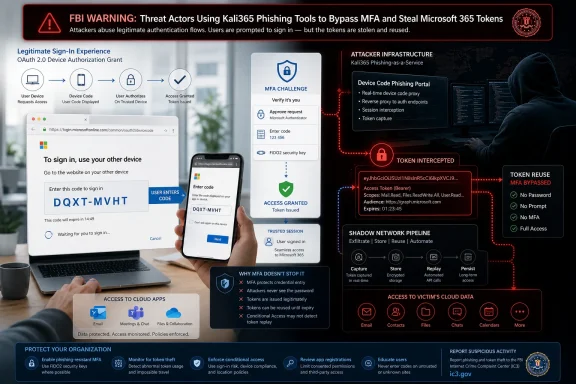
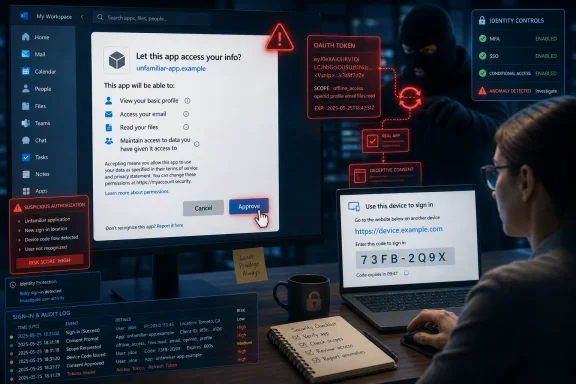
The FBI issued a May 21, 2026 public warning that a phishing-as-a-service platform called Kali365 is targeting Microsoft 365 accounts by abusing device-code authentication to capture OAuth tokens and bypass multi-factor authentication. That makes this less a story about one new phishing kit than about a brittle assumption in modern cloud security: that MFA, once deployed, is enough. Kali365 is dangerous because it turns a legitimate Microsoft workflow into an attacker’s front door. The practical lesson for WindowsForum readers is blunt: identity plumbing now needs the same hardening discipline once reserved for firewalls and endpoint agents.
For years, Microsoft 365 security advice has revolved around one clean message: turn on MFA. That advice is still correct, but Kali365 shows why it is no longer sufficient as a complete defense. The attacker does not need to steal the password if they can trick the user into authorizing a session that produces usable access tokens.
This is the part that makes device-code phishing so effective. The victim is not necessarily typing credentials into a fake Microsoft login page. In many cases, the page they visit is genuinely Microsoft’s own verification endpoint, which means the usual user-training reflexes — look for misspellings, check the domain, distrust crude clone pages — are less helpful than defenders would like.
The attack turns trust into the exploit. A user receives a message that appears to come from a familiar document-sharing or collaboration service, sees a code, and is told to enter it into a Microsoft page. If they comply, they may be approving the attacker’s device rather than their own.
That distinction matters because modern Microsoft 365 compromise is not just about inbox access. A successful token theft can expose Outlook mail, Teams conversations, OneDrive data, SharePoint material, and any downstream application the account is allowed to reach. For businesses, that means the attacker may be standing inside the collaboration fabric rather than merely reading email from the outside.
Device-code phishing itself is not a brand-new idea. Security researchers and incident responders have tracked abuse of OAuth device authorization flows before, including campaigns against Microsoft 365 tenants. What appears to be changing is the packaging: Kali365 reportedly combines device-code abuse with polished phishing lures, Telegram-based distribution, and real-time tracking that makes the workflow easier for operators.
That is the recurring story in cybercrime. A technique appears in targeted campaigns, matures in underground tooling, and eventually becomes a commodity service. Once that happens, defenders no longer need to worry only about sophisticated crews; they must prepare for opportunists who rent capability by the month.
The name Kali365 is also likely to cause some confusion. This is not about Kali Linux being installed on a user’s machine, and it is not a Microsoft product. It is a branded criminal service aimed at Microsoft 365 identity flows, and its success depends on abusing legitimate behavior rather than exploiting an unpatched Windows vulnerability.
In a legitimate scenario, a device displays a short code. The user goes to Microsoft’s verification page on a separate device, signs in, and enters the code. Microsoft then grants the original device access. It is a sensible usability compromise — until an attacker becomes the “original device.”
Kali365-style phishing flips the model. The attacker initiates the authentication flow and sends the victim the resulting code. The victim, believing they are completing a normal verification step, enters the code on Microsoft’s real site. From Microsoft’s perspective, the user has authenticated and approved the flow; from the attacker’s perspective, the user has just handed over an authorized session.
This is why the phrase MFA bypass can be both accurate and misleading. MFA is not necessarily being cryptographically broken. Instead, the user is being socially engineered into satisfying the authentication ceremony on behalf of the attacker. The MFA check may happen, but it protects the wrong session.
That distinction should shape the defensive response. Telling users to “never enter codes” is too broad because some organizations still rely on device-code sign-ins for legitimate hardware. Telling administrators to inventory, restrict, and monitor device-code usage is more realistic — and much closer to what the FBI is urging.
That is why token theft is so damaging. A password can be reset. A suspicious login can be challenged. But an access token may allow an attacker to operate inside a cloud environment in ways that look uncomfortably similar to normal user activity. The more privileged the account, the more valuable the token.
For sysadmins, this is not an abstract architectural point. A compromised Microsoft 365 account can be used to search mailboxes for invoices, reset workflows, observe internal projects, send trusted messages to colleagues, register persistence mechanisms where allowed, and pivot into data stores. The attacker does not need domain admin rights to cause serious harm.
The situation is especially uncomfortable for small and midsize organizations. Many have moved email, files, meetings, and identity into Microsoft’s cloud precisely to reduce infrastructure burden. But cloud consolidation also concentrates risk: one tricked user can expose far more than a single mailbox if tenant policies are permissive.
The first recommendation is to create a Conditional Access policy that blocks device-code flow for users, with tightly limited exceptions. This is the heart of the defense. If the organization does not need device-code authentication broadly, it should not be available broadly.
The second recommendation is to review who currently has access to device-code usage and confirm that every case is legitimate. This is the part many tenants will find messy. Years of incremental cloud adoption often leave behind exceptions, stale device patterns, and undocumented operational habits.
The third recommendation is to block the ability for users to transfer authentication from computers to mobile devices. That speaks to the broader risk of authentication handoff flows being abused when users are coached through steps they do not understand. In identity security, convenience features deserve the same suspicion administrators already apply to open inbound firewall rules.
The fourth recommendation is to exclude emergency access accounts to prevent lockouts. This is not a contradiction; it is operational realism. A policy that protects the tenant but strands administrators during an outage or misconfiguration can become its own incident.
Blocking device-code flow is an example of using Conditional Access as a guardrail against an entire class of abuse. Rather than trying to detect every malicious Kali365 email, the administrator limits whether the flow can be used at all. That is a stronger posture than relying on users to interpret every unexpected prompt correctly.
The hard part is that device-code flow is not inherently malicious. Some legitimate devices and workflows may depend on it. Conference-room devices, shared endpoints, developer tools, and operational edge cases can create pressure to leave the feature available “just in case.”
That is where many organizations will need to do real work. A good policy is not simply “block everything” or “allow everything.” It is a narrow allowance for known use cases, preferably scoped by users, device platforms, trusted locations, or other conditions that make abuse harder.
For enterprises, the policy conversation should involve identity teams, endpoint teams, collaboration administrators, and help desk staff. For smaller organizations, it may come down to an MSP or a single Microsoft 365 administrator asking a simpler question: do we actually use this flow anywhere? If the answer is no, the risk calculation becomes much easier.
The malicious part is the context, not necessarily the destination. The user is not being asked to log into an obvious fake portal. They are being asked to perform a legitimate Microsoft action at the wrong time, for the wrong device, under instructions supplied by an attacker.
This is why awareness training needs to change. “Do not enter your password on strange sites” remains useful, but it does not cover approval-based attacks. Users need to understand that codes, push approvals, QR codes, consent prompts, and device enrollment prompts can all be weapons when initiated by someone else.
A simple rule is more durable: if an email, chat message, or document tells you to enter a code into a Microsoft page and you did not initiate that sign-in, stop. That rule will not solve every case, but it maps better to the attack than generic phishing advice.
For defenders, the bigger problem is the combination of AI-written lures with service-style infrastructure. A polished email is more dangerous when it plugs into a backend that tracks victims, manages sessions, and guides operators through token capture. The email is only the bait; the platform is the fishing fleet.
That distinction matters because organizations sometimes over-index on content detection. They look for bad grammar, suspicious wording, or known malicious links. Those controls still matter, but they are least effective when the attacker can rapidly vary language and point the victim toward legitimate Microsoft endpoints.
The defensive center of gravity therefore shifts toward behavior. Was device-code flow used unexpectedly? Did a user authenticate from an unusual location? Did a new session appear that does not match the user’s normal pattern? Did mailbox rules, OAuth app consents, or session persistence artifacts change after the event? Those are the questions that survive when the lure itself keeps mutating.
For an individual user, the immediate advice is behavioral. Do not enter a Microsoft device code because an email tells you to. Do not approve sign-in prompts you did not initiate. Do not treat a real Microsoft page as proof that the request is legitimate.
If you suspect you complied with such a request, speed matters. Sign out of sessions where possible, change your password, review recent sign-in activity, check recovery methods, inspect mailbox forwarding rules, and look for unfamiliar devices or connected apps. Password changes alone may not be enough if an attacker has already obtained active tokens or established other forms of persistence.
For family administrators and power users, this is another reason to move away from casual trust in email links and toward explicit workflows. If someone shares a document, navigate to OneDrive or SharePoint through your normal route rather than following a surprise instruction chain. Convenience is often the attacker’s best camouflage.
The quality of that investigation depends heavily on logging maturity. Many smaller tenants do not retain enough detail for long enough, or they lack staff who regularly review identity events. That creates a window where a token-based compromise can be missed until the attacker sends more phishing from the compromised account or exfiltrates data.
Microsoft’s ecosystem offers multiple places to look, including Entra sign-in logs, audit logs, Defender portals, and workload-specific activity records. The tooling can be powerful, but it is only useful if someone has decided what normal looks like before the incident. Otherwise, every anomaly becomes a research project during a crisis.
Incident response should also include revocation steps. If an account is suspected of compromise, administrators should revoke sessions and refresh tokens, reset credentials, review MFA methods, remove suspicious app consents, check mailbox rules, and examine recent file activity. In token theft scenarios, simply asking the user to pick a new password can be a dangerously incomplete response.
But the gap between Microsoft’s available controls and customers’ actual configurations remains large. Many tenants have legacy exceptions, partial MFA coverage, weak monitoring, broad user consent settings, unmanaged devices, and administrators who are split across too many responsibilities. Attackers live in that gap.
Kali365 also illustrates a persistent tension in platform design. Features that reduce friction for legitimate users can create new paths for social engineering. Device-code flow is useful because it allows authentication across devices; it is risky for exactly the same reason.
This does not mean Microsoft should simply remove every convenience feature. It does mean the platform needs safer defaults, clearer tenant visibility, and more aggressive surfacing of high-risk authentication flows. If device-code flow is rarely needed by a tenant, administrators should not have to discover its risk profile only after a federal warning makes headlines.
That makes the security lesson broader than Microsoft 365. Any system that separates approval from context can be abused if users can be convinced to approve an action they do not understand. Push fatigue attacks, QR-code phishing, OAuth consent scams, malicious device enrollment, and device-code phishing all share this shape.
The practical response is to reduce the number of moments when users are asked to make high-stakes security decisions without context. A prompt that says “approve sign-in” is weaker than a system that verifies device compliance, location, application, flow type, and user risk before the prompt ever appears. Human judgment is valuable, but it should not be the primary enforcement layer.
For Windows administrators, that means identity policy belongs in the same operational category as patching, endpoint detection, backup testing, and privileged access management. It is not a one-time setup wizard. It is infrastructure.
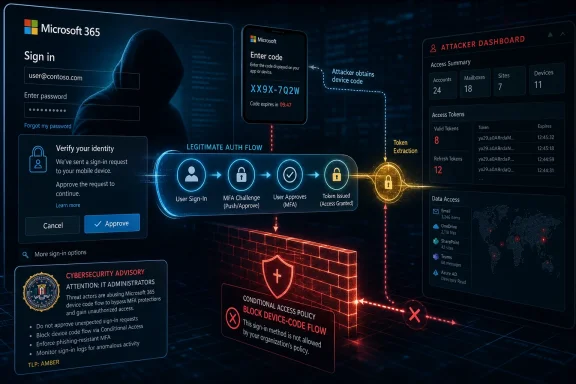 The Password Was Not the Prize
For years, Microsoft 365 security advice has revolved around one clean message: turn on MFA. That advice is still correct, but Kali365 shows why it is no longer sufficient as a complete defense. The attacker does not need to steal the password if they can trick the user into authorizing a session that produces usable access tokens.This is the part that makes device-code phishing so effective. The victim is not necessarily typing credentials into a fake Microsoft login page. In many cases, the page they visit is genuinely Microsoft’s own verification endpoint, which means the usual user-training reflexes — look for misspellings, check the domain, distrust crude clone pages — are less helpful than defenders would like.
The attack turns trust into the exploit. A user receives a message that appears to come from a familiar document-sharing or collaboration service, sees a code, and is told to enter it into a Microsoft page. If they comply, they may be approving the attacker’s device rather than their own.
That distinction matters because modern Microsoft 365 compromise is not just about inbox access. A successful token theft can expose Outlook mail, Teams conversations, OneDrive data, SharePoint material, and any downstream application the account is allowed to reach. For businesses, that means the attacker may be standing inside the collaboration fabric rather than merely reading email from the outside.
Kali365 Industrializes a Trick Defenders Already Feared
Kali365 is being described as a phishing-as-a-service platform, and that label is not marketing fluff. These platforms package infrastructure, templates, targeting controls, dashboards, and automation so that less skilled criminals can run campaigns that previously required more operational competence. The FBI’s warning that Kali365 lowers the barrier to entry is important because scale, not novelty, is often what turns a security technique into an enterprise problem.Device-code phishing itself is not a brand-new idea. Security researchers and incident responders have tracked abuse of OAuth device authorization flows before, including campaigns against Microsoft 365 tenants. What appears to be changing is the packaging: Kali365 reportedly combines device-code abuse with polished phishing lures, Telegram-based distribution, and real-time tracking that makes the workflow easier for operators.
That is the recurring story in cybercrime. A technique appears in targeted campaigns, matures in underground tooling, and eventually becomes a commodity service. Once that happens, defenders no longer need to worry only about sophisticated crews; they must prepare for opportunists who rent capability by the month.
The name Kali365 is also likely to cause some confusion. This is not about Kali Linux being installed on a user’s machine, and it is not a Microsoft product. It is a branded criminal service aimed at Microsoft 365 identity flows, and its success depends on abusing legitimate behavior rather than exploiting an unpatched Windows vulnerability.
The Real Attack Surface Is a Legitimate Login Flow
The device-code flow exists for a reason. It is designed for situations where a device has limited input capability or where signing in through a browser on another device is more convenient. Think televisions, conference-room systems, shared devices, or other hardware where typing a full password and completing MFA directly may be awkward.In a legitimate scenario, a device displays a short code. The user goes to Microsoft’s verification page on a separate device, signs in, and enters the code. Microsoft then grants the original device access. It is a sensible usability compromise — until an attacker becomes the “original device.”
Kali365-style phishing flips the model. The attacker initiates the authentication flow and sends the victim the resulting code. The victim, believing they are completing a normal verification step, enters the code on Microsoft’s real site. From Microsoft’s perspective, the user has authenticated and approved the flow; from the attacker’s perspective, the user has just handed over an authorized session.
This is why the phrase MFA bypass can be both accurate and misleading. MFA is not necessarily being cryptographically broken. Instead, the user is being socially engineered into satisfying the authentication ceremony on behalf of the attacker. The MFA check may happen, but it protects the wrong session.
That distinction should shape the defensive response. Telling users to “never enter codes” is too broad because some organizations still rely on device-code sign-ins for legitimate hardware. Telling administrators to inventory, restrict, and monitor device-code usage is more realistic — and much closer to what the FBI is urging.
Microsoft 365 Made Identity the New Perimeter
The old perimeter model assumed that the office network was inside and the internet was outside. Microsoft 365, Entra ID, Teams, SharePoint, OneDrive, Exchange Online, and third-party SaaS integrations have made that distinction increasingly theatrical. The user’s identity, conditional access posture, and session state are now the perimeter.That is why token theft is so damaging. A password can be reset. A suspicious login can be challenged. But an access token may allow an attacker to operate inside a cloud environment in ways that look uncomfortably similar to normal user activity. The more privileged the account, the more valuable the token.
For sysadmins, this is not an abstract architectural point. A compromised Microsoft 365 account can be used to search mailboxes for invoices, reset workflows, observe internal projects, send trusted messages to colleagues, register persistence mechanisms where allowed, and pivot into data stores. The attacker does not need domain admin rights to cause serious harm.
The situation is especially uncomfortable for small and midsize organizations. Many have moved email, files, meetings, and identity into Microsoft’s cloud precisely to reduce infrastructure burden. But cloud consolidation also concentrates risk: one tricked user can expose far more than a single mailbox if tenant policies are permissive.
The FBI’s Four Actions Are Really One Administrative Philosophy
The FBI’s recommendations focus on cutting off the abused path rather than merely warning users about the lure. That is the right emphasis. User education matters, but it is not a control plane; it is a last-mile friction layer that fails under pressure, fatigue, and plausible pretexts.The first recommendation is to create a Conditional Access policy that blocks device-code flow for users, with tightly limited exceptions. This is the heart of the defense. If the organization does not need device-code authentication broadly, it should not be available broadly.
The second recommendation is to review who currently has access to device-code usage and confirm that every case is legitimate. This is the part many tenants will find messy. Years of incremental cloud adoption often leave behind exceptions, stale device patterns, and undocumented operational habits.
The third recommendation is to block the ability for users to transfer authentication from computers to mobile devices. That speaks to the broader risk of authentication handoff flows being abused when users are coached through steps they do not understand. In identity security, convenience features deserve the same suspicion administrators already apply to open inbound firewall rules.
The fourth recommendation is to exclude emergency access accounts to prevent lockouts. This is not a contradiction; it is operational realism. A policy that protects the tenant but strands administrators during an outage or misconfiguration can become its own incident.
Conditional Access Becomes the Security Boundary
Conditional Access has become one of Microsoft 365’s most important security mechanisms because it lets administrators express risk decisions in policy. Who is signing in, from what device, from what location, to which application, using which authentication flow — these conditions now determine whether access should proceed.Blocking device-code flow is an example of using Conditional Access as a guardrail against an entire class of abuse. Rather than trying to detect every malicious Kali365 email, the administrator limits whether the flow can be used at all. That is a stronger posture than relying on users to interpret every unexpected prompt correctly.
The hard part is that device-code flow is not inherently malicious. Some legitimate devices and workflows may depend on it. Conference-room devices, shared endpoints, developer tools, and operational edge cases can create pressure to leave the feature available “just in case.”
That is where many organizations will need to do real work. A good policy is not simply “block everything” or “allow everything.” It is a narrow allowance for known use cases, preferably scoped by users, device platforms, trusted locations, or other conditions that make abuse harder.
For enterprises, the policy conversation should involve identity teams, endpoint teams, collaboration administrators, and help desk staff. For smaller organizations, it may come down to an MSP or a single Microsoft 365 administrator asking a simpler question: do we actually use this flow anywhere? If the answer is no, the risk calculation becomes much easier.
The User Sees Microsoft, the Attacker Sees a Session
Kali365 is particularly treacherous because it exploits a psychological shortcut: if the page is real, the action must be safe. That shortcut is deeply embedded in security training. Users have been taught to look for the lock icon, the right domain, and familiar branding, all of which can be present in a device-code attack.The malicious part is the context, not necessarily the destination. The user is not being asked to log into an obvious fake portal. They are being asked to perform a legitimate Microsoft action at the wrong time, for the wrong device, under instructions supplied by an attacker.
This is why awareness training needs to change. “Do not enter your password on strange sites” remains useful, but it does not cover approval-based attacks. Users need to understand that codes, push approvals, QR codes, consent prompts, and device enrollment prompts can all be weapons when initiated by someone else.
A simple rule is more durable: if an email, chat message, or document tells you to enter a code into a Microsoft page and you did not initiate that sign-in, stop. That rule will not solve every case, but it maps better to the attack than generic phishing advice.
AI Makes the Lure Better, but Automation Makes It Scale
Reports around Kali365 mention AI-generated phishing lures, and that detail will attract attention. It should, but not because AI magically makes phishing unstoppable. The more important point is that AI helps attackers produce more plausible messages faster, in more styles, and with fewer language errors.For defenders, the bigger problem is the combination of AI-written lures with service-style infrastructure. A polished email is more dangerous when it plugs into a backend that tracks victims, manages sessions, and guides operators through token capture. The email is only the bait; the platform is the fishing fleet.
That distinction matters because organizations sometimes over-index on content detection. They look for bad grammar, suspicious wording, or known malicious links. Those controls still matter, but they are least effective when the attacker can rapidly vary language and point the victim toward legitimate Microsoft endpoints.
The defensive center of gravity therefore shifts toward behavior. Was device-code flow used unexpectedly? Did a user authenticate from an unusual location? Did a new session appear that does not match the user’s normal pattern? Did mailbox rules, OAuth app consents, or session persistence artifacts change after the event? Those are the questions that survive when the lure itself keeps mutating.
The Consumer Advice Is Simpler, but Less Complete
The FBI warning is especially relevant to businesses, schools, government offices, and managed Microsoft 365 tenants, but personal Microsoft accounts are not immune to the broader pattern. Consumers may encounter similar social engineering that asks them to enter codes, approve prompts, or complete authentication steps they did not initiate. The difference is that consumers usually lack Conditional Access and tenant-wide logging.For an individual user, the immediate advice is behavioral. Do not enter a Microsoft device code because an email tells you to. Do not approve sign-in prompts you did not initiate. Do not treat a real Microsoft page as proof that the request is legitimate.
If you suspect you complied with such a request, speed matters. Sign out of sessions where possible, change your password, review recent sign-in activity, check recovery methods, inspect mailbox forwarding rules, and look for unfamiliar devices or connected apps. Password changes alone may not be enough if an attacker has already obtained active tokens or established other forms of persistence.
For family administrators and power users, this is another reason to move away from casual trust in email links and toward explicit workflows. If someone shares a document, navigate to OneDrive or SharePoint through your normal route rather than following a surprise instruction chain. Convenience is often the attacker’s best camouflage.
Administrators Need Logs, Not Just Policies
Blocking risky flows is the preventive move, but detection still matters because no policy rollout is perfect. Organizations should look for device-code authentication events, unfamiliar devices, unusual locations, impossible travel signals, suspicious user agents, and changes that follow shortly after a questionable sign-in. The attacker’s first move may be identity access, but their second move often leaves traces in Exchange Online, Teams, OneDrive, or Entra ID.The quality of that investigation depends heavily on logging maturity. Many smaller tenants do not retain enough detail for long enough, or they lack staff who regularly review identity events. That creates a window where a token-based compromise can be missed until the attacker sends more phishing from the compromised account or exfiltrates data.
Microsoft’s ecosystem offers multiple places to look, including Entra sign-in logs, audit logs, Defender portals, and workload-specific activity records. The tooling can be powerful, but it is only useful if someone has decided what normal looks like before the incident. Otherwise, every anomaly becomes a research project during a crisis.
Incident response should also include revocation steps. If an account is suspected of compromise, administrators should revoke sessions and refresh tokens, reset credentials, review MFA methods, remove suspicious app consents, check mailbox rules, and examine recent file activity. In token theft scenarios, simply asking the user to pick a new password can be a dangerously incomplete response.
Microsoft’s Security Model Is Stronger Than Its Defaults in the Real World
Microsoft has spent years pushing customers toward MFA, Conditional Access, passwordless authentication, risk-based sign-ins, and Zero Trust language. Those investments matter. A well-managed Microsoft 365 tenant today can be significantly more resilient than the average on-premises mail server era ever was.But the gap between Microsoft’s available controls and customers’ actual configurations remains large. Many tenants have legacy exceptions, partial MFA coverage, weak monitoring, broad user consent settings, unmanaged devices, and administrators who are split across too many responsibilities. Attackers live in that gap.
Kali365 also illustrates a persistent tension in platform design. Features that reduce friction for legitimate users can create new paths for social engineering. Device-code flow is useful because it allows authentication across devices; it is risky for exactly the same reason.
This does not mean Microsoft should simply remove every convenience feature. It does mean the platform needs safer defaults, clearer tenant visibility, and more aggressive surfacing of high-risk authentication flows. If device-code flow is rarely needed by a tenant, administrators should not have to discover its risk profile only after a federal warning makes headlines.
The Security Lesson Is Uncomfortable but Familiar
The industry keeps relearning that authentication is not a single event. It is a chain of decisions involving the user, the device, the application, the network, the token, and the policy engine. Kali365 attacks the chain by persuading the user to bless the wrong device.That makes the security lesson broader than Microsoft 365. Any system that separates approval from context can be abused if users can be convinced to approve an action they do not understand. Push fatigue attacks, QR-code phishing, OAuth consent scams, malicious device enrollment, and device-code phishing all share this shape.
The practical response is to reduce the number of moments when users are asked to make high-stakes security decisions without context. A prompt that says “approve sign-in” is weaker than a system that verifies device compliance, location, application, flow type, and user risk before the prompt ever appears. Human judgment is valuable, but it should not be the primary enforcement layer.
For Windows administrators, that means identity policy belongs in the same operational category as patching, endpoint detection, backup testing, and privileged access management. It is not a one-time setup wizard. It is infrastructure.
The Four-Step Warning Boils Down to Tenant Discipline
The FBI’s guidance is short, but it points to a larger program of Microsoft 365 hygiene. Organizations that treat the warning as a quick checkbox exercise may reduce one risk while leaving the next token-abuse campaign plenty of room. The better move is to use Kali365 as a forcing function to review how authentication flows are allowed, monitored, and retired.- Organizations that do not need device-code authentication should block it with Conditional Access rather than relying on users to spot every malicious lure.
- Any exception for device-code flow should be documented, narrowly scoped, and tied to a real business or device requirement.
- Administrators should review sign-in and audit logs for unexpected device-code activity, unfamiliar sessions, and changes made after suspicious authentication events.
- Users should be trained that a real Microsoft page can still be part of an attack if the code or approval request came from an unsolicited message.
- Suspected compromise should trigger session revocation, token invalidation, MFA-method review, mailbox-rule inspection, and connected-app cleanup, not just a password reset.
References
- Primary source: UNILAD
Published: 2026-06-01T07:22:09.721573
FBI issues critical hack warning to Microsoft users - and wants them to do four specific things
A new hacking tool is being sold on Telegram and uses AI to make its attacks more convincingwww.unilad.com - Related coverage: techradar.com
FBI warns of Kali phishing scam hitting Microsoft OAuth tokens — warns 'Kali365 lowers the barrier of entry, providing less-technical attackers access to AI-generated phishing lures' | TechRadar
A new phishing kit is being offered on Telegramwww.techradar.com - Related coverage: itpro.com
FBI warns Microsoft 365 users about another phishing as a service attack – here's how to avoid it | IT Pro
Kali365 platform is serious enough to garner a warning from the FBIwww.itpro.com - Official source: learn.microsoft.com
Authentication flows as a condition in Conditional Access policy - Microsoft Entra ID | Microsoft Learn
Learn how authentication flows provide a seamless experience across all application and device typeslearn.microsoft.com - Related coverage: techrepublic.com
FBI Warns: ‘Kali365’ Phishing Service Targets Microsoft 365 Accounts
The FBI warned that Kali365 can hijack Microsoft 365 accounts by abusing device code authentication and capturing OAuth tokens.www.techrepublic.com
- Official source: microsoft.com
Inside an AI‑enabled device code phishing campaign | Microsoft Security Blog
A new wave of device code phishing shows how threat actors are scaling account compromise using AI and end‑to‑end automation. This campaign goes beyond traditional phishing by generating live authentication codes on demand, enabling higher success rates and sustained post‑compromise access.www.microsoft.com
- Related coverage: cybersecuritydive.com
FBI warns about PhaaS platform used to access Microsoft 365 environments | Cybersecurity Dive
Device code phishing enabled hackers to bypass multifactor authentication without credentials.www.cybersecuritydive.com
- Related coverage: thecybersignal.com
FBI Warns of Kali365 Phishing Kit Stealing Microsoft 365 Tokens
The FBI's IC3 warned of Kali365, a Telegram-sold phishing kit that runs device-code phishing to steal Microsoft 365 OAuth tokens after victims pass MFA. www.thecybersignal.com
- Related coverage: teufelswerk.net
FBI warnt vor „Kali365“: Neue Phishing-Plattform umgeht Multi-Faktor-Authentifizierung in Microsoft 365
Das Federal Bureau of Investigation (FBI) hat am 21. Mai 2026 eine öffentliche Sicherheitswarnung zu einer neuen „Phishing-as-a-Service“-Plattform namens teufelswerk.net
- Related coverage: redmondmag.com
FBI Urges Microsoft 365 Defenders To Watch for Kali365 Phishing Attacks -- Redmondmag.com
The FBI is warning orgs about Kali365, a phishing-as-a-service kit that can help attackers get around multifactor authentication protections in Microsoft 365 environments by stealing access tokens instead of passwords.redmondmag.com - Related coverage: safebrowz.com
FBI Kali365 Warning 2026: Why OAuth Device-Code Phishing Slips Past MFA | SafeBrowz
The FBI's May 2026 PSA260521 advisory on Kali365 phishing-as-a-service is a watershed moment for Microsoft 365 security. SafeBrowz unpacks the OAuth device-code flow abuse, why MFA does not stop it, and how our 3-layer detection engine catches the landing pages.safebrowz.com - Related coverage: consumeraffairs.com
- Official source: download.microsoft.com
- Related coverage: jmu.edu
- Official source: techcommunity.microsoft.com