

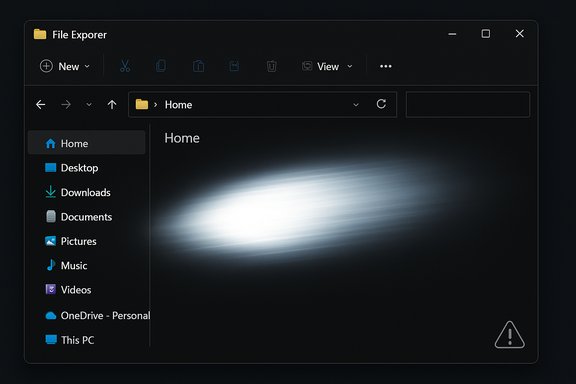
Microsoft shipped an optional Windows 11 preview (KB5070311) intended to finally finish the long‑running work of making dark mode consistent across File Explorer — and for some users it instead produced a literal, momentary "flashbang": File Explorer can briefly display a bright white screen when opened or when certain Explorer UI elements change while the system is set to Dark mode.
Windows 11's dark theme has been an incremental project: modern Fluent and WinUI surfaces adopted dark palettes early, but many legacy Win32 dialog flows and Explorer surfaces continued to default to bright backgrounds, producing jarring luminance jumps for users who prefer the dark theme. KB5070311, released as a non‑security preview cumulative on December 1, 2025, was explicitly crafted to extend dark styling into those legacy areas — copy/move/delete dialogs, progress bars, chart views, and confirmation or error dialogs — with the goal of reducing contrast shocks when performing common file operations. The package was paired with a servicing stack update and updates specific OS builds (26100.7309 and 26200.7309 for affected channels).
The irony is that the preview's advertised benefit — more consistent dark mode in File Explorer — is the very area that produced the new regression: in certain conditions, a near‑full window white flash can occur before the dark UI finishes rendering. Microsoft has documented the behavior in the update's Known Issues and stated engineers are working on a fix, while independent outlets and community reproductions corroborated the symptom.
For power users and IT administrators, the immediate posture is conservative: treat optional previews as test candidates, pilot broadly and cautiously, and prefer avoidance for production fleets until the Known Issue is cleared. For Microsoft, the incident is a timely reminder to expand pixel‑level visual regression testing, include accessibility thresholds in automated flighting, and coordinate closely with GPU vendors and OEMs when changing paint or composition behavior in the shell.
When the fix arrives, the net result should be positive: a genuinely consistent dark mode across File Explorer and fewer jarring luminance shocks for users who work in dim environments. Until then, the lesson is simple — modernizing a decades‑old platform requires not just ambition but an engineering rhythm that protects existing usability and accessibility expectations while delivering new polish.
Source: Tom's Hardware https://www.tomshardware.com/tech-i...ng-preview-build-stuns-unsuspecting-eyeballs/
 Background
Windows 11's dark theme has been an incremental project: modern Fluent and WinUI surfaces adopted dark palettes early, but many legacy Win32 dialog flows and Explorer surfaces continued to default to bright backgrounds, producing jarring luminance jumps for users who prefer the dark theme. KB5070311, released as a non‑security preview cumulative on December 1, 2025, was explicitly crafted to extend dark styling into those legacy areas — copy/move/delete dialogs, progress bars, chart views, and confirmation or error dialogs — with the goal of reducing contrast shocks when performing common file operations. The package was paired with a servicing stack update and updates specific OS builds (26100.7309 and 26200.7309 for affected channels).The irony is that the preview's advertised benefit — more consistent dark mode in File Explorer — is the very area that produced the new regression: in certain conditions, a near‑full window white flash can occur before the dark UI finishes rendering. Microsoft has documented the behavior in the update's Known Issues and stated engineers are working on a fix, while independent outlets and community reproductions corroborated the symptom.
What the update promised — and what it delivered
Key intended improvements in KB5070311
- Expanded dark theme coverage for legacy File Explorer dialogs and progress surfaces (copy/move/delete dialogs, confirmation prompts, chart views).
- Consistency refinements to reduce abrupt white-to-dark transitions in Explorer workflows.
- Context menu adjustments, consolidating actions like Share, Copy, and Move to improve discoverability.
- New and improved settings and hardware support, including the Full‑Screen Experience for compatible handhelds, haptic‑enabled pen interactions that respond to UI actions, and a new Mobile Devices setting for Bluetooth management.
- Several quality‑of‑life and accessibility adjustments, such as moving keyboard character repeat/delay and cursor blink rate to Settings, and a Quick Machine Recovery feature intended to run a one‑time scan and surface recovery options.
The regression: File Explorer white flash
The symptom is simple, visible, and reproducible under a set of common actions when the system theme is set to Dark:- Opening File Explorer (including launching directly to Home or Gallery).
- Creating a new tab in Explorer.
- Navigating to or from Home or Gallery.
- Turning the Details pane on or off.
- Selecting “More details” while copying files (expanding copy/move dialogs).
Technical anatomy — why a white flash happens when you try to fix white UI
Extending dark mode into long‑standing Win32/COM code paths is not a matter of flipping color variables alone. Explorer is a composite of modern XAML/WinUI surfaces and legacy Win32 dialogs; changing theme behavior can influence:- Window creation and paint order: New theming may shift when child windows or dialogs are created relative to their parent frames.
- Early default background exposure: If the system draws a default background (white) before the themed controls fully initialize and paint, that default becomes briefly visible.
- Compositor and driver timing: Desktop Window Manager (DWM), GPU drivers, and compositor handoffs determine when frames are presented. If the themed content arrives later than the default clear color, a flash appears.
- Third‑party injectors or shell extensions: Browser‑style or OEM skinning, shell extensions, or accessibility overlays can change rendering timing in unpredictable ways.
Accessibility and operational risk
This regression is not a security vulnerability nor a data integrity issue — it is a visual accessibility and user experience problem with measurable operational impact.- Photosensitive users: Sudden bright flashes can trigger discomfort or seizures in photosensitive individuals. Even a short blink of full white on a dark screen is more than cosmetic for some users.
- Helpdesk load: Administrators and support teams may see an uptick in tickets from confused or alarmed users, especially those on enterprise hardware with sensitive input devices or specialized displays.
- Trust erosion: Visible regressions like this erode confidence in updates; when UI changes intended to improve comfort end up producing a jarring artifact, users become reluctant to adopt future previews or rapid feature updates.
- Testing gaps: The incident highlights gaps in automated visual‑regression testing: theme and luminance checks, accessibility gating, and vendor driver coordination are critical but evidently under‑exercised for timing‑sensitive paint changes.
Practical guidance — what users and IT should do right now
Home users and enthusiasts
- If you value stability and a consistent dark experience, do not install this optional preview on primary machines.
- If you've already installed KB5070311 and the flash is unacceptable:
- Switch to Light mode as a temporary workaround — the white flash is tied to Dark mode and does not occur when Light mode is active.
- Uninstall the preview LCU via Settings → Windows Update → Update history → Uninstall updates. Note: the associated Servicing Stack Update (SSU) may not be removable and uninstalling combined packages should be done carefully.
- If you use advanced tools, DISM can remove LCU components, but proceed only if you are comfortable with manual servicing commands and understand SSU constraints.
IT administrators and device managers
- Treat KB5070311 as a pilot preview — do not push it to broad production rings.
- Create a representative pilot ring that includes hardware diversity, OLED and HDR displays, and devices with common GPU driver versions used across your fleet.
- Block or defer optional previews in production until Microsoft confirms a remediation.
- Prepare rollback instructions and update support scripts to remove the LCU portion if needed; document the potential non‑removability of the SSU.
- Collect telemetry from pilot devices, include short screen recordings when filing Feedback Hub reports, and escalate telemetry to Microsoft if the issue affects accessibility‑sensitive users.
What Microsoft could and should do to fix this (engineer’s perspective)
A robust fix needs to address timing and composition guarantees across diverse stacks. Practical remediation steps might include:- Ensure an explicit dark background paint early in the window initialization sequence so that the compositor never sees an unthemed default background color.
- Delay presenting frames until themed controls are painted — hold the first composited frame until the primary content has fully rendered.
- Add pixel‑level visual regression tests that monitor luminance changes and flag sudden spikes beyond accessibility thresholds.
- Coordinate with GPU vendors and OEMs to validate the timing scenario across driver versions and custom compositors.
- Add accessibility gating in flighting: if telemetry indicates a spike in brightness or complaint volume, roll back dark theme activation for the affected cohort until a fix is validated.
The rest of KB5070311 — not all bad news
It’s important to separate the regression from the remainder of the update package, which includes several beneficial changes worth noting:- Full‑Screen Experience for handheld devices is generally available with KB5070311, improving gaming and media workflows on compatible handheld PCs.
- Haptic‑enabled pens now respond to Windows UI actions on supported devices, offering finer tactile feedback for pen users.
- Expanded keyboard customization: compatible backlit keyboards gain more configurability, and advanced keyboard repeat/delay and cursor blink rate settings have been moved into Settings for easier access.
- Quick Machine Recovery can run a one‑time scan to try to fix basic install issues or point users to recovery options — a potentially useful first‑line recovery tool for enthusiasts and IT support.
- Windows Share improvements now support multi‑file sharing in some contexts, and a fix for a gaming bug that caused unsupported‑graphics errors in certain games has been included.
Critical analysis — strengths, failures, and what this says about modern Windows development
Notable strengths
- Ambition to finally unify dark mode across legacy and modern surfaces is overdue and, when implemented correctly, will significantly improve ergonomics for low‑light users, creators, and those sensitive to abrupt contrast changes.
- Feature breadth in the preview shows Microsoft is iterating on hardware‑adjacent experiences (handheld full‑screen, pen haptics) and on device management (Mobile Devices Bluetooth control), which are meaningful for specific user cohorts.
- Transparent acknowledgement: Microsoft documented the issue in the preview’s Known Issues and signaled that a fix is in progress — a necessary step for enterprise planning.
Notable weaknesses and risks
- Regression in the UI path with accessibility consequences: shipping a paint/timing regression that causes a bright flash is a serious user‑impact oversight, particularly for photosensitive users.
- Insufficient automated visual testing: the problem suggests lack of pixel‑level, luminance‑sensitive regression tests in the flighting pipeline, or insufficient coverage across drivers and OEM stacks.
- Staging paradox: Microsoft’s model of shipping binaries but gating activation server‑side reduces risk but can still expose users who opt into previews; a fix must be fast and well‑validated to avoid undermining trust.
- Perception problem: for power users and IT, visible regressions in basic workflows increase hesitancy to adopt preview builds, slowing feedback loops that Microsoft depends on for iterative improvements.
Recommendations and checklist
- If you manage devices:
- Pilot KB5070311 only on representative devices.
- Communicate with support teams and update user guidance to include the temporary workaround (switch to Light mode or uninstall LCU).
- Collect screen recordings and telemetry for Microsoft via Feedback Hub when reproing the flash.
- If you’re a home user who prefers stability:
- Avoid optional preview cumulative updates on daily drivers.
- If you installed it and the flash is intolerable, revert to Light mode or use the uninstall path for the LCU.
- If you’re an enthusiast testing features:
- Use non‑critical machines, keep recovery media, and be prepared to roll back using standard update uninstall steps or DISM if comfortable.
- Open Settings → Windows Update → Update history.
- Select "Uninstall updates".
- Locate the KB5070311 LCU entry and uninstall.
- Reboot and confirm Explorer behavior while in Dark mode.
- If uninstall isn't possible or the SSU is present and non‑removable, switch to Light mode as a temporary mitigation.
Final thoughts
KB5070311 is a classic example of software tradeoffs at scale: an update aiming to improve accessibility and polish introduced a timing‑sensitive regression that has real user impact. The good news is that Microsoft documented the issue and committed to a fix; the less encouraging news is that a regression of this sort exposes gaps in testing and gating for theme and luminance changes.For power users and IT administrators, the immediate posture is conservative: treat optional previews as test candidates, pilot broadly and cautiously, and prefer avoidance for production fleets until the Known Issue is cleared. For Microsoft, the incident is a timely reminder to expand pixel‑level visual regression testing, include accessibility thresholds in automated flighting, and coordinate closely with GPU vendors and OEMs when changing paint or composition behavior in the shell.
When the fix arrives, the net result should be positive: a genuinely consistent dark mode across File Explorer and fewer jarring luminance shocks for users who work in dim environments. Until then, the lesson is simple — modernizing a decades‑old platform requires not just ambition but an engineering rhythm that protects existing usability and accessibility expectations while delivering new polish.
Source: Tom's Hardware https://www.tomshardware.com/tech-i...ng-preview-build-stuns-unsuspecting-eyeballs/
