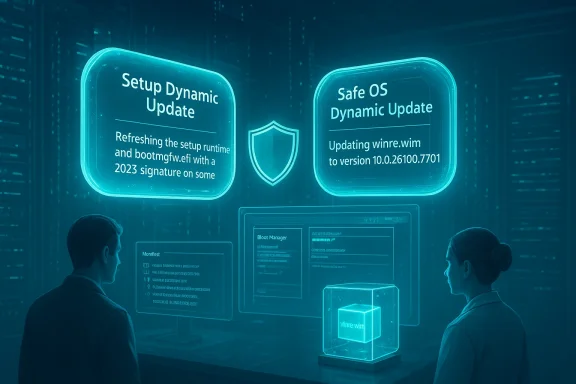
Microsoft’s KB5074110, published on January 29, 2026, is a targeted Setup Dynamic Update for Windows 11, versions 24H2 and 25H2 (and Windows Server 2025) that refreshes the tiny but critical Setup runtime and related binaries used during feature upgrades, media-based installs, and recovery operations — and it comes with specific Secure Boot guidance that makes cautious rollout and image verification mandatory for many organizations.
Dynamic updates occupy a special place in Windows servicing: they are small, surgical packages meant to update only the binaries that Windows Setup and the Windows Recovery Environment (WinRE, also called Safe OS) rely on when the system is being upgraded, reset, or repaired. Unlike Latest Cumulative Updates (LCUs), dynamic updates are not intended to change user-facing features or deliver broad security fixes; their purpose is to ensure installer and recovery flows remain compatible with evolving firmware, drivers, and the latest LCUs.
There are two closely related families administrators need to understand:
Key operational facts:
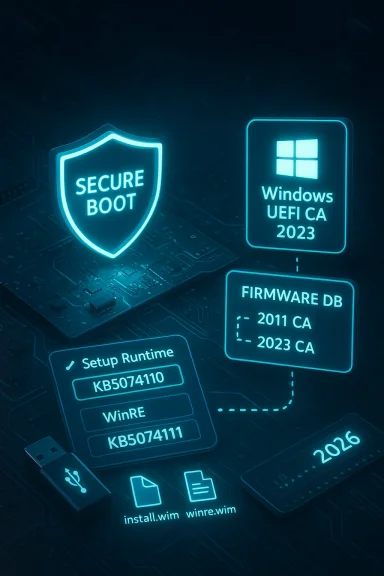
Microsoft also documented an upcoming Secure Boot certificate timeline — administrators are explicitly warned to audit UEFI DB contents and prepare for certificate rollouts (notably a CA update in mid‑2026 is referenced in guidance). Those certificate lifecycle events, combined with KB5074110’s boot manager replacement behavior, create a narrow but high‑impact failure mode if DB operations are performed without prepared recovery media.
Because of this confluence of factors, KB5074110 should not be treated as a trivial "install everywhere immediately" package in enterprise fleets.
KB5074110 is an example of the quiet but consequential plumbing work that keeps Windows feature upgrades and recovery flows reliable. It’s small, verifiable, and necessary — but not risk‑free. Treat it like image hygiene with a safety harness: validate, prepare, pilot, and keep golden images ready.
Source: Microsoft Support KB5074110: Setup Dynamic Update for Windows 11, version 24H2 and 25H2: January 29, 2026 - Microsoft Support
 Background
Dynamic updates occupy a special place in Windows servicing: they are small, surgical packages meant to update only the binaries that Windows Setup and the Windows Recovery Environment (WinRE, also called Safe OS) rely on when the system is being upgraded, reset, or repaired. Unlike Latest Cumulative Updates (LCUs), dynamic updates are not intended to change user-facing features or deliver broad security fixes; their purpose is to ensure installer and recovery flows remain compatible with evolving firmware, drivers, and the latest LCUs.There are two closely related families administrators need to understand:
- Setup Dynamic Updates — refresh the Setup runtime (Appraiser, migration DLLs, SetupPlatform bits) used during feature upgrades and offline media installs.
- Safe OS / WinRE Dynamic Updates — refresh the WinRE payload (winre.wim) and a compact set of pre-boot drivers and orchestration binaries used for Reset this PC, Automatic Repair and cloud reinstall flows.
What KB5074110 actually does
Scope and purpose
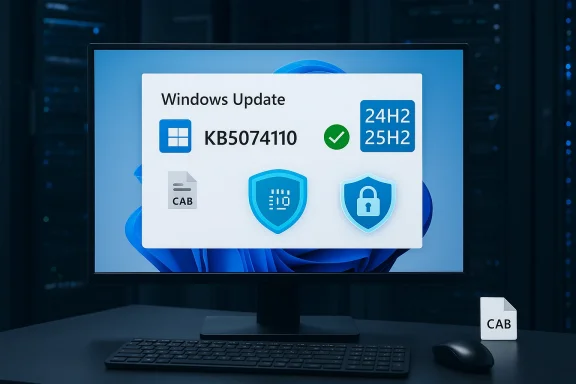
KB5074110 targets:- Windows 11, version 24H2 (all editions)
- Windows 11, version 25H2 (all editions)
- Windows Server 2025 (administrative notes identify distinct KB IDs for server vs. client servicing in January 2026).
Notable changes inside the package
Microsoft’s published manifest lists specific files and versions that the CAB replaces or injects into WinRE/install images. Representative entries reported in the KB manifest include:- Appraiser.dll — updated to a January 2026 file version in the 10.0.26100.x range.
- A collection of SetupPlatform and MediaSetupUIMgr resource files and related DLLs carrying early‑January 2026 timestamps.
Secure Boot and boot manager behaviour
Crucially, KB5074110 performs a conditional change to the pre-boot boot manager: on devices that already include Microsoft’s UEFI CA 2023 certificate in their Secure Boot Signature Database (DB), the package will replace the older (2011-signed) bootmgfw.efi with a 2023-signed boot manager binary. Microsoft explicitly warns that resetting the DB or toggling Secure Boot on devices that received the new boot manager may trigger Secure Boot violations, and it strongly recommends creating Secure Boot recovery media before making any DB changes.Why this matters to administrators and imaging teams
Dynamic updates are invisible during normal day-to-day operations but come into play during the single most critical moments: upgrades and recovery. A stale Setup runtime or mismatched WinRE image can produce a wide variety of problems — from misclassification of upgrade compatibility (blocking otherwise-supported upgrades) to outright failure of Reset this PC, Automatic Repair, cloud reinstall, or WinRE-based BitLocker recovery flows. Because KB5074110 updates the exact code paths used in those scenarios, applying it is both beneficial and operationally consequential.Key operational facts:
- The update is distributed via Windows Update, WSUS, and the Microsoft Update Catalog (standalone CAB for image injection). Microsoft calls out the Update Catalog as the place to download the standalone package for offline injection.
- In many cases Safe OS/WinRE dynamic updates that are applied into a WIM are non-removable from that image; rollback typically requires restoring a prior golden image or rebuilding the media. That permanence increases both value and operational cost of mistakes.
- No host restart is generally required for the on-device WinRE image update to be written, but the updated files are used only when WinRE runs. Verification via reagentc /info and DISM inspection is possible and recommended.
Risk context: January 2026 patching and Secure Boot timing
January’s Patch Tuesday cycle earlier in the month included several LCUs that produced notable real-world regressions — boot failures with UNMOUNTABLE_BOOT_VOLUME symptoms, unexpected restarts, Remote Desktop authentication issues, and driver removals for legacy hardware. Microsoft acknowledged and issued follow-up corrections during the month. That backdrop matters because KB5074110 touches the same setup and pre-boot chains; even though the dynamic update is narrowly scoped, interactions between LCUs, dynamic updates, firmware, and driver changes can reveal latent fragility in the upgrade and recovery flow.Microsoft also documented an upcoming Secure Boot certificate timeline — administrators are explicitly warned to audit UEFI DB contents and prepare for certificate rollouts (notably a CA update in mid‑2026 is referenced in guidance). Those certificate lifecycle events, combined with KB5074110’s boot manager replacement behavior, create a narrow but high‑impact failure mode if DB operations are performed without prepared recovery media.
Because of this confluence of factors, KB5074110 should not be treated as a trivial "install everywhere immediately" package in enterprise fleets.
Recommended operational playbook — step-by-step
Below is a practical, prioritized checklist to adopt KB5074110 safely. It’s written for imaging teams, desktop engineers, and SCCM/Intune administrators who control large, heterogeneous fleets.- Inventory & risk triage
- Identify devices with custom Secure Boot configurations, partner CA certs, or non-standard UEFI DB entries.
- Flag systems that previously experienced January regressions or that rely on legacy hardware/drivers removed by recent LCUs. Those are high-risk targets for careful testing.
- Obtain the standalone CAB
- Download the KB5074110 standalone CAB from the Microsoft Update Catalog and add it to your WSUS/SCCM content library for controlled deployment. Microsoft explicitly points administrators to the Catalog for offline packages.
- Build a controlled test matrix
- Assemble representative hardware across vendors, firmware versions, BitLocker/TPM pairings, and any machines with custom Secure Boot DBs.
- Include Copilot+ hardware or NPU‑accelerated devices where applicable (dynamic updates for pre-boot flows matter on new hardware families).
- Inject and verify WinRE/Setup changes (concrete DISM steps)
- Mount your offline WIM: DISM /Mount-Wim /WimFile:C:\images\install.wim /index:1 /MountDir:C:\wimmount
- Query updated file info: DISM /Image:C:\wimmount /Get-FileInfo /FilePath:\Windows\System32\Appraiser.dll
- Unmount and commit: DISM /Unmount-Wim /MountDir:C:\wimmount /Commit
- On a test machine, verify on-device WinRE version using reagentc /info and Microsoft’s verification scripts where available. Microsoft has provided helper tooling with other Safe OS DUs; adapt those checks to confirm the manifest versions match your target.
- Build Secure Boot recovery media now
- Microsoft explicitly recommends creating recovery media that is able to address Secure Boot violations. Do this before making any Secure Boot DB changes or toggles on systems that will receive the update. Treat this as mandatory for devices with non-default DB contents.
- Test real recovery flows
- Execute Reset this PC (local and cloud), Automatic Repair, and BitLocker unlock scenarios inside WinRE on each hardware family you support.
- Confirm USB keyboard/mouse, storage drivers, and network stacks behave inside WinRE on test platforms. Keep telemetry and help-desk scripts ready to capture failure symptoms.
- Pilot and staged rollout
- Phase 0 — lab validation (10–50 devices).
- Phase 1 — limited production ring for critical imaging/build servers.
- Phase 2 — broader rollouts using controlled channels (SCCM/Update Rings), delaying automatic Windows Update exposure for sensitive groups.
- Maintain golden images and rollback plans
- Because WinRE and some Safe OS dynamic updates are image-applied and non-removable, keep validated pre-update golden images for rapid rollback if necessary. Restoring older images is often the only practical large-scale rollback.
Troubleshooting highlights and limitations
- Non-removable image changes: If you inject a Safe OS DU into a WIM and later experience regressions, undoing that change at scale is expensive; restore an older gold image or rebuild media. This is not a hypothetical — Microsoft’s guidance and operational experience indicate image permanence is real.
- Secure Boot DB surprises: Environments that routinely clear or reset the DB, or that include partner CA certificates, are particularly exposed. After the boot manager replacement, toggling Secure Boot can provoke a secure-boot violation, potentially leaving devices unbootable until recovery media is used.
- Interactions with January LCUs: Although KB5074110 is not an LCU, it sits inside the same servicing ecosystem. Systems that already had fragility after January cumulative updates should be treated as higher risk — delay automatic deployment until you verify the LCU + DU combination in your environment. Independent reporting and the patch timeline in January 2026 showed that even small interactions can cause outsized user impact.
- Verification tooling variability: Microsoft publishes helper scripts and manifests with each dynamic update family, but exact script names and locations vary. If you rely on a specific Microsoft helper script referenced in older DUs, double-check that the January 29, 2026 KB includes or references the equivalent toolset for KB5074110. When in doubt, verify using DISM and reagentc primitives.
Strengths and benefits
- Targeted, low-bandwidth fixes — Dynamic updates like KB5074110 are compact and focused, making them easy to distribute across constrained networks or include in offline image maintenance workflows. They let you update frozen install.wim or winre.wim images without rebuilding entire ISOs.
- Explicit verifiability — Microsoft publishes file manifests and expected file versions for these packages; administrators can verify that Appraiser.dll and other files match the manifest before trusting refreshed images. This helps avoid surprise mismatches during upgrades.
- Necessary for modern hardware — Firmware and driver changes on new device families (including Copilot+ and NPU-enabled machines) require fresh Setup and WinRE runtimes to ensure consistent recovery behavior. Refreshing these components reduces the likelihood of upgrade and reset failures on new hardware.
Where to be cautious — the tradeoffs
- High-impact failure surface — Because the update touches boot and recovery chains, mistakes can strand devices. The combination of Secure Boot changes and the permanent nature of image-applied updates increases operational risk.
- Rollback friction — Undoing an injected Safe OS DU in a WIM is not a simple uninstall; it often requires restoring golden images, which is time-consuming for large fleets. Keep rollback plans and validated images accessible.
- Certificate and firmware timing — Administrative windows that include Secure Boot certificate rollouts (Microsoft noted certificate lifecycle events in mid‑2026) make timing critical: touching the UEFI DB or boot manager near a certificate change increases the chance of needing recovery media. If your estate uses partner CAs or custom DB entries, treat rollout windows conservatively.
- Unverified edge claims — Some public commentary ties these dynamic updates explicitly to recent user-facing regressions; while KB5074110 itself is narrowly scoped, the complex interaction space means we cannot categorically rule out novel regressions in every environment. Treat any claim that a dynamic update caused a broad class of issues as contextually plausible but contingent on local testing. Flag unverified causal claims and validate in your lab before broad deployment.
Monitoring, telemetry and help-desk preparedness
- Instrument pilot devices to collect:
- Boot success/failure counts and error codes (use BCD/bootmgr logs).
- WinRE entry/exit logs and reagentc status on devices.
- BitLocker recovery ticks during Reset this PC tests.
- Prepare help-desk playbooks that include:
- Steps to verify WinRE version and boot manager signature.
- How to use Secure Boot recovery media and re-enroll Microsoft UEFI certificates if necessary.
- Contact paths for OEM firmware support when a device refuses to boot after DB changes.
Final verdict — how to treat KB5074110 in your lifecycle
KB5074110 is a routine but important dynamic update: it does not bring broad security fixes or user-facing features, yet it updates the installer and recovery runtimes that determine whether you can recover or upgrade devices reliably. For imaging teams and enterprise IT, treat KB5074110 as mandatory image‑hygiene — but also treat it as an operationally sensitive change that demands testing, Secure Boot recovery preparedness, and a phased rollout. If you follow a measured plan — inventory, lab testing, pilot, staged expansion, and careful monitoring — the update will likely improve upgrade and recovery reliability without incident. If you skip verification and roll it out blindly across firmware‑diverse fleets, you risk encountering the exact boot and recovery edge cases Microsoft warns about.Quick action checklist (one-page summary)
- Download the KB5074110 CAB from the Update Catalog and stage it in WSUS/SCCM.
- Build Secure Boot recovery media for all test and pilot devices.
- Validate file versions in your offline WIMs using DISM and the manifest from the KB.
- Test Reset this PC, Automatic Repair, and BitLocker recovery across representative hardware.
- Pilot for 7–14 days, monitor telemetry and help-desk tickets, then expand by risk class.
KB5074110 is an example of the quiet but consequential plumbing work that keeps Windows feature upgrades and recovery flows reliable. It’s small, verifiable, and necessary — but not risk‑free. Treat it like image hygiene with a safety harness: validate, prepare, pilot, and keep golden images ready.
Source: Microsoft Support KB5074110: Setup Dynamic Update for Windows 11, version 24H2 and 25H2: January 29, 2026 - Microsoft Support