

Microsoft’s KB5082063 is not a simple one-click Windows update; it is a sequenced servicing package that Microsoft expects administrators to install with care. The company’s own instructions say the release includes one or more MSU files that must be applied in order, either by letting DISM discover prerequisites automatically or by installing each package individually in the documented sequence. That alone tells us this KB belongs in the IT pro lane, not the casual consumer lane, and that deployment discipline matters as much as the patch itself.
KB5082063 sits inside a broader April 2026 Windows servicing cycle that has been unusually focused on boot trust, Secure Boot transitions, and recovery reliability. Microsoft’s support note for the KB describes support for both running systems and offline media, which is a strong sign that the company expects the update to be used in enterprise deployment pipelines as well as on live PCs. It also explicitly calls out Dynamic Update guidance for installation media, reinforcing that the patch is part of a broader image-maintenance story rather than a narrow runtime fix.
The release is also tied to Microsoft’s ongoing Secure Boot and BitLocker maintenance work. In the same April 2026 servicing wave, Microsoft has been dealing with issues where certain machines may prompt for BitLocker recovery after Secure Boot updates, and internal coverage in the forum’s recent reporting shows that KB5082063 is one of the updates implicated in that behavior. That makes the update operationally sensitive: it is not just changing files in Windows, it is touching the early boot chain where encryption, trust, and firmware state intersect.
The packaging model also reveals a lot about Microsoft’s current servicing philosophy. Instead of shipping a single monolithic MSU, the company is using a layered update set with a prerequisite package and a target package, which is why the documented install order matters. That is consistent with the broader trend in Windows servicing toward more granular, more dependency-aware update delivery. It is flexible, but it is also more fragile if an administrator improvises.
This matters because modern Windows is no longer just an operating system; it is a stack of coordinated services spanning setup, recovery, trust, identity, and runtime security. When Microsoft issues a KB like this, it is often servicing several layers at once, and the deployment method is part of the solution. In other words, the instructions are not filler. They are the patch.
Microsoft’s preferred path is clearly the bulk-install route. The company says to place all MSU files in the same folder and let DISM discover prerequisites as needed, which is a practical way to reduce human error. By contrast, the manual route requires the administrator to preserve order exactly, which is more brittle even if it feels more controlled.
There is also an automation angle here. A lot of enterprise patching is scripted, and scripted environments are especially vulnerable to assumptions like “all MSUs are equivalent” or “the install order doesn’t matter.” KB5082063 is a reminder that those assumptions are often wrong. If a deployment pipeline mishandles sequencing, the resulting troubleshooting burden can exceed the cost of the patch itself.
The package order documented by Microsoft is straightforward:
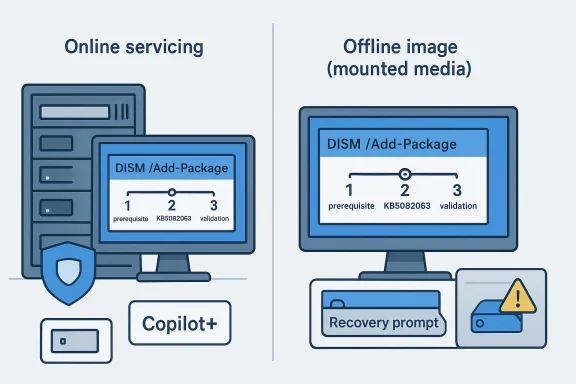
For a running system, Microsoft gives classic elevated command-line examples such as DISM /Online /Add-Package and the corresponding PowerShell Add-WindowsPackage command. For offline media, it points administrators to mounted images and Dynamic Update workflows. That split matters because it covers both live endpoints and deployment artifacts, which is exactly where servicing friction usually appears.
Microsoft’s note about matching Dynamic Update packages by month is another clue about the servicing stack’s complexity. If the SafeOS Dynamic Update or Setup Dynamic Update for the same month is unavailable, Microsoft says to use the most recently published version. That guidance is small but important, because it shows how Windows setup, recovery, and runtime servicing are increasingly interdependent.
Administrators should read this release as a checklist item, not an optional refresh. The safest workflow is to test the exact MSU order in a lab, validate both online and offline servicing, then roll the change out under change control. That is especially true in environments where one failed patch can trigger recovery key lookups, image rebuilds, or a wave of help desk calls.
That means the KB has a dual audience. For mainstream systems, KB5082063 is mostly about platform servicing and update order. For Copilot+ PCs, the package also participates in Microsoft’s broader AI component lifecycle, which makes the release part of a much larger hardware-specific roadmap. Those component updates may be invisible to most users, but they matter for the future of Windows feature delivery.
For consumers, the practical result is simple: if you are not on a Copilot+ PC, you should not expect these AI component updates to do anything visible. For enterprises, the implication is more complicated, because imaging standards, asset inventories, and deployment logic now need to distinguish between standard Windows hardware and AI-capable systems. That is a subtle but important shift in fleet management.
The strategic signal is even bigger. Microsoft is building Windows servicing around a mixed payload model in which one KB can include routine security maintenance, recovery-related adjustments, and AI-device-specific content. That makes the servicing ecosystem more powerful, but also more complex to validate.
The trigger conditions are highly specific. Microsoft’s documented pattern involves BitLocker on the OS drive, a TPM validation policy that includes PCR7, a device whose Secure Boot state reports PCR7 binding as not possible, the presence of the Windows UEFI CA 2023 certificate in the Secure Boot database, and a boot manager state that has not already transitioned to the 2023-signed version. That combination is why Microsoft considers the issue unlikely on most personal devices.
BitLocker recovery is especially painful because it happens before normal Windows logon. That means users cannot simply click through the problem, and remote support becomes more awkward if the machine cannot complete boot. For a fleet, even a one-time recovery prompt can become a real incident if recovery keys are not properly escrowed and available.
Microsoft’s guidance suggests that the recovery event is usually one-time and tied to the first reboot after the update. That is important, because it implies the patch is not permanently corrupting BitLocker state; instead, it is provoking a transition in the boot trust chain that BitLocker notices. The practical challenge is the same either way: if a recovery key is missing, the device stops being a normal workstation and starts being an emergency.
The consumer impact is usually isolated. A home user may never notice the sequencing requirement at all if the update is delivered through a managed channel or Windows servicing stack that handles the dependency chain automatically. The enterprise impact is systemic: one bad script or one undocumented deployment shortcut can turn into a fleet-wide servicing inconsistency.
There is also a human factor. Enterprises often rely on scripts, imaging libraries, and standard operating procedures. When Microsoft changes the deployment rules for a particular KB, those workflows have to be updated quickly or they become part of the problem. That is one reason detailed servicing notes are so valuable: they reduce the chance that institutional habit overrides current guidance.
In consumer settings, the main risk is confusion. In enterprise settings, the main risk is scale. A single recovery-event bug or a single sequencing mistake can create support surges, delayed provisioning, and a backlog of devices waiting for human intervention. That is why KB5082063 should be treated as a change-management item, not just a patch.
Administrators should first identify which systems actually need the update path, especially if some devices are Copilot+ hardware and others are not. Then they should confirm whether BitLocker policy, Secure Boot configuration, or image-customization practices create any recovery risk. That is not paranoia; it is basic rollout hygiene for a package with boot-chain implications.
For imaging teams, the extra step is validation against mounted media. The note about Dynamic Update packages means your deployment media should be checked against the current month’s support posture, especially if you are rebuilding Windows 11 installation sets or maintain repair images for support use. That is the kind of maintenance work that rarely makes headlines but prevents bigger headaches later.
It also gives Microsoft a chance to demonstrate that its modern servicing model can be precise without being opaque. A well-documented, sequence-aware release can reduce support friction if organizations follow the instructions carefully. In that sense, the update is a test of process maturity as much as code quality.
The other major concern is the broader pattern of servicing complexity. Windows now relies on a layered update model that spans runtime, recovery, setup, and device-specific components. That model is powerful, but it also means the consequences of a bad deployment are more varied and harder to diagnose.
The second thing to watch is enterprise readiness. Organizations that refresh installation media, manage custom images, or enforce strict BitLocker policies should treat this KB as a reminder to test recovery paths before the next major rollout. Microsoft’s own guidance is effectively saying the same thing: do not assume the update is self-explanatory, and do not wait until a machine is already in distress to validate your boot chain.
Source: Microsoft - Message Center April 14, 2026—KB5082063(OS Build 26100.32690) - Microsoft Support
 Background
KB5082063 sits inside a broader April 2026 Windows servicing cycle that has been unusually focused on boot trust, Secure Boot transitions, and recovery reliability. Microsoft’s support note for the KB describes support for both running systems and offline media, which is a strong sign that the company expects the update to be used in enterprise deployment pipelines as well as on live PCs. It also explicitly calls out Dynamic Update guidance for installation media, reinforcing that the patch is part of a broader image-maintenance story rather than a narrow runtime fix.The release is also tied to Microsoft’s ongoing Secure Boot and BitLocker maintenance work. In the same April 2026 servicing wave, Microsoft has been dealing with issues where certain machines may prompt for BitLocker recovery after Secure Boot updates, and internal coverage in the forum’s recent reporting shows that KB5082063 is one of the updates implicated in that behavior. That makes the update operationally sensitive: it is not just changing files in Windows, it is touching the early boot chain where encryption, trust, and firmware state intersect.
The packaging model also reveals a lot about Microsoft’s current servicing philosophy. Instead of shipping a single monolithic MSU, the company is using a layered update set with a prerequisite package and a target package, which is why the documented install order matters. That is consistent with the broader trend in Windows servicing toward more granular, more dependency-aware update delivery. It is flexible, but it is also more fragile if an administrator improvises.
This matters because modern Windows is no longer just an operating system; it is a stack of coordinated services spanning setup, recovery, trust, identity, and runtime security. When Microsoft issues a KB like this, it is often servicing several layers at once, and the deployment method is part of the solution. In other words, the instructions are not filler. They are the patch.
What KB5082063 Actually Changes
The most important detail in Microsoft’s note is that KB5082063 is distributed as standalone MSU content from the Microsoft Update Catalog, and the update contains multiple packages that must be applied in a specific order. Microsoft explicitly offers two supported paths: install all MSUs together with DISM, or install each file individually in sequence. That distinction is critical, because it tells administrators the package is not self-contained in the ordinary sense.Microsoft’s preferred path is clearly the bulk-install route. The company says to place all MSU files in the same folder and let DISM discover prerequisites as needed, which is a practical way to reduce human error. By contrast, the manual route requires the administrator to preserve order exactly, which is more brittle even if it feels more controlled.
Why sequencing matters
Windows servicing is unforgiving when dependency chains are broken. If a prerequisite package is skipped or applied out of order, later packages can fail, partially install, or leave the system in a hybrid state that is harder to diagnose than the original issue. That is why Microsoft’s sequencing note should be treated as operational guidance, not a suggestion.There is also an automation angle here. A lot of enterprise patching is scripted, and scripted environments are especially vulnerable to assumptions like “all MSUs are equivalent” or “the install order doesn’t matter.” KB5082063 is a reminder that those assumptions are often wrong. If a deployment pipeline mishandles sequencing, the resulting troubleshooting burden can exceed the cost of the patch itself.
The package order documented by Microsoft is straightforward:
- Install the prerequisite MSU first.
- Install the KB5082063 target MSU second.
- Verify the final build and servicing state.
- Confirm the machine reboots cleanly.
- If using images, test the offline path separately.
Deployment Paths and Admin Workflow
Microsoft provides two major deployment models for KB5082063. Method 1 is the recommended enterprise-friendly approach: download all required MSU files, put them in the same folder, and install them together using DISM or Add-WindowsPackage. Method 2 is the more manual alternative, in which each MSU is installed individually and in the documented order. The fact that Microsoft documents both tells us it wants flexibility, but the preferred path is clearly the safer one.For a running system, Microsoft gives classic elevated command-line examples such as DISM /Online /Add-Package and the corresponding PowerShell Add-WindowsPackage command. For offline media, it points administrators to mounted images and Dynamic Update workflows. That split matters because it covers both live endpoints and deployment artifacts, which is exactly where servicing friction usually appears.
Online versus offline servicing
The online path is the one most home users will never see, because it assumes a running Windows installation and admin privileges. The offline path, however, is the route that matters to imaging teams, OEMs, repair workflows, and organizations that maintain custom Windows media. KB5082063 is therefore as much an image-maintenance package as it is a hotfix.Microsoft’s note about matching Dynamic Update packages by month is another clue about the servicing stack’s complexity. If the SafeOS Dynamic Update or Setup Dynamic Update for the same month is unavailable, Microsoft says to use the most recently published version. That guidance is small but important, because it shows how Windows setup, recovery, and runtime servicing are increasingly interdependent.
Administrators should read this release as a checklist item, not an optional refresh. The safest workflow is to test the exact MSU order in a lab, validate both online and offline servicing, then roll the change out under change control. That is especially true in environments where one failed patch can trigger recovery key lookups, image rebuilds, or a wave of help desk calls.
Practical admin takeaways
- Use DISM when possible, because it is the least error-prone supported route.
- Keep the MSU files in the same folder so prerequisite discovery works correctly.
- Validate the update on a non-production system before broad rollout.
- Refresh deployment media separately from running endpoints.
- Document the exact sequence inside your deployment runbook.
AI Components and Copilot+ PC Scope
One notable line in Microsoft’s note is that this latest cumulative update includes updates for AI components, but those AI component updates apply only to Windows Copilot+ PCs. Microsoft says they will not install on ordinary Windows PCs or Windows Server. That is a meaningful distinction because it shows how increasingly segmented Windows servicing has become in the age of AI hardware.That means the KB has a dual audience. For mainstream systems, KB5082063 is mostly about platform servicing and update order. For Copilot+ PCs, the package also participates in Microsoft’s broader AI component lifecycle, which makes the release part of a much larger hardware-specific roadmap. Those component updates may be invisible to most users, but they matter for the future of Windows feature delivery.
Why this separation matters
The AI component note reinforces a broader pattern: Microsoft is no longer treating “Windows” as a single uniform target. Different device classes now receive different payloads, and the platform’s update behavior can vary depending on whether the hardware is part of the Copilot+ ecosystem. That is great for tailoring experiences, but it also raises the operational burden on administrators who have to know which devices should receive which packages.For consumers, the practical result is simple: if you are not on a Copilot+ PC, you should not expect these AI component updates to do anything visible. For enterprises, the implication is more complicated, because imaging standards, asset inventories, and deployment logic now need to distinguish between standard Windows hardware and AI-capable systems. That is a subtle but important shift in fleet management.
The strategic signal is even bigger. Microsoft is building Windows servicing around a mixed payload model in which one KB can include routine security maintenance, recovery-related adjustments, and AI-device-specific content. That makes the servicing ecosystem more powerful, but also more complex to validate.
BitLocker, Secure Boot, and Recovery Risk
The most consequential operational concern around KB5082063 is its relationship to BitLocker recovery after Secure Boot changes. Forum reporting tied to Microsoft’s April 2026 update cycle says that certain machines can prompt for BitLocker recovery on first reboot after installing the update, especially when specific Secure Boot and PCR7 policy conditions are present. Microsoft has described the issue as narrowly scoped, but for affected organizations it is a serious problem.The trigger conditions are highly specific. Microsoft’s documented pattern involves BitLocker on the OS drive, a TPM validation policy that includes PCR7, a device whose Secure Boot state reports PCR7 binding as not possible, the presence of the Windows UEFI CA 2023 certificate in the Secure Boot database, and a boot manager state that has not already transitioned to the 2023-signed version. That combination is why Microsoft considers the issue unlikely on most personal devices.
Why enterprises should care most
This is mostly an enterprise problem because managed environments are more likely to use explicit BitLocker policy, tighter TPM validation, and certificate management practices that expose the edge case. A home user with default settings is much less likely to match all of those conditions. A corporate laptop, on the other hand, could hit the exact policy and firmware mix Microsoft is warning about.BitLocker recovery is especially painful because it happens before normal Windows logon. That means users cannot simply click through the problem, and remote support becomes more awkward if the machine cannot complete boot. For a fleet, even a one-time recovery prompt can become a real incident if recovery keys are not properly escrowed and available.
Microsoft’s guidance suggests that the recovery event is usually one-time and tied to the first reboot after the update. That is important, because it implies the patch is not permanently corrupting BitLocker state; instead, it is provoking a transition in the boot trust chain that BitLocker notices. The practical challenge is the same either way: if a recovery key is missing, the device stops being a normal workstation and starts being an emergency.
Operational impact on support teams
- Recovery prompts can strand machines before desktop access.
- Help desks need current, reachable recovery key escrow.
- Remote workers are harder to assist than office-based users.
- One policy mismatch can affect many devices at once.
- Boot-chain issues are slower to troubleshoot than ordinary app bugs.
Enterprise versus Consumer Impact
For consumers, KB5082063 is mostly a matter of following Windows Update or using the correct catalog package if you are doing manual servicing. For enterprises, the update is more complicated because it intersects with image management, security policy, recovery planning, and deployment automation. That makes the same KB look very different depending on the environment.The consumer impact is usually isolated. A home user may never notice the sequencing requirement at all if the update is delivered through a managed channel or Windows servicing stack that handles the dependency chain automatically. The enterprise impact is systemic: one bad script or one undocumented deployment shortcut can turn into a fleet-wide servicing inconsistency.
Why managed fleets face more risk
Managed devices are far more likely to use custom BitLocker policies, Secure Boot baselines, and offline deployment tooling. That is good security practice, but it also means the device state is more likely to match the conditions that can trigger recovery or installation complexity. In short, the same controls that improve security can make servicing more delicate.There is also a human factor. Enterprises often rely on scripts, imaging libraries, and standard operating procedures. When Microsoft changes the deployment rules for a particular KB, those workflows have to be updated quickly or they become part of the problem. That is one reason detailed servicing notes are so valuable: they reduce the chance that institutional habit overrides current guidance.
In consumer settings, the main risk is confusion. In enterprise settings, the main risk is scale. A single recovery-event bug or a single sequencing mistake can create support surges, delayed provisioning, and a backlog of devices waiting for human intervention. That is why KB5082063 should be treated as a change-management item, not just a patch.
Installation Strategy and Validation
The best way to approach KB5082063 is to treat it as a controlled servicing event. Microsoft’s documentation already points in that direction by emphasizing order, DISM, offline support, and catalog-based deployment. A rushed double-click installation is exactly the sort of shortcut that can create hidden problems later.Administrators should first identify which systems actually need the update path, especially if some devices are Copilot+ hardware and others are not. Then they should confirm whether BitLocker policy, Secure Boot configuration, or image-customization practices create any recovery risk. That is not paranoia; it is basic rollout hygiene for a package with boot-chain implications.
Recommended rollout discipline
- Download all required MSU files from the catalog.
- Put them in the same folder.
- Test the DISM install on a non-production machine.
- Confirm the package order succeeds in logs.
- Reboot and validate the post-install boot path.
- If you manage images, test offline servicing separately.
For imaging teams, the extra step is validation against mounted media. The note about Dynamic Update packages means your deployment media should be checked against the current month’s support posture, especially if you are rebuilding Windows 11 installation sets or maintain repair images for support use. That is the kind of maintenance work that rarely makes headlines but prevents bigger headaches later.
Strengths and Opportunities
KB5082063 has real strengths, even if its packaging is more demanding than usual. Microsoft is being unusually explicit about deployment order, online and offline servicing, and the relation between this release and the broader boot/recovery stack. That clarity gives IT teams something solid to work with, which is especially valuable when the surrounding servicing climate is as complex as it is now.It also gives Microsoft a chance to demonstrate that its modern servicing model can be precise without being opaque. A well-documented, sequence-aware release can reduce support friction if organizations follow the instructions carefully. In that sense, the update is a test of process maturity as much as code quality.
- Clear, documented installation sequence.
- Supports both live PCs and offline images.
- DISM-based workflow reduces ambiguity.
- Catalog availability gives administrators control.
- Fits modern enterprise change-management practices.
- Includes AI component updates for Copilot+ systems.
- Helps Microsoft maintain a cleaner servicing baseline across device classes.
Risks and Concerns
The biggest concern with KB5082063 is not that it is impossible to install, but that it is easy to install almost correctly. Sequencing-based updates are inherently more fragile than a single rollup, and that fragility grows when the update is pushed through automation without enough validation. The wrong install order can create more work than the original problem the patch was meant to solve.The other major concern is the broader pattern of servicing complexity. Windows now relies on a layered update model that spans runtime, recovery, setup, and device-specific components. That model is powerful, but it also means the consequences of a bad deployment are more varied and harder to diagnose.
- Manual sequencing increases human error risk.
- Automation can fail if scripts assume package independence.
- BitLocker recovery issues can disrupt managed fleets.
- Offline images can drift from current support state.
- More out-of-band servicing can erode confidence in normal patch cycles.
- AI component segmentation adds fleet-management complexity.
- Small IT teams may struggle if documentation is incomplete or outdated.
Looking Ahead
The most important thing to watch next is how Microsoft continues aligning Secure Boot, BitLocker, and recovery servicing across the April 2026 release train. If the company gets the sequencing and boot-trust transitions right, KB5082063 should fade into the background as a routine but slightly fussy servicing event. If it does not, the problems will likely show up first in recovery workflows, not in everyday desktop use.The second thing to watch is enterprise readiness. Organizations that refresh installation media, manage custom images, or enforce strict BitLocker policies should treat this KB as a reminder to test recovery paths before the next major rollout. Microsoft’s own guidance is effectively saying the same thing: do not assume the update is self-explanatory, and do not wait until a machine is already in distress to validate your boot chain.
- Validate recovery key escrow before rolling out boot-chain updates.
- Test DISM sequencing in a lab first.
- Refresh deployment media and mounted images.
- Watch for follow-up guidance on Secure Boot and BitLocker.
- Separate Copilot+ PC servicing from standard Windows fleet logic.
Source: Microsoft - Message Center April 14, 2026—KB5082063(OS Build 26100.32690) - Microsoft Support
