

The Patch Did Not Break Something Cosmetic
Windows updates often irritate users in small, visible ways: a printer vanishes, a tray icon changes, a setting reverts, a driver sulks. This one cuts closer to the bone because backup software is not an accessory in a modern Windows estate. It is the last line of defense after ransomware, hardware failure, user error, and, yes, defective updates.
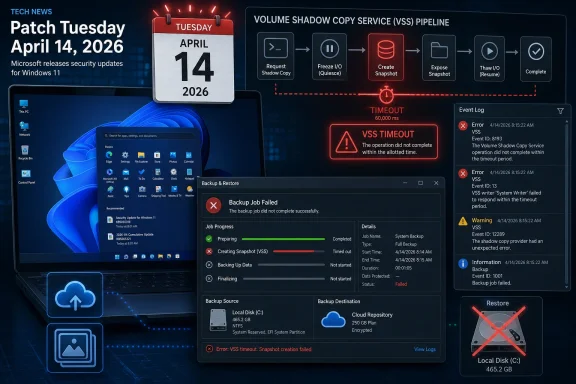
The reported culprit is KB5083769, the April 2026 cumulative update for Windows 11 24H2 and 25H2. Microsoft’s own support material identifies it as a security-bearing cumulative release for OS builds 26100.8246 and 26200.8246, released on April 14. That matters because cumulative security updates are not fringe preview packages that only adventurous users install; they are the mainstream monthly payload.
Reports gathered by security and Windows outlets indicate that some backup jobs fail after the update because Microsoft VSS, the Volume Shadow Copy Service, times out while creating snapshots. VSS is the plumbing that lets backup applications capture a consistent view of a live Windows system. When that plumbing stalls, backup tools can look broken even if their own agents and schedules are intact.
Acronis has reportedly acknowledged the problem in its own advisory, telling affected users that KB5083769 may introduce system-wide VSS issues and that removing the update followed by a reboot can restore backup operations. Macrium, NinjaOne, and UrBackup users have also surfaced similar failures in forums and community reports. Microsoft’s public KB page, at least as of the initial reporting window, did not list backup failures as a known issue.
VSS Is the Quiet Contract Between Windows and Your Recovery Plan
VSS is one of those Windows components that almost nobody thinks about until something fails at 2 a.m. It coordinates writers, providers, and requesters so that applications and the file system can be captured in a stable state while the machine keeps running. Backup software leans on that coordination because a copy of a live system is not automatically a usable recovery point.
That means this bug, if confirmed broadly, is not simply “Acronis broke” or “Macrium broke.” It is potentially a Windows platform regression exposed through the tools that depend on documented Windows behavior. The affected products differ in architecture and audience, but they share reliance on the same underlying snapshot service.
The distinction matters for blame and for remediation. A vendor can patch its agent if it mishandles an API change, but a platform-level timeout can require Microsoft to alter the servicing package, ship a compatibility fix, or document a workaround. Until that happens, IT teams are left diagnosing symptoms in backup consoles while the cause may sit several layers below.
This is why administrators tend to be more alarmed by VSS failures than by ordinary application crashes. A failed backup may not announce itself to the end user. It may sit quietly in a dashboard until someone checks, or worse, until someone needs a restore that does not exist.
The Worst Patch Failure Is the One That Erases Your Escape Route
Every Patch Tuesday rests on a bargain: take short-term operational risk to reduce longer-term security risk. Most months, that bargain is rational. Attackers reverse-engineer patches, weaponize fixed vulnerabilities, and punish slow-moving organizations.
But backup failure changes the equation. If a machine is compromised because it missed a security update, a good backup gives the organization options. If a machine is damaged by the update itself, a good backup gives the user a route back. If the update breaks the backup mechanism, the patch is no longer just an event to recover from; it is a threat to recovery.
This is especially painful for small businesses and managed service providers, where backup software is often the control that turns chaos into a ticket. A failed endpoint backup might not be glamorous, but it determines whether a ransomware event becomes a restore exercise or a negotiation. In that world, “temporarily uninstall the update” is not a clean answer; it is choosing which exposure to tolerate.
Home users face a different version of the same problem. Many have been trained, correctly, to install security updates quickly and to maintain third-party image backups because Windows’ built-in cloud-oriented recovery story is not a full substitute for a tested bare-metal restore. When those two pieces of advice collide, the technically prudent user is left with no emotionally satisfying option.
Microsoft’s Servicing Model Leaves Little Room for Nuance
The cumulative update model has real advantages. It reduces fragmentation, simplifies compliance, and ensures that a machine that installs the latest update receives the full chain of prior fixes. In enterprise terms, it is cleaner than the old buffet of selectively installed patches.
The downside is that everything travels together. Security fixes, non-security improvements from prior preview releases, servicing stack changes, and compatibility adjustments arrive as one object. When the object causes trouble, administrators cannot easily peel off the one bad change while retaining the urgent security fixes.
KB5083769 is a classic example of that tension. It is not a minor optional tweak. It is the April security rollup for supported Windows 11 24H2 and 25H2 machines. Pausing or uninstalling it may restore backups for some users, but it also moves those systems away from the current security baseline.
That is why the standard consumer advice — “uninstall the update if you are affected” — is only half an answer. It is practical for a single workstation with failed backup jobs. It is far messier for a fleet, particularly if the same update also addresses vulnerabilities the organization’s risk team already flagged.
Microsoft has tried to soften this dilemma over the years with known issue rollback, release health dashboards, phased deployment, and better enterprise controls. Yet the lived experience remains familiar: the first few days after Patch Tuesday are a distributed test cycle conducted across consumer PCs, MSP-managed estates, and corporate rings.
Backup Vendors Are Becoming Microsoft’s Early-Warning Sensors
The interesting detail in this story is that the alarm did not appear to come first from Microsoft’s release health machinery. It came through backup vendors, user forums, and administrators comparing notes. That is increasingly how Windows servicing problems become visible: not as a single official declaration, but as a pattern recognized by communities before the platform owner has completed triage.
Acronis appears to have moved fastest with a public-facing advisory. Forum users then connected dots across Macrium, NinjaOne, and UrBackup. BleepingComputer and Forbes amplified the reports into mainstream visibility. By the time a bug reaches that stage, the user base has already done a great deal of Microsoft’s signal gathering.
This does not mean Microsoft is ignoring the issue. Large-scale servicing telemetry is complicated, and a VSS timeout may not be obvious unless the right error codes, event logs, and application failures line up. But it does show the limits of vendor telemetry when the failure lives in the space between Windows and third-party tools.
For backup vendors, the situation is awkward. They own the customer relationship when the job fails, even if Windows triggered the failure. Their support teams field the angry tickets, publish the workarounds, and tell users to remove a Microsoft update. In effect, they become the patch quality communications layer for a platform they do not control.
The 24H2 and 25H2 Era Is Testing Trust More Than Features
Windows 11 24H2 was already a consequential platform turn, with deeper changes under the hood than many casual users appreciated. Windows 11 25H2, by sharing much of that servicing lineage, continues the same basic risk surface. When Microsoft changes core subsystems, the ecosystem pays attention because compatibility is not merely about whether apps launch.
The backup reports around KB5083769 land in that broader context. Windows 11’s recent update history has included issues around BitLocker recovery prompts, sign-in failures, VPN disruption, and other unpleasant surprises. Some were narrow, some were quickly fixed, and some affected only specific configurations. The cumulative effect, however, is a growing sense that Windows servicing is reliable enough to be mandatory but not predictable enough to be boring.
That is a dangerous middle ground for Microsoft. Users can tolerate aggressive updating when it fades into the background. They can tolerate complex updating when they have granular control. What they resent is aggressive complexity: updates that arrive with security urgency, behave like feature-bearing platform changes, and occasionally break the tools used to survive outages.
For IT professionals, trust is built less by perfection than by containment. A bad patch is survivable if it is clearly documented, rapidly mitigated, and easy to scope. Silence is what turns an incident into a reputation problem.
The Right Response Is Not Patch Panic
It would be irresponsible to turn this into a blanket “do not install Windows updates” argument. That advice ages badly and helps attackers. Security updates exist because vulnerabilities are real, exploitation windows are shrinking, and unpatched endpoints remain one of the easiest ways into an organization.
The better response is disciplined skepticism. If you have already installed KB5083769 and your backup jobs continue to complete and verify, there may be no reason to rip out the update preemptively. If backups are failing with VSS timeout errors after installation, the pattern is strong enough to treat the update as a suspect.
For enterprises and MSPs, the move is to tighten rings rather than abandon patching. Test KB5083769 against representative Windows 11 24H2 and 25H2 systems that run the same backup agents as production. Confirm not just that the update installs, but that snapshot creation, image backup, file backup, and restore validation still work afterward.
For consumers and small offices, the pragmatic step is simpler: open the backup application and check the most recent job status. Do not assume “no notification” means “good backup.” If the last successful image predates April 14, the machine may be running without the protection the owner thinks it has.
The Uninstall Workaround Is a Risk Trade, Not a Cure
Acronis’ reported workaround — uninstall KB5083769 and reboot — is sensible as a temporary measure for affected users. If a machine cannot produce a backup, restoring that capability may be urgent. But uninstalling a security update is not a repair in the deeper sense.
The trade is stark. Leave the update installed, and some users may lack functioning third-party backups. Remove it, and those machines lose whatever security fixes KB5083769 provided until Microsoft or the vendor ecosystem offers a better path. In regulated environments, that decision may require documentation, approval, and compensating controls.
There is also a timing problem. Windows may attempt to reinstall the update depending on policy, deferral settings, and management tooling. A user who removes the patch without pausing updates or adjusting deployment rings may find the machine back in the same state after the next maintenance window.
The cleaner outcome would be an official Microsoft acknowledgement, a known issue entry, and either a rollback mechanism or an out-of-band fix if the defect is sufficiently widespread. Until then, support desks will have to treat this as a live incident: identify affected systems, preserve evidence, restore backup capability, and avoid broad changes made on rumor alone.
Cloud Backup Is Not a Magic Escape Hatch
One subtle point in the reporting is that Windows’ own cloud-oriented backup features appear to be unaffected. That is good news, but it should not be overread. Windows Backup and cloud sync features are useful for settings, files, and consumer continuity; they are not equivalent to a complete, independently verified system image in every recovery scenario.
Third-party backup tools persist because they solve problems Microsoft’s built-in experience does not fully cover. They support richer scheduling, image-based recovery, local and offsite targets, central management, retention policies, and disaster recovery workflows. In business environments, those features are not luxury extras.
This is why a VSS issue hits harder than a cloud backup outage would for many WindowsForum readers. VSS is tied to the serious recovery workflows: the ones that restore a whole machine, preserve application consistency, and let an admin recover from more than accidental file deletion. When that layer misbehaves, the backup architecture itself is in question.
Microsoft’s consumer messaging often nudges users toward OneDrive and account-based continuity. That has value, especially for nontechnical users. But no sysadmin should confuse sync with backup, and no platform vendor should treat third-party backup compatibility as a peripheral concern.
The Real Test Is Whether Microsoft Can Close the Loop Fast
The immediate facts are still developing. The issue is reportedly linked to KB5083769 on Windows 11 24H2 and 25H2. Acronis has acknowledged VSS-related backup failures and suggested uninstalling the update as a workaround. Users of other backup products have reported similar symptoms. Microsoft’s public documentation did not initially reflect the backup issue.
What happens next matters more than the existence of the bug itself. Microsoft ships software to an impossibly diverse hardware and application ecosystem; occasional regressions are inevitable. The difference between a tolerable regression and a trust-eroding one is the speed and clarity of the response.
The company should be able to answer four questions quickly. Is VSS actually regressing after KB5083769 on supported Windows 11 builds? Which configurations are affected? Can known issue rollback address it without removing the full security update? Should affected users uninstall, pause, or wait for a targeted fix?
Those answers need to appear where admins already look: the KB page, the Windows release health dashboard, Microsoft 365 admin communications where relevant, and support channels. Vendor advisories are useful, but they should not be the primary map for a Windows servicing incident.
The April Patch Is a Reminder to Test the Restore, Not Just the Install
The old patch-management ritual often stops too early. A pilot group installs the update, users can sign in, common apps open, and the patch is promoted to wider deployment. That test catches obvious failures. It does not catch backup degradation unless backup validation is part of the ring.
KB5083769 should push organizations to add recovery checks to patch acceptance. That does not mean every endpoint needs a full restore test every month. It does mean that representative machines should prove they can still create VSS snapshots and complete backup jobs after the update.
The same applies at home, just with less ceremony. If you rely on Macrium, Acronis, UrBackup, or another image-based tool, the test after a major cumulative update should include opening the program, checking logs, and confirming the latest backup is current. A backup strategy that is never inspected is more superstition than strategy.
There is a psychological trap here. Users often think of backup as something configured once and then trusted forever. Windows servicing breaks that illusion because the operating system remains a moving target. Recovery plans have to be maintained against that motion.
The April Lesson for Windows 11 Backup Hygiene
The KB5083769 incident is still unfolding, but its practical message is already clear: security updates and recovery tooling must be validated together, not treated as separate chores. A backup that silently stopped working after Patch Tuesday is worse than no backup in one respect — it encourages confidence that reality will not honor.
- Windows 11 users on 24H2 or 25H2 who installed KB5083769 should check whether their third-party backup jobs have completed successfully since April 14, 2026.
- Systems showing VSS timeout errors after the update should be treated as potentially affected rather than dismissed as isolated backup-agent failures.
- Uninstalling KB5083769 may restore backups for some affected users, but it also removes April’s cumulative security fixes and should be handled as a temporary risk decision.
- IT teams should add VSS snapshot and backup-job validation to their post-patch pilot rings before broad deployment.
- Microsoft needs to document the issue publicly if its investigation confirms a platform regression, because vendor forums should not be the only reliable warning system.
The deeper story is not that Microsoft shipped another imperfect update; it is that Windows’ security model depends on frequent patching while Windows’ resilience model depends on backups that must keep working after those patches land. KB5083769 exposes the fragile seam between those two obligations. If Microsoft wants Windows 11 to be trusted as both a secure and recoverable platform, it has to treat backup compatibility as core infrastructure, not collateral damage in the monthly servicing cycle.