

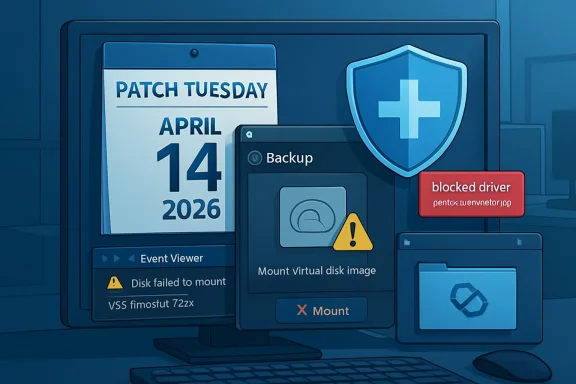
Microsoft’s April 14, 2026 Windows 11 security update KB5083769 deliberately blocks vulnerable versions of the psmounterex.sys kernel driver, causing some third-party backup tools on Windows 11, Windows 10, and Windows Server to fail when mounting or managing backup images. The immediate fix is not a Windows rollback but an update to the affected backup application so it no longer depends on the blocked driver. That answer is technically tidy, operationally messy, and very Microsoft in 2026: the platform is safer, but the blast radius lands on the people whose safety net just stopped working.
The important part of the KB5083769 story is that Microsoft is not treating this as a conventional update regression. This is not a case where a storage stack change accidentally tripped over Macrium Reflect, Acronis Cyber Protect Cloud, UrBackup Server, NinjaOne Backup, or another backup product in the field. Microsoft’s position is that vulnerable versions of psmounterex.sys belong on the vulnerable driver blocklist, and Windows Code Integrity is doing exactly what it was told to do.
That distinction matters because it changes the remedy. If this were a Windows bug, administrators would be waiting for an out-of-band fix, a Known Issue Rollback, or a later cumulative update to unwind the damage. Instead, Microsoft is telling customers to update their backup software, because the driver being blocked is the risk.
The driver itself is not random debris. psmounterex.sys is associated with disk-image mounting, the useful magic that lets a backup file appear as a browsable virtual drive. That is exactly the sort of capability backup tools need, and exactly the sort of kernel-level privilege that makes security engineers nervous when a vulnerable version remains installed.
This is the uncomfortable bargain Windows has been making for years. The ecosystem’s depth is one of the platform’s strengths, but every privileged third-party driver becomes part of the operating system’s real-world attack surface. KB5083769 simply makes that bargain visible at the worst possible place: the backup job.
That is the right direction for Windows security. Bring-your-own-vulnerable-driver attacks have been a persistent problem because attackers do not always need a new zero-day when they can abuse an old, signed, vulnerable driver. If Windows allows that driver to load, the signature becomes a passport rather than a guarantee.
Microsoft’s increasingly aggressive stance is therefore understandable. A driver that can help mount a backup image can also, if vulnerable, become a route into privileged territory. The operating system cannot plausibly claim to be hardened while knowingly allowing vulnerable kernel components to continue loading just because they belong to familiar commercial software.
But there is a difference between a correct security policy and a graceful operational rollout. Backup systems are not cosmetic utilities. They are the fallback plan for ransomware, failed patches, dead drives, botched migrations, and human error. When security hardening disables part of the backup workflow, administrators are forced to choose between two kinds of risk they would rather not rank.
The real trigger may be lower in the stack: Windows blocking psmounterex.sys from loading. Event Viewer can expose that clue under the Code Integrity operational log, where Event ID 3077 and the relevant policy information indicate that the driver was blocked. That is useful, but it is not exactly the first place a home user or harried MSP technician will look after a scheduled backup fails.
This is why the phrase “not a bug” can feel maddening even when it is technically true. From the operating system’s perspective, the protection is working. From the user’s perspective, a backup product worked on Monday and failed after Patch Tuesday.
There is also an important nuance: not every backup scenario necessarily fails in the same way. Microsoft’s own description leaves room for full image backups to succeed while image-mount operations fail. That distinction is operationally huge. A dashboard that says a backup completed may not prove that restores, browsing, or image verification still work.
That is the lesson administrators should take from this incident. Backup health is not the same as backup creation. If your restore path depends on mounting an image, then the mount operation is part of the backup system, not an optional convenience.
In practice, backup software is often treated differently from browsers, collaboration apps, or even endpoint agents. It is deliberately boring infrastructure. Many organizations pin versions because restore procedures are documented against them, because licensing is messy, because old agents are embedded in golden images, or because “do not touch the backup server” became a cultural rule after the last migration scare.
That conservatism now cuts both ways. A stable backup stack is valuable only if it remains compatible with the security posture of the platform underneath it. When Windows changes enforcement rules around vulnerable drivers, the backup stack cannot be frozen in amber.
This is especially painful for MSPs and small IT teams. The affected software list is not limited to one niche utility. Reports and Microsoft’s guidance point to a broader class of third-party backup applications that rely on vulnerable versions of the same driver. That means the response is not simply “patch Macrium” or “patch Acronis.” It is “inventory every backup agent, every management console, every old rescue workflow, and every machine where image mounting matters.”
The home enthusiast version of the problem is smaller but no less real. Many Windows power users keep image backups precisely because they distrust the next big OS change. If the update that improves kernel security also breaks their ability to browse or restore those images, the psychological damage is disproportionate. The user may not care that the vulnerable driver was the real issue; they will remember that Windows Update interfered with their escape hatch.
What has changed is the nature of the conflicts. The old Patch Tuesday nightmare was often a printer, a VPN client, a domain join edge case, or a line-of-business application that depended on undocumented behavior. Those problems still exist, but the newer class of failures is more philosophical. Windows is enforcing a security boundary that administrators have been told to want.
That makes the argument harder. It is easy to criticize Microsoft when an update breaks something by mistake. It is harder when the breakage is the side effect of closing a real security gap. Nobody wants vulnerable kernel drivers. Nobody wants backup failures. KB5083769 is where those two statements collide.
The reasonable criticism is not that Microsoft blocked the driver. The reasonable criticism is that the Windows ecosystem still lacks a sufficiently elegant way to surface these impending enforcement changes before they interrupt critical workflows. If a driver is known vulnerable and widely used by backup products, customers need loud, specific, actionable warnings before the block becomes a surprise operational incident.
To be fair, Microsoft cannot wait forever for every vendor and customer to modernize. Delayed enforcement is how security debt becomes permanent architecture. But if the company wants Windows to be both aggressively hardened and trusted by administrators, it needs to make the path from “this driver will be blocked” to “your backup vendor has replaced it” much less opaque.
A backup product is a security product whether it markets itself that way or not. It handles sensitive data, runs with elevated privileges, interacts with storage at a low level, and may be the last line of defense after ransomware. If such a product depends on a vulnerable kernel driver, the vendor must move quickly, communicate clearly, and make upgrades safe enough that customers actually deploy them.
There is also a packaging problem. Many users do not know which drivers their backup applications install, which versions are present, or whether old drivers remain after upgrades. A modern backup console should be able to say, plainly, whether its kernel components are compatible with Microsoft’s current blocklist enforcement. If it cannot, that is a product weakness.
The same applies to MSP tooling. Backup dashboards that report only job completion are no longer sufficient. They need to detect mount failures, restore test failures, driver block events, and Code Integrity problems. A green checkmark that ignores the blocked driver beneath it is not operational truth; it is decorative reassurance.
This is where the industry’s rhetoric around resilience meets its implementation details. Everyone sells recoverability. Fewer products make it easy to prove recoverability after the operating system’s security model changes.
There is also a bad response in the other direction: assuming that because Microsoft calls the change intentional, your backups are fine as long as Windows is patched. That is magical thinking. The whole point of this incident is that a secure endpoint can still have a broken recovery workflow.
The correct response is boring and disciplined. Update the backup product. Confirm the vendor has replaced or remediated the affected driver path. Check Event Viewer for Code Integrity blocks where failures occurred. Run a real restore test or at least mount and browse recent images on representative machines.
For enterprises, this belongs in patch validation. It is not enough to test whether the April cumulative update installs cleanly or whether the system reboots. If a device class depends on third-party image backups, the validation plan should include backup creation, image mount, file-level restore, and bare-metal recovery assumptions.
For home users and enthusiasts, the guidance is simpler but still important. Do not assume yesterday’s rescue media, old installer, or archived backup agent is safe merely because it has always worked. Update the tool, make fresh recovery media if the vendor recommends it, and test the thing you expect to save you.
Recovery is a chain. It includes the agent, the driver, the storage target, the catalog, the rescue environment, the image mount path, credentials, encryption keys, and the administrator’s ability to perform the restore under pressure. KB5083769 broke one link for some users, and that was enough.
This is why Microsoft’s “update your backup software” recommendation should be read narrowly and broadly at the same time. Narrowly, it means install a version that no longer relies on the blocked vulnerable driver. Broadly, it means stop treating backup infrastructure as exempt from ordinary security maintenance.
There is a cultural issue here. Many administrators delay backup upgrades because backup software is supposed to be conservative. But old does not always mean reliable. In kernel-mode software, old can mean vulnerable, blocked, or incompatible with the next security baseline.
That does not absolve Microsoft of responsibility for communication. A predictable platform should give administrators enough warning to coordinate vendor updates before enforcement lands. But it does mean the days of leaving backup agents untouched for years are over.
Source: Windows Central https://www.windowscentral.com/micr...p-failures-and-microsoft-recommends-this-fix/
 Microsoft Did Not Break Backups by Accident
The important part of the KB5083769 story is that Microsoft is not treating this as a conventional update regression. This is not a case where a storage stack change accidentally tripped over Macrium Reflect, Acronis Cyber Protect Cloud, UrBackup Server, NinjaOne Backup, or another backup product in the field. Microsoft’s position is that vulnerable versions of psmounterex.sys belong on the vulnerable driver blocklist, and Windows Code Integrity is doing exactly what it was told to do.That distinction matters because it changes the remedy. If this were a Windows bug, administrators would be waiting for an out-of-band fix, a Known Issue Rollback, or a later cumulative update to unwind the damage. Instead, Microsoft is telling customers to update their backup software, because the driver being blocked is the risk.
The driver itself is not random debris. psmounterex.sys is associated with disk-image mounting, the useful magic that lets a backup file appear as a browsable virtual drive. That is exactly the sort of capability backup tools need, and exactly the sort of kernel-level privilege that makes security engineers nervous when a vulnerable version remains installed.
This is the uncomfortable bargain Windows has been making for years. The ecosystem’s depth is one of the platform’s strengths, but every privileged third-party driver becomes part of the operating system’s real-world attack surface. KB5083769 simply makes that bargain visible at the worst possible place: the backup job.
The Driver Blocklist Is Becoming a Real Enforcement Mechanism
For a long time, driver blocklists occupied a strange psychological space in Windows administration. They sounded serious, appeared in security guidance, and mattered deeply to endpoint hardening teams, but many desktop users could go years without noticing them. KB5083769 is a reminder that the blocklist is not a white paper concept. It is a live enforcement mechanism, and it can decide whether a kernel driver loads.That is the right direction for Windows security. Bring-your-own-vulnerable-driver attacks have been a persistent problem because attackers do not always need a new zero-day when they can abuse an old, signed, vulnerable driver. If Windows allows that driver to load, the signature becomes a passport rather than a guarantee.
Microsoft’s increasingly aggressive stance is therefore understandable. A driver that can help mount a backup image can also, if vulnerable, become a route into privileged territory. The operating system cannot plausibly claim to be hardened while knowingly allowing vulnerable kernel components to continue loading just because they belong to familiar commercial software.
But there is a difference between a correct security policy and a graceful operational rollout. Backup systems are not cosmetic utilities. They are the fallback plan for ransomware, failed patches, dead drives, botched migrations, and human error. When security hardening disables part of the backup workflow, administrators are forced to choose between two kinds of risk they would rather not rank.
The Failure Mode Is Especially Cruel
The most frustrating failures are the ones that look like something else. In this case, affected users may see Microsoft VSS timeouts, VSS_E_BAD_STATE errors, failed image browsing, or restore-related problems. Those messages point administrators toward Volume Shadow Copy Service troubleshooting, storage state, locked files, writers, services, and permissions.The real trigger may be lower in the stack: Windows blocking psmounterex.sys from loading. Event Viewer can expose that clue under the Code Integrity operational log, where Event ID 3077 and the relevant policy information indicate that the driver was blocked. That is useful, but it is not exactly the first place a home user or harried MSP technician will look after a scheduled backup fails.
This is why the phrase “not a bug” can feel maddening even when it is technically true. From the operating system’s perspective, the protection is working. From the user’s perspective, a backup product worked on Monday and failed after Patch Tuesday.
There is also an important nuance: not every backup scenario necessarily fails in the same way. Microsoft’s own description leaves room for full image backups to succeed while image-mount operations fail. That distinction is operationally huge. A dashboard that says a backup completed may not prove that restores, browsing, or image verification still work.
That is the lesson administrators should take from this incident. Backup health is not the same as backup creation. If your restore path depends on mounting an image, then the mount operation is part of the backup system, not an optional convenience.
Microsoft’s Fix Is Simple, but the Enterprise Reality Is Not
“Update your backup software” is the right answer in the abstract. Vendors should not ship or retain vulnerable kernel drivers once patched replacements exist. Customers should not cling to old builds of backup software indefinitely, especially when those builds install privileged components.In practice, backup software is often treated differently from browsers, collaboration apps, or even endpoint agents. It is deliberately boring infrastructure. Many organizations pin versions because restore procedures are documented against them, because licensing is messy, because old agents are embedded in golden images, or because “do not touch the backup server” became a cultural rule after the last migration scare.
That conservatism now cuts both ways. A stable backup stack is valuable only if it remains compatible with the security posture of the platform underneath it. When Windows changes enforcement rules around vulnerable drivers, the backup stack cannot be frozen in amber.
This is especially painful for MSPs and small IT teams. The affected software list is not limited to one niche utility. Reports and Microsoft’s guidance point to a broader class of third-party backup applications that rely on vulnerable versions of the same driver. That means the response is not simply “patch Macrium” or “patch Acronis.” It is “inventory every backup agent, every management console, every old rescue workflow, and every machine where image mounting matters.”
The home enthusiast version of the problem is smaller but no less real. Many Windows power users keep image backups precisely because they distrust the next big OS change. If the update that improves kernel security also breaks their ability to browse or restore those images, the psychological damage is disproportionate. The user may not care that the vulnerable driver was the real issue; they will remember that Windows Update interfered with their escape hatch.
Patch Tuesday Has Become a Compatibility Test You Run in Production
The broader pattern is familiar. Microsoft ships a security update, a subset of the ecosystem breaks, and the official explanation eventually narrows the issue to a compatibility conflict, a policy change, or a third-party dependency. The details differ, but the rhythm is recognizable to anyone who manages Windows fleets.What has changed is the nature of the conflicts. The old Patch Tuesday nightmare was often a printer, a VPN client, a domain join edge case, or a line-of-business application that depended on undocumented behavior. Those problems still exist, but the newer class of failures is more philosophical. Windows is enforcing a security boundary that administrators have been told to want.
That makes the argument harder. It is easy to criticize Microsoft when an update breaks something by mistake. It is harder when the breakage is the side effect of closing a real security gap. Nobody wants vulnerable kernel drivers. Nobody wants backup failures. KB5083769 is where those two statements collide.
The reasonable criticism is not that Microsoft blocked the driver. The reasonable criticism is that the Windows ecosystem still lacks a sufficiently elegant way to surface these impending enforcement changes before they interrupt critical workflows. If a driver is known vulnerable and widely used by backup products, customers need loud, specific, actionable warnings before the block becomes a surprise operational incident.
To be fair, Microsoft cannot wait forever for every vendor and customer to modernize. Delayed enforcement is how security debt becomes permanent architecture. But if the company wants Windows to be both aggressively hardened and trusted by administrators, it needs to make the path from “this driver will be blocked” to “your backup vendor has replaced it” much less opaque.
Backup Vendors Own More of This Than Users Want to Admit
It is tempting to put the entire burden on Microsoft because Windows Update is the visible event. That is too easy. Backup vendors that install kernel drivers inherit a higher duty of maintenance than ordinary application developers, and that duty does not end when the backup job succeeds.A backup product is a security product whether it markets itself that way or not. It handles sensitive data, runs with elevated privileges, interacts with storage at a low level, and may be the last line of defense after ransomware. If such a product depends on a vulnerable kernel driver, the vendor must move quickly, communicate clearly, and make upgrades safe enough that customers actually deploy them.
There is also a packaging problem. Many users do not know which drivers their backup applications install, which versions are present, or whether old drivers remain after upgrades. A modern backup console should be able to say, plainly, whether its kernel components are compatible with Microsoft’s current blocklist enforcement. If it cannot, that is a product weakness.
The same applies to MSP tooling. Backup dashboards that report only job completion are no longer sufficient. They need to detect mount failures, restore test failures, driver block events, and Code Integrity problems. A green checkmark that ignores the blocked driver beneath it is not operational truth; it is decorative reassurance.
This is where the industry’s rhetoric around resilience meets its implementation details. Everyone sells recoverability. Fewer products make it easy to prove recoverability after the operating system’s security model changes.
The Sensible Response Is Verification, Not Panic
There is a bad response to KB5083769, and it is reflexively uninstalling the security update everywhere because a backup job failed somewhere. That may restore a workflow, but it also reopens the vulnerable-driver exposure Microsoft intended to close. It turns a compatibility problem into a security exception.There is also a bad response in the other direction: assuming that because Microsoft calls the change intentional, your backups are fine as long as Windows is patched. That is magical thinking. The whole point of this incident is that a secure endpoint can still have a broken recovery workflow.
The correct response is boring and disciplined. Update the backup product. Confirm the vendor has replaced or remediated the affected driver path. Check Event Viewer for Code Integrity blocks where failures occurred. Run a real restore test or at least mount and browse recent images on representative machines.
For enterprises, this belongs in patch validation. It is not enough to test whether the April cumulative update installs cleanly or whether the system reboots. If a device class depends on third-party image backups, the validation plan should include backup creation, image mount, file-level restore, and bare-metal recovery assumptions.
For home users and enthusiasts, the guidance is simpler but still important. Do not assume yesterday’s rescue media, old installer, or archived backup agent is safe merely because it has always worked. Update the tool, make fresh recovery media if the vendor recommends it, and test the thing you expect to save you.
The April Patch Exposes the Weak Link in Recovery Planning
The KB5083769 episode is not ultimately about one driver. It is about the gap between having backups and having a recovery system. Windows users often talk about backup as a file or a schedule: the image exists, the task ran, the NAS has data, the cloud console shows success.Recovery is a chain. It includes the agent, the driver, the storage target, the catalog, the rescue environment, the image mount path, credentials, encryption keys, and the administrator’s ability to perform the restore under pressure. KB5083769 broke one link for some users, and that was enough.
This is why Microsoft’s “update your backup software” recommendation should be read narrowly and broadly at the same time. Narrowly, it means install a version that no longer relies on the blocked vulnerable driver. Broadly, it means stop treating backup infrastructure as exempt from ordinary security maintenance.
There is a cultural issue here. Many administrators delay backup upgrades because backup software is supposed to be conservative. But old does not always mean reliable. In kernel-mode software, old can mean vulnerable, blocked, or incompatible with the next security baseline.
That does not absolve Microsoft of responsibility for communication. A predictable platform should give administrators enough warning to coordinate vendor updates before enforcement lands. But it does mean the days of leaving backup agents untouched for years are over.
The Practical Reading of KB5083769
The most useful lessons from this update are concrete, not philosophical. KB5083769 should push administrators to verify the recovery path they actually depend on, not the one they assume exists.- The April 14, 2026 Windows security update KB5083769 intentionally blocks vulnerable versions of psmounterex.sys through Windows Code Integrity when the Microsoft vulnerable driver blocklist is enabled.
- Some third-party backup applications may fail to mount, browse, manage, or restore from disk images even if backup creation appears to succeed.
- VSS timeout messages and VSS_E_BAD_STATE errors can be symptoms of the blocked driver rather than a pure Volume Shadow Copy Service problem.
- Event Viewer’s Code Integrity operational log can confirm whether Windows blocked the driver from loading.
- Microsoft’s recommended fix is to update the affected backup application rather than disable the security protection or rely on uninstalling the Windows update.
- Administrators should test image mounting and restore workflows after patching, because a completed backup job is not proof of recoverability.
Source: Windows Central https://www.windowscentral.com/micr...p-failures-and-microsoft-recommends-this-fix/
