

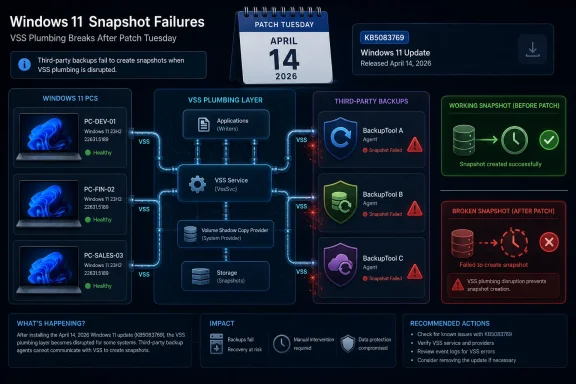
Microsoft’s April 14, 2026 cumulative update KB5083769 for Windows 11 24H2 and 25H2 is now being blamed for breaking VSS-dependent third-party backup tools, including Acronis Cyber Protect Cloud, Macrium Reflect, NinjaOne Backup, and UrBackup Server. That makes this more than another post-Patch Tuesday nuisance. When the component that fails is the plumbing used to make reliable backups of live systems, the update does not merely annoy users; it undermines the recovery story Windows depends on.
The immediate advice circulating from affected vendors and administrators is familiar: uninstall the update if backups are failing and risk tolerance allows it. But that is the uncomfortable part. KB5083769 is a security update, and asking users to choose between current patches and working backups is precisely the sort of tradeoff modern endpoint management was supposed to eliminate.
Windows users have learned to tolerate a certain amount of monthly turbulence. A printer driver regresses, a Start menu animation stutters, a Remote Desktop prompt renders badly on a mixed-DPI desk setup. Those are aggravating, but they live in the category of visible breakage: the user sees the problem, complains, waits for a Known Issue Rollback or a cumulative fix, and moves on.
Backup failures are different. They are often silent until the day they matter. A nightly job that times out during snapshot creation may appear as a failed task in a dashboard, but the real damage is operational: retention chains are interrupted, recovery point objectives slip, and administrators lose confidence in restore points they have not yet had to test.
The reported culprit here is Microsoft’s Volume Shadow Copy Service, better known as VSS. It is old, unglamorous Windows infrastructure, and that is exactly why it matters. VSS is the broker that lets backup applications take consistent point-in-time snapshots of files, volumes, and application data while Windows is still running.
For many WindowsForum readers, VSS is not a feature so much as a dependency. It sits under imaging tools, endpoint backup agents, Hyper-V-adjacent workflows, database-aware backup writers, and the humble “just get me a restorable copy of this workstation” jobs that keep small offices alive. When VSS starts timing out, the backup product gets blamed first, but the fault line runs through the operating system.
That is the normal monthly bundle model. It is also the source of the problem. The same package can contain security hardening, UI changes, Secure Boot certificate preparation, Remote Desktop behavior changes, servicing stack improvements, and fixes for older issues. If one part regresses, administrators cannot always surgically remove only the bad component.
Before the backup reports gained wider attention, KB5083769 was already associated with BitLocker recovery prompts on a narrow set of systems. Microsoft described that issue as affecting devices with a non-recommended BitLocker Group Policy configuration involving TPM platform validation and PCR7. In plain English, some managed machines could ask for a recovery key after the first reboot because the platform measurement expected by BitLocker changed in a way the configured policy did not tolerate.
That BitLocker issue was not random chaos; Microsoft documented specific preconditions and a mitigation path. But it contributed to the sense that April’s update was stepping across several deeply trusted boot and recovery boundaries at once. The same month brought reports of boot loops, Remote Desktop warning display problems, and now backup failures tied to snapshot creation.
A single update can survive one ugly known issue. It is harder to shrug off a cluster of problems that all orbit trust: Can I boot? Can I unlock the disk? Can I remote into the machine safely? Can I back it up?
The jargon hides a fragile social contract among components. A VSS requester, such as a backup tool, asks for a snapshot. VSS writers, often tied to Windows services or applications, prepare their data. A provider creates the shadow copy. If one part stalls, misreports state, or waits too long, the whole chain can fail.
That is why a VSS timeout is not just an error code. It is an operating system-level loss of coordination. Backup software can retry, reset writers, or run its own repair routines, but if the service layer introduced by Windows Update has changed behavior in a way vendors did not anticipate, the vendor becomes a passenger on Microsoft’s train.
Acronis, according to public reporting, has described failures after KB5083769 with wording that points directly to Microsoft VSS timing out during snapshot creation. Reports around Macrium Reflect and other tools follow the same theme: jobs that rely on VSS begin failing or behaving unreliably after the April update lands. That pattern matters more than any single product name because it suggests a shared dependency, not four unrelated vendor bugs.
There is an additional sting for home power users. Macrium Reflect, Acronis, and UrBackup occupy the space Microsoft largely vacated when Windows’ own consumer backup story became a museum of half-deprecated utilities, OneDrive nudges, and “reset this PC” recovery assumptions. Windows enthusiasts moved to third-party imaging tools because they wanted control. Now those tools are colliding with the one layer they cannot replace.
This is where home users and administrators experience the same bug differently. A home user with a failed Macrium image might uninstall the update, run a backup, and wait. An MSP with 600 Windows 11 endpoints must decide whether to pause rollout, remove the update from affected systems, adjust backup monitoring, notify clients, and document why security posture temporarily changed.
Microsoft’s update model has spent years pushing users toward trust in cumulative servicing. The bargain is clear: take the monthly update, get safer, stay supported, and let Windows handle the rest. But backup is the escape hatch for when that bargain fails. If the update that improves security disables the mechanism that recovers from bad updates, ransomware, disk failure, or user error, the contract becomes self-contradictory.
That does not mean every Windows 11 user should panic-remove KB5083769. The more rational approach is verification. Check whether backups are actually failing. Confirm whether the backup software uses VSS for the affected job type. Review event logs, vendor consoles, and recent restore point history. Test a restore path if possible.
But the choice remains ugly. A fully patched system with broken backups is not resilient. A system with working backups but a removed security update is not ideal either. The safest posture is not a slogan; it is a temporary, documented risk decision while Microsoft and vendors converge on a fix.
The sequence is predictable. Users notice something odd. Reddit threads and vendor forums accumulate reports. MVPs and patch-watch communities connect the dots. A security journalist or Windows specialist writes it up. Then, sometimes, Microsoft adds a known issue or ships a fix later.
For UI bugs, that cadence is tolerable. For backup failures, it is too slow. Backups are time-sensitive by design; every missed run widens the recovery gap. An enterprise that discovers after five days that every laptop in a pilot ring failed snapshots has lost five days of routine recovery coverage, even if no disaster occurred.
This is where Microsoft’s telemetry advantage should matter. Windows knows when VSS throws certain classes of errors. Defender for Endpoint, Windows Error Reporting, and enterprise update channels collectively offer the kind of signal that should reveal a post-update spike in snapshot failures quickly. If third-party vendors can see support tickets rise, Microsoft should be able to see at least part of the smoke.
The harder question is whether Microsoft tests monthly cumulative updates deeply enough against the backup ecosystem it effectively relies on. It is not realistic to validate every version of every third-party tool in every configuration. It is realistic to maintain compatibility test suites around VSS requesters, writers, providers, and common backup workflows because those workflows are central to Windows’ recoverability promise.
Small businesses live in that gap. So do enthusiasts with carefully configured workstations, developers with local environments, labs, kiosks, accounting PCs, and field machines that do not map neatly to Microsoft’s cloud-first ideal. The third-party backup market exists because Windows endpoints are still messy, local, and valuable.
That makes compatibility with backup tools a platform obligation, not a courtesy. Acronis, Macrium, NinjaOne, and UrBackup are not fringe utilities poking undocumented kernel structures for sport. They are part of the practical recovery infrastructure around Windows. When they fail together after a Windows update, the ecosystem has a platform problem.
There is also an asymmetry of blame. Users see the backup product’s error dialog. The vendor support desk takes the call. The MSP dashboard turns red. Microsoft’s update may be the trigger, but the first layer of pain lands elsewhere. That is why vendors are quick to publish advisories when they can reproduce a Windows-caused issue: they need to move the blame boundary back to the layer that changed.
This is not to absolve backup vendors of responsibility. Good backup software should detect VSS failures clearly, avoid false success states, preserve previous recovery points, and guide users toward safe mitigations. But no backup vendor can guarantee snapshot creation if the operating system service that coordinates snapshots regresses.
Still, the issue demonstrates that the April update touched the chain of trust around boot, Secure Boot certificates, and platform measurements. Microsoft is preparing the ecosystem for Secure Boot certificate expirations beginning in June 2026, and that work inevitably reaches sensitive areas. The company cannot avoid updating boot trust infrastructure forever.
The problem is that recovery features are layered on top of those trust decisions. BitLocker does exactly what it is supposed to do when the measured boot environment changes unexpectedly: it asks for proof that the user is authorized. But when that prompt appears because a cumulative update and a policy edge case collided, the security feature feels like a lockout.
Backup failures live in the same emotional category. A system protection mechanism becomes a source of risk. The more deeply Microsoft integrates security, servicing, boot validation, cloud identity, and recovery, the more a regression in one layer can ripple across the whole administrator experience.
That is the Windows 11 servicing paradox. The OS must modernize old foundations and harden its attack surface. But those foundations are exactly where users keep their trust. Touch them carefully, or the update becomes the incident.
A pilot ring that only checks whether machines restart and users can log in is incomplete. For Windows 11 endpoints with third-party backup agents, a pilot should confirm that at least one scheduled backup completes after the update, VSS writers remain stable, and restore media or recovery workflows are still viable. That is boring work until it saves the organization from a fleet-wide blind spot.
Administrators should also resist the temptation to treat “backup succeeded” as a binary console state. The quality of the restore point matters. Incremental chains can become fragile. A backup that completed after falling back to a less desirable method may not meet the same recovery assumptions. VSS-related errors in Event Viewer deserve attention even when the vendor dashboard looks mostly green.
For MSPs, the communication burden is especially sharp. Clients do not want a lecture on VSS. They need to know whether their machines are protected, whether a Microsoft update is involved, whether removing it creates security exposure, and what the temporary plan is. The best answer is short, documented, and honest: affected systems are being identified, backups are being verified, and update removal is being used only where the backup risk outweighs the patch risk.
Home enthusiasts can borrow the same discipline at smaller scale. If you run Macrium, Acronis, UrBackup, Veeam Agent, or similar tools, check the last successful image after installing KB5083769. Do not assume a scheduled task ran because the PC was on overnight. Open the application, inspect the log, and confirm that a restore point exists from after the update.
Microsoft’s strategic answer has been to make PCs more replaceable. Store files in the cloud, reinstall apps from the Store or winget, restore settings through a Microsoft account, and treat the device as an endpoint rather than a snowflake. That is a reasonable enterprise and consumer direction. It is not the entire Windows reality.
Windows remains the operating system of weird peripherals, old accounting packages, DAW plug-ins, CAD dongles, local Hyper-V labs, modded games, custom scripts, and carefully tuned workstations. The users most likely to care about backups are precisely the users least satisfied with a cloud-sync-only story.
So Microsoft depends on third-party backup tools while leaving them to absorb user frustration when Windows servicing breaks shared infrastructure. That is not sustainable. If Microsoft does not want to build and maintain a serious local imaging product, it has to treat the VSS and backup compatibility surface with the seriousness of a platform API.
The alternative is a slow erosion of trust. Users will not stop updating Windows because one backup bug made headlines. But each incident teaches a small lesson: wait longer, distrust Patch Tuesday, image before updating, keep offline media handy, and assume the official recovery story is incomplete. Some of those habits are healthy. The distrust is not.
Microsoft will almost certainly patch or mitigate the VSS fallout if the reports continue to converge, and most users will eventually move past KB5083769 as just another rough month in the Windows update ledger. But the larger issue will remain. Windows 11 is now a platform where security hardening, boot trust, cloud recovery, and old-school imaging all collide inside monthly cumulative updates, and Microsoft’s real challenge is not shipping fewer changes; it is proving that the recovery path still works after those changes land.
Source: PCWorld Windows 11's April update is now breaking third-party backup apps
The immediate advice circulating from affected vendors and administrators is familiar: uninstall the update if backups are failing and risk tolerance allows it. But that is the uncomfortable part. KB5083769 is a security update, and asking users to choose between current patches and working backups is precisely the sort of tradeoff modern endpoint management was supposed to eliminate.
 Microsoft’s Patch Tuesday Contract Is Fraying at the Backup Layer
Windows users have learned to tolerate a certain amount of monthly turbulence. A printer driver regresses, a Start menu animation stutters, a Remote Desktop prompt renders badly on a mixed-DPI desk setup. Those are aggravating, but they live in the category of visible breakage: the user sees the problem, complains, waits for a Known Issue Rollback or a cumulative fix, and moves on.Backup failures are different. They are often silent until the day they matter. A nightly job that times out during snapshot creation may appear as a failed task in a dashboard, but the real damage is operational: retention chains are interrupted, recovery point objectives slip, and administrators lose confidence in restore points they have not yet had to test.
The reported culprit here is Microsoft’s Volume Shadow Copy Service, better known as VSS. It is old, unglamorous Windows infrastructure, and that is exactly why it matters. VSS is the broker that lets backup applications take consistent point-in-time snapshots of files, volumes, and application data while Windows is still running.
For many WindowsForum readers, VSS is not a feature so much as a dependency. It sits under imaging tools, endpoint backup agents, Hyper-V-adjacent workflows, database-aware backup writers, and the humble “just get me a restorable copy of this workstation” jobs that keep small offices alive. When VSS starts timing out, the backup product gets blamed first, but the fault line runs through the operating system.
The Update Was Already Carrying Baggage Before Backups Entered the Story
KB5083769 was not a minor optional preview that adventurous users pulled down for a new Settings page. It was the April 2026 security update for Windows 11 versions 24H2 and 25H2, carrying OS builds 26100.8246 and 26200.8246. Microsoft’s own documentation framed it as a cumulative package with security fixes, quality improvements, servicing stack updates, and changes inherited from recent preview releases.That is the normal monthly bundle model. It is also the source of the problem. The same package can contain security hardening, UI changes, Secure Boot certificate preparation, Remote Desktop behavior changes, servicing stack improvements, and fixes for older issues. If one part regresses, administrators cannot always surgically remove only the bad component.
Before the backup reports gained wider attention, KB5083769 was already associated with BitLocker recovery prompts on a narrow set of systems. Microsoft described that issue as affecting devices with a non-recommended BitLocker Group Policy configuration involving TPM platform validation and PCR7. In plain English, some managed machines could ask for a recovery key after the first reboot because the platform measurement expected by BitLocker changed in a way the configured policy did not tolerate.
That BitLocker issue was not random chaos; Microsoft documented specific preconditions and a mitigation path. But it contributed to the sense that April’s update was stepping across several deeply trusted boot and recovery boundaries at once. The same month brought reports of boot loops, Remote Desktop warning display problems, and now backup failures tied to snapshot creation.
A single update can survive one ugly known issue. It is harder to shrug off a cluster of problems that all orbit trust: Can I boot? Can I unlock the disk? Can I remote into the machine safely? Can I back it up?
VSS Is Boring Until It Becomes the Most Important Component in Windows
The Volume Shadow Copy Service dates back to an era when Microsoft had to make Windows server workloads survivable without taking them offline for every backup. Its basic idea remains elegant. Coordinate writers, providers, and requesters so that an application can say, “I need a consistent snapshot,” Windows can quiesce the right pieces, and backup software can copy from a stable view rather than a moving target.The jargon hides a fragile social contract among components. A VSS requester, such as a backup tool, asks for a snapshot. VSS writers, often tied to Windows services or applications, prepare their data. A provider creates the shadow copy. If one part stalls, misreports state, or waits too long, the whole chain can fail.
That is why a VSS timeout is not just an error code. It is an operating system-level loss of coordination. Backup software can retry, reset writers, or run its own repair routines, but if the service layer introduced by Windows Update has changed behavior in a way vendors did not anticipate, the vendor becomes a passenger on Microsoft’s train.
Acronis, according to public reporting, has described failures after KB5083769 with wording that points directly to Microsoft VSS timing out during snapshot creation. Reports around Macrium Reflect and other tools follow the same theme: jobs that rely on VSS begin failing or behaving unreliably after the April update lands. That pattern matters more than any single product name because it suggests a shared dependency, not four unrelated vendor bugs.
There is an additional sting for home power users. Macrium Reflect, Acronis, and UrBackup occupy the space Microsoft largely vacated when Windows’ own consumer backup story became a museum of half-deprecated utilities, OneDrive nudges, and “reset this PC” recovery assumptions. Windows enthusiasts moved to third-party imaging tools because they wanted control. Now those tools are colliding with the one layer they cannot replace.
The Security Patch Versus Backup Choice Is a False Choice With Real Consequences
The easy headline is “uninstall KB5083769.” The harder truth is that uninstalling a security update is not neutral advice. April’s package includes security fixes, and removing it may reopen vulnerabilities Microsoft intended to close. For a standalone test machine, that may be an acceptable short-term workaround. For an internet-exposed fleet, a regulated environment, or a laptop estate full of remote workers, it is a governance problem.This is where home users and administrators experience the same bug differently. A home user with a failed Macrium image might uninstall the update, run a backup, and wait. An MSP with 600 Windows 11 endpoints must decide whether to pause rollout, remove the update from affected systems, adjust backup monitoring, notify clients, and document why security posture temporarily changed.
Microsoft’s update model has spent years pushing users toward trust in cumulative servicing. The bargain is clear: take the monthly update, get safer, stay supported, and let Windows handle the rest. But backup is the escape hatch for when that bargain fails. If the update that improves security disables the mechanism that recovers from bad updates, ransomware, disk failure, or user error, the contract becomes self-contradictory.
That does not mean every Windows 11 user should panic-remove KB5083769. The more rational approach is verification. Check whether backups are actually failing. Confirm whether the backup software uses VSS for the affected job type. Review event logs, vendor consoles, and recent restore point history. Test a restore path if possible.
But the choice remains ugly. A fully patched system with broken backups is not resilient. A system with working backups but a removed security update is not ideal either. The safest posture is not a slogan; it is a temporary, documented risk decision while Microsoft and vendors converge on a fix.
Microsoft’s Known-Issue Machinery Still Moves Too Slowly for Operational Failures
Microsoft has become more transparent about some Windows update problems than it used to be. The Windows release health dashboard, known-issue notes, safeguard holds, and Known Issue Rollback have all improved the servicing experience. Yet the backup reports show the limitation of a system that still tends to treat regressions as page updates after the blast radius becomes clear.The sequence is predictable. Users notice something odd. Reddit threads and vendor forums accumulate reports. MVPs and patch-watch communities connect the dots. A security journalist or Windows specialist writes it up. Then, sometimes, Microsoft adds a known issue or ships a fix later.
For UI bugs, that cadence is tolerable. For backup failures, it is too slow. Backups are time-sensitive by design; every missed run widens the recovery gap. An enterprise that discovers after five days that every laptop in a pilot ring failed snapshots has lost five days of routine recovery coverage, even if no disaster occurred.
This is where Microsoft’s telemetry advantage should matter. Windows knows when VSS throws certain classes of errors. Defender for Endpoint, Windows Error Reporting, and enterprise update channels collectively offer the kind of signal that should reveal a post-update spike in snapshot failures quickly. If third-party vendors can see support tickets rise, Microsoft should be able to see at least part of the smoke.
The harder question is whether Microsoft tests monthly cumulative updates deeply enough against the backup ecosystem it effectively relies on. It is not realistic to validate every version of every third-party tool in every configuration. It is realistic to maintain compatibility test suites around VSS requesters, writers, providers, and common backup workflows because those workflows are central to Windows’ recoverability promise.
Third-Party Backup Vendors Are Not Optional in the Windows World Microsoft Built
Microsoft would probably prefer users to think of Windows recovery as a combination of cloud sync, device reset, enterprise management, and identity-based restoration. That model works for some cases. It does not replace full-system imaging, bare-metal recovery, application-consistent snapshots, or fast rollback for machines with complex local state.Small businesses live in that gap. So do enthusiasts with carefully configured workstations, developers with local environments, labs, kiosks, accounting PCs, and field machines that do not map neatly to Microsoft’s cloud-first ideal. The third-party backup market exists because Windows endpoints are still messy, local, and valuable.
That makes compatibility with backup tools a platform obligation, not a courtesy. Acronis, Macrium, NinjaOne, and UrBackup are not fringe utilities poking undocumented kernel structures for sport. They are part of the practical recovery infrastructure around Windows. When they fail together after a Windows update, the ecosystem has a platform problem.
There is also an asymmetry of blame. Users see the backup product’s error dialog. The vendor support desk takes the call. The MSP dashboard turns red. Microsoft’s update may be the trigger, but the first layer of pain lands elsewhere. That is why vendors are quick to publish advisories when they can reproduce a Windows-caused issue: they need to move the blame boundary back to the layer that changed.
This is not to absolve backup vendors of responsibility. Good backup software should detect VSS failures clearly, avoid false success states, preserve previous recovery points, and guide users toward safe mitigations. But no backup vendor can guarantee snapshot creation if the operating system service that coordinates snapshots regresses.
The BitLocker Angle Shows How Deep the April Update Reached
The BitLocker recovery issue attached to KB5083769 is narrower than the backup story, but it is thematically important. Microsoft said affected devices needed a specific non-recommended Group Policy configuration, PCR7 included in the TPM validation profile, Secure Boot state constraints, and eligibility for newer boot manager behavior. That is not the average home PC.Still, the issue demonstrates that the April update touched the chain of trust around boot, Secure Boot certificates, and platform measurements. Microsoft is preparing the ecosystem for Secure Boot certificate expirations beginning in June 2026, and that work inevitably reaches sensitive areas. The company cannot avoid updating boot trust infrastructure forever.
The problem is that recovery features are layered on top of those trust decisions. BitLocker does exactly what it is supposed to do when the measured boot environment changes unexpectedly: it asks for proof that the user is authorized. But when that prompt appears because a cumulative update and a policy edge case collided, the security feature feels like a lockout.
Backup failures live in the same emotional category. A system protection mechanism becomes a source of risk. The more deeply Microsoft integrates security, servicing, boot validation, cloud identity, and recovery, the more a regression in one layer can ripple across the whole administrator experience.
That is the Windows 11 servicing paradox. The OS must modernize old foundations and harden its attack surface. But those foundations are exactly where users keep their trust. Touch them carefully, or the update becomes the incident.
For Administrators, the Right Move Is Ring Discipline and Backup Proof
The lesson for IT shops is not “never install Patch Tuesday updates quickly.” That is a fantasy, especially in a world where exploited vulnerabilities can move faster than change advisory boards. The lesson is that update rings must include recovery validation, not just boot validation.A pilot ring that only checks whether machines restart and users can log in is incomplete. For Windows 11 endpoints with third-party backup agents, a pilot should confirm that at least one scheduled backup completes after the update, VSS writers remain stable, and restore media or recovery workflows are still viable. That is boring work until it saves the organization from a fleet-wide blind spot.
Administrators should also resist the temptation to treat “backup succeeded” as a binary console state. The quality of the restore point matters. Incremental chains can become fragile. A backup that completed after falling back to a less desirable method may not meet the same recovery assumptions. VSS-related errors in Event Viewer deserve attention even when the vendor dashboard looks mostly green.
For MSPs, the communication burden is especially sharp. Clients do not want a lecture on VSS. They need to know whether their machines are protected, whether a Microsoft update is involved, whether removing it creates security exposure, and what the temporary plan is. The best answer is short, documented, and honest: affected systems are being identified, backups are being verified, and update removal is being used only where the backup risk outweighs the patch risk.
Home enthusiasts can borrow the same discipline at smaller scale. If you run Macrium, Acronis, UrBackup, Veeam Agent, or similar tools, check the last successful image after installing KB5083769. Do not assume a scheduled task ran because the PC was on overnight. Open the application, inspect the log, and confirm that a restore point exists from after the update.
The Consumer Backup Story Remains Microsoft’s Unfinished Business
This episode also revives an older complaint: Windows still lacks a coherent, modern, first-party backup experience for people who want full local recovery. File History faded into neglect. Backup and Restore still carries the “Windows 7” label like a warning sign from another era. OneDrive protects selected user files well enough for many consumers, but sync is not backup, and it is certainly not a full image.Microsoft’s strategic answer has been to make PCs more replaceable. Store files in the cloud, reinstall apps from the Store or winget, restore settings through a Microsoft account, and treat the device as an endpoint rather than a snowflake. That is a reasonable enterprise and consumer direction. It is not the entire Windows reality.
Windows remains the operating system of weird peripherals, old accounting packages, DAW plug-ins, CAD dongles, local Hyper-V labs, modded games, custom scripts, and carefully tuned workstations. The users most likely to care about backups are precisely the users least satisfied with a cloud-sync-only story.
So Microsoft depends on third-party backup tools while leaving them to absorb user frustration when Windows servicing breaks shared infrastructure. That is not sustainable. If Microsoft does not want to build and maintain a serious local imaging product, it has to treat the VSS and backup compatibility surface with the seriousness of a platform API.
The alternative is a slow erosion of trust. Users will not stop updating Windows because one backup bug made headlines. But each incident teaches a small lesson: wait longer, distrust Patch Tuesday, image before updating, keep offline media handy, and assume the official recovery story is incomplete. Some of those habits are healthy. The distrust is not.
April’s Backup Breakage Leaves a Practical Playbook
The safest response to KB5083769 is neither panic nor passivity. The update may be installed on many systems without visible trouble, but backup failure is too consequential to discover late. Treat this as a verification event.- Confirm whether KB5083769 is installed on Windows 11 24H2 or 25H2 systems that rely on third-party backup software.
- Check the most recent backup logs for VSS timeout errors, failed snapshot creation, unusually long incremental runs, or silent job failures.
- Avoid uninstalling the security update fleet-wide unless failed backups are confirmed and the security tradeoff has been documented.
- If uninstalling the update is necessary, preserve evidence of the failure first and retest backups immediately after rollback.
- Watch vendor advisories and Microsoft’s release health notes for an acknowledged fix, workaround, or follow-up cumulative update.
- Add post-update backup validation to pilot rings, because a machine that boots after Patch Tuesday has not necessarily remained recoverable.
Microsoft will almost certainly patch or mitigate the VSS fallout if the reports continue to converge, and most users will eventually move past KB5083769 as just another rough month in the Windows update ledger. But the larger issue will remain. Windows 11 is now a platform where security hardening, boot trust, cloud recovery, and old-school imaging all collide inside monthly cumulative updates, and Microsoft’s real challenge is not shipping fewer changes; it is proving that the recovery path still works after those changes land.
Source: PCWorld Windows 11's April update is now breaking third-party backup apps
