

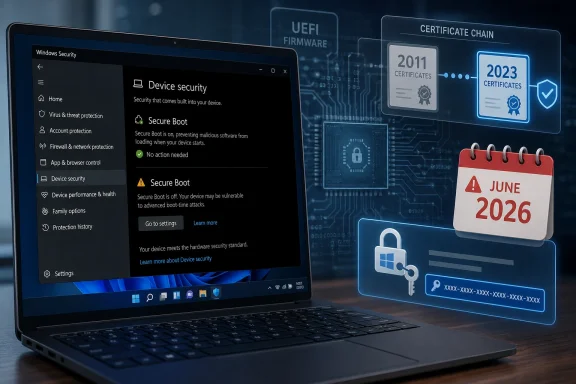
Microsoft’s May 12, 2026 Windows 10 extended security update, KB5087544, adds Secure Boot status reporting to the Windows Security app before Microsoft’s original 2011 Secure Boot certificates begin expiring in June 2026 across many Windows devices. The update is not just another Patch Tuesday footnote; it is Microsoft trying to turn a firmware-trust problem into something ordinary users and administrators can see before it bites them. The stakes are highest for Windows 10 machines now outside normal support, because eligibility for the certificate refresh depends on being on a supported update path. This is the rare Windows deadline that is both deeply technical and uncomfortably practical.
Secure Boot was designed to make the earliest moments of a PC’s startup less trusting and more verifiable. Before Windows loads, the firmware checks whether boot components are signed by authorities it recognizes, blocking a class of attacks that try to wedge themselves below the operating system. That trust chain relies on certificates, and the certificates Microsoft issued in the Windows 8 era were never immortal.
For most of the past 15 years, that expiration date was a distant maintenance concern. Now it is close enough to appear in consumer-facing warnings and Windows Security status screens. Microsoft is not saying every unpatched PC will suddenly become a brick in June, but it is saying that devices without the newer certificates may fall into a degraded security state or encounter Secure Boot complications over time.
That distinction matters because the public conversation around this issue has already drifted toward apocalyptic shorthand. “Secure Boot certificates expire” sounds like “Windows will not boot,” but Microsoft’s guidance is more nuanced. The point is not that every affected machine fails at midnight; the point is that a core trust mechanism is aging out, and Windows needs a controlled handoff to the 2023 certificate chain.
The May update is therefore less a cure than a dashboard light. KB5087544 gives Windows 10 ESU systems a more visible way to report Secure Boot certificate status through the Windows Security app. It is Microsoft’s way of admitting that a problem buried in UEFI databases, boot managers, OEM firmware behavior, and phased rollout logic cannot be managed if users never see it.
That exception is crucial for Secure Boot. Microsoft has said unsupported Windows versions do not receive the new Secure Boot certificates through Windows Update. For Windows 10, that means ESU enrollment is not merely a monthly vulnerability-patch decision; it becomes the dividing line between machines that can participate in Microsoft’s certificate transition and machines that may be left with aging firmware trust anchors.
This is the practical trap for users who thought they could simply ride Windows 10 for another year or two without paying attention. A PC can be fast enough, compatible enough, and familiar enough while still falling off the update rails that deliver low-level trust maintenance. In the old Windows world, unsupported often meant “riskier over time.” In this case, unsupported also means potentially excluded from a coordinated firmware-era migration.
Microsoft’s messaging is careful because it has to be. The company wants users to move to Windows 11, wants businesses to enroll Windows 10 holdouts in ESU, and wants OEMs and IT departments to update certificates without causing boot problems. That is a lot of incentives packed into one warning banner.
This matters because Secure Boot does not live entirely inside Windows. The relevant certificates sit in firmware databases, and updating them is not the same thing as replacing a DLL or installing a cumulative update. Microsoft can stage the process through Windows Update, but the system still depends on firmware behavior, device eligibility, successful update signals, and rollout controls.
That is why Microsoft is using a phased approach rather than blasting every eligible PC at once. A bad bootloader update is annoying; a botched Secure Boot certificate transition is the kind of failure that can strand users at startup screens, trigger BitLocker recovery, or expose fleet-wide firmware assumptions nobody has tested in years. Controlled rollout is not corporate timidity here. It is survival instinct.
For IT pros, the new reporting also changes the order of operations. Instead of waiting for a user to complain that something broke, administrators can inventory device status, identify systems that are not receiving the update, and decide whether the obstacle is Windows support, firmware readiness, BitLocker preparedness, or simple patch lag. That is a better failure mode than discovering the issue during a reboot window.
This is why the correct advice is not simply “install the update.” The better advice is “install the update after confirming you can recover the machine if BitLocker asks.” That small difference separates a routine maintenance task from a help desk surge. A security update that protects the boot chain can still create operational pain if the recovery path was never documented.
Microsoft has been here before. Changes that touch boot state, firmware variables, TPM measurements, or Secure Boot policy can alter what BitLocker expects to see during startup. BitLocker is doing its job when it asks for a recovery key after a meaningful change; the problem is that many users only discover the recovery mechanism exists when they are locked out of their own desktop.
The lesson for administrators is blunt: before the certificate transition becomes urgent, make recovery-key hygiene boring. Confirm escrow. Test retrieval. Check stale device records. Do not assume the user who has ignored Windows 11 upgrade prompts for five years knows where a 48-digit recovery key lives.
Microsoft’s problem is that trust infrastructure ages in public. Certificates expire. Algorithms fall out of favor. Compromised bootloaders need to be blocked. Old media keeps circulating. Offline devices sit in closets. OEMs ship firmware with different defaults. Enterprises build golden images, recovery ISOs, PXE flows, Linux dual-boot setups, anti-cheat dependencies, and disaster-recovery procedures around assumptions that were true when the machine was deployed.
The 2011 certificates were part of the foundation for the Secure Boot era. The 2023 certificates are the replacement foundation. Moving the ecosystem from one to the other sounds simple until you remember that Windows is not just one operating system on one class of hardware. It is a sprawling boot ecosystem that includes consumer laptops, ruggedized tablets, gaming desktops, servers, industrial PCs, virtual machines, and old install media pulled from network shares.
That is why Microsoft’s caution is justified even if its deadlines are inconvenient. A certificate rollover in firmware land is not a cosmetic refresh. It is a migration of the roots that decide what is trusted before the operating system can defend itself.
This is where Microsoft’s security story and Windows 11’s hardware requirements collide. Windows 11 demands newer security capabilities, including TPM 2.0 and Secure Boot support, and many Windows 10-era machines never made the official cut. Those machines now face a narrowing corridor: enroll in ESU if eligible, move to Windows 11 if supported, replace the hardware, or accept an increasingly degraded security posture.
The company will argue, reasonably, that security maintenance cannot be infinite. Firmware trust transitions are complicated enough on supported devices; extending them indefinitely to every old Windows installation would expand the test matrix and increase the chance of catastrophic edge cases. But from the user’s perspective, the message is still stark: the PC did not get slower overnight, but the trust model around it is being retired.
That is the Windows 10 endgame in miniature. The operating system’s popularity does not change the lifecycle math. Microsoft’s certificate update is a security necessity, but it also functions as another pressure point pushing users off unsupported ground.
The right enterprise question is not “Did Microsoft ship the update?” It is “Which of our devices can actually consume it safely?” That requires knowing whether Secure Boot is enabled, which certificates are present, whether the device is supported, whether firmware updates are needed, and whether recovery keys are available if BitLocker intervenes. None of that can be solved by reading a Patch Tuesday headline.
There is also the matter of devices that are powered off, stored, air-gapped, intermittently connected, or managed outside the main endpoint stack. A laptop on a shelf will not politely absorb a phased certificate update. A factory PC that only reboots during maintenance windows may not follow the same cadence as office hardware. A recovery image created before the new certificate chain may not behave the same way on future devices with stricter firmware trust stores.
The certificate deadline should therefore be treated as a fleet hygiene event. It is an excuse to reconcile asset records with reality, retire mystery hardware, refresh boot media, and test recovery paths before the deadline turns into a support incident. The organizations that experience the least drama will be the ones that use Microsoft’s warning as a trigger for boring operational work.
A distorted warning dialog is not the same as a broken boot chain, but both reveal how security depends on presentation. If a certificate state is hidden, users cannot act. If a warning renders badly, users may misread it or ignore it. If BitLocker recovery instructions are buried until the recovery screen appears, users panic.
Microsoft has spent years moving security from background plumbing into user-facing dashboards, but firmware-level trust remains hard to explain in a consumer interface. Windows Security can tell a user that something needs attention; it cannot teach them UEFI architecture in the middle of a deadline. That is why these updates need clear operational messaging, not just toggles and status icons.
The Remote Desktop fix will not drive headlines, but it reinforces the larger story. In modern Windows, the interface is part of the security boundary. A warning that cannot be read, a certificate state that cannot be seen, and a recovery key that cannot be found all create risk.
For enthusiasts, the edge cases are where the story gets interesting. Dual-boot systems, older GPUs with legacy option ROM behavior, custom recovery media, and machines with unusual firmware settings may expose problems that a clean Windows 11 laptop never sees. Secure Boot is a standards-based mechanism, but the lived experience is filtered through OEM implementation quality and years of accumulated platform history.
That does not mean users should disable Secure Boot as a reflex. Turning off Secure Boot may make a particular boot problem disappear, but it also removes a defense that Windows increasingly assumes is present. The better answer is to update certificates, update firmware where appropriate, refresh boot media, and understand which machines are exceptions for a reason.
This is the difference between enthusiast tinkering and fleet management. A hobbyist can work around one stubborn machine. An administrator responsible for thousands of endpoints needs a repeatable state, a rollback plan, and a way to prove which systems are compliant.
That is an implicit admission that Secure Boot updates carry asymmetric risk. If Microsoft moves too slowly, some devices remain on aging certificates as June approaches. If it moves too quickly, a rare firmware bug could become a very visible boot failure. Phased deployment is the compromise: gather signals, expand eligibility, and avoid turning a preventative update into an outage.
This will frustrate some administrators because phased rollouts can feel opaque. A device may be “eligible” in a general sense while not yet receiving the certificate payload. Another may report a status that requires action but not make the remedy obvious. In a normal Windows cumulative update, such ambiguity is annoying; in a Secure Boot migration, it can feel like the ground is moving under the fleet.
Still, the alternative is worse. A global, simultaneous certificate write across countless firmware versions would be reckless. Microsoft’s caution is not proof that the update is broken. It is evidence that the company understands the blast radius.
Windows 11’s stricter hardware baseline helps, but it does not magically normalize firmware state across the installed base. A Windows 11 device upgraded from older hardware, a machine installed through unsupported workarounds, or a fleet image carried forward across multiple hardware generations may still need scrutiny. The operating system version is a clue, not a guarantee.
The Windows Security app’s reporting is therefore useful beyond Windows 10. It gives users a practical place to look instead of asking them to inspect firmware certificate databases. That is the right abstraction for most people, provided the status messages are specific enough to guide action.
Microsoft’s challenge is to avoid overpromising simplicity. The best-case experience is invisible: Windows updates, certificates refresh, Secure Boot remains healthy, and the user never cares. But the reason this story matters is that not every device will live in the best case.
That boundary will be messy because the Windows ecosystem is messy. Some users will get the update automatically and never know why. Some will see a warning and resolve it. Some will discover they are not enrolled in ESU. Some will hit BitLocker recovery and have a bad afternoon. Some will learn that old recovery media, old firmware, or old assumptions no longer fit the modern boot chain.
The temptation is to blame Microsoft for making security complicated. There is truth in that, but not the whole truth. Secure Boot exists because the pre-OS environment is an attractive attack surface, and certificate expiration exists because trust credentials should not last forever. The complexity is the price of maintaining a security model across hardware that outlives the software support cycle it was sold with.
This is why “avoid disruption” is doing a lot of work in Microsoft’s warning. The company is not merely asking users to patch. It is asking them to participate in a trust migration before the deadline makes the invisible visible.
Source: Forbes ‘Avoid Disruption’—Microsoft Updates Windows Before June Deadline
 Microsoft’s Calendar Problem Has Reached the Firmware Layer
Secure Boot was designed to make the earliest moments of a PC’s startup less trusting and more verifiable. Before Windows loads, the firmware checks whether boot components are signed by authorities it recognizes, blocking a class of attacks that try to wedge themselves below the operating system. That trust chain relies on certificates, and the certificates Microsoft issued in the Windows 8 era were never immortal.For most of the past 15 years, that expiration date was a distant maintenance concern. Now it is close enough to appear in consumer-facing warnings and Windows Security status screens. Microsoft is not saying every unpatched PC will suddenly become a brick in June, but it is saying that devices without the newer certificates may fall into a degraded security state or encounter Secure Boot complications over time.
That distinction matters because the public conversation around this issue has already drifted toward apocalyptic shorthand. “Secure Boot certificates expire” sounds like “Windows will not boot,” but Microsoft’s guidance is more nuanced. The point is not that every affected machine fails at midnight; the point is that a core trust mechanism is aging out, and Windows needs a controlled handoff to the 2023 certificate chain.
The May update is therefore less a cure than a dashboard light. KB5087544 gives Windows 10 ESU systems a more visible way to report Secure Boot certificate status through the Windows Security app. It is Microsoft’s way of admitting that a problem buried in UEFI databases, boot managers, OEM firmware behavior, and phased rollout logic cannot be managed if users never see it.
Windows 10 Is Still the Center of Gravity, Even After Support “Ended”
The awkwardness here comes from Windows 10’s strange afterlife. Microsoft ended mainstream support for Windows 10 in October 2025, but the operating system remains embedded across homes, small businesses, schools, factories, clinics, and fleets of otherwise functional PCs. Extended Security Updates keep some of those systems in the update stream, but they do not erase the reality that Windows 10 is now a supported platform only by exception.That exception is crucial for Secure Boot. Microsoft has said unsupported Windows versions do not receive the new Secure Boot certificates through Windows Update. For Windows 10, that means ESU enrollment is not merely a monthly vulnerability-patch decision; it becomes the dividing line between machines that can participate in Microsoft’s certificate transition and machines that may be left with aging firmware trust anchors.
This is the practical trap for users who thought they could simply ride Windows 10 for another year or two without paying attention. A PC can be fast enough, compatible enough, and familiar enough while still falling off the update rails that deliver low-level trust maintenance. In the old Windows world, unsupported often meant “riskier over time.” In this case, unsupported also means potentially excluded from a coordinated firmware-era migration.
Microsoft’s messaging is careful because it has to be. The company wants users to move to Windows 11, wants businesses to enroll Windows 10 holdouts in ESU, and wants OEMs and IT departments to update certificates without causing boot problems. That is a lot of incentives packed into one warning banner.
The Security App Becomes a Negotiator Between Windows and UEFI
The most important part of KB5087544 may be the least dramatic: “dynamic status reporting.” That phrase sounds like ordinary release-note sludge, but in this case it describes the missing link between a firmware trust transition and a user’s ability to act on it. If Windows Security can show whether Secure Boot certificates are current, pending, or problematic, administrators no longer have to treat the issue as invisible infrastructure.This matters because Secure Boot does not live entirely inside Windows. The relevant certificates sit in firmware databases, and updating them is not the same thing as replacing a DLL or installing a cumulative update. Microsoft can stage the process through Windows Update, but the system still depends on firmware behavior, device eligibility, successful update signals, and rollout controls.
That is why Microsoft is using a phased approach rather than blasting every eligible PC at once. A bad bootloader update is annoying; a botched Secure Boot certificate transition is the kind of failure that can strand users at startup screens, trigger BitLocker recovery, or expose fleet-wide firmware assumptions nobody has tested in years. Controlled rollout is not corporate timidity here. It is survival instinct.
For IT pros, the new reporting also changes the order of operations. Instead of waiting for a user to complain that something broke, administrators can inventory device status, identify systems that are not receiving the update, and decide whether the obstacle is Windows support, firmware readiness, BitLocker preparedness, or simple patch lag. That is a better failure mode than discovering the issue during a reboot window.
The BitLocker Warning Is a Reminder That “Security Update” Does Not Mean “Low Impact”
KB5087544 also carries a familiar but still unwelcome warning: some systems may restart and request a BitLocker recovery key. Microsoft says affected users should only need to enter the key once, but that is cold comfort to anyone who does not know where the key is stored. For home users, the recovery key may be tied to a Microsoft account. For businesses, it may be escrowed in Entra ID, Active Directory, Intune, or another management system.This is why the correct advice is not simply “install the update.” The better advice is “install the update after confirming you can recover the machine if BitLocker asks.” That small difference separates a routine maintenance task from a help desk surge. A security update that protects the boot chain can still create operational pain if the recovery path was never documented.
Microsoft has been here before. Changes that touch boot state, firmware variables, TPM measurements, or Secure Boot policy can alter what BitLocker expects to see during startup. BitLocker is doing its job when it asks for a recovery key after a meaningful change; the problem is that many users only discover the recovery mechanism exists when they are locked out of their own desktop.
The lesson for administrators is blunt: before the certificate transition becomes urgent, make recovery-key hygiene boring. Confirm escrow. Test retrieval. Check stale device records. Do not assume the user who has ignored Windows 11 upgrade prompts for five years knows where a 48-digit recovery key lives.
Microsoft Is Trying to Avoid Another Trust-Chain Mess
Secure Boot sits in the same psychological category as certificates, revocation lists, TPMs, and code-signing infrastructure: everyone benefits when it works, almost nobody thinks about it until it fails. That is partly why this transition is so delicate. The average Windows user sees a boot logo, not a chain of cryptographic assertions passing between firmware, boot managers, drivers, and the operating system.Microsoft’s problem is that trust infrastructure ages in public. Certificates expire. Algorithms fall out of favor. Compromised bootloaders need to be blocked. Old media keeps circulating. Offline devices sit in closets. OEMs ship firmware with different defaults. Enterprises build golden images, recovery ISOs, PXE flows, Linux dual-boot setups, anti-cheat dependencies, and disaster-recovery procedures around assumptions that were true when the machine was deployed.
The 2011 certificates were part of the foundation for the Secure Boot era. The 2023 certificates are the replacement foundation. Moving the ecosystem from one to the other sounds simple until you remember that Windows is not just one operating system on one class of hardware. It is a sprawling boot ecosystem that includes consumer laptops, ruggedized tablets, gaming desktops, servers, industrial PCs, virtual machines, and old install media pulled from network shares.
That is why Microsoft’s caution is justified even if its deadlines are inconvenient. A certificate rollover in firmware land is not a cosmetic refresh. It is a migration of the roots that decide what is trusted before the operating system can defend itself.
The Unsupported-PC Problem Is Not a Bug, It Is the Policy Showing Through
The hardest message in this update is aimed at PCs that are not on a supported Windows path. If a Windows 10 system is not enrolled in ESU, Microsoft is not treating it as eligible for the same certificate update flow. That may be defensible from a lifecycle-policy standpoint, but it will feel arbitrary to users whose hardware still works perfectly.This is where Microsoft’s security story and Windows 11’s hardware requirements collide. Windows 11 demands newer security capabilities, including TPM 2.0 and Secure Boot support, and many Windows 10-era machines never made the official cut. Those machines now face a narrowing corridor: enroll in ESU if eligible, move to Windows 11 if supported, replace the hardware, or accept an increasingly degraded security posture.
The company will argue, reasonably, that security maintenance cannot be infinite. Firmware trust transitions are complicated enough on supported devices; extending them indefinitely to every old Windows installation would expand the test matrix and increase the chance of catastrophic edge cases. But from the user’s perspective, the message is still stark: the PC did not get slower overnight, but the trust model around it is being retired.
That is the Windows 10 endgame in miniature. The operating system’s popularity does not change the lifecycle math. Microsoft’s certificate update is a security necessity, but it also functions as another pressure point pushing users off unsupported ground.
Enterprises Have a Bigger Problem Than the Deadline
For large organizations, the June 2026 date is less important than the inventory it forces. A single home PC either updates or does not. A business fleet contains hardware generations, BIOS versions, Secure Boot states, BitLocker policies, recovery media, imaging workflows, third-party boot tools, and exceptions that nobody remembers approving.The right enterprise question is not “Did Microsoft ship the update?” It is “Which of our devices can actually consume it safely?” That requires knowing whether Secure Boot is enabled, which certificates are present, whether the device is supported, whether firmware updates are needed, and whether recovery keys are available if BitLocker intervenes. None of that can be solved by reading a Patch Tuesday headline.
There is also the matter of devices that are powered off, stored, air-gapped, intermittently connected, or managed outside the main endpoint stack. A laptop on a shelf will not politely absorb a phased certificate update. A factory PC that only reboots during maintenance windows may not follow the same cadence as office hardware. A recovery image created before the new certificate chain may not behave the same way on future devices with stricter firmware trust stores.
The certificate deadline should therefore be treated as a fleet hygiene event. It is an excuse to reconcile asset records with reality, retire mystery hardware, refresh boot media, and test recovery paths before the deadline turns into a support incident. The organizations that experience the least drama will be the ones that use Microsoft’s warning as a trigger for boring operational work.
The Remote Desktop Fix Is Small, but It Shows the Same Pattern
KB5087544 also fixes a Remote Desktop Connection security-warning dialog that could render incorrectly on multi-monitor systems with different display-scaling settings after the April 14, 2026 Windows security update. Compared with Secure Boot, that sounds minor. It is, but it belongs to the same broader category of Windows maintenance risk: security UI must be visible, accurate, and understandable at the moment users need it.A distorted warning dialog is not the same as a broken boot chain, but both reveal how security depends on presentation. If a certificate state is hidden, users cannot act. If a warning renders badly, users may misread it or ignore it. If BitLocker recovery instructions are buried until the recovery screen appears, users panic.
Microsoft has spent years moving security from background plumbing into user-facing dashboards, but firmware-level trust remains hard to explain in a consumer interface. Windows Security can tell a user that something needs attention; it cannot teach them UEFI architecture in the middle of a deadline. That is why these updates need clear operational messaging, not just toggles and status icons.
The Remote Desktop fix will not drive headlines, but it reinforces the larger story. In modern Windows, the interface is part of the security boundary. A warning that cannot be read, a certificate state that cannot be seen, and a recovery key that cannot be found all create risk.
Secure Boot’s Messy Reality Runs Beyond Windows
The Secure Boot transition is not only about Windows bootloaders. The broader UEFI ecosystem includes third-party drivers, option ROMs, Linux boot paths, recovery environments, deployment media, and tools that depend on Microsoft’s signing authorities. That complexity is one reason Microsoft and OEMs have been preparing this transition in stages.For enthusiasts, the edge cases are where the story gets interesting. Dual-boot systems, older GPUs with legacy option ROM behavior, custom recovery media, and machines with unusual firmware settings may expose problems that a clean Windows 11 laptop never sees. Secure Boot is a standards-based mechanism, but the lived experience is filtered through OEM implementation quality and years of accumulated platform history.
That does not mean users should disable Secure Boot as a reflex. Turning off Secure Boot may make a particular boot problem disappear, but it also removes a defense that Windows increasingly assumes is present. The better answer is to update certificates, update firmware where appropriate, refresh boot media, and understand which machines are exceptions for a reason.
This is the difference between enthusiast tinkering and fleet management. A hobbyist can work around one stubborn machine. An administrator responsible for thousands of endpoints needs a repeatable state, a rollback plan, and a way to prove which systems are compliant.
Microsoft’s Phased Rollout Is a Feature, Not a Stall
Microsoft says it will issue new certificates only to devices that demonstrate sufficient successful update signals, and that phrasing deserves attention. The company is not merely checking whether a machine asked for an update. It is trying to determine whether the device looks safe enough to receive a change that reaches below the operating system.That is an implicit admission that Secure Boot updates carry asymmetric risk. If Microsoft moves too slowly, some devices remain on aging certificates as June approaches. If it moves too quickly, a rare firmware bug could become a very visible boot failure. Phased deployment is the compromise: gather signals, expand eligibility, and avoid turning a preventative update into an outage.
This will frustrate some administrators because phased rollouts can feel opaque. A device may be “eligible” in a general sense while not yet receiving the certificate payload. Another may report a status that requires action but not make the remedy obvious. In a normal Windows cumulative update, such ambiguity is annoying; in a Secure Boot migration, it can feel like the ground is moving under the fleet.
Still, the alternative is worse. A global, simultaneous certificate write across countless firmware versions would be reckless. Microsoft’s caution is not proof that the update is broken. It is evidence that the company understands the blast radius.
The Windows 11 Angle Is Reassuring, but Not Universal
Most Windows 11 PCs also need to be considered in this transition, though newer systems are more likely to already carry the updated certificate chain. Microsoft and OEMs have been moving toward the 2023 certificates for newer devices, and PCs sold in the last couple of years are less likely to require the same remediation. That does not mean every Windows 11 machine can be ignored.Windows 11’s stricter hardware baseline helps, but it does not magically normalize firmware state across the installed base. A Windows 11 device upgraded from older hardware, a machine installed through unsupported workarounds, or a fleet image carried forward across multiple hardware generations may still need scrutiny. The operating system version is a clue, not a guarantee.
The Windows Security app’s reporting is therefore useful beyond Windows 10. It gives users a practical place to look instead of asking them to inspect firmware certificate databases. That is the right abstraction for most people, provided the status messages are specific enough to guide action.
Microsoft’s challenge is to avoid overpromising simplicity. The best-case experience is invisible: Windows updates, certificates refresh, Secure Boot remains healthy, and the user never cares. But the reason this story matters is that not every device will live in the best case.
The Deadline Is Really a Support Boundary in Disguise
The June 2026 certificate date is easy to treat as a single moment, but it is better understood as a boundary becoming visible. On one side are devices that receive supported updates, report their Secure Boot state, and migrate toward the new trust chain. On the other are devices whose owners may have to accept manual work, reduced security, or replacement.That boundary will be messy because the Windows ecosystem is messy. Some users will get the update automatically and never know why. Some will see a warning and resolve it. Some will discover they are not enrolled in ESU. Some will hit BitLocker recovery and have a bad afternoon. Some will learn that old recovery media, old firmware, or old assumptions no longer fit the modern boot chain.
The temptation is to blame Microsoft for making security complicated. There is truth in that, but not the whole truth. Secure Boot exists because the pre-OS environment is an attractive attack surface, and certificate expiration exists because trust credentials should not last forever. The complexity is the price of maintaining a security model across hardware that outlives the software support cycle it was sold with.
This is why “avoid disruption” is doing a lot of work in Microsoft’s warning. The company is not merely asking users to patch. It is asking them to participate in a trust migration before the deadline makes the invisible visible.
The June Certificate Cliff Rewards the Administrators Who Act Early
The practical answer is not panic; it is sequencing. Microsoft has already shipped the Windows-side reporting improvements for eligible Windows 10 ESU devices, and Windows 11 systems have also been getting clearer Secure Boot status signals. The work now is to make sure devices are updated, supported, recoverable, and visible before the certificate expiration window opens.- Windows 10 machines need to be on a supported path, and for many holdouts that means ESU enrollment rather than merely hoping Windows Update continues to behave normally.
- Users should install the May 2026 update promptly, but they should confirm they can retrieve any BitLocker recovery key before rebooting a machine that matters.
- Administrators should inventory Secure Boot status, firmware versions, device eligibility, and recovery-key escrow instead of treating this as just another cumulative update.
- Recovery media, deployment images, and offline or rarely used devices deserve attention because they may not receive certificate updates on the same schedule as active endpoints.
- Disabling Secure Boot may work around isolated symptoms, but it should not be treated as a normal remediation for a trust-chain transition.
- Newer Windows 11 hardware is less likely to be exposed, but Windows 11 alone is not a substitute for checking the actual Secure Boot certificate state.
Source: Forbes ‘Avoid Disruption’—Microsoft Updates Windows Before June Deadline
