

Microsoft released KB5087544 on May 12, 2026, for Windows 10 Enterprise LTSC 2021, Windows 10 IoT Enterprise LTSC 2021, and eligible Extended Security Updates systems, fixing May Patch Tuesday security flaws while correcting Remote Desktop warning behavior and Secure Boot reporting. The update is a reminder that Windows 10 is no longer a mainstream product so much as a managed liability with a meter running. For home users, administrators, and anyone still nursing Windows 10 fleets through extended support, the message is blunt: the operating system may be finished evolving, but it is not finished demanding operational attention.
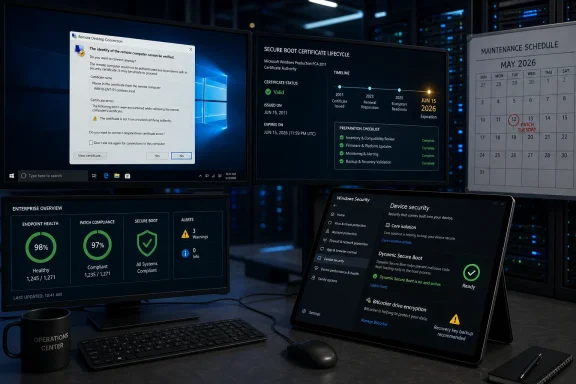
The headline fix is small enough to sound mundane. Remote Desktop Connection security warnings could render incorrectly on multi-monitor systems with different display scaling settings, a bug introduced by an earlier security update. Yet the more revealing change is the Secure Boot work sitting beside it, because Microsoft is preparing Windows devices for a certificate transition that reaches beyond a single cumulative update.
KB5087544 lands in the strange afterlife of Windows 10. Microsoft has ended feature development for the platform, and the broad consumer support story has moved on to Windows 11. But Windows 10 still exists in factories, clinics, call centers, schools, point-of-sale deployments, and small businesses whose hardware refresh cycles do not obey Redmond’s marketing calendar.
That makes this update less about novelty and more about containment. The cumulative update advances Windows 10 to OS builds 19045.7291 and 19044.7291 for the supported channels that still qualify. It does not promise new interface work, productivity features, or a softer landing for users who skipped Windows 11.
This is Windows 10 as infrastructure: patched, constrained, and increasingly conditional. If a device is in the Enterprise LTSC lane or covered by the Extended Security Updates program, it remains in the security conversation. If it is not, the user is drifting outside the normal patch pipeline at precisely the moment attackers are reading Patch Tuesday notes as a target list.
That distinction matters because the May 2026 Patch Tuesday batch was not cosmetic. Microsoft’s May release addressed 120 vulnerabilities across Windows and other Microsoft products, with multiple critical remote code execution and privilege escalation bugs in the mix. Even when no zero-day exploitation is reported at release, the clock starts ticking as soon as patches describe what was wrong.
Remote Desktop warnings are not decorative. They sit at the boundary between a user and a remote session, where certificates, identity, and trust decisions are compressed into a moment of interface judgment. If the warning renders badly, is cut off, or appears in a confusing way, the user experience becomes less trustworthy even if the underlying security model remains intact.
This is the awkward truth about enterprise security: the interface is part of the control surface. A broken warning can train users to click past uncertainty, and a warning that appears incorrectly can make legitimate sessions look suspicious. In environments where RDP is still used for administration, support, or legacy application access, that is more than a cosmetic regression.
The multi-monitor and scaling angle also fits the modern workplace better than it might seem. Hybrid work setups, docking stations, ultrawide monitors, laptop panels, and mixed-DPI displays are now ordinary. Microsoft did not just fix a rare edge case; it repaired a paper cut in the messy hardware reality where Windows clients actually live.
Secure Boot is supposed to make sure a device starts from trusted firmware and boot components. The catch is that trust is not eternal. Certificates age, signing authorities change, and boot managers need to move with the platform. The 2026 certificate rollover is the kind of maintenance event that becomes invisible when it works and catastrophic when it does not.
Dynamic reporting inside Windows Security is therefore not just a UI improvement. It is Microsoft trying to surface the state of a boot-trust chain that many users never think about and many administrators only inspect when something breaks. If the operating system can better report Secure Boot status, it can reduce the gap between “this machine appears healthy” and “this machine is ready for the next boot security transition.”
That distinction is especially important for Windows 10. Older fleets tend to contain the weirdest combinations of firmware age, TPM behavior, deployment history, BitLocker policy, and OEM defaults. Those combinations are precisely where certificate transitions and boot validation changes can produce surprises.
That is not BitLocker “breaking” in the ordinary sense. It is BitLocker doing what it was designed to do: protect the drive when boot measurements no longer match expectations. The problem is that a technically correct recovery prompt can still be a business interruption if the recovery key is missing, poorly escrowed, or locked behind a process nobody can access during an outage.
The affected setup is not supposed to be the common path. It involves BitLocker protecting the operating system drive, a manually configured TPM validation profile, PCR7 included in that profile, and Secure Boot state reporting that indicates PCR7 binding is not possible. It also intersects with the newer Windows UEFI CA 2023 certificate state and whether the machine is already using the newer signed Windows Boot Manager.
That is a dense stack of conditions, but administrators should resist the temptation to wave it away. The systems most likely to have odd TPM and BitLocker policies are often the same systems that have been imaged, re-imaged, upgraded, exempted, and carried forward through years of changing security baselines. The danger is not that every Windows 10 device will hit a recovery screen; the danger is that the one that does will be a kiosk, a clinical workstation, or a remote office machine without anyone nearby who knows where the recovery key lives.
Microsoft’s workaround points administrators toward undoing the problematic Group Policy configuration and then suspending and resuming BitLocker so the bindings can be updated. That is sensible, but it is also a reminder that encryption policy is not fire-and-forget. It is coupled to firmware trust, boot loaders, Secure Boot certificates, and the update cadence.
KB5087544 is available to Windows 10 systems in the right channels, including Enterprise LTSC and eligible ESU participants. That eligibility line is now central to the story. Two Windows 10 machines may look identical to an end user, but only one may be receiving the cumulative security update that closes the month’s vulnerabilities.
This is where Microsoft’s messaging gets uncomfortable for the installed base. The company wants customers on Windows 11, and Windows 10’s feature development is over. But the security reality is more complicated because millions of systems remain on Windows 10 for reasons that are not always lazy or irrational.
Some hardware cannot move cleanly to Windows 11. Some organizations have application dependencies that make upgrades slow. Some environments prize stability over platform churn, especially where LTSC is used by design. KB5087544 does not resolve that tension; it exposes it.
The May 2026 batch included a broad set of Microsoft fixes, with reporting from multiple security outlets highlighting critical remote code execution issues and a substantial number of elevation-of-privilege vulnerabilities. Those categories are the familiar fuel of enterprise compromise. Remote code execution can provide a foothold; privilege escalation can turn that foothold into control.
Windows 10 administrators should treat the “no new features” language carefully. It does not mean “nothing important changed.” It means the update’s value is concentrated in risk reduction rather than capability expansion.
That is a harder sell to users, but it is the core bargain of extended support. You are paying, directly or indirectly, for the absence of drama. The best outcome of KB5087544 is that nothing interesting happens after installation: Remote Desktop warnings render correctly, Secure Boot status becomes clearer, BitLocker does not surprise anyone, and vulnerabilities quietly stop being reachable.
Certificate transitions are unforgiving because they involve trust anchors that exist below the normal application and operating system layers. When the trust chain is wrong, the device may not simply show a friendly error inside Windows. It may fail earlier, in a state where remote management tools, endpoint agents, and user self-service portals are unavailable.
For administrators, the practical lesson is to inventory before panic. Secure Boot state, PCR7 binding, BitLocker recovery escrow, firmware versions, and boot manager signing status need to be understood before broad deployment. KB5087544 improves reporting, but reporting is only useful if someone reads it and acts on it.
For home users in the ESU program, the lesson is simpler but no less important. Make sure BitLocker recovery keys are backed up, especially on laptops and devices tied to Microsoft accounts. A recovery prompt is not the time to discover that the key was never saved or that the account used to store it is inaccessible.
The operating system remains familiar, but the maintenance model is changing underneath it. Updates are no longer part of a living roadmap for most users; they are part of a controlled descent. That changes how organizations should think about every remaining Windows 10 device.
A supported Windows 10 system in 2026 should have a reason to exist. It should be inventoried, patched, monitored, and scheduled for eventual replacement or isolation. An unsupported Windows 10 system should be treated as an exception that needs a risk owner, not as a harmless relic.
There is a cultural shift here as well. Windows 10 spent years as the safe harbor after the turbulence of Windows 8 and the hardware demands of Windows 11. Many users still experience it as the “normal” version of Windows. But in security terms, normal has an expiration date.
Administrators should read the known issue before deployment, not after the first recovery-key ticket arrives. They should verify BitLocker key escrow, review TPM validation policies, and identify machines where PCR7 binding is already reporting trouble. The cost of that work is small compared with the cost of a fleet that boots into recovery without a prepared support path.
For individual users, the advice is less elaborate. If your Windows 10 machine is eligible for the update, install it. If BitLocker is enabled, confirm that your recovery key is backed up somewhere you can actually reach. If your machine is not eligible for security updates, stop treating that as a future problem.
The concrete lessons are straightforward:
Source: SC Media Windows 10 KB5087544 update fixes Remote Desktop warnings and Secure Boot reporting
The headline fix is small enough to sound mundane. Remote Desktop Connection security warnings could render incorrectly on multi-monitor systems with different display scaling settings, a bug introduced by an earlier security update. Yet the more revealing change is the Secure Boot work sitting beside it, because Microsoft is preparing Windows devices for a certificate transition that reaches beyond a single cumulative update.
 Windows 10 Has Become a Security Channel, Not a Product Roadmap
KB5087544 lands in the strange afterlife of Windows 10. Microsoft has ended feature development for the platform, and the broad consumer support story has moved on to Windows 11. But Windows 10 still exists in factories, clinics, call centers, schools, point-of-sale deployments, and small businesses whose hardware refresh cycles do not obey Redmond’s marketing calendar.That makes this update less about novelty and more about containment. The cumulative update advances Windows 10 to OS builds 19045.7291 and 19044.7291 for the supported channels that still qualify. It does not promise new interface work, productivity features, or a softer landing for users who skipped Windows 11.
This is Windows 10 as infrastructure: patched, constrained, and increasingly conditional. If a device is in the Enterprise LTSC lane or covered by the Extended Security Updates program, it remains in the security conversation. If it is not, the user is drifting outside the normal patch pipeline at precisely the moment attackers are reading Patch Tuesday notes as a target list.
That distinction matters because the May 2026 Patch Tuesday batch was not cosmetic. Microsoft’s May release addressed 120 vulnerabilities across Windows and other Microsoft products, with multiple critical remote code execution and privilege escalation bugs in the mix. Even when no zero-day exploitation is reported at release, the clock starts ticking as soon as patches describe what was wrong.
The Remote Desktop Fix Is a Small Bug With Real Admin Consequences
The Remote Desktop issue fixed by KB5087544 was not the kind of flaw that dominates security briefings. It involved a warning dialog that could display incorrectly when Remote Desktop Connection was used on multi-monitor systems with different display scaling values. That sounds like the sort of bug an administrator might dismiss until it appears on a help desk ticket from someone trying to reach a production system at 2 a.m.Remote Desktop warnings are not decorative. They sit at the boundary between a user and a remote session, where certificates, identity, and trust decisions are compressed into a moment of interface judgment. If the warning renders badly, is cut off, or appears in a confusing way, the user experience becomes less trustworthy even if the underlying security model remains intact.
This is the awkward truth about enterprise security: the interface is part of the control surface. A broken warning can train users to click past uncertainty, and a warning that appears incorrectly can make legitimate sessions look suspicious. In environments where RDP is still used for administration, support, or legacy application access, that is more than a cosmetic regression.
The multi-monitor and scaling angle also fits the modern workplace better than it might seem. Hybrid work setups, docking stations, ultrawide monitors, laptop panels, and mixed-DPI displays are now ordinary. Microsoft did not just fix a rare edge case; it repaired a paper cut in the messy hardware reality where Windows clients actually live.
Secure Boot Reporting Is the Quiet Center of the Update
The more strategic change in KB5087544 is Secure Boot reporting. Microsoft says the update enables dynamic Secure Boot status reporting in the Windows Security app, a phrase that sounds bureaucratic until you place it against the coming Secure Boot certificate transition. Certificates used by many Windows devices are set to expire beginning in June 2026, and Microsoft has been urging administrators to prepare devices and servers before the deadline becomes a boot problem.Secure Boot is supposed to make sure a device starts from trusted firmware and boot components. The catch is that trust is not eternal. Certificates age, signing authorities change, and boot managers need to move with the platform. The 2026 certificate rollover is the kind of maintenance event that becomes invisible when it works and catastrophic when it does not.
Dynamic reporting inside Windows Security is therefore not just a UI improvement. It is Microsoft trying to surface the state of a boot-trust chain that many users never think about and many administrators only inspect when something breaks. If the operating system can better report Secure Boot status, it can reduce the gap between “this machine appears healthy” and “this machine is ready for the next boot security transition.”
That distinction is especially important for Windows 10. Older fleets tend to contain the weirdest combinations of firmware age, TPM behavior, deployment history, BitLocker policy, and OEM defaults. Those combinations are precisely where certificate transitions and boot validation changes can produce surprises.
BitLocker Is the Warning Light Administrators Should Not Ignore
Microsoft’s known issue for KB5087544 is narrowly framed but operationally important. Some systems may ask for a BitLocker recovery key after installation, particularly when a specific and discouraged Group Policy configuration is in place involving TPM platform validation, PCR7, and Secure Boot. In plain English, the machine may decide that the boot environment has changed enough to demand proof before releasing the encrypted drive.That is not BitLocker “breaking” in the ordinary sense. It is BitLocker doing what it was designed to do: protect the drive when boot measurements no longer match expectations. The problem is that a technically correct recovery prompt can still be a business interruption if the recovery key is missing, poorly escrowed, or locked behind a process nobody can access during an outage.
The affected setup is not supposed to be the common path. It involves BitLocker protecting the operating system drive, a manually configured TPM validation profile, PCR7 included in that profile, and Secure Boot state reporting that indicates PCR7 binding is not possible. It also intersects with the newer Windows UEFI CA 2023 certificate state and whether the machine is already using the newer signed Windows Boot Manager.
That is a dense stack of conditions, but administrators should resist the temptation to wave it away. The systems most likely to have odd TPM and BitLocker policies are often the same systems that have been imaged, re-imaged, upgraded, exempted, and carried forward through years of changing security baselines. The danger is not that every Windows 10 device will hit a recovery screen; the danger is that the one that does will be a kiosk, a clinical workstation, or a remote office machine without anyone nearby who knows where the recovery key lives.
Microsoft’s workaround points administrators toward undoing the problematic Group Policy configuration and then suspending and resuming BitLocker so the bindings can be updated. That is sensible, but it is also a reminder that encryption policy is not fire-and-forget. It is coupled to firmware trust, boot loaders, Secure Boot certificates, and the update cadence.
Patch Tuesday Is Now a Windows 10 Eligibility Test
For years, Patch Tuesday was treated as a calendar rhythm. Updates arrived, admins tested, users complained, and the cycle repeated. In the post-mainstream Windows 10 era, Patch Tuesday has become something else: a monthly test of whether a device still belongs inside Microsoft’s supported security perimeter.KB5087544 is available to Windows 10 systems in the right channels, including Enterprise LTSC and eligible ESU participants. That eligibility line is now central to the story. Two Windows 10 machines may look identical to an end user, but only one may be receiving the cumulative security update that closes the month’s vulnerabilities.
This is where Microsoft’s messaging gets uncomfortable for the installed base. The company wants customers on Windows 11, and Windows 10’s feature development is over. But the security reality is more complicated because millions of systems remain on Windows 10 for reasons that are not always lazy or irrational.
Some hardware cannot move cleanly to Windows 11. Some organizations have application dependencies that make upgrades slow. Some environments prize stability over platform churn, especially where LTSC is used by design. KB5087544 does not resolve that tension; it exposes it.
The Security Fixes Matter More Than the Visible Bug Fixes
The Remote Desktop correction and Secure Boot reporting change are easy to describe because they have user-visible hooks. The larger security payload is harder to summarize because Patch Tuesday spreads across components, privilege boundaries, parsing engines, network services, and application surfaces. That does not make it less urgent.The May 2026 batch included a broad set of Microsoft fixes, with reporting from multiple security outlets highlighting critical remote code execution issues and a substantial number of elevation-of-privilege vulnerabilities. Those categories are the familiar fuel of enterprise compromise. Remote code execution can provide a foothold; privilege escalation can turn that foothold into control.
Windows 10 administrators should treat the “no new features” language carefully. It does not mean “nothing important changed.” It means the update’s value is concentrated in risk reduction rather than capability expansion.
That is a harder sell to users, but it is the core bargain of extended support. You are paying, directly or indirectly, for the absence of drama. The best outcome of KB5087544 is that nothing interesting happens after installation: Remote Desktop warnings render correctly, Secure Boot status becomes clearer, BitLocker does not surprise anyone, and vulnerabilities quietly stop being reachable.
Microsoft’s Secure Boot Deadline Is Bigger Than This One Patch
The Secure Boot certificate expiration timeline gives KB5087544 a broader context. Microsoft has been warning that certificates used by many Windows devices begin expiring in June 2026. That date turns Secure Boot from a background assurance into a calendar-driven maintenance project.Certificate transitions are unforgiving because they involve trust anchors that exist below the normal application and operating system layers. When the trust chain is wrong, the device may not simply show a friendly error inside Windows. It may fail earlier, in a state where remote management tools, endpoint agents, and user self-service portals are unavailable.
For administrators, the practical lesson is to inventory before panic. Secure Boot state, PCR7 binding, BitLocker recovery escrow, firmware versions, and boot manager signing status need to be understood before broad deployment. KB5087544 improves reporting, but reporting is only useful if someone reads it and acts on it.
For home users in the ESU program, the lesson is simpler but no less important. Make sure BitLocker recovery keys are backed up, especially on laptops and devices tied to Microsoft accounts. A recovery prompt is not the time to discover that the key was never saved or that the account used to store it is inaccessible.
Windows 10’s Long Goodbye Is Getting More Technical
Windows 10’s retirement was never going to be a single moment. It was always going to be a drawn-out negotiation among hardware requirements, enterprise budgets, software compatibility, and security pressure. KB5087544 shows what that negotiation looks like in practice: not a dramatic cutoff, but a narrowing path of eligibility and operational caveats.The operating system remains familiar, but the maintenance model is changing underneath it. Updates are no longer part of a living roadmap for most users; they are part of a controlled descent. That changes how organizations should think about every remaining Windows 10 device.
A supported Windows 10 system in 2026 should have a reason to exist. It should be inventoried, patched, monitored, and scheduled for eventual replacement or isolation. An unsupported Windows 10 system should be treated as an exception that needs a risk owner, not as a harmless relic.
There is a cultural shift here as well. Windows 10 spent years as the safe harbor after the turbulence of Windows 8 and the hardware demands of Windows 11. Many users still experience it as the “normal” version of Windows. But in security terms, normal has an expiration date.
The Practical Read From KB5087544 Is Narrow but Urgent
KB5087544 is not a flashy update, and that is exactly why it deserves attention. It touches Remote Desktop trust prompts, Secure Boot visibility, BitLocker recovery behavior, and the May security baseline for the Windows 10 systems that still qualify. That combination is a neat snapshot of late-stage Windows 10: less about features, more about keeping the floor from collapsing.Administrators should read the known issue before deployment, not after the first recovery-key ticket arrives. They should verify BitLocker key escrow, review TPM validation policies, and identify machines where PCR7 binding is already reporting trouble. The cost of that work is small compared with the cost of a fleet that boots into recovery without a prepared support path.
For individual users, the advice is less elaborate. If your Windows 10 machine is eligible for the update, install it. If BitLocker is enabled, confirm that your recovery key is backed up somewhere you can actually reach. If your machine is not eligible for security updates, stop treating that as a future problem.
The Patch Tells Windows 10 Holdouts What Microsoft Won’t Say Softly
KB5087544 is a maintenance release, but its implications are sharper than its changelog. The update says Windows 10 can still be secured, but only inside defined lanes. It says Microsoft will still fix important bugs, but not reopen the feature roadmap. It says Secure Boot is not a checkbox from the day a PC was purchased, but a trust system that must survive certificate turnover and policy drift.The concrete lessons are straightforward:
- Windows 10 KB5087544 applies to Enterprise LTSC 2021, IoT Enterprise LTSC 2021, and eligible Extended Security Updates systems rather than the general unsupported Windows 10 population.
- The update fixes a Remote Desktop Connection warning dialog problem that could appear on mixed-scaling multi-monitor setups.
- The update improves Secure Boot status reporting in the Windows Security app as Microsoft prepares devices for Secure Boot certificate changes beginning in June 2026.
- Some systems with discouraged BitLocker and TPM validation policy configurations may prompt for a recovery key after installation.
- Administrators should verify BitLocker recovery key escrow and review PCR7-related policy settings before broad deployment.
- The absence of new Windows 10 features does not reduce the urgency of the May 2026 security fixes.
Source: SC Media Windows 10 KB5087544 update fixes Remote Desktop warnings and Secure Boot reporting
