

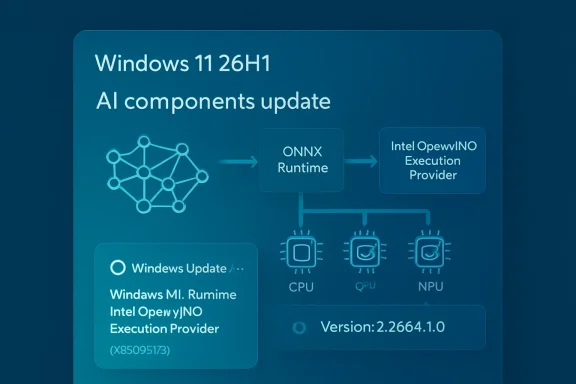
 KB5089173: Intel OpenVINO Execution Provider Update Version 2.2604.1.0 Released for Windows 11 Version 26H1
Microsoft has published KB5089173, an Intel OpenVINO Execution Provider update for Windows 11, version 26H1. The update brings the Intel OpenVINO Execution Provider AI component to version 2.2604.1.0 and is intended for supported Windows 11 26H1 systems that use Microsoft’s Windows machine-learning stack, ONNX Runtime, and Intel hardware acceleration for local artificial-intelligence workloads.The update is not a traditional user-facing feature update. Instead, it is part of the expanding set of Windows AI component updates that keep on-device machine-learning infrastructure current without requiring a full operating-system upgrade. KB5089173 focuses specifically on the Intel OpenVINO Execution Provider, a component that allows ONNX models to run more efficiently on Intel CPUs, GPUs, and NPUs.
For most users, the update will install quietly through Windows Update. For developers, OEMs, IT administrators, and users with AI-capable Intel systems, however, the update is worth noting because it affects the underlying execution layer that Windows and applications may rely on for accelerated local inference.
What KB5089173 Updates
KB5089173 updates the Intel OpenVINO Execution Provider AI component for Windows 11, version 26H1. Microsoft identifies the updated component as version 2.2604.1.0.The update applies to Windows 11 version 26H1, all editions. Microsoft states that the update includes improvements to the OpenVINO Execution Provider AI component. It is distributed through Windows Update and should be downloaded and installed automatically on eligible systems.
The update also replaces the previously released KB5083466. That means KB5089173 is the newer update in this particular component chain and supersedes the earlier release for applicable devices.
After installation, users should be able to confirm the update through Windows Update history. Microsoft says the installed entry should appear as:
Windows ML Runtime Intel OpenVINO Execution Provider (KB5089173)
This naming is important because the update may not appear under a generic “Intel driver” label or as a standard cumulative update. It is listed as a Windows ML Runtime component update for the Intel OpenVINO Execution Provider.
What the Intel OpenVINO Execution Provider Is
The Intel OpenVINO Execution Provider is an execution provider used with ONNX Runtime and Windows machine-learning technologies to accelerate AI model inference on Intel hardware.In practical terms, an execution provider is the part of an inference runtime that knows how to send work to a particular hardware backend. ONNX Runtime can run machine-learning models using different execution providers depending on the device, framework integration, application configuration, and available hardware. Instead of relying only on a generic CPU path, an execution provider can route supported parts of a model to optimized hardware and software libraries.
The OpenVINO Execution Provider is designed for Intel platforms. It enables ONNX models to take advantage of Intel hardware acceleration across CPUs, integrated GPUs, discrete GPUs, and NPUs where available. That makes it relevant for a wide range of Windows PCs, from standard Intel-based laptops and desktops to newer AI PCs with dedicated neural processing hardware.
OpenVINO itself is Intel’s open-source toolkit for optimizing and deploying AI inference workloads. It is commonly used to improve performance, reduce latency, increase throughput, and make better use of available Intel hardware. By integrating OpenVINO through ONNX Runtime and Windows ML infrastructure, Windows and applications can benefit from Intel-specific optimizations without every application developer needing to build a complete hardware acceleration stack from scratch.
Why This Matters for Windows 11 AI Features
Windows 11 is increasingly dependent on local AI components. Some AI experiences run in the cloud, but many modern Windows scenarios also involve on-device inference. Local inference can improve responsiveness, reduce reliance on network connectivity, protect privacy by keeping data on the device, and allow applications to use specialized hardware such as NPUs.For local AI to work well, several layers must line up:
- The operating system must expose the right APIs.
- The runtime must be able to execute the model.
- The model format must be supported.
- The hardware driver and acceleration stack must be available.
- The execution provider must know how to use the hardware efficiently.
This does not mean every user will immediately notice a visible change after installing the update. The component works underneath applications and Windows AI experiences. Its benefits are most likely to show up when software uses ONNX models and is configured to take advantage of Windows ML, ONNX Runtime, or Intel OpenVINO acceleration.
For users on supported Intel-based Windows 11 26H1 systems, this kind of update can help maintain compatibility and performance as Microsoft, Intel, and application developers continue to refine AI workloads for local execution.
ONNX Runtime and the Role of Execution Providers
ONNX Runtime is a high-performance inference runtime used to run models in the ONNX format. ONNX, short for Open Neural Network Exchange, is a widely used model format that allows machine-learning models to move between frameworks and deployment environments.A model might be trained in one framework and then exported to ONNX so it can run in a production application, desktop app, cloud service, or device-local runtime. ONNX Runtime provides the engine that loads and executes the model. Execution providers extend that engine so workloads can run on different types of hardware.
Without an optimized execution provider, a model may run on a default CPU path. That can be suitable for some workloads, but it may not deliver the performance, power efficiency, or responsiveness required for modern AI experiences. With a hardware-specific execution provider, ONNX Runtime can offload supported operations to accelerators.
The OpenVINO Execution Provider is Intel’s optimized path. It can accelerate supported ONNX workloads on Intel CPUs, GPUs, and NPUs. Depending on the model and hardware, this can improve inference speed, reduce CPU load, or allow multiple inference requests to run more efficiently.
The execution provider model also gives applications flexibility. Developers can choose a provider based on the available hardware and workload characteristics. For example, a latency-sensitive model may be configured differently from a throughput-focused model. Some systems may benefit most from the CPU; others may gain more from GPU or NPU acceleration.
KB5089173 updates the Windows-delivered Intel OpenVINO Execution Provider component, helping ensure that the operating system’s AI runtime layer remains aligned with current Intel OpenVINO improvements.
CPUs, GPUs, and NPUs: Why the Hardware Target Matters
Microsoft’s KB5089173 description notes that the Intel OpenVINO Execution Provider accelerates ONNX models on Intel CPUs, GPUs, and NPUs. Each of these hardware types can play a different role in AI inference.A CPU is general-purpose and broadly compatible. It is often the fallback path for operations that are unsupported elsewhere. Modern Intel CPUs include instruction-set and architecture-level optimizations that can improve AI inference, especially for smaller models, mixed workloads, and situations where compatibility is more important than maximum acceleration.
A GPU is designed for parallel computation and can be well suited to many neural-network workloads. Intel integrated GPUs are present in many laptops and desktops, while Intel discrete GPUs may offer additional compute capacity. For some ONNX workloads, GPU execution can deliver better throughput or faster inference than CPU-only execution.
An NPU is a dedicated neural processing unit designed specifically for AI inference. NPUs are increasingly common in newer AI PCs. They can run certain AI workloads more power-efficiently than a CPU or GPU, which is especially important for mobile systems where battery life, thermals, and sustained performance matter.
The OpenVINO Execution Provider helps route inference work to these Intel hardware targets when supported. Not every model, operator, or workload will run entirely on every device. Some workloads may use fallback paths, and performance depends on the model architecture, precision, tensor shapes, operator support, driver stack, and runtime configuration. But keeping the execution provider updated improves the foundation on which these workloads run.
KB5089173 and Windows 11 Version 26H1
KB5089173 applies specifically to Windows 11, version 26H1, all editions. Microsoft also lists a prerequisite: the latest cumulative update for Windows 11 version 26H1 must be installed.This prerequisite matters. Component updates like KB5089173 are often tied to the servicing state of the operating system. If a device is not on the latest required cumulative update, Windows Update may not offer the component update immediately, or the update may not apply correctly.
For users and administrators, the practical takeaway is simple: before expecting KB5089173 to appear, make sure the Windows 11 26H1 device is fully current through Windows Update. Install the latest cumulative update first, restart if required, and then check Windows Update again.
Because the update is delivered automatically, most users should not need to manually download or install anything. If the device is eligible, current, and connected to Windows Update, KB5089173 should be handled through the normal servicing process.
How to Get KB5089173
Microsoft says KB5089173 will be downloaded and installed automatically from Windows Update.To check for updates manually:
- Open Settings.
- Go to Windows Update.
- Select Check for updates.
- Install any available cumulative updates first.
- Restart the device if prompted.
- Return to Windows Update and check again if needed.
For managed environments, administrators should treat this as part of Windows component servicing rather than as a standalone application update. The update is tied to Windows Update and appears in update history under the Windows ML Runtime Intel OpenVINO Execution Provider name.
How to Confirm KB5089173 Is Installed
Microsoft provides a straightforward way to confirm whether KB5089173 is present on a device.To check:
- Open Settings.
- Select Windows Update.
- Open Update history.
- Look for the entry named Windows ML Runtime Intel OpenVINO Execution Provider (KB5089173).
If it does not appear, there are several possible reasons:
- The device may not be running Windows 11 version 26H1.
- The latest cumulative update for Windows 11 26H1 may not be installed.
- The device may not yet have received the update through Windows Update.
- The hardware or software configuration may not be eligible.
- The update may be staged or pending a restart.
- Update history may not have refreshed yet.
Replacement Information: KB5089173 Supersedes KB5083466
Microsoft states that KB5089173 replaces the previously released KB5083466.This replacement information helps administrators and support teams understand update lineage. If a device receives KB5089173, it should be considered the newer update in place of KB5083466 for this component. In normal Windows servicing, replacement updates reduce the need to install older component packages separately.
For troubleshooting, this also means support staff should check for KB5089173 rather than relying only on the earlier KB5083466 entry. If an application, device image, or validation checklist references KB5083466, it may need to be updated to account for KB5089173 as the newer replacement.
What Users Should Expect After Installation
Most users should expect no obvious interface change after installing KB5089173. There is no new desktop app, Start menu item, or visible Windows feature associated with the update. It is a runtime component update.The update’s effects are more likely to be observed indirectly, such as through:
- Improved behavior in applications that use ONNX Runtime and OpenVINO acceleration.
- Better compatibility with Windows AI component servicing.
- Updated runtime support for Intel AI hardware paths.
- More current underlying AI infrastructure for Windows 11 26H1.
- Potential improvements to local inference workloads, depending on the app and hardware.
For general consumers, the best approach is to let Windows Update install it automatically. For developers and IT professionals, the update is more significant because it may affect validation, performance testing, image maintenance, and compatibility for AI-enabled applications.
Implications for Developers
Developers building Windows applications that use ONNX Runtime, Windows ML, or local AI inference on Intel hardware should pay attention to updates like KB5089173. The execution provider layer can influence performance characteristics, model compatibility, and runtime behavior.If an application uses ONNX models and relies on Intel acceleration, developers may want to test against systems with KB5089173 installed. This is especially true for applications that target Windows 11 26H1 and newer Intel hardware with NPUs.
Testing should include:
- Model loading behavior.
- First inference latency.
- Sustained inference performance.
- CPU, GPU, and NPU utilization.
- Fallback behavior for unsupported operators.
- Power and thermal behavior on mobile systems.
- Accuracy validation if precision or backend behavior changes.
- Regression testing across different Intel hardware generations.
Developers should also remember that acceleration is workload-dependent. A model that performs well on one backend may not behave the same way on another. Operator coverage, tensor shape, model precision, and memory transfer overhead can all affect real-world performance.
Implications for IT Administrators
For IT administrators, KB5089173 is part of a broader trend: Windows AI components are being serviced independently through Windows Update. This allows Microsoft to update specific AI runtime pieces without waiting for a major Windows release.In managed environments, administrators may need to account for these updates in:
- Windows 11 26H1 deployment rings.
- Update compliance reporting.
- Device readiness checks for AI-enabled applications.
- Standard operating environment validation.
- OEM image maintenance.
- Help desk troubleshooting scripts.
- Security and change-management documentation.
- Application compatibility testing.
Update history is the simplest user-facing verification path, but enterprise tools may also report the update through Windows Update compliance channels depending on management configuration.
Implications for AI PCs
Newer Windows PCs increasingly include NPUs, and Intel-based systems are part of that trend. As NPUs become more common, the software layer that exposes them to applications becomes increasingly important.The Intel OpenVINO Execution Provider helps applications access Intel AI acceleration in a way that fits into existing ONNX Runtime and Windows ML workflows. Updating this provider can therefore be important for AI PCs, even if the change is invisible to users.
An AI PC is not defined only by having a fast processor or an NPU. It also needs a software stack that can use that hardware effectively. Drivers, runtimes, model frameworks, and execution providers all need to work together. KB5089173 updates one of those pieces for Windows 11 26H1 systems.
For users buying or deploying Intel-based AI PCs, component updates like this should be viewed as normal maintenance. Just as graphics drivers and firmware updates can affect gaming or media performance, AI runtime component updates can affect local inference behavior.
Relationship to Windows ML Runtime
The update history entry for KB5089173 uses the phrase Windows ML Runtime Intel OpenVINO Execution Provider. This indicates that the component is tied to the Windows machine-learning runtime environment rather than being simply an Intel application package.Windows ML provides APIs and platform infrastructure for running machine-learning models on Windows. ONNX models are a major part of that ecosystem. Execution providers allow the runtime to make use of hardware acceleration.
The Windows ML Runtime naming also helps explain why Microsoft distributes this update through Windows Update. The component is part of the Windows AI platform stack. Keeping it updated through Windows servicing ensures that applications can rely on a more consistent runtime base across supported systems.
Why Componentized AI Updates Are Becoming More Common
AI software stacks evolve quickly. Model formats, optimization techniques, hardware capabilities, and runtime backends change faster than traditional operating-system release cycles. If every AI runtime improvement required a full OS upgrade, users and developers would have to wait too long for important fixes and improvements.Componentized updates solve this problem by allowing Microsoft and its partners to service specific AI runtime pieces independently. KB5089173 is an example of that approach.
Instead of delivering a broad Windows feature update, Microsoft can update the Intel OpenVINO Execution Provider component directly. This is more efficient for users, more manageable for enterprises, and better aligned with the rapid pace of AI hardware and software development.
For developers, this means the runtime environment on Windows may continue to improve over time, even on the same OS version. For administrators, it means update validation needs to include not only cumulative updates and drivers but also AI component updates.
Performance Expectations and Real-World Impact
The purpose of the Intel OpenVINO Execution Provider is to improve AI inference on Intel platforms. However, the exact effect of KB5089173 will vary.Performance depends on many factors, including:
- The model architecture.
- The ONNX operator set used by the model.
- The device selected for inference.
- Whether the workload runs on CPU, GPU, NPU, or a combination.
- Model precision, such as FP32, FP16, BF16, or INT8.
- Driver versions.
- Runtime provider options.
- Batch size and input shape.
- Whether model caching is used.
- Whether the workload is latency-sensitive or throughput-oriented.
The important point is that KB5089173 updates the runtime foundation. It does not guarantee a universal performance boost across all applications, but it helps keep the Intel acceleration path current for applications that can use it.
Troubleshooting Notes
If KB5089173 does not appear on a Windows 11 26H1 system, users should first verify that the device has installed the latest cumulative update for Windows 11 version 26H1. Microsoft lists that as a prerequisite.If the latest cumulative update is installed and KB5089173 still does not appear, users can try checking Windows Update again, restarting the system, and reviewing update history after the restart. Because Windows Update rollouts can be staged, the update may not appear at exactly the same time on every eligible device.
If an application that depends on local AI acceleration behaves unexpectedly after the update, developers or administrators should verify which execution provider the application is using, whether the model is falling back to CPU, and whether the device has current Intel graphics, NPU, and chipset-related drivers. In many AI runtime issues, the execution provider is only one part of the stack.
For enterprise environments, it may also be useful to compare behavior between systems with KB5089173 and systems still on the previous component version, especially if a specific application regression is suspected.
Key Details at a Glance
Update: KB5089173Component: Intel OpenVINO Execution Provider
Version: 2.2604.1.0
Applies to: Windows 11 version 26H1, all editions
Purpose: Improvements to the OpenVINO Execution Provider AI component
Delivery method: Automatic installation through Windows Update
Prerequisite: Latest cumulative update for Windows 11 version 26H1
Replaces: KB5083466
Update history entry: Windows ML Runtime Intel OpenVINO Execution Provider (KB5089173)
Bottom Line
KB5089173 is an AI runtime component update for Windows 11 version 26H1 systems using the Intel OpenVINO Execution Provider. It updates the provider to version 2.2604.1.0 and replaces KB5083466.The update is installed automatically through Windows Update, provided the device has the latest cumulative update for Windows 11 26H1. Users can verify installation in Windows Update history by looking for Windows ML Runtime Intel OpenVINO Execution Provider (KB5089173).
While most users will not see a visible change, the update is important for the underlying Windows AI platform. It helps keep ONNX Runtime and Windows machine-learning acceleration current for Intel CPUs, GPUs, and NPUs, supporting the broader shift toward local AI workloads on Windows PCs.
Source: Microsoft Support KB5089173: Intel OpenVINO Execution Provider update (version 2.2604.1.0) - Microsoft Support
