
 Microsoft Turns a Quiet Patch Tuesday Into a Servicing Signal
KB5089548 lands as a conventional Patch Tuesday cumulative update for Windows 11 version 26H1, but its packaging says more than its modest changelog. The support note describes the update as containing the latest security fixes and improvements, plus the non-security changes from the prior optional preview release. That is the normal cadence: optional preview first, security update second, broad deployment after the month’s second Tuesday.
The interesting part is the way Microsoft now writes these releases. The KB is not just a list of bug fixes; it is a map of Windows’ servicing architecture. There is the cumulative update itself, a bundled servicing stack update, AI component versions, catalog installation ordering, WSUS classification, Dynamic Update guidance, and uninstall caveats.
That density matters because Windows updates have become less like a single patch and more like a synchronized set of moving pieces. The shell, the servicing stack, setup media, AI experiences, device-specific components, and enterprise policy channels all now converge in what still looks, from the outside, like one monthly KB.
For home users on Windows Update, this complexity is mostly invisible. For administrators, image builders, and anyone maintaining offline media, it is the job.
Build 28000.2113 Is Mostly Maintenance, and That Is the Point
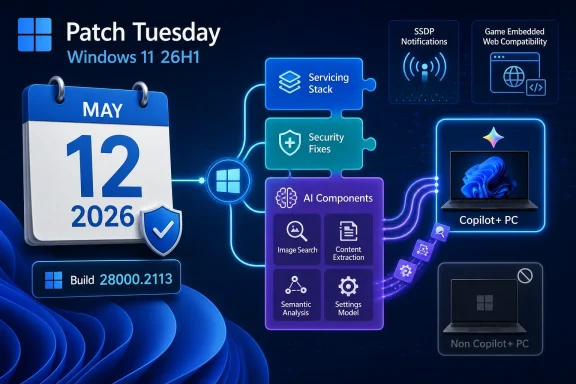
The visible fix list for KB5089548 is short. Microsoft calls out an improvement to Simple Service Discovery Protocol notifications intended to prevent the service from becoming unresponsive. It also notes better compatibility for some games that use embedded web content, reducing the impact of JavaScript errors on in-game features.
That is not the sort of changelog that sells a Windows release. It is the sort of changelog that keeps a Windows fleet from accumulating strange edge-case failures. SSDP reliability affects discovery scenarios that many users never think about until printers, media devices, smart-home bridges, or local network services stop behaving. Embedded web content in games is similarly easy to dismiss until a launcher, store panel, login flow, news feed, or live-service widget starts throwing script errors inside a full-screen application.
The narrowness of the public list also reflects a familiar Microsoft pattern. Security updates routinely include many under-the-hood changes that are not described in detail in the KB article, either because they are security-sensitive, too low-level for consumer documentation, or inherited from the previous preview update. The result is a recurring asymmetry: administrators must deploy a package that may contain dozens of changed binaries, while the release note names only a handful of user-facing symptoms.
That asymmetry is not necessarily bad. It is simply the price of cumulative servicing. But it does mean that the public KB should be read less as a full technical diff and more as Microsoft’s editorialized view of what deserves attention.
The AI Payload Is Now Part of the Monthly Windows Weather
The most consequential line in KB5089548 may be the note that the release updates AI components. Microsoft lists Image Search, Content Extraction, Semantic Analysis, and Settings Model components at version 1.2603.377.0. The company also adds an important boundary: these AI component updates are applicable to Windows Copilot+ PCs and will not install on non-Copilot+ Windows PCs or Windows Server.
That distinction is going to become increasingly important. Microsoft is no longer shipping Windows as a single experience where all devices simply receive the same dormant files. A Copilot+ PC is becoming a different servicing target, with components that may be irrelevant or inapplicable to older PCs but still documented inside the same cumulative update.
The practical effect is that the monthly Windows update now doubles as a delivery channel for local AI infrastructure. Image search, extraction, semantic analysis, and settings interpretation are not just app features. They are enabling layers for experiences that expect the operating system to understand content, index meaning, and respond to natural-language intent.
This is where Windows 11’s AI strategy stops being marketing and starts becoming plumbing. Once AI models and supporting components are serviced like networking, graphics, or storage pieces, they become part of the baseline platform. That gives Microsoft a path to improve features without waiting for annual releases, but it also increases the number of things administrators must account for when validating a patch.
The caveat is equally important. Microsoft says these AI components do not install on Windows Server or non-Copilot+ PCs. That should reassure administrators worried about stray AI packages appearing everywhere, but it also creates a two-track Windows estate. Two machines can be “fully patched” on the same KB and still differ meaningfully in what the package actually laid down.
Copilot+ PCs Are Becoming Their Own Servicing Class
The Copilot+ PC label began life as a hardware and experience category. In servicing terms, it is now also a targeting boundary. KB5089548 shows how that boundary works: the same cumulative update can contain components that apply only to a subset of client devices.
For consumers, this may feel normal. Buy newer hardware, get newer experiences. For enterprises, it complicates testing because the OS version and build number are no longer enough to describe the post-update state of a device. Hardware capability, neural processing unit support, and Microsoft’s component applicability rules all influence what changes.
That raises a mundane but serious management issue. A test ring made up mostly of conventional laptops may not represent a production ring that includes Copilot+ PCs, even if both run Windows 11 version 26H1 and both report build 28000.2113. The update may succeed everywhere, yet the AI-related component changes may only exercise themselves on the newer devices.
This is not a theoretical concern. Windows compatibility problems often appear at the boundary between platform components and hardware-specific acceleration. If image indexing, semantic extraction, or settings interpretation behaves differently on AI-capable hardware, administrators will need test coverage that reflects that hardware class.
Microsoft’s documentation does not suggest a known problem here. It says the company is not currently aware of issues with the update. But “no known issues” is not the same as “no differentiated behavior.” The latter is now built into the product strategy.
The Servicing Stack Is Still the Unseen Gatekeeper
KB5089548 includes a servicing stack update, KB5092761, bringing the servicing stack to version 28000.2103. That number will not excite anyone outside deployment engineering, but it should not be ignored. The servicing stack is the component that installs Windows updates, and Microsoft has spent years reducing the friction caused by mismatched SSUs and LCUs by combining them into single packages.
That combination is good news for most administrators. It reduces the old dance of installing one prerequisite before another and hoping update detection gets the order right. It also makes Windows Update and Windows Update for Business smoother because the prerequisite logic is handled inside Microsoft’s normal servicing flow.
But the combined package has consequences. Microsoft’s uninstall guidance repeats the modern rule: you can remove the latest cumulative update using DISM with the LCU package name, but you cannot remove the servicing stack update after it is installed. Running Windows Update Standalone Installer with the uninstall switch against the combined package will not work because the package contains the SSU.
That is not a footnote. It changes rollback planning. If a monthly update causes trouble, the organization may be able to remove the LCU portion, but the servicing stack remains. In most cases that is acceptable, even desirable, because Microsoft does not want systems rolling back the machinery required to install future fixes. In a tightly controlled environment, however, it means the system state after rollback is not identical to the state before patching.
The servicing stack is therefore a one-way door hidden inside a routine monthly update. That is usually fine. It is also the sort of thing serious change-control processes should explicitly acknowledge.
The Catalog Instructions Expose the Friction Beneath the Automation
For devices receiving KB5089548 through Windows Update, Windows Update for Business, or WSUS, the deployment story is straightforward. The update is available through the standard channels, downloads automatically where policy allows, and syncs to WSUS under the Windows 11 product and Security Updates classification.
The Microsoft Update Catalog story is messier. Microsoft says the KB may contain one or more MSU files that require installation in a specific order. Administrators can either place all MSU files in the same folder and let DISM discover and install prerequisites as needed, or install each MSU individually in order.
That guidance is sensible, but the wording in the support text is awkward enough to deserve scrutiny. The article repeatedly includes placeholder-style text indicating that a download link will be available soon, embedded directly in example package paths. That creates a documentation smell: the underlying process is valid, but the page appears to have been published before every catalog detail was cleanly rendered.
This matters because administrators copy commands from Microsoft support pages. A malformed package path is not just a cosmetic problem; it is a potential source of failed deployments, confused tickets, and wasted time. Experienced admins will recognize the placeholder and substitute the actual downloaded MSU name. Less experienced operators may wonder why Microsoft’s own syntax appears broken.
The broader lesson is that automation hides complexity until it does not. Windows Update can absorb the package relationships. DISM can resolve prerequisites if the files are staged properly. But the moment an organization steps outside the fully managed channel—offline servicing, gold images, disconnected networks, recovery media—the administrator inherits the packaging details.
Offline Media Is Now a Monthly Maintenance Problem
KB5089548 also points administrators toward Dynamic Update guidance for Windows installation media. Microsoft specifically advises that when downloading other Dynamic Update packages, they should match the same month as this KB where available. If the SafeOS Dynamic Update or Setup Dynamic Update is not available for the same month, administrators should use the most recently published version.
That guidance is easy to skim past, but it captures a growing reality: installation media is no longer a static artifact that can be created once and trusted for months. Setup itself, recovery components, SafeOS behavior, and cumulative updates all have moving parts. If those parts drift too far apart, deployment problems can appear before the user even reaches the desktop.
For enterprise imaging teams, this means patching the installed OS is only half the job. The boot and setup environment must also be kept reasonably current. That is especially true in environments that rely on offline media, task sequences, network deployment shares, or pre-provisioned images.
The old mental model treated Windows installation media as a source and monthly updates as a layer placed on top. The newer model treats media as another serviced object. That shift is not glamorous, but it is one of the reasons deployment teams spend so much time validating what looks from the outside like routine patching.
It also gives Microsoft more room to fix setup and recovery issues outside major OS releases. That is useful. It just transfers more operational responsibility to the people who maintain images.
“No Known Issues” Is a Status, Not a Warranty
Microsoft says it is not currently aware of any issues with KB5089548. That is the line everyone wants to see on Patch Tuesday, and it is certainly better than a release note that arrives with a list of blocked upgrades, broken apps, or domain-join warnings.
But “not currently aware” is carefully chosen language. It means Microsoft has no published known issue at the time of the article. It does not mean every configuration has been exercised, every driver stack has been tested, or every enterprise application has survived the update unscathed. Windows is too broad a platform for that sort of certainty.
This is particularly true for version 26H1, where the build number places the release beyond the better-known Windows 11 24H2 and 25H2 servicing lines. Early or newer servicing branches tend to concentrate enthusiast devices, test fleets, and forward-leaning organizations before they become the boring default. That makes public issue discovery uneven.
Administrators should therefore treat “no known issues” as permission to proceed through normal rings, not as permission to skip rings entirely. Pilot devices still matter. App validation still matters. Copilot+ hardware coverage now matters more than it did when every Windows client looked broadly similar from a servicing standpoint.
The correct posture is not panic. It is disciplined skepticism.
Security Remains the Forcing Function
The update addresses security vulnerabilities documented in Microsoft’s May 2026 security release material. That is the part of the KB that changes the deployment calculus. Optional preview fixes can be deferred; Patch Tuesday security updates cannot be ignored indefinitely.
This is why Microsoft’s cumulative model is so powerful and so frustrating. The same package that contains security fixes also carries quality changes, servicing-stack updates, and in this case AI component updates for eligible devices. Organizations cannot cherry-pick the security portion while declining the other changes. The bundle is the product.
Security teams generally like that because it reduces fragmentation. Desktop engineering teams sometimes dislike it because it compresses validation timelines. Business owners only notice when a line-of-business application breaks. Users mostly notice the reboot.
The cumulative model is not going away. If anything, KB5089548 shows it expanding. The monthly security update is now the conveyor belt for more categories of Windows infrastructure, not fewer.
Gamers Get a Small Fix From a Very Enterprise-Looking Patch
The gaming fix in KB5089548 is modest but telling. Microsoft says the update improves compatibility for some games using embedded web content and helps reduce the impact of JavaScript errors on in-game features. That phrasing points to a modern reality: many games are no longer just native executables. They are hybrid shells around account systems, stores, news panels, battle passes, anti-cheat notices, video overlays, authentication flows, and web-rendered experiences.
When embedded web content misbehaves, users do not experience it as “a JavaScript issue.” They experience it as a broken game menu, a failed login, a missing store, or a frozen overlay. The boundary between Windows, Edge/WebView-style components, game launchers, and the game itself becomes blurry.
A Windows cumulative update fixing that sort of issue is useful, but it also shows how wide the OS blast radius has become. The operating system is not merely scheduling threads and drawing windows. It is part of the compatibility substrate for web technology embedded in applications that users think of as entirely separate from the browser.
For WindowsForum readers, this is a reminder that gaming stability is not only about GPU drivers. Monthly OS updates can change web runtimes, compatibility shims, network behavior, certificate handling, and shell integration in ways that affect games. Sometimes the patch that helps your game looks like an enterprise servicing bulletin.
Network Discovery Still Lives in the Corners
The SSDP fix may be the least flashy item in KB5089548, but it speaks to one of Windows’ oldest pain points: local network discovery. SSDP sits in the neighborhood of UPnP and device discovery, where consumer convenience, legacy assumptions, and security caution have always collided.
A service becoming unresponsive because of notification reliability problems is exactly the sort of bug that can generate disproportionate annoyance. It may not crash the PC. It may not produce a clean error. It may simply make devices appear unreliable, disappear from discovery lists, or behave inconsistently across reboots and networks.
Microsoft’s note does not provide extensive detail, and administrators should not overread it. But the inclusion of the fix suggests enough real-world pain or telemetry to justify calling it out. In mixed environments with printers, media receivers, IoT devices, conference-room hardware, or consumer-grade network equipment, small discovery fixes can matter.
It is also a reminder that Windows 11’s future-facing AI story still sits on top of decades of inherited local-network behavior. The platform has to service both semantic analysis components and SSDP notifications. That is Windows in one sentence: the newest and oldest parts of personal computing sharing the same monthly package.
The Real Patch Notes Are Written in Deployment Policy
The right reading of KB5089548 depends on who is installing it. A home user should mostly see a normal monthly security update that reboots, advances the build number, and perhaps improves a few edge cases. A gamer affected by embedded web content glitches may get a quieter experience. A Copilot+ PC owner receives updated AI components whether or not those changes are immediately visible.
For IT administrators, the update is a validation checklist. Confirm that Windows Update for Business rings are behaving as expected. Watch WSUS sync and approvals. Make sure Copilot+ test hardware is included in pilot groups. Treat offline media as part of the patching surface. Avoid assuming that uninstalling the LCU returns the machine to its exact prior state because the servicing stack remains.
For security teams, the priority is straightforward: this is the May 2026 security cumulative update for Windows 11 version 26H1, and deferral increases exposure. The debate is not whether to deploy but how fast, how broadly, and with what monitoring.
For Microsoft, the release is another step toward a Windows servicing model where the monthly cumulative update is the universal delivery vehicle. That may be efficient. It also concentrates trust. Every month, users and administrators accept that Microsoft can update not just the OS core but the supporting layers for discovery, gaming compatibility, setup, servicing, and AI experiences.
The May 2026 Build Rewards Boring Discipline
KB5089548 is not a feature parade, and treating it like one misses the point. It is a maintenance release that shows where Windows is heading: more componentized, more hardware-aware, more AI-adjacent, and more dependent on correct servicing practice.
- KB5089548 updates Windows 11 version 26H1 to OS build 28000.2113 and should be treated as the May 2026 security baseline for that branch.
- The update includes reliability fixes for SSDP notifications and compatibility improvements for some games that rely on embedded web content.
- Copilot+ PCs receive updated AI components for Image Search, Content Extraction, Semantic Analysis, and Settings Model at version 1.2603.377.0.
- Non-Copilot+ Windows PCs and Windows Server systems should not install those AI components, even though they are documented in the same cumulative update.
- The bundled servicing stack update improves the update installation machinery but cannot be removed after installation.
- Administrators using the Microsoft Update Catalog or offline media should pay close attention to MSU ordering, DISM staging, and month-matched Dynamic Update packages.
The dullest Windows updates are often the ones that best reveal the operating system’s direction. KB5089548 is not asking users to learn a new interface or administrators to respond to a headline-grabbing failure; it is showing that Windows’ future will arrive through cumulative servicing, one component version and one deployment caveat at a time. For the next few years, the organizations that handle that future best will not be the ones chasing every new feature first, but the ones that understand the monthly update as both a security obligation and a map of Microsoft’s platform strategy.
