

Microsoft updated Windows 11 version 26H1 on May 12, 2026, with cumulative update KB5089548, moving the hardware-specific branch to OS Build 28000.2113 for selected new devices rather than existing Windows 11 PCs. That distinction is the story. The update itself is ordinary Patch Tuesday plumbing; the branch it services is not. Windows 11 is becoming less like a single road and more like a set of lanes divided by silicon, firmware, AI hardware, and OEM timing.
The temptation is to treat every Windows version number as a consumer event. 24H2, 25H2, 26H1: the cadence looks familiar, so users naturally ask whether their machine is next. In this case, the answer is unusually blunt. 26H1 is not the next general-purpose Windows milestone for the PC already sitting on your desk. It is a platform branch for new hardware that needs Windows changes Microsoft does not want to push across the existing installed base.
That makes KB5089548 more interesting than its changelog suggests. Microsoft is not launching a feature parade; it is keeping a specialized Windows track serviced, secure, and aligned with the monthly update machine. For enthusiasts, that is a curiosity. For OEMs and silicon partners, it is infrastructure. For IT departments, it is a reminder that Windows version numbers now carry less meaning unless you also know the hardware underneath them.
Windows 11 version 26H1 exists because Microsoft needed a Windows release for new devices coming to market in early 2026, not because the mainstream Windows population needed another feature update. Microsoft’s own framing is clear: existing PCs running Windows 11 24H2 or 25H2 are not meant to receive 26H1 as an in-place update through Windows Update. That is a major departure from the user instinct formed by years of semiannual and annual Windows naming.
This is why the build number, 28000.2113, matters less than the servicing boundary around it. A build number normally invites comparison: is it newer than mine, should I install it, what features am I missing? Here, that logic breaks down. A 24H2 or 25H2 system is not necessarily “behind” merely because 26H1 exists. It may simply be on the mainstream branch Microsoft still expects most users and enterprises to run.
The distinction is not cosmetic. Microsoft describes 26H1 as a hardware-optimized release designed to support next-generation silicon in partnership with device makers and chip vendors. That implies changes closer to the platform floor: scheduler behavior, power management, firmware coordination, AI acceleration hooks, driver models, and board-specific assumptions that are not always suitable for broad distribution.
This is the kind of Windows split users rarely see because it usually hides behind OEM images, driver packages, and enablement plumbing. The difference with 26H1 is that the branch is visible enough to create confusion. Microsoft has effectively put a road sign on what used to look like backstage work.
The named fixes are not glamorous. Microsoft calls out reliability improvements around SSDP notifications, aimed at preventing the associated service from becoming unreliable or unresponsive. It also notes gaming compatibility work for titles that use embedded web content. These are the kinds of items that vanish from public discussion unless they break, but they are exactly the kind of work that determines whether a young platform branch feels stable in the real world.
That is the quiet importance of this release. A hardware-specific Windows branch cannot be treated as a lab curiosity once it ships on commercial devices. It has to receive Patch Tuesday updates, absorb preview fixes, report release health, and behave like a first-class Windows product even if most Windows users will never install it.
The maintenance cadence also reassures OEMs. A new device platform is only as credible as the update story behind it. If a branch exists only to light up new silicon but then falls out of sync with the servicing baseline, enterprise buyers notice. Microsoft cannot afford to make 26H1 feel exotic in the bad sense: special, fragile, and operationally inconvenient.
That small caveat says a great deal about where Windows is heading. The operating system is no longer merely adapting to faster CPUs and GPUs; it is being shaped around NPUs, local inference workloads, and device classes Microsoft wants to differentiate. The “Windows experience” increasingly depends on what the hardware can execute locally, what privacy model Microsoft can support, and what OEM image ships with the device.
This is not entirely new. Windows has always had platform-specific code paths, from ACPI quirks to GPU driver stacks to Arm support. But Copilot+ PC branding turns those differences into a commercial promise. Once Microsoft sells AI features as part of the PC itself, Windows must become more tightly coupled to the silicon than the old universal desktop story allowed.
26H1 therefore looks less like a detour and more like a prototype for the future Windows contract. The OS, NPU, firmware, drivers, and preinstalled image are becoming a single performance and feature envelope. Users may still think they are buying “a Windows laptop,” but administrators will increasingly need to ask which Windows branch, which silicon generation, which AI component baseline, and which servicing path.
That should calm the predictable panic that follows any new Windows version number. If your desktop, workstation, or corporate laptop is on 24H2 or 25H2, 26H1 is not an urgent missing upgrade. It is not a Patch Tuesday prerequisite. It is not the hidden key to future mainstream support. It is a branch for selected new devices.
There is a real operational benefit in that separation. Microsoft avoids forcing platform-level changes onto machines that do not need them, while OEMs get a branch tailored to new hardware. In theory, that lowers the blast radius. Instead of pushing every foundational change through the full Windows ecosystem at once, Microsoft can constrain some of the risk to devices designed and validated for that branch.
The tradeoff is explanatory complexity. Windows used to be confusing because there were too many editions, update channels, feature packs, and servicing deadlines. Now the version number itself may not answer the most basic question: should this device be on this release? The answer depends increasingly on the hardware class, not simply the calendar.
That does not mean IT departments need to panic. In many environments, 26H1 will matter only when procurement starts evaluating hardware that ships with it. The branch is not likely to appear mysteriously across existing managed devices via Windows Update. The more relevant question is whether a new laptop class, especially one built around next-generation Arm or AI-focused silicon, fits the organization’s standard image, app stack, endpoint protection, VPN, device management, and help desk assumptions.
This is where Microsoft’s clean public distinction helps. Administrators can tell users and managers that 26H1 is not a general upgrade target. They can treat it as part of hardware evaluation rather than fleet-wide Windows migration. That moves the conversation from “when do we deploy 26H1?” to “do we buy devices that require 26H1?”
The second question is more honest. If the hardware advantage is meaningful — better battery life, stronger local AI performance, improved thermals, or specific form-factor benefits — then the special branch may be worth accepting. If not, it becomes another exception in the asset database, another line in the support matrix, and another reason to delay standardization.
This matters more for 26H1 than it would for a mainstream release. A branch shipping only on selected new devices has a smaller and more controlled test surface. That can reduce chaos because the hardware combinations are fewer. It can also hide problems longer because fewer users are exercising the branch across weird peripherals, legacy business applications, regional configurations, and half-forgotten enterprise agents.
Windows history teaches the same lesson repeatedly: the long tail is where confidence goes to be humbled. A release can behave beautifully on reference hardware and still stumble when confronted with a decade-old printer driver, a line-of-business app that hooks into Explorer, or a security product that assumes undocumented behavior. The absence of known issues is a useful signal, not a certification seal.
For consumers buying a new 26H1 device, the practical advice is familiar. Install cumulative updates, watch for firmware and driver updates from the OEM, and treat early hardware platforms with the same caution you would apply to any first wave of devices. For IT teams, pilot before standardizing. New silicon plus a special Windows branch is exactly the kind of combination that deserves real-world validation before bulk purchasing.
That map is not necessarily bad. A monolithic operating system can be slow to exploit new hardware because every change must survive the entire ecosystem. If Microsoft wants Windows on Arm, AI PCs, and new low-power device classes to compete seriously, it cannot always wait for the slowest common denominator. Specialized platform work may be the price of relevance.
The danger is fragmentation without clarity. Consumers understand that a gaming laptop and a thin ultraportable differ. They do not necessarily understand why two new Windows 11 laptops might sit on different branches with different future upgrade paths. Enterprises understand hardware standards, but they also value predictable servicing. Every branch split adds a coordination cost.
This is where Microsoft’s communication has to improve faster than its version numbers multiply. Saying 26H1 is not for existing PCs is helpful. Explaining what happens next matters just as much. Buyers need to know whether a device on 26H1 will follow a different upgrade calendar, how long it will remain supported, and how feature parity with mainstream Windows will be maintained.
That inversion will feel strange because Microsoft trained users to watch the calendar. H1 and H2 once suggested a release rhythm. Now 26H1 describes a scoped hardware release, while 24H2 and 25H2 continue to carry the mainstream installed base. The suffix still looks like time, but the product reality is segmentation.
There is a case for this. If Microsoft had called the branch something entirely different, it might have created an even stranger support story. OEMs, driver vendors, and administrators still need to know they are dealing with Windows 11. The company probably chose the least disruptive naming within its existing scheme.
Still, the result is awkward. A user seeing “Windows 11 version 26H1” can reasonably assume it is a public upgrade. That assumption is wrong. The burden should not be on users to reverse-engineer Microsoft’s platform strategy from release notes.
But once a new device ships on a special branch, the OEM cannot hide behind generic Windows support. Firmware, drivers, recovery images, power profiles, AI components, and Windows servicing all become part of the same customer experience. If the machine performs poorly, drains battery unexpectedly, or breaks a workflow after an update, users will not distinguish between Microsoft’s branch and the manufacturer’s platform package.
This is especially true for Copilot+ PCs. Microsoft’s AI branding invites users to expect local intelligence that is fast, private, and useful. Delivering that expectation requires more than an NPU on a spec sheet. It requires tuned software, stable models, secure data handling, and consistent behavior across updates.
The first wave of any platform tends to expose the gap between demo and deployment. 26H1 can help narrow that gap by giving new hardware the OS foundation it needs. It cannot eliminate the need for disciplined OEM validation.
That is especially important because hardware-specific releases risk becoming second-class citizens if the servicing story is weak. A niche branch that lags on security is a liability. A niche branch that tracks Patch Tuesday like any other supported Windows release is much easier to defend.
The enterprise view is unforgiving here. Security teams do not want poetry about silicon partnerships; they want predictable patch availability, clear known-issue documentation, reliable rollback behavior, and compatibility with existing management tools. If 26H1 can meet that bar, it becomes just another supported platform variant. If it cannot, it becomes an exception that security teams will resist.
So far, KB5089548 suggests Microsoft knows the assignment. The update is not dramatic because it should not be dramatic. For a specialized branch, boring monthly servicing is a feature.
Source: igor´sLAB Windows 11 26H1: Microsoft keeps the special branch on track for new …
The temptation is to treat every Windows version number as a consumer event. 24H2, 25H2, 26H1: the cadence looks familiar, so users naturally ask whether their machine is next. In this case, the answer is unusually blunt. 26H1 is not the next general-purpose Windows milestone for the PC already sitting on your desk. It is a platform branch for new hardware that needs Windows changes Microsoft does not want to push across the existing installed base.
That makes KB5089548 more interesting than its changelog suggests. Microsoft is not launching a feature parade; it is keeping a specialized Windows track serviced, secure, and aligned with the monthly update machine. For enthusiasts, that is a curiosity. For OEMs and silicon partners, it is infrastructure. For IT departments, it is a reminder that Windows version numbers now carry less meaning unless you also know the hardware underneath them.
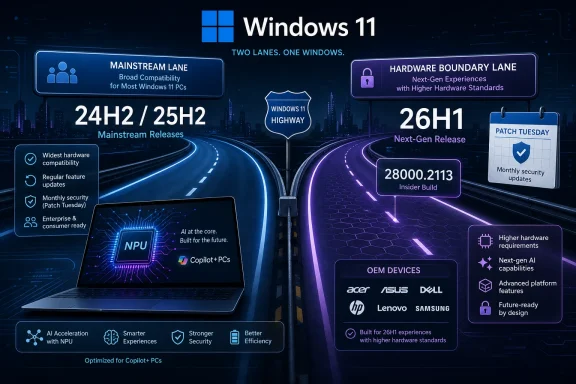 Microsoft Turns a Version Number Into a Hardware Boundary
Windows 11 version 26H1 exists because Microsoft needed a Windows release for new devices coming to market in early 2026, not because the mainstream Windows population needed another feature update. Microsoft’s own framing is clear: existing PCs running Windows 11 24H2 or 25H2 are not meant to receive 26H1 as an in-place update through Windows Update. That is a major departure from the user instinct formed by years of semiannual and annual Windows naming.This is why the build number, 28000.2113, matters less than the servicing boundary around it. A build number normally invites comparison: is it newer than mine, should I install it, what features am I missing? Here, that logic breaks down. A 24H2 or 25H2 system is not necessarily “behind” merely because 26H1 exists. It may simply be on the mainstream branch Microsoft still expects most users and enterprises to run.
The distinction is not cosmetic. Microsoft describes 26H1 as a hardware-optimized release designed to support next-generation silicon in partnership with device makers and chip vendors. That implies changes closer to the platform floor: scheduler behavior, power management, firmware coordination, AI acceleration hooks, driver models, and board-specific assumptions that are not always suitable for broad distribution.
This is the kind of Windows split users rarely see because it usually hides behind OEM images, driver packages, and enablement plumbing. The difference with 26H1 is that the branch is visible enough to create confusion. Microsoft has effectively put a road sign on what used to look like backstage work.
KB5089548 Is Maintenance, but Maintenance Is the Message
KB5089548 is a cumulative update, and in that respect it behaves like countless Windows updates before it. It includes current security fixes, quality improvements, and non-security changes carried forward from the prior optional preview cycle. Microsoft’s update machinery is doing what it is designed to do: fold recent fixes into the security baseline and keep supported machines moving.The named fixes are not glamorous. Microsoft calls out reliability improvements around SSDP notifications, aimed at preventing the associated service from becoming unreliable or unresponsive. It also notes gaming compatibility work for titles that use embedded web content. These are the kinds of items that vanish from public discussion unless they break, but they are exactly the kind of work that determines whether a young platform branch feels stable in the real world.
That is the quiet importance of this release. A hardware-specific Windows branch cannot be treated as a lab curiosity once it ships on commercial devices. It has to receive Patch Tuesday updates, absorb preview fixes, report release health, and behave like a first-class Windows product even if most Windows users will never install it.
The maintenance cadence also reassures OEMs. A new device platform is only as credible as the update story behind it. If a branch exists only to light up new silicon but then falls out of sync with the servicing baseline, enterprise buyers notice. Microsoft cannot afford to make 26H1 feel exotic in the bad sense: special, fragile, and operationally inconvenient.
The AI Components Reveal the Real Center of Gravity
The most revealing part of KB5089548 may not be SSDP or gaming compatibility, but the AI component block. Microsoft updates components such as Image Search, Content Extraction, Semantic Analysis, and the Settings Model to version 1.2603.377.0. At the same time, it makes clear that these components apply to Copilot+ PCs and are not installed on ordinary Windows PCs or Windows Server.That small caveat says a great deal about where Windows is heading. The operating system is no longer merely adapting to faster CPUs and GPUs; it is being shaped around NPUs, local inference workloads, and device classes Microsoft wants to differentiate. The “Windows experience” increasingly depends on what the hardware can execute locally, what privacy model Microsoft can support, and what OEM image ships with the device.
This is not entirely new. Windows has always had platform-specific code paths, from ACPI quirks to GPU driver stacks to Arm support. But Copilot+ PC branding turns those differences into a commercial promise. Once Microsoft sells AI features as part of the PC itself, Windows must become more tightly coupled to the silicon than the old universal desktop story allowed.
26H1 therefore looks less like a detour and more like a prototype for the future Windows contract. The OS, NPU, firmware, drivers, and preinstalled image are becoming a single performance and feature envelope. Users may still think they are buying “a Windows laptop,” but administrators will increasingly need to ask which Windows branch, which silicon generation, which AI component baseline, and which servicing path.
The Mainstream Fleet Gets Stability by Being Left Out
For existing Windows 11 systems, the practical message is almost boring, and that is a virtue. Microsoft continues to point mainstream users and organizations toward 24H2 and 25H2, not 26H1. Those versions remain the normal lanes for monthly security updates, quality fixes, and feature delivery on current PCs.That should calm the predictable panic that follows any new Windows version number. If your desktop, workstation, or corporate laptop is on 24H2 or 25H2, 26H1 is not an urgent missing upgrade. It is not a Patch Tuesday prerequisite. It is not the hidden key to future mainstream support. It is a branch for selected new devices.
There is a real operational benefit in that separation. Microsoft avoids forcing platform-level changes onto machines that do not need them, while OEMs get a branch tailored to new hardware. In theory, that lowers the blast radius. Instead of pushing every foundational change through the full Windows ecosystem at once, Microsoft can constrain some of the risk to devices designed and validated for that branch.
The tradeoff is explanatory complexity. Windows used to be confusing because there were too many editions, update channels, feature packs, and servicing deadlines. Now the version number itself may not answer the most basic question: should this device be on this release? The answer depends increasingly on the hardware class, not simply the calendar.
Enterprise IT Will Care Less About the Name Than the Lifecycle
Enterprises do not adopt Windows versions because the name is neat. They adopt them when the support lifecycle, hardware certification, application compatibility, security baseline, and management tooling line up. 26H1 introduces a new wrinkle because it may arrive preinstalled on certain new devices while the broader fleet remains on 24H2 or 25H2.That does not mean IT departments need to panic. In many environments, 26H1 will matter only when procurement starts evaluating hardware that ships with it. The branch is not likely to appear mysteriously across existing managed devices via Windows Update. The more relevant question is whether a new laptop class, especially one built around next-generation Arm or AI-focused silicon, fits the organization’s standard image, app stack, endpoint protection, VPN, device management, and help desk assumptions.
This is where Microsoft’s clean public distinction helps. Administrators can tell users and managers that 26H1 is not a general upgrade target. They can treat it as part of hardware evaluation rather than fleet-wide Windows migration. That moves the conversation from “when do we deploy 26H1?” to “do we buy devices that require 26H1?”
The second question is more honest. If the hardware advantage is meaningful — better battery life, stronger local AI performance, improved thermals, or specific form-factor benefits — then the special branch may be worth accepting. If not, it becomes another exception in the asset database, another line in the support matrix, and another reason to delay standardization.
Release Health Looks Clean, but the Sample Size Is the Catch
Microsoft’s release health information for Windows 11 26H1 currently lists no active known issues, and the KB5089548 page likewise does not identify Microsoft-known issues with the update. That is good news, but it should be read carefully. “No known issues” means no publicly acknowledged active issues in Microsoft’s release-health system. It does not mean no bugs exist.This matters more for 26H1 than it would for a mainstream release. A branch shipping only on selected new devices has a smaller and more controlled test surface. That can reduce chaos because the hardware combinations are fewer. It can also hide problems longer because fewer users are exercising the branch across weird peripherals, legacy business applications, regional configurations, and half-forgotten enterprise agents.
Windows history teaches the same lesson repeatedly: the long tail is where confidence goes to be humbled. A release can behave beautifully on reference hardware and still stumble when confronted with a decade-old printer driver, a line-of-business app that hooks into Explorer, or a security product that assumes undocumented behavior. The absence of known issues is a useful signal, not a certification seal.
For consumers buying a new 26H1 device, the practical advice is familiar. Install cumulative updates, watch for firmware and driver updates from the OEM, and treat early hardware platforms with the same caution you would apply to any first wave of devices. For IT teams, pilot before standardizing. New silicon plus a special Windows branch is exactly the kind of combination that deserves real-world validation before bulk purchasing.
The Old Windows Monolith Is Giving Way to a Silicon Map
Microsoft spent years trying to make Windows feel like one product again. Windows 10 was famously pitched as the last version of Windows, even as servicing channels and feature updates complicated that slogan almost immediately. Windows 11 restored version symbolism, but the deeper trend now points in another direction: Windows is becoming a map of hardware capabilities.That map is not necessarily bad. A monolithic operating system can be slow to exploit new hardware because every change must survive the entire ecosystem. If Microsoft wants Windows on Arm, AI PCs, and new low-power device classes to compete seriously, it cannot always wait for the slowest common denominator. Specialized platform work may be the price of relevance.
The danger is fragmentation without clarity. Consumers understand that a gaming laptop and a thin ultraportable differ. They do not necessarily understand why two new Windows 11 laptops might sit on different branches with different future upgrade paths. Enterprises understand hardware standards, but they also value predictable servicing. Every branch split adds a coordination cost.
This is where Microsoft’s communication has to improve faster than its version numbers multiply. Saying 26H1 is not for existing PCs is helpful. Explaining what happens next matters just as much. Buyers need to know whether a device on 26H1 will follow a different upgrade calendar, how long it will remain supported, and how feature parity with mainstream Windows will be maintained.
The Version Number Is Now a Clue, Not an Answer
The old enthusiast habit was simple: newer build equals more interesting build. That instinct still makes sense in Insider rings and preview channels, but it is less useful in the shipping Windows landscape. A version number now needs context. 26H1 is newer than 25H2 by name, but for most existing PCs it is not the next step.That inversion will feel strange because Microsoft trained users to watch the calendar. H1 and H2 once suggested a release rhythm. Now 26H1 describes a scoped hardware release, while 24H2 and 25H2 continue to carry the mainstream installed base. The suffix still looks like time, but the product reality is segmentation.
There is a case for this. If Microsoft had called the branch something entirely different, it might have created an even stranger support story. OEMs, driver vendors, and administrators still need to know they are dealing with Windows 11. The company probably chose the least disruptive naming within its existing scheme.
Still, the result is awkward. A user seeing “Windows 11 version 26H1” can reasonably assume it is a public upgrade. That assumption is wrong. The burden should not be on users to reverse-engineer Microsoft’s platform strategy from release notes.
OEMs Get a Cleaner Launch Pad, but They Also Inherit More Responsibility
For device makers, 26H1 is both a gift and a commitment. A hardware-optimized branch gives OEMs and silicon partners a cleaner path to ship machines that rely on platform changes not present in 24H2 or 25H2. That matters if the hardware is genuinely different enough to need deeper OS support.But once a new device ships on a special branch, the OEM cannot hide behind generic Windows support. Firmware, drivers, recovery images, power profiles, AI components, and Windows servicing all become part of the same customer experience. If the machine performs poorly, drains battery unexpectedly, or breaks a workflow after an update, users will not distinguish between Microsoft’s branch and the manufacturer’s platform package.
This is especially true for Copilot+ PCs. Microsoft’s AI branding invites users to expect local intelligence that is fast, private, and useful. Delivering that expectation requires more than an NPU on a spec sheet. It requires tuned software, stable models, secure data handling, and consistent behavior across updates.
The first wave of any platform tends to expose the gap between demo and deployment. 26H1 can help narrow that gap by giving new hardware the OS foundation it needs. It cannot eliminate the need for disciplined OEM validation.
Security Servicing Is the Part Microsoft Cannot Let Become Special
The healthiest sign in KB5089548 is that 26H1 is being serviced through the same basic cumulative-update discipline Windows users already understand. Security fixes arrive. Quality improvements roll forward. Optional preview changes become part of the next baseline. The branch may be special, but the security model cannot be.That is especially important because hardware-specific releases risk becoming second-class citizens if the servicing story is weak. A niche branch that lags on security is a liability. A niche branch that tracks Patch Tuesday like any other supported Windows release is much easier to defend.
The enterprise view is unforgiving here. Security teams do not want poetry about silicon partnerships; they want predictable patch availability, clear known-issue documentation, reliable rollback behavior, and compatibility with existing management tools. If 26H1 can meet that bar, it becomes just another supported platform variant. If it cannot, it becomes an exception that security teams will resist.
So far, KB5089548 suggests Microsoft knows the assignment. The update is not dramatic because it should not be dramatic. For a specialized branch, boring monthly servicing is a feature.
The Real 26H1 Story Is Procurement, Not Upgrade Fever
The lesson of KB5089548 is not that everyone should chase Build 28000.2113. It is that Windows versioning is becoming inseparable from hardware strategy, and users need to interpret Microsoft’s release names with more skepticism than before.- Windows 11 26H1 is intended for selected new devices, not as an in-place upgrade for existing Windows 11 24H2 or 25H2 PCs.
- KB5089548 moves the branch to OS Build 28000.2113 and includes current security fixes, quality improvements, and prior optional-preview changes.
- Microsoft’s AI component updates in this release apply to Copilot+ PCs and do not install on ordinary Windows PCs or Windows Server.
- The absence of active known issues is encouraging, but it is not proof that every hardware-specific deployment will be trouble-free.
- IT departments should treat 26H1 as part of new-device evaluation rather than as a mainstream fleet migration target.
- The broader Windows 11 population should continue to think in terms of 24H2 and 25H2 unless the hardware itself brings 26H1 into scope.
Source: igor´sLAB Windows 11 26H1: Microsoft keeps the special branch on track for new …
