

Microsoft released KB5089549 on May 12, 2026, as the monthly cumulative security update for Windows 11 versions 25H2 and 24H2, moving systems to OS builds 26200.8457 and 26100.8457 while bundling security fixes, servicing-stack changes, and selected reliability improvements. The update looks routine only if you read Patch Tuesday as a calendar event rather than a servicing signal. Underneath the familiar cumulative-update packaging, Microsoft is tightening the machinery that decides which devices get boot-chain changes, how offline images are serviced, and how Copilot+ AI components are delivered without touching machines that cannot use them. For administrators, KB5089549 is less about one month’s fixes than about Microsoft’s increasingly controlled model of Windows maintenance.
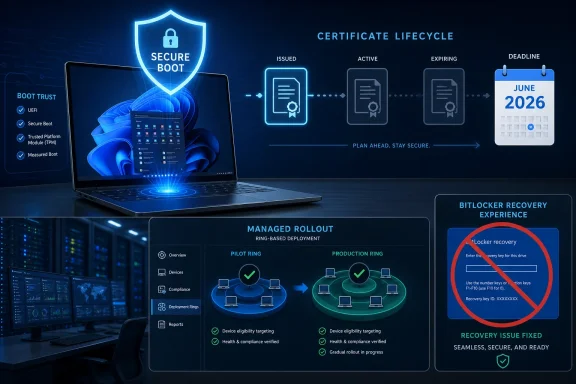
The most important line in KB5089549 is not the build number. It is Microsoft’s reminder that Secure Boot certificates used by most Windows devices are set to begin expiring in June 2026, and that devices need to be prepared before that deadline becomes a real-world boot problem.
That warning changes the texture of this update. A normal cumulative release patches code already running inside Windows. This one also advances the slow, careful work of updating the trust material that allows Windows to start securely in the first place.
Microsoft says this update adds “high confidence device targeting data” to increase the number of devices eligible to automatically receive new Secure Boot certificates. That phrase is dry, but the meaning is not: Microsoft is trying to avoid a mass boot-chain event by deciding which devices have shown enough successful update behavior to receive certificate changes automatically.
That caution is understandable. Secure Boot is supposed to protect the earliest stages of system startup, and mistakes there are far more frightening than a broken tray icon or a failed app launch. A bad boot update can become a BitLocker recovery storm, a help-desk flood, or a field-support incident for machines that were otherwise healthy.
That matters because BitLocker recovery is not a minor inconvenience in managed environments. A user at a recovery screen cannot work, and an administrator without escrowed recovery keys is suddenly managing a crisis rather than a patch cycle.
The phrase invalid PCR7 configuration will mean little to most home users, but it points to the interface between firmware, TPM measurements, Secure Boot state, and Windows’ judgment about whether the machine is still trustworthy. When that chain shifts, BitLocker may decide the boot environment has changed enough to demand proof that the owner is legitimate.
Microsoft’s fix is therefore a practical concession to reality. The company needs to move the ecosystem toward updated Secure Boot certificates, but it also has to keep millions of machines from interpreting that movement as tampering.
The servicing stack is the component that installs Windows updates. If it fails, the cumulative update model fails with it. Microsoft’s modern approach combines the latest servicing stack update with the latest cumulative update, reducing the old problem of machines needing prerequisite update plumbing before they could accept the update that actually mattered.
That convenience has a tradeoff. Once an SSU is installed, it cannot be removed from the system. Microsoft explicitly notes that uninstalling the combined package with Windows Update Standalone Installer does not work because the SSU is part of the combined payload, and the SSU itself is not removable.
For IT teams, that makes predeployment testing more important, not less. The combined model simplifies delivery, but it also narrows rollback options. If something goes wrong, administrators may be able to remove the LCU portion using DISM with the correct package name, but the servicing-stack change remains part of the machine’s update history.
For a fully managed device taking updates from Windows Update, Microsoft Update, Windows Update for Business, or WSUS, this complexity should be largely invisible. The update is meant to download and install automatically according to policy. But for administrators who build images, patch offline media, or maintain controlled deployment rings, the details still matter.
Microsoft offers two methods. Administrators can place all MSU files in the same folder and let DISM discover and install prerequisites as needed, or they can install each package individually in the documented order. That is a meaningful distinction because it reflects a Windows servicing ecosystem where the package is cumulative in concept but still dependent on precise installation sequencing in some offline and standalone workflows.
The awkward placeholder text in the support article, where download links are marked as coming soon, is also a reminder that documentation and distribution do not always land in perfect synchrony. In consumer Windows Update scenarios, that usually does not matter. In enterprise imaging pipelines, it can matter a great deal if the support article is live before the catalog payloads are cleanly available or mirrored into deployment tools.
That is the sort of instruction that separates a patched image from a well-serviced image. The cumulative update may bring the installed operating system forward, but setup, recovery, SafeOS, and boot-related components can follow their own servicing paths. If those layers drift too far apart, the image may install successfully but inherit avoidable reliability or recovery problems.
This is especially relevant now because Microsoft is threading Secure Boot certificate readiness through the monthly update channel. Installation media that lags behind the deployed fleet can become a weak link, particularly when devices are reimaged, repaired, or rebuilt after the certificate transition begins to bite.
The best reading of KB5089549 is that Windows servicing has become a stack of interlocking update domains. The OS build number is the visible marker, but the boot environment, recovery path, setup experience, servicing stack, and AI component layer all have to be considered part of the same operational surface.
That split is becoming one of the defining features of Windows 11 servicing. Microsoft wants a single monthly update vehicle, but Windows itself is no longer a single uniform feature surface. Copilot+ PCs, standard x64 desktops, Arm64 laptops, and servers may receive the same cumulative update identity while activating different subsets of the payload.
For users, this may feel odd: the update includes AI components that their device will never install. For administrators, it is another reason to read applicability notes carefully before assuming every line in a KB article maps to every endpoint.
The bigger story is that Microsoft is normalizing AI component updates as part of Windows maintenance rather than treating them as app-store curiosities or feature-pack extras. That approach gives Microsoft a predictable delivery route for on-device AI capabilities, but it also means organizations will need to understand how those components are inventoried, governed, and excluded where policy requires it.
That has advantages. Shared servicing reduces fragmentation, speeds fix propagation, and gives administrators a more predictable patch cadence across fleets that are not all on the same feature release. It also allows Microsoft to stage enablement and feature differences without reinventing the update base every year.
But the shared-platform model can be confusing for people who expect a feature update to mean a clean break. In practice, the monthly update experience increasingly looks like a common foundation with policy, hardware, edition, and enablement determining what users actually see.
KB5089549 fits that pattern neatly. It is simultaneously a security update, a reliability update, a servicing-stack update, a Secure Boot readiness update, and an AI component carrier. The Windows version label tells you which branch you are on; it no longer tells the whole story of what the monthly package is doing.
“No known issues” means no issues Microsoft is disclosing at publication time. It does not mean no edge cases exist, and boot-related changes are exactly the kind of update behavior that can reveal itself only after encountering a particular firmware version, TPM state, encryption policy, or imaging history.
The BitLocker recovery fix in this update is proof enough. The April update shipped, some systems encountered recovery behavior tied to boot-file servicing and TPM validation, and the May cumulative update addresses it. That is not evidence of negligence; it is evidence of how complicated the Windows hardware ecosystem remains.
Administrators should therefore treat KB5089549 as a normal Patch Tuesday deployment with an above-normal eye on startup behavior. The absence of a known issue does not remove the need for phased rings, recovery-key validation, pilot groups, and monitoring after reboot.
The practical advice is straightforward: install the update, do not interrupt reboot cycles, and make sure BitLocker recovery information is accessible if device encryption is enabled. Many consumer PCs now use device encryption quietly, especially when signed in with a Microsoft account, so recovery-key awareness is no longer just an enterprise concern.
The Secure Boot certificate warning is less immediately actionable for a typical home user, but it should not be ignored. Microsoft is preparing the fleet for a June 2026 certificate-expiration milestone, and staying current is the least risky path through that transition.
The bigger danger for consumers is delaying updates for months and then hitting several boot, servicing, and certificate-related changes at once. Windows Update is designed to sequence that work, but it works best when the machine is not treated as a time capsule.
The first priority should be inventory. Devices with unusual Secure Boot status, nonstandard TPM validation, invalid PCR7 behavior, or stale firmware are exactly the machines that can turn a routine update into an incident.
The second priority is recovery readiness. BitLocker keys should be escrowed and testable before deploying boot-chain updates at scale. That sounds obvious, but every large environment contains machines that exist outside the neat diagrams: old laptops, rebuilt workstations, loaners, lab devices, kiosks, and systems inherited from previous management stacks.
The third priority is image hygiene. Offline media, task sequences, and deployment shares should be aligned with the May cumulative update and the appropriate Dynamic Update guidance. A cleanly patched live fleet can still be undermined by old installation media that reintroduces outdated setup or recovery components.
That is a policy engine disguised as servicing. The device has to demonstrate enough successful update behavior before Microsoft expands automatic certificate coverage. In theory, that reduces risk. In practice, it also means administrators need to understand that not every eligible-looking device will necessarily move at the same time.
This is where Microsoft’s cloud-managed Windows strategy becomes visible. Windows Update is no longer just a download service. It is a phased rollout system, a compatibility gate, a security distribution channel, and, increasingly, a hardware-state decision mechanism.
That centralization will make some administrators uncomfortable. The alternative, however, is not a simpler world; it is a more chaotic one in which every organization must manually choreograph certificate replacement across countless firmware combinations. KB5089549 shows Microsoft trying to keep control because the blast radius of getting it wrong is enormous.
Source: Microsoft Support May 12, 2026—KB5089549 (OS Builds 26200.8457 and 26100.8457) - Microsoft Support
 Microsoft Turns Patch Tuesday Into a Boot-Trust Exercise
The most important line in KB5089549 is not the build number. It is Microsoft’s reminder that Secure Boot certificates used by most Windows devices are set to begin expiring in June 2026, and that devices need to be prepared before that deadline becomes a real-world boot problem.That warning changes the texture of this update. A normal cumulative release patches code already running inside Windows. This one also advances the slow, careful work of updating the trust material that allows Windows to start securely in the first place.
Microsoft says this update adds “high confidence device targeting data” to increase the number of devices eligible to automatically receive new Secure Boot certificates. That phrase is dry, but the meaning is not: Microsoft is trying to avoid a mass boot-chain event by deciding which devices have shown enough successful update behavior to receive certificate changes automatically.
That caution is understandable. Secure Boot is supposed to protect the earliest stages of system startup, and mistakes there are far more frightening than a broken tray icon or a failed app launch. A bad boot update can become a BitLocker recovery storm, a help-desk flood, or a field-support incident for machines that were otherwise healthy.
The BitLocker Fix Is a Reminder That Startup Is Still Fragile
KB5089549 also fixes an issue in which some devices could enter BitLocker Recovery after boot-file updates, particularly on systems with certain Trusted Platform Module validation settings and invalid PCR7 configurations. Microsoft ties that problem to the April 2026 security update, KB5083769, which means this release is partly cleanup for the previous month’s harder security work.That matters because BitLocker recovery is not a minor inconvenience in managed environments. A user at a recovery screen cannot work, and an administrator without escrowed recovery keys is suddenly managing a crisis rather than a patch cycle.
The phrase invalid PCR7 configuration will mean little to most home users, but it points to the interface between firmware, TPM measurements, Secure Boot state, and Windows’ judgment about whether the machine is still trustworthy. When that chain shifts, BitLocker may decide the boot environment has changed enough to demand proof that the owner is legitimate.
Microsoft’s fix is therefore a practical concession to reality. The company needs to move the ecosystem toward updated Secure Boot certificates, but it also has to keep millions of machines from interpreting that movement as tampering.
The Servicing Stack Is the Quiet Center of the Update
KB5089549 includes a servicing stack update, KB5092762, at version 26100.8456. Servicing stack updates are rarely the headline, but they are the machinery that makes the headline possible.The servicing stack is the component that installs Windows updates. If it fails, the cumulative update model fails with it. Microsoft’s modern approach combines the latest servicing stack update with the latest cumulative update, reducing the old problem of machines needing prerequisite update plumbing before they could accept the update that actually mattered.
That convenience has a tradeoff. Once an SSU is installed, it cannot be removed from the system. Microsoft explicitly notes that uninstalling the combined package with Windows Update Standalone Installer does not work because the SSU is part of the combined payload, and the SSU itself is not removable.
For IT teams, that makes predeployment testing more important, not less. The combined model simplifies delivery, but it also narrows rollback options. If something goes wrong, administrators may be able to remove the LCU portion using DISM with the correct package name, but the servicing-stack change remains part of the machine’s update history.
The Catalog Instructions Show How Complicated “One Update” Has Become
The Microsoft Update Catalog instructions for KB5089549 are unusually revealing. Microsoft says the standalone package contains one or more MSU files that must be installed in a specific order, with KB5043080 listed before KB5089549 for both Arm64 and x64 paths.For a fully managed device taking updates from Windows Update, Microsoft Update, Windows Update for Business, or WSUS, this complexity should be largely invisible. The update is meant to download and install automatically according to policy. But for administrators who build images, patch offline media, or maintain controlled deployment rings, the details still matter.
Microsoft offers two methods. Administrators can place all MSU files in the same folder and let DISM discover and install prerequisites as needed, or they can install each package individually in the documented order. That is a meaningful distinction because it reflects a Windows servicing ecosystem where the package is cumulative in concept but still dependent on precise installation sequencing in some offline and standalone workflows.
The awkward placeholder text in the support article, where download links are marked as coming soon, is also a reminder that documentation and distribution do not always land in perfect synchrony. In consumer Windows Update scenarios, that usually does not matter. In enterprise imaging pipelines, it can matter a great deal if the support article is live before the catalog payloads are cleanly available or mirrored into deployment tools.
Offline Images Now Need Calendar Discipline
KB5089549’s offline-media guidance is not just a procedural aside. Microsoft tells administrators updating Windows installation media to use Dynamic Update packages that match the same month as the KB, and to fall back to the most recently published SafeOS Dynamic Update or Setup Dynamic Update only if a same-month package is unavailable.That is the sort of instruction that separates a patched image from a well-serviced image. The cumulative update may bring the installed operating system forward, but setup, recovery, SafeOS, and boot-related components can follow their own servicing paths. If those layers drift too far apart, the image may install successfully but inherit avoidable reliability or recovery problems.
This is especially relevant now because Microsoft is threading Secure Boot certificate readiness through the monthly update channel. Installation media that lags behind the deployed fleet can become a weak link, particularly when devices are reimaged, repaired, or rebuilt after the certificate transition begins to bite.
The best reading of KB5089549 is that Windows servicing has become a stack of interlocking update domains. The OS build number is the visible marker, but the boot environment, recovery path, setup experience, servicing stack, and AI component layer all have to be considered part of the same operational surface.
Copilot+ Components Ride Along, But Not Everywhere
KB5089549 also updates Windows AI components, including Image Search, Content Extraction, Semantic Analysis, and the Settings Model, all listed at version 1.2604.515.0. Microsoft notes that these components are included in the cumulative update but apply only to Windows Copilot+ PCs and do not install on ordinary Windows PCs or Windows Server.That split is becoming one of the defining features of Windows 11 servicing. Microsoft wants a single monthly update vehicle, but Windows itself is no longer a single uniform feature surface. Copilot+ PCs, standard x64 desktops, Arm64 laptops, and servers may receive the same cumulative update identity while activating different subsets of the payload.
For users, this may feel odd: the update includes AI components that their device will never install. For administrators, it is another reason to read applicability notes carefully before assuming every line in a KB article maps to every endpoint.
The bigger story is that Microsoft is normalizing AI component updates as part of Windows maintenance rather than treating them as app-store curiosities or feature-pack extras. That approach gives Microsoft a predictable delivery route for on-device AI capabilities, but it also means organizations will need to understand how those components are inventoried, governed, and excluded where policy requires it.
Windows 11 24H2 and 25H2 Are Being Serviced as a Shared Platform
KB5089549 applies to Windows 11 version 24H2 and version 25H2, with the two build branches landing on 26100.8457 and 26200.8457 respectively. The paired build numbers reinforce what has become clear in recent Windows 11 servicing: Microsoft is treating adjacent releases as closely related platforms, even when they carry different version labels.That has advantages. Shared servicing reduces fragmentation, speeds fix propagation, and gives administrators a more predictable patch cadence across fleets that are not all on the same feature release. It also allows Microsoft to stage enablement and feature differences without reinventing the update base every year.
But the shared-platform model can be confusing for people who expect a feature update to mean a clean break. In practice, the monthly update experience increasingly looks like a common foundation with policy, hardware, edition, and enablement determining what users actually see.
KB5089549 fits that pattern neatly. It is simultaneously a security update, a reliability update, a servicing-stack update, a Secure Boot readiness update, and an AI component carrier. The Windows version label tells you which branch you are on; it no longer tells the whole story of what the monthly package is doing.
The “No Known Issues” Line Should Not End Testing
Microsoft says it is not currently aware of any issues with KB5089549. That is welcome, but it should not be mistaken for a guarantee.“No known issues” means no issues Microsoft is disclosing at publication time. It does not mean no edge cases exist, and boot-related changes are exactly the kind of update behavior that can reveal itself only after encountering a particular firmware version, TPM state, encryption policy, or imaging history.
The BitLocker recovery fix in this update is proof enough. The April update shipped, some systems encountered recovery behavior tied to boot-file servicing and TPM validation, and the May cumulative update addresses it. That is not evidence of negligence; it is evidence of how complicated the Windows hardware ecosystem remains.
Administrators should therefore treat KB5089549 as a normal Patch Tuesday deployment with an above-normal eye on startup behavior. The absence of a known issue does not remove the need for phased rings, recovery-key validation, pilot groups, and monitoring after reboot.
Home Users Get the Simplest Version of the Story
For most home users, KB5089549 should arrive through Windows Update and install without any manual work. The build number will change, security fixes will apply, and Copilot+ AI component updates will matter only if the device supports them.The practical advice is straightforward: install the update, do not interrupt reboot cycles, and make sure BitLocker recovery information is accessible if device encryption is enabled. Many consumer PCs now use device encryption quietly, especially when signed in with a Microsoft account, so recovery-key awareness is no longer just an enterprise concern.
The Secure Boot certificate warning is less immediately actionable for a typical home user, but it should not be ignored. Microsoft is preparing the fleet for a June 2026 certificate-expiration milestone, and staying current is the least risky path through that transition.
The bigger danger for consumers is delaying updates for months and then hitting several boot, servicing, and certificate-related changes at once. Windows Update is designed to sequence that work, but it works best when the machine is not treated as a time capsule.
Enterprise IT Gets a Month to Rehearse the June Problem
For enterprise administrators, the May update lands as a rehearsal for the Secure Boot certificate deadline. It gives organizations a chance to observe which devices receive certificate-targeting changes, which machines show BitLocker recovery behavior, and which firmware or TPM configurations need remediation before June 2026 becomes operationally significant.The first priority should be inventory. Devices with unusual Secure Boot status, nonstandard TPM validation, invalid PCR7 behavior, or stale firmware are exactly the machines that can turn a routine update into an incident.
The second priority is recovery readiness. BitLocker keys should be escrowed and testable before deploying boot-chain updates at scale. That sounds obvious, but every large environment contains machines that exist outside the neat diagrams: old laptops, rebuilt workstations, loaners, lab devices, kiosks, and systems inherited from previous management stacks.
The third priority is image hygiene. Offline media, task sequences, and deployment shares should be aligned with the May cumulative update and the appropriate Dynamic Update guidance. A cleanly patched live fleet can still be undermined by old installation media that reintroduces outdated setup or recovery components.
The Real Lesson Is That Windows Updates Are Becoming Policy Engines
KB5089549 is nominally a cumulative update, but its Secure Boot targeting language points to something more interesting. Microsoft is not merely shipping code; it is using update telemetry and eligibility signals to decide which machines should receive sensitive boot-trust material and when.That is a policy engine disguised as servicing. The device has to demonstrate enough successful update behavior before Microsoft expands automatic certificate coverage. In theory, that reduces risk. In practice, it also means administrators need to understand that not every eligible-looking device will necessarily move at the same time.
This is where Microsoft’s cloud-managed Windows strategy becomes visible. Windows Update is no longer just a download service. It is a phased rollout system, a compatibility gate, a security distribution channel, and, increasingly, a hardware-state decision mechanism.
That centralization will make some administrators uncomfortable. The alternative, however, is not a simpler world; it is a more chaotic one in which every organization must manually choreograph certificate replacement across countless firmware combinations. KB5089549 shows Microsoft trying to keep control because the blast radius of getting it wrong is enormous.
The Details That Should Survive the Reboot
KB5089549 is not a flashy update, but it is a consequential one because it sits directly in the path between ordinary monthly patching and the Secure Boot certificate transition now bearing down on Windows estates. The useful reading is not “install this because it is Patch Tuesday,” but “install this because Microsoft is preparing the boot ecosystem for a deadline.”- KB5089549 updates Windows 11 version 25H2 to build 26200.8457 and Windows 11 version 24H2 to build 26100.8457.
- The update includes May 2026 security fixes, the prior month’s selected improvements, and a servicing stack update identified as KB5092762.
- Microsoft says the release improves targeting for devices eligible to receive new Secure Boot certificates ahead of expirations beginning in June 2026.
- The update fixes a BitLocker Recovery issue that could occur after boot-file updates on systems with certain TPM validation settings, including invalid PCR7 configurations.
- Standalone Catalog installation can require multiple MSU files installed together through DISM or individually in a documented order, with KB5043080 preceding KB5089549.
- AI component updates are included in the package but apply only to Windows Copilot+ PCs, not standard Windows PCs or Windows Server.
Source: Microsoft Support May 12, 2026—KB5089549 (OS Builds 26200.8457 and 26100.8457) - Microsoft Support
