

Microsoft’s April 2026 Patch Tuesday is doing something that always gets enterprise admins’ attention: it is tightening security around Secure Boot and, in the process, exposing a BitLocker recovery prompt bug on a narrow but very real slice of managed devices. Microsoft has now acknowledged that Windows 11 KB5083769 and KB5082052, along with related April 2026 updates for Windows 10 and Windows Server, can trigger a one-time recovery-key request on systems using a specific BitLocker Group Policy configuration. The company says the issue is limited, but the criteria are detailed enough to make clear that this is not random chaos; it is a policy-and-firmware edge case that lands hardest in well-managed enterprise environments. (support.microsoft.com)
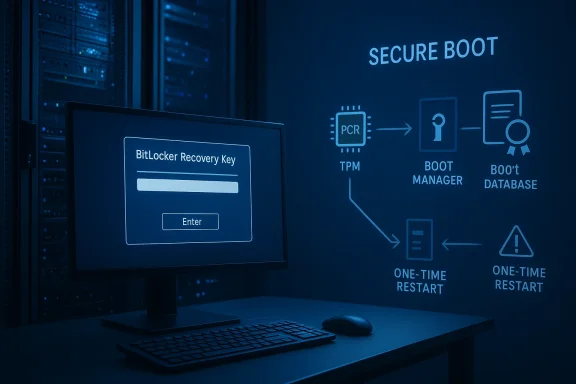
The headline here is not simply that Windows is asking for BitLocker recovery. That happens from time to time after updates, firmware changes, or boot-chain adjustments. What makes this case notable is that Microsoft has tied the symptom to the interaction between Secure Boot certificate updates, a PCR7-based BitLocker policy, and devices that are in a transitional state between boot manager versions. The issue appears after the April 14, 2026 cumulative updates, and Microsoft says the first restart is the key moment when the recovery screen may appear. (support.microsoft.com)
For Windows administrators, the details matter. Microsoft says the problem affects devices where BitLocker is enabled on the operating system drive, the BitLocker policy “Configure TPM platform validation profile for native UEFI firmware configurations” is configured with PCR7 selected, and System Information reports Secure Boot State PCR7 Binding as “Not Possible.” Add to that the presence of the Windows UEFI CA 2023 certificate in the Secure Boot database and the fact that the machine is not already using the 2023-signed Windows Boot Manager, and you have the exact conditions under which the bug can surface. (support.microsoft.com)
That is a very specific intersection of policy, firmware state, and boot trust chain. It also explains why Microsoft says the issue is unlikely to affect most consumer PCs. Personal devices are typically not managed with that kind of explicit BitLocker PCR profile, and many home systems do not have the same level of enterprise boot-policy hardening. In other words, this is less a “Windows update broke everyone” story and more a reminder that the security stack is deeply interconnected, and one small change in that chain can ripple outward in surprising ways. (support.microsoft.com)
Microsoft’s recommended fix is straightforward in concept but operationally important: remove the problematic Group Policy setting before deploying the update, refresh policy, suspend and resume BitLocker to rebake the bindings, and let Windows revert to its default PCR profile. If organizations cannot make that change immediately, Microsoft says a Known Issue Rollback is available as a pre-deployment safeguard. That tells us two things: first, Microsoft considers this an acknowledged servicing issue, not user error; second, the company expects large environments to need a controlled mitigation path rather than an ad hoc recovery scramble. (support.microsoft.com)
The current episode fits into a broader pattern. Microsoft has been rolling out Secure Boot certificate updates and boot-chain hardening in recent servicing releases, and it has also repeatedly warned that certain BitLocker policy combinations can become fragile when PCR7 binding is not possible. That same general theme appears in older Secure Boot DBX update guidance, where Microsoft described how policy-driven PCR7 binding could trigger recovery behavior on some devices. The present issue is not identical, but it rhymes with those earlier cases in both cause and consequence.
What makes this moment especially interesting is the timing. The April 2026 cumulative updates include Secure Boot improvements and additional device-targeting data to help roll out new certificates to eligible systems in a controlled way. Microsoft also says this update addresses an issue where the device might enter BitLocker Recovery after the Secure Boot updates. That suggests the company is trying to both advance Secure Boot modernization and clean up the edge cases created by that migration. (support.microsoft.com)
The practical implication is that security hardening is increasingly a choreography problem. The boot path, TPM measurements, policy settings, certificate database contents, and Windows Update behavior all need to line up. When they do not, the machine may decide it has seen an unexpected boot environment and ask for recovery credentials. That is exactly what BitLocker is designed to do, but when it happens because of a servicing transition rather than a genuine attack or hardware change, it feels like a false positive to the user and a support event to IT. (support.microsoft.com)
There is also a historical lesson here for Microsoft’s update cadence. The company has increasingly tried to use cumulative updates to move Windows toward more secure defaults without forcing sudden, visible disruptions. Yet the more the platform depends on secure boot chains, the more each update must account for legacy policy choices made years earlier. That makes the April 2026 issue a case study in the tension between secure-by-default design and the reality of heterogeneous enterprise estates. (support.microsoft.com)
A key nuance is the “not possible” PCR7 binding status. That tells admins that the machine cannot cleanly satisfy the policy’s intended measurement model, which is precisely the kind of mismatch that can lead BitLocker to decide the boot state has changed enough to demand recovery. In practice, this is the kind of detail that only appears in tightly managed fleets or on systems that have accumulated policy and firmware baggage over time. (support.microsoft.com)
Microsoft also notes that the recovery key should only be needed once, and subsequent restarts will not re-trigger the screen as long as the group policy remains unchanged. That is a major distinction. It means the update is not necessarily creating a permanent boot loop; instead, it is forcing a one-time rebind event that gets past the mismatch after the first boot. That is cold comfort if you are stranded at the lock screen, but it does indicate a bounded failure mode rather than a systemic encryption regression. (support.microsoft.com)
This is one of those areas where security architecture and usability collide. The more tightly you pin the machine to a measured boot profile, the more resilient it becomes against tampering. But the more tightly you pin it, the more likely a legitimate platform change will look suspicious. That tradeoff is central to understanding why managed Windows environments can be more vulnerable to update-related friction than consumer devices. (support.microsoft.com)
The important takeaway for admins is that this is not a policy you should leave unexamined indefinitely. If you are deliberately selecting PCR7, you need to understand the device population, the Secure Boot certificate state, and whether the devices are actually able to bind consistently. Otherwise, the next boot-chain update can become a support incident waiting to happen. (support.microsoft.com)
There is also an architectural tension here. Secure Boot updates are meant to raise the bar against boot-level tampering, but they also alter the exact measurements BitLocker watches. The April update appears to have exposed a subset of systems where the transition from old boot trust to the 2023-signed Windows Boot Manager intersects with an old PCR policy. In other words, the update did not invent the complexity; it surfaced it. (support.microsoft.com)
That may improve safety, but it also means IT needs to anticipate more friction. The vendor is no longer assuming that users should glide through potentially risky actions without seeing the consequences first. For administrators, that means more training, more policy tuning, and more careful staging of updates that affect authentication or boot trust. (support.microsoft.com)
Enterprises also have the burden of policy inheritance. A BitLocker setting might have been deployed years earlier to support a compliance target or hardware mix that no longer exists. This update is a reminder that old policy decisions linger, and they can suddenly become relevant when Microsoft adjusts the boot chain. An endpoint that looked perfectly fine yesterday can reveal its configuration debt after a routine Patch Tuesday reboot. (support.microsoft.com)
Still, consumer users should not be complacent. BitLocker prompts can still appear after firmware updates, motherboard changes, or security changes, and the broader lesson is that any device relying on measured boot can be sensitive to changes below the user interface layer. The software may look stable; the trust chain may not be. (learn.microsoft.com)
This is sensible, but it is not casual. It assumes the admin knows exactly where the policy came from, whether it is configured by GPO or registry, and how the device is managed. In an environment with Intune, Configuration Manager, or multiple GPO layers, that can take real coordination. The fix is simple only if the environment is simple. (support.microsoft.com)
That is especially relevant as Microsoft continues moving Windows toward more tightly controlled certificate and boot trust transitions. The company’s April 2026 notes make clear that it is deliberately increasing coverage for devices eligible to receive new Secure Boot certificates, and that it is doing so with phased rollout logic. Phased rollout reduces blast radius, but it does not eliminate the chance that some systems land in a weird middle state.
The bigger opportunity is for organizations to use this incident as a BitLocker hygiene audit. Many fleets still carry inherited settings that were sensible in the past but are no longer aligned with current Secure Boot behavior. If enterprises use this moment to review PCR profiles, key escrow readiness, and boot trust baselines, they may reduce future update friction. (support.microsoft.com)
A second concern is confidence. Repeated BitLocker recovery incidents, even if technically explainable, can erode trust in Patch Tuesday among admins and users. When security updates are perceived as creating new support headaches, organizations may become more cautious about deployment, which can in turn delay critical protection. That is the worst kind of tradeoff: more security in theory, more hesitation in practice. (support.microsoft.com)
The second thing to watch is whether this issue changes how Microsoft handles Secure Boot certificate migration more broadly. If the company wants to keep pushing toward newer boot managers and updated certificate trust while avoiding disruptive BitLocker prompts, it may need even more conservative staging, better preflight checks, or clearer compatibility signals for administrators. The balance between modernization and stability will matter more as Windows continues to harden its boot path.
The third thing to watch is how enterprise tooling evolves around these edge cases. If management platforms, reporting tools, and baseline-compliance dashboards can surface PCR7 mismatch risk earlier, admins may be able to preempt issues like this one instead of reacting to recovery screens after the fact. That would be a meaningful win, because it would make BitLocker feel less like an unpredictable gatekeeper and more like the dependable guardrail it is supposed to be. (support.microsoft.com)
Source: Neowin Microsoft confirms Windows 11 KB5083769, KB5082052 wrongly forcing BitLocker recovery
 Overview
The headline here is not simply that Windows is asking for BitLocker recovery. That happens from time to time after updates, firmware changes, or boot-chain adjustments. What makes this case notable is that Microsoft has tied the symptom to the interaction between Secure Boot certificate updates, a PCR7-based BitLocker policy, and devices that are in a transitional state between boot manager versions. The issue appears after the April 14, 2026 cumulative updates, and Microsoft says the first restart is the key moment when the recovery screen may appear. (support.microsoft.com)For Windows administrators, the details matter. Microsoft says the problem affects devices where BitLocker is enabled on the operating system drive, the BitLocker policy “Configure TPM platform validation profile for native UEFI firmware configurations” is configured with PCR7 selected, and System Information reports Secure Boot State PCR7 Binding as “Not Possible.” Add to that the presence of the Windows UEFI CA 2023 certificate in the Secure Boot database and the fact that the machine is not already using the 2023-signed Windows Boot Manager, and you have the exact conditions under which the bug can surface. (support.microsoft.com)
That is a very specific intersection of policy, firmware state, and boot trust chain. It also explains why Microsoft says the issue is unlikely to affect most consumer PCs. Personal devices are typically not managed with that kind of explicit BitLocker PCR profile, and many home systems do not have the same level of enterprise boot-policy hardening. In other words, this is less a “Windows update broke everyone” story and more a reminder that the security stack is deeply interconnected, and one small change in that chain can ripple outward in surprising ways. (support.microsoft.com)
Microsoft’s recommended fix is straightforward in concept but operationally important: remove the problematic Group Policy setting before deploying the update, refresh policy, suspend and resume BitLocker to rebake the bindings, and let Windows revert to its default PCR profile. If organizations cannot make that change immediately, Microsoft says a Known Issue Rollback is available as a pre-deployment safeguard. That tells us two things: first, Microsoft considers this an acknowledged servicing issue, not user error; second, the company expects large environments to need a controlled mitigation path rather than an ad hoc recovery scramble. (support.microsoft.com)
Background
BitLocker has always been more than disk encryption. In modern Windows deployments, it is part of the machine’s trust chain, helping ensure that the operating system only starts if the boot environment matches what the TPM expects. That means updates that alter Secure Boot, boot managers, or PCR measurement behavior can interact with BitLocker even when the encryption layer itself is healthy. Microsoft’s own known-issues guidance has long documented that firmware and boot-chain changes may require recovery in some cases, especially where custom policies or hardware constraints are involved. (learn.microsoft.com)The current episode fits into a broader pattern. Microsoft has been rolling out Secure Boot certificate updates and boot-chain hardening in recent servicing releases, and it has also repeatedly warned that certain BitLocker policy combinations can become fragile when PCR7 binding is not possible. That same general theme appears in older Secure Boot DBX update guidance, where Microsoft described how policy-driven PCR7 binding could trigger recovery behavior on some devices. The present issue is not identical, but it rhymes with those earlier cases in both cause and consequence.
What makes this moment especially interesting is the timing. The April 2026 cumulative updates include Secure Boot improvements and additional device-targeting data to help roll out new certificates to eligible systems in a controlled way. Microsoft also says this update addresses an issue where the device might enter BitLocker Recovery after the Secure Boot updates. That suggests the company is trying to both advance Secure Boot modernization and clean up the edge cases created by that migration. (support.microsoft.com)
The practical implication is that security hardening is increasingly a choreography problem. The boot path, TPM measurements, policy settings, certificate database contents, and Windows Update behavior all need to line up. When they do not, the machine may decide it has seen an unexpected boot environment and ask for recovery credentials. That is exactly what BitLocker is designed to do, but when it happens because of a servicing transition rather than a genuine attack or hardware change, it feels like a false positive to the user and a support event to IT. (support.microsoft.com)
There is also a historical lesson here for Microsoft’s update cadence. The company has increasingly tried to use cumulative updates to move Windows toward more secure defaults without forcing sudden, visible disruptions. Yet the more the platform depends on secure boot chains, the more each update must account for legacy policy choices made years earlier. That makes the April 2026 issue a case study in the tension between secure-by-default design and the reality of heterogeneous enterprise estates. (support.microsoft.com)
What Microsoft Actually Confirmed
Microsoft’s language is unusually specific. The company says some devices with an unrecommended BitLocker Group Policy configuration may be required to enter their BitLocker recovery key on the first restart after installing the update. It also says the issue affects only a limited number of systems, and it explicitly calls out the conditions that have to be true at the same time. That specificity is useful because it narrows the problem from “Windows update caused BitLocker trouble” to “this exact boot-policy combination can trip recovery.” (support.microsoft.com)The trigger conditions
Microsoft lists five conditions, and they are the real story. They include BitLocker on the OS drive, PCR7 selected in the TPM platform validation policy, Secure Boot State PCR7 Binding shown as Not Possible, the Windows UEFI CA 2023 certificate present in the Secure Boot DB, and the device not yet running the 2023-signed Windows Boot Manager. That combination points directly to a trust-chain transition, not generalized corruption or encryption failure. (support.microsoft.com)A key nuance is the “not possible” PCR7 binding status. That tells admins that the machine cannot cleanly satisfy the policy’s intended measurement model, which is precisely the kind of mismatch that can lead BitLocker to decide the boot state has changed enough to demand recovery. In practice, this is the kind of detail that only appears in tightly managed fleets or on systems that have accumulated policy and firmware baggage over time. (support.microsoft.com)
Microsoft also notes that the recovery key should only be needed once, and subsequent restarts will not re-trigger the screen as long as the group policy remains unchanged. That is a major distinction. It means the update is not necessarily creating a permanent boot loop; instead, it is forcing a one-time rebind event that gets past the mismatch after the first boot. That is cold comfort if you are stranded at the lock screen, but it does indicate a bounded failure mode rather than a systemic encryption regression. (support.microsoft.com)
Why this matters operationally
The most important operational lesson is that BitLocker recovery is not always a sign of disaster. Sometimes it is a protective response to changes in the measured boot environment, and Microsoft’s guidance explicitly treats this as a manageable transition. But in an enterprise, even a one-time recovery event can be costly if the recovery keys are not instantly available to the help desk or if devices are remote and unmanned. (support.microsoft.com)- The issue is limited, but the affected devices are likely to be high-value managed endpoints.
- The recovery prompt is a first-restart event, not an endless loop.
- The underlying cause is a policy mismatch, not simply “Windows Update broke encryption.”
- The transition is tied to Secure Boot and boot manager modernization.
- The fix path is available, but it requires advance admin action.
Why PCR7 Is the Pivot Point
PCR7 is the sensitive part of the story because it ties BitLocker to Secure Boot trust measurements. If the platform validation profile is built around PCR7 but the system cannot actually bind that profile the way the policy expects, the machine is in a precarious state. Microsoft’s documentation and release notes both make clear that PCR7 inclusion is a known point of complexity in BitLocker deployments. (support.microsoft.com)Boot-chain trust in plain English
At a high level, BitLocker does not just encrypt the drive and walk away. It stores expectations about the boot environment, often using TPM measurements. If Windows sees a boot path that looks different enough, it asks for recovery to make sure the machine is still the legitimate one. That is why Secure Boot certificate changes, boot manager updates, or firmware tweaks can provoke a recovery request even when the disk is fine. (learn.microsoft.com)This is one of those areas where security architecture and usability collide. The more tightly you pin the machine to a measured boot profile, the more resilient it becomes against tampering. But the more tightly you pin it, the more likely a legitimate platform change will look suspicious. That tradeoff is central to understanding why managed Windows environments can be more vulnerable to update-related friction than consumer devices. (support.microsoft.com)
What PCR7 binding “Not Possible” suggests
When Microsoft says msinfo32 reports PCR7 Binding as Not Possible, that strongly suggests the system cannot participate in the intended measurement path in the normal way. Inference-wise, that likely means the policy is overconstrained for the machine’s actual Secure Boot and firmware state, so an update that changes the boot manager selection becomes enough to tip the system into recovery. This is not an official explanation beyond Microsoft’s own text, but it is a reasonable reading of the symptoms described. (support.microsoft.com)The important takeaway for admins is that this is not a policy you should leave unexamined indefinitely. If you are deliberately selecting PCR7, you need to understand the device population, the Secure Boot certificate state, and whether the devices are actually able to bind consistently. Otherwise, the next boot-chain update can become a support incident waiting to happen. (support.microsoft.com)
The April 2026 Update Package Itself
The April 2026 cumulative updates are doing a lot more than the BitLocker bug disclosure might suggest. Microsoft says the package includes Secure Boot improvements, Remote Desktop hardening, updated device-targeting data for certificate rollout, and other quality fixes. That breadth is important because it shows the update is part of a broader hardening wave, not a one-off patch. (support.microsoft.com)Secure Boot modernization is not optional anymore
Microsoft’s release notes say quality updates now include additional high-confidence device targeting data to expand coverage of devices eligible to automatically receive new Secure Boot certificates. That tells us the company is still in the middle of a large-scale boot trust transition, and it is trying to do it gradually. The more gradual the rollout, the more likely some systems sit in intermediate states long enough to encounter edge cases like this one.There is also an architectural tension here. Secure Boot updates are meant to raise the bar against boot-level tampering, but they also alter the exact measurements BitLocker watches. The April update appears to have exposed a subset of systems where the transition from old boot trust to the 2023-signed Windows Boot Manager intersects with an old PCR policy. In other words, the update did not invent the complexity; it surfaced it. (support.microsoft.com)
Remote Desktop and security hardening
Microsoft also highlighted a new Remote Desktop behavior where opening an .rdp file now surfaces all requested connection settings before connection, with each setting turned off by default until explicitly chosen. That is a separate security story, but it fits the same general pattern: Microsoft is making Windows more opinionated about trust and connection state. Security prompts are becoming more explicit across the platform. (support.microsoft.com)That may improve safety, but it also means IT needs to anticipate more friction. The vendor is no longer assuming that users should glide through potentially risky actions without seeing the consequences first. For administrators, that means more training, more policy tuning, and more careful staging of updates that affect authentication or boot trust. (support.microsoft.com)
- Secure Boot certificate rollout is part of the update package.
- Remote Desktop hardening signals broader trust tightening across Windows.
- The BitLocker issue is likely an emergent transition bug.
- The update is security-forward, but security-forward changes often expose older assumptions.
Enterprise Impact Versus Consumer Impact
This is one of the rare Windows update bugs where the enterprise angle matters much more than the consumer angle. Microsoft itself says the affected systems are unlikely to be personal devices not managed by IT departments, which is a polite way of saying this is mostly an enterprise-policy problem. That matters because the consequences of recovery prompts scale very differently in a business than at home. (support.microsoft.com)What enterprises should worry about
If you run a managed fleet, the risk is not just the recovery screen. It is the logistics of getting the recovery key to the right device at the right time, especially for remote workers, kiosks, or lightly staffed branch offices. Even when the prompt appears only once, the operational friction can be significant if the user cannot reach the help desk quickly or if the key escrow process is not clean. (support.microsoft.com)Enterprises also have the burden of policy inheritance. A BitLocker setting might have been deployed years earlier to support a compliance target or hardware mix that no longer exists. This update is a reminder that old policy decisions linger, and they can suddenly become relevant when Microsoft adjusts the boot chain. An endpoint that looked perfectly fine yesterday can reveal its configuration debt after a routine Patch Tuesday reboot. (support.microsoft.com)
Why consumers are mostly spared
Consumer systems do not usually have the same level of explicit BitLocker PCR7 policy tuning. Many home users are on default settings, and many never manually configure the “Configure TPM platform validation profile for native UEFI firmware configurations” policy at all. That makes the issue rare in the consumer world, even if it is alarming when it occurs. (support.microsoft.com)Still, consumer users should not be complacent. BitLocker prompts can still appear after firmware updates, motherboard changes, or security changes, and the broader lesson is that any device relying on measured boot can be sensitive to changes below the user interface layer. The software may look stable; the trust chain may not be. (learn.microsoft.com)
A practical split
- Enterprises need pre-deployment audits.
- Consumers need recovery-key awareness.
- Managed endpoints need policy hygiene.
- Home users need backup and account access for recovery keys.
Microsoft’s Workaround Strategy
Microsoft’s recommended path is not to “wait and see.” It is to remove the problematic policy, propagate the change, and rebake BitLocker’s bindings before the update is deployed. That is the sort of guidance you expect when the issue is rooted in trust measurements rather than code corruption. It is also a sign that Microsoft believes the best mitigation is to normalize the configuration rather than to patch around it entirely. (support.microsoft.com)Option 1: remove the policy
The first workaround is to open Group Policy Editor or the Group Policy Management Console, navigate to the BitLocker operating-system-drive policy, and set the TPM platform validation profile to Not Configured. Then Microsoft instructs admins to rungpupdate /force, suspend BitLocker with manage-bde -protectors -disable C:, and re-enable it with manage-bde -protectors -enable C:. That sequence forces BitLocker to refresh its bindings against the Windows-selected default PCR profile. (support.microsoft.com)This is sensible, but it is not casual. It assumes the admin knows exactly where the policy came from, whether it is configured by GPO or registry, and how the device is managed. In an environment with Intune, Configuration Manager, or multiple GPO layers, that can take real coordination. The fix is simple only if the environment is simple. (support.microsoft.com)
Option 2: use KIR
If the policy cannot be removed in time, Microsoft says a Known Issue Rollback is available to prevent the automatic switch to the 2023 Boot Manager. That is particularly useful for organizations with change freezes, limited maintenance windows, or complex device groups where the policy cannot be touched quickly. KIR has become an increasingly important escape hatch in Windows servicing, and this is another example of it being used as a surgical mitigation tool. (support.microsoft.com)Why the workaround matters beyond this bug
The workaround is not just about avoiding recovery prompts. It reveals how Microsoft expects modern Windows fleets to be managed: with policy auditing, staged rollout, and explicit remediation before the update lands. That is a mature servicing model, but it also assumes enterprises have the operational discipline to act before the issue becomes visible to end users. (support.microsoft.com)- Audit BitLocker policy before update deployment.
- Refresh policy with
gpupdate /force. - Suspend and resume BitLocker to update bindings.
- Use KIR if policy removal is not practical.
- Plan ahead for recovery-key access.
Historical Echoes and Why This Keeps Happening
This is not the first time a Windows security update has had an uncomfortable relationship with BitLocker. Microsoft has previously documented scenarios where Secure Boot DBX or TPM-related updates could trigger recovery on devices with certain PCR7 policies. The pattern is consistent: when the boot trust chain changes, BitLocker may interpret the change as potentially suspicious and demand proof of legitimacy.The recurring lesson
The recurring lesson is that firmware, boot manager, and policy changes cannot be treated as isolated events. They all feed into the same measured-boot model. Whenever Microsoft pushes the platform toward stronger Secure Boot defaults or rotates certificates, it risks exposing older configuration assumptions that were once harmless. (support.microsoft.com)That is especially relevant as Microsoft continues moving Windows toward more tightly controlled certificate and boot trust transitions. The company’s April 2026 notes make clear that it is deliberately increasing coverage for devices eligible to receive new Secure Boot certificates, and that it is doing so with phased rollout logic. Phased rollout reduces blast radius, but it does not eliminate the chance that some systems land in a weird middle state.
Why admin maturity matters more than ever
The more Windows leans into secure measured boot, the more important it becomes for admins to understand their estate’s exact boot posture. That includes firmware versioning, Secure Boot certificate contents, boot manager signing state, and TPM policy settings. In a world where those variables can decide whether a user sees the desktop or a recovery screen, configuration hygiene becomes part of security posture. (support.microsoft.com)- Past Secure Boot updates have shown similar failure modes.
- The same boot chain is now carrying more security weight.
- Policy drift is a hidden operational risk.
- Phased rollouts help, but do not eliminate edge cases.
Strengths and Opportunities
Microsoft’s response has several strengths. The company identified the issue quickly enough to add it to the release notes, published a precise workaround, and offered a KIR path for enterprises that cannot immediately normalize policy. That combination gives administrators a practical way to contain the problem while still moving forward with important security updates. (support.microsoft.com)The bigger opportunity is for organizations to use this incident as a BitLocker hygiene audit. Many fleets still carry inherited settings that were sensible in the past but are no longer aligned with current Secure Boot behavior. If enterprises use this moment to review PCR profiles, key escrow readiness, and boot trust baselines, they may reduce future update friction. (support.microsoft.com)
- Microsoft provided clear trigger criteria.
- The recovery event appears to be one-time, not continuous.
- A recommended workaround is documented.
- A KIR option exists for harder environments.
- The issue creates a chance to clean up policy debt.
- It reinforces the value of recovery-key escrow.
- It encourages better change management around boot-related updates.
Risks and Concerns
The obvious risk is operational disruption. Even a one-time recovery prompt can become a support flood if devices are distributed, off-site, or not closely managed. The more remote the workforce, the more painful it becomes to get a recovery key into the right hands fast enough to restore productivity. (support.microsoft.com)A second concern is confidence. Repeated BitLocker recovery incidents, even if technically explainable, can erode trust in Patch Tuesday among admins and users. When security updates are perceived as creating new support headaches, organizations may become more cautious about deployment, which can in turn delay critical protection. That is the worst kind of tradeoff: more security in theory, more hesitation in practice. (support.microsoft.com)
- The issue could trigger support burden in managed fleets.
- It may reveal poorly documented policy inheritance.
- Users may misinterpret the prompt as a data-loss event.
- Admins may delay future patch deployment out of caution.
- Recovery-key access may be incomplete or poorly tested.
- Remote or offline devices are at higher risk of prolonged outage.
- The bug highlights how boot-chain changes can cascade unexpectedly.
Looking Ahead
The most important thing to watch is whether Microsoft follows this acknowledgement with a more permanent servicing fix in a future cumulative update. The company has already said a durable resolution is planned, which suggests this is not the end of the story. For now, the short-term question is whether enterprises that have not yet deployed the April updates can still use the workaround or KIR in time to avoid the first-restart prompt. (support.microsoft.com)The second thing to watch is whether this issue changes how Microsoft handles Secure Boot certificate migration more broadly. If the company wants to keep pushing toward newer boot managers and updated certificate trust while avoiding disruptive BitLocker prompts, it may need even more conservative staging, better preflight checks, or clearer compatibility signals for administrators. The balance between modernization and stability will matter more as Windows continues to harden its boot path.
The third thing to watch is how enterprise tooling evolves around these edge cases. If management platforms, reporting tools, and baseline-compliance dashboards can surface PCR7 mismatch risk earlier, admins may be able to preempt issues like this one instead of reacting to recovery screens after the fact. That would be a meaningful win, because it would make BitLocker feel less like an unpredictable gatekeeper and more like the dependable guardrail it is supposed to be. (support.microsoft.com)
- Watch for a permanent fix in a future Windows update.
- Watch whether Microsoft expands preflight compatibility guidance.
- Watch for additional Secure Boot rollout refinements.
- Watch how enterprises adapt their BitLocker policy audits.
- Watch whether future updates offer better early-warning signals.
Source: Neowin Microsoft confirms Windows 11 KB5083769, KB5082052 wrongly forcing BitLocker recovery
Last edited:


