

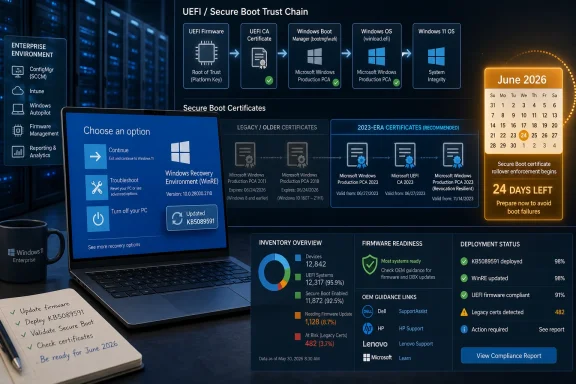
Microsoft released KB5089591 on May 12, 2026, as a Safe OS Dynamic Update for Windows 11 version 26H1, delivering improvements to the Windows Recovery Environment while repeating its warning that Secure Boot certificates on most Windows devices begin expiring in June 2026. The update itself is small, automatic, and easy to overlook. The warning attached to it is not. Microsoft is using even routine recovery-environment servicing to remind users and administrators that the Secure Boot trust chain is entering a once-in-a-platform-generation transition.
KB5089591 is not a flashy Patch Tuesday headline. It does not promise a redesigned Start menu, a Copilot breakthrough, or a dramatic security fix with a logo and a panic-inducing acronym. Microsoft describes it as an update that improves the Windows Recovery Environment, or WinRE, for Windows 11 version 26H1.
That makes it the kind of update most users never think about unless something has already gone wrong. WinRE is the preinstalled recovery layer Windows uses for startup repair, reset operations, troubleshooting, system recovery, and other jobs that happen outside the normal running OS. It is plumbing, but it is critical plumbing.
Microsoft says KB5089591 is available through Windows Update and will be downloaded and installed automatically. The standalone package is also available through the Microsoft Update Catalog, and administrators can manually add the package to Windows RE images. There are no prerequisites, no restart requirement after applying it, and no supported removal path once the update is applied to a Windows image.
The verification detail is unusually concrete: after installation, the WinRE version should be 10.0.28000.2110. That matters for IT teams because recovery partitions are notorious for drifting out of step with the main OS. A device can look current in Windows Update while still carrying an older recovery image, and that gap has burned administrators before.
This is the difference between an ordinary maintenance release and a signal flare. Microsoft is not merely publishing a support article somewhere and hoping administrators stumble across it. It is inserting the message into the release notes of ordinary servicing channels, because the affected population is broad and the deadline is no longer abstract.
Secure Boot is supposed to be boring. It verifies that trusted boot components are loaded before Windows starts, reducing the risk that bootkits, tampered loaders, or unauthorized pre-OS code can wedge themselves underneath the operating system. The feature depends on certificates stored in firmware databases, and many of those certificates trace back to the early Windows 8 era.
That long tail is now the problem. Certificates issued in 2011 were never meant to be eternal infrastructure. They have served through Windows 8, Windows 10, Windows 11, multiple hardware generations, and an entire era of firmware security learning the hard way that “set it and forget it” is not a lifecycle strategy.
That distinction matters because planned does not mean painless. A certificate expiration can be entirely predictable and still disruptive if the replacement path depends on multiple vendors, firmware behavior, Windows Update policy, recovery images, deployment rings, and users who may not have booted a stored laptop in months.
Microsoft’s newer trust chain centers on 2023-era Secure Boot certificates, including updated Windows and UEFI certificate authorities. The practical goal is straightforward: devices need to learn to trust the newer certificates before the older ones become a problem. The operational reality is messier, because Secure Boot is not controlled by Windows alone.
The trust databases live in firmware. Windows can help deliver and stage updates, but firmware must accept them, OEM implementations must behave correctly, and enterprise policy must not block the process. On some systems, a Windows update may be enough. On others, an OEM firmware update may be part of the path. On neglected or unsupported systems, the path may be uncertain.
That reassurance is real, but it has boundaries. Firmware is the other half of this story, and firmware remains one of the least uniform parts of the Windows PC market. Microsoft can coordinate, document, and deliver update payloads, but Dell, HP, Lenovo, Asus, Acer, Microsoft Surface, server vendors, motherboard makers, and industrial PC suppliers all sit somewhere in the chain.
That is why this issue lands differently for a gamer with a 2024 laptop, a school district with carts of Windows devices, a manufacturer with industrial systems, and a sysadmin responsible for older servers. The same phrase — “update Secure Boot certificates” — can mean a different operational project in each environment.
The risk is not necessarily that every unpatched machine turns into a brick on the first morning of expiration. Microsoft’s own guidance has been more measured than that. The more realistic concern is a degraded security state, trouble applying future boot-level updates, failure to validate newer boot components, or edge-case boot failures on systems that missed the transition.
WinRE is the environment users meet when Windows cannot start normally. It is where repair tools, reset workflows, and certain servicing actions live. If Secure Boot is about trusting the path into the operating system, the recovery environment is part of the safety net when that path breaks.
Microsoft has spent years trying to make recovery servicing less brittle, and not always successfully. Windows recovery partitions have caused failed updates when they were too small, stale, or oddly configured. Administrators know the pain of discovering that the supposedly invisible recovery layer requires inventory, validation, and sometimes manual intervention.
KB5089591 is therefore a reminder that the Windows device is not just the running desktop. It is firmware, boot manager, recovery image, OS image, update policy, and management tooling. When Microsoft says there is no restart required and the update cannot be removed once applied to an image, it is speaking to the mechanics of servicing that hidden stack.
The hardest machines to update are often not the ones users touch every day. They are loaner laptops in cabinets, point-of-sale terminals with narrow maintenance windows, lab PCs tied to old peripherals, classroom devices powered down for long stretches, and remote systems that only connect through fragile VPN assumptions. A certificate refresh that depends on the device being online, healthy, and eligible for updates can miss exactly the devices most likely to surprise you later.
The server angle is even more sensitive. Windows Server estates tend to include longer hardware lifecycles, stricter maintenance windows, and more complicated firmware governance. Microsoft has separate preparation material for servers for a reason: the operational blast radius of boot trust changes is different in a datacenter than on a consumer notebook.
IT teams should treat KB5089591 as another breadcrumb in Microsoft’s campaign to force inventory. Which devices have the 2023 certificates? Which ones still depend on 2011-era trust? Which models need firmware first? Which update rings are allowed to receive Secure Boot database changes? Which recovery images have been updated, and which offline images are still stale?
Most modern Windows 11 systems should move through this transition without drama. Machines sold recently are more likely to already include newer Secure Boot material or to be in a support window where firmware updates are available. Microsoft Surface devices, for example, have been receiving Secure Boot-related firmware updates through Windows Update channels.
Older machines are where the uncertainty grows. A Windows 10 PC outside normal support, a Windows 11-compatible system from a vendor with weak firmware support, or a device that has not been updated in months may not be in the same position as a current laptop that has stayed patched. Users do not need to become PKI engineers, but they do need to stop treating firmware updates as mysterious optional extras.
There is also a Linux and dual-boot wrinkle. Secure Boot is part of a broader UEFI ecosystem, and Microsoft’s UEFI certificate authority has historically mattered for some non-Windows boot loaders and third-party EFI applications. The certificate transition can therefore affect enthusiasts who run Linux, custom boot managers, recovery tools, or specialized pre-boot software.
If Microsoft overstates the risk, users panic and disable security features they should leave alone. If it understates the risk, administrators delay action and discover too late that an aging fleet needs firmware coordination. The company is trying to thread a needle: this is not Y2K for PCs, but it is also not a routine monthly patch note.
The “most devices” phrasing is doing a lot of work. Most devices may be fine. Certain personal and business devices may not. A fraction of hardware may need OEM help. Some offline images, stored devices, or tightly managed environments may require deliberate action. None of those caveats is comforting to the person responsible for the exception.
That is why the KB5089591 notice matters even though the update itself is not specifically described as the Secure Boot certificate fix. Microsoft is turning every relevant servicing page into a reminder that the old trust chain is aging out. The company wants administrators to discover the issue in May, not during a boot failure after a maintenance window in late June.
Devices drift when firmware is not updated. Recovery images drift when they are not serviced with the OS. Offline deployment media drift when no one rebuilds them. Update policies drift when a temporary block becomes permanent. Hardware inventories drift when “retired” machines remain in closets and then reappear during a budget crunch.
The Secure Boot certificate transition punishes that drift because it spans layers that many organizations manage separately. Desktop engineering owns the OS image. Security owns the baseline. Infrastructure owns servers. Procurement owns hardware refresh timing. Vendors own firmware. Users own the habit of postponing reboots and ignoring update prompts.
That cross-layer ownership problem is why a relatively dry support notice deserves attention. The technology is complicated, but the management failure mode is simple: everyone assumes someone else has handled the boot chain.
On paper, Windows Update is the right vehicle. It is already present, widely trusted, policy-aware, and capable of reaching consumer and business devices. It can coordinate OS and recovery-environment servicing in ways manual download pages never could. It also gives Microsoft telemetry and staged rollout controls.
But Secure Boot is not just another Windows component. The firmware layer is fragmented, vendor-specific, and often opaque. Even when updates are available, organizations may block driver and firmware delivery through Windows Update because they have been burned by bad firmware before. That caution is rational, but it can become dangerous if it prevents essential trust updates from landing.
The result is an uncomfortable bargain. Microsoft wants the PC ecosystem to behave like a cloud-managed platform, but the hardware ecosystem still contains the residue of decades of decentralized firmware responsibility. Secure Boot certificate expiration is where those two realities meet.
That timing gives the release a particular flavor. Microsoft is not merely preparing a next-generation OS branch. It is servicing that branch while the trust assumptions of the last 15 years are being replaced underneath it. The operating system can be modern, but if the boot chain is not modernized with it, the security story has a weak seam.
The WinRE version number, 10.0.28000.2110, will matter to administrators validating device state. But the broader inventory question is bigger than one number. Is the recovery environment current? Is Secure Boot enabled? Are the new certificates present? Has firmware been updated? Are server and client processes aligned? Are deployment images and recovery media being refreshed?
Those questions are not glamorous, and they do not fit neatly into a consumer-facing Windows feature tour. They are exactly the questions that determine whether a platform transition is quiet or chaotic.
There is a temptation to wait for a definitive red alert: a dashboard that says “this device is affected,” a vendor utility that resolves every ambiguity, or a single Microsoft update that makes the issue disappear. Some of that tooling and messaging may improve, but waiting for perfect clarity is a poor strategy this close to the deadline.
Administrators should instead work from probability and consequence. A fully patched, recently purchased Windows 11 laptop from a major vendor is probably low risk. A stored Windows 10 device, an older server, a dual-boot workstation, or a machine with blocked firmware updates deserves inspection. A fleet with inconsistent update controls deserves more than a memo.
For consumers, the action is lighter but still real. Run Windows Update. Check the optional updates and firmware path your PC maker uses. Do not ignore BIOS or UEFI updates simply because they sound scary. If a device has been powered off for months, bring it online before the deadline rather than after.
The update’s mechanics are deliberately uneventful. It arrives automatically through Windows Update, has no prerequisites, does not require a restart after application, and cannot be removed once applied to an image. Those are the marks of routine servicing, not an emergency repair.
But routine servicing is exactly how Microsoft wants this transition to happen. The company does not want millions of users manually editing firmware settings or downloading obscure certificate packages. It wants the ecosystem to update itself before the old certificates age out.
The danger is that “automatic” becomes a lullaby. Automatic updates only help devices that are online, eligible, supported, correctly configured, and not blocked by policy. The closer June gets, the less reassuring that assumption becomes.
Source: Microsoft Support KB5089591: Safe OS Dynamic Update for Windows 11, version 26H1: May 12, 2026 - Microsoft Support
 A Recovery Update Carries a Bigger Message Than Its File List
KB5089591 is not a flashy Patch Tuesday headline. It does not promise a redesigned Start menu, a Copilot breakthrough, or a dramatic security fix with a logo and a panic-inducing acronym. Microsoft describes it as an update that improves the Windows Recovery Environment, or WinRE, for Windows 11 version 26H1.That makes it the kind of update most users never think about unless something has already gone wrong. WinRE is the preinstalled recovery layer Windows uses for startup repair, reset operations, troubleshooting, system recovery, and other jobs that happen outside the normal running OS. It is plumbing, but it is critical plumbing.
Microsoft says KB5089591 is available through Windows Update and will be downloaded and installed automatically. The standalone package is also available through the Microsoft Update Catalog, and administrators can manually add the package to Windows RE images. There are no prerequisites, no restart requirement after applying it, and no supported removal path once the update is applied to a Windows image.
The verification detail is unusually concrete: after installation, the WinRE version should be 10.0.28000.2110. That matters for IT teams because recovery partitions are notorious for drifting out of step with the main OS. A device can look current in Windows Update while still carrying an older recovery image, and that gap has burned administrators before.
Microsoft Is Turning Routine Servicing Into a Countdown Clock
The striking part of KB5089591 is not the recovery environment update. It is the Secure Boot notice Microsoft places above the summary. The company again warns that Secure Boot certificates used by most Windows devices are set to expire starting in June 2026, and that some personal and business devices may lose the ability to boot securely if they are not updated in time.This is the difference between an ordinary maintenance release and a signal flare. Microsoft is not merely publishing a support article somewhere and hoping administrators stumble across it. It is inserting the message into the release notes of ordinary servicing channels, because the affected population is broad and the deadline is no longer abstract.
Secure Boot is supposed to be boring. It verifies that trusted boot components are loaded before Windows starts, reducing the risk that bootkits, tampered loaders, or unauthorized pre-OS code can wedge themselves underneath the operating system. The feature depends on certificates stored in firmware databases, and many of those certificates trace back to the early Windows 8 era.
That long tail is now the problem. Certificates issued in 2011 were never meant to be eternal infrastructure. They have served through Windows 8, Windows 10, Windows 11, multiple hardware generations, and an entire era of firmware security learning the hard way that “set it and forget it” is not a lifecycle strategy.
The 2011 Trust Chain Finally Meets Its Expiration Date
The Secure Boot certificate issue is not a conventional Windows bug. It is not a regression introduced by one monthly cumulative update, and it is not a malware outbreak. It is the planned expiration of cryptographic material that has been embedded deeply across the PC ecosystem for roughly 15 years.That distinction matters because planned does not mean painless. A certificate expiration can be entirely predictable and still disruptive if the replacement path depends on multiple vendors, firmware behavior, Windows Update policy, recovery images, deployment rings, and users who may not have booted a stored laptop in months.
Microsoft’s newer trust chain centers on 2023-era Secure Boot certificates, including updated Windows and UEFI certificate authorities. The practical goal is straightforward: devices need to learn to trust the newer certificates before the older ones become a problem. The operational reality is messier, because Secure Boot is not controlled by Windows alone.
The trust databases live in firmware. Windows can help deliver and stage updates, but firmware must accept them, OEM implementations must behave correctly, and enterprise policy must not block the process. On some systems, a Windows update may be enough. On others, an OEM firmware update may be part of the path. On neglected or unsupported systems, the path may be uncertain.
The Windows Update Promise Has an OEM Escape Clause
For many home users, the right answer will be boring: keep Windows Update enabled, install firmware updates when offered, and do not treat every BIOS update as optional noise. Microsoft’s messaging suggests that many devices will receive the Secure Boot certificate refresh through normal update mechanisms.That reassurance is real, but it has boundaries. Firmware is the other half of this story, and firmware remains one of the least uniform parts of the Windows PC market. Microsoft can coordinate, document, and deliver update payloads, but Dell, HP, Lenovo, Asus, Acer, Microsoft Surface, server vendors, motherboard makers, and industrial PC suppliers all sit somewhere in the chain.
That is why this issue lands differently for a gamer with a 2024 laptop, a school district with carts of Windows devices, a manufacturer with industrial systems, and a sysadmin responsible for older servers. The same phrase — “update Secure Boot certificates” — can mean a different operational project in each environment.
The risk is not necessarily that every unpatched machine turns into a brick on the first morning of expiration. Microsoft’s own guidance has been more measured than that. The more realistic concern is a degraded security state, trouble applying future boot-level updates, failure to validate newer boot components, or edge-case boot failures on systems that missed the transition.
WinRE Is a Sensible Place to Tighten the Bolts
At first glance, a Safe OS Dynamic Update and a Secure Boot certificate warning may look only loosely related. One updates the recovery environment; the other concerns firmware trust. But the pairing is logical because Windows recovery is part of the same pre-OS and early-boot story administrators need to care about.WinRE is the environment users meet when Windows cannot start normally. It is where repair tools, reset workflows, and certain servicing actions live. If Secure Boot is about trusting the path into the operating system, the recovery environment is part of the safety net when that path breaks.
Microsoft has spent years trying to make recovery servicing less brittle, and not always successfully. Windows recovery partitions have caused failed updates when they were too small, stale, or oddly configured. Administrators know the pain of discovering that the supposedly invisible recovery layer requires inventory, validation, and sometimes manual intervention.
KB5089591 is therefore a reminder that the Windows device is not just the running desktop. It is firmware, boot manager, recovery image, OS image, update policy, and management tooling. When Microsoft says there is no restart required and the update cannot be removed once applied to an image, it is speaking to the mechanics of servicing that hidden stack.
Enterprise IT Has Less Time Than the Calendar Suggests
June 2026 sounds like a deadline, but enterprise teams know deadlines arrive early. If an organization has change freezes, procurement cycles, pilot rings, firmware approval processes, or devices sitting in storage, the effective deadline may already be here.The hardest machines to update are often not the ones users touch every day. They are loaner laptops in cabinets, point-of-sale terminals with narrow maintenance windows, lab PCs tied to old peripherals, classroom devices powered down for long stretches, and remote systems that only connect through fragile VPN assumptions. A certificate refresh that depends on the device being online, healthy, and eligible for updates can miss exactly the devices most likely to surprise you later.
The server angle is even more sensitive. Windows Server estates tend to include longer hardware lifecycles, stricter maintenance windows, and more complicated firmware governance. Microsoft has separate preparation material for servers for a reason: the operational blast radius of boot trust changes is different in a datacenter than on a consumer notebook.
IT teams should treat KB5089591 as another breadcrumb in Microsoft’s campaign to force inventory. Which devices have the 2023 certificates? Which ones still depend on 2011-era trust? Which models need firmware first? Which update rings are allowed to receive Secure Boot database changes? Which recovery images have been updated, and which offline images are still stale?
The Consumer Version Is Simpler, but Not Effortless
For ordinary Windows users, the practical advice is not glamorous: install Windows updates, install firmware updates from the PC maker, and avoid disabling Secure Boot unless you know exactly why you are doing it. The danger is that consumer advice often collapses into “you probably do not need to do anything,” which is comforting but incomplete.Most modern Windows 11 systems should move through this transition without drama. Machines sold recently are more likely to already include newer Secure Boot material or to be in a support window where firmware updates are available. Microsoft Surface devices, for example, have been receiving Secure Boot-related firmware updates through Windows Update channels.
Older machines are where the uncertainty grows. A Windows 10 PC outside normal support, a Windows 11-compatible system from a vendor with weak firmware support, or a device that has not been updated in months may not be in the same position as a current laptop that has stayed patched. Users do not need to become PKI engineers, but they do need to stop treating firmware updates as mysterious optional extras.
There is also a Linux and dual-boot wrinkle. Secure Boot is part of a broader UEFI ecosystem, and Microsoft’s UEFI certificate authority has historically mattered for some non-Windows boot loaders and third-party EFI applications. The certificate transition can therefore affect enthusiasts who run Linux, custom boot managers, recovery tools, or specialized pre-boot software.
Microsoft’s Messaging Is Cautious Because the Edge Cases Are Real
Microsoft’s language around Secure Boot expiration has been careful. The company warns of possible disruption and degraded secure boot behavior, while also indicating that updates are being delivered and that many systems should be handled automatically. That caution reflects the nature of the problem.If Microsoft overstates the risk, users panic and disable security features they should leave alone. If it understates the risk, administrators delay action and discover too late that an aging fleet needs firmware coordination. The company is trying to thread a needle: this is not Y2K for PCs, but it is also not a routine monthly patch note.
The “most devices” phrasing is doing a lot of work. Most devices may be fine. Certain personal and business devices may not. A fraction of hardware may need OEM help. Some offline images, stored devices, or tightly managed environments may require deliberate action. None of those caveats is comforting to the person responsible for the exception.
That is why the KB5089591 notice matters even though the update itself is not specifically described as the Secure Boot certificate fix. Microsoft is turning every relevant servicing page into a reminder that the old trust chain is aging out. The company wants administrators to discover the issue in May, not during a boot failure after a maintenance window in late June.
The Real Risk Is Operational Drift, Not Cryptographic Theory
Security people often explain certificate expiration in abstract terms: trust anchors, signing chains, revocation, database updates, authority rollover. Those terms are accurate, but they can obscure the more familiar Windows problem underneath. The risk is drift.Devices drift when firmware is not updated. Recovery images drift when they are not serviced with the OS. Offline deployment media drift when no one rebuilds them. Update policies drift when a temporary block becomes permanent. Hardware inventories drift when “retired” machines remain in closets and then reappear during a budget crunch.
The Secure Boot certificate transition punishes that drift because it spans layers that many organizations manage separately. Desktop engineering owns the OS image. Security owns the baseline. Infrastructure owns servers. Procurement owns hardware refresh timing. Vendors own firmware. Users own the habit of postponing reboots and ignoring update prompts.
That cross-layer ownership problem is why a relatively dry support notice deserves attention. The technology is complicated, but the management failure mode is simple: everyone assumes someone else has handled the boot chain.
The Certificate Refresh Tests Microsoft’s Modern Windows Model
Microsoft has spent the Windows 10 and Windows 11 eras arguing that Windows is now a serviced platform, not a boxed product. Monthly cumulative updates, dynamic updates, enablement packages, cloud-managed policies, and firmware delivery through Windows Update all support that model. The Secure Boot certificate rollover is a major test of whether that servicing model reaches deep enough.On paper, Windows Update is the right vehicle. It is already present, widely trusted, policy-aware, and capable of reaching consumer and business devices. It can coordinate OS and recovery-environment servicing in ways manual download pages never could. It also gives Microsoft telemetry and staged rollout controls.
But Secure Boot is not just another Windows component. The firmware layer is fragmented, vendor-specific, and often opaque. Even when updates are available, organizations may block driver and firmware delivery through Windows Update because they have been burned by bad firmware before. That caution is rational, but it can become dangerous if it prevents essential trust updates from landing.
The result is an uncomfortable bargain. Microsoft wants the PC ecosystem to behave like a cloud-managed platform, but the hardware ecosystem still contains the residue of decades of decentralized firmware responsibility. Secure Boot certificate expiration is where those two realities meet.
Windows 11 26H1 Is Already Living in the Post-2011 Transition
KB5089591 targets Windows 11 version 26H1, a release line that exists firmly in the transition window. By May 12, 2026, the Secure Boot deadline is not a future planning item; it is weeks away. Any update shipping now belongs to the final stretch before expiration begins.That timing gives the release a particular flavor. Microsoft is not merely preparing a next-generation OS branch. It is servicing that branch while the trust assumptions of the last 15 years are being replaced underneath it. The operating system can be modern, but if the boot chain is not modernized with it, the security story has a weak seam.
The WinRE version number, 10.0.28000.2110, will matter to administrators validating device state. But the broader inventory question is bigger than one number. Is the recovery environment current? Is Secure Boot enabled? Are the new certificates present? Has firmware been updated? Are server and client processes aligned? Are deployment images and recovery media being refreshed?
Those questions are not glamorous, and they do not fit neatly into a consumer-facing Windows feature tour. They are exactly the questions that determine whether a platform transition is quiet or chaotic.
The May Servicing Note Is a Warning to Stop Waiting
The safest interpretation of KB5089591 is that Microsoft is widening the blast radius of its reminder system. A Safe OS Dynamic Update becomes not just a recovery patch but another vehicle for telling the ecosystem that Secure Boot certificate expiration is imminent. That is sensible because the people who read KB articles are often the people who can still do something useful.There is a temptation to wait for a definitive red alert: a dashboard that says “this device is affected,” a vendor utility that resolves every ambiguity, or a single Microsoft update that makes the issue disappear. Some of that tooling and messaging may improve, but waiting for perfect clarity is a poor strategy this close to the deadline.
Administrators should instead work from probability and consequence. A fully patched, recently purchased Windows 11 laptop from a major vendor is probably low risk. A stored Windows 10 device, an older server, a dual-boot workstation, or a machine with blocked firmware updates deserves inspection. A fleet with inconsistent update controls deserves more than a memo.
For consumers, the action is lighter but still real. Run Windows Update. Check the optional updates and firmware path your PC maker uses. Do not ignore BIOS or UEFI updates simply because they sound scary. If a device has been powered off for months, bring it online before the deadline rather than after.
The Practical Meaning of KB5089591 Is Hidden in the Boring Parts
KB5089591 gives Windows 11 version 26H1 a refreshed recovery environment and sets the expected WinRE version at 10.0.28000.2110. That fact will matter most to administrators who validate recovery partitions and maintain deployment images. The rest of us should read the support note as one more sign that Microsoft is entering the final operational phase of the Secure Boot rollover.The update’s mechanics are deliberately uneventful. It arrives automatically through Windows Update, has no prerequisites, does not require a restart after application, and cannot be removed once applied to an image. Those are the marks of routine servicing, not an emergency repair.
But routine servicing is exactly how Microsoft wants this transition to happen. The company does not want millions of users manually editing firmware settings or downloading obscure certificate packages. It wants the ecosystem to update itself before the old certificates age out.
The danger is that “automatic” becomes a lullaby. Automatic updates only help devices that are online, eligible, supported, correctly configured, and not blocked by policy. The closer June gets, the less reassuring that assumption becomes.
The Checklist Microsoft Buried in Plain Sight
The message for WindowsForum readers is not to panic, but to stop treating Secure Boot as a static checkbox in firmware setup. KB5089591 is a small update with a large shadow, and the shadow falls across recovery, firmware, deployment, and fleet hygiene.- Windows 11 version 26H1 devices receiving KB5089591 should report WinRE version 10.0.28000.2110 after the update is installed.
- Secure Boot certificates used by most Windows devices begin expiring in June 2026, making the remaining preparation window short.
- Many devices should receive the necessary changes through normal update channels, but some systems may also depend on OEM firmware support.
- Administrators should inventory Secure Boot certificate status, firmware levels, recovery images, offline deployment media, and devices that have been stored or rarely connected.
- Consumers should keep Windows Update current, install vendor firmware updates when offered, and avoid disabling Secure Boot as a workaround.
- The highest-risk systems are likely to be older, offline, tightly managed, dual-boot, server-class, or dependent on vendors that have not clearly documented their firmware path.
Source: Microsoft Support KB5089591: Safe OS Dynamic Update for Windows 11, version 26H1: May 12, 2026 - Microsoft Support
