

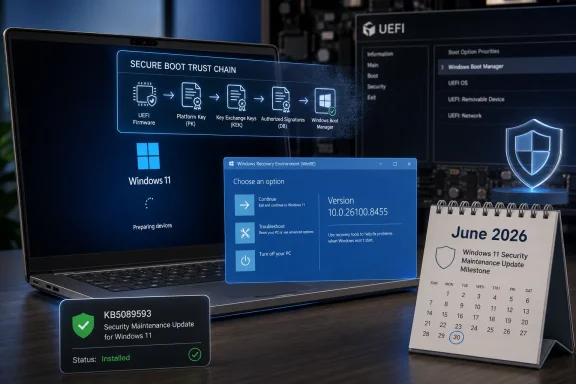
Microsoft released KB5089593 on May 12, 2026, as a Safe OS Dynamic Update for Windows 11 versions 24H2 and 25H2, updating the Windows Recovery Environment while again warning that Secure Boot certificates used by most Windows devices begin expiring in June 2026. The smallness of the package is the point: this is not a flashy feature drop, but another brick in a defensive wall Microsoft has been trying to build before the firmware clock runs out. If Windows servicing has taught administrators anything, it is that the updates most likely to become emergencies are often the ones that arrive under dry names. KB5089593 is one of those updates.
KB5089593 is formally a Safe OS Dynamic Update, the kind of servicing component that improves the Windows recovery environment rather than the desktop shell, taskbar, or application platform. After installation, Microsoft says the WinRE version on affected Windows 11 24H2 and 25H2 systems should be 10.0.26100.8455. There are no prerequisites, no restart requirement after applying it to an image, and no supported uninstall path once it has been applied.
That sounds routine until you notice the warning Microsoft placed at the top of the support article. Secure Boot certificates used by most Windows devices are set to expire starting in June 2026, and Microsoft is telling both consumers and enterprises to prepare now. The warning is not ornamental. It is the servicing equivalent of a fire alarm test conducted while smoke is already visible in the hallway.
Safe OS updates matter because recovery is where Windows goes when the normal operating system cannot help itself. WinRE handles reset flows, recovery tools, startup repair, and parts of the pre-boot troubleshooting experience. In a world where boot trust is being refreshed across hundreds of millions of machines, the recovery environment cannot be treated as a neglected sidecar.
The more interesting story, then, is not that KB5089593 exists. It is that Microsoft is using even narrow recovery-environment updates to keep pointing at the same cliff edge: June 2026, the month when old Secure Boot trust anchors begin aging out of the ecosystem.
The certificates behind that trust model were not immortal. Many devices still depend on Microsoft Secure Boot certificates issued in 2011, during the Windows 8 era. Those certificates begin expiring in June 2026, which means the industry is now paying down a 15-year dependency that has been embedded across firmware, operating systems, OEM processes, recovery media, and enterprise imaging pipelines.
Microsoft’s recent guidance has been careful to avoid panic. Devices that miss the update may not simply become bricks at midnight. Microsoft’s own documentation indicates that affected systems may continue to boot and receive regular Windows updates, but may lose the ability to receive future Secure Boot protections for early boot components such as boot managers, Secure Boot databases, revocation lists, and fixes for new boot vulnerabilities.
That distinction is important, but it is not comforting. A PC that boots but can no longer participate properly in the next phase of boot-level security is not healthy; it is merely operational. For home users, that may look like another Windows Security warning. For enterprises, it becomes an asset-management problem with security, compliance, and availability consequences.
The worst cases are the ones administrators already fear: BitLocker recovery prompts, startup hangs, Secure Boot validation errors, and machines that require OEM firmware updates before Windows can finish the certificate transition. Those are not theoretical annoyances in a fleet with mixed models, old BIOS versions, remote workers, and just enough specialized hardware to ruin a weekend.
That broader stream matters more than any one KB number. Microsoft has been rolling the 2023-era Secure Boot certificate chain into supported Windows paths, surfacing status indicators in Windows Security for consumers, and publishing administrative guidance for managed environments. The company has also been warning that some devices may need firmware from their OEM before the new certificates can be fully applied.
This is where the Windows ecosystem’s strength and weakness are the same thing. Windows runs across an extraordinary range of hardware, from brand-new AI-branded laptops to aging desktops, industrial PCs, gaming rigs, lab machines, virtualized environments, and servers with carefully staged maintenance windows. Microsoft can ship the operating-system side of the transition, but it cannot magically normalize every firmware implementation in the field.
KB5089593 therefore reads like a maintenance note and a reminder. The update improves WinRE, but the placement of the Secure Boot warning says Microsoft wants this deadline visible in every servicing channel it can reasonably touch. That is a sensible strategy. Administrators do not always read blog posts, but they do read KB articles when something appears in their deployment rings.
There is also a subtle admission here. Boot security is not one update; it is a choreography. Firmware must accept the right variables, Windows must install and validate the right components, recovery must keep pace, and administrators must avoid creating old boot media that reintroduces vulnerable or expired trust paths.
If the normal OS is patched but recovery remains stale, administrators inherit a split-brain system. The production image may know about current Secure Boot assumptions while the recovery path lags behind. That mismatch is especially dangerous during incident response, failed updates, BitLocker events, or bare-metal recovery, when teams are already operating under stress.
Microsoft has spent the past several years tightening the early boot story, especially after the BlackLotus UEFI bootkit forced a more aggressive conversation about revoking vulnerable boot managers and updating Secure Boot databases. Those mitigations were never going to be a single patch Tuesday affair. They require staged deployment because revocations can have permanent consequences if applied before a machine is ready.
That is why Safe OS updates deserve more respect than they usually receive. They keep the preinstallation and recovery side of Windows aligned with the live OS. In a certificate migration, that alignment is not housekeeping; it is the difference between a recoverable machine and a machine that sends technicians spelunking through firmware settings with BitLocker keys in hand.
For WindowsForum readers who maintain their own rescue drives, customized images, or offline deployment shares, the lesson is blunt. The installed OS is only one copy of Windows in your environment. If the copy you boot in an emergency is old, unsigned in the wrong way, or unaware of the 2023 trust chain, your recovery plan may become the thing that fails first.
Secure Boot lives in firmware, and firmware is where Windows servicing becomes least Windows-like. OEMs control firmware releases. Enterprises control BIOS settings. Users dual-boot Linux. Gamers run anti-cheat systems that care deeply about boot integrity. Servers run in maintenance windows measured against business operations, not Microsoft’s calendar. Some systems are supported but neglected; others are unsupported but still in use because they run something important.
The phrase certificate expiration can make the issue sound like a calendar problem. It is really an ecosystem coordination problem. Microsoft can deliver certificate updates through Windows Update for many eligible machines, but some devices may need OEM firmware updates, and some environments will need staged validation before they allow changes to Secure Boot databases.
That complexity explains Microsoft’s increasingly visible guidance for managed fleets. IT teams are being asked to identify devices with outdated certificate status, watch for relevant event log entries, confirm registry state where applicable, and test representative hardware before broad rollout. This is not because Microsoft wants to make certificate rotation dramatic. It is because a failed boot-security update is one of the few endpoint events that can instantly turn a remote management problem into a hands-on repair job.
The company is also walking a communications tightrope. If it shouts too loudly, it risks creating the impression that Windows PCs will stop booting en masse in June. If it whispers, it leaves administrators underprepared for a security transition that depends on firmware, recovery environments, and deployment media all being current.
The risk for consumers is less likely to be a carefully timed certificate failure and more likely to be update avoidance. A laptop that has been deferred, paused, imaged badly, or left without firmware updates may miss the window in which Microsoft and the OEM expected it to receive the new trust chain. The result could be degraded boot security, warnings, or a more painful recovery experience later.
For IT, the situation is more procedural. Administrators need to know which machines are eligible for automatic updates, which require firmware, which are outside support, and which are governed by exceptions. A single unmanaged design workstation, lab controller, or remote executive laptop can become the machine that turns a certificate transition into a support escalation.
This is especially true for organizations that control Windows Update through Intune, Configuration Manager, WSUS, Group Policy, or third-party patch tools. The question is not simply whether May’s update is approved. The question is whether the organization’s entire servicing path allows the Secure Boot certificate transition to complete in the intended order.
Servers add another layer of caution. Microsoft’s server guidance emphasizes planning, sequencing, and validation because firmware, boot settings, and availability requirements vary widely. The conservative instinct to delay anything touching Secure Boot is understandable, but delay becomes risk when the old trust chain has a real expiration horizon.
That matters because the Secure Boot migration is happening while Windows itself is in motion. Windows 11 24H2 remains widely deployed, while 25H2 is the newer target for many consumer and enterprise systems. Microsoft needs the certificate work to span both without creating a maze of incompatible boot assumptions.
The shared servicing branch does not eliminate complexity, but it reduces some of it. Organizations moving from 24H2 to 25H2 can think of the transition less as a forklift upgrade and more as part of the same security-maintenance runway. That is useful, because the certificate deadline does not care whether an enterprise is halfway through a feature update project.
Still, version alignment is not the same thing as readiness. A fully patched Windows build can sit on firmware that is too old, misconfigured, or outside the OEM’s tested path. Conversely, a newer PC may already have the 2023 certificates and need little drama. The version number is necessary context, not a guarantee.
This is why Microsoft’s status checks matter more than branding. Administrators should be looking at certificate state, event logs, firmware levels, and actual deployment results, not simply whether a device says Windows 11 25H2 in Settings.
This is not just a Microsoft problem. Any public key infrastructure eventually forces a reckoning with time. Certificates expire because trust should not be perpetual. The uncomfortable part is that PCs are physical objects with long lives, uneven maintenance, and owners who often think of firmware as something installed at the factory and never touched again.
Windows Update has trained users to expect operating-system maintenance to be automatic. Firmware updates have not earned the same trust. Many users still avoid BIOS updates unless something is broken, and many organizations stage them cautiously because a bad firmware update can be worse than the vulnerability it fixes. Secure Boot certificate migration sits right in the middle of that cultural mismatch.
The most exposed systems may not be the oldest ones in a purely chronological sense. They may be the least maintained supported systems: devices technically capable of receiving updates but stuck behind policy, offline for months, excluded from firmware campaigns, or deployed with custom images that never kept WinRE current. Those are the machines that look fine in a spreadsheet until they are asked to boot through a changed trust environment.
KB5089593 cannot solve that problem by itself. What it can do is serve as another timestamp in the paper trail. Microsoft has now put the warning in front of administrators repeatedly, across support articles, message-center posts, consumer UI, and platform guidance. By May 2026, “we didn’t know” is becoming harder to argue.
That shift has practical implications. Deployment teams need to update bootable media, not just installed systems. Security teams need to understand the difference between a machine that can still boot and a machine that can still receive future boot-level protections. Help desks need to be ready for BitLocker recovery prompts that may be related to firmware and Secure Boot changes, not just user error.
Developers and power users are not exempt. Dual-boot setups, custom bootloaders, kernel-level anti-cheat systems, and specialized recovery tools all rely on assumptions about what firmware will trust. The migration to 2023 certificates may be smooth for mainstream configurations, but edge cases deserve testing before the deadline arrives.
There is a broader philosophical point here. Microsoft has been trying to harden Windows below the level most users can see, from virtualization-based security to measured boot, vulnerable-driver blocking, and UEFI revocations. Those investments only work if the trust chain remains serviceable. Expired certificates turn security architecture into archaeology.
The industry asked for stronger boot security after real attacks showed that malware below the OS could survive traditional defenses. The bill for that security is operational discipline. KB5089593 is one of the smaller payments.
For WindowsForum readers, the lesson is not to obsess over this one package in isolation. The lesson is to treat it as evidence that Microsoft is tightening every layer around the boot and recovery path before June 2026. The closer the deadline gets, the less room there is for passive maintenance habits.
Source: Microsoft Support KB5089593: Safe OS Dynamic Update for Windows 11, versions 24H2 and 25H2: May 12, 2026 - Microsoft Support
 Microsoft Ships a Recovery Update With a Firmware Deadline Attached
KB5089593 is formally a Safe OS Dynamic Update, the kind of servicing component that improves the Windows recovery environment rather than the desktop shell, taskbar, or application platform. After installation, Microsoft says the WinRE version on affected Windows 11 24H2 and 25H2 systems should be 10.0.26100.8455. There are no prerequisites, no restart requirement after applying it to an image, and no supported uninstall path once it has been applied.That sounds routine until you notice the warning Microsoft placed at the top of the support article. Secure Boot certificates used by most Windows devices are set to expire starting in June 2026, and Microsoft is telling both consumers and enterprises to prepare now. The warning is not ornamental. It is the servicing equivalent of a fire alarm test conducted while smoke is already visible in the hallway.
Safe OS updates matter because recovery is where Windows goes when the normal operating system cannot help itself. WinRE handles reset flows, recovery tools, startup repair, and parts of the pre-boot troubleshooting experience. In a world where boot trust is being refreshed across hundreds of millions of machines, the recovery environment cannot be treated as a neglected sidecar.
The more interesting story, then, is not that KB5089593 exists. It is that Microsoft is using even narrow recovery-environment updates to keep pointing at the same cliff edge: June 2026, the month when old Secure Boot trust anchors begin aging out of the ecosystem.
The Old Root of Trust Is Finally Becoming Operational Debt
Secure Boot is one of those technologies that disappears when it works and becomes brutally visible when it does not. The feature is designed to ensure that a PC starts using trusted software, checking signatures on early boot components before Windows takes control. For years, most users experienced it only as a BIOS toggle they were told not to touch unless installing Linux, replacing hardware, or troubleshooting an anti-cheat complaint.The certificates behind that trust model were not immortal. Many devices still depend on Microsoft Secure Boot certificates issued in 2011, during the Windows 8 era. Those certificates begin expiring in June 2026, which means the industry is now paying down a 15-year dependency that has been embedded across firmware, operating systems, OEM processes, recovery media, and enterprise imaging pipelines.
Microsoft’s recent guidance has been careful to avoid panic. Devices that miss the update may not simply become bricks at midnight. Microsoft’s own documentation indicates that affected systems may continue to boot and receive regular Windows updates, but may lose the ability to receive future Secure Boot protections for early boot components such as boot managers, Secure Boot databases, revocation lists, and fixes for new boot vulnerabilities.
That distinction is important, but it is not comforting. A PC that boots but can no longer participate properly in the next phase of boot-level security is not healthy; it is merely operational. For home users, that may look like another Windows Security warning. For enterprises, it becomes an asset-management problem with security, compliance, and availability consequences.
The worst cases are the ones administrators already fear: BitLocker recovery prompts, startup hangs, Secure Boot validation errors, and machines that require OEM firmware updates before Windows can finish the certificate transition. Those are not theoretical annoyances in a fleet with mixed models, old BIOS versions, remote workers, and just enough specialized hardware to ruin a weekend.
KB5089593 Is Small Because the Campaign Is Big
Dynamic Updates are easy to underestimate because they rarely have the narrative gravity of cumulative updates. They exist to improve setup, recovery, compatibility, and the servicing machinery around Windows. In this case, KB5089593 replaces the earlier KB5084812 and slots into a broader stream of updates preparing Windows 11 24H2 and 25H2 for the Secure Boot certificate handover.That broader stream matters more than any one KB number. Microsoft has been rolling the 2023-era Secure Boot certificate chain into supported Windows paths, surfacing status indicators in Windows Security for consumers, and publishing administrative guidance for managed environments. The company has also been warning that some devices may need firmware from their OEM before the new certificates can be fully applied.
This is where the Windows ecosystem’s strength and weakness are the same thing. Windows runs across an extraordinary range of hardware, from brand-new AI-branded laptops to aging desktops, industrial PCs, gaming rigs, lab machines, virtualized environments, and servers with carefully staged maintenance windows. Microsoft can ship the operating-system side of the transition, but it cannot magically normalize every firmware implementation in the field.
KB5089593 therefore reads like a maintenance note and a reminder. The update improves WinRE, but the placement of the Secure Boot warning says Microsoft wants this deadline visible in every servicing channel it can reasonably touch. That is a sensible strategy. Administrators do not always read blog posts, but they do read KB articles when something appears in their deployment rings.
There is also a subtle admission here. Boot security is not one update; it is a choreography. Firmware must accept the right variables, Windows must install and validate the right components, recovery must keep pace, and administrators must avoid creating old boot media that reintroduces vulnerable or expired trust paths.
The Recovery Environment Is Part of the Security Boundary Now
The phrase Windows Recovery Environment still sounds like a support feature, not a security component. That mental model is obsolete. Recovery media, reset flows, offline servicing, and boot repair all sit close enough to the startup chain that they must be considered part of the practical security boundary of a Windows deployment.If the normal OS is patched but recovery remains stale, administrators inherit a split-brain system. The production image may know about current Secure Boot assumptions while the recovery path lags behind. That mismatch is especially dangerous during incident response, failed updates, BitLocker events, or bare-metal recovery, when teams are already operating under stress.
Microsoft has spent the past several years tightening the early boot story, especially after the BlackLotus UEFI bootkit forced a more aggressive conversation about revoking vulnerable boot managers and updating Secure Boot databases. Those mitigations were never going to be a single patch Tuesday affair. They require staged deployment because revocations can have permanent consequences if applied before a machine is ready.
That is why Safe OS updates deserve more respect than they usually receive. They keep the preinstallation and recovery side of Windows aligned with the live OS. In a certificate migration, that alignment is not housekeeping; it is the difference between a recoverable machine and a machine that sends technicians spelunking through firmware settings with BitLocker keys in hand.
For WindowsForum readers who maintain their own rescue drives, customized images, or offline deployment shares, the lesson is blunt. The installed OS is only one copy of Windows in your environment. If the copy you boot in an emergency is old, unsigned in the wrong way, or unaware of the 2023 trust chain, your recovery plan may become the thing that fails first.
Microsoft’s Real Problem Is Not Shipping the Certificates
The easy version of the story says Microsoft has old certificates, new certificates, and a deadline. The harder version says Microsoft must change the root of trust without breaking the trust of users who expect their machines to turn on. That is a much less forgiving task.Secure Boot lives in firmware, and firmware is where Windows servicing becomes least Windows-like. OEMs control firmware releases. Enterprises control BIOS settings. Users dual-boot Linux. Gamers run anti-cheat systems that care deeply about boot integrity. Servers run in maintenance windows measured against business operations, not Microsoft’s calendar. Some systems are supported but neglected; others are unsupported but still in use because they run something important.
The phrase certificate expiration can make the issue sound like a calendar problem. It is really an ecosystem coordination problem. Microsoft can deliver certificate updates through Windows Update for many eligible machines, but some devices may need OEM firmware updates, and some environments will need staged validation before they allow changes to Secure Boot databases.
That complexity explains Microsoft’s increasingly visible guidance for managed fleets. IT teams are being asked to identify devices with outdated certificate status, watch for relevant event log entries, confirm registry state where applicable, and test representative hardware before broad rollout. This is not because Microsoft wants to make certificate rotation dramatic. It is because a failed boot-security update is one of the few endpoint events that can instantly turn a remote management problem into a hands-on repair job.
The company is also walking a communications tightrope. If it shouts too loudly, it risks creating the impression that Windows PCs will stop booting en masse in June. If it whispers, it leaves administrators underprepared for a security transition that depends on firmware, recovery environments, and deployment media all being current.
Home Users Will See a Warning; IT Will See a Fleet
For individual Windows 11 users, the practical advice is straightforward: keep Windows Update enabled, install current firmware from the PC maker when offered, and pay attention to Secure Boot status warnings in Windows Security. Microsoft has been adding consumer-facing status indicators so users can see whether their Secure Boot certificate update state is green, yellow, or red. That is the right level of abstraction for most people.The risk for consumers is less likely to be a carefully timed certificate failure and more likely to be update avoidance. A laptop that has been deferred, paused, imaged badly, or left without firmware updates may miss the window in which Microsoft and the OEM expected it to receive the new trust chain. The result could be degraded boot security, warnings, or a more painful recovery experience later.
For IT, the situation is more procedural. Administrators need to know which machines are eligible for automatic updates, which require firmware, which are outside support, and which are governed by exceptions. A single unmanaged design workstation, lab controller, or remote executive laptop can become the machine that turns a certificate transition into a support escalation.
This is especially true for organizations that control Windows Update through Intune, Configuration Manager, WSUS, Group Policy, or third-party patch tools. The question is not simply whether May’s update is approved. The question is whether the organization’s entire servicing path allows the Secure Boot certificate transition to complete in the intended order.
Servers add another layer of caution. Microsoft’s server guidance emphasizes planning, sequencing, and validation because firmware, boot settings, and availability requirements vary widely. The conservative instinct to delay anything touching Secure Boot is understandable, but delay becomes risk when the old trust chain has a real expiration horizon.
The Windows 11 24H2 and 25H2 Pairing Is Doing Some Heavy Lifting
KB5089593 applies to Windows 11 versions 24H2 and 25H2, which share a servicing foundation in ways that make Microsoft’s update story more manageable. That commonality helps explain why the same Safe OS Dynamic Update can target both versions. It also shows how Microsoft is increasingly treating Windows feature releases as servicing states rather than wholly separate operating-system generations.That matters because the Secure Boot migration is happening while Windows itself is in motion. Windows 11 24H2 remains widely deployed, while 25H2 is the newer target for many consumer and enterprise systems. Microsoft needs the certificate work to span both without creating a maze of incompatible boot assumptions.
The shared servicing branch does not eliminate complexity, but it reduces some of it. Organizations moving from 24H2 to 25H2 can think of the transition less as a forklift upgrade and more as part of the same security-maintenance runway. That is useful, because the certificate deadline does not care whether an enterprise is halfway through a feature update project.
Still, version alignment is not the same thing as readiness. A fully patched Windows build can sit on firmware that is too old, misconfigured, or outside the OEM’s tested path. Conversely, a newer PC may already have the 2023 certificates and need little drama. The version number is necessary context, not a guarantee.
This is why Microsoft’s status checks matter more than branding. Administrators should be looking at certificate state, event logs, firmware levels, and actual deployment results, not simply whether a device says Windows 11 25H2 in Settings.
The June Deadline Exposes the Weakness of Forgotten Machines
Every enterprise has forgotten machines. They are the kiosks no one owns, the lab PCs behind locked doors, the conference-room systems that only wake for presentations, the factory workstations that cannot be casually rebooted, and the old laptops waiting in drawers until someone suddenly needs them. Secure Boot certificate expiration is exactly the kind of event that punishes that inventory rot.This is not just a Microsoft problem. Any public key infrastructure eventually forces a reckoning with time. Certificates expire because trust should not be perpetual. The uncomfortable part is that PCs are physical objects with long lives, uneven maintenance, and owners who often think of firmware as something installed at the factory and never touched again.
Windows Update has trained users to expect operating-system maintenance to be automatic. Firmware updates have not earned the same trust. Many users still avoid BIOS updates unless something is broken, and many organizations stage them cautiously because a bad firmware update can be worse than the vulnerability it fixes. Secure Boot certificate migration sits right in the middle of that cultural mismatch.
The most exposed systems may not be the oldest ones in a purely chronological sense. They may be the least maintained supported systems: devices technically capable of receiving updates but stuck behind policy, offline for months, excluded from firmware campaigns, or deployed with custom images that never kept WinRE current. Those are the machines that look fine in a spreadsheet until they are asked to boot through a changed trust environment.
KB5089593 cannot solve that problem by itself. What it can do is serve as another timestamp in the paper trail. Microsoft has now put the warning in front of administrators repeatedly, across support articles, message-center posts, consumer UI, and platform guidance. By May 2026, “we didn’t know” is becoming harder to argue.
Boot Security Is Becoming a Servicing Discipline, Not a Checkbox
For years, Secure Boot was treated as a configuration requirement: enabled or disabled, compatible or incompatible, on the checklist or not. The 2026 certificate rollover makes that view look quaint. Secure Boot is a living trust system, and living trust systems require rotation, revocation, monitoring, and recovery planning.That shift has practical implications. Deployment teams need to update bootable media, not just installed systems. Security teams need to understand the difference between a machine that can still boot and a machine that can still receive future boot-level protections. Help desks need to be ready for BitLocker recovery prompts that may be related to firmware and Secure Boot changes, not just user error.
Developers and power users are not exempt. Dual-boot setups, custom bootloaders, kernel-level anti-cheat systems, and specialized recovery tools all rely on assumptions about what firmware will trust. The migration to 2023 certificates may be smooth for mainstream configurations, but edge cases deserve testing before the deadline arrives.
There is a broader philosophical point here. Microsoft has been trying to harden Windows below the level most users can see, from virtualization-based security to measured boot, vulnerable-driver blocking, and UEFI revocations. Those investments only work if the trust chain remains serviceable. Expired certificates turn security architecture into archaeology.
The industry asked for stronger boot security after real attacks showed that malware below the OS could survive traditional defenses. The bill for that security is operational discipline. KB5089593 is one of the smaller payments.
The Quiet KB Number Is the Warning Label
KB5089593 will not be remembered as a landmark update. It does not introduce a new Start menu behavior, break a popular printer driver, or add a button that sends the internet into a week-long argument. Its importance is quieter: it updates the recovery environment while keeping the Secure Boot certificate deadline in view.For WindowsForum readers, the lesson is not to obsess over this one package in isolation. The lesson is to treat it as evidence that Microsoft is tightening every layer around the boot and recovery path before June 2026. The closer the deadline gets, the less room there is for passive maintenance habits.
- KB5089593 updates the Windows Recovery Environment for Windows 11 versions 24H2 and 25H2 and brings WinRE to version 10.0.26100.8455 when installed successfully.
- The update has no prerequisites, does not require a restart after being applied to an image, and cannot be removed once applied to a Windows image.
- Microsoft is again warning that Secure Boot certificates used by most Windows devices begin expiring in June 2026.
- Devices that miss the certificate transition may still boot and receive regular Windows updates, but they may lose future boot-level protections for early startup components.
- Administrators should validate certificate status, firmware readiness, recovery media, and representative hardware before broad rollout.
- Home users should keep Windows and OEM firmware current and should not ignore Secure Boot status warnings in Windows Security.
Source: Microsoft Support KB5089593: Safe OS Dynamic Update for Windows 11, versions 24H2 and 25H2: May 12, 2026 - Microsoft Support
