
KB5090934, released as the April 2026 Phi Silica AI component update version 1.2604.515.0 for Intel-powered Copilot+ PCs, delivers Microsoft’s on-device small language model through Windows Update for Windows 11 versions 24H2 and 25H2. The update is narrow in hardware scope but broad in strategic meaning. Microsoft is no longer treating AI in Windows as a single app, a cloud endpoint, or a preview novelty. It is turning local models into serviced Windows components.
For years, Windows updates were mostly about the operating system: kernel fixes, driver compatibility, security hardening, browser plumbing, and the occasional feature that appeared after a reboot. KB5090934 belongs to a different lineage. It updates an AI model component that sits inside the Windows experience and is delivered through the same machinery that administrators already use to keep fleets current.
That matters because Phi Silica is not just another Copilot-branded feature. It is Microsoft’s small language model for Copilot+ PCs, optimized to run on the neural processing unit rather than shipping prompts to a remote datacenter. The promise is familiar by now: lower latency, less dependence on connectivity, and fewer privacy anxieties because the work can happen locally.
But the update also exposes the harder truth behind the AI PC pitch. If Windows is going to rely on local models for summarization, rewriting, semantic search, accessibility, and developer-facing language features, those models cannot be frozen at launch. They need versioning, servicing, replacement logic, compatibility gates, and release notes. In other words, AI becomes part of the operating system’s maintenance burden.
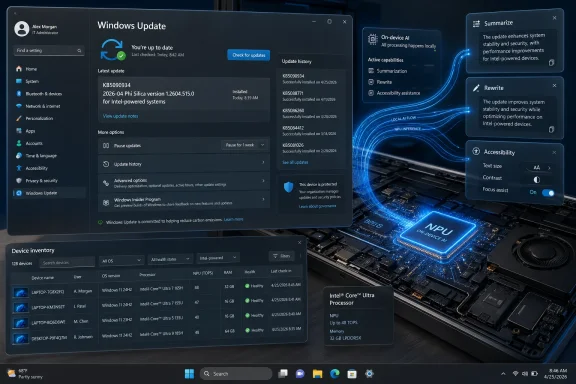
KB5090934 is mundane by design. It downloads automatically. It appears in Windows Update history. It requires the latest cumulative update for Windows 11 version 24H2 or 25H2. It replaces an earlier Phi Silica package, KB5084176. None of that sounds glamorous, but it is precisely the kind of boring infrastructure Microsoft needs if Copilot+ PCs are to become more than showroom demos.
A datacenter model can sprawl. A Windows model has to coexist with Teams calls, browser tabs, endpoint security tools, Office documents, GPU drivers, and whatever ancient line-of-business application still holds a department together. The NPU is Microsoft’s escape hatch: a dedicated accelerator that lets language tasks run without turning the CPU into a space heater or stealing too much from the GPU.
That explains why Microsoft’s Copilot+ PC requirements have put so much emphasis on NPU throughput. The company is not merely chasing a spec-sheet arms race. It is trying to create a dependable baseline for features that assume local inference is available, power-efficient, and fast enough to feel native.
Phi Silica’s advertised capabilities — understanding text, summarizing, rewriting, and generating short responses — are not meant to replace cloud-scale Copilot. They are the kind of ambient language services an operating system can call repeatedly without making every interaction feel like a web request. The strategic value is not that one local model can do everything. It is that Windows can begin assuming a certain class of language intelligence is present on supported machines.
That assumption changes software design. An app that can summarize a selected block of text locally does not need to build a cloud AI pipeline for every small assistive feature. A workflow that needs a rewrite, a short draft, or a natural-language interpretation can hand the job to a Windows API rather than asking each developer to package, optimize, and moderate their own model.
That is not a scandal; it is what client computing looks like. Windows has always been a compatibility layer over a hardware zoo. What is new is that AI model servicing now has to respect the same diversity. A model optimized for one NPU path may need different packaging, validation, or release timing from another.
This is where KB5090934 becomes interesting for IT departments. The update is not merely “Windows AI got better.” It is “this particular AI component, at this particular version, for this particular processor class, on these particular Windows versions, has been released through Windows Update.” That is a much more operationally useful statement, but it also signals complexity.
The user sees one Copilot+ PC category. The administrator sees update rings, hardware inventories, driver dependencies, OS build prerequisites, region restrictions, app compatibility, and now AI component versions. If Microsoft wants local AI to be trusted in business environments, this level of specificity is not optional. It is the price of making AI manageable.
The awkward middle period will be full of these distinctions. One Copilot+ feature may arrive first on Snapdragon. Another may expand later to AMD and Intel. A developer API may require a preview Windows App SDK, a Limited Access Feature token, or a newer OS build than the machine currently has. The branding will say “AI PC”; the deployment reality will say “check the matrix.”
That choice has obvious benefits. Windows Update already solves distribution, integrity, targeting, rollback planning, and installation reporting at enormous scale. If Microsoft had pushed local model updates through the Store, each app, or a separate AI management tool, the result would have been fragmentation before the ecosystem had even matured.
Automatic delivery also makes sense for security and safety. Language models are software artifacts, even if they do not look like traditional executables. Their behavior can change. Their guardrails can improve. Their failure modes can be discovered after release. If a model is exposed through system APIs, Microsoft needs a way to update it with the seriousness normally reserved for platform components.
But there is a cost. Windows Update has become the place where Microsoft delivers almost everything: security fixes, feature enablement packages, firmware, drivers, Defender intelligence, Store-adjacent components, and now AI models. For consumers, that can feel seamless. For administrators, it raises the old question in a new form: what exactly changed on this machine overnight?
Model updates are harder to reason about than conventional patches. A file version changes, but so might summarization style, refusal behavior, latency, memory usage, or compatibility with an app that depends on a specific response pattern. The release note for KB5090934 is clear about installation mechanics but light on behavioral detail. That may be acceptable for a minor component refresh, but it will not satisfy enterprises forever.
If local AI becomes part of regulated workflows, Microsoft will need richer documentation around model changes. Not necessarily academic model cards for every Windows Update, but enough information for organizations to assess whether a new component affects compliance, accessibility, data handling, or user-facing behavior.
Phi Silica is built for that story. It lets Windows and applications perform language tasks on the device’s NPU, reducing round trips to the cloud and making AI features more resilient when connectivity is poor or unavailable. For many users, the difference between “your text is processed locally” and “your text is sent to an AI service” is the difference between trying a feature and disabling it on sight.
Still, local processing does not magically settle every privacy question. The operating system still needs clear controls. Applications still need to disclose what data they send to which component. Developers still need to avoid mixing local inference with silent cloud fallbacks that blur the boundary users thought they understood.
This is where Windows has to earn trust rather than advertise it. If a feature says it uses on-device AI, users should be able to understand whether the entire workflow is local or whether only one stage is. If an enterprise disables cloud AI features, it should be clear whether Phi Silica-powered local features remain available. If audit teams ask what model version produced a given output, Windows should make that answer discoverable.
KB5090934 helps because it gives the component a visible identity in update history. That sounds small, but visibility is the foundation for governance. A model that cannot be named, versioned, or inventoried cannot be responsibly managed.
The pitch is attractive. A note-taking app could summarize text locally. A mail client could rewrite a paragraph without sending it to a server. A developer tool could explain a snippet or format a short answer. An accessibility application could transform text for readability. These are not science-fiction workloads. They are exactly the small, repeated language tasks that make sense on an NPU.
There are caveats. Microsoft’s own documentation has described Phi Silica APIs as a Limited Access Feature, meaning developers may need an unlock token outside certain experimental paths. The APIs have also been tied to specific Windows builds, Copilot+ hardware, and Windows App SDK versions. That is normal for an emerging platform, but it means developers cannot yet treat Phi Silica as universally available across the Windows installed base.
This creates a chicken-and-egg problem. Developers want a large addressable market before investing in local AI features. Microsoft needs developers to create compelling local AI experiences so users care about buying Copilot+ PCs. Component updates such as KB5090934 are part of the answer because they make the platform feel serviced and real, but they do not by themselves solve distribution economics.
The more Microsoft can hide hardware-specific complexity behind stable APIs, the more likely developers are to participate. If an app can ask Windows whether local language generation is available, gracefully fall back when it is not, and rely on the OS to keep the model updated, the barrier falls. If every feature requires hardware tables, tokens, preview SDKs, and support caveats, many developers will wait.
The prerequisites are straightforward. The machine must be a Copilot+ PC with Intel silicon, running Windows 11 version 24H2 or 25H2, and it must have the latest cumulative update installed. The component arrives automatically through Windows Update and appears in update history as “2026-04 Phi Silica version 1.2604.515.0 for Intel-powered systems (KB5090934).”
That is useful for help desks. If a user says an AI-powered feature is unavailable, support staff can check OS version, hardware class, cumulative update level, and update history. If the component is missing, the failure is no longer mysterious; it is a servicing issue.
The harder questions concern policy. Can organizations block AI component updates without blocking security updates? Can they approve these packages through existing management tools with the same granularity they apply to drivers? Can they defer a model update if internal validation finds a regression? Will Microsoft provide enough metadata for asset management platforms to inventory AI components across a fleet?
Those questions are not anti-AI. They are how AI becomes boring enough for business. The history of Windows in the enterprise is the history of turning exciting features into controllable, documented, supportable components. Phi Silica will be judged by that standard, not by demo applause.
That will frustrate some users, especially those with powerful desktops that lack a qualifying NPU. A high-end GPU may be perfectly capable of running local models, but Copilot+ features are built around a specific Windows hardware and power model. Microsoft is drawing a line around the experience it wants to support rather than the broader universe of machines that can technically perform inference.
There is a practical reason for that. Windows features need predictable latency, power behavior, and thermal impact. A GPU-based solution might work beautifully on a plugged-in workstation and terribly on a thin laptop during a video call. The NPU gives Microsoft a narrower target and a cleaner user promise.
But the trade-off is perception. Users who bought expensive PCs before the Copilot+ wave may see AI features gated behind branding rather than capability. Developers may wonder why a local model API is unavailable on machines that can run far larger models through other frameworks. Microsoft will need to keep explaining that Copilot+ is not just raw compute; it is a support contract between Windows, silicon vendors, OEMs, and users.
The inclusion of both 24H2 and 25H2 is also a reminder that Windows feature delivery has become less tied to the old annual-version drama. Microsoft can ship major experiences through cumulative updates, component packages, Store updates, and controlled rollouts. AI fits naturally into that world because models and features will evolve faster than traditional OS milestones.
This is the beginning of a model-update cadence. Today the change may be opaque. Tomorrow it may be performance tuning, expanded hardware enablement, better moderation, lower memory use, improved summarization quality, or fixes for application compatibility. Over time, organizations will need to know whether a Phi Silica version matters as much as a driver version.
The software industry has been through this before. Browsers became evergreen. Antivirus signatures became continuous. Drivers moved into Windows Update. Feature Experience Packs blurred the boundary between OS and app. AI components are simply the next layer to be pulled into the servicing machine.
The risk is that users experience model changes as unexplained behavior changes. A summarizer that was concise becomes wordier. A rewrite function becomes more cautious. A local assistant refuses a category of content it previously handled. In cloud AI, users already accept that the service changes behind the curtain. On Windows, where local software traditionally feels more stable and inspectable, that assumption may meet resistance.
Microsoft can reduce that friction by being more explicit over time. Not every update needs a dissertation, but release notes should eventually say more than “new release.” If the company wants developers and enterprises to build on Phi Silica, it should treat behavioral compatibility as a first-class concern.
The broader reading is more consequential. Microsoft is constructing a local AI substrate inside Windows, one component update at a time. Phi Silica is not merely a model; it is a signal that the Windows platform is being reworked around on-device inference as a standard capability on supported hardware.
Source: Microsoft Support KB5090934: Phi Silica AI component update (version 1.2604.515.0) for Intel-powered systems - Microsoft Support
 Microsoft’s AI PC Strategy Is Becoming a Patch Tuesday Story
For years, Windows updates were mostly about the operating system: kernel fixes, driver compatibility, security hardening, browser plumbing, and the occasional feature that appeared after a reboot. KB5090934 belongs to a different lineage. It updates an AI model component that sits inside the Windows experience and is delivered through the same machinery that administrators already use to keep fleets current.That matters because Phi Silica is not just another Copilot-branded feature. It is Microsoft’s small language model for Copilot+ PCs, optimized to run on the neural processing unit rather than shipping prompts to a remote datacenter. The promise is familiar by now: lower latency, less dependence on connectivity, and fewer privacy anxieties because the work can happen locally.
But the update also exposes the harder truth behind the AI PC pitch. If Windows is going to rely on local models for summarization, rewriting, semantic search, accessibility, and developer-facing language features, those models cannot be frozen at launch. They need versioning, servicing, replacement logic, compatibility gates, and release notes. In other words, AI becomes part of the operating system’s maintenance burden.
KB5090934 is mundane by design. It downloads automatically. It appears in Windows Update history. It requires the latest cumulative update for Windows 11 version 24H2 or 25H2. It replaces an earlier Phi Silica package, KB5084176. None of that sounds glamorous, but it is precisely the kind of boring infrastructure Microsoft needs if Copilot+ PCs are to become more than showroom demos.
Phi Silica Is Small Because Windows Needs It to Be Everywhere
The phrase small language model can sound like an apology in a market obsessed with frontier models, giant context windows, and benchmark theatrics. In Windows, smallness is the point. Phi Silica is designed to live inside the constraints of a client PC: battery, thermals, memory bandwidth, foreground responsiveness, and the unpredictable mess of everyday desktop workloads.A datacenter model can sprawl. A Windows model has to coexist with Teams calls, browser tabs, endpoint security tools, Office documents, GPU drivers, and whatever ancient line-of-business application still holds a department together. The NPU is Microsoft’s escape hatch: a dedicated accelerator that lets language tasks run without turning the CPU into a space heater or stealing too much from the GPU.
That explains why Microsoft’s Copilot+ PC requirements have put so much emphasis on NPU throughput. The company is not merely chasing a spec-sheet arms race. It is trying to create a dependable baseline for features that assume local inference is available, power-efficient, and fast enough to feel native.
Phi Silica’s advertised capabilities — understanding text, summarizing, rewriting, and generating short responses — are not meant to replace cloud-scale Copilot. They are the kind of ambient language services an operating system can call repeatedly without making every interaction feel like a web request. The strategic value is not that one local model can do everything. It is that Windows can begin assuming a certain class of language intelligence is present on supported machines.
That assumption changes software design. An app that can summarize a selected block of text locally does not need to build a cloud AI pipeline for every small assistive feature. A workflow that needs a rewrite, a short draft, or a natural-language interpretation can hand the job to a Windows API rather than asking each developer to package, optimize, and moderate their own model.
The Intel-Specific Package Shows the Fragmentation Beneath the Brand
The headline says “Intel-powered systems,” and that qualifier is not incidental. Copilot+ PC may be a unified retail label, but under the hood Microsoft is dealing with a split hardware world: Qualcomm, AMD, and Intel platforms with different NPUs, drivers, performance profiles, and rollout schedules.That is not a scandal; it is what client computing looks like. Windows has always been a compatibility layer over a hardware zoo. What is new is that AI model servicing now has to respect the same diversity. A model optimized for one NPU path may need different packaging, validation, or release timing from another.
This is where KB5090934 becomes interesting for IT departments. The update is not merely “Windows AI got better.” It is “this particular AI component, at this particular version, for this particular processor class, on these particular Windows versions, has been released through Windows Update.” That is a much more operationally useful statement, but it also signals complexity.
The user sees one Copilot+ PC category. The administrator sees update rings, hardware inventories, driver dependencies, OS build prerequisites, region restrictions, app compatibility, and now AI component versions. If Microsoft wants local AI to be trusted in business environments, this level of specificity is not optional. It is the price of making AI manageable.
The awkward middle period will be full of these distinctions. One Copilot+ feature may arrive first on Snapdragon. Another may expand later to AMD and Intel. A developer API may require a preview Windows App SDK, a Limited Access Feature token, or a newer OS build than the machine currently has. The branding will say “AI PC”; the deployment reality will say “check the matrix.”
Windows Update Is Becoming a Model Distribution System
The most important line in the KB article may be the least dramatic: the update downloads and installs automatically from Windows Update. That means Microsoft is treating Phi Silica not as a separate app payload but as a serviced component of the platform.That choice has obvious benefits. Windows Update already solves distribution, integrity, targeting, rollback planning, and installation reporting at enormous scale. If Microsoft had pushed local model updates through the Store, each app, or a separate AI management tool, the result would have been fragmentation before the ecosystem had even matured.
Automatic delivery also makes sense for security and safety. Language models are software artifacts, even if they do not look like traditional executables. Their behavior can change. Their guardrails can improve. Their failure modes can be discovered after release. If a model is exposed through system APIs, Microsoft needs a way to update it with the seriousness normally reserved for platform components.
But there is a cost. Windows Update has become the place where Microsoft delivers almost everything: security fixes, feature enablement packages, firmware, drivers, Defender intelligence, Store-adjacent components, and now AI models. For consumers, that can feel seamless. For administrators, it raises the old question in a new form: what exactly changed on this machine overnight?
Model updates are harder to reason about than conventional patches. A file version changes, but so might summarization style, refusal behavior, latency, memory usage, or compatibility with an app that depends on a specific response pattern. The release note for KB5090934 is clear about installation mechanics but light on behavioral detail. That may be acceptable for a minor component refresh, but it will not satisfy enterprises forever.
If local AI becomes part of regulated workflows, Microsoft will need richer documentation around model changes. Not necessarily academic model cards for every Windows Update, but enough information for organizations to assess whether a new component affects compliance, accessibility, data handling, or user-facing behavior.
The Privacy Pitch Is Powerful, but It Is Not Self-Executing
On-device AI gives Microsoft one of its strongest answers to the skepticism that has dogged Copilot-era Windows. If a task runs locally, user content does not need to leave the machine for that task. That is a cleaner story than cloud inference, especially for organizations handling sensitive documents, healthcare data, legal material, source code, or government work.Phi Silica is built for that story. It lets Windows and applications perform language tasks on the device’s NPU, reducing round trips to the cloud and making AI features more resilient when connectivity is poor or unavailable. For many users, the difference between “your text is processed locally” and “your text is sent to an AI service” is the difference between trying a feature and disabling it on sight.
Still, local processing does not magically settle every privacy question. The operating system still needs clear controls. Applications still need to disclose what data they send to which component. Developers still need to avoid mixing local inference with silent cloud fallbacks that blur the boundary users thought they understood.
This is where Windows has to earn trust rather than advertise it. If a feature says it uses on-device AI, users should be able to understand whether the entire workflow is local or whether only one stage is. If an enterprise disables cloud AI features, it should be clear whether Phi Silica-powered local features remain available. If audit teams ask what model version produced a given output, Windows should make that answer discoverable.
KB5090934 helps because it gives the component a visible identity in update history. That sounds small, but visibility is the foundation for governance. A model that cannot be named, versioned, or inventoried cannot be responsibly managed.
Developers Get a Platform, Not Just a Party Trick
The developer angle is the part of Phi Silica that could matter most over time. Microsoft is exposing the model through Windows AI APIs, allowing applications to call local language capabilities without bundling their own model or negotiating their own cloud service. That is the classic Windows platform move: absorb a capability into the OS, standardize access, and let developers build above it.The pitch is attractive. A note-taking app could summarize text locally. A mail client could rewrite a paragraph without sending it to a server. A developer tool could explain a snippet or format a short answer. An accessibility application could transform text for readability. These are not science-fiction workloads. They are exactly the small, repeated language tasks that make sense on an NPU.
There are caveats. Microsoft’s own documentation has described Phi Silica APIs as a Limited Access Feature, meaning developers may need an unlock token outside certain experimental paths. The APIs have also been tied to specific Windows builds, Copilot+ hardware, and Windows App SDK versions. That is normal for an emerging platform, but it means developers cannot yet treat Phi Silica as universally available across the Windows installed base.
This creates a chicken-and-egg problem. Developers want a large addressable market before investing in local AI features. Microsoft needs developers to create compelling local AI experiences so users care about buying Copilot+ PCs. Component updates such as KB5090934 are part of the answer because they make the platform feel serviced and real, but they do not by themselves solve distribution economics.
The more Microsoft can hide hardware-specific complexity behind stable APIs, the more likely developers are to participate. If an app can ask Windows whether local language generation is available, gracefully fall back when it is not, and rely on the OS to keep the model updated, the barrier falls. If every feature requires hardware tables, tokens, preview SDKs, and support caveats, many developers will wait.
IT Departments Will Ask the Least Glamorous Questions First
Enthusiasts tend to ask what a model can do. IT departments ask how it is deployed, how it is disabled, how it is audited, and what breaks when it changes. KB5090934 gives them some of the ingredients but not the whole meal.The prerequisites are straightforward. The machine must be a Copilot+ PC with Intel silicon, running Windows 11 version 24H2 or 25H2, and it must have the latest cumulative update installed. The component arrives automatically through Windows Update and appears in update history as “2026-04 Phi Silica version 1.2604.515.0 for Intel-powered systems (KB5090934).”
That is useful for help desks. If a user says an AI-powered feature is unavailable, support staff can check OS version, hardware class, cumulative update level, and update history. If the component is missing, the failure is no longer mysterious; it is a servicing issue.
The harder questions concern policy. Can organizations block AI component updates without blocking security updates? Can they approve these packages through existing management tools with the same granularity they apply to drivers? Can they defer a model update if internal validation finds a regression? Will Microsoft provide enough metadata for asset management platforms to inventory AI components across a fleet?
Those questions are not anti-AI. They are how AI becomes boring enough for business. The history of Windows in the enterprise is the history of turning exciting features into controllable, documented, supportable components. Phi Silica will be judged by that standard, not by demo applause.
The Model Update Is Also a Bet on Windows 11 24H2 and 25H2
KB5090934 applies to Windows 11 version 24H2 and Windows 11 version 25H2, which reinforces another Microsoft priority: using the current Windows 11 platform as the foundation for AI features. This is not a backport story for older Windows releases. It is a forward-pressure story.That will frustrate some users, especially those with powerful desktops that lack a qualifying NPU. A high-end GPU may be perfectly capable of running local models, but Copilot+ features are built around a specific Windows hardware and power model. Microsoft is drawing a line around the experience it wants to support rather than the broader universe of machines that can technically perform inference.
There is a practical reason for that. Windows features need predictable latency, power behavior, and thermal impact. A GPU-based solution might work beautifully on a plugged-in workstation and terribly on a thin laptop during a video call. The NPU gives Microsoft a narrower target and a cleaner user promise.
But the trade-off is perception. Users who bought expensive PCs before the Copilot+ wave may see AI features gated behind branding rather than capability. Developers may wonder why a local model API is unavailable on machines that can run far larger models through other frameworks. Microsoft will need to keep explaining that Copilot+ is not just raw compute; it is a support contract between Windows, silicon vendors, OEMs, and users.
The inclusion of both 24H2 and 25H2 is also a reminder that Windows feature delivery has become less tied to the old annual-version drama. Microsoft can ship major experiences through cumulative updates, component packages, Store updates, and controlled rollouts. AI fits naturally into that world because models and features will evolve faster than traditional OS milestones.
The Quiet Replacement of KB5084176 Is the Story’s Tell
The KB article notes that KB5090934 replaces KB5084176. That replacement line is the kind of detail most users skip and administrators notice. It means Phi Silica is already living the lifecycle of a serviced Windows component: previous package, new package, supersedence, installation state.This is the beginning of a model-update cadence. Today the change may be opaque. Tomorrow it may be performance tuning, expanded hardware enablement, better moderation, lower memory use, improved summarization quality, or fixes for application compatibility. Over time, organizations will need to know whether a Phi Silica version matters as much as a driver version.
The software industry has been through this before. Browsers became evergreen. Antivirus signatures became continuous. Drivers moved into Windows Update. Feature Experience Packs blurred the boundary between OS and app. AI components are simply the next layer to be pulled into the servicing machine.
The risk is that users experience model changes as unexplained behavior changes. A summarizer that was concise becomes wordier. A rewrite function becomes more cautious. A local assistant refuses a category of content it previously handled. In cloud AI, users already accept that the service changes behind the curtain. On Windows, where local software traditionally feels more stable and inspectable, that assumption may meet resistance.
Microsoft can reduce that friction by being more explicit over time. Not every update needs a dissertation, but release notes should eventually say more than “new release.” If the company wants developers and enterprises to build on Phi Silica, it should treat behavioral compatibility as a first-class concern.
The April Phi Silica Package Makes the AI PC Less Theoretical
The practical reading of KB5090934 is simple, and that simplicity is the point. If you own or manage an Intel-powered Copilot+ PC on Windows 11 24H2 or 25H2, this update brings Phi Silica to version 1.2604.515.0 through Windows Update, assuming the latest cumulative update is already installed. You can verify it in Windows Update history.The broader reading is more consequential. Microsoft is constructing a local AI substrate inside Windows, one component update at a time. Phi Silica is not merely a model; it is a signal that the Windows platform is being reworked around on-device inference as a standard capability on supported hardware.
- KB5090934 is for Intel-powered Copilot+ PCs running Windows 11 version 24H2 or 25H2.
- The update installs automatically through Windows Update and requires the latest cumulative update as a prerequisite.
- The installed entry should appear as “2026-04 Phi Silica version 1.2604.515.0 for Intel-powered systems (KB5090934)” in Windows Update history.
- The package replaces the earlier Phi Silica update KB5084176.
- Phi Silica is Microsoft’s NPU-optimized local small language model for Windows language tasks such as summarization, rewriting, and short-form generation.
- The update matters because it turns a local AI model into a named, versioned, serviced Windows component rather than a one-off feature.
Source: Microsoft Support KB5090934: Phi Silica AI component update (version 1.2604.515.0) for Intel-powered systems - Microsoft Support
