

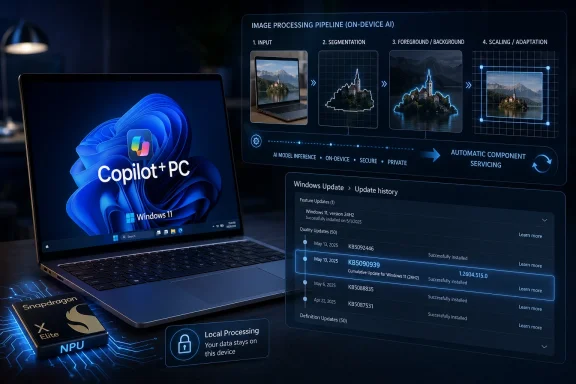
Microsoft released KB5090939 in April 2026 as an automatic Windows Update for Qualcomm-powered Copilot+ PCs running Windows 11 version 24H2 or 25H2, updating the Image Processing AI component to version 1.2604.515.0. It is not a flashy feature drop, and that is precisely why it matters. Microsoft is quietly turning Windows AI into a serviced platform, where models, runtimes, and hardware-specific components move on their own cadence beneath the operating system. For users, developers, and IT teams, KB5090939 is another small proof that the Copilot+ PC era will be governed less by annual Windows releases and more by the invisible maintenance of local AI plumbing.
KB5090939 is easy to miss because it looks like the kind of support article most people never read. The update applies only to Copilot+ PCs powered by Qualcomm silicon, and it targets a component called Image Processing rather than an app with a recognizable icon. Microsoft describes it as improving the Windows AI component responsible for on-device image understanding and image processing across Windows features and applications.
That phrasing is doing a lot of work. This component is not Paint, Photos, Recall, Click to Do, or Windows Studio Effects by itself. It is part of the substrate those experiences can call into when Windows needs to scale an image, segment a subject, extract foreground from background, analyze visual content, or feed a higher-level AI workflow.
The important bit is that Microsoft is servicing this as a component, not waiting for a monolithic Windows feature update. The update arrives automatically through Windows Update, requires the latest cumulative update for Windows 11 24H2 or 25H2, and replaces KB5084171. In Update history, it should appear as “2026-04 Image Processing version 1.2604.515.0 for Qualcomm-powered systems (KB5090939).”
That makes KB5090939 less of a headline-grabbing release and more of a marker in Microsoft’s new operating model. Windows is no longer just patching drivers, kernel bugs, browser components, and inbox apps. On Copilot+ PCs, it is also patching the AI models and runtime pieces that give the device its advertised intelligence.
But the image-processing stack is closer to the engine room. A feature such as background removal, subject selection, image description, object extraction, or super-resolution may appear to the user as a button in an app. Underneath, it depends on local models, inference runtimes, execution providers, hardware-specific optimizations, and Windows components that make the output fast enough to feel native.
KB5090939 sits in that second layer. Microsoft says the component uses machine-learning models and supporting runtime components to perform scaling, segmentation, foreground and background extraction, and visual analysis. That is the kind of work that makes an AI PC feel different from a normal laptop with a chatbot pinned to the taskbar.
This is also why the update is limited to Qualcomm-powered systems. The first wave of Copilot+ PCs arrived with Snapdragon X Elite and Snapdragon X Plus chips, and those machines rely on Qualcomm’s NPU and execution stack for local inference. A model update that improves image processing on Qualcomm hardware is not necessarily the same artifact Microsoft would ship for AMD, Intel, or Nvidia-backed execution paths.
That fragmentation is not a bug in the new Windows AI model. It is the model. A Windows laptop in 2026 is becoming a bundle of CPU, GPU, NPU, driver, execution provider, app framework, and model versions. The operating system has to broker all of that without asking the average user to know what a TOPS rating is.
If Microsoft wants developers to build against Windows AI APIs, it needs a reasonably predictable installed base. If one Copilot+ PC has a stale model, another has a newer image segmentation component, and a third has a vendor-specific runtime mismatch, developers will treat the platform as unstable. Automatic servicing is the only realistic way to avoid that outcome at consumer scale.
This is also why Microsoft’s release information for AI components matters. The company now tracks AI components separately, with availability dates, versions, and KB numbers. That gives Windows AI a lifecycle closer to browser engines, security intelligence updates, or .NET runtimes than to old-fashioned Windows feature packs.
There is a trade-off. Automatic AI component updates reduce the burden on users and help Microsoft keep the platform coherent. They also make Windows more dynamic and harder to explain. An IT admin can know a device is on Windows 11 25H2 and still need to ask which Image Processing component, which execution provider, which Phi Silica variant, and which vendor runtime are installed.
That is not merely academic. If a visual AI feature behaves differently across two supposedly identical devices, the answer may not be “Windows version.” It may be a component KB buried in Update history.
KB5090939 reinforces that Qualcomm remains a privileged path in the Copilot+ rollout. The update is explicitly for Qualcomm-powered systems, and the versioning belongs to that hardware-specific lane. Microsoft has expanded Copilot+ features across AMD and Intel systems as those platforms arrived, but the servicing reality is still silicon-aware.
That is both sensible and messy. It is sensible because local AI performance depends heavily on vendor-specific acceleration. Qualcomm, AMD, Intel, and Nvidia do not expose identical hardware, identical drivers, or identical inference paths. If Microsoft wants image processing to feel instantaneous and battery-friendly, it cannot treat every NPU as interchangeable.
It is messy because Windows users are used to thinking in operating system editions and build numbers. Copilot+ PCs force them to think in hardware capabilities. Two PCs can both run Windows 11 25H2, both have the Copilot key, and both be sold as AI PCs, while receiving different AI component updates and gaining features on different schedules.
That distinction matters for buyers as well as admins. “Copilot+ PC” is a floor, not a guarantee that every AI experience arrives at the same moment or behaves identically across every chip family. KB5090939 is a small reminder that Microsoft’s AI PC promise depends on a matrix of hardware-specific servicing lanes.
This pitch became especially important after the original Recall backlash. Microsoft learned quickly that “AI sees what you do on your PC” is not a sentence users automatically receive as helpful. The company has since leaned hard on local processing, opt-in controls, device encryption, and enterprise management policies.
Image processing is a particularly sensitive domain because images can contain faces, documents, financial information, workplace material, medical content, location clues, and private messages. If Windows is going to analyze visual content for accessibility, editing, semantic search, or contextual actions, the local-processing story has to be technically credible. A half-local, half-cloud experience would not satisfy skeptical users or regulated organizations.
KB5090939 does not, by itself, prove that every related Windows experience is private in every configuration. But it does show Microsoft investing in the local stack as a serviced part of Windows. The more capable that stack becomes, the less pressure there is to punt image understanding to cloud models.
That is a strategic advantage if Microsoft can execute. Apple has made on-device intelligence part of its platform identity, and Google has spent years normalizing device-side ML on phones. Windows has to do the same on a messier hardware ecosystem, with enterprise customers watching the logs.
That vagueness is frustrating, but it is also revealing. Microsoft is treating these AI components like infrastructure. Infrastructure changelogs often say “quality improvements” because the point is not a single feature but a capability baseline that other teams depend on.
Still, Microsoft should be clearer. If an update changes model behavior, improves segmentation quality, reduces latency, fixes a failure mode, or alters resource consumption, admins and developers deserve more than a version number. In the classic Windows world, vague cumulative update notes were annoying. In the AI world, vague model update notes can obscure changes in output behavior.
That matters because AI components are probabilistic in ways traditional libraries are not. A new image model might produce better foreground masks in most cases but worse results for certain hair textures, lighting conditions, UI screenshots, or document layouts. It might improve accessibility descriptions while changing the wording an app receives from an API. It might reduce NPU usage but increase memory pressure.
Microsoft does not need to publish every internal evaluation. But if Windows AI is becoming a platform, its component release notes need to mature into platform-grade documentation. The audience is no longer just consumers wondering whether to click “check for updates.” It includes developers, accessibility specialists, security teams, and enterprise desktop engineers who need to understand what changed.
That is powerful. A developer can call Windows AI APIs for image description, foreground extraction, object erase, object extraction, super-resolution, OCR, or similar workloads without bundling massive models or building a full ML distribution pipeline. Microsoft handles the model files, runtime, hardware routing, and servicing. In theory, that lowers the barrier for native Windows apps to gain AI features.
But it also means developers inherit Microsoft’s cadence. If an app depends on a specific model behavior, the ground can move underneath it. That is not new in software; web developers live with browser engine changes, and mobile developers live with OS framework updates. What is new is that the output of an AI model can change in ways that are harder to pin down with conventional tests.
A traditional API either returns the expected structure or it breaks. An image description API can still return a valid string while being subtly different. A foreground extractor can still return a mask while making a different judgment about the edge of a subject. An object eraser can still complete while producing a different hallucinated background.
For many consumer features, that is acceptable. Better models should improve the experience over time. For professional workflows, compliance-sensitive environments, or apps that require repeatability, Microsoft will need to provide stronger controls, version awareness, and testing guidance.
This is where Windows AI can either become a dependable platform or another layer of “works on my machine.” KB5090939 is a good sign that Microsoft is maintaining the stack. It is not yet proof that the ecosystem has the transparency developers will eventually demand.
For enterprise IT, automatic installation is a control question. Many organizations spent years building rings, deferrals, WSUS habits, Intune policies, reporting dashboards, and change-management rituals around Windows servicing. AI components introduce another class of update that may not map cleanly to old mental models.
The prerequisite is clear enough: the device must have the latest cumulative update for Windows 11 24H2 or 25H2. The detection path is also clear enough: Settings, Windows Update, Update history. But at fleet scale, “look in Update history” is not an operational answer. Admins need inventory, compliance reporting, policy clarity, and a way to understand whether AI component updates are flowing through their chosen management channel.
This is especially important because Copilot+ features straddle productivity, privacy, accessibility, and data governance. An organization may allow local image enhancement but disable Recall. It may permit accessibility descriptions but block contextual screen analysis. It may want the security benefits of current AI components without enabling every AI-branded user experience.
Microsoft has made progress on enterprise controls for controversial features such as Recall and Click to Do, but the servicing model needs equal attention. If AI components are prerequisites for both harmless and sensitive experiences, admins will want to patch the components while controlling the features. That distinction must remain sharp.
Otherwise, “AI update” becomes a phrase that triggers unnecessary fear. The right enterprise posture is not to freeze the stack. It is to service the stack while governing activation, data access, and user-facing experiences.
That separation is the point. Windows 11 24H2 and 25H2 can both receive the Image Processing update. The component is not locked to a single annual release. Microsoft can service the same AI capability across supported Windows versions, provided the right cumulative update baseline is in place.
This is the Windows-as-a-service idea applied to machine learning. The OS version becomes a compatibility boundary, while components inside that boundary evolve faster. Users may think they are “on 25H2,” but their AI experience also depends on a layer of packages that can be newer than the feature update.
There is a danger here for communication. If Microsoft markets Copilot+ features in broad strokes but ships them through component-specific updates, users will ask why their machine does not behave like the demo. The answer may involve staged rollouts, hardware lanes, app versions, regional availability, enterprise policy, or missing AI components.
That is too many variables for a normal person. Microsoft’s challenge is to keep the servicing model flexible without making the product feel arbitrary.
That moves Windows closer to the platform model familiar from smartphones. The device is not just a general-purpose machine; it is a managed stack of hardware capabilities, OS services, model packages, APIs, and app entitlements. Microsoft is not merely shipping an operating system. It is curating an AI runtime environment.
KB5090939 is a tiny example of that curation. It updates a component most users will never launch, for a hardware subset of a Windows device class, across two Windows releases, through the ordinary update channel. That is exactly how platform vendors behave when they own a capability they expect developers and first-party apps to rely on.
The difference is that Windows still has to support the openness and variety that made the PC ecosystem durable. Microsoft cannot simply dictate one chip, one camera pipeline, one NPU stack, and one app distribution path. It has to make Qualcomm, AMD, Intel, Nvidia, OEM drivers, Windows Update, the Microsoft Store, enterprise management, and third-party apps behave like a coherent system.
That is a harder problem than adding a chatbot. It is also the real test of the AI PC.
But it should not be dismissed either. Small component updates are how modern platforms become real. Browsers became application platforms through relentless engine updates. Mobile operating systems became camera platforms through years of image pipeline tuning. Windows AI will succeed or fail through the same unglamorous process.
The visible Copilot+ story is about features. The durable story is about maintenance. If Microsoft can keep local models current, preserve privacy boundaries, expose stable APIs, document changes honestly, and give admins enough control, then Copilot+ PCs may become more than a marketing label.
If it cannot, Windows AI risks becoming another fragmented layer in a platform already famous for edge cases. Users will see inconsistent features. Developers will hesitate. Enterprises will disable first and ask questions later.
Source: Microsoft Support KB5090939: Image Processing AI component update (version 1.2604.515.0) for Qualcomm-powered systems - Microsoft Support
 Microsoft’s AI PC Strategy Is Now Hiding in Update History
KB5090939 is easy to miss because it looks like the kind of support article most people never read. The update applies only to Copilot+ PCs powered by Qualcomm silicon, and it targets a component called Image Processing rather than an app with a recognizable icon. Microsoft describes it as improving the Windows AI component responsible for on-device image understanding and image processing across Windows features and applications.That phrasing is doing a lot of work. This component is not Paint, Photos, Recall, Click to Do, or Windows Studio Effects by itself. It is part of the substrate those experiences can call into when Windows needs to scale an image, segment a subject, extract foreground from background, analyze visual content, or feed a higher-level AI workflow.
The important bit is that Microsoft is servicing this as a component, not waiting for a monolithic Windows feature update. The update arrives automatically through Windows Update, requires the latest cumulative update for Windows 11 24H2 or 25H2, and replaces KB5084171. In Update history, it should appear as “2026-04 Image Processing version 1.2604.515.0 for Qualcomm-powered systems (KB5090939).”
That makes KB5090939 less of a headline-grabbing release and more of a marker in Microsoft’s new operating model. Windows is no longer just patching drivers, kernel bugs, browser components, and inbox apps. On Copilot+ PCs, it is also patching the AI models and runtime pieces that give the device its advertised intelligence.
The Component Matters Because the Feature Names Do Not Tell the Whole Story
Microsoft’s Copilot+ PC messaging tends to center on visible features: Recall, Live Captions, Cocreator, Windows Studio Effects, improved search, Photos tools, Click to Do, and newer local AI APIs for developers. Those are the demos. They are the things that fit into a keynote slide.But the image-processing stack is closer to the engine room. A feature such as background removal, subject selection, image description, object extraction, or super-resolution may appear to the user as a button in an app. Underneath, it depends on local models, inference runtimes, execution providers, hardware-specific optimizations, and Windows components that make the output fast enough to feel native.
KB5090939 sits in that second layer. Microsoft says the component uses machine-learning models and supporting runtime components to perform scaling, segmentation, foreground and background extraction, and visual analysis. That is the kind of work that makes an AI PC feel different from a normal laptop with a chatbot pinned to the taskbar.
This is also why the update is limited to Qualcomm-powered systems. The first wave of Copilot+ PCs arrived with Snapdragon X Elite and Snapdragon X Plus chips, and those machines rely on Qualcomm’s NPU and execution stack for local inference. A model update that improves image processing on Qualcomm hardware is not necessarily the same artifact Microsoft would ship for AMD, Intel, or Nvidia-backed execution paths.
That fragmentation is not a bug in the new Windows AI model. It is the model. A Windows laptop in 2026 is becoming a bundle of CPU, GPU, NPU, driver, execution provider, app framework, and model versions. The operating system has to broker all of that without asking the average user to know what a TOPS rating is.
Windows Update Becomes the Model Delivery Network
For decades, Windows Update has been associated with security fixes, cumulative updates, drivers, and the occasional surprise reboot. KB5090939 shows a different role: model and component distribution for local AI. That sounds mundane until you consider the implications.If Microsoft wants developers to build against Windows AI APIs, it needs a reasonably predictable installed base. If one Copilot+ PC has a stale model, another has a newer image segmentation component, and a third has a vendor-specific runtime mismatch, developers will treat the platform as unstable. Automatic servicing is the only realistic way to avoid that outcome at consumer scale.
This is also why Microsoft’s release information for AI components matters. The company now tracks AI components separately, with availability dates, versions, and KB numbers. That gives Windows AI a lifecycle closer to browser engines, security intelligence updates, or .NET runtimes than to old-fashioned Windows feature packs.
There is a trade-off. Automatic AI component updates reduce the burden on users and help Microsoft keep the platform coherent. They also make Windows more dynamic and harder to explain. An IT admin can know a device is on Windows 11 25H2 and still need to ask which Image Processing component, which execution provider, which Phi Silica variant, and which vendor runtime are installed.
That is not merely academic. If a visual AI feature behaves differently across two supposedly identical devices, the answer may not be “Windows version.” It may be a component KB buried in Update history.
Qualcomm Gets the First-Class Treatment Because It Was First Through the Door
The Qualcomm focus is not accidental. Snapdragon X systems were the launch vehicles for Copilot+ PCs in 2024, and Microsoft built much of the first wave of local AI messaging around the combination of Arm-based efficiency and a 40-plus TOPS NPU. Those devices gave Microsoft a clean way to say: this is not just Windows with cloud Copilot; this is Windows running AI locally.KB5090939 reinforces that Qualcomm remains a privileged path in the Copilot+ rollout. The update is explicitly for Qualcomm-powered systems, and the versioning belongs to that hardware-specific lane. Microsoft has expanded Copilot+ features across AMD and Intel systems as those platforms arrived, but the servicing reality is still silicon-aware.
That is both sensible and messy. It is sensible because local AI performance depends heavily on vendor-specific acceleration. Qualcomm, AMD, Intel, and Nvidia do not expose identical hardware, identical drivers, or identical inference paths. If Microsoft wants image processing to feel instantaneous and battery-friendly, it cannot treat every NPU as interchangeable.
It is messy because Windows users are used to thinking in operating system editions and build numbers. Copilot+ PCs force them to think in hardware capabilities. Two PCs can both run Windows 11 25H2, both have the Copilot key, and both be sold as AI PCs, while receiving different AI component updates and gaining features on different schedules.
That distinction matters for buyers as well as admins. “Copilot+ PC” is a floor, not a guarantee that every AI experience arrives at the same moment or behaves identically across every chip family. KB5090939 is a small reminder that Microsoft’s AI PC promise depends on a matrix of hardware-specific servicing lanes.
The Privacy Pitch Depends on This Plumbing Working
Microsoft’s support language for KB5090939 emphasizes that the Image Processing component runs locally on the device’s dedicated AI hardware, delivering low-latency performance while keeping image data on the device. That is the core privacy argument for Copilot+ PCs: your screenshots, photos, camera frames, and visual context do not need to be shipped to a cloud service for every AI-assisted action.This pitch became especially important after the original Recall backlash. Microsoft learned quickly that “AI sees what you do on your PC” is not a sentence users automatically receive as helpful. The company has since leaned hard on local processing, opt-in controls, device encryption, and enterprise management policies.
Image processing is a particularly sensitive domain because images can contain faces, documents, financial information, workplace material, medical content, location clues, and private messages. If Windows is going to analyze visual content for accessibility, editing, semantic search, or contextual actions, the local-processing story has to be technically credible. A half-local, half-cloud experience would not satisfy skeptical users or regulated organizations.
KB5090939 does not, by itself, prove that every related Windows experience is private in every configuration. But it does show Microsoft investing in the local stack as a serviced part of Windows. The more capable that stack becomes, the less pressure there is to punt image understanding to cloud models.
That is a strategic advantage if Microsoft can execute. Apple has made on-device intelligence part of its platform identity, and Google has spent years normalizing device-side ML on phones. Windows has to do the same on a messier hardware ecosystem, with enterprise customers watching the logs.
The Boring KB Article Is the New Feature Roadmap
The support article for KB5090939 is short, almost aggressively so. It does not list user-facing changes. It does not promise a new Paint button or a redesigned Photos workflow. It says the update includes improvements to the Image Processing AI component for Windows 11 24H2 and 25H2.That vagueness is frustrating, but it is also revealing. Microsoft is treating these AI components like infrastructure. Infrastructure changelogs often say “quality improvements” because the point is not a single feature but a capability baseline that other teams depend on.
Still, Microsoft should be clearer. If an update changes model behavior, improves segmentation quality, reduces latency, fixes a failure mode, or alters resource consumption, admins and developers deserve more than a version number. In the classic Windows world, vague cumulative update notes were annoying. In the AI world, vague model update notes can obscure changes in output behavior.
That matters because AI components are probabilistic in ways traditional libraries are not. A new image model might produce better foreground masks in most cases but worse results for certain hair textures, lighting conditions, UI screenshots, or document layouts. It might improve accessibility descriptions while changing the wording an app receives from an API. It might reduce NPU usage but increase memory pressure.
Microsoft does not need to publish every internal evaluation. But if Windows AI is becoming a platform, its component release notes need to mature into platform-grade documentation. The audience is no longer just consumers wondering whether to click “check for updates.” It includes developers, accessibility specialists, security teams, and enterprise desktop engineers who need to understand what changed.
Developers Are Being Asked to Trust a Moving Target
The deeper story behind KB5090939 is not just that Microsoft updated an image component. It is that developers are being encouraged to build apps on top of shared local AI capabilities that Microsoft can update independently of their applications.That is powerful. A developer can call Windows AI APIs for image description, foreground extraction, object erase, object extraction, super-resolution, OCR, or similar workloads without bundling massive models or building a full ML distribution pipeline. Microsoft handles the model files, runtime, hardware routing, and servicing. In theory, that lowers the barrier for native Windows apps to gain AI features.
But it also means developers inherit Microsoft’s cadence. If an app depends on a specific model behavior, the ground can move underneath it. That is not new in software; web developers live with browser engine changes, and mobile developers live with OS framework updates. What is new is that the output of an AI model can change in ways that are harder to pin down with conventional tests.
A traditional API either returns the expected structure or it breaks. An image description API can still return a valid string while being subtly different. A foreground extractor can still return a mask while making a different judgment about the edge of a subject. An object eraser can still complete while producing a different hallucinated background.
For many consumer features, that is acceptable. Better models should improve the experience over time. For professional workflows, compliance-sensitive environments, or apps that require repeatability, Microsoft will need to provide stronger controls, version awareness, and testing guidance.
This is where Windows AI can either become a dependable platform or another layer of “works on my machine.” KB5090939 is a good sign that Microsoft is maintaining the stack. It is not yet proof that the ecosystem has the transparency developers will eventually demand.
Enterprise IT Will Read “Automatic” Differently Than Consumers Do
For consumers, automatic installation is a convenience. A Qualcomm-powered Copilot+ PC gets KB5090939 through Windows Update, and the user may never know. If the update improves image-based features or fixes a latent bug, that is a win.For enterprise IT, automatic installation is a control question. Many organizations spent years building rings, deferrals, WSUS habits, Intune policies, reporting dashboards, and change-management rituals around Windows servicing. AI components introduce another class of update that may not map cleanly to old mental models.
The prerequisite is clear enough: the device must have the latest cumulative update for Windows 11 24H2 or 25H2. The detection path is also clear enough: Settings, Windows Update, Update history. But at fleet scale, “look in Update history” is not an operational answer. Admins need inventory, compliance reporting, policy clarity, and a way to understand whether AI component updates are flowing through their chosen management channel.
This is especially important because Copilot+ features straddle productivity, privacy, accessibility, and data governance. An organization may allow local image enhancement but disable Recall. It may permit accessibility descriptions but block contextual screen analysis. It may want the security benefits of current AI components without enabling every AI-branded user experience.
Microsoft has made progress on enterprise controls for controversial features such as Recall and Click to Do, but the servicing model needs equal attention. If AI components are prerequisites for both harmless and sensitive experiences, admins will want to patch the components while controlling the features. That distinction must remain sharp.
Otherwise, “AI update” becomes a phrase that triggers unnecessary fear. The right enterprise posture is not to freeze the stack. It is to service the stack while governing activation, data access, and user-facing experiences.
The Version Number Tells a Bigger Story Than the Feature List
Version 1.2604.515.0 looks like an internal artifact, but it carries useful clues. The “2604” portion strongly suggests an April 2026-era component train, matching the update’s “2026-04” history label. Microsoft’s AI component versioning has increasingly followed a rhythm that separates these packages from the Windows build number itself.That separation is the point. Windows 11 24H2 and 25H2 can both receive the Image Processing update. The component is not locked to a single annual release. Microsoft can service the same AI capability across supported Windows versions, provided the right cumulative update baseline is in place.
This is the Windows-as-a-service idea applied to machine learning. The OS version becomes a compatibility boundary, while components inside that boundary evolve faster. Users may think they are “on 25H2,” but their AI experience also depends on a layer of packages that can be newer than the feature update.
There is a danger here for communication. If Microsoft markets Copilot+ features in broad strokes but ships them through component-specific updates, users will ask why their machine does not behave like the demo. The answer may involve staged rollouts, hardware lanes, app versions, regional availability, enterprise policy, or missing AI components.
That is too many variables for a normal person. Microsoft’s challenge is to keep the servicing model flexible without making the product feel arbitrary.
Copilot+ PCs Are Becoming Less Like PCs and More Like Platforms
The old Windows PC bargain was simple: install Windows, install drivers, install apps. Hardware mattered, but most OS features were governed by the Windows edition and version. Copilot+ PCs complicate that bargain because the OS is now promising experiences that depend on local AI acceleration and shared model infrastructure.That moves Windows closer to the platform model familiar from smartphones. The device is not just a general-purpose machine; it is a managed stack of hardware capabilities, OS services, model packages, APIs, and app entitlements. Microsoft is not merely shipping an operating system. It is curating an AI runtime environment.
KB5090939 is a tiny example of that curation. It updates a component most users will never launch, for a hardware subset of a Windows device class, across two Windows releases, through the ordinary update channel. That is exactly how platform vendors behave when they own a capability they expect developers and first-party apps to rely on.
The difference is that Windows still has to support the openness and variety that made the PC ecosystem durable. Microsoft cannot simply dictate one chip, one camera pipeline, one NPU stack, and one app distribution path. It has to make Qualcomm, AMD, Intel, Nvidia, OEM drivers, Windows Update, the Microsoft Store, enterprise management, and third-party apps behave like a coherent system.
That is a harder problem than adding a chatbot. It is also the real test of the AI PC.
The April Image Update Draws the Map for What Comes Next
KB5090939 should not be oversold. It is not a dramatic new feature, and Microsoft’s notes do not claim a breakthrough. Most users will never notice it unless a previously flaky visual AI feature becomes faster or more reliable.But it should not be dismissed either. Small component updates are how modern platforms become real. Browsers became application platforms through relentless engine updates. Mobile operating systems became camera platforms through years of image pipeline tuning. Windows AI will succeed or fail through the same unglamorous process.
The visible Copilot+ story is about features. The durable story is about maintenance. If Microsoft can keep local models current, preserve privacy boundaries, expose stable APIs, document changes honestly, and give admins enough control, then Copilot+ PCs may become more than a marketing label.
If it cannot, Windows AI risks becoming another fragmented layer in a platform already famous for edge cases. Users will see inconsistent features. Developers will hesitate. Enterprises will disable first and ask questions later.
The Signal Buried in KB5090939
KB5090939 is worth treating as a signal rather than a spectacle. It shows how Microsoft intends to keep AI PCs alive after the launch event: through automatic, component-level updates that make local AI a maintained part of Windows rather than a bundle of one-off demos.- KB5090939 updates the Image Processing AI component to version 1.2604.515.0 on Qualcomm-powered Copilot+ PCs.
- The update applies to Windows 11 version 24H2 and Windows 11 version 25H2, provided the latest cumulative update is already installed.
- The component supports local image tasks such as scaling, segmentation, foreground and background extraction, and visual analysis.
- The update installs automatically through Windows Update and replaces the earlier KB5084171 package.
- Users can confirm installation in Windows Update history under the 2026-04 Image Processing entry for Qualcomm-powered systems.
- The larger significance is that Microsoft is now servicing AI models and runtimes as first-class Windows components, not as occasional app features.
Source: Microsoft Support KB5090939: Image Processing AI component update (version 1.2604.515.0) for Qualcomm-powered systems - Microsoft Support
