

Microsoft has released KB5090938, an April 2026 Windows Update package that updates the Image Processing AI component to version 1.2604.515.0 on Intel-powered Copilot+ PCs running Windows 11 version 24H2 or 25H2, after the latest cumulative update is installed through automatic delivery. The small KB number hides a larger strategic move: Microsoft is turning Windows AI into a serviced platform, not a once-a-year operating-system feature drop. For users, that means image understanding, segmentation, scaling, foreground extraction, and related local AI plumbing can change underneath Windows without a full OS upgrade. For IT departments, it means the AI PC is becoming another patchable estate.
KB5090938 is not a flashy consumer feature release. It does not announce a new Photos button, a redesigned Paint tool, or a dramatic Copilot interface. Instead, it updates one of the low-level AI components that Windows uses to make those experiences possible.
That distinction matters because Microsoft’s AI strategy on Windows now depends on a stack of components that looks more like a browser engine or graphics driver than a traditional inbox app. Image Processing sits alongside other Windows AI components such as Image Transform, Image Creation, Phi Silica, semantic analysis, content extraction, and execution providers. Each can be versioned, patched, replaced, and targeted to specific silicon.
The update applies only to Copilot+ PCs, and more narrowly to Intel-powered systems. That specificity is not an accident. Copilot+ PCs are defined by local AI capability, particularly the presence of a sufficiently capable neural processing unit, and Microsoft’s AI components must be tuned not merely for Windows but for the hardware path beneath Windows.
In the old Windows world, a component this specialized might have been buried in a feature update, an optional driver, or a Store app dependency. In the Copilot+ era, it receives its own KB article, its own version number, and its own place in Windows Update history. That is the story: AI is becoming part of Windows servicing.
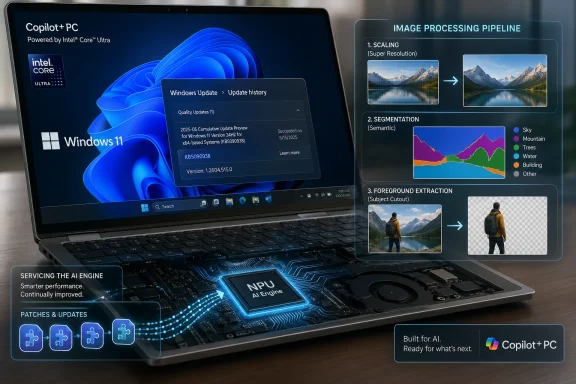
Foreground extraction might support an editing tool that separates a subject from the background. Segmentation can help isolate objects or regions in an image. Visual analysis can feed accessibility descriptions, search experiences, or AI-assisted workflows. Image scaling can support enhancement and super-resolution-style pipelines.
The key is that these tasks run locally on dedicated AI hardware. Microsoft’s pitch is familiar by now: lower latency, better battery efficiency, and improved privacy because image data does not need to travel to a cloud service for every operation. Whether every Windows AI experience lives up to that promise is another matter, but KB5090938 exists because Microsoft needs the local stack to be updated continuously if that promise is to hold.
This is also why the package coordinates with other Windows AI components. Image Processing is not the whole machine; it is one gear in it. Image Transform may perform downstream edits, Image Creation may generate new imagery, and other system components may handle model execution. The more modular Microsoft makes the stack, the more often administrators should expect to see narrow updates like this one.
An Intel-specific Image Processing update means Microsoft is not treating “Copilot+ PC” as a single generic hardware bucket. The Windows AI stack must map onto different execution providers, drivers, model packaging assumptions, and NPU behaviors. That is a familiar problem for anyone who has watched graphics, Wi-Fi, or storage drivers diverge across OEM platforms, but AI makes the divergence more visible because model performance is part of the user experience.
The update replaces KB5084172, which tells us this is not a one-off. Microsoft is iterating the component, assigning replacement relationships, and building a history administrators can audit. That is the machinery of a mature servicing channel, even if the feature category it supports still feels new.
For Intel-powered Copilot+ PC owners, the practical effect is simple: if the device is eligible, current, and connected to Windows Update, the package should arrive automatically. For everyone else, including non-Copilot+ Intel PCs, older Windows 11 systems, and machines without the required NPU class, the update is irrelevant. This is not a general Intel graphics or camera update.
The prerequisite is important: the device must have the latest cumulative update for Windows 11 24H2 or 25H2 installed. Microsoft is effectively saying that AI component updates ride on top of a current OS servicing foundation. If the base operating system is behind, the model and runtime layer may not be offered.
That dependency has consequences for enterprise imaging. Organizations that still think of Windows AI features as optional extras may discover that the update path is tied to ordinary cumulative update compliance. If a fleet falls behind on LCUs, it may also fall behind on the local AI components that Microsoft expects newer Windows experiences to use.
This is not just about new toys in Photos. Microsoft’s own Windows 11 feature set increasingly routes visible functionality through local models: Click to Do, improved Windows search, image actions, accessibility descriptions, creative tools, and settings assistance. The model layer is becoming part of the operating system’s behavior, even when the user never opens an app called Copilot.
But local AI shifts the burden from cloud governance to endpoint governance. The model has to be present, current, compatible, and trustworthy on the machine. The runtime has to behave correctly. The hardware acceleration path has to work. The user must be able to understand what is happening locally, and administrators must be able to control it.
KB5090938 is part of that bargain. Microsoft can say the image data stays on the device, but it must then maintain the components that process that data on millions of devices. If the segmentation model is flawed, if an image enhancement pipeline regresses, or if an accessibility-related description feature improves, the update mechanism becomes the path to correction.
That may be good for users, but it complicates the mental model of Windows Update. Security fixes, quality fixes, drivers, Store app updates, feature enablement packages, and AI model updates are all now part of the same operational reality. “Fully patched” no longer means merely that the OS build number is current.
For consumers, it provides a way to tell whether the system has received the AI component update. For help desks, it creates a concrete artifact to ask for when troubleshooting Copilot+ image features. For administrators, it establishes a visible record that a model-adjacent component changed at a specific version.
The problem is that Update history remains a blunt instrument for a more complex world. It can tell you the component is present, but not necessarily which Windows feature consumed it, which app triggered a dependency, or whether a given user-facing failure is caused by the Image Processing component, the execution provider, the NPU driver, the Photos app, or a policy block.
That diagnostic gap is going to matter. As AI features become more modular, failure modes become more distributed. A user may report that an image action is missing or slow, but the root cause may sit several layers below the UI. KB-style visibility is a start, not the end state.
From a risk perspective, Image Processing sounds less sensitive than a language model that summarizes documents or a Recall-style feature that indexes screen activity. Yet image understanding can still touch regulated data. Screenshots, design files, medical images, identity documents, whiteboards, and customer photos are all images. Local processing reduces cloud exposure, but it does not eliminate the need for policy.
The deployment model also raises lifecycle questions. If an organization certifies a Windows image for a regulated workstation, does an automatically updated AI component require recertification? If an image editing workflow produces different output after a model update, is that a quality issue or expected platform evolution? If a help desk blocks a feature but not the component, what exactly has been disabled?
These are not reasons to panic. They are reasons to treat AI components as first-class managed assets. Microsoft is building release histories and KB pages because it knows administrators need something to track. The next step is for management tooling, reporting, and policy documentation to catch up with the speed of the component model.
That contract is stricter than the broader “AI PC” language that has floated around the market. A PC with a weak NPU, a discrete GPU, or a Copilot key is not necessarily a Copilot+ PC. Windows features gated to Copilot+ hardware need specific local compute characteristics, and Microsoft’s component updates reflect that gating.
This matters because the PC market loves ambiguous labels. Vendors want to sell AI branding across as many machines as possible, while Microsoft wants a predictable runtime target for Windows features. KB5090938 falls on the Microsoft side of that tension: it is not for every Intel machine, only Intel-powered Copilot+ PCs.
Over time, this may make Copilot+ less confusing, not more. Users will learn that the label corresponds to actual OS-delivered capabilities. Administrators will learn that Copilot+ status affects update applicability. Developers will learn that local AI APIs are not merely theoretical if the component stack is present and current.
That cadence is the real news. Microsoft does not need to ship a new Windows feature update to adjust the component that performs image segmentation or scaling. It can service the model layer monthly, or near-monthly, as long as the base OS and hardware qualify.
This is how AI platforms behave. Models improve, runtimes change, hardware acceleration paths evolve, and applications learn to depend on capabilities that were immature a year earlier. The Windows AI layer will therefore be less static than traditional shell features.
The catch is that Windows users have been trained to fear hidden change. Microsoft’s history with feature enablement, advertising surfaces, driver regressions, and telemetry debates means that automatic AI updates will face skepticism even when the update is technically sensible. Transparency, not merely automation, will determine whether this servicing model is trusted.
That indirectness makes the update easy to dismiss. Yet operating systems are full of components that matter precisely because users do not think about them. Font rendering, color management, media codecs, GPU scheduling, and camera pipelines shape daily experience without asking for attention. AI image processing is joining that class.
The challenge for Microsoft is to make the invisible layer reliable enough that users stop treating AI features as demos. A local image tool that works only sometimes is worse than a cloud tool that is predictably slow. A model pipeline that varies unpredictably across Intel, AMD, and Qualcomm devices risks undermining the whole Copilot+ message.
KB5090938 is therefore best understood as maintenance on Microsoft’s credibility. If Windows is going to claim that local AI is part of the PC platform, then local AI must receive the unglamorous upkeep that every platform component requires.
A serviced Image Processing component helps create a shared substrate. Instead of every app vendor shipping a separate image model, Windows can provide local capabilities through documented APIs, with the OS handling model delivery and hardware acceleration. That is the platform dream.
It is also a platform risk. Developers will only trust these APIs if versioning, availability, error behavior, and hardware requirements are clear. If an API works on one Copilot+ PC but fails silently on another because a component is missing or outdated, developers will retreat to cloud services or private runtimes.
This is where KB pages become part of developer infrastructure. They are not elegant, but they establish a public record of what changed, when, and for which hardware class. The more Microsoft wants developers to treat Windows as an AI runtime, the more it must document the runtime like a serious dependency.
There are questions of model behavior, data handling, prompt and input robustness, output reliability, and abuse resistance. Image components can misclassify, overselect, underselect, leak context through outputs, or behave inconsistently across image types. Those failures may not be CVEs, but they can still matter in business workflows.
Local AI also changes the attack surface. A model that runs on the endpoint depends on local files, runtime libraries, drivers, and hardware execution paths. The more capable the on-device AI stack becomes, the more it becomes part of the system’s trusted computing base.
That does not mean KB5090938 should be treated as ominous. It means the Windows community should stop separating “AI feature updates” from “system updates” too neatly. Once AI components ship through Windows Update and support OS-level experiences, they are part of the system.
This is unavoidable given the hardware differences. NPUs are not interchangeable abstractions in practice, even when the operating system tries to hide the complexity. Execution providers, drivers, memory behavior, and performance characteristics differ by vendor. A model optimized for one path may need packaging or runtime changes for another.
The user-facing problem is expectation. A Copilot+ badge suggests a consistent experience. The engineering reality is a matrix. Microsoft’s job is to make the matrix invisible without pretending it does not exist.
KB5090938 is one square in that matrix. It will matter most to people responsible for keeping Intel Copilot+ machines current, but it also signals what administrators should expect across the category: more AI components, more hardware-specific updates, and more cases where the KB article is the only obvious public clue.
The concrete points are straightforward:
Microsoft’s bet is that Windows can turn local AI from a showcase feature into background infrastructure: updated regularly, accelerated by hardware, exposed to apps, and trusted by users who may never know the component names. KB5090938 is a small Intel-specific brick in that wall, but the wall is getting higher. The next phase of Windows will not be defined only by whether Copilot gets smarter; it will be defined by whether the underlying AI components become boring, dependable, governable parts of the PC.
Source: Microsoft Support KB5090938: Image Processing AI component update (version 1.2604.515.0) for Intel-powered systems - Microsoft Support
 Microsoft Is Servicing the Model, Not Just the Operating System
KB5090938 is not a flashy consumer feature release. It does not announce a new Photos button, a redesigned Paint tool, or a dramatic Copilot interface. Instead, it updates one of the low-level AI components that Windows uses to make those experiences possible.That distinction matters because Microsoft’s AI strategy on Windows now depends on a stack of components that looks more like a browser engine or graphics driver than a traditional inbox app. Image Processing sits alongside other Windows AI components such as Image Transform, Image Creation, Phi Silica, semantic analysis, content extraction, and execution providers. Each can be versioned, patched, replaced, and targeted to specific silicon.
The update applies only to Copilot+ PCs, and more narrowly to Intel-powered systems. That specificity is not an accident. Copilot+ PCs are defined by local AI capability, particularly the presence of a sufficiently capable neural processing unit, and Microsoft’s AI components must be tuned not merely for Windows but for the hardware path beneath Windows.
In the old Windows world, a component this specialized might have been buried in a feature update, an optional driver, or a Store app dependency. In the Copilot+ era, it receives its own KB article, its own version number, and its own place in Windows Update history. That is the story: AI is becoming part of Windows servicing.
The Boring Update Is the One That Shows the Architecture
The Image Processing AI component handles on-device image understanding and image-processing tasks used by Windows features and applications. Microsoft describes its responsibilities in practical terms: image scaling, segmentation, visual analysis, and foreground/background extraction. These are not consumer-facing features by themselves; they are the preparatory work that makes consumer-facing features feel instant.Foreground extraction might support an editing tool that separates a subject from the background. Segmentation can help isolate objects or regions in an image. Visual analysis can feed accessibility descriptions, search experiences, or AI-assisted workflows. Image scaling can support enhancement and super-resolution-style pipelines.
The key is that these tasks run locally on dedicated AI hardware. Microsoft’s pitch is familiar by now: lower latency, better battery efficiency, and improved privacy because image data does not need to travel to a cloud service for every operation. Whether every Windows AI experience lives up to that promise is another matter, but KB5090938 exists because Microsoft needs the local stack to be updated continuously if that promise is to hold.
This is also why the package coordinates with other Windows AI components. Image Processing is not the whole machine; it is one gear in it. Image Transform may perform downstream edits, Image Creation may generate new imagery, and other system components may handle model execution. The more modular Microsoft makes the stack, the more often administrators should expect to see narrow updates like this one.
Intel’s Copilot+ Catch-Up Is Now a Servicing Story
The first wave of Copilot+ PCs made the category feel tightly associated with Arm-based Snapdragon systems. Intel and AMD then had to enter a category whose rules were already being written around NPU performance, model compatibility, and Windows feature gating. KB5090938 is one of the quieter signs that Intel’s side of the Copilot+ world is now operationally real.An Intel-specific Image Processing update means Microsoft is not treating “Copilot+ PC” as a single generic hardware bucket. The Windows AI stack must map onto different execution providers, drivers, model packaging assumptions, and NPU behaviors. That is a familiar problem for anyone who has watched graphics, Wi-Fi, or storage drivers diverge across OEM platforms, but AI makes the divergence more visible because model performance is part of the user experience.
The update replaces KB5084172, which tells us this is not a one-off. Microsoft is iterating the component, assigning replacement relationships, and building a history administrators can audit. That is the machinery of a mature servicing channel, even if the feature category it supports still feels new.
For Intel-powered Copilot+ PC owners, the practical effect is simple: if the device is eligible, current, and connected to Windows Update, the package should arrive automatically. For everyone else, including non-Copilot+ Intel PCs, older Windows 11 systems, and machines without the required NPU class, the update is irrelevant. This is not a general Intel graphics or camera update.
Windows 11 24H2 and 25H2 Are Becoming the AI Baseline
KB5090938 targets Windows 11 version 24H2 and Windows 11 version 25H2. That pairing is now central to Microsoft’s client strategy. Version 24H2 introduced the modern Copilot+ baseline, while 25H2 continues the same servicing family with additional AI-facing management and feature work.The prerequisite is important: the device must have the latest cumulative update for Windows 11 24H2 or 25H2 installed. Microsoft is effectively saying that AI component updates ride on top of a current OS servicing foundation. If the base operating system is behind, the model and runtime layer may not be offered.
That dependency has consequences for enterprise imaging. Organizations that still think of Windows AI features as optional extras may discover that the update path is tied to ordinary cumulative update compliance. If a fleet falls behind on LCUs, it may also fall behind on the local AI components that Microsoft expects newer Windows experiences to use.
This is not just about new toys in Photos. Microsoft’s own Windows 11 feature set increasingly routes visible functionality through local models: Click to Do, improved Windows search, image actions, accessibility descriptions, creative tools, and settings assistance. The model layer is becoming part of the operating system’s behavior, even when the user never opens an app called Copilot.
Privacy Is the Sales Pitch, Servicing Is the Price
The best argument for on-device AI is privacy. If a PC can analyze an image locally, extract a subject locally, describe a screenshot locally, or prepare an edit locally, users and organizations do not need to send that data to a remote inference service. That is a meaningful improvement over cloud-only AI workflows.But local AI shifts the burden from cloud governance to endpoint governance. The model has to be present, current, compatible, and trustworthy on the machine. The runtime has to behave correctly. The hardware acceleration path has to work. The user must be able to understand what is happening locally, and administrators must be able to control it.
KB5090938 is part of that bargain. Microsoft can say the image data stays on the device, but it must then maintain the components that process that data on millions of devices. If the segmentation model is flawed, if an image enhancement pipeline regresses, or if an accessibility-related description feature improves, the update mechanism becomes the path to correction.
That may be good for users, but it complicates the mental model of Windows Update. Security fixes, quality fixes, drivers, Store app updates, feature enablement packages, and AI model updates are all now part of the same operational reality. “Fully patched” no longer means merely that the OS build number is current.
The Update History Entry Is a New Kind of Breadcrumb
Microsoft says users can confirm installation by going to Settings, Windows Update, and Update history. After installation, the entry should appear as “2026-04 Image Processing version 1.2604.515.0 for Intel-powered systems (KB5090938).” That label is more useful than it looks.For consumers, it provides a way to tell whether the system has received the AI component update. For help desks, it creates a concrete artifact to ask for when troubleshooting Copilot+ image features. For administrators, it establishes a visible record that a model-adjacent component changed at a specific version.
The problem is that Update history remains a blunt instrument for a more complex world. It can tell you the component is present, but not necessarily which Windows feature consumed it, which app triggered a dependency, or whether a given user-facing failure is caused by the Image Processing component, the execution provider, the NPU driver, the Photos app, or a policy block.
That diagnostic gap is going to matter. As AI features become more modular, failure modes become more distributed. A user may report that an image action is missing or slow, but the root cause may sit several layers below the UI. KB-style visibility is a start, not the end state.
Enterprise IT Will Ask Whether This Belongs in the Same Bucket as Drivers
The enterprise question is not whether KB5090938 is large or exciting. It is how these AI components should be governed. Are they application dependencies? OS components? Drivers? Model packages? Optional experiences? The answer appears to be “yes,” which is exactly the problem.From a risk perspective, Image Processing sounds less sensitive than a language model that summarizes documents or a Recall-style feature that indexes screen activity. Yet image understanding can still touch regulated data. Screenshots, design files, medical images, identity documents, whiteboards, and customer photos are all images. Local processing reduces cloud exposure, but it does not eliminate the need for policy.
The deployment model also raises lifecycle questions. If an organization certifies a Windows image for a regulated workstation, does an automatically updated AI component require recertification? If an image editing workflow produces different output after a model update, is that a quality issue or expected platform evolution? If a help desk blocks a feature but not the component, what exactly has been disabled?
These are not reasons to panic. They are reasons to treat AI components as first-class managed assets. Microsoft is building release histories and KB pages because it knows administrators need something to track. The next step is for management tooling, reporting, and policy documentation to catch up with the speed of the component model.
Copilot+ Is Becoming Less of a Brand and More of a Compatibility Contract
The phrase Copilot+ PC began as a marketing label, but updates like KB5090938 reveal its more durable meaning. It is a compatibility contract among Windows, silicon vendors, OEMs, model packages, and user-facing features. If the device meets the contract, Microsoft can deliver local AI components and assume a certain level of hardware acceleration.That contract is stricter than the broader “AI PC” language that has floated around the market. A PC with a weak NPU, a discrete GPU, or a Copilot key is not necessarily a Copilot+ PC. Windows features gated to Copilot+ hardware need specific local compute characteristics, and Microsoft’s component updates reflect that gating.
This matters because the PC market loves ambiguous labels. Vendors want to sell AI branding across as many machines as possible, while Microsoft wants a predictable runtime target for Windows features. KB5090938 falls on the Microsoft side of that tension: it is not for every Intel machine, only Intel-powered Copilot+ PCs.
Over time, this may make Copilot+ less confusing, not more. Users will learn that the label corresponds to actual OS-delivered capabilities. Administrators will learn that Copilot+ status affects update applicability. Developers will learn that local AI APIs are not merely theoretical if the component stack is present and current.
The Version Number Tells a Calendar Story
Version 1.2604.515.0 looks like a minor detail, but Microsoft’s recent AI component versioning suggests a cadence. The “2604” portion strongly implies an April 2026 generation of the component, consistent with the update history label. Previous AI component updates have used similarly date-like version patterns.That cadence is the real news. Microsoft does not need to ship a new Windows feature update to adjust the component that performs image segmentation or scaling. It can service the model layer monthly, or near-monthly, as long as the base OS and hardware qualify.
This is how AI platforms behave. Models improve, runtimes change, hardware acceleration paths evolve, and applications learn to depend on capabilities that were immature a year earlier. The Windows AI layer will therefore be less static than traditional shell features.
The catch is that Windows users have been trained to fear hidden change. Microsoft’s history with feature enablement, advertising surfaces, driver regressions, and telemetry debates means that automatic AI updates will face skepticism even when the update is technically sensible. Transparency, not merely automation, will determine whether this servicing model is trusted.
The Consumer Benefit Is Real, but Indirect
Most owners of eligible Intel Copilot+ PCs will not wake up and notice KB5090938. There is no single “new feature” to launch. The benefit is more likely to appear as a smoother crop, a faster foreground selection, a more reliable visual analysis step, or a Photos or Paint experience that feels less dependent on network latency.That indirectness makes the update easy to dismiss. Yet operating systems are full of components that matter precisely because users do not think about them. Font rendering, color management, media codecs, GPU scheduling, and camera pipelines shape daily experience without asking for attention. AI image processing is joining that class.
The challenge for Microsoft is to make the invisible layer reliable enough that users stop treating AI features as demos. A local image tool that works only sometimes is worse than a cloud tool that is predictably slow. A model pipeline that varies unpredictably across Intel, AMD, and Qualcomm devices risks undermining the whole Copilot+ message.
KB5090938 is therefore best understood as maintenance on Microsoft’s credibility. If Windows is going to claim that local AI is part of the PC platform, then local AI must receive the unglamorous upkeep that every platform component requires.
Developers Are the Quiet Audience for This Update
The most interesting long-term audience for Windows AI components may not be consumers at all. It may be developers who want to build applications that call local AI APIs without bundling their own model stack. Microsoft has been moving in that direction with Windows App SDK work around image description, text recognition, object removal, image generation, and related capabilities.A serviced Image Processing component helps create a shared substrate. Instead of every app vendor shipping a separate image model, Windows can provide local capabilities through documented APIs, with the OS handling model delivery and hardware acceleration. That is the platform dream.
It is also a platform risk. Developers will only trust these APIs if versioning, availability, error behavior, and hardware requirements are clear. If an API works on one Copilot+ PC but fails silently on another because a component is missing or outdated, developers will retreat to cloud services or private runtimes.
This is where KB pages become part of developer infrastructure. They are not elegant, but they establish a public record of what changed, when, and for which hardware class. The more Microsoft wants developers to treat Windows as an AI runtime, the more it must document the runtime like a serious dependency.
The Security Conversation Is Broader Than Malware
AI component updates are not security updates in the classic sense, at least not as described here. KB5090938 is framed as an improvement update for Image Processing. But security in AI systems is not limited to patching remote-code execution bugs.There are questions of model behavior, data handling, prompt and input robustness, output reliability, and abuse resistance. Image components can misclassify, overselect, underselect, leak context through outputs, or behave inconsistently across image types. Those failures may not be CVEs, but they can still matter in business workflows.
Local AI also changes the attack surface. A model that runs on the endpoint depends on local files, runtime libraries, drivers, and hardware execution paths. The more capable the on-device AI stack becomes, the more it becomes part of the system’s trusted computing base.
That does not mean KB5090938 should be treated as ominous. It means the Windows community should stop separating “AI feature updates” from “system updates” too neatly. Once AI components ship through Windows Update and support OS-level experiences, they are part of the system.
The AMD and Qualcomm Context Is Always in the Room
Although KB5090938 is for Intel-powered systems, the broader Windows AI component catalog spans multiple silicon families. That creates a multi-lane servicing model. Qualcomm, Intel, and AMD systems may receive analogous components at different times, with different KB numbers, replacement chains, and version histories.This is unavoidable given the hardware differences. NPUs are not interchangeable abstractions in practice, even when the operating system tries to hide the complexity. Execution providers, drivers, memory behavior, and performance characteristics differ by vendor. A model optimized for one path may need packaging or runtime changes for another.
The user-facing problem is expectation. A Copilot+ badge suggests a consistent experience. The engineering reality is a matrix. Microsoft’s job is to make the matrix invisible without pretending it does not exist.
KB5090938 is one square in that matrix. It will matter most to people responsible for keeping Intel Copilot+ machines current, but it also signals what administrators should expect across the category: more AI components, more hardware-specific updates, and more cases where the KB article is the only obvious public clue.
The April Patch Carries a Bigger Message Than Its Size
KB5090938 should be read less as a feature launch and more as a marker for where Windows is going. The AI PC is no longer just a device with a faster inference chip; it is a serviced software stack whose models and runtimes are updated through the same machinery that once mostly delivered OS fixes.The concrete points are straightforward:
- KB5090938 updates the Image Processing AI component to version 1.2604.515.0 for Intel-powered Copilot+ PCs.
- The update applies to Windows 11 version 24H2 and Windows 11 version 25H2, provided the latest cumulative update is already installed.
- The component supports local image understanding and processing tasks such as scaling, segmentation, visual analysis, and foreground/background extraction.
- The package installs automatically through Windows Update and replaces the earlier KB5084172 release.
- Users can verify installation in Windows Update history under the April 2026 Image Processing entry.
- The update is not for ordinary Intel PCs; it is limited to Intel systems that qualify as Copilot+ PCs.
Microsoft’s bet is that Windows can turn local AI from a showcase feature into background infrastructure: updated regularly, accelerated by hardware, exposed to apps, and trusted by users who may never know the component names. KB5090938 is a small Intel-specific brick in that wall, but the wall is getting higher. The next phase of Windows will not be defined only by whether Copilot gets smarter; it will be defined by whether the underlying AI components become boring, dependable, governable parts of the PC.
Source: Microsoft Support KB5090938: Image Processing AI component update (version 1.2604.515.0) for Intel-powered systems - Microsoft Support
