

Microsoft’s June 23, 2026 preview update for Windows 11 versions 24H2 and 25H2 fixes a storage leak in CapabilityAccessManager.db-wal, a hidden write-ahead log under ProgramData that could quietly swell from kilobytes into tens or hundreds of gigabytes on affected PCs. The bug is not glamorous, which is precisely why it matters: it sits in the plumbing of Windows permissions, not in some flashy new AI button or Start menu experiment. As Microsoft’s support notes now put it, KB5095093 “improves disk space usage” for the file, while Windows Latest, TechRadar, Windows Central, and affected users have filled in the uglier human translation: some machines were watching their system drives disappear.
The file at the center of the mess is
Capability Access Manager is the Windows component involved when apps request access to things like your camera, microphone, location, contacts, screenshots, or other protected capabilities. In a healthy system, that sort of logging should be boring. A small database records events, the write-ahead log absorbs changes, and routine checkpointing folds those changes back into the main database so the log does not become the database’s obese twin.
On affected Windows 11 installations, that cleanup loop appears to have failed. Users began reporting a WAL file that did not settle back down after use, did not get compacted, and in some cases kept growing day after day. The reports vary wildly, from a dozen gigabytes to 50GB, 100GB, 200GB, and in the most dramatic cases roughly half a terabyte.
That range is important. “Up to 500GB” makes the better headline, but the more useful administrator’s framing is this: even a 30GB or 60GB leak is enough to wreck a 256GB laptop SSD, poison Windows Update staging, break app installs, and turn normal troubleshooting into a scavenger hunt through
This is classic Windows servicing prose: technically accurate, emotionally useless. “Improves disk space usage” can mean anything from shaving a few megabytes off a cache to stopping a log file from eating the better part of a consumer SSD. In this case, outside reporting from Windows Latest, Windows Central, TechRadar, ComputerBase, and others has connected the bland release-note wording with weeks of user reports about uncontrolled WAL growth.
The timeline is awkward for Microsoft. Community reports were circulating before the company’s public note made the issue legible to ordinary users, and some affected users were already doing the old Windows ritual: downloading disk visualizers, blaming OneDrive, clearing temp folders, running Storage Sense, then discovering the real culprit deep under ProgramData.
That delay matters because storage bugs are not just cosmetic. A system drive running out of space can cascade into failed updates, corrupted downloads, broken app state, indexing problems, profile weirdness, and performance degradation. Windows users have been trained to treat “low disk space” as their own fault; this time, the operating system itself was apparently leaving the lights on.
SQLite’s WAL mode is common, proven, and not inherently dangerous. The problem begins when the log is not checkpointed or trimmed as expected. Then the file becomes a running backlog rather than a temporary staging area.
That distinction is the difference between a normal Windows implementation detail and a runaway system component. Users should not have to know how SQLite journaling works to keep a PC usable. If a database-maintenance routine fails inside a privileged Windows service, the operating system should detect the abnormal growth, recover from it, or at least surface a clear diagnostic instead of burying the evidence under a generic “System” storage bucket.
This is where the bug becomes more than a one-off annoyance. Windows 11 already has a reputation for hiding complexity behind softened Settings pages while the real state of the machine still lives in Event Viewer, Task Scheduler, CBS logs, DISM output, and obscure ProgramData folders.
That design goal is sound. The failure mode is not. A privacy and permissions ledger that silently balloons until the machine becomes unstable is the sort of bug that undermines confidence in the very guardrails it supports.
There is no good evidence that this issue exposed user data or created a security vulnerability in the usual sense. The problem appears to be resource consumption, not unauthorized access. But security-minded users will still bristle at the shape of the failure: a background permissions service writing endlessly into a hidden database log, with no obvious front-end warning and no graceful cap.
In enterprise language, that is a reliability incident in a security-adjacent component. In home-user language, it is “my C: drive vanished and Windows won’t tell me why.”
That uncertainty should be treated carefully. It is tempting to say, “Dell bloatware did it,” because OEM utilities are a familiar villain and often deserve suspicion. But Microsoft’s own fix is in Windows, not merely in an OEM uninstall script, and the affected file belongs to a Windows service.
The safer read is that certain apps, drivers, or OEM components may have amplified a Windows bookkeeping defect. If something repeatedly asked Windows about a protected capability, and the database log failed to compact properly, the leak would look worse on those systems. That would also explain why some PCs saw modest growth while others produced horror-story screenshots.
This is the sort of bug that makes administrators uncomfortable because it sits between layers of ownership. Microsoft owns the service. OEMs may own the noisy companion software. App developers may be generating permission events. Users own the suffering.
That creates the usual Windows servicing fork. If your PC is affected now and the system drive is under pressure, installing the optional preview update may be the fastest route back to sanity. If your machine is stable and you do not enjoy being an unpaid validation node, waiting for the July cumulative update is the more conservative move.
For businesses, the answer depends on fleet telemetry. If endpoint management shows abnormal free-space drops or
For everyone else, the practical first step is not patching blindly; it is checking. Tools like TreeSize Free, WizTree, or Windows’ own storage views can expose whether the missing space is actually sitting in
The crucial word is “only.” The neighboring
On a single home PC, an elevated PowerShell session and a careful command may be acceptable if the disk is already full. In a managed environment, this should be wrapped in detection logic, logging, and a rollback mindset. Deleting system files by path across a fleet is how a cleanup task becomes next week’s incident report.
The better long-term remedy is the patched Windows build. Manual deletion can claw back space, but if the underlying bug or trigger remains, the file may grow again. A workaround that must be repeated is not a fix; it is a chore with administrative privileges.
That gap is not unique to this bug. Windows has multiple classes of disk consumption that collapse into vague categories in Settings. The component store can grow. System Restore can reserve space. Hibernation can consume gigabytes. Hyper-V images, WSL distributions, Docker layers, Teams caches, Edge profiles, and installer leftovers can all live in places ordinary users never inspect.
The Capability Access Manager leak belongs to the worst version of that family because it does not merely consume space; it looks authoritative while doing so. It is under ProgramData, it is owned by Windows, and it has a name that implies deleting it might break permissions, privacy, or both. Many users quite reasonably hesitate before touching it.
That is why Microsoft’s communication should be better than a terse release-note line. When a hidden system file can grow by tens or hundreds of gigabytes, the support story should include symptoms, affected versions, safe remediation, and whether the fix cleans existing bloat automatically. Users should not have to triangulate the answer from Reddit, third-party repair blogs, and changelog archaeology.
The detection path is straightforward enough. Endpoint scripts can check the file size at the known path, compare it against a sane threshold, and report devices where the WAL file has crossed into gigabytes. Administrators can then correlate affected machines with Windows build, OEM model, installed utilities, camera or microphone-heavy applications, and recent update history.
The response path should be staged. Patch known affected systems first, verify whether rebooting reclaims space, then decide whether manual cleanup is necessary. If the update prevents future growth but does not always shrink existing files immediately, remediation may still need to stop
There is also a monitoring lesson here. Free-space alerts often trigger too late, especially on small SSDs with aggressive update cadences. A machine that falls from 70GB free to 5GB free in a week should raise a different kind of alarm than a machine that has always lived near capacity. Rate of change is the signal.
The CapabilityAccessManager bug lands in that trust gap. Users do not mind a database that records permission access if it behaves. They do mind discovering that the same subsystem has quietly consumed more storage than their photo library.
Microsoft’s challenge is that Windows now has to be both deeply instrumented and legible. The company wants an operating system that can recover, secure, personalize, and explain itself. But when something goes wrong, Windows often still reverts to the old posture: the machine is doing something important, the user is not meant to know, and the fix will arrive as a line item in a cumulative update.
That posture is wearing thin. Enthusiasts and administrators are not asking Microsoft to expose every implementation detail in Settings. They are asking for the OS to identify abnormal behavior in its own components before third-party disk analyzers do.
The funny part is that the underlying technology is mundane. SQLite is not exotic. WAL files are not rare. Permission logging is not strange. The failure is in lifecycle management and user visibility, two things Microsoft has been promising to improve since before Windows 11 had rounded corners.
The less funny part is that ordinary users are bad at distinguishing safe cleanup from dangerous cleanup, because Windows gives them too little context. If a user deletes the wrong file, corrupts a system database, or follows a bad script from a random forum, the story shifts from Microsoft’s leak to the user’s mistake. That is convenient for no one except the bug.
A better Windows would notice that a normally tiny service log has reached 20GB, throttle or compact it, write a clear event, and surface an actionable recommendation. A truly modern Windows would not need a viral filename to explain where the storage went.
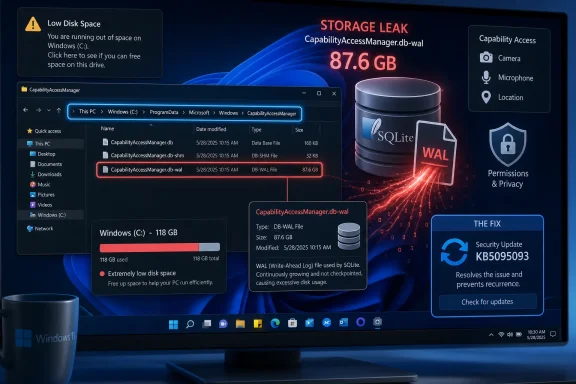 A Tiny Privacy Ledger Became a Disk-Eating Monster
The file at the center of the mess is CapabilityAccessManager.db-wal, usually found at C:\ProgramData\Microsoft\Windows\CapabilityAccessManager. It is not malware, not a ghost installer, and not some mysterious OEM recovery partition wearing a trench coat. It is a SQLite write-ahead log, part of the database Windows uses to track capability and privacy access events.Capability Access Manager is the Windows component involved when apps request access to things like your camera, microphone, location, contacts, screenshots, or other protected capabilities. In a healthy system, that sort of logging should be boring. A small database records events, the write-ahead log absorbs changes, and routine checkpointing folds those changes back into the main database so the log does not become the database’s obese twin.
On affected Windows 11 installations, that cleanup loop appears to have failed. Users began reporting a WAL file that did not settle back down after use, did not get compacted, and in some cases kept growing day after day. The reports vary wildly, from a dozen gigabytes to 50GB, 100GB, 200GB, and in the most dramatic cases roughly half a terabyte.
That range is important. “Up to 500GB” makes the better headline, but the more useful administrator’s framing is this: even a 30GB or 60GB leak is enough to wreck a 256GB laptop SSD, poison Windows Update staging, break app installs, and turn normal troubleshooting into a scavenger hunt through
System files.Microsoft Fixed the Symptom Before It Explained the Disease
Microsoft has now acknowledged the issue in the understated language of release notes. In KB5095093, the June 23 preview cumulative update for Windows 11 24H2 and 25H2, the company says the update improves disk space usage forCapabilityAccessManager.db-wal. That note was added after the original release, according to Microsoft’s own update history.This is classic Windows servicing prose: technically accurate, emotionally useless. “Improves disk space usage” can mean anything from shaving a few megabytes off a cache to stopping a log file from eating the better part of a consumer SSD. In this case, outside reporting from Windows Latest, Windows Central, TechRadar, ComputerBase, and others has connected the bland release-note wording with weeks of user reports about uncontrolled WAL growth.
The timeline is awkward for Microsoft. Community reports were circulating before the company’s public note made the issue legible to ordinary users, and some affected users were already doing the old Windows ritual: downloading disk visualizers, blaming OneDrive, clearing temp folders, running Storage Sense, then discovering the real culprit deep under ProgramData.
That delay matters because storage bugs are not just cosmetic. A system drive running out of space can cascade into failed updates, corrupted downloads, broken app state, indexing problems, profile weirdness, and performance degradation. Windows users have been trained to treat “low disk space” as their own fault; this time, the operating system itself was apparently leaving the lights on.
The WAL File Is Not the Villain, It Is the Warning Light
The phrase write-ahead log sounds like the sort of thing only database engineers should care about, but the concept is simple enough. Before a database commits changes to its main file, it can write those changes to a separate log. That improves reliability and performance, because the system can recover cleanly if something crashes halfway through a transaction.SQLite’s WAL mode is common, proven, and not inherently dangerous. The problem begins when the log is not checkpointed or trimmed as expected. Then the file becomes a running backlog rather than a temporary staging area.
That distinction is the difference between a normal Windows implementation detail and a runaway system component. Users should not have to know how SQLite journaling works to keep a PC usable. If a database-maintenance routine fails inside a privileged Windows service, the operating system should detect the abnormal growth, recover from it, or at least surface a clear diagnostic instead of burying the evidence under a generic “System” storage bucket.
This is where the bug becomes more than a one-off annoyance. Windows 11 already has a reputation for hiding complexity behind softened Settings pages while the real state of the machine still lives in Event Viewer, Task Scheduler, CBS logs, DISM output, and obscure ProgramData folders.
CapabilityAccessManager.db-wal is another reminder that modern Windows is not less complex than old Windows; it is often just more polite about concealing the machinery.The Privacy System Generated a Privacy-Adjacent Failure
There is a mild irony in the component involved. Capability Access Manager exists because modern operating systems must mediate app access to sensitive resources. Users expect to know which apps touched the microphone, camera, location, and other device capabilities. Enterprise admins expect auditability, policy control, and predictable behavior.That design goal is sound. The failure mode is not. A privacy and permissions ledger that silently balloons until the machine becomes unstable is the sort of bug that undermines confidence in the very guardrails it supports.
There is no good evidence that this issue exposed user data or created a security vulnerability in the usual sense. The problem appears to be resource consumption, not unauthorized access. But security-minded users will still bristle at the shape of the failure: a background permissions service writing endlessly into a hidden database log, with no obvious front-end warning and no graceful cap.
In enterprise language, that is a reliability incident in a security-adjacent component. In home-user language, it is “my C: drive vanished and Windows won’t tell me why.”
The Trigger Story Is Still Messy
Some reports have pointed to Dell laptops, Dell SmartByte, Bluetooth behavior, camera or microphone permissions, and other vendor utilities as possible accelerants. Windows Latest and community threads have mentioned OEM software and repeated capability checks as factors on some machines. But the public evidence does not yet support a single clean trigger that applies to every case.That uncertainty should be treated carefully. It is tempting to say, “Dell bloatware did it,” because OEM utilities are a familiar villain and often deserve suspicion. But Microsoft’s own fix is in Windows, not merely in an OEM uninstall script, and the affected file belongs to a Windows service.
The safer read is that certain apps, drivers, or OEM components may have amplified a Windows bookkeeping defect. If something repeatedly asked Windows about a protected capability, and the database log failed to compact properly, the leak would look worse on those systems. That would also explain why some PCs saw modest growth while others produced horror-story screenshots.
This is the sort of bug that makes administrators uncomfortable because it sits between layers of ownership. Microsoft owns the service. OEMs may own the noisy companion software. App developers may be generating permission events. Users own the suffering.
The Fix Is Here, but the Servicing Model Adds Its Own Suspense
KB5095093 is a preview cumulative update, not the regular Patch Tuesday security rollup. Microsoft released it on June 23, 2026, for Windows 11 versions 24H2 and 25H2, with OS builds 26100.8737 and 26200.8737. The storage fix is expected to ride into the broader July Patch Tuesday update cycle, which lands on July 14, 2026.That creates the usual Windows servicing fork. If your PC is affected now and the system drive is under pressure, installing the optional preview update may be the fastest route back to sanity. If your machine is stable and you do not enjoy being an unpaid validation node, waiting for the July cumulative update is the more conservative move.
For businesses, the answer depends on fleet telemetry. If endpoint management shows abnormal free-space drops or
CapabilityAccessManager.db-wal growth across devices, this is not a patch to admire from a distance. It is a candidate for targeted deployment to affected rings, followed by the normal broader rollout once July’s cumulative update arrives.For everyone else, the practical first step is not patching blindly; it is checking. Tools like TreeSize Free, WizTree, or Windows’ own storage views can expose whether the missing space is actually sitting in
C:\ProgramData\Microsoft\Windows\CapabilityAccessManager. If that file is still tiny, this story is a useful warning rather than an emergency.Manual Deletion Is a Scalpel, Not a Cleanup Routine
There is a manual workaround, and it should be treated with respect. BecauseCapabilityAccessManager.db-wal is actively used by the Capability Access Manager service, Windows may lock it. Users have reported success stopping the service, deleting only the .db-wal file, and rebooting so Windows can rebuild a clean log.The crucial word is “only.” The neighboring
CapabilityAccessManager.db file is the actual database, and deleting it casually is not the same thing as clearing a runaway log. A bloated WAL file can often be removed after the service is stopped; the database itself should be left alone unless Microsoft or a carefully tested remediation script says otherwise.On a single home PC, an elevated PowerShell session and a careful command may be acceptable if the disk is already full. In a managed environment, this should be wrapped in detection logic, logging, and a rollback mindset. Deleting system files by path across a fleet is how a cleanup task becomes next week’s incident report.
The better long-term remedy is the patched Windows build. Manual deletion can claw back space, but if the underlying bug or trigger remains, the file may grow again. A workaround that must be repeated is not a fix; it is a chore with administrative privileges.
Storage Sense Was Never Built for This Kind of Mess
One reason this bug annoyed users so much is that the usual Windows cleanup tools do not naturally lead people to it. Storage Sense can remove temporary files, recycle-bin contents, delivery optimization leftovers, and some update detritus. Disk Cleanup can still help with old Windows Update files and thumbnails. Neither is designed to diagnose a single runaway database log owned by a system service.That gap is not unique to this bug. Windows has multiple classes of disk consumption that collapse into vague categories in Settings. The component store can grow. System Restore can reserve space. Hibernation can consume gigabytes. Hyper-V images, WSL distributions, Docker layers, Teams caches, Edge profiles, and installer leftovers can all live in places ordinary users never inspect.
The Capability Access Manager leak belongs to the worst version of that family because it does not merely consume space; it looks authoritative while doing so. It is under ProgramData, it is owned by Windows, and it has a name that implies deleting it might break permissions, privacy, or both. Many users quite reasonably hesitate before touching it.
That is why Microsoft’s communication should be better than a terse release-note line. When a hidden system file can grow by tens or hundreds of gigabytes, the support story should include symptoms, affected versions, safe remediation, and whether the fix cleans existing bloat automatically. Users should not have to triangulate the answer from Reddit, third-party repair blogs, and changelog archaeology.
Enterprise IT Sees a Capacity Incident Wearing a Consumer Headline
For sysadmins, the consumer headline “Windows eats 500GB” is less useful than the operational question: how many endpoints are affected, how fast is the growth, and what breaks first? A 500GB case is spectacular, but a hundred laptops each losing 40GB is the real estate bill no one budgeted for.The detection path is straightforward enough. Endpoint scripts can check the file size at the known path, compare it against a sane threshold, and report devices where the WAL file has crossed into gigabytes. Administrators can then correlate affected machines with Windows build, OEM model, installed utilities, camera or microphone-heavy applications, and recent update history.
The response path should be staged. Patch known affected systems first, verify whether rebooting reclaims space, then decide whether manual cleanup is necessary. If the update prevents future growth but does not always shrink existing files immediately, remediation may still need to stop
camsvc and delete the WAL file under controlled conditions.There is also a monitoring lesson here. Free-space alerts often trigger too late, especially on small SSDs with aggressive update cadences. A machine that falls from 70GB free to 5GB free in a week should raise a different kind of alarm than a machine that has always lived near capacity. Rate of change is the signal.
The Broader Windows 11 Problem Is Trust in the Background
Windows 11 is full of background intelligence. It indexes, syncs, stages updates, scans, learns usage patterns, checks compatibility, predicts battery behavior, monitors app privacy events, and increasingly integrates cloud and AI features. Most of that background work is defensible in isolation. Collectively, it makes the OS feel like a tenant with too many keys.The CapabilityAccessManager bug lands in that trust gap. Users do not mind a database that records permission access if it behaves. They do mind discovering that the same subsystem has quietly consumed more storage than their photo library.
Microsoft’s challenge is that Windows now has to be both deeply instrumented and legible. The company wants an operating system that can recover, secure, personalize, and explain itself. But when something goes wrong, Windows often still reverts to the old posture: the machine is doing something important, the user is not meant to know, and the fix will arrive as a line item in a cumulative update.
That posture is wearing thin. Enthusiasts and administrators are not asking Microsoft to expose every implementation detail in Settings. They are asking for the OS to identify abnormal behavior in its own components before third-party disk analyzers do.
The File Path Became a Symptom of a Support Culture
There is a reason this story spread. It has all the ingredients of a classic Windows panic: a full C: drive, an ominous hidden folder, a file name that reads like a generated password, and a fix that involves stopping a service from an elevated shell. It is not just a bug; it is a miniature reenactment of decades of Windows troubleshooting.The funny part is that the underlying technology is mundane. SQLite is not exotic. WAL files are not rare. Permission logging is not strange. The failure is in lifecycle management and user visibility, two things Microsoft has been promising to improve since before Windows 11 had rounded corners.
The less funny part is that ordinary users are bad at distinguishing safe cleanup from dangerous cleanup, because Windows gives them too little context. If a user deletes the wrong file, corrupts a system database, or follows a bad script from a random forum, the story shifts from Microsoft’s leak to the user’s mistake. That is convenient for no one except the bug.
A better Windows would notice that a normally tiny service log has reached 20GB, throttle or compact it, write a clear event, and surface an actionable recommendation. A truly modern Windows would not need a viral filename to explain where the storage went.
The Patch Fixes the File; The Lesson Is Larger
The immediate fix is narrow, but the practical consequences are broad enough that Windows users and admins should treat this as more than trivia. If your system drive has been shrinking without explanation, this file deserves a place near the top of the suspect list.- Microsoft’s KB5095093 preview update for Windows 11 24H2 and 25H2 includes a fix for excessive disk usage by
CapabilityAccessManager.db-wal. - The affected file is a SQLite write-ahead log used by Windows’ Capability Access Manager, which is tied to app access requests for protected resources such as camera, microphone, and location.
- Reported file sizes vary substantially, with many cases in the tens or hundreds of gigabytes and the most extreme reports approaching roughly 500GB.
- Users should check the file size before taking action, because not every Windows 11 installation is affected and the file is normally small.
- Manual deletion should target only the
.db-walfile after stopping the relevant service, and the safer long-term answer is installing the fixed Windows update. - Enterprise administrators should detect the file across fleets, prioritize machines with rapid free-space loss, and deploy remediation in rings rather than relying on ad hoc user cleanup.
References
- Primary source: Korben
Published: 2026-07-07T12:10:10.923787
This Windows 11 ghost file grows on its own and swallows your entire disk - Korben
Okay, I'll admit I've kind of given up on my summer body. With this heat wave, I'm two seconds away from making a raclette. That said, there's one thing I ...korben.info
- Related coverage: techradar.com
Keep running low on storage and don't know why? Mysterious Windows 11 file that ate tons of drive space is fixed in latest update | TechRadar
Latest update finally fixes a 'notorious culprit for system bloat'www.techradar.com - Related coverage: windowscentral.com
Windows 11 is accidentally wasting up to 500GB of your PC's storage | Windows Central
A bloated file related to app permissions is gobbling up hard drive space, but Microsoft's latest update addresses the issue.www.windowscentral.com - Related coverage: windowslatest.com
Windows 11 KB5060829 adds taskbar features, direct download for 24H2
Windows 11 KB5060829 is June 2025's optional update for Windows 11 24H2 rolling out with a new taskbar scaling feature. www.windowslatest.com
- Official source: techcommunity.microsoft.com
Loading…
techcommunity.microsoft.com - Related coverage: computerbase.de
Microsoft bestätigt Bug: Windows 11 kann fehlerbedingt um bis zu 500 GB anwachsen - ComputerBase
Microsoft hat einen Fehler in Windows 11 bestätigt, durch den auf der Systempartition bis zu mehrere hundert Gigabyte belegt werden können.www.computerbase.de
- Related coverage: wintips.org
How to Fix CapabilityAccessManager.db-wal Taking up Huge Disk Space on Windows 11.
This guide explains what the Capability Access Manager is, why its database file (CapabilityAccessManager.db-wal) can grow too large, taking up many gigabytes owww.wintips.org - Related coverage: fdaytalk.com
CapabilityAccessManager.db-wal Is Eating Your Windows 11 Storage
CapabilityAccessManager.db-wal eating your Windows 11 storage? Fix the bloat fast with Safe Mode commands and stop it from growing back.www.fdaytalk.com - Related coverage: canaltech.com.br
Bug no Windows 11 consome quase todo o armazenamento do PC - Canaltech
Um bug no Windows 11 pode ocupar centenas de gigabytes de armazenamento do computador sem que o usuário perceba. A falha faz o arquivo CapabilityAccessMacanaltech.com.br - Related coverage: windowsforum.com
Windows 11 KB5095093 Fixes Runaway CapabilityAccessManager.db-wal Disk Use | Windows Forum
Microsoft’s June 23, 2026 optional Windows 11 preview update, KB5095093, includes a fix for runaway disk usage tied to CapabilityAccessManager.db-wal, a...windowsforum.com - Related coverage: techgenyz.com
Microsoft Confirms Windows 11 Bug That Can Consume Up to 500GB of Storage, Fix Arrives This Month
Microsoft has addressed a Windows 11 bug where the CapabilityAccessManager.db-wal file can consume up to 500GB of storage. Here's what's confirmed and the fixtechgenyz.com - Related coverage: notebookcheck.net
Windows 11 KB5095093 Preview adds Point-in-time restore - Notebookcheck News
Microsoft launches Windows 11 optional preview update KB5095093 for versions 24H2 and 25H2, introducing Point-in-time restore and a Recycle Bin display patch. www.notebookcheck.net
- Related coverage: anavem.com
KB5095093: Windows 11 Preview Update – Builds 26200/26100 (2026)
KB5095093 is the June 23, 2026 Preview Cumulative Update for Windows 11 (Builds 26200.8737 & 26100.8737). Fixes taskbar, File Explorer, DirectX, Search, andwww.anavem.com - Related coverage: notebookcheck.org
La versión preliminar de Windows 11 KB5095093 incorpora la función de restauración a un punto concreto en el tiempo - NotebookCheck.org News
Microsoft lanza la actualización opcional de vista previa de Windows 11 KB5095093 para las versiones 24H2 y 25H2, que introduce la restauración a un punto concreto en el tiempo y un parche para la visualización de la Papelera de reciclaje. www.notebookcheck.org
- Related coverage: notebookcheck.com
Neue Wiederherstellungsfunktion kommt mit Windows 11 KB5095093 Preview - Notebookcheck News
Microsoft veröffentlicht das optionale Vorschau‑Update KB5095093 für Windows 11 in den Versionen 24H2 und 25H2. Es bringt die Wiederherstellung zu einem bestimmten Zeitpunkt sowie einen Fix für die Papierkorbanzeige mit. www.notebookcheck.com
- Related coverage: notebookcheck.it
La versione Preview di Windows 11 KB5095093 introduce il ripristino ad una data specifica - NotebookCheck.it News
Microsoft lancia l'aggiornamento di anteprima facoltativo KB5095093 per Windows 11, destinato alle versioni 24H2 e 25H2, che introduce il ripristino a un punto specifico nel tempo e una correzione relativa alla visualizzazione del Cestino. www.notebookcheck.it