

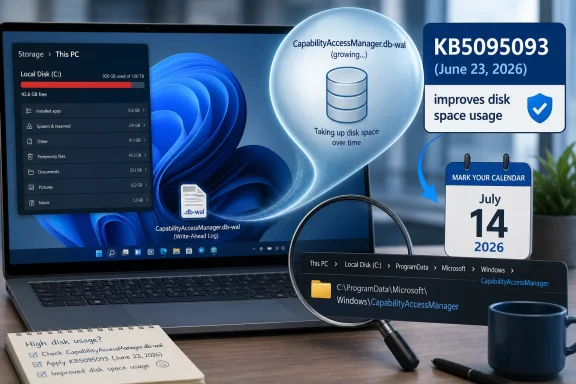
Microsoft’s June 23, 2026 Windows 11 preview update, KB5095093, fixes a storage bug in which the CapabilityAccessManager.db-wal system file can reportedly swell from a few kilobytes or megabytes to tens or hundreds of gigabytes on affected PCs. The failure is not glamorous, but it is exactly the sort of Windows problem that makes users distrust the operating system: silent, obscure, and discovered only after the C: drive starts gasping for air. As ZDNET’s Lance Whitney reported, building on earlier Windows Latest coverage and user reports, the practical fix is now in Microsoft’s update pipeline. The real story is less that one file got too large than that Windows still hides too much of its own housekeeping until something breaks.
The file at the center of the mess, CapabilityAccessManager.db-wal, lives under Windows’ Capability Access Manager infrastructure. That service helps track whether apps are allowed to use sensitive capabilities such as the camera, microphone, location, and other privacy-gated features. In ordinary use, this is the kind of background plumbing nobody should ever need to learn by name.
The suffix matters. A “wal” file is a write-ahead log, a database companion file used to stage changes before they are committed to the main database. In a healthy system, that log should not behave like a digital landfill. It may grow briefly, shrink, checkpoint, or otherwise settle back into a trivial footprint.
According to ZDNET and Windows Latest, the bug causes the file to grow far beyond what anyone would expect from a permissions database. User reports have put the damage at dozens, hundreds, and in one long-running Reddit case roughly 500GB. That number sounds absurd until you remember how many modern Windows laptops ship with 512GB or 1TB SSDs, where a runaway half-terabyte file is not a curiosity but a machine-stopping event.
Microsoft’s own wording is characteristically understated. In the KB5095093 release notes, the company says the update “improves disk space usage” for CapabilityAccessManager.db-wal. That is technically true in the same way that a flooded basement is “an indoor humidity event.”
ZDNET’s check is a sensible first pass. Open Settings, go to System, then Storage, and expand the storage categories. If “System & reserved” is sitting in the ordinary range of several gigabytes to a few dozen gigabytes, this specific issue is probably not your problem. If it is reporting well over 100GB, especially without an obvious reason such as a massive Windows.old folder or restore-point usage, the Capability Access Manager log becomes a suspect.
That check is imperfect because “System & reserved” is a bucket, not a forensic report. It can include system files, reserved storage, virtual memory, hibernation files, update components, and restore data. But it is good enough to tell you whether you are looking at a normal Windows footprint or a system category that has quietly ballooned into absurdity.
The more direct check is the file itself. The folder path is C:\ProgramData\Microsoft\Windows\CapabilityAccessManager, but Windows does not normally let standard users rummage through that location. That is as it should be; changing permissions on protected system folders to satisfy curiosity is a classic way to turn a storage problem into a stability problem.
The command being circulated is:
The important switch is
For a healthy system, the relevant files should be tiny by modern storage standards. ZDNET found most of its test environments reporting around 57,000 bytes, while one primary laptop showed the file at 7GB. That 7GB result is not the 500GB horror story, but it is still far too large for what is supposed to be a small service database log.
The temptation, naturally, is to delete the file. That may work for some technically comfortable users in some circumstances, especially if the related service is stopped first, and Reddit is full of such advice. But for most readers, the better answer is boring: install the Windows fix and let the servicing stack clean up Microsoft’s mess.
Preview updates are Microsoft’s monthly staging ground. They contain fixes and quality improvements that are intended to roll into the following month’s security update, but they are generally aimed at admins, testers, and enthusiasts who are willing to trade a little predictability for earlier relief. In this case, the preview also includes other changes: File Explorer responsiveness fixes, Bluetooth improvements, Windows Update pause refinements, and a fix for a Recycle Bin filename display bug introduced by the June security update.
For someone whose system drive is being eaten alive, waiting is not a virtue. If CapabilityAccessManager.db-wal is already tens or hundreds of gigabytes, KB5095093 is the sensible first stop, assuming the machine is otherwise eligible and backed up. For everyone else, waiting until the July Patch Tuesday rollout is reasonable, because Microsoft says these changes flow into the next security update.
ZDNET points to July 14, 2026 as the date the mandatory July update should bring the fix broadly to users. That is the date to circle if you are not desperate for space and do not normally install optional preview updates. The calculus is familiar to Windows admins: preview updates solve known annoyances sooner, but the broad security release is the safer default for fleets and less adventurous PCs.
That gap pushes ordinary users toward third-party disk analyzers such as WizTree, TreeSize, or WinDirStat. Those tools are excellent, and many WindowsForum readers probably keep one installed already. But the fact that users need outside software or a Robocopy incantation to identify a runaway Microsoft system file says something uncomfortable about Windows’ built-in observability.
Storage bugs also have a way of cascading into unrelated failures. A bloated system file can make Windows Update less reliable, prevent large application updates, break developer workflows, or cause sync clients to churn. On smaller SSDs, especially 256GB and 512GB systems still common in budget laptops and corporate fleets, the margin for mysterious waste is thin.
The location of this bug adds another layer of irony. Capability Access Manager exists because modern operating systems need privacy controls. Users want to know which apps can access the camera, microphone, and location. Yet the system that supports those privacy decisions became, for some users, an opaque consumer of storage they could not easily inspect.
Disk pressure is also a management problem. Devices with full system drives fail updates, fail application deployments, and become harder to remediate remotely. If the affected population is small, the fix is still operationally annoying. If it is large, it becomes a compliance and patching problem disguised as a storage anomaly.
The Microsoft release notes do not say how many devices are affected, what triggers the growth, or whether the fix merely prevents future bloat or also cleans up existing oversized logs. That lack of detail is not unusual, but it leaves administrators to verify behavior themselves. In a managed environment, the prudent move is to sample devices, query for abnormal “System & reserved” usage, and test the update on a pilot ring before broad deployment.
There is also a communication issue. A line item that says “improves disk space usage” does not convey urgency to a help desk or endpoint team. It does not tell an admin whether this is a 200MB cleanup, a 20GB edge case, or a 500GB landmine. Microsoft often writes release notes as if every bug fix is equally bland; this is one case where more plain English would have saved everyone time.
If the file is small, move on. Windows has many ways to consume storage, including hibernation, page files, restore points, delivery optimization cache, Windows.old folders, WSL virtual disks, game launchers, and cloud sync placeholders gone wrong. Not every storage mystery is this bug.
If the file is large, install the Microsoft fix rather than improvising. KB5095093 is already available as the June 23 preview update, and the same fix is expected to arrive through the July 14 Patch Tuesday update. Users who are not currently blocked by storage pressure can wait for the normal cumulative update path.
If the system drive is already critically full, make a backup before doing anything aggressive. A full C: drive can make Windows behave unpredictably, and deleting files from protected system locations is never risk-free. The goal is to restore the OS to a supported state, not to win a fight with a database log.
The ZDNET report is useful because it translates a release-note footnote into a user-facing check. Windows Latest did the same by surfacing the specific file and tying it to Microsoft’s preview update. That is the sort of connective tissue users depend on when Microsoft’s public language is too sanitized to explain what actually happened.
For WindowsForum readers, the practical value is immediate. You can check the system category in under a minute. You can verify the file size without taking ownership of protected directories. You can decide whether to install the preview update now or wait for the July security release.
The larger lesson is familiar: Windows has become a rolling platform, and rolling platforms need better self-diagnosis. If a database log tied to a privacy service grows beyond reason, the operating system should surface that condition clearly. It should not require a trail from Reddit to Windows Latest to ZDNET to a KB changelog to a Robocopy command.
 A Privacy Database Became a Storage Sinkhole
The file at the center of the mess, CapabilityAccessManager.db-wal, lives under Windows’ Capability Access Manager infrastructure. That service helps track whether apps are allowed to use sensitive capabilities such as the camera, microphone, location, and other privacy-gated features. In ordinary use, this is the kind of background plumbing nobody should ever need to learn by name.The suffix matters. A “wal” file is a write-ahead log, a database companion file used to stage changes before they are committed to the main database. In a healthy system, that log should not behave like a digital landfill. It may grow briefly, shrink, checkpoint, or otherwise settle back into a trivial footprint.
According to ZDNET and Windows Latest, the bug causes the file to grow far beyond what anyone would expect from a permissions database. User reports have put the damage at dozens, hundreds, and in one long-running Reddit case roughly 500GB. That number sounds absurd until you remember how many modern Windows laptops ship with 512GB or 1TB SSDs, where a runaway half-terabyte file is not a curiosity but a machine-stopping event.
Microsoft’s own wording is characteristically understated. In the KB5095093 release notes, the company says the update “improves disk space usage” for CapabilityAccessManager.db-wal. That is technically true in the same way that a flooded basement is “an indoor humidity event.”
The Bug Is Obscure, but the Symptom Is Not
Most users will not notice this through a scary dialog box or a clear Windows Security alert. They will notice it the way people notice most storage problems: downloads fail, games refuse to update, OneDrive complains, Windows Update gets fussy, or the system drive suddenly looks much fuller than it should. The bug’s invisibility is what makes it more irritating than dramatic.ZDNET’s check is a sensible first pass. Open Settings, go to System, then Storage, and expand the storage categories. If “System & reserved” is sitting in the ordinary range of several gigabytes to a few dozen gigabytes, this specific issue is probably not your problem. If it is reporting well over 100GB, especially without an obvious reason such as a massive Windows.old folder or restore-point usage, the Capability Access Manager log becomes a suspect.
That check is imperfect because “System & reserved” is a bucket, not a forensic report. It can include system files, reserved storage, virtual memory, hibernation files, update components, and restore data. But it is good enough to tell you whether you are looking at a normal Windows footprint or a system category that has quietly ballooned into absurdity.
The more direct check is the file itself. The folder path is C:\ProgramData\Microsoft\Windows\CapabilityAccessManager, but Windows does not normally let standard users rummage through that location. That is as it should be; changing permissions on protected system folders to satisfy curiosity is a classic way to turn a storage problem into a stability problem.
Robocopy Is the Least Reckless Flashlight
The neat trick in the ZDNET and Windows Latest reporting is to use Robocopy as a read-only measuring tool. Run an elevated Command Prompt and use Robocopy with list-only and backup-mode switches to enumerate the folder without actually copying the file. That approach gives advanced users a way to see the size without taking ownership of the folder or deleting anything by hand.The command being circulated is:
robocopy "C:\ProgramData\Microsoft\Windows\CapabilityAccessManager" "%TEMP%\CAMCheck" /L /B /R:0 /W:0 /BYTES /NPThe important switch is
/L, which tells Robocopy to list what it would do rather than perform the copy. /B uses backup mode, which is why the command should be run from an elevated prompt. The rest suppresses retries, waits, progress noise, and converts size output into bytes, making the result easier to interpret.For a healthy system, the relevant files should be tiny by modern storage standards. ZDNET found most of its test environments reporting around 57,000 bytes, while one primary laptop showed the file at 7GB. That 7GB result is not the 500GB horror story, but it is still far too large for what is supposed to be a small service database log.
The temptation, naturally, is to delete the file. That may work for some technically comfortable users in some circumstances, especially if the related service is stopped first, and Reddit is full of such advice. But for most readers, the better answer is boring: install the Windows fix and let the servicing stack clean up Microsoft’s mess.
Microsoft Fixed the Right File, but the Calendar Still Matters
KB5095093 is a preview update, released June 23, 2026, for Windows 11 version 24H2 and 25H2 with OS builds 26100.8737 and 26200.8737. Microsoft says the update includes production-quality improvements, but it is still an optional non-security preview rather than the ordinary Patch Tuesday security release most consumers receive automatically. That distinction matters.Preview updates are Microsoft’s monthly staging ground. They contain fixes and quality improvements that are intended to roll into the following month’s security update, but they are generally aimed at admins, testers, and enthusiasts who are willing to trade a little predictability for earlier relief. In this case, the preview also includes other changes: File Explorer responsiveness fixes, Bluetooth improvements, Windows Update pause refinements, and a fix for a Recycle Bin filename display bug introduced by the June security update.
For someone whose system drive is being eaten alive, waiting is not a virtue. If CapabilityAccessManager.db-wal is already tens or hundreds of gigabytes, KB5095093 is the sensible first stop, assuming the machine is otherwise eligible and backed up. For everyone else, waiting until the July Patch Tuesday rollout is reasonable, because Microsoft says these changes flow into the next security update.
ZDNET points to July 14, 2026 as the date the mandatory July update should bring the fix broadly to users. That is the date to circle if you are not desperate for space and do not normally install optional preview updates. The calculus is familiar to Windows admins: preview updates solve known annoyances sooner, but the broad security release is the safer default for fleets and less adventurous PCs.
The Bug Exposes a Weak Spot in Windows’ Storage Story
Windows 11 has become better at showing storage use than older versions of Windows, but the interface still tends to abstract away the very information users need when something goes wrong. “System & reserved” is a polite label, not a diagnosis. When that category explodes, the Settings app does not say, “A write-ahead log under Capability Access Manager is consuming your SSD.”That gap pushes ordinary users toward third-party disk analyzers such as WizTree, TreeSize, or WinDirStat. Those tools are excellent, and many WindowsForum readers probably keep one installed already. But the fact that users need outside software or a Robocopy incantation to identify a runaway Microsoft system file says something uncomfortable about Windows’ built-in observability.
Storage bugs also have a way of cascading into unrelated failures. A bloated system file can make Windows Update less reliable, prevent large application updates, break developer workflows, or cause sync clients to churn. On smaller SSDs, especially 256GB and 512GB systems still common in budget laptops and corporate fleets, the margin for mysterious waste is thin.
The location of this bug adds another layer of irony. Capability Access Manager exists because modern operating systems need privacy controls. Users want to know which apps can access the camera, microphone, and location. Yet the system that supports those privacy decisions became, for some users, an opaque consumer of storage they could not easily inspect.
This Is Why Admins Distrust “Small” Windows Fixes
For home users, the path is relatively simple: check storage, install the update if needed, and move on. For enterprise administrators, the bug raises a different concern. A silent system-file bloat issue is exactly the kind of defect that does not show up as a dramatic outage but still generates tickets, imaging churn, and user frustration across a fleet.Disk pressure is also a management problem. Devices with full system drives fail updates, fail application deployments, and become harder to remediate remotely. If the affected population is small, the fix is still operationally annoying. If it is large, it becomes a compliance and patching problem disguised as a storage anomaly.
The Microsoft release notes do not say how many devices are affected, what triggers the growth, or whether the fix merely prevents future bloat or also cleans up existing oversized logs. That lack of detail is not unusual, but it leaves administrators to verify behavior themselves. In a managed environment, the prudent move is to sample devices, query for abnormal “System & reserved” usage, and test the update on a pilot ring before broad deployment.
There is also a communication issue. A line item that says “improves disk space usage” does not convey urgency to a help desk or endpoint team. It does not tell an admin whether this is a 200MB cleanup, a 20GB edge case, or a 500GB landmine. Microsoft often writes release notes as if every bug fix is equally bland; this is one case where more plain English would have saved everyone time.
The Safe User Playbook Is Boring by Design
The best consumer advice here is not to start hacking away at protected folders. First, check Settings > System > Storage and look for an unusually large “System & reserved” category. Second, if that number is suspicious, use an elevated Robocopy listing command or a reputable disk-usage tool running as administrator to confirm whether CapabilityAccessManager.db-wal is the culprit.If the file is small, move on. Windows has many ways to consume storage, including hibernation, page files, restore points, delivery optimization cache, Windows.old folders, WSL virtual disks, game launchers, and cloud sync placeholders gone wrong. Not every storage mystery is this bug.
If the file is large, install the Microsoft fix rather than improvising. KB5095093 is already available as the June 23 preview update, and the same fix is expected to arrive through the July 14 Patch Tuesday update. Users who are not currently blocked by storage pressure can wait for the normal cumulative update path.
If the system drive is already critically full, make a backup before doing anything aggressive. A full C: drive can make Windows behave unpredictably, and deleting files from protected system locations is never risk-free. The goal is to restore the OS to a supported state, not to win a fight with a database log.
The 500GB File Is a Warning Label for Windows Maintenance
This episode should not be exaggerated into a claim that every Windows 11 PC is losing half a terabyte. The available reporting points to a real but uneven bug, with some systems untouched and others showing anything from mild bloat to catastrophic growth. But it should not be minimized either, because storage exhaustion is one of those failures that turns a technically small defect into a very visible user problem.The ZDNET report is useful because it translates a release-note footnote into a user-facing check. Windows Latest did the same by surfacing the specific file and tying it to Microsoft’s preview update. That is the sort of connective tissue users depend on when Microsoft’s public language is too sanitized to explain what actually happened.
For WindowsForum readers, the practical value is immediate. You can check the system category in under a minute. You can verify the file size without taking ownership of protected directories. You can decide whether to install the preview update now or wait for the July security release.
The larger lesson is familiar: Windows has become a rolling platform, and rolling platforms need better self-diagnosis. If a database log tied to a privacy service grows beyond reason, the operating system should surface that condition clearly. It should not require a trail from Reddit to Windows Latest to ZDNET to a KB changelog to a Robocopy command.
The Fix Is Simple, but the Lesson Is Not
The immediate action items are concrete, and they separate normal Windows housekeeping from a genuine runaway-file problem.- Open Windows Settings and check System > Storage before assuming a missing-space problem is caused by downloads, games, or user data.
- Treat an unusually large “System & reserved” category, especially one above 100GB, as a reason to investigate further.
- Use a read-only Robocopy listing command or a trusted disk-usage utility in administrator mode to inspect the CapabilityAccessManager folder safely.
- Install KB5095093 if the bug is actively hurting your available storage and you are comfortable taking an optional preview update.
- Wait for the July 14, 2026 Patch Tuesday update if your system is not under storage pressure and you prefer the normal cumulative update channel.
- Avoid changing permissions or manually deleting protected system files unless you have a tested recovery plan and understand the service involved.
References
- Primary source: ZDNET
Published: Tue, 07 Jul 2026 18:55:00 GMT
Loading…
www.zdnet.com - Related coverage: windowslatest.com
Microsoft admits a Windows 11 bug is eating up to 500GB of storage, verify if you are affected
Microsoft admits a Windows 11 bug is silently eating up to 500GB of your storage, fix coming July 14, 2026. www.windowslatest.com
- Related coverage: windowscentral.com
Windows 11 is accidentally wasting up to 500GB of your PC's storage | Windows Central
A bloated file related to app permissions is gobbling up hard drive space, but Microsoft's latest update addresses the issue.www.windowscentral.com - Related coverage: pcworld.com
A Windows 11 bug can eat 500GB of your storage. Here's how to check | PCWorld
A Windows 11 update reveals a bug that can silently consume up to 500GB of storage. Here's how to check if you're affected and fix it.www.pcworld.com - Related coverage: pcgamer.com
A nasty Windows 11 bug is taking upwards of 500 GB worth of storage, and is surprisingly difficult to spot, but there's a fix | PC Gamer
That's about $100 worth of space in the current memory crisis.www.pcgamer.com - Related coverage: computerbase.de
Microsoft bestätigt Bug: Windows 11 kann fehlerbedingt um bis zu 500 GB anwachsen - ComputerBase
Microsoft hat einen Fehler in Windows 11 bestätigt, durch den auf der Systempartition bis zu mehrere hundert Gigabyte belegt werden können.www.computerbase.de
- Related coverage: tecnoblog.net
Bug faz Windows 11 ocupar 500 GB de armazenamento com "lixo" • Tecnoblog
falha no Windows 11 de alguns PCs faz recursos do sistema ocupar dezenas ou até centenas de gigabytes indevidamente na unidade C. Problema já tem correção. tecnoblog.net
- Related coverage: techgenyz.com
Microsoft Confirms Windows 11 Bug That Can Consume Up to 500GB of Storage, Fix Arrives This Month
Microsoft has addressed a Windows 11 bug where the CapabilityAccessManager.db-wal file can consume up to 500GB of storage. Here's what's confirmed and the fixtechgenyz.com - Related coverage: techradar.com
Keep running low on storage and don't know why? Mysterious Windows 11 file that ate tons of drive space is fixed in latest update | TechRadar
Latest update finally fixes a 'notorious culprit for system bloat'www.techradar.com - Related coverage: windowsforum.com
Loading…
windowsforum.com - Official source: techcommunity.microsoft.com
Loading…
techcommunity.microsoft.com - Related coverage: appinn.com
Loading…
www.appinn.com