

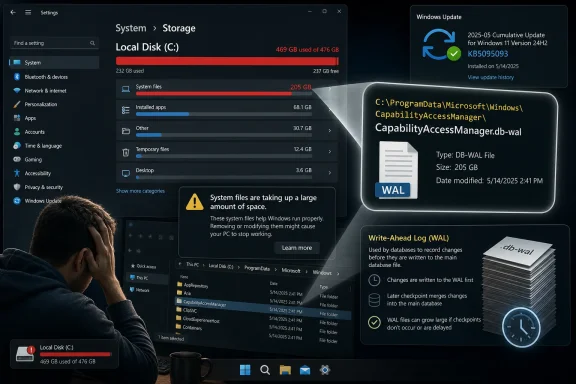
Microsoft’s June 23, 2026 preview update for Windows 11 24H2 and 25H2 addresses a storage bug in which the CapabilityAccessManager.db-wal system file can reportedly balloon into tens, hundreds, or even 500GB on affected PCs. The bug is obscure in name but painfully ordinary in effect: the C: drive fills up, Windows blames “System files,” and the user is left hunting ghosts. Digital Trends amplified the warning this week, drawing on reporting from Windows Latest and user reports that Microsoft’s own release notes only partially explain. The larger story is not just that one Windows log file got too big; it is that Windows still hides too much of its own housekeeping from the people expected to trust it.
The file at the center of the mess,
A write-ahead log growing temporarily is not, by itself, suspicious. Databases use these files precisely because they help protect consistency and performance while writes are happening. The problem begins when the temporary part stops being temporary, and the log becomes a hoarder’s attic for repeated events that should have been compacted, checkpointed, or discarded.
Microsoft’s public acknowledgement is almost aggressively terse. In the KB5095093 release notes, the company says the update “improves disk space usage for the CapabilityAccessManager.db-wal file.” That is vendor language doing what vendor language often does: confirming enough to validate the bug reports while avoiding the messier sentence users actually need to hear — Windows could let a privacy-permissions database log consume a shocking amount of your system drive.
Windows Latest connected that dry changelog line to real-world complaints, including Feedback Hub and Reddit reports where the file had grown to roughly 200GB, with some subsequent coverage citing cases as high as 500GB. Digital Trends then carried the warning to a broader audience, which is appropriate because this is not the sort of bug that announces itself with a crash dialog. It looks like a storage crisis, not a Windows component failure.
That distinction matters. A blue screen is dramatic but legible. A disappearing SSD is quiet, ambiguous, and easy to misdiagnose as user behavior, application bloat, cloud sync, game installs, or Windows Update leftovers.
This is where the bug becomes a user-experience failure. Windows has enough internal knowledge to categorize the growth as system usage, but not enough visible plumbing to tell a normal person that one database log has gone feral. The result is a support pattern familiar to anyone who has administered Windows fleets: the official UI identifies the neighborhood, while third-party disk analyzers identify the house.
Tools such as TreeSize, WizTree, or plain command-line directory inspection can reveal the culprit quickly, but that is not a reasonable expectation for mainstream users. Even many IT pros will spend time clearing temporary files, Delivery Optimization caches, old update packages, browser profiles, Teams caches, OneDrive placeholders, and crash dumps before they land on Capability Access Manager. By then, the diagnosis has already cost more time than the bug deserved.
The location of the file also complicates matters.
That friction is not accidental; protected system files are protected for good reasons. But the same protection that prevents casual breakage also turns a runaway internal log into a locked-room mystery.
That makes the bug more than a garden-variety disk leak. It sits at the intersection of privacy, telemetry-like event tracking, and system reliability. If the subsystem that records permission-related activity starts consuming the disk, the operating system’s protective machinery begins to look like another source of fragility.
To be clear, the available reporting does not establish that the contents of the file expose sensitive data, nor that this is a security vulnerability in the usual sense. The concern is operational. A component designed to make Windows more accountable appears, in some circumstances, to have failed at basic housekeeping.
The failure mode is especially punishing on modern consumer laptops and business ultrabooks. A 256GB SSD remains common in lower-cost systems and managed fleets. A 100GB runaway log on that class of device is not an inconvenience; it is a denial of usable space. A 200GB file can turn routine patching, Office work, browser caching, and even sign-in behavior into a cascade of low-disk warnings.
For IT departments, the capacity impact is only part of the problem. Low storage can break updates, interrupt user profiles, corrupt application state, and trigger help-desk tickets that look unrelated until someone finds the same file across multiple machines. The bug’s obscurity multiplies its cost.
That means the storage fix currently lives in the uncomfortable middle ground Windows admins know well. It is available, it is official, and it may solve a severe problem. It is also a preview update, and preview updates are not always what cautious organizations rush to deploy across production fleets.
For an individual user whose C: drive is already being eaten, the calculus is simple: install the update before attempting file surgery. Microsoft has put a fix in the servicing channel, and taking that fix is safer than deleting a protected database log while Windows is live. Digital Trends notes that some Reddit users reported losing Wi-Fi functionality after manually deleting the file, which is exactly the sort of anecdote that should make people pause before treating
For enterprises, the decision is more conditional. If telemetry, endpoint management, or service-desk patterns show widespread low-disk incidents tied to this file, KB5095093 deserves accelerated validation. If the issue is not appearing in your environment, waiting for the July 2026 Patch Tuesday package may be the more conservative move.
The important thing is not to confuse optional with experimental in the colloquial sense. Microsoft’s preview cumulative updates are a standard part of the Windows servicing model, often carrying non-security fixes before broader release. But “standard” does not mean “risk-free,” especially when the same update also contains unrelated changes to File Explorer, Bluetooth, networking, accessibility, printing behavior, and other system areas.
The
Safe Mode lowers the risk because it reduces the number of active services and locks, but it does not magically make every deletion supported. Capability Access Manager is not a random cache. It is tied to app permissions and OS policy state. If Windows expects database consistency between a main file, a write-ahead log, and associated shared-memory files, deleting the wrong piece at the wrong time can produce secondary failures.
That is why the best advice is boring: update first. If the update cannot install because the disk is full, then the recovery path becomes more delicate. At that point, a user or admin may need to free space elsewhere, use external media, temporarily remove nonessential large files, or perform offline maintenance in a controlled way before trying the cumulative update again.
This is also where Microsoft’s sparse communication does practical harm. A detailed known-issue entry could explain whether the update compacts existing bloated files, prevents future growth, or both. It could say whether affected users should reboot twice, whether Storage Sense can help, whether manual deletion is unsupported, and whether enterprises should query the file path at scale. Instead, everyone is left inferring behavior from five words in a changelog.
The gap is clearest when the numbers become absurd. If “System files” rises by 10GB after a feature update, users may grumble and move on. If it rises by 200GB, Windows should escalate from categorization to diagnosis. A modern OS ought to be able to say, “One system database log is unusually large,” even if it does not expose a delete button.
Microsoft has spent years pushing Windows toward more managed, cloud-connected, self-healing behavior. That strategy depends on trust. Users tolerate opaque background activity when the system appears to maintain itself; they become less tolerant when opacity hides a runaway file that can fill an SSD.
There is a security angle here, too, but not the breathless kind. Low disk space can degrade security posture because updates fail, logs stop writing, browsers and endpoint tools misbehave, and users become more willing to follow risky internet advice. A storage bug in a protected Windows component can therefore create conditions in which bad decisions become more likely.
That is why this episode should not be dismissed as merely embarrassing. Storage exhaustion is one of the oldest reliability failures in computing, and it remains powerful because everything depends on free space. If Windows consumes that space silently, the OS has effectively become its own noisy neighbor.
The useful threshold will vary. A few megabytes or even moderate growth may be uninteresting. Dozens of gigabytes should be suspicious. Anything in the high double digits or hundreds of gigabytes should be treated as both a local capacity incident and a patch-compliance signal.
The trick is to avoid turning detection into a delete campaign. A script that blindly removes the file fleet-wide may feel satisfying until it breaks edge cases or destroys useful state. The safer play is to identify affected systems, prioritize installation of the fixed cumulative update, and reserve offline remediation for machines that cannot be patched because they are already out of space.
There is also a reporting lesson. If a Windows bug is visible only through cumulative side effects, service desks need a playbook that maps symptoms to root causes. “C: drive full” is not a root cause. “System files consuming 180GB because CapabilityAccessManager.db-wal has grown abnormally” is actionable.
Organizations using Windows Update for Business should also note Microsoft’s release language around preview changes flowing into the next security update. That matters for change windows and deferral policies. If the July security update includes the same fix, many shops can let normal patch cadence resolve the problem while separately triaging machines already in distress.
Microsoft’s public note is a maintenance whisper, not a user-facing warning. It does not say who is affected, how large the file can become, whether existing bloat is reclaimed, whether the issue is limited to certain builds or device classes, or whether manual deletion is dangerous. That leaves Digital Trends, Windows Latest, TechRadar, PCWorld, Reddit, and community forums to translate the patch note into operational reality.
There is nothing wrong with journalism and forums doing that work. WindowsForum exists because Microsoft’s ecosystem has always needed a layer of interpretation between Redmond and real machines. But when a bug can eat hundreds of gigabytes, the official explanation should not require archaeology.
The company may have reasons for caution. It may not know the full trigger. It may want to avoid encouraging users to touch protected files. It may consider the impact limited. But silence has its own risks, because users will still search the filename and they will still find advice — some careful, some reckless, some obsolete.
A better Microsoft response would be modest but concrete. A known-issue note could acknowledge abnormal growth, recommend installing KB5095093 or the next security update, discourage live deletion, and describe supported recovery options for devices with critically low free space. That would not require admitting catastrophe. It would simply treat users and administrators as partners in repair.
Windows has spent decades teaching users that the system drive is a shared apartment with too many locked rooms. The
 Microsoft Fixed the File Before It Explained the Failure
The file at the center of the mess, CapabilityAccessManager.db-wal, lives under C:\ProgramData\Microsoft\Windows\CapabilityAccessManager, a location most users will never browse and many administrators will not think to check first. It is associated with Windows’ Capability Access Manager, the component that tracks app access to privacy-sensitive capabilities such as camera, microphone, location, and screen capture. The “wal” suffix matters because it points to a write-ahead log, the kind of database companion file that records changes before they are folded back into the main database.A write-ahead log growing temporarily is not, by itself, suspicious. Databases use these files precisely because they help protect consistency and performance while writes are happening. The problem begins when the temporary part stops being temporary, and the log becomes a hoarder’s attic for repeated events that should have been compacted, checkpointed, or discarded.
Microsoft’s public acknowledgement is almost aggressively terse. In the KB5095093 release notes, the company says the update “improves disk space usage for the CapabilityAccessManager.db-wal file.” That is vendor language doing what vendor language often does: confirming enough to validate the bug reports while avoiding the messier sentence users actually need to hear — Windows could let a privacy-permissions database log consume a shocking amount of your system drive.
Windows Latest connected that dry changelog line to real-world complaints, including Feedback Hub and Reddit reports where the file had grown to roughly 200GB, with some subsequent coverage citing cases as high as 500GB. Digital Trends then carried the warning to a broader audience, which is appropriate because this is not the sort of bug that announces itself with a crash dialog. It looks like a storage crisis, not a Windows component failure.
That distinction matters. A blue screen is dramatic but legible. A disappearing SSD is quiet, ambiguous, and easy to misdiagnose as user behavior, application bloat, cloud sync, game installs, or Windows Update leftovers.
The Crime Scene Is Hidden Behind “System Files”
The first visible symptom for most affected users is not a filename. It is Windows Settings reporting unusually high usage under System, Storage, “System & reserved,” or “System files.” That is a clue, but not a useful one if the number is suddenly 80GB, 200GB, or more and Windows refuses to say which file is responsible.This is where the bug becomes a user-experience failure. Windows has enough internal knowledge to categorize the growth as system usage, but not enough visible plumbing to tell a normal person that one database log has gone feral. The result is a support pattern familiar to anyone who has administered Windows fleets: the official UI identifies the neighborhood, while third-party disk analyzers identify the house.
Tools such as TreeSize, WizTree, or plain command-line directory inspection can reveal the culprit quickly, but that is not a reasonable expectation for mainstream users. Even many IT pros will spend time clearing temporary files, Delivery Optimization caches, old update packages, browser profiles, Teams caches, OneDrive placeholders, and crash dumps before they land on Capability Access Manager. By then, the diagnosis has already cost more time than the bug deserved.
The location of the file also complicates matters.
ProgramData is hidden by default, and the CapabilityAccessManager folder is part of Windows’ protected system territory. You can navigate there, but Windows is not exactly inviting you in. Digital Trends correctly cautions that users may need Safe Mode or elevated access just to inspect or manage the file directly.That friction is not accidental; protected system files are protected for good reasons. But the same protection that prevents casual breakage also turns a runaway internal log into a locked-room mystery.
A Privacy Component Became a Storage Liability
There is an irony in the component involved. Capability Access Manager exists because modern operating systems mediate access to sensitive hardware and data. Users expect Windows to know which apps can touch the camera, microphone, location, contacts, screenshots, and other capabilities. Enterprises expect that mediation to be governable, auditable, and stable.That makes the bug more than a garden-variety disk leak. It sits at the intersection of privacy, telemetry-like event tracking, and system reliability. If the subsystem that records permission-related activity starts consuming the disk, the operating system’s protective machinery begins to look like another source of fragility.
To be clear, the available reporting does not establish that the contents of the file expose sensitive data, nor that this is a security vulnerability in the usual sense. The concern is operational. A component designed to make Windows more accountable appears, in some circumstances, to have failed at basic housekeeping.
The failure mode is especially punishing on modern consumer laptops and business ultrabooks. A 256GB SSD remains common in lower-cost systems and managed fleets. A 100GB runaway log on that class of device is not an inconvenience; it is a denial of usable space. A 200GB file can turn routine patching, Office work, browser caching, and even sign-in behavior into a cascade of low-disk warnings.
For IT departments, the capacity impact is only part of the problem. Low storage can break updates, interrupt user profiles, corrupt application state, and trigger help-desk tickets that look unrelated until someone finds the same file across multiple machines. The bug’s obscurity multiplies its cost.
The Patch Is Real, but the Rollout Timing Is Awkward
KB5095093 is a preview cumulative update, released on June 23, 2026, for Windows 11 versions 24H2 and 25H2 with OS builds 26100.8737 and 26200.8737. Microsoft says the update includes production-quality improvements, but preview updates remain optional for most unmanaged users unless they go looking for them. The same fixes typically move into the following Patch Tuesday security update cycle.That means the storage fix currently lives in the uncomfortable middle ground Windows admins know well. It is available, it is official, and it may solve a severe problem. It is also a preview update, and preview updates are not always what cautious organizations rush to deploy across production fleets.
For an individual user whose C: drive is already being eaten, the calculus is simple: install the update before attempting file surgery. Microsoft has put a fix in the servicing channel, and taking that fix is safer than deleting a protected database log while Windows is live. Digital Trends notes that some Reddit users reported losing Wi-Fi functionality after manually deleting the file, which is exactly the sort of anecdote that should make people pause before treating
ProgramData like a junk drawer.For enterprises, the decision is more conditional. If telemetry, endpoint management, or service-desk patterns show widespread low-disk incidents tied to this file, KB5095093 deserves accelerated validation. If the issue is not appearing in your environment, waiting for the July 2026 Patch Tuesday package may be the more conservative move.
The important thing is not to confuse optional with experimental in the colloquial sense. Microsoft’s preview cumulative updates are a standard part of the Windows servicing model, often carrying non-security fixes before broader release. But “standard” does not mean “risk-free,” especially when the same update also contains unrelated changes to File Explorer, Bluetooth, networking, accessibility, printing behavior, and other system areas.
The Manual Fix Is Tempting Because Windows Makes Diagnosis Hard
There is a familiar rhythm to Windows problem-solving: users find a giant file, search its name, discover forum posts, boot into Safe Mode, delete or rename something, and hope the operating system rebuilds it. Sometimes that works. Sometimes it works until it does not. Sometimes it fixes one symptom while creating a stranger one.The
CapabilityAccessManager.db-wal case invites exactly that behavior because the file’s size can be so obviously wrong. If a log file is 200GB, the human instinct is to remove the log file. In a cleanly designed troubleshooting experience, Windows would offer a supported repair operation: compact this database, reset this component, or reclaim excess system log space. Instead, users are forced into the ancient Windows ritual of interpreting hidden files as omens.Safe Mode lowers the risk because it reduces the number of active services and locks, but it does not magically make every deletion supported. Capability Access Manager is not a random cache. It is tied to app permissions and OS policy state. If Windows expects database consistency between a main file, a write-ahead log, and associated shared-memory files, deleting the wrong piece at the wrong time can produce secondary failures.
That is why the best advice is boring: update first. If the update cannot install because the disk is full, then the recovery path becomes more delicate. At that point, a user or admin may need to free space elsewhere, use external media, temporarily remove nonessential large files, or perform offline maintenance in a controlled way before trying the cumulative update again.
This is also where Microsoft’s sparse communication does practical harm. A detailed known-issue entry could explain whether the update compacts existing bloated files, prevents future growth, or both. It could say whether affected users should reboot twice, whether Storage Sense can help, whether manual deletion is unsupported, and whether enterprises should query the file path at scale. Instead, everyone is left inferring behavior from five words in a changelog.
The Bug Shows Why “System & Reserved” Is Not Good Enough
Windows 11’s storage breakdown is friendlier than the old days of right-clicking a drive and guessing, but it still collapses too much internal state into categories that are too broad. “System files” can include legitimate OS components, caches, updates, logs, recovery data, drivers, hibernation files, and apparently a runaway permission database log. That makes the label technically defensible and operationally weak.The gap is clearest when the numbers become absurd. If “System files” rises by 10GB after a feature update, users may grumble and move on. If it rises by 200GB, Windows should escalate from categorization to diagnosis. A modern OS ought to be able to say, “One system database log is unusually large,” even if it does not expose a delete button.
Microsoft has spent years pushing Windows toward more managed, cloud-connected, self-healing behavior. That strategy depends on trust. Users tolerate opaque background activity when the system appears to maintain itself; they become less tolerant when opacity hides a runaway file that can fill an SSD.
There is a security angle here, too, but not the breathless kind. Low disk space can degrade security posture because updates fail, logs stop writing, browsers and endpoint tools misbehave, and users become more willing to follow risky internet advice. A storage bug in a protected Windows component can therefore create conditions in which bad decisions become more likely.
That is why this episode should not be dismissed as merely embarrassing. Storage exhaustion is one of the oldest reliability failures in computing, and it remains powerful because everything depends on free space. If Windows consumes that space silently, the OS has effectively become its own noisy neighbor.
Administrators Need Detection Before Users Need Rescue
For managed environments, the right response is not waiting for users to complain that Outlook will not open attachments. The file path is predictable, and the failure signature is measurable. Administrators can queryC:\ProgramData\Microsoft\Windows\CapabilityAccessManager\CapabilityAccessManager.db-wal across endpoints with PowerShell, endpoint management tooling, EDR inventory, or configuration management platforms.The useful threshold will vary. A few megabytes or even moderate growth may be uninteresting. Dozens of gigabytes should be suspicious. Anything in the high double digits or hundreds of gigabytes should be treated as both a local capacity incident and a patch-compliance signal.
The trick is to avoid turning detection into a delete campaign. A script that blindly removes the file fleet-wide may feel satisfying until it breaks edge cases or destroys useful state. The safer play is to identify affected systems, prioritize installation of the fixed cumulative update, and reserve offline remediation for machines that cannot be patched because they are already out of space.
There is also a reporting lesson. If a Windows bug is visible only through cumulative side effects, service desks need a playbook that maps symptoms to root causes. “C: drive full” is not a root cause. “System files consuming 180GB because CapabilityAccessManager.db-wal has grown abnormally” is actionable.
Organizations using Windows Update for Business should also note Microsoft’s release language around preview changes flowing into the next security update. That matters for change windows and deferral policies. If the July security update includes the same fix, many shops can let normal patch cadence resolve the problem while separately triaging machines already in distress.
Microsoft’s Silence Is the Most Windows Part of the Story
The most frustrating part of this bug is not that a database log grew too large. Software has bugs; logging and database checkpoint behavior are easy places for rare conditions to hide. The more revealing failure is how little explanatory surface Windows gives to the people affected.Microsoft’s public note is a maintenance whisper, not a user-facing warning. It does not say who is affected, how large the file can become, whether existing bloat is reclaimed, whether the issue is limited to certain builds or device classes, or whether manual deletion is dangerous. That leaves Digital Trends, Windows Latest, TechRadar, PCWorld, Reddit, and community forums to translate the patch note into operational reality.
There is nothing wrong with journalism and forums doing that work. WindowsForum exists because Microsoft’s ecosystem has always needed a layer of interpretation between Redmond and real machines. But when a bug can eat hundreds of gigabytes, the official explanation should not require archaeology.
The company may have reasons for caution. It may not know the full trigger. It may want to avoid encouraging users to touch protected files. It may consider the impact limited. But silence has its own risks, because users will still search the filename and they will still find advice — some careful, some reckless, some obsolete.
A better Microsoft response would be modest but concrete. A known-issue note could acknowledge abnormal growth, recommend installing KB5095093 or the next security update, discourage live deletion, and describe supported recovery options for devices with critically low free space. That would not require admitting catastrophe. It would simply treat users and administrators as partners in repair.
The Disappearing Disk Space Has a Short Checklist
The practical response is narrower than the online panic suggests, but it still requires attention. If Windows 11 suddenly reports that System files are enormous, this bug belongs on the shortlist, especially on 24H2 or 25H2 machines that have not yet received KB5095093 or its successor security update.- Check Windows Settings under System, Storage, and System & reserved if your C: drive suddenly loses a large amount of free space.
- Inspect
C:\ProgramData\Microsoft\Windows\CapabilityAccessManager\CapabilityAccessManager.db-walif System files appear to be consuming tens or hundreds of gigabytes. - Install KB5095093 or the July 2026 security update that contains the same fix before attempting manual cleanup.
- Avoid deleting the file while Windows is running, because it belongs to a protected system component tied to app permissions.
- In managed environments, query the file size across endpoints and prioritize machines where the file has grown into the high double digits or beyond.
- Treat online deletion recipes as last-resort recovery steps, not as the standard fix for healthy systems.
Windows has spent decades teaching users that the system drive is a shared apartment with too many locked rooms. The
CapabilityAccessManager.db-wal bug is a reminder that the locked rooms still matter, and that hidden maintenance failures can look indistinguishable from ordinary bloat until someone names the file. Microsoft appears to have shipped the repair; now it needs to make the diagnosis less dependent on third-party sleuthing, because the next quiet Windows failure will not be easier to trust just because it arrives with a shorter filename.References
- Primary source: Digital Trends
Published: Tue, 07 Jul 2026 21:47:39 GMT
A Windows 11 bug may be quietly eating hundreds of gigabytes of your storage - Digital Trends
If System files are using hundreds of gigabytes on your Windows 11 PC, a bug tied to CapabilityAccessManager.db-wal may be responsible.www.digitaltrends.com - Related coverage: techradar.com
Keep running low on storage and don't know why? Mysterious Windows 11 file that ate tons of drive space is fixed in latest update | TechRadar
Latest update finally fixes a 'notorious culprit for system bloat'www.techradar.com - Related coverage: pcworld.com
A Windows 11 bug can eat 500GB of your storage. Here's how to check | PCWorld
A Windows 11 update reveals a bug that can silently consume up to 500GB of storage. Here's how to check if you're affected and fix it.www.pcworld.com - Related coverage: computerbase.de
Microsoft bestätigt Bug: Windows 11 kann fehlerbedingt um bis zu 500 GB anwachsen - ComputerBase
Microsoft hat einen Fehler in Windows 11 bestätigt, durch den auf der Systempartition bis zu mehrere hundert Gigabyte belegt werden können.www.computerbase.de
- Related coverage: windowsforum.com
KB5095093 Fixes Windows 11 24H2/25H2 Shell Break After Provisioning | Windows Forum
Microsoft has fixed a Windows 11 24H2 and 25H2 bug that could break Explorer, Start, Search, Settings, the taskbar, and other XAML-dependent shell...windowsforum.com - Related coverage: windowslatest.com
Microsoft admits a Windows 11 bug is eating up to 500GB of storage, verify if you are affected
Microsoft admits a Windows 11 bug is silently eating up to 500GB of your storage, fix coming July 14, 2026. www.windowslatest.com
- Official source: microsofters.com
Windows 11 corrige un fallo que devoraba espacio en disco | Microsofters
Microsoft corrige en KB5095093 un fallo de Capability Access Manager que podía hacer crecer un archivo oculto hasta ocupar decenas de GB. microsofters.com
- Related coverage: tecnoblog.net
Bug faz Windows 11 ocupar 500 GB de armazenamento com "lixo" • Tecnoblog
falha no Windows 11 de alguns PCs faz recursos do sistema ocupar dezenas ou até centenas de gigabytes indevidamente na unidade C. Problema já tem correção. tecnoblog.net
- Related coverage: technopat.net
Windows 11’de diskleri dolduran 80 GB’lık hata düzeltildi - Technopat
Windows 11’de disk alanını tüketen CapabilityAccessManager.db-wal sorunu, KB5095093 güncellemesiyle çözüldü.www.technopat.net - Related coverage: techgenyz.com
Microsoft Confirms Windows 11 Bug That Can Consume Up to 500GB of Storage, Fix Arrives This Month
Microsoft has addressed a Windows 11 bug where the CapabilityAccessManager.db-wal file can consume up to 500GB of storage. Here's what's confirmed and the fixtechgenyz.com