

Microsoft’s June 23, 2026 optional preview update KB5095093 for Windows 11 versions 24H2 and 25H2 improves File Explorer launch performance, address bar reliability, disk-image mounting responsiveness, and several Home view behaviors before the same changes move into July’s broader security update cycle. The important part is not that Explorer suddenly became glamorous. It is that Microsoft appears to be treating one of Windows 11’s most visible annoyances as a performance bug rather than a branding problem. For a file manager that users touch dozens of times a day, that distinction matters.
File Explorer slowness has always occupied an awkward space in Windows criticism. It is rarely catastrophic enough to justify a rollback, rarely measurable enough to dominate benchmark charts, and yet it shapes the user’s sense of whether the machine is fighting back. A one-second hesitation in a shell window feels different from a one-second delay in a background service because it interrupts intent.
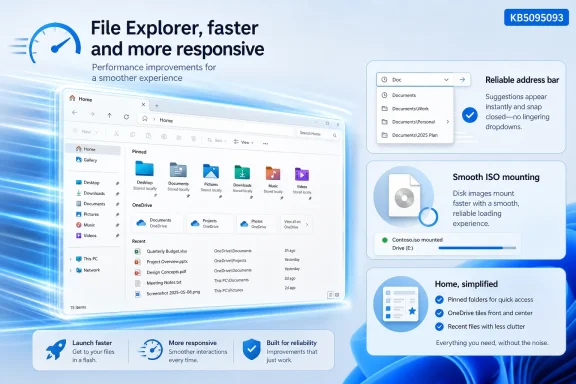
KB5095093 lands squarely in that zone. Microsoft’s own wording says the update improves the speed and performance of File Explorer launch, while also making the address bar suggestion dropdown more reliable and improving responsiveness when mounting disk images. Those are not flashy features, but they hit the small frictions that make Windows 11 feel less immediate than it should on modern hardware.
The change is also notable because it is arriving through an optional preview update, not a keynote demo or a major Windows release. That is how Windows is increasingly repaired now: in monthly cumulative packages that mix user-facing features, driver plumbing, security-adjacent maintenance, shell fixes, and small performance claims. The operating system no longer waits for a big version number to change character.
What makes this one worth watching is that File Explorer sits at the center of Windows credibility. Microsoft can add AI actions, cloud recommendations, Widgets refinements, and recovery tools, but if opening a folder still feels sticky, the platform reads as unfinished. KB5095093 is a quiet acknowledgement that the shell’s feel is part of the product.
That ambition carries a cost. Every extra source of context in Home asks Explorer to do more before the user gets to do anything. Cloud state must be reconciled, recent activity must be presented, account permissions must be respected, and the interface must avoid showing stale or duplicated results. When that work happens in the path between pressing Win+E and seeing a usable window, users experience it as lag.
This is why reports that the improvement comes from reorganizing Home rather than simply preloading Explorer are important. Preloading can make launch look faster by doing work before the user asks for the app, but it does not necessarily reduce complexity. Reworking the default surface suggests Microsoft is trying to shorten or defer the work that made Explorer feel slow in the first place.
That distinction will matter to administrators and power users. A preloaded Explorer would raise predictable questions about memory use, background processes, and whether users can disable the behavior without losing the benefit. A leaner Home path is less controversial because it improves the thing people actually use without asking the machine to keep more of the shell warm at all times.
The irony is that Home became heavy because Microsoft wanted File Explorer to be more helpful. Windows 11’s shell is supposed to understand recent work, cloud files, shared documents, and account context. But a file manager earns trust through immediacy first; intelligence comes second.
The address bar suggestion dropdown is also supposed to close more reliably after selection. Again, this is the kind of fix that sounds too small for a headline but large enough to matter in daily use. When the shell leaves stale UI elements hanging around, it creates the impression that the interface is one event behind the user.
Disk image mounting responsiveness is another practical improvement. ISO and disk-image workflows remain common for IT pros, developers, lab builders, and anyone dealing with installation media. If Explorer pauses or feels uncertain while mounting images, the user does not think “storage subsystem edge case”; the user thinks “Windows is slow.”
There are also refinements around renaming, including case-only name changes and repeated text selection in folder views. These fixes matter disproportionately to developers and cross-platform users, who are more likely to care about exact casing, synced folders, and source trees where names are not merely decorative. Explorer’s job is to make the filesystem feel predictable, not approximate.
Taken together, the Explorer fixes in KB5095093 suggest Microsoft is sanding down a cluster of shell irritations rather than flipping one magic performance switch. That is less exciting than a dramatic rewrite. It is also more believable.
For enthusiasts, that is an opportunity. If File Explorer lag has been a daily annoyance, installing the optional update may be worth the small risk that comes with any preview cumulative package. For managed fleets, the calculation is different. Optional updates are often where organizations observe fixes, validate compatibility, and decide whether to accelerate or wait.
This update also uses gradual rollout language, which means installing the KB may not instantly enable every feature or behavior on every eligible machine. That is now a familiar frustration in Windows servicing. Two PCs can report the same build number and still differ in visible feature availability because Microsoft gates some changes by device, market, account type, or rollout cohort.
The practical consequence is that users should be careful about declaring the update a failure within minutes of installation. Some improvements may be immediate, some may depend on configuration, and some may appear only after Microsoft expands the rollout. This is the modern Windows bargain: faster iteration, but less clean cause and effect.
For IT departments, the ambiguity is a management problem. Help desks prefer deterministic answers: install this update, get this behavior. Gradual feature rollout turns that into a probabilistic statement, which complicates documentation and user support even when the underlying fix is welcome.
Windows 11 has steadily modernized pieces of the shell while preserving decades of compatibility expectations. That is the hard part. Explorer must feel current, but it also has to behave well with network shares, old shell extensions, unusual path names, removable media, redirected folders, sync clients, and enterprise identity. The old Windows promise was that almost everything plugged into Explorer; the new Windows challenge is that almost everything still does.
This helps explain why Explorer performance fixes often arrive as incremental changes rather than dramatic overhauls. Microsoft cannot simply throw away the existing shell contract without breaking workflows that have accumulated over many Windows generations. Even small visual or behavioral changes can have enterprise consequences when they affect file dialogs, extensions, automation, or support scripts.
But compatibility cannot be a permanent excuse for hesitation. Users judge Windows 11 against phones, browsers, and lightweight desktop environments that respond instantly on modest hardware. If Explorer feels sluggish on fast SSDs and modern CPUs, the platform looks bloated even when the root cause is a complicated interaction between cloud metadata, shell extensions, and UI initialization.
KB5095093 therefore reads less like a one-off quality update and more like a reminder of Microsoft’s central Windows problem. The company wants the shell to become smarter and more connected, but every connected surface has to earn its keep in milliseconds.
A clean test machine with local storage and a personal Microsoft account is one environment. A domain-joined laptop with redirected folders, OneDrive Known Folder Move, VPN-dependent shares, shell extensions, security agents, and years of profile history is another. If the Explorer launch path has been streamlined, both should benefit, but not necessarily by the same amount.
That is why Microsoft’s address bar and OneDrive-related fixes matter alongside the raw launch claim. The worst Explorer experiences often happen when the shell is waiting on something external: a cloud sync provider, a network location, a stale shortcut, an extension, or a path parser that does not like what it has been handed. Faster launch is useful, but resilience under imperfect conditions is what makes the shell feel trustworthy.
The July deployment will also test how well Microsoft communicates gradual rollout behavior. Users will read that File Explorer is faster, install the cumulative update, and expect the change to be obvious. If the improvement is gated or subtle, some will conclude nothing happened. That may be unfair, but it is predictable.
Microsoft has spent years training Windows users to treat updates as both necessary and suspicious. A performance improvement in Explorer is exactly the kind of change that can rebuild goodwill, provided it arrives without side effects. If it introduces new regressions, the narrative flips quickly.
That does not mean every organization should rush the optional preview into production. Preview cumulative updates can contain fixes that are valuable and issues that are not yet widely understood. This KB also carries known-issue language around some third-party applications launching Office documents through OLE automation after Windows updates released on or after June 9, 2026. In environments with tax, dental, document-management, research, or accounting software, that caveat deserves attention.
The smarter move is targeted validation. Test the update on representative devices: a standard office laptop, a developer workstation, a machine with heavy OneDrive use, a device with mapped drives, and any system class that relies on unusual shell extensions or document workflows. Explorer performance is not just about opening a window; it is about how that window behaves in the organization’s actual file topology.
There is also a policy angle. If users are allowed to take optional previews themselves, support teams may see a mixed estate before July’s security update normalizes the baseline. If optional previews are blocked, users may still read about the Explorer improvement and ask why their machines remain slow. Either way, the update becomes a communication issue as much as a technical one.
For home users, the decision is simpler. If File Explorer lag is a daily irritation and the system is backed up, KB5095093 is a reasonable update to consider. If the machine is mission-critical or currently stable, waiting for July’s cumulative security update is the safer default.
That breadth is both impressive and exhausting. It shows Microsoft can continuously improve the operating system without waiting for annual monoliths. It also means users struggle to understand what changed, why it changed, and whether a specific improvement applies to them. The update model is efficient for delivery and poor for narrative clarity.
Explorer performance cuts through that noise because it is visceral. A faster file manager does not require a tutorial. It does not need a promotional video. Users either feel less waiting or they do not. In a Windows ecosystem crowded with AI branding and cloud integration, that kind of plain improvement is unusually persuasive.
There is a lesson here for Microsoft. The company often talks about Windows as a platform for productivity, creativity, and AI-assisted work. But the foundation of that platform is still the confidence that opening folders, renaming files, pasting paths, mounting images, and navigating storage will happen without friction. Productivity begins before Copilot enters the frame.
If KB5095093 makes Explorer feel meaningfully faster for a broad swath of users, it will do more for Windows 11’s reputation than several more minor feature additions. Performance is a feature users do not have to discover.
 Microsoft Finally Aims at the Pause Everyone Can Feel
File Explorer slowness has always occupied an awkward space in Windows criticism. It is rarely catastrophic enough to justify a rollback, rarely measurable enough to dominate benchmark charts, and yet it shapes the user’s sense of whether the machine is fighting back. A one-second hesitation in a shell window feels different from a one-second delay in a background service because it interrupts intent.KB5095093 lands squarely in that zone. Microsoft’s own wording says the update improves the speed and performance of File Explorer launch, while also making the address bar suggestion dropdown more reliable and improving responsiveness when mounting disk images. Those are not flashy features, but they hit the small frictions that make Windows 11 feel less immediate than it should on modern hardware.
The change is also notable because it is arriving through an optional preview update, not a keynote demo or a major Windows release. That is how Windows is increasingly repaired now: in monthly cumulative packages that mix user-facing features, driver plumbing, security-adjacent maintenance, shell fixes, and small performance claims. The operating system no longer waits for a big version number to change character.
What makes this one worth watching is that File Explorer sits at the center of Windows credibility. Microsoft can add AI actions, cloud recommendations, Widgets refinements, and recovery tools, but if opening a folder still feels sticky, the platform reads as unfinished. KB5095093 is a quiet acknowledgement that the shell’s feel is part of the product.
The Home Tab Became a Performance Tax
The technical story behind the Explorer speed-up appears to involve the Home view, the default landing area that replaced the older Quick Access concept in Windows 11. Home is no longer just a list of pinned folders and recent files. It is a blended surface for local files, OneDrive items, Favorites, account-linked recommendations, work or school identity, and now quick actions such as opening a file location or invoking Copilot where available.That ambition carries a cost. Every extra source of context in Home asks Explorer to do more before the user gets to do anything. Cloud state must be reconciled, recent activity must be presented, account permissions must be respected, and the interface must avoid showing stale or duplicated results. When that work happens in the path between pressing Win+E and seeing a usable window, users experience it as lag.
This is why reports that the improvement comes from reorganizing Home rather than simply preloading Explorer are important. Preloading can make launch look faster by doing work before the user asks for the app, but it does not necessarily reduce complexity. Reworking the default surface suggests Microsoft is trying to shorten or defer the work that made Explorer feel slow in the first place.
That distinction will matter to administrators and power users. A preloaded Explorer would raise predictable questions about memory use, background processes, and whether users can disable the behavior without losing the benefit. A leaner Home path is less controversial because it improves the thing people actually use without asking the machine to keep more of the shell warm at all times.
The irony is that Home became heavy because Microsoft wanted File Explorer to be more helpful. Windows 11’s shell is supposed to understand recent work, cloud files, shared documents, and account context. But a file manager earns trust through immediacy first; intelligence comes second.
Explorer’s Problem Was Never Just Launch Time
It would be easy to read KB5095093 as a single launch-speed patch, but Microsoft’s changelog points to a broader Explorer cleanup. The address bar now handles paths containing double backslashes and quotation marks, which sounds trivial until you remember how often administrators paste paths from scripts, logs, remote sessions, and documentation. A file manager that is picky about path syntax becomes a tax on troubleshooting.The address bar suggestion dropdown is also supposed to close more reliably after selection. Again, this is the kind of fix that sounds too small for a headline but large enough to matter in daily use. When the shell leaves stale UI elements hanging around, it creates the impression that the interface is one event behind the user.
Disk image mounting responsiveness is another practical improvement. ISO and disk-image workflows remain common for IT pros, developers, lab builders, and anyone dealing with installation media. If Explorer pauses or feels uncertain while mounting images, the user does not think “storage subsystem edge case”; the user thinks “Windows is slow.”
There are also refinements around renaming, including case-only name changes and repeated text selection in folder views. These fixes matter disproportionately to developers and cross-platform users, who are more likely to care about exact casing, synced folders, and source trees where names are not merely decorative. Explorer’s job is to make the filesystem feel predictable, not approximate.
Taken together, the Explorer fixes in KB5095093 suggest Microsoft is sanding down a cluster of shell irritations rather than flipping one magic performance switch. That is less exciting than a dramatic rewrite. It is also more believable.
Optional Updates Are Now Microsoft’s Public Test Track
KB5095093 is an optional preview update, which means users can install it now through Windows Update or the Microsoft Update Catalog, while most mainstream systems will receive the contents later through the next security update. This preview-to-Patch-Tuesday pipeline has become one of Microsoft’s most important release mechanisms. It lets the company put production-quality non-security fixes in front of willing users before the broader mandatory rollout.For enthusiasts, that is an opportunity. If File Explorer lag has been a daily annoyance, installing the optional update may be worth the small risk that comes with any preview cumulative package. For managed fleets, the calculation is different. Optional updates are often where organizations observe fixes, validate compatibility, and decide whether to accelerate or wait.
This update also uses gradual rollout language, which means installing the KB may not instantly enable every feature or behavior on every eligible machine. That is now a familiar frustration in Windows servicing. Two PCs can report the same build number and still differ in visible feature availability because Microsoft gates some changes by device, market, account type, or rollout cohort.
The practical consequence is that users should be careful about declaring the update a failure within minutes of installation. Some improvements may be immediate, some may depend on configuration, and some may appear only after Microsoft expands the rollout. This is the modern Windows bargain: faster iteration, but less clean cause and effect.
For IT departments, the ambiguity is a management problem. Help desks prefer deterministic answers: install this update, get this behavior. Gradual feature rollout turns that into a probabilistic statement, which complicates documentation and user support even when the underlying fix is welcome.
The Shell Is Carrying Too Many Jobs
The larger story is that File Explorer is no longer just File Explorer. It is a local file manager, a cloud sync browser, a SharePoint and OneDrive surface, a shell extension host, a preview surface, a search entry point, a compression tool, a disk-image handler, and increasingly a place where Microsoft can expose Copilot-adjacent actions. Every role is defensible in isolation. Together, they make Explorer harder to keep fast.Windows 11 has steadily modernized pieces of the shell while preserving decades of compatibility expectations. That is the hard part. Explorer must feel current, but it also has to behave well with network shares, old shell extensions, unusual path names, removable media, redirected folders, sync clients, and enterprise identity. The old Windows promise was that almost everything plugged into Explorer; the new Windows challenge is that almost everything still does.
This helps explain why Explorer performance fixes often arrive as incremental changes rather than dramatic overhauls. Microsoft cannot simply throw away the existing shell contract without breaking workflows that have accumulated over many Windows generations. Even small visual or behavioral changes can have enterprise consequences when they affect file dialogs, extensions, automation, or support scripts.
But compatibility cannot be a permanent excuse for hesitation. Users judge Windows 11 against phones, browsers, and lightweight desktop environments that respond instantly on modest hardware. If Explorer feels sluggish on fast SSDs and modern CPUs, the platform looks bloated even when the root cause is a complicated interaction between cloud metadata, shell extensions, and UI initialization.
KB5095093 therefore reads less like a one-off quality update and more like a reminder of Microsoft’s central Windows problem. The company wants the shell to become smarter and more connected, but every connected surface has to earn its keep in milliseconds.
The July Rollout Will Be the Real Test
Because the Explorer improvements are tied to June’s optional preview package and expected to move into July’s mandatory update flow, the next broader rollout will provide a better signal than early adopter reports. Enthusiasts and tech sites can spot a difference on individual machines, but the real question is whether the change holds across the messy diversity of Windows hardware and configurations. Explorer performance is notoriously sensitive to context.A clean test machine with local storage and a personal Microsoft account is one environment. A domain-joined laptop with redirected folders, OneDrive Known Folder Move, VPN-dependent shares, shell extensions, security agents, and years of profile history is another. If the Explorer launch path has been streamlined, both should benefit, but not necessarily by the same amount.
That is why Microsoft’s address bar and OneDrive-related fixes matter alongside the raw launch claim. The worst Explorer experiences often happen when the shell is waiting on something external: a cloud sync provider, a network location, a stale shortcut, an extension, or a path parser that does not like what it has been handed. Faster launch is useful, but resilience under imperfect conditions is what makes the shell feel trustworthy.
The July deployment will also test how well Microsoft communicates gradual rollout behavior. Users will read that File Explorer is faster, install the cumulative update, and expect the change to be obvious. If the improvement is gated or subtle, some will conclude nothing happened. That may be unfair, but it is predictable.
Microsoft has spent years training Windows users to treat updates as both necessary and suspicious. A performance improvement in Explorer is exactly the kind of change that can rebuild goodwill, provided it arrives without side effects. If it introduces new regressions, the narrative flips quickly.
Admins Should Treat This as a Quality Fix, Not a Feature Drop
For administrators, KB5095093 belongs in the category of updates that look small from a feature matrix but large from a support perspective. File Explorer is one of the few Windows components that nearly every user touches, regardless of role. A measurable reduction in hangs, launch delay, or address bar weirdness can lower the background hum of help-desk complaints.That does not mean every organization should rush the optional preview into production. Preview cumulative updates can contain fixes that are valuable and issues that are not yet widely understood. This KB also carries known-issue language around some third-party applications launching Office documents through OLE automation after Windows updates released on or after June 9, 2026. In environments with tax, dental, document-management, research, or accounting software, that caveat deserves attention.
The smarter move is targeted validation. Test the update on representative devices: a standard office laptop, a developer workstation, a machine with heavy OneDrive use, a device with mapped drives, and any system class that relies on unusual shell extensions or document workflows. Explorer performance is not just about opening a window; it is about how that window behaves in the organization’s actual file topology.
There is also a policy angle. If users are allowed to take optional previews themselves, support teams may see a mixed estate before July’s security update normalizes the baseline. If optional previews are blocked, users may still read about the Explorer improvement and ask why their machines remain slow. Either way, the update becomes a communication issue as much as a technical one.
For home users, the decision is simpler. If File Explorer lag is a daily irritation and the system is backed up, KB5095093 is a reasonable update to consider. If the machine is mission-critical or currently stable, waiting for July’s cumulative security update is the safer default.
The Quiet Explorer Fix Says More Than the Changelog
The most revealing thing about KB5095093 is that the File Explorer speed-up sits among a sprawling set of changes. The same update also touches Bluetooth reliability, Widgets behavior, accessibility features, printing defaults, networking, WSL VPN behavior, graphics reliability, taskbar behavior, shutdown timing for BITS, and explorer.exe stability. This is Windows servicing in 2026: not one story, but a pile of small stories sharing a reboot.That breadth is both impressive and exhausting. It shows Microsoft can continuously improve the operating system without waiting for annual monoliths. It also means users struggle to understand what changed, why it changed, and whether a specific improvement applies to them. The update model is efficient for delivery and poor for narrative clarity.
Explorer performance cuts through that noise because it is visceral. A faster file manager does not require a tutorial. It does not need a promotional video. Users either feel less waiting or they do not. In a Windows ecosystem crowded with AI branding and cloud integration, that kind of plain improvement is unusually persuasive.
There is a lesson here for Microsoft. The company often talks about Windows as a platform for productivity, creativity, and AI-assisted work. But the foundation of that platform is still the confidence that opening folders, renaming files, pasting paths, mounting images, and navigating storage will happen without friction. Productivity begins before Copilot enters the frame.
If KB5095093 makes Explorer feel meaningfully faster for a broad swath of users, it will do more for Windows 11’s reputation than several more minor feature additions. Performance is a feature users do not have to discover.
The Patch Notes Translate Into a Simple Decision
KB5095093 is not a reason to romanticize Windows Update, and it is not proof that File Explorer’s long-running performance complaints are solved forever. It is a useful preview of the direction Microsoft is taking: less tolerance for shell latency, more fixes around Home and cloud-linked behavior, and a continued reliance on gradual rollout to manage risk. The practical read is straightforward.- KB5095093 is an optional preview update for Windows 11 24H2 and 25H2, with the same changes expected to arrive more broadly in July’s security update cycle.
- The File Explorer improvement is aimed at launch speed and responsiveness, with reports pointing to Home view reorganization rather than background preloading as the key mechanism.
- The update also improves address bar handling, suggestion behavior, disk-image mounting responsiveness, OneDrive-related Explorer behavior, and several rename scenarios.
- Users may not see every change immediately because Microsoft is using gradual rollout for some Windows 11 experiences.
- Home users annoyed by Explorer lag can consider installing the optional update now, while managed environments should validate it against OneDrive, mapped drives, shell extensions, and document-heavy workflows.
- The update’s value is less about a single benchmark and more about whether Windows 11 feels less hesitant in one of its most-used surfaces.
References
- Primary source: PCWorld
Published: 2026-06-29T14:42:23.381887
Microsoft quietly sped up File Explorer in June's optional update | PCWorld
Microsoft's optional KB5095093 update speeds up File Explorer, fixes the address bar, and improves disk image performance.www.pcworld.com - Related coverage: windowslatest.com
Microsoft begins rolling out a faster File Explorer on Windows 11, and no, it's not preloading
Microsoft has quietly confirmed that it's rolling out a faster File Explorer on Windows 11, and a faster context menu is coming. www.windowslatest.com
- Related coverage: anavem.com
KB5095093: Windows 11 Preview Update – Builds 26200/26100 (2026)
KB5095093 is the June 23, 2026 Preview Cumulative Update for Windows 11 (Builds 26200.8737 & 26100.8737). Fixes taskbar, File Explorer, DirectX, Search, andwww.anavem.com - Related coverage: windowsreport.com
Windows 11 KB5095093 Brings Major File Explorer, Bluetooth, and Networking Improvements
Microsoft's Windows 11 KB5095093 preview update improves File Explorer, Bluetooth, networking, VPN support, voice typing, and more. windowsreport.com
- Related coverage: technobaboy.com
Microsoft rolls out Windows 11 KB5095093 with new features - Technobaboy
Windows 11 KB5095093 released with restore snapshots, widget updates, Bluetooth fixes, and Explorer improvements.www.technobaboy.com - Official source: support.microsoft.com
File Explorer in Windows | Microsoft Support
Find and open File Explorer in Windows, and customize Quick access by pinning and removing files and folders.support.microsoft.com
- Related coverage: windowscentral.com
Microsoft is testing a Windows 11 tweak that preloads File Explorer in the background to make it faster | Windows Central
Microsoft is testing a change to File Explorer on Windows 11 that will automatically run it in the background to make launching the app faster.www.windowscentral.com - Related coverage: techradar.com
- Official source: news.microsoft.com