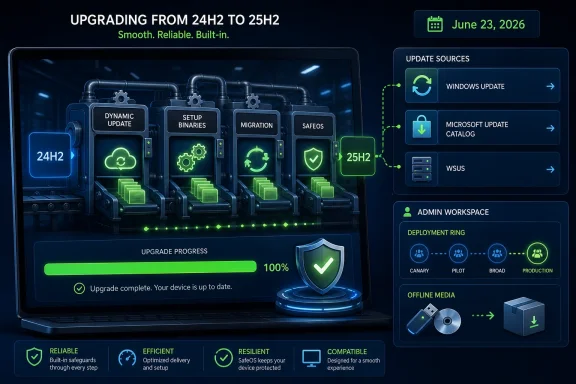
Microsoft released KB5095189 on June 23, 2026, as a cumulative Out of Box Experience update for Windows 11 versions 24H2 and 25H2, delivered automatically during setup when a device reaches OOBE with an available Internet connection. The update is narrow, quiet, and easy to miss, but it touches one of the most politically loaded parts of modern Windows: the moment before the user gets control. Its significance is not that it fixes a named crash or adds a visible feature; it is that Microsoft continues to treat first boot as a serviceable, cloud-connected surface. For administrators, refurbishers, OEMs, and Windows enthusiasts, that is both useful engineering and another reminder that “clean install” no longer means “static install.”
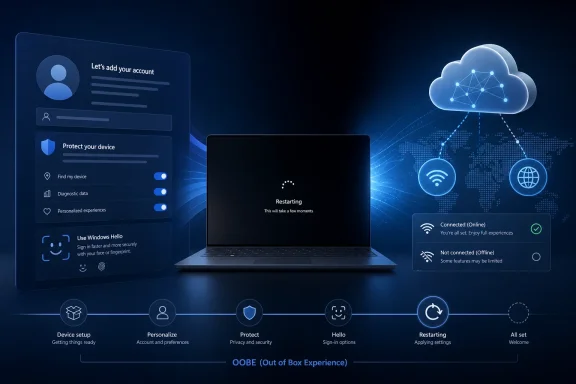
The Out of Box Experience used to be a handoff ceremony. Windows copied files, rebooted, asked for a name, maybe asked for a product key, and then delivered the desktop. In Windows 11, OOBE is closer to a managed web-and-system workflow: identity, network, privacy settings, Microsoft account handling, enterprise enrollment, Windows Hello, regional selection, device naming, and sometimes recovery or restore all converge before the user ever sees Explorer.
KB5095189 fits squarely inside that newer model. Microsoft says the cumulative update improves the OOBE process for Windows 11 24H2 and 25H2, applies only to OOBE, and is available only when OOBE updates are installed. It downloads and installs automatically during that phase if the PC is online.
That caveat matters. This is not a regular cumulative update for a machine already in service, and it is not a full operating system refresh. It is a setup-time patch, aimed at a system state that many users experience only once but that enterprises and OEMs experience thousands of times.
The article also says the device requires a restart after applying the update. That may sound mundane, but it explains why new Windows 11 devices can sometimes appear to take an extra lap during initial setup: the OOBE layer itself can be updated, then Windows can reboot back into a revised version of the same onboarding pipeline.
The word cumulative is doing more work than the support page’s sparse prose suggests. Microsoft is telling administrators that the June package supersedes the earlier OOBE update rather than sitting alongside it as a one-off. That is the standard servicing story Windows admins know from monthly cumulative updates, now applied to the pre-desktop setup stack.
This is sensible from Microsoft’s perspective. If OOBE is increasingly responsible for account setup, cloud policy discovery, Autopilot-style enrollment, restore flows, privacy choices, and device readiness checks, then letting that code age inside install media is a support problem waiting to happen. A factory image burned months earlier may reach a cloud service whose assumptions have already changed.
But it also shifts part of Windows reliability away from the ISO or OEM image and toward live setup. In practical terms, the first boot of a Windows 11 24H2 or 25H2 device may be using newer OOBE components than the install media that placed Windows on the disk. That is not inherently bad; in fact, it is often exactly what prevents a broken sign-in flow or outdated enrollment screen. But it means the real setup experience is now partly defined at runtime.
KB5095189’s support article moves that file information into a downloadable CSV rather than displaying pages of component tables inline. That is cleaner for humans but also a quiet admission of scale. The OOBE stack is not a tiny dialog box; it is a bundled application environment with scripts, markup, native binaries, localized resources, policy templates, and UI assets.
This is why OOBE updates are a category of their own. A bug in this area can block a new PC from becoming usable, derail enterprise provisioning, confuse local account creation, interrupt Microsoft account authentication, or produce region-specific setup failures. The setup phase is short, but the consequences of failure are disproportionate.
For enthusiasts, this also explains why the “OOBE” term has outgrown its old meaning. It now covers the whole first-run negotiation between Windows, the user, Microsoft’s cloud, enterprise identity systems, hardware vendors, and policy. The desktop is not the beginning of Windows setup anymore; it is the point at which setup has decided enough conditions have been satisfied.
For consumers, that difference is usually invisible unless something changes in the account flow, the privacy pages, the restore experience, or the timing of a reboot. For IT departments, it is operationally important. A device staged online may receive a newer OOBE stack before enrollment; a device staged offline may proceed with whatever OOBE components are already present in the image.
That does not mean administrators should avoid connectivity. In managed deployments, online OOBE is often necessary for Entra ID join, mobile device management enrollment, Autopilot, device registration, and policy retrieval. But it does mean OOBE should be treated as a network-dependent servicing moment, not merely a passive screen sequence.
There is also a reproducibility problem. Help desk scripts, imaging labs, and deployment runbooks often assume that a given build behaves the same way every time. OOBE updates complicate that assumption because the install medium is not the only variable. The date of deployment, Internet access, and Microsoft’s current setup-time servicing payload can all matter.
This should not surprise anyone who has followed recent Windows development. Microsoft has repeatedly tried to reduce friction between annual Windows 11 releases where possible, with enablement-style changes and shared servicing foundations appearing across adjacent versions. Even when a version number changes, not every layer of the operating system necessarily diverges.
OOBE is an especially logical candidate for shared servicing. The account screens, cloud discovery pieces, region and language pages, and enrollment flows need to behave consistently across supported releases because the back-end services do not want to maintain an infinite matrix of first-run clients. If Microsoft wants a unified setup funnel, shared OOBE updates are a natural tool.
For WindowsForum readers, the practical conclusion is straightforward: if you are testing 25H2 deployment behavior, do not assume that every observed change comes from 25H2 itself. Some setup behavior may arrive through an OOBE update that also applies to 24H2.
Microsoft can absorb that friction on consumer PCs because OOBE already involves restarts, progress rings, and “getting things ready” interludes. In enterprise staging, the restart matters more. A technician watching a device enroll may need to distinguish a normal OOBE servicing restart from a provisioning failure, a reboot loop, or a policy-driven reset.
The restart also reinforces that OOBE is not merely web content. Native components and host processes are involved, and updating them safely may require tearing down and reinitializing the setup environment. That is a heavier operation than refreshing a page.
For high-volume deployments, the best response is not panic but instrumentation. Teams should document that OOBE can install a cumulative update and reboot before the device reaches the desktop. If your deployment timing metrics suddenly stretch by a few minutes after June 23, KB5095189 belongs on the suspect list.
That warning is not presented as the purpose of KB5095189, and Microsoft does not say the OOBE update is a Secure Boot certificate update. The placement still matters. June 2026 is now a live servicing milestone for the trust chain beneath Windows startup, and Microsoft is using support pages across the Windows update ecosystem to keep the message visible.
This is where OOBE becomes strategically interesting. A new or newly reset Windows device is exactly the kind of machine that may need to establish trust state, enroll identity, apply policy, and catch up on servicing before normal use. Microsoft’s setup pipeline is a natural place to reduce the chance that a device emerges from first boot already behind on critical readiness work.
Administrators should resist overreading the page. KB5095189 is described as an OOBE cumulative update, not a Secure Boot remediation package. But they also should not ignore the adjacency. Windows servicing in 2026 is increasingly about making sure devices are healthy before they are handed to users, and OOBE is one of the few moments where Microsoft can still influence the device before habits, apps, and local configuration settle in.
Updating OOBE during setup gives Microsoft a way to fix these problems without waiting for OEMs to refresh factory images or users to install a full update after reaching the desktop. That is especially valuable for devices sitting in warehouses, schools, enterprise staging rooms, and refurbisher inventories. A laptop imaged in March can be unboxed in July and still receive June’s setup fixes before the user signs in.
For OEMs, this reduces the cost of stale images. They still need to ship stable builds, but Microsoft can patch parts of the first-run experience dynamically. For users, the benefit is boring but real: fewer dead ends during the first hour of ownership.
The risk is that Microsoft also gains more power over the first-run funnel. If OOBE is live-serviceable, Microsoft can change not just bug fixes but presentation, defaults, prompts, and flows. The support article does not claim KB5095189 does that. The broader architecture, however, makes it possible.
The answer is not to treat KB5095189 as dangerous. The answer is to treat it as part of deployment reality. If your organization provisions Windows 11 24H2 or 25H2 systems online, OOBE updates are in scope for testing. They belong in lab validation, Autopilot pilot rings, and help desk documentation.
There is also a communications issue. When Microsoft publishes a normal cumulative update, admins can map it to release notes, known issues, and deployment tools. OOBE updates are often thinner on explanation. “Improves the out-of-box experience” is accurate but not diagnostic. If an OOBE update changes behavior in a way that affects a provisioning workflow, administrators may need to infer cause from timing, logs, and component versions rather than from a detailed changelog.
That opacity is the weakest part of the model. Microsoft is right to service OOBE, but IT pros deserve more clarity when setup-time components change. The company does not need to expose every implementation detail, but it should distinguish reliability fixes, enrollment fixes, account-flow changes, localization updates, and security-related setup hardening more explicitly.
File lists matter to administrators, security analysts, image maintainers, and support engineers because they provide concrete evidence of what changed. A vague “OOBE improvement” becomes more actionable when you can see versions, file names, sizes, timestamps, and architecture differences. The CSV format also makes it easier to diff against previous packages, archive internally, or import into tooling.
There is a subtle documentation improvement here. KB5078674’s page exposed a huge inline file table, which was useful but unwieldy. KB5095189’s downloadable file list is a better fit for machine-assisted inspection, even if it makes the support article look sparse.
The note that the English version might contain files for additional languages is also worth keeping. OOBE is a multilingual first-run surface, and localization resources are not decorative. A bad string, missing resource, or wrong regional asset can break trust during the first minutes of device ownership.
 Microsoft Keeps Moving the First Boot Finish Line
The Out of Box Experience used to be a handoff ceremony. Windows copied files, rebooted, asked for a name, maybe asked for a product key, and then delivered the desktop. In Windows 11, OOBE is closer to a managed web-and-system workflow: identity, network, privacy settings, Microsoft account handling, enterprise enrollment, Windows Hello, regional selection, device naming, and sometimes recovery or restore all converge before the user ever sees Explorer.KB5095189 fits squarely inside that newer model. Microsoft says the cumulative update improves the OOBE process for Windows 11 24H2 and 25H2, applies only to OOBE, and is available only when OOBE updates are installed. It downloads and installs automatically during that phase if the PC is online.
That caveat matters. This is not a regular cumulative update for a machine already in service, and it is not a full operating system refresh. It is a setup-time patch, aimed at a system state that many users experience only once but that enterprises and OEMs experience thousands of times.
The article also says the device requires a restart after applying the update. That may sound mundane, but it explains why new Windows 11 devices can sometimes appear to take an extra lap during initial setup: the OOBE layer itself can be updated, then Windows can reboot back into a revised version of the same onboarding pipeline.
The Cumulative Label Is the Real Change
The predecessor here is KB5078674, published in February 2026 and later updated in May. That earlier OOBE update was also for Windows 11 24H2 and 25H2, and it installed during OOBE when an Internet connection was available. KB5095189 explicitly replaces it.The word cumulative is doing more work than the support page’s sparse prose suggests. Microsoft is telling administrators that the June package supersedes the earlier OOBE update rather than sitting alongside it as a one-off. That is the standard servicing story Windows admins know from monthly cumulative updates, now applied to the pre-desktop setup stack.
This is sensible from Microsoft’s perspective. If OOBE is increasingly responsible for account setup, cloud policy discovery, Autopilot-style enrollment, restore flows, privacy choices, and device readiness checks, then letting that code age inside install media is a support problem waiting to happen. A factory image burned months earlier may reach a cloud service whose assumptions have already changed.
But it also shifts part of Windows reliability away from the ISO or OEM image and toward live setup. In practical terms, the first boot of a Windows 11 24H2 or 25H2 device may be using newer OOBE components than the install media that placed Windows on the disk. That is not inherently bad; in fact, it is often exactly what prevents a broken sign-in flow or outdated enrollment screen. But it means the real setup experience is now partly defined at runtime.
OOBE Is No Longer Just a Wizard
The file list from KB5078674 gave a revealing glimpse into what Microsoft considers part of OOBE. It included CloudExperienceHost components, Microsoft account token provider pieces, local account screens, Windows Hello enrollment, enterprise enrollment, OEM registration, retail demo paths, language and region pages, privacy settings assets, WebView-based OOBE host files, and Lottie animations used by modern setup UI.KB5095189’s support article moves that file information into a downloadable CSV rather than displaying pages of component tables inline. That is cleaner for humans but also a quiet admission of scale. The OOBE stack is not a tiny dialog box; it is a bundled application environment with scripts, markup, native binaries, localized resources, policy templates, and UI assets.
This is why OOBE updates are a category of their own. A bug in this area can block a new PC from becoming usable, derail enterprise provisioning, confuse local account creation, interrupt Microsoft account authentication, or produce region-specific setup failures. The setup phase is short, but the consequences of failure are disproportionate.
For enthusiasts, this also explains why the “OOBE” term has outgrown its old meaning. It now covers the whole first-run negotiation between Windows, the user, Microsoft’s cloud, enterprise identity systems, hardware vendors, and policy. The desktop is not the beginning of Windows setup anymore; it is the point at which setup has decided enough conditions have been satisfied.
The Internet Connection Is the Switch
KB5095189 installs automatically during OOBE if an Internet connection is available. That line is both technically simple and politically loaded. It means two users installing the same Windows 11 image can have different first-run experiences depending on whether the machine is online during setup.For consumers, that difference is usually invisible unless something changes in the account flow, the privacy pages, the restore experience, or the timing of a reboot. For IT departments, it is operationally important. A device staged online may receive a newer OOBE stack before enrollment; a device staged offline may proceed with whatever OOBE components are already present in the image.
That does not mean administrators should avoid connectivity. In managed deployments, online OOBE is often necessary for Entra ID join, mobile device management enrollment, Autopilot, device registration, and policy retrieval. But it does mean OOBE should be treated as a network-dependent servicing moment, not merely a passive screen sequence.
There is also a reproducibility problem. Help desk scripts, imaging labs, and deployment runbooks often assume that a given build behaves the same way every time. OOBE updates complicate that assumption because the install medium is not the only variable. The date of deployment, Internet access, and Microsoft’s current setup-time servicing payload can all matter.
Why 24H2 and 25H2 Share the Same Setup Patch
KB5095189 applies to Windows 11 versions 24H2 and 25H2, all editions. That pairing tells us something about Microsoft’s current Windows 11 servicing cadence. The setup experience for these releases is close enough that Microsoft can service it with a common OOBE package.This should not surprise anyone who has followed recent Windows development. Microsoft has repeatedly tried to reduce friction between annual Windows 11 releases where possible, with enablement-style changes and shared servicing foundations appearing across adjacent versions. Even when a version number changes, not every layer of the operating system necessarily diverges.
OOBE is an especially logical candidate for shared servicing. The account screens, cloud discovery pieces, region and language pages, and enrollment flows need to behave consistently across supported releases because the back-end services do not want to maintain an infinite matrix of first-run clients. If Microsoft wants a unified setup funnel, shared OOBE updates are a natural tool.
For WindowsForum readers, the practical conclusion is straightforward: if you are testing 25H2 deployment behavior, do not assume that every observed change comes from 25H2 itself. Some setup behavior may arrive through an OOBE update that also applies to 24H2.
The Restart Requirement Is a Small Clue With Big Deployment Implications
The support article says a restart is required after applying KB5095189. In a normal desktop update, that line is routine. During OOBE, however, a restart can be more disruptive because the user has not yet finished setup and may not understand why a supposedly new PC is already rebooting.Microsoft can absorb that friction on consumer PCs because OOBE already involves restarts, progress rings, and “getting things ready” interludes. In enterprise staging, the restart matters more. A technician watching a device enroll may need to distinguish a normal OOBE servicing restart from a provisioning failure, a reboot loop, or a policy-driven reset.
The restart also reinforces that OOBE is not merely web content. Native components and host processes are involved, and updating them safely may require tearing down and reinitializing the setup environment. That is a heavier operation than refreshing a page.
For high-volume deployments, the best response is not panic but instrumentation. Teams should document that OOBE can install a cumulative update and reboot before the device reaches the desktop. If your deployment timing metrics suddenly stretch by a few minutes after June 23, KB5095189 belongs on the suspect list.
The Security Subtext Is Sitting in the Related Topics Box
KB5095189’s page includes a related warning about Secure Boot certificate expiration beginning in June 2026. Microsoft says devices that have not yet received newer certificates will continue to start and operate normally, and standard Windows updates will continue to install. It also points users toward Windows Security for status checks and administrators toward Secure Boot playbooks.That warning is not presented as the purpose of KB5095189, and Microsoft does not say the OOBE update is a Secure Boot certificate update. The placement still matters. June 2026 is now a live servicing milestone for the trust chain beneath Windows startup, and Microsoft is using support pages across the Windows update ecosystem to keep the message visible.
This is where OOBE becomes strategically interesting. A new or newly reset Windows device is exactly the kind of machine that may need to establish trust state, enroll identity, apply policy, and catch up on servicing before normal use. Microsoft’s setup pipeline is a natural place to reduce the chance that a device emerges from first boot already behind on critical readiness work.
Administrators should resist overreading the page. KB5095189 is described as an OOBE cumulative update, not a Secure Boot remediation package. But they also should not ignore the adjacency. Windows servicing in 2026 is increasingly about making sure devices are healthy before they are handed to users, and OOBE is one of the few moments where Microsoft can still influence the device before habits, apps, and local configuration settle in.
Where This Helps Microsoft, OEMs, and Users
There is a good case for KB5095189. New PC setup is fragile in ways that are easy to underestimate. A broken account page can block a consumer. A failed enterprise enrollment step can strand a corporate laptop. A localization problem can affect an entire market. A mismatch between OOBE and Microsoft’s authentication services can generate support calls that have nothing to do with the Windows kernel.Updating OOBE during setup gives Microsoft a way to fix these problems without waiting for OEMs to refresh factory images or users to install a full update after reaching the desktop. That is especially valuable for devices sitting in warehouses, schools, enterprise staging rooms, and refurbisher inventories. A laptop imaged in March can be unboxed in July and still receive June’s setup fixes before the user signs in.
For OEMs, this reduces the cost of stale images. They still need to ship stable builds, but Microsoft can patch parts of the first-run experience dynamically. For users, the benefit is boring but real: fewer dead ends during the first hour of ownership.
The risk is that Microsoft also gains more power over the first-run funnel. If OOBE is live-serviceable, Microsoft can change not just bug fixes but presentation, defaults, prompts, and flows. The support article does not claim KB5095189 does that. The broader architecture, however, makes it possible.
Where Enterprise IT Sees the Trade-Off
Enterprise administrators tend to dislike surprise, and setup-time cumulative updates are surprise-adjacent by design. They appear before the device is fully managed, may depend on Internet access, can require a reboot, and may not be obvious to the end user or field technician. That is a lot of moving parts for a process that enterprises prefer to standardize.The answer is not to treat KB5095189 as dangerous. The answer is to treat it as part of deployment reality. If your organization provisions Windows 11 24H2 or 25H2 systems online, OOBE updates are in scope for testing. They belong in lab validation, Autopilot pilot rings, and help desk documentation.
There is also a communications issue. When Microsoft publishes a normal cumulative update, admins can map it to release notes, known issues, and deployment tools. OOBE updates are often thinner on explanation. “Improves the out-of-box experience” is accurate but not diagnostic. If an OOBE update changes behavior in a way that affects a provisioning workflow, administrators may need to infer cause from timing, logs, and component versions rather than from a detailed changelog.
That opacity is the weakest part of the model. Microsoft is right to service OOBE, but IT pros deserve more clarity when setup-time components change. The company does not need to expose every implementation detail, but it should distinguish reliability fixes, enrollment fixes, account-flow changes, localization updates, and security-related setup hardening more explicitly.
The File List Moving to CSV Is a Small Win for People Who Actually Audit Windows
KB5095189’s support page says the list of included files is provided as a comma-delimited CSV file that can be opened in Notepad or Excel. That is less visually satisfying than an inline table, but it is more useful for the people who need to compare packages.File lists matter to administrators, security analysts, image maintainers, and support engineers because they provide concrete evidence of what changed. A vague “OOBE improvement” becomes more actionable when you can see versions, file names, sizes, timestamps, and architecture differences. The CSV format also makes it easier to diff against previous packages, archive internally, or import into tooling.
There is a subtle documentation improvement here. KB5078674’s page exposed a huge inline file table, which was useful but unwieldy. KB5095189’s downloadable file list is a better fit for machine-assisted inspection, even if it makes the support article look sparse.
The note that the English version might contain files for additional languages is also worth keeping. OOBE is a multilingual first-run surface, and localization resources are not decorative. A bad string, missing resource, or wrong regional asset can break trust during the first minutes of device ownership.
The June OOBE Patch Leaves Five Practical Signals
KB5095189 is not a headline-grabbing Windows update, but it tells administrators and enthusiasts how Microsoft is thinking about Windows 11 setup in mid-2026. The first-run experience is now a serviced layer, and that makes deployment both more resilient and less static.- KB5095189 applies only to Windows 11 24H2 and 25H2 during the OOBE process, not as a general desktop cumulative update.
- The update installs automatically during setup when an Internet connection is available, so online and offline first-run behavior can differ.
- The package requires a restart after installation, which may add an extra reboot before the user reaches the desktop.
- KB5095189 replaces KB5078674, making the June release the current cumulative OOBE package for those Windows 11 versions.
- Microsoft provides the file inventory as a downloadable CSV, which is better suited to auditing and comparison than a long embedded table.
- The related Secure Boot certificate warning on the page should be read as contextual Windows servicing guidance, not as proof that this OOBE package itself is a Secure Boot fix.
References
- Primary source: Microsoft Support
Published: Tue, 23 Jun 2026 17:02:16 Z