

Microsoft released KB5096038 on May 26, 2026, as a Safe OS Dynamic Update for Windows 11 versions 24H2 and 25H2, delivering Windows Recovery Environment improvements while repeating its warning that Secure Boot certificates on most Windows devices begin expiring in June 2026 and require planning. That sounds like a small servicing footnote, the kind of update admins approve between larger cumulative patches. It is not. KB5096038 is another sign that Microsoft is moving the Windows boot chain from a 2011 trust model to a 2023 one, and the clock is now measured in weeks rather than quarters.
KB5096038 is, on its face, a Safe OS Dynamic Update. In Microsoft’s servicing vocabulary, that means it targets the Windows setup and recovery environment rather than the day-to-day desktop shell, Start menu, kernel fixes, or application compatibility layers that dominate normal cumulative update chatter.
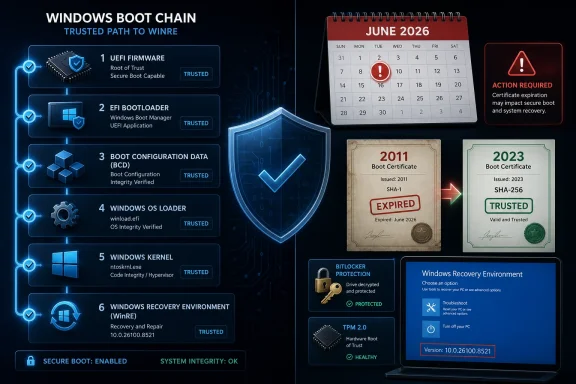
The stated payload is simple: improvements to the Windows Recovery Environment, or WinRE. Microsoft says the update applies to all editions of Windows 11 version 24H2 and Windows 11 version 25H2, arrives through Windows Update automatically, is available from the Microsoft Update Catalog, and does not require a restart after application. Once installed, the WinRE version should report as 10.0.26100.8521.
That would normally be the whole story. WinRE updates are not glamorous; they are the plumbing that matters most when something else has already gone wrong. They support recovery, repair, reset, BitLocker workflows, and the offline servicing path that administrators would rather not need but absolutely need to trust.
The headline inside the headline is Microsoft’s repeated Secure Boot warning. The KB article again tells users and administrators that Secure Boot certificates used by most Windows devices are set to expire starting in June 2026, and that affected systems may lose the ability to boot securely if not updated in time.
That warning is not decorative boilerplate. Microsoft has been seeding the same message across support pages, Windows release notes, server guidance, and IT pro documentation because Secure Boot is one of those technologies that only becomes visible when it fails. The practical lesson of KB5096038 is that recovery readiness and boot-chain trust now belong in the same conversation.
That trust depends on certificates stored in UEFI firmware databases. There is a Platform Key, Key Enrollment Keys, an allowed signature database, and a disallowed signature database. Most users never see these structures, but every Secure Boot decision depends on them.
The problem is not that Secure Boot suddenly became broken. The problem is that much of the ecosystem still relies on Microsoft certificates issued in 2011. Those certificates were not meant to last forever, and their expiration schedule now collides with the lived reality of Windows hardware: long-lived PCs, forgotten servers, disconnected spares, lab machines, point-of-sale systems, and firmware that may not have been touched since procurement day.
Microsoft’s certificate table is blunt about the calendar. The Microsoft Corporation KEK CA 2011 expires on June 24, 2026. The Microsoft UEFI CA 2011 expires on June 27, 2026. The Microsoft Windows Production PCA 2011 follows on October 19, 2026.
The replacement architecture moves to 2023 certificates, including a new KEK certificate and new UEFI CA certificates. Microsoft is also splitting some trust roles more cleanly, separating certificates used for third-party boot loaders from those used for option ROMs. That is sensible security engineering, but sensible security engineering still has to survive the messy world of OEM firmware, BitLocker recovery keys, imaging workflows, and machines that only connect to management once in a while.
That distinction matters. A device missing the updated Secure Boot certificates is not automatically dead, and Microsoft is not saying every affected PC will fail to boot the morning a certificate expires. The danger is subtler and more operationally awkward: those devices may no longer receive future Secure Boot protections for early boot components, including boot manager updates, Secure Boot database updates, revocation lists, and mitigations for newly discovered boot-level vulnerabilities.
That is the kind of degradation enterprises hate because it does not always break loudly. It can leave a machine apparently healthy while weakening the foundation beneath disk encryption, boot validation, third-party boot loaders, recovery operations, and future revocation handling.
Security teams should resist both extremes. This is not a reason to declare Secure Boot useless theater, nor is it proof that every unremediated laptop is hours away from becoming a paperweight. It is a lifecycle event for a root of trust, and lifecycle events are where IT process either proves itself or collapses into heroics.
Microsoft’s messaging reflects that tension. The company is trying to make the update routine for the broadest possible population while giving managed environments enough knobs to inventory, pilot, and stage the transition. That dual-track approach is necessary, but it also guarantees confusion: home users are told to keep updating, while administrators are told to validate firmware, status signals, policy settings, and deployment rings.
Windows recovery is the operating system’s safety net. It is where automatic repair runs, where reset workflows begin, where command-line repair tools live, and where BitLocker recovery prompts can become the difference between a recoverable incident and a lost afternoon. If the pre-boot and recovery path is stale, the endpoint’s resilience story is stale too.
Microsoft says KB5096038 has no prerequisites, requires no restart, and cannot be removed once applied to a Windows image. That last point is normal for this class of servicing, but it should remind administrators that Safe OS updates are image-maintenance events, not casual app updates. They become part of the recovery substrate.
For Windows 11 24H2 and 25H2, the shared servicing branch also matters. Microsoft has treated these releases as closely related from a servicing standpoint, which means Safe OS Dynamic Updates can serve both version lines. That is good for operational simplicity, but it also concentrates responsibility: if your 24H2 and 25H2 deployment rings share the same imaging or update assumptions, a blind spot can spread quickly.
The lesson is not that KB5096038 is dangerous. The lesson is that recovery environments deserve the same reporting discipline as monthly cumulative updates. If admins can tell you the OS build but not the WinRE version, the Secure Boot certificate status, or whether firmware updates are actually landing, they do not yet have a complete picture of endpoint health.
That is the ideal outcome. The least disruptive certificate migration is the one most users never notice. If Windows Update can deliver the required changes and the firmware accepts them cleanly, the whole event becomes another invisible piece of platform maintenance.
But Microsoft’s own guidance makes clear that not every device belongs to that easy category. Older firmware, OEM-specific behavior, managed update policies, disconnected devices, and systems with specialized boot requirements can complicate the transition. Some machines may need firmware updates before certificate remediation succeeds.
That is where enterprise risk begins. The affected population is not defined only by Windows version. It is defined by firmware state, Secure Boot configuration, certificate inventory, update channel, management model, and sometimes by whether a device has been sitting on a shelf since a hardware refresh.
This is also why “we patch monthly” is not a sufficient answer. Monthly patch compliance may tell you that a device has current Windows fixes, but it may not prove that its UEFI Secure Boot databases have been updated, that BitLocker will behave after the change, or that a future boot manager revocation will apply successfully.
The problem becomes more interesting in mixed environments. A corporate fleet might contain Windows 11 24H2 laptops, Windows 10 ESU systems, Windows Server instances, Azure Virtual Desktop hosts, Windows 365 Cloud PCs, lab hardware, and dual-boot developer machines. Secure Boot is a platform boundary, not a neat Windows SKU boundary.
Microsoft has documented status signals, including event log indicators and registry values, that administrators can use to determine whether systems have moved to the expected 2023 certificate state. The presence or absence of those signals is where organizations should start, not with vague confidence that update rings are working.
Event IDs such as 1795 and 1801, along with values like UEFICA2023Status, matter because they turn an abstract trust migration into a measurable deployment. Without that measurement, admins are left with anecdotes: a pilot group seemed fine, a few laptops prompted for BitLocker recovery, a firmware package was approved, a help desk ticket mentioned a startup hang.
A good inventory pass should separate devices into at least four practical buckets: already remediated, eligible but pending, blocked by firmware or policy, and unknown. The last bucket is the one that deserves the most suspicion. Unknown systems are how a June security deadline becomes an October outage.
The same logic applies to spares and cold storage. Devices that are powered off during the transition window may miss the smooth path. They may still be recoverable later, but recovery later is more expensive than remediation now, especially when the device is needed for a new employee, a field replacement, or an incident response surge.
Microsoft’s guidance warns that higher-risk scenarios can include BitLocker recovery prompts, repeated recovery loops, startup hangs, Secure Boot validation errors, and devices failing to boot. That does not mean those outcomes are expected for most machines, but it does mean they are plausible enough to plan around.
For home users, the practical advice is boring but vital: make sure the Microsoft account or other recovery-key location is current before experimenting with firmware settings. For business users, the burden is heavier. Recovery keys must be escrowed, retrievable, and tested through the same support process that would be used during a real incident.
The riskiest organization is not the one with BitLocker enabled everywhere. It is the one with BitLocker enabled everywhere but recovery-key hygiene treated as someone else’s problem. Secure Boot certificate updates expose that gap because the boot chain is exactly where encryption policy meets hardware reality.
This is why pilots need to include BitLocker-enabled systems across multiple OEM models and firmware revisions. A pilot made of fresh hardware from a single vendor tells you very little about the odd machines that actually generate tickets.
Virtualization complicates the story further. Secure Boot exists in physical firmware, but it also exists in virtualized trust models for cloud and hypervisor-backed machines. Azure, Windows 365, Azure Virtual Desktop, Trusted Launch virtual machines, and confidential VM scenarios each introduce a different operational surface.
For server teams, the question is not merely whether a certificate update can be applied. It is whether the update fits into a maintenance sequence that includes firmware, hypervisor compatibility, backup validation, cluster failover, disaster recovery testing, and rollback planning.
Here again, the expiration dates should not be read as a single cliff. The June certificates and the October Windows Production PCA date create a staged pressure curve. That can be useful if organizations treat it as a runway. It will be brutal if they treat it as trivia until a security tool starts flagging boot-chain exposure.
The server lesson for client admins is clear: if the machine matters, test the boot path before the calendar tests it for you.
And yet the user experience remains awkward because Secure Boot sits at the intersection of Microsoft, OEMs, firmware vendors, enterprise management tools, and local device state. Microsoft can provide the certificates and the Windows-side machinery, but firmware compatibility still matters. OEM updates still matter. Admin policy still matters.
That is the perennial Windows platform bargain. The ecosystem’s flexibility is also its management burden. Microsoft can update a Surface fleet more predictably than it can update a decade of mixed hardware from every PC maker, white-box vendor, and embedded-device supplier.
The KB5096038 article illustrates the tension. One paragraph says the update will download and install automatically through Windows Update. Another prominent warning says Secure Boot certificates used by most Windows devices are expiring and may require action. Both statements are true, but they speak to different layers of the stack.
For WindowsForum readers, that distinction is everything. KB5096038 should be approved like a recovery update, but understood as part of a larger boot-trust migration. Treating it as only one or the other misses the point.
The Windows 10 angle matters because 2026 is already a messy year for legacy estates. Windows 10 has moved beyond its mainstream consumer endpoint story, and organizations keeping it alive through extended servicing have to think carefully about which systems continue receiving the updates required for Secure Boot certificate migration.
A Windows 11 fleet on current servicing is the simplest case. A Windows 10 fleet with mixed eligibility, partial ESU coverage, older firmware, and hardware that failed the Windows 11 requirements is not. Those systems are exactly where Secure Boot status can become one more variable in an already overloaded migration plan.
There is a temptation to view Secure Boot certificate work as an argument for accelerating hardware refresh. In some environments, it will be. If a device is old enough that firmware support is gone, Windows 11 is not viable, and Secure Boot remediation is uncertain, the rational answer may be retirement rather than another workaround.
But not every old device can disappear overnight. Industrial PCs, kiosks, classroom machines, lab instruments, and branch-office spares often outlive neat lifecycle diagrams. Those are the places where administrators should start asking vendors uncomfortable questions now, while there is still time to get useful answers.
The expiration of the Microsoft UEFI CA 2011 certificate brings that tension back into view. Microsoft’s 2023 certificate model separates third-party boot loader signing from option ROM signing, which is cleaner from a trust-management perspective. But cleaner trust boundaries can still produce friction for users who run unusual boot chains.
Most mainstream Linux distributions have spent years adapting to Secure Boot through signed shims and Microsoft-trusted paths. Still, the transition to new certificates means dual-boot users should pay attention to firmware updates, distribution guidance, and whether their boot loader path depends on older trust anchors.
This is not a reason to disable Secure Boot reflexively. Disabling it may restore a boot path in some troubleshooting scenarios, but it also removes a protection layer that Windows increasingly assumes is present. For many users, the better answer is to update the firmware, update the OS, update the boot loader, and verify that the new trust chain works.
The enthusiast community can help here by doing what it does best: testing odd configurations before enterprises encounter them accidentally. The edge cases are not noise. They are early warning systems.
KB5096038 is another argument for making WinRE visible in normal patch management. Administrators should know whether WinRE is enabled, whether the recovery partition has enough space, whether the expected version is installed, and whether offline images used for deployment are being updated alongside live systems.
This matters because recovery images can lag behind installed Windows. If an organization keeps deploying an older image and then relies on post-install updating to fix everything, it may create a window where the recovery environment, Secure Boot state, firmware, and OS are not aligned. That may be survivable in normal operation and painful during recovery.
Microsoft’s note that KB5096038 can be manually added to Windows RE is a reminder that image servicing is still a discipline. Modern management tools have made Windows updating feel automatic, but recovery partitions and offline media still require deliberate maintenance.
The best practice is not complicated, but it is often skipped: update the deployment image, update WinRE, validate Secure Boot certificate status, check BitLocker recovery flow, and test the device after firmware changes. That is less exciting than a new feature release. It is also closer to what keeps endpoints alive.
That should change behavior. Security teams should stop treating Secure Boot certificate migration as a policy document to read later. Endpoint teams should stop assuming Windows Update compliance alone proves success. Help desks should prepare for the possibility of BitLocker and boot-related tickets. Procurement teams should ask OEMs which models are supported and which firmware updates are required.
For smaller shops and power users, the practical path is less elaborate but still real. Install current Windows updates, install OEM firmware updates, confirm BitLocker recovery keys are available, and avoid last-minute firmware experiments on a machine you cannot afford to troubleshoot.
For large organizations, the work should already be in flight. If it is not, the next best time is immediately. The certificate expiration itself may not brick fleets, but the inability to receive future boot-level protections is exactly the kind of deferred risk that turns into an emergency when the next bootkit, revocation, or firmware issue appears.
 Microsoft Hides a Boot-Chain Deadline Inside a Recovery Update
KB5096038 is, on its face, a Safe OS Dynamic Update. In Microsoft’s servicing vocabulary, that means it targets the Windows setup and recovery environment rather than the day-to-day desktop shell, Start menu, kernel fixes, or application compatibility layers that dominate normal cumulative update chatter.The stated payload is simple: improvements to the Windows Recovery Environment, or WinRE. Microsoft says the update applies to all editions of Windows 11 version 24H2 and Windows 11 version 25H2, arrives through Windows Update automatically, is available from the Microsoft Update Catalog, and does not require a restart after application. Once installed, the WinRE version should report as 10.0.26100.8521.
That would normally be the whole story. WinRE updates are not glamorous; they are the plumbing that matters most when something else has already gone wrong. They support recovery, repair, reset, BitLocker workflows, and the offline servicing path that administrators would rather not need but absolutely need to trust.
The headline inside the headline is Microsoft’s repeated Secure Boot warning. The KB article again tells users and administrators that Secure Boot certificates used by most Windows devices are set to expire starting in June 2026, and that affected systems may lose the ability to boot securely if not updated in time.
That warning is not decorative boilerplate. Microsoft has been seeding the same message across support pages, Windows release notes, server guidance, and IT pro documentation because Secure Boot is one of those technologies that only becomes visible when it fails. The practical lesson of KB5096038 is that recovery readiness and boot-chain trust now belong in the same conversation.
The 2011 Trust Anchor Is Finally Aging Out
Secure Boot arrived in the Windows mainstream with Windows 8, at a moment when bootkits and pre-OS malware had become a credible platform threat. Its promise was straightforward: before Windows loads, firmware checks whether the code trying to run is signed by a trusted authority. If that code is not trusted, the platform should stop it before the operating system ever gets a chance to be compromised.That trust depends on certificates stored in UEFI firmware databases. There is a Platform Key, Key Enrollment Keys, an allowed signature database, and a disallowed signature database. Most users never see these structures, but every Secure Boot decision depends on them.
The problem is not that Secure Boot suddenly became broken. The problem is that much of the ecosystem still relies on Microsoft certificates issued in 2011. Those certificates were not meant to last forever, and their expiration schedule now collides with the lived reality of Windows hardware: long-lived PCs, forgotten servers, disconnected spares, lab machines, point-of-sale systems, and firmware that may not have been touched since procurement day.
Microsoft’s certificate table is blunt about the calendar. The Microsoft Corporation KEK CA 2011 expires on June 24, 2026. The Microsoft UEFI CA 2011 expires on June 27, 2026. The Microsoft Windows Production PCA 2011 follows on October 19, 2026.
The replacement architecture moves to 2023 certificates, including a new KEK certificate and new UEFI CA certificates. Microsoft is also splitting some trust roles more cleanly, separating certificates used for third-party boot loaders from those used for option ROMs. That is sensible security engineering, but sensible security engineering still has to survive the messy world of OEM firmware, BitLocker recovery keys, imaging workflows, and machines that only connect to management once in a while.
This Is Not a Panic Patch, and That Is the Point
The most important thing Microsoft says about the expiration is also the easiest to misunderstand: devices that have not received the newer certificates may still start and operate normally, and standard Windows updates may still install. In other words, June 24 is not necessarily a mass bricking event.That distinction matters. A device missing the updated Secure Boot certificates is not automatically dead, and Microsoft is not saying every affected PC will fail to boot the morning a certificate expires. The danger is subtler and more operationally awkward: those devices may no longer receive future Secure Boot protections for early boot components, including boot manager updates, Secure Boot database updates, revocation lists, and mitigations for newly discovered boot-level vulnerabilities.
That is the kind of degradation enterprises hate because it does not always break loudly. It can leave a machine apparently healthy while weakening the foundation beneath disk encryption, boot validation, third-party boot loaders, recovery operations, and future revocation handling.
Security teams should resist both extremes. This is not a reason to declare Secure Boot useless theater, nor is it proof that every unremediated laptop is hours away from becoming a paperweight. It is a lifecycle event for a root of trust, and lifecycle events are where IT process either proves itself or collapses into heroics.
Microsoft’s messaging reflects that tension. The company is trying to make the update routine for the broadest possible population while giving managed environments enough knobs to inventory, pilot, and stage the transition. That dual-track approach is necessary, but it also guarantees confusion: home users are told to keep updating, while administrators are told to validate firmware, status signals, policy settings, and deployment rings.
WinRE Is the Place You Notice Boot Trust After It Breaks
KB5096038 updates WinRE, not the Secure Boot certificate store directly. Still, the pairing of a recovery update and a Secure Boot warning is not accidental in practical terms. When boot policy, BitLocker, firmware, or recovery partitions misbehave, WinRE is where users and technicians end up.Windows recovery is the operating system’s safety net. It is where automatic repair runs, where reset workflows begin, where command-line repair tools live, and where BitLocker recovery prompts can become the difference between a recoverable incident and a lost afternoon. If the pre-boot and recovery path is stale, the endpoint’s resilience story is stale too.
Microsoft says KB5096038 has no prerequisites, requires no restart, and cannot be removed once applied to a Windows image. That last point is normal for this class of servicing, but it should remind administrators that Safe OS updates are image-maintenance events, not casual app updates. They become part of the recovery substrate.
For Windows 11 24H2 and 25H2, the shared servicing branch also matters. Microsoft has treated these releases as closely related from a servicing standpoint, which means Safe OS Dynamic Updates can serve both version lines. That is good for operational simplicity, but it also concentrates responsibility: if your 24H2 and 25H2 deployment rings share the same imaging or update assumptions, a blind spot can spread quickly.
The lesson is not that KB5096038 is dangerous. The lesson is that recovery environments deserve the same reporting discipline as monthly cumulative updates. If admins can tell you the OS build but not the WinRE version, the Secure Boot certificate status, or whether firmware updates are actually landing, they do not yet have a complete picture of endpoint health.
Automatic Updates Will Save Many PCs, but Not Every Fleet
For ordinary Windows users, Microsoft’s preferred answer is simple: keep the device supported, connected, and receiving Windows updates. A significant share of consumer, business, and school devices should receive the new Secure Boot certificates through normal Microsoft-managed servicing.That is the ideal outcome. The least disruptive certificate migration is the one most users never notice. If Windows Update can deliver the required changes and the firmware accepts them cleanly, the whole event becomes another invisible piece of platform maintenance.
But Microsoft’s own guidance makes clear that not every device belongs to that easy category. Older firmware, OEM-specific behavior, managed update policies, disconnected devices, and systems with specialized boot requirements can complicate the transition. Some machines may need firmware updates before certificate remediation succeeds.
That is where enterprise risk begins. The affected population is not defined only by Windows version. It is defined by firmware state, Secure Boot configuration, certificate inventory, update channel, management model, and sometimes by whether a device has been sitting on a shelf since a hardware refresh.
This is also why “we patch monthly” is not a sufficient answer. Monthly patch compliance may tell you that a device has current Windows fixes, but it may not prove that its UEFI Secure Boot databases have been updated, that BitLocker will behave after the change, or that a future boot manager revocation will apply successfully.
The problem becomes more interesting in mixed environments. A corporate fleet might contain Windows 11 24H2 laptops, Windows 10 ESU systems, Windows Server instances, Azure Virtual Desktop hosts, Windows 365 Cloud PCs, lab hardware, and dual-boot developer machines. Secure Boot is a platform boundary, not a neat Windows SKU boundary.
The Real Failure Mode Is Inventory
Most large IT incidents begin as inventory failures. Not because administrators do not know inventory matters, but because the inventory that exists is usually optimized for yesterday’s problem. It tracks installed apps, OS build numbers, warranty dates, antivirus state, and maybe TPM presence. It may not reliably track Secure Boot certificate remediation status.Microsoft has documented status signals, including event log indicators and registry values, that administrators can use to determine whether systems have moved to the expected 2023 certificate state. The presence or absence of those signals is where organizations should start, not with vague confidence that update rings are working.
Event IDs such as 1795 and 1801, along with values like UEFICA2023Status, matter because they turn an abstract trust migration into a measurable deployment. Without that measurement, admins are left with anecdotes: a pilot group seemed fine, a few laptops prompted for BitLocker recovery, a firmware package was approved, a help desk ticket mentioned a startup hang.
A good inventory pass should separate devices into at least four practical buckets: already remediated, eligible but pending, blocked by firmware or policy, and unknown. The last bucket is the one that deserves the most suspicion. Unknown systems are how a June security deadline becomes an October outage.
The same logic applies to spares and cold storage. Devices that are powered off during the transition window may miss the smooth path. They may still be recoverable later, but recovery later is more expensive than remediation now, especially when the device is needed for a new employee, a field replacement, or an incident response surge.
BitLocker Turns Small Boot Changes Into Help Desk Events
Any discussion of Secure Boot updates must treat BitLocker as more than a footnote. BitLocker depends on platform measurements and boot integrity assumptions. Change enough about the early boot environment, firmware, or Secure Boot state, and a device may decide it needs recovery proof before releasing the disk.Microsoft’s guidance warns that higher-risk scenarios can include BitLocker recovery prompts, repeated recovery loops, startup hangs, Secure Boot validation errors, and devices failing to boot. That does not mean those outcomes are expected for most machines, but it does mean they are plausible enough to plan around.
For home users, the practical advice is boring but vital: make sure the Microsoft account or other recovery-key location is current before experimenting with firmware settings. For business users, the burden is heavier. Recovery keys must be escrowed, retrievable, and tested through the same support process that would be used during a real incident.
The riskiest organization is not the one with BitLocker enabled everywhere. It is the one with BitLocker enabled everywhere but recovery-key hygiene treated as someone else’s problem. Secure Boot certificate updates expose that gap because the boot chain is exactly where encryption policy meets hardware reality.
This is why pilots need to include BitLocker-enabled systems across multiple OEM models and firmware revisions. A pilot made of fresh hardware from a single vendor tells you very little about the odd machines that actually generate tickets.
Servers Make the Calendar Less Forgiving
Microsoft’s KB5096038 article points Windows Server administrators to separate Secure Boot resources, and that separation is justified. Servers carry a different risk profile from client PCs. They may run longer without reboots, use stricter change windows, sit behind firmware baselines that lag client fleets, or run workloads where downtime is negotiated weeks in advance.Virtualization complicates the story further. Secure Boot exists in physical firmware, but it also exists in virtualized trust models for cloud and hypervisor-backed machines. Azure, Windows 365, Azure Virtual Desktop, Trusted Launch virtual machines, and confidential VM scenarios each introduce a different operational surface.
For server teams, the question is not merely whether a certificate update can be applied. It is whether the update fits into a maintenance sequence that includes firmware, hypervisor compatibility, backup validation, cluster failover, disaster recovery testing, and rollback planning.
Here again, the expiration dates should not be read as a single cliff. The June certificates and the October Windows Production PCA date create a staged pressure curve. That can be useful if organizations treat it as a runway. It will be brutal if they treat it as trivia until a security tool starts flagging boot-chain exposure.
The server lesson for client admins is clear: if the machine matters, test the boot path before the calendar tests it for you.
Microsoft’s Messaging Is Clearer Than Its Servicing Model Feels
Microsoft deserves credit for publishing detailed guidance well before the certificate deadlines. The company has support pages, Learn content, IT pro playbooks, server guidance, status indicators, deployment options, and OEM-facing material. This is not a silent change being smuggled into Windows.And yet the user experience remains awkward because Secure Boot sits at the intersection of Microsoft, OEMs, firmware vendors, enterprise management tools, and local device state. Microsoft can provide the certificates and the Windows-side machinery, but firmware compatibility still matters. OEM updates still matter. Admin policy still matters.
That is the perennial Windows platform bargain. The ecosystem’s flexibility is also its management burden. Microsoft can update a Surface fleet more predictably than it can update a decade of mixed hardware from every PC maker, white-box vendor, and embedded-device supplier.
The KB5096038 article illustrates the tension. One paragraph says the update will download and install automatically through Windows Update. Another prominent warning says Secure Boot certificates used by most Windows devices are expiring and may require action. Both statements are true, but they speak to different layers of the stack.
For WindowsForum readers, that distinction is everything. KB5096038 should be approved like a recovery update, but understood as part of a larger boot-trust migration. Treating it as only one or the other misses the point.
Windows 10 Makes the Edge Cases Sharper
Although KB5096038 is for Windows 11 24H2 and 25H2, the Secure Boot certificate story reaches beyond those releases. Microsoft’s broader guidance covers supported Windows client and server versions, including Windows 10 and long-term servicing editions.The Windows 10 angle matters because 2026 is already a messy year for legacy estates. Windows 10 has moved beyond its mainstream consumer endpoint story, and organizations keeping it alive through extended servicing have to think carefully about which systems continue receiving the updates required for Secure Boot certificate migration.
A Windows 11 fleet on current servicing is the simplest case. A Windows 10 fleet with mixed eligibility, partial ESU coverage, older firmware, and hardware that failed the Windows 11 requirements is not. Those systems are exactly where Secure Boot status can become one more variable in an already overloaded migration plan.
There is a temptation to view Secure Boot certificate work as an argument for accelerating hardware refresh. In some environments, it will be. If a device is old enough that firmware support is gone, Windows 11 is not viable, and Secure Boot remediation is uncertain, the rational answer may be retirement rather than another workaround.
But not every old device can disappear overnight. Industrial PCs, kiosks, classroom machines, lab instruments, and branch-office spares often outlive neat lifecycle diagrams. Those are the places where administrators should start asking vendors uncomfortable questions now, while there is still time to get useful answers.
Dual-Boot and Third-Party Boot Loaders Remain the Cultural Fault Line
Secure Boot has always been technically important and culturally controversial. For many Windows users, it is just a default firmware setting. For Linux users, developers, security researchers, and hobbyists, it is also a gatekeeper that determines which boot loaders and pre-OS tools are trusted.The expiration of the Microsoft UEFI CA 2011 certificate brings that tension back into view. Microsoft’s 2023 certificate model separates third-party boot loader signing from option ROM signing, which is cleaner from a trust-management perspective. But cleaner trust boundaries can still produce friction for users who run unusual boot chains.
Most mainstream Linux distributions have spent years adapting to Secure Boot through signed shims and Microsoft-trusted paths. Still, the transition to new certificates means dual-boot users should pay attention to firmware updates, distribution guidance, and whether their boot loader path depends on older trust anchors.
This is not a reason to disable Secure Boot reflexively. Disabling it may restore a boot path in some troubleshooting scenarios, but it also removes a protection layer that Windows increasingly assumes is present. For many users, the better answer is to update the firmware, update the OS, update the boot loader, and verify that the new trust chain works.
The enthusiast community can help here by doing what it does best: testing odd configurations before enterprises encounter them accidentally. The edge cases are not noise. They are early warning systems.
The Recovery Partition Deserves a Place in Patch Management
WinRE has spent years as the neglected room in the Windows house. It only gets attention when a recovery partition is too small, a BitLocker prompt appears, a reset fails, or a vulnerability forces Microsoft to service recovery images that many tools barely report on.KB5096038 is another argument for making WinRE visible in normal patch management. Administrators should know whether WinRE is enabled, whether the recovery partition has enough space, whether the expected version is installed, and whether offline images used for deployment are being updated alongside live systems.
This matters because recovery images can lag behind installed Windows. If an organization keeps deploying an older image and then relies on post-install updating to fix everything, it may create a window where the recovery environment, Secure Boot state, firmware, and OS are not aligned. That may be survivable in normal operation and painful during recovery.
Microsoft’s note that KB5096038 can be manually added to Windows RE is a reminder that image servicing is still a discipline. Modern management tools have made Windows updating feel automatic, but recovery partitions and offline media still require deliberate maintenance.
The best practice is not complicated, but it is often skipped: update the deployment image, update WinRE, validate Secure Boot certificate status, check BitLocker recovery flow, and test the device after firmware changes. That is less exciting than a new feature release. It is also closer to what keeps endpoints alive.
The June Deadline Turns Theory Into Operational Work
The most useful way to read KB5096038 is as a calendar marker. Microsoft is no longer merely previewing a future Secure Boot event. It is shipping routine servicing updates in the same window that the first 2011 certificates begin to expire.That should change behavior. Security teams should stop treating Secure Boot certificate migration as a policy document to read later. Endpoint teams should stop assuming Windows Update compliance alone proves success. Help desks should prepare for the possibility of BitLocker and boot-related tickets. Procurement teams should ask OEMs which models are supported and which firmware updates are required.
For smaller shops and power users, the practical path is less elaborate but still real. Install current Windows updates, install OEM firmware updates, confirm BitLocker recovery keys are available, and avoid last-minute firmware experiments on a machine you cannot afford to troubleshoot.
For large organizations, the work should already be in flight. If it is not, the next best time is immediately. The certificate expiration itself may not brick fleets, but the inability to receive future boot-level protections is exactly the kind of deferred risk that turns into an emergency when the next bootkit, revocation, or firmware issue appears.
The KB5096038 Checklist Is Really a Trust-Chain Checklist
KB5096038 is a narrow update, but the action it implies is broader. The point is not to panic over one Safe OS package; it is to use this servicing moment to verify the entire early-boot and recovery chain.- KB5096038 applies to Windows 11 versions 24H2 and 25H2 and updates the Windows Recovery Environment to version 10.0.26100.8521.
- The update is available through Windows Update and the Microsoft Update Catalog, has no prerequisites, requires no restart, and cannot be removed once applied to a Windows image.
- Microsoft’s first 2011 Secure Boot certificate expiration date is June 24, 2026, followed by another on June 27 and the Windows Production PCA expiration on October 19.
- Devices without the 2023 Secure Boot certificates may continue to run but may lose future early-boot security protections, including revocations and boot-manager-related mitigations.
- Administrators should inventory certificate status, firmware readiness, BitLocker recovery-key escrow, WinRE version, and offline image servicing rather than relying on OS build compliance alone.
- Mixed fleets, stored devices, dual-boot systems, older firmware, and servers deserve special attention because they are where automatic remediation is most likely to meet reality.
References
- Primary source: Microsoft Support
Published: Tue, 26 May 2026 21:02:34 Z
- Official source: learn.microsoft.com

Update Secure Boot Certificates for Windows Devices - Windows Client
Update your Windows devices to maintain Secure Boot protection with 2023 certificates before they expire in June 2026.learn.microsoft.com - Official source: microsoft.com

Prepare your servers for Secure Boot certificate updates | Microsoft Windows Server Blog
The original Secure Boot certificates introduced in 2011 are approaching the end of their planned lifecycle, with expirations beginning in late June 2026. www.microsoft.com
- Related coverage: windowscentral.com
Microsoft warns Secure Boot certificates will expire soon — what to expect
After 15 years, the original Secure Boot certificates that keep your PC secure during boot are expiring. Here's what you need to know. www.windowscentral.com
- Related coverage: notebookcheck.net
Microsoft sets 2026 deadline for Secure Boot certificate expiration
Microsoft has issued new guidance warning that 2011 Secure Boot certificates begin expiring in June 2026. Windows updates are rolling out 2023 replacement certificates, with some PCs requiring OEM firmware updates. www.notebookcheck.net
- Official source: blogs.windows.com

Refreshing the root of trust: industry collaboration on Secure Boot certificate updates
Secure Boot is a foundational security feature of the Windows and Windows Server experience, providing protection from the moment a device powers on. Introduced in 2011, Secure Boot runs at startup – before Windows loads – and h blogs.windows.com

- Official source: techcommunity.microsoft.com
Act now: Secure Boot certificates expire in June 2026 - Windows IT Pro Blog
Get tips to prepare for the rollout of updated certificates across your organization. techcommunity.microsoft.com
- Related coverage: tomshardware.com

Microsoft to force updates to Windows 11 25H2 for PCs with older Windows 11 OS versions — 'intelligent' update system uses machine learning to determine when a device is ready
Microsoft forces 25H2 rollout ahead of 24H2 end-of-supportwww.tomshardware.com
- Related coverage: techradar.com

Microsoft's Secure Boot replacements could be bad news for Windows 10 users
Secure Boot certificate upgrades is bad news for Windows 10www.techradar.com
- Related coverage: cisco.com
- Related coverage: pcgamer.com
- Official source: download.microsoft.com
