

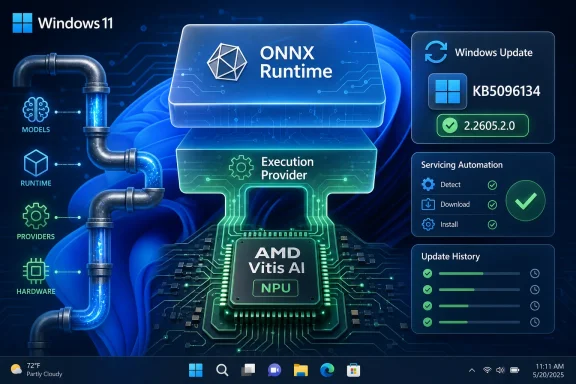
Microsoft has published KB5096134, an automatic Windows Update package for Windows 11 version 24H2 and 25H2 that updates the AMD Vitis AI Execution Provider to version 2.2605.2.0 for ONNX Runtime and Windows machine learning workloads on supported AMD AI hardware. The small support article says little, but the move says plenty: Windows’ AI stack is becoming an operating-system service, not a bundle of SDKs that every app vendor must carry alone. For users, the update is mostly invisible; for developers and administrators, it is another sign that local AI acceleration on Windows will live or die by Microsoft’s ability to keep silicon-specific components current without turning every PC into a driver archaeology project.
KB5096134 is not a flashy feature update. It does not promise a new Copilot surface, a redesigned Settings page, or a marquee consumer trick. It updates an execution provider, the software layer that lets ONNX Runtime and Windows ML send inference workloads to suitable hardware instead of falling back to a more generic path.
That distinction matters because execution providers are where the clean marketing phrase on-device AI meets the messy diversity of PC hardware. Qualcomm, Intel, AMD, NVIDIA, and Microsoft all have different accelerators, driver models, runtimes, constraints, and performance profiles. Windows ML’s pitch is that developers should not have to ship a separate hardware stack for every one of them.
The AMD Vitis AI Execution Provider sits in that middle layer. It is designed to help Windows ML and ONNX Runtime target AMD platforms, including Ryzen AI systems and other AMD acceleration hardware. KB5096134 bumps that component to version 2.2605.2.0, replacing the prior KB5089169 release.
The update applies to Windows 11 version 24H2 and Windows 11 version 25H2, and Microsoft says the latest cumulative update for those releases is required. Installation is automatic through Windows Update. Verification is mundane: Settings, Windows Update, Update history, where it should appear as “Windows Runtime ML AMD NPU Execution Provider Update (KB5096134).”
That mundane delivery mechanism is the story. Microsoft is treating AI acceleration less like an optional developer add-on and more like a maintained Windows subsystem. That is the right architectural direction, but it also raises an uncomfortable question: how much of the Windows AI experience is now dependent on opaque component updates whose contents are described only as “improvements”?
This is not the old Windows model, where most users thought in terms of service packs, feature updates, and Patch Tuesday. The new AI stack has its own moving parts. Models, runtimes, execution providers, driver dependencies, and app SDK packages can all change on different schedules.
That is both necessary and risky. Necessary, because AI inference performance depends heavily on low-level optimizations, supported operators, memory behavior, and hardware-specific quirks. Risky, because Windows administrators already struggle to map what changed, when it changed, and which update channel delivered it.
KB5096134 sits squarely in that tension. Microsoft’s support language says the update contains improvements to the AMD Vitis AI Execution Provider AI component. It does not spell out whether those improvements involve performance, stability, operator coverage, compatibility, power behavior, or servicing metadata. The practical answer may be “some combination of the above,” but that is not documentation; it is a shrug dressed as a release note.
For consumer PCs, that opacity is probably tolerable. If the update arrives automatically and makes local AI workloads behave better, few users will care. For managed fleets, developer workstations, and validation labs, the lack of detail is less charming.
The deeper significance is that Windows Update is becoming the distribution channel for AI middleware. That makes sense only if Microsoft can provide enough transparency for IT teams to trust it. KB5096134 is a useful update, but it is also a reminder that Microsoft’s release-note discipline has not yet caught up with its AI platform ambitions.
Execution providers complicate that model. They are not quite application code, not quite drivers, and not quite ordinary Windows components. They are translation layers that decide how an AI model runs on available hardware. If an app uses Windows ML and calls into a dynamically acquired execution provider, the behavior of that app may change when the provider changes, even if the app itself has not been updated.
That is the promise. Developers get better performance and broader operator support without shipping a new build. Users get improvements through Windows Update. The platform absorbs hardware complexity that would otherwise fragment the Windows AI ecosystem.
But the same mechanism also moves responsibility into a gray zone. If a local AI feature slows down, fails on a specific model, drains battery, or behaves differently after a component update, who owns the bug? The app developer? Microsoft? AMD? The OEM? The driver package? The answer may vary case by case, and that is precisely why observability will matter.
Microsoft’s Windows ML documentation frames dynamic execution provider delivery as a benefit: apps can acquire and use Windows-certified providers without bundling large vendor packages. That is a sensible default for a broad PC ecosystem. It reduces application size and gives Microsoft a path to patch common infrastructure.
Still, administrators will want more than a support article that says “improvements.” They will want version inventory, known issue tracking, rollback expectations, and compatibility notes. They will also want clarity on whether a given provider update arrives only through Windows Update, through optional preview releases, through cumulative updates, or through all of the above depending on timing.
That is a competitive necessity. Qualcomm’s early Copilot+ PC push made NPUs part of the mainstream Windows conversation. Intel has its own NPU strategy through Core Ultra platforms. NVIDIA remains dominant in high-throughput GPU AI, especially for developer and creator workloads. AMD cannot afford to be merely “compatible” if Windows becomes a serious local inference platform.
KB5096134 does not turn a Ryzen AI laptop into a datacenter accelerator. It does not mean every ONNX model suddenly runs perfectly on AMD’s NPU. Hardware acceleration remains bounded by supported operators, driver versions, model shape, precision choices, memory limits, and the practical realities of scheduling workloads across CPU, GPU, and NPU.
What it does mean is that AMD’s Windows AI path is being serviced through the same kind of platform channel that Microsoft wants developers to rely on. That is strategically important. If Windows ML is to be credible, the execution providers behind it must be maintained frequently enough to keep pace with model changes and hardware evolution.
This is where the PC industry’s AI marketing meets engineering truth. Local AI is not a single feature. It is a pipeline. Models have to be converted, quantized, packaged, scheduled, accelerated, and updated. A weak link anywhere in that chain turns “AI PC” into a sticker.
For AMD, frequent Vitis AI Execution Provider updates through Windows Update suggest active participation in that pipeline. For Microsoft, they show an attempt to normalize hardware-specific AI support as part of Windows itself. For users, they may simply mean that an AI feature works better after a reboot.
That matters for administrators still managing mixed Windows 10, Windows 11 23H2, 24H2, and 25H2 estates. The AI component story is not evenly distributed across all supported Windows clients. Some features, APIs, and execution provider mechanisms expect the 24H2-or-newer architecture.
The requirement for the latest cumulative update reinforces the same point. Microsoft does not want execution provider servicing floating independently of the OS servicing baseline. If the Windows ML stack, app SDK, driver interface, or system component assumptions depend on recent cumulative updates, then installing the execution provider alone is not enough.
This is reasonable engineering. It is also another push toward staying current. The more Windows features are decomposed into separately serviced components, the more stale baselines become a support liability. A machine that is “on Windows 11” is no longer a sufficiently precise answer.
For WindowsForum readers, the practical consequence is simple: when troubleshooting local AI behavior, collect the full stack. The Windows version, build number, cumulative update level, NPU or GPU driver, Windows ML package version, execution provider name, and execution provider version all matter. The days of saying “it works on Windows 11” are over.
This will frustrate some users, especially those who remember when a Windows feature was either present or absent. But AI acceleration is closer to graphics acceleration than to Notepad. The silicon matters, the driver matters, and the runtime layer matters.
Automatic delivery also helps developers. If an app depends on Windows ML’s dynamic provider model, the developer can assume that supported systems will gradually receive compatible improvements. That reduces pressure to ship vendor-specific binaries inside every application package.
The enterprise view is more cautious. Automatic updates are welcome when they are predictable, documented, and reversible. They become harder to love when they affect a runtime layer used by business applications, internal tools, or developer workflows.
The issue is not that KB5096134 is suspicious. There is no evidence that this particular update is causing trouble. The issue is the category. AI execution providers sit close enough to app behavior that an update can matter, but low enough in the stack that many users will not know it exists.
Managed environments should therefore treat these updates as part of the Windows servicing picture, not as irrelevant background noise. If an organization is testing Windows 11 25H2 on AMD Ryzen AI systems, execution provider updates belong in the validation matrix. If a developer team is benchmarking inference performance, the provider version belongs in the benchmark notes.
This is especially true because performance improvements can look like regressions if they change scheduling behavior or model compatibility in unexpected ways. A faster path for one workload may expose a different bottleneck in another. Local AI is still young enough on Windows that administrators should assume the stack will continue to move.
The missing details are familiar. Microsoft does not enumerate fixed issues. It does not identify newly supported operators. It does not mention performance targets. It does not call out known issues. It does not provide a scenario matrix for Ryzen AI generations, driver versions, or supported model types.
Some of that restraint may be deliberate. Execution provider updates can include vendor-provided implementation changes that Microsoft does not want to document at a granular level. Release notes can also overpromise when the real-world behavior depends heavily on hardware and models.
But the current level of disclosure is too thin for a platform Microsoft wants developers to trust. If Windows ML is going to become a dependable abstraction layer for local AI, its servicing story needs to look more like a developer platform and less like a mystery patch.
A useful release note would not need to reveal proprietary implementation details. It could still say whether the update focuses on reliability, performance, compatibility, security hardening, operator support, packaging, or telemetry. Even broad categories would help.
The problem is not unique to AMD. It is a Microsoft AI component servicing problem. If Redmond wants Windows Update to become the trusted supply chain for local AI infrastructure, then the documentation has to acknowledge that these components are infrastructure.
That is a real improvement. A Windows app that can request the appropriate execution provider and let Windows handle installation is easier to maintain than one that ships separate AMD, Intel, NVIDIA, Qualcomm, CPU, and fallback paths. It also gives users a better chance of receiving hardware optimizations after the app has shipped.
But developers should not mistake abstraction for certainty. Hardware acceleration remains conditional. A model that runs on CPU may not map efficiently to an NPU. A provider may support some operators and not others. A device may have the right OS version but the wrong driver. First-run acquisition may require network access unless the provider is already present.
The responsible application design is therefore layered. Detect providers. Check versions where relevant. Provide graceful fallback. Log enough diagnostic information to make support possible. Avoid presenting hardware acceleration as a binary promise when it is really a negotiated outcome.
This is especially important for apps using local AI in user-visible workflows. If a photo tool, note-taking app, video editor, accessibility feature, or enterprise document processor silently changes acceleration paths, users may experience different latency, battery drain, or thermal behavior. Good apps should make those differences survivable.
The best version of Windows ML gives developers a common on-ramp while preserving hardware choice. The worst version hides too much and leaves developers blamed for platform changes they cannot see. KB5096134 is a reminder that Microsoft and its silicon partners are still building the line between those futures.
That will not last. As more Windows applications use local inference, AI runtime components will become part of ordinary support. A help desk ticket that once asked for the GPU driver may soon ask for the Windows ML execution provider version. A procurement test may compare not only NPU TOPS, but also the maturity of the Windows provider stack behind it.
KB5096134’s update-history entry gives administrators at least one visible checkpoint. It is not a complete inventory mechanism, but it is a place to start. On individual systems, Settings can confirm whether the package landed. At scale, organizations will need management tooling and reporting that can surface these component versions more cleanly.
There is also a policy dimension. Some environments tightly control Windows Update access, especially where devices are managed through WSUS, Configuration Manager, Intune rings, or third-party patch tooling. If execution provider updates rely on Windows Update delivery, admins need to understand whether their policies permit, defer, or block these packages.
That may sound like an edge case until an internal AI-enabled app works on unmanaged test laptops but not on production-managed systems. The likely culprit may not be the app. It may be that the provider was never acquired, never updated, or blocked by policy.
The Windows AI era will reward organizations that document the whole chain early. Hardware capability alone is not enough. The supported path includes OS release, cumulative update, driver, runtime, execution provider, app SDK, and model compatibility.
The benefits, if any are visible, will be indirect. A local AI feature may become faster. An app may choose an AMD acceleration path more reliably. A model may run with fewer failures. Battery life may improve for sustained inference if workloads move to a more appropriate accelerator.
The flip side is that failures will also be indirect. A user may not connect a changed AI feature to a Windows Runtime ML AMD NPU Execution Provider update. They may blame the app, the OEM, the GPU driver, or Windows generally. In many cases, they will not be entirely wrong, because all of those layers participate.
This is why Microsoft’s decision to expose the update in Settings matters. Even a plain update-history string gives enthusiasts and support technicians something to search, compare, and discuss. It turns an invisible component into a traceable event.
Still, Microsoft should go further over time. Windows needs a coherent place to view local AI capabilities: available accelerators, installed execution providers, driver compatibility, runtime versions, and fallback status. Device Manager is not enough, Settings is too shallow, and developer APIs are not a user support interface.
If Microsoft wants users to believe in AI PCs, it needs to make the AI part inspectable. Otherwise, “AI PC” risks becoming another sticker that hides more than it explains.
That is how new platform capabilities become normal. Wi-Fi, Bluetooth, graphics acceleration, biometric authentication, and modern standby all passed through the same evolution. First they were differentiators. Then they were compatibility headaches. Eventually they became expected plumbing, maintained through a mix of drivers, firmware, OS updates, and vendor packages.
AI acceleration is entering that middle stage now. The marketing has raced ahead, but the plumbing is catching up. Execution providers are a key part of that catch-up because they translate the broad promise of local inference into something specific hardware can execute.
The danger is that Microsoft repeats old Windows mistakes: too many layers, too little documentation, inconsistent update channels, and blame diffusion between the OS vendor, silicon vendor, OEM, and app developer. The opportunity is that Microsoft has learned enough from driver servicing, Windows Update for Business, and app platform fragmentation to build a cleaner model this time.
KB5096134 suggests Microsoft is choosing the cleaner model architecturally. Windows Update delivers the component. Windows ML abstracts the hardware path. Developers can depend on a certified provider mechanism. Users do not have to install a separate AMD AI runtime manually for every app.
The editorial caveat is that architecture is only half the platform. Trust comes from transparency, repeatability, and supportability. Microsoft has the first part in motion. The second part still needs work.
The concrete takeaways are narrower than the marketing around AI PCs, and that is useful. This is a component update, not a feature rollout. It is part of the operating system’s effort to keep hardware acceleration viable as apps begin to lean on local inference.
 Microsoft Quietly Moves AI Acceleration Into the Plumbing
KB5096134 is not a flashy feature update. It does not promise a new Copilot surface, a redesigned Settings page, or a marquee consumer trick. It updates an execution provider, the software layer that lets ONNX Runtime and Windows ML send inference workloads to suitable hardware instead of falling back to a more generic path.That distinction matters because execution providers are where the clean marketing phrase on-device AI meets the messy diversity of PC hardware. Qualcomm, Intel, AMD, NVIDIA, and Microsoft all have different accelerators, driver models, runtimes, constraints, and performance profiles. Windows ML’s pitch is that developers should not have to ship a separate hardware stack for every one of them.
The AMD Vitis AI Execution Provider sits in that middle layer. It is designed to help Windows ML and ONNX Runtime target AMD platforms, including Ryzen AI systems and other AMD acceleration hardware. KB5096134 bumps that component to version 2.2605.2.0, replacing the prior KB5089169 release.
The update applies to Windows 11 version 24H2 and Windows 11 version 25H2, and Microsoft says the latest cumulative update for those releases is required. Installation is automatic through Windows Update. Verification is mundane: Settings, Windows Update, Update history, where it should appear as “Windows Runtime ML AMD NPU Execution Provider Update (KB5096134).”
That mundane delivery mechanism is the story. Microsoft is treating AI acceleration less like an optional developer add-on and more like a maintained Windows subsystem. That is the right architectural direction, but it also raises an uncomfortable question: how much of the Windows AI experience is now dependent on opaque component updates whose contents are described only as “improvements”?
The Version Number Is Small, but the Strategy Is Not
A version bump from KB5089169 to KB5096134 will not thrill anyone outside a release-management meeting. Yet the naming and cadence point to an emerging reality for Windows 11: the operating system’s AI capabilities are being disassembled into componentized, hardware-aware pieces that can move faster than the annual Windows branding cycle.This is not the old Windows model, where most users thought in terms of service packs, feature updates, and Patch Tuesday. The new AI stack has its own moving parts. Models, runtimes, execution providers, driver dependencies, and app SDK packages can all change on different schedules.
That is both necessary and risky. Necessary, because AI inference performance depends heavily on low-level optimizations, supported operators, memory behavior, and hardware-specific quirks. Risky, because Windows administrators already struggle to map what changed, when it changed, and which update channel delivered it.
KB5096134 sits squarely in that tension. Microsoft’s support language says the update contains improvements to the AMD Vitis AI Execution Provider AI component. It does not spell out whether those improvements involve performance, stability, operator coverage, compatibility, power behavior, or servicing metadata. The practical answer may be “some combination of the above,” but that is not documentation; it is a shrug dressed as a release note.
For consumer PCs, that opacity is probably tolerable. If the update arrives automatically and makes local AI workloads behave better, few users will care. For managed fleets, developer workstations, and validation labs, the lack of detail is less charming.
The deeper significance is that Windows Update is becoming the distribution channel for AI middleware. That makes sense only if Microsoft can provide enough transparency for IT teams to trust it. KB5096134 is a useful update, but it is also a reminder that Microsoft’s release-note discipline has not yet caught up with its AI platform ambitions.
Execution Providers Are the New Driver Boundary
The traditional Windows support problem was hardware drivers. A GPU driver broke a game. A printer driver broke printing. A chipset package changed sleep behavior. Administrators knew where to look, even if they did not always like what they found.Execution providers complicate that model. They are not quite application code, not quite drivers, and not quite ordinary Windows components. They are translation layers that decide how an AI model runs on available hardware. If an app uses Windows ML and calls into a dynamically acquired execution provider, the behavior of that app may change when the provider changes, even if the app itself has not been updated.
That is the promise. Developers get better performance and broader operator support without shipping a new build. Users get improvements through Windows Update. The platform absorbs hardware complexity that would otherwise fragment the Windows AI ecosystem.
But the same mechanism also moves responsibility into a gray zone. If a local AI feature slows down, fails on a specific model, drains battery, or behaves differently after a component update, who owns the bug? The app developer? Microsoft? AMD? The OEM? The driver package? The answer may vary case by case, and that is precisely why observability will matter.
Microsoft’s Windows ML documentation frames dynamic execution provider delivery as a benefit: apps can acquire and use Windows-certified providers without bundling large vendor packages. That is a sensible default for a broad PC ecosystem. It reduces application size and gives Microsoft a path to patch common infrastructure.
Still, administrators will want more than a support article that says “improvements.” They will want version inventory, known issue tracking, rollback expectations, and compatibility notes. They will also want clarity on whether a given provider update arrives only through Windows Update, through optional preview releases, through cumulative updates, or through all of the above depending on timing.
AMD’s Vitis AI Lands in a More Competitive Windows Stack
AMD’s presence in Windows AI has become more important as Ryzen AI systems have moved from concept to shipping machines. The Vitis AI stack is AMD’s route for hardware-accelerated inference, and on Windows it increasingly intersects with Microsoft’s effort to make Windows ML the stable developer-facing abstraction.That is a competitive necessity. Qualcomm’s early Copilot+ PC push made NPUs part of the mainstream Windows conversation. Intel has its own NPU strategy through Core Ultra platforms. NVIDIA remains dominant in high-throughput GPU AI, especially for developer and creator workloads. AMD cannot afford to be merely “compatible” if Windows becomes a serious local inference platform.
KB5096134 does not turn a Ryzen AI laptop into a datacenter accelerator. It does not mean every ONNX model suddenly runs perfectly on AMD’s NPU. Hardware acceleration remains bounded by supported operators, driver versions, model shape, precision choices, memory limits, and the practical realities of scheduling workloads across CPU, GPU, and NPU.
What it does mean is that AMD’s Windows AI path is being serviced through the same kind of platform channel that Microsoft wants developers to rely on. That is strategically important. If Windows ML is to be credible, the execution providers behind it must be maintained frequently enough to keep pace with model changes and hardware evolution.
This is where the PC industry’s AI marketing meets engineering truth. Local AI is not a single feature. It is a pipeline. Models have to be converted, quantized, packaged, scheduled, accelerated, and updated. A weak link anywhere in that chain turns “AI PC” into a sticker.
For AMD, frequent Vitis AI Execution Provider updates through Windows Update suggest active participation in that pipeline. For Microsoft, they show an attempt to normalize hardware-specific AI support as part of Windows itself. For users, they may simply mean that an AI feature works better after a reboot.
Windows 11 24H2 and 25H2 Are Becoming the AI Baseline
The KB applies to Windows 11 version 24H2 and 25H2, which is no accident. Microsoft’s modern Windows AI story is tied to the newer platform baseline. Windows 11 24H2 introduced major under-the-hood changes for Copilot+ PCs and AI-capable hardware, and 25H2 continues that trajectory rather than resetting it.That matters for administrators still managing mixed Windows 10, Windows 11 23H2, 24H2, and 25H2 estates. The AI component story is not evenly distributed across all supported Windows clients. Some features, APIs, and execution provider mechanisms expect the 24H2-or-newer architecture.
The requirement for the latest cumulative update reinforces the same point. Microsoft does not want execution provider servicing floating independently of the OS servicing baseline. If the Windows ML stack, app SDK, driver interface, or system component assumptions depend on recent cumulative updates, then installing the execution provider alone is not enough.
This is reasonable engineering. It is also another push toward staying current. The more Windows features are decomposed into separately serviced components, the more stale baselines become a support liability. A machine that is “on Windows 11” is no longer a sufficiently precise answer.
For WindowsForum readers, the practical consequence is simple: when troubleshooting local AI behavior, collect the full stack. The Windows version, build number, cumulative update level, NPU or GPU driver, Windows ML package version, execution provider name, and execution provider version all matter. The days of saying “it works on Windows 11” are over.
This will frustrate some users, especially those who remember when a Windows feature was either present or absent. But AI acceleration is closer to graphics acceleration than to Notepad. The silicon matters, the driver matters, and the runtime layer matters.
Automatic Installation Is Convenient Until It Isn’t
Microsoft says KB5096134 will download and install automatically from Windows Update. For home users and most enthusiasts, that is probably the correct choice. Nobody wants to manually track execution provider packages just to make a camera effect, image tool, or local inference feature perform properly.Automatic delivery also helps developers. If an app depends on Windows ML’s dynamic provider model, the developer can assume that supported systems will gradually receive compatible improvements. That reduces pressure to ship vendor-specific binaries inside every application package.
The enterprise view is more cautious. Automatic updates are welcome when they are predictable, documented, and reversible. They become harder to love when they affect a runtime layer used by business applications, internal tools, or developer workflows.
The issue is not that KB5096134 is suspicious. There is no evidence that this particular update is causing trouble. The issue is the category. AI execution providers sit close enough to app behavior that an update can matter, but low enough in the stack that many users will not know it exists.
Managed environments should therefore treat these updates as part of the Windows servicing picture, not as irrelevant background noise. If an organization is testing Windows 11 25H2 on AMD Ryzen AI systems, execution provider updates belong in the validation matrix. If a developer team is benchmarking inference performance, the provider version belongs in the benchmark notes.
This is especially true because performance improvements can look like regressions if they change scheduling behavior or model compatibility in unexpected ways. A faster path for one workload may expose a different bottleneck in another. Local AI is still young enough on Windows that administrators should assume the stack will continue to move.
The Support Article Says Less Than IT Needs
Microsoft’s support entry for KB5096134 is concise to the point of austerity. It identifies the component, the target Windows versions, the prerequisite, the replacement relationship, and the update-history string. That is enough for a consumer support database. It is not enough for the people who will be asked to explain why a workload changed.The missing details are familiar. Microsoft does not enumerate fixed issues. It does not identify newly supported operators. It does not mention performance targets. It does not call out known issues. It does not provide a scenario matrix for Ryzen AI generations, driver versions, or supported model types.
Some of that restraint may be deliberate. Execution provider updates can include vendor-provided implementation changes that Microsoft does not want to document at a granular level. Release notes can also overpromise when the real-world behavior depends heavily on hardware and models.
But the current level of disclosure is too thin for a platform Microsoft wants developers to trust. If Windows ML is going to become a dependable abstraction layer for local AI, its servicing story needs to look more like a developer platform and less like a mystery patch.
A useful release note would not need to reveal proprietary implementation details. It could still say whether the update focuses on reliability, performance, compatibility, security hardening, operator support, packaging, or telemetry. Even broad categories would help.
The problem is not unique to AMD. It is a Microsoft AI component servicing problem. If Redmond wants Windows Update to become the trusted supply chain for local AI infrastructure, then the documentation has to acknowledge that these components are infrastructure.
Developers Get a Cleaner Target, but Not a Free Pass
For developers building Windows applications around ONNX Runtime or Windows ML, KB5096134 reinforces the value of targeting the platform abstraction rather than hand-rolling a hardware matrix. Windows ML’s dynamic execution provider model can reduce package bloat and spare developers from bundling every vendor’s acceleration stack.That is a real improvement. A Windows app that can request the appropriate execution provider and let Windows handle installation is easier to maintain than one that ships separate AMD, Intel, NVIDIA, Qualcomm, CPU, and fallback paths. It also gives users a better chance of receiving hardware optimizations after the app has shipped.
But developers should not mistake abstraction for certainty. Hardware acceleration remains conditional. A model that runs on CPU may not map efficiently to an NPU. A provider may support some operators and not others. A device may have the right OS version but the wrong driver. First-run acquisition may require network access unless the provider is already present.
The responsible application design is therefore layered. Detect providers. Check versions where relevant. Provide graceful fallback. Log enough diagnostic information to make support possible. Avoid presenting hardware acceleration as a binary promise when it is really a negotiated outcome.
This is especially important for apps using local AI in user-visible workflows. If a photo tool, note-taking app, video editor, accessibility feature, or enterprise document processor silently changes acceleration paths, users may experience different latency, battery drain, or thermal behavior. Good apps should make those differences survivable.
The best version of Windows ML gives developers a common on-ramp while preserving hardware choice. The worst version hides too much and leaves developers blamed for platform changes they cannot see. KB5096134 is a reminder that Microsoft and its silicon partners are still building the line between those futures.
Admins Should Inventory the AI Stack Before It Inventories Them
Most IT departments do not yet have a mature process for tracking AI component versions on Windows clients. They track OS builds, security patches, firmware, BIOS versions, browsers, endpoint agents, and core business apps. Execution providers are new enough that they can slip through the cracks.That will not last. As more Windows applications use local inference, AI runtime components will become part of ordinary support. A help desk ticket that once asked for the GPU driver may soon ask for the Windows ML execution provider version. A procurement test may compare not only NPU TOPS, but also the maturity of the Windows provider stack behind it.
KB5096134’s update-history entry gives administrators at least one visible checkpoint. It is not a complete inventory mechanism, but it is a place to start. On individual systems, Settings can confirm whether the package landed. At scale, organizations will need management tooling and reporting that can surface these component versions more cleanly.
There is also a policy dimension. Some environments tightly control Windows Update access, especially where devices are managed through WSUS, Configuration Manager, Intune rings, or third-party patch tooling. If execution provider updates rely on Windows Update delivery, admins need to understand whether their policies permit, defer, or block these packages.
That may sound like an edge case until an internal AI-enabled app works on unmanaged test laptops but not on production-managed systems. The likely culprit may not be the app. It may be that the provider was never acquired, never updated, or blocked by policy.
The Windows AI era will reward organizations that document the whole chain early. Hardware capability alone is not enough. The supported path includes OS release, cumulative update, driver, runtime, execution provider, app SDK, and model compatibility.
Users Will Mostly Notice When Things Break—or When They Suddenly Don’t
For ordinary Windows users, KB5096134 should be boring. It arrives through Windows Update, appears in update history, and updates a component most people will never knowingly launch. That is exactly how infrastructure should feel when it works.The benefits, if any are visible, will be indirect. A local AI feature may become faster. An app may choose an AMD acceleration path more reliably. A model may run with fewer failures. Battery life may improve for sustained inference if workloads move to a more appropriate accelerator.
The flip side is that failures will also be indirect. A user may not connect a changed AI feature to a Windows Runtime ML AMD NPU Execution Provider update. They may blame the app, the OEM, the GPU driver, or Windows generally. In many cases, they will not be entirely wrong, because all of those layers participate.
This is why Microsoft’s decision to expose the update in Settings matters. Even a plain update-history string gives enthusiasts and support technicians something to search, compare, and discuss. It turns an invisible component into a traceable event.
Still, Microsoft should go further over time. Windows needs a coherent place to view local AI capabilities: available accelerators, installed execution providers, driver compatibility, runtime versions, and fallback status. Device Manager is not enough, Settings is too shallow, and developer APIs are not a user support interface.
If Microsoft wants users to believe in AI PCs, it needs to make the AI part inspectable. Otherwise, “AI PC” risks becoming another sticker that hides more than it explains.
This Is How AI PCs Become Ordinary PCs
The most interesting thing about KB5096134 is that it is not interesting in the usual product-news sense. It is not a launch. It is not a keynote. It is not a benchmark contest. It is a servicing event.That is how new platform capabilities become normal. Wi-Fi, Bluetooth, graphics acceleration, biometric authentication, and modern standby all passed through the same evolution. First they were differentiators. Then they were compatibility headaches. Eventually they became expected plumbing, maintained through a mix of drivers, firmware, OS updates, and vendor packages.
AI acceleration is entering that middle stage now. The marketing has raced ahead, but the plumbing is catching up. Execution providers are a key part of that catch-up because they translate the broad promise of local inference into something specific hardware can execute.
The danger is that Microsoft repeats old Windows mistakes: too many layers, too little documentation, inconsistent update channels, and blame diffusion between the OS vendor, silicon vendor, OEM, and app developer. The opportunity is that Microsoft has learned enough from driver servicing, Windows Update for Business, and app platform fragmentation to build a cleaner model this time.
KB5096134 suggests Microsoft is choosing the cleaner model architecturally. Windows Update delivers the component. Windows ML abstracts the hardware path. Developers can depend on a certified provider mechanism. Users do not have to install a separate AMD AI runtime manually for every app.
The editorial caveat is that architecture is only half the platform. Trust comes from transparency, repeatability, and supportability. Microsoft has the first part in motion. The second part still needs work.
The KB5096134 Reality Check for Ryzen AI Windows Machines
KB5096134 is not a reason to rush out and buy new hardware, nor is it a reason to panic about an existing AMD system. It is a maintenance update for a specific layer of the Windows AI stack. Its importance lies in what it reveals about where Windows is going.The concrete takeaways are narrower than the marketing around AI PCs, and that is useful. This is a component update, not a feature rollout. It is part of the operating system’s effort to keep hardware acceleration viable as apps begin to lean on local inference.
- KB5096134 updates the AMD Vitis AI Execution Provider to version 2.2605.2.0 on supported Windows 11 version 24H2 and 25H2 systems.
- The update replaces KB5089169 and is delivered automatically through Windows Update when prerequisites are met.
- The visible update-history entry should read “Windows Runtime ML AMD NPU Execution Provider Update (KB5096134).”
- The update matters most to apps using ONNX Runtime or Windows ML to run AI inference on AMD acceleration hardware.
- Administrators should track execution provider versions alongside OS builds, cumulative updates, and AMD driver versions when validating AI-capable Windows devices.
- Developers should still design for fallback paths because execution provider availability does not guarantee that every model or workload will accelerate successfully.
References
- Primary source: Microsoft Support
Published: Tue, 26 May 2026 21:02:29 Z
- Official source: learn.microsoft.com

Windows ML execution providers
Learn which ONNX Runtime execution providers are available in Windows ML for accelerating local AI models across Windows PCs, and see their release history.learn.microsoft.com - Related coverage: windowsforum.com

KB5077529: AMD Vitis AI Execution Provider Update for Windows 11 24H2/25H2
Microsoft has quietly published a targeted component update for AMD’s on‑device AI stack — KB5077529 — which bumps the Vitis AI Execution Provider to version 1.8.50.0 and is being delivered through Windows Update for Windows 11 systems running 24H2 and 25H2. (support.microsoft.com) Background... windowsforum.com
- Related coverage: amd.com
- Related coverage: xilinx.com

