

Microsoft has released KB5096137, an automatic Windows Update package that updates the Windows ML Runtime Qualcomm QNN Execution Provider to version 2.2605.2.0 on supported Windows 11 version 26H1 devices, replacing KB5089618 and requiring the latest 26H1 cumulative update first. That dry sentence is the whole news item, but it is not the whole story. The more interesting development is that Microsoft is treating AI acceleration as a serviced Windows substrate, not as a driver footnote or an app feature. For Snapdragon-era Windows PCs, that distinction matters.
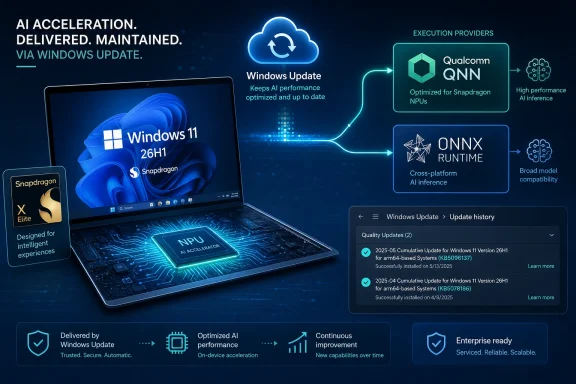
KB5096137 is a small update with a large architectural implication. It updates the Qualcomm QNN Execution Provider, the component ONNX Runtime can use to send machine-learning workloads to Qualcomm hardware through the Qualcomm AI Engine Direct SDK. In plainer English, it helps Windows and Windows apps run supported AI models on the right accelerator instead of dumping everything onto the CPU.
That is not a user-facing feature in the conventional Windows sense. There is no new Start menu behavior, no redesigned Settings page, no obvious button that says “use my NPU better.” Yet this is precisely why the update is worth watching: Microsoft is increasingly putting the machinery of AI performance into modular components that can move independently from headline operating-system releases.
For years, Windows performance conversations were dominated by graphics drivers, storage stacks, scheduler changes, and power management. The Copilot+ PC era adds another layer: execution providers, model runtimes, and hardware abstraction for local inference. KB5096137 sits in that layer, and Microsoft’s support note makes clear that the QNN provider is no longer just a developer dependency pulled from a GitHub release or bundled inside an app. It is a Windows-serviced AI component.
That should change how administrators think about Windows Update on AI PCs. An update like this may not patch a remote-code-execution flaw or fix a blue screen, but it can influence whether an app’s local model runs efficiently, falls back to CPU, or fails to use the NPU path a developer expected.
The old mental model for hardware acceleration was simpler. An app called into an API, a driver exposed capabilities, and Windows mediated the usual battles among compatibility, performance, and power. AI inference complicates that model because the workload is not a frame, a file copy, or a shader in the traditional sense. It is a graph of operations that may need to be partitioned across CPU, GPU, NPU, DSP, or some vendor-specific accelerator path.
The Qualcomm QNN Execution Provider takes an ONNX model and uses Qualcomm’s QNN SDK to construct a QNN graph. That graph is then executed by a supported backend library. The important word is “construct”: this is not merely a switch that says “run faster.” It is a translation and dispatch layer, and translation layers become strategic when the platform is moving quickly.
This is why Microsoft’s packaging choice matters. By servicing the provider through Windows Update, Microsoft can revise part of the AI acceleration path without asking every app developer to ship a new copy of the runtime stack. That does not eliminate app-level responsibility, but it does create a shared base that Windows can improve under the apps already present on the machine.
There is a security and reliability angle here, too. Once local AI becomes part of the everyday Windows experience, the runtime components that touch models and accelerators need the same discipline as graphics and networking components. Administrators will not want each vendor, app, and OEM to carry divergent copies of the acceleration stack forever. Central servicing is not glamorous, but it is how Windows turns fragile novelty into platform behavior.
That context prevents a lot of confusion. If a user on a Snapdragon X Elite laptop running 24H2 or 25H2 goes looking for KB5096137 and cannot find it, that is probably not a Windows Update failure. The update is tied to the 26H1 branch and to devices that meet the prerequisite stack. Microsoft’s note also says the latest cumulative update for Windows 11 version 26H1 must already be installed.
This is the unusual part of the 2026 Windows story. Microsoft is no longer moving every relevant platform change through a single, uniform Windows version path. Instead, it is using 26H1 as a silicon-aligned release while the wider Windows fleet continues on its own servicing cadence. For IT departments, that means version numbers are becoming less useful as shorthand unless they are paired with hardware class.
The Windows enthusiast reaction to 26H1 has predictably focused on whether it can be installed on older or unsupported hardware. That is the wrong center of gravity for this update. KB5096137 is not an invitation to chase a version number; it is evidence that Microsoft is building a more explicit servicing channel for AI components on systems where the hardware stack requires it.
For enterprises, the message is more conservative. Microsoft has continued to point organizations toward mainstream Windows 11 releases for broad deployment while treating 26H1 as something to evaluate alongside new hardware. That makes KB5096137 relevant today mostly to early adopters, OEM validation teams, developers building for Snapdragon systems, and IT groups piloting the next wave of Copilot+ PCs.
The QNN Execution Provider is central to that strategy. It gives ONNX Runtime a path to Qualcomm acceleration, and ONNX Runtime gives developers a relatively portable way to target local inference without hard-coding every vendor-specific backend themselves. That portability is never perfect, but it is vastly better than expecting every Windows developer to become an expert in every silicon vendor’s AI SDK.
Qualcomm has also been pushing a more modular execution-provider model, including plugin-style delivery for ONNX Runtime. The broader direction is clear: silicon vendors want to update their AI acceleration layers faster than operating systems historically moved, while Microsoft wants those layers to fit into a Windows servicing and compatibility story. KB5096137 sits at the overlap.
That overlap is delicate. If Qualcomm’s components move too independently, Windows risks fragmentation. If Microsoft moves too slowly, Snapdragon systems may fail to keep pace with model and framework changes. Servicing the QNN provider as a Windows AI component is Microsoft’s attempt to split the difference.
The competitive pressure is obvious. Intel, AMD, NVIDIA, and Qualcomm all want developers to see their hardware as the best local AI target. Microsoft, meanwhile, wants Windows to be the platform that makes those targets accessible without forcing developers to choose one hardware camp too early. Execution providers are the compromise layer where that ambition either works or becomes another compatibility matrix.
This is important because AI acceleration bugs often do not look like familiar Windows bugs. A broken path may not crash the system. It may simply cause a model to run on the CPU, produce lower-than-expected throughput, increase battery drain, or behave differently across devices. Those are exactly the kinds of issues that benefit from component-level servicing.
A monthly-ish rhythm also aligns with the way AI software moves. Model formats evolve, operator support changes, quantization approaches mature, and backend libraries get optimized for newly shipping silicon. If Windows is going to present local AI as a platform capability, it cannot rely on annual feature updates to keep this layer current.
At the same time, frequent AI-component updates introduce a new kind of operational risk. Administrators know how to test cumulative updates because the process is mature, even if the outcomes are not always pleasant. Testing an execution-provider update is less familiar. It may require workload-specific validation: the same package that fixes one model path could expose a regression in another.
That does not mean organizations should block these updates reflexively. It means they should recognize them as part of the platform, not as harmless noise in update history. If a business is deploying local AI workloads on Snapdragon Windows PCs, the QNN provider version becomes part of the environment inventory.
That is a practical win for consumers. The average buyer of a Snapdragon-based Windows 11 26H1 device should not have to understand execution providers to benefit from improved AI acceleration. If Microsoft and Qualcomm fix or optimize the provider, Windows Update should deliver the improvement quietly.
For IT pros, automatic delivery raises the usual questions. Is the update visible in Windows Update for Business reporting? Can it be deferred as part of a broader update policy? How should it be validated in a pilot ring? Microsoft’s article tells users where to check update history, but it does not turn the update into a richly documented release note with operator-level details.
That lack of detail is not surprising, but it is frustrating. Microsoft often publishes terse support notes for component updates, especially when the changes are packaged as “improvements” rather than discrete user-facing fixes. In the AI era, that terseness becomes more consequential because administrators need to know whether an update affects performance, compatibility, security, or all three.
The safest reading is that Microsoft wants these packages to behave like platform maintenance rather than optional tuning. If the device is on Windows 11 26H1 and meets prerequisites, the update arrives. The user confirms it in Settings under Windows Update history, where it should appear as the Windows ML Runtime Qualcomm QNN Execution Provider Update.
That is not new in software, but AI workloads make it more visible. A developer may test a model against one provider version and discover different performance characteristics after Windows Update installs a newer component. In most cases, better backend support is welcome. In edge cases, model partitioning, supported operators, precision behavior, or fallback handling can matter.
This is where ONNX Runtime’s abstraction is useful but not magical. The execution provider can route supported operations to Qualcomm acceleration, but models still need to be compatible with the target backend. Quantization choices, operator coverage, tensor shapes, and provider options can determine whether the NPU path is actually used. A developer who assumes “ONNX equals accelerated” will eventually have a bad afternoon.
The better view is that KB5096137 improves the baseline for a specific class of Windows machines. It does not replace profiling, validation, or graceful fallback. Good Windows AI apps should still detect provider availability, handle CPU fallback sanely, and avoid presenting local AI features as guaranteed solely because the device has a Snapdragon logo.
The encouraging part is that Microsoft is making the baseline less static. A Windows 11 26H1 Snapdragon device bought at launch should not be frozen at the AI acceleration behavior it shipped with. If this servicing model works, local AI performance and compatibility can improve during the device’s life in ways users may never notice directly but developers can rely on indirectly.
The visible signs, if any, will be indirect. An app that uses ONNX Runtime for local inference may become more responsive. A feature that previously pinned the CPU may lean more effectively on the accelerator. Battery life during certain AI workloads may improve. Conversely, if something regresses, users may only know that an app suddenly behaves differently after “some Windows update.”
That ambiguity is why update history matters. Microsoft explicitly tells users to check Settings, then Windows Update, then Update history to verify the package. For enthusiasts and support technicians, that entry becomes a useful breadcrumb. If a machine is behaving differently with local AI workloads, knowing whether KB5096137 is present is part of troubleshooting.
The naming is still a problem. “Windows ML Runtime Qualcomm QNN Execution Provider Update” is accurate, but it is not human-friendly. Microsoft has long struggled to name under-the-hood Windows components in ways that help normal users understand impact. In this case, even many power users will need to parse three layers of jargon before realizing the update concerns local AI acceleration on Qualcomm hardware.
There is also a reasonable expectation-management issue. This update will not turn every AI model into an NPU-accelerated workload. It does not make an unsupported app supported. It does not mean every Snapdragon PC on every Windows version receives the same component. The real benefit is narrower and more important: it keeps a specific hardware-accelerated inference path current on supported 26H1 systems.
This matters for compliance and reproducibility. If a business uses local inference for document processing, call transcription, image analysis, accessibility, or line-of-business workflows, performance and output consistency may depend on the runtime stack. The operating system version alone is no longer enough to describe the client environment. Component versions matter.
It also matters for procurement. The arrival of 26H1 on select new devices means an organization may have multiple Windows 11 branches in circulation, not because of sloppy imaging but because hardware vendors ship different platform-optimized builds. A Snapdragon X2-class machine may not be operationally identical to an older Snapdragon X Elite machine, even if both are called Copilot+ PCs in marketing material.
For pilot programs, the practical advice is straightforward: capture the Windows build, cumulative update level, execution-provider update history, app version, model version, and observed performance together. Without that bundle, diagnosing AI workload behavior will be guesswork. The old “works on my machine” problem becomes “works on my NPU provider version.”
Microsoft could help by making AI component release information more administrator-friendly. A richer changelog would let IT teams distinguish routine optimization from compatibility-significant changes. Until then, organizations should assume these packages are meaningful whenever local AI workloads are part of the business case for the device.
Maintenance is where many ambitious client-platform ideas either mature or fade. It is one thing to ship a laptop with a fast NPU and a slide deck full of TOPS numbers. It is another to keep the runtime, model formats, acceleration libraries, drivers, security posture, and app expectations aligned for years. Users do not buy an accelerator; they buy a PC that should keep working.
Microsoft’s AI-component model is an answer to that problem. Windows can provide execution-provider components for different silicon families and service them through familiar update channels. Apps can target ONNX Runtime rather than directly targeting every hardware vendor. Silicon vendors can improve their backend support without asking every user to become a developer.
The risk is opacity. If AI acceleration becomes invisible when it works and inscrutable when it breaks, support costs will move from the vendor’s engineering team to administrators, help desks, and frustrated users. The Windows ecosystem has seen this movie before with drivers. The lesson is not to avoid abstraction; it is to make the abstraction observable enough to troubleshoot.
KB5096137 is therefore both mundane and meaningful. It is a component update. It is also a sign that Microsoft is operationalizing AI acceleration as part of Windows servicing, one provider package at a time.
The concrete reading is simple:
 Microsoft Turns the AI Stack Into a Windows Update Lane
KB5096137 is a small update with a large architectural implication. It updates the Qualcomm QNN Execution Provider, the component ONNX Runtime can use to send machine-learning workloads to Qualcomm hardware through the Qualcomm AI Engine Direct SDK. In plainer English, it helps Windows and Windows apps run supported AI models on the right accelerator instead of dumping everything onto the CPU.That is not a user-facing feature in the conventional Windows sense. There is no new Start menu behavior, no redesigned Settings page, no obvious button that says “use my NPU better.” Yet this is precisely why the update is worth watching: Microsoft is increasingly putting the machinery of AI performance into modular components that can move independently from headline operating-system releases.
For years, Windows performance conversations were dominated by graphics drivers, storage stacks, scheduler changes, and power management. The Copilot+ PC era adds another layer: execution providers, model runtimes, and hardware abstraction for local inference. KB5096137 sits in that layer, and Microsoft’s support note makes clear that the QNN provider is no longer just a developer dependency pulled from a GitHub release or bundled inside an app. It is a Windows-serviced AI component.
That should change how administrators think about Windows Update on AI PCs. An update like this may not patch a remote-code-execution flaw or fix a blue screen, but it can influence whether an app’s local model runs efficiently, falls back to CPU, or fails to use the NPU path a developer expected.
The Execution Provider Is the New Driver Boundary
The term execution provider sounds like plumbing because it is. ONNX Runtime is Microsoft’s widely used inference runtime for running models packaged in the Open Neural Network Exchange format. Execution providers are the bridge between that runtime and specific hardware backends: Qualcomm QNN on Snapdragon systems, Intel OpenVINO on Intel hardware, NVIDIA TensorRT-RTX on supported GPUs, AMD Vitis AI or MIGraphX in other scenarios.The old mental model for hardware acceleration was simpler. An app called into an API, a driver exposed capabilities, and Windows mediated the usual battles among compatibility, performance, and power. AI inference complicates that model because the workload is not a frame, a file copy, or a shader in the traditional sense. It is a graph of operations that may need to be partitioned across CPU, GPU, NPU, DSP, or some vendor-specific accelerator path.
The Qualcomm QNN Execution Provider takes an ONNX model and uses Qualcomm’s QNN SDK to construct a QNN graph. That graph is then executed by a supported backend library. The important word is “construct”: this is not merely a switch that says “run faster.” It is a translation and dispatch layer, and translation layers become strategic when the platform is moving quickly.
This is why Microsoft’s packaging choice matters. By servicing the provider through Windows Update, Microsoft can revise part of the AI acceleration path without asking every app developer to ship a new copy of the runtime stack. That does not eliminate app-level responsibility, but it does create a shared base that Windows can improve under the apps already present on the machine.
There is a security and reliability angle here, too. Once local AI becomes part of the everyday Windows experience, the runtime components that touch models and accelerators need the same discipline as graphics and networking components. Administrators will not want each vendor, app, and OEM to carry divergent copies of the acceleration stack forever. Central servicing is not glamorous, but it is how Windows turns fragile novelty into platform behavior.
26H1 Is Not a Normal Windows Release, and That Explains the Narrow Scope
KB5096137 applies to Windows 11 version 26H1, all editions, but 26H1 itself is not a broad feature update for the installed base. Microsoft has described 26H1 as a hardware-optimized release intended for select new devices, especially next-generation silicon platforms. Existing Windows 11 24H2 and 25H2 machines are not expected to receive 26H1 through the ordinary Windows Update feature-update channel.That context prevents a lot of confusion. If a user on a Snapdragon X Elite laptop running 24H2 or 25H2 goes looking for KB5096137 and cannot find it, that is probably not a Windows Update failure. The update is tied to the 26H1 branch and to devices that meet the prerequisite stack. Microsoft’s note also says the latest cumulative update for Windows 11 version 26H1 must already be installed.
This is the unusual part of the 2026 Windows story. Microsoft is no longer moving every relevant platform change through a single, uniform Windows version path. Instead, it is using 26H1 as a silicon-aligned release while the wider Windows fleet continues on its own servicing cadence. For IT departments, that means version numbers are becoming less useful as shorthand unless they are paired with hardware class.
The Windows enthusiast reaction to 26H1 has predictably focused on whether it can be installed on older or unsupported hardware. That is the wrong center of gravity for this update. KB5096137 is not an invitation to chase a version number; it is evidence that Microsoft is building a more explicit servicing channel for AI components on systems where the hardware stack requires it.
For enterprises, the message is more conservative. Microsoft has continued to point organizations toward mainstream Windows 11 releases for broad deployment while treating 26H1 as something to evaluate alongside new hardware. That makes KB5096137 relevant today mostly to early adopters, OEM validation teams, developers building for Snapdragon systems, and IT groups piloting the next wave of Copilot+ PCs.
Qualcomm’s QNN Layer Is Becoming More Than a Vendor Add-On
Qualcomm’s role in Windows on Arm has changed substantially since the first wave of always-connected PCs. The company is no longer merely trying to prove that Arm laptops can run Office, Edge, and Teams acceptably. With Snapdragon X-class devices, Qualcomm is trying to make the NPU and AI software stack part of the sales pitch.The QNN Execution Provider is central to that strategy. It gives ONNX Runtime a path to Qualcomm acceleration, and ONNX Runtime gives developers a relatively portable way to target local inference without hard-coding every vendor-specific backend themselves. That portability is never perfect, but it is vastly better than expecting every Windows developer to become an expert in every silicon vendor’s AI SDK.
Qualcomm has also been pushing a more modular execution-provider model, including plugin-style delivery for ONNX Runtime. The broader direction is clear: silicon vendors want to update their AI acceleration layers faster than operating systems historically moved, while Microsoft wants those layers to fit into a Windows servicing and compatibility story. KB5096137 sits at the overlap.
That overlap is delicate. If Qualcomm’s components move too independently, Windows risks fragmentation. If Microsoft moves too slowly, Snapdragon systems may fail to keep pace with model and framework changes. Servicing the QNN provider as a Windows AI component is Microsoft’s attempt to split the difference.
The competitive pressure is obvious. Intel, AMD, NVIDIA, and Qualcomm all want developers to see their hardware as the best local AI target. Microsoft, meanwhile, wants Windows to be the platform that makes those targets accessible without forcing developers to choose one hardware camp too early. Execution providers are the compromise layer where that ambition either works or becomes another compatibility matrix.
The Replacement of KB5089618 Shows a Monthly Rhythm Forming
Microsoft’s note says KB5096137 replaces KB5089618, which updated the same Qualcomm QNN Execution Provider component to version 2.2604.2.0. The new package moves the component to 2.2605.2.0. That version numbering strongly suggests an iterative cadence rather than a one-time bring-up patch.This is important because AI acceleration bugs often do not look like familiar Windows bugs. A broken path may not crash the system. It may simply cause a model to run on the CPU, produce lower-than-expected throughput, increase battery drain, or behave differently across devices. Those are exactly the kinds of issues that benefit from component-level servicing.
A monthly-ish rhythm also aligns with the way AI software moves. Model formats evolve, operator support changes, quantization approaches mature, and backend libraries get optimized for newly shipping silicon. If Windows is going to present local AI as a platform capability, it cannot rely on annual feature updates to keep this layer current.
At the same time, frequent AI-component updates introduce a new kind of operational risk. Administrators know how to test cumulative updates because the process is mature, even if the outcomes are not always pleasant. Testing an execution-provider update is less familiar. It may require workload-specific validation: the same package that fixes one model path could expose a regression in another.
That does not mean organizations should block these updates reflexively. It means they should recognize them as part of the platform, not as harmless noise in update history. If a business is deploying local AI workloads on Snapdragon Windows PCs, the QNN provider version becomes part of the environment inventory.
Windows Update Is Becoming the Distribution Channel for Local AI Behavior
The phrase “downloaded and installed automatically from Windows Update” is easy to skim past. It is the most operationally important line in the support article. Microsoft is not asking users to visit Qualcomm, install a developer SDK, or manually update an ONNX package. The supported consumer and managed-device path is Windows Update.That is a practical win for consumers. The average buyer of a Snapdragon-based Windows 11 26H1 device should not have to understand execution providers to benefit from improved AI acceleration. If Microsoft and Qualcomm fix or optimize the provider, Windows Update should deliver the improvement quietly.
For IT pros, automatic delivery raises the usual questions. Is the update visible in Windows Update for Business reporting? Can it be deferred as part of a broader update policy? How should it be validated in a pilot ring? Microsoft’s article tells users where to check update history, but it does not turn the update into a richly documented release note with operator-level details.
That lack of detail is not surprising, but it is frustrating. Microsoft often publishes terse support notes for component updates, especially when the changes are packaged as “improvements” rather than discrete user-facing fixes. In the AI era, that terseness becomes more consequential because administrators need to know whether an update affects performance, compatibility, security, or all three.
The safest reading is that Microsoft wants these packages to behave like platform maintenance rather than optional tuning. If the device is on Windows 11 26H1 and meets prerequisites, the update arrives. The user confirms it in Settings under Windows Update history, where it should appear as the Windows ML Runtime Qualcomm QNN Execution Provider Update.
Developers Get a More Stable Target, but Not a Free Pass
For developers building Windows AI applications, a serviced QNN provider is both reassuring and constraining. It means the platform can improve underneath an app, reducing the burden of bundling vendor-specific components. It also means the runtime environment may change after the app ships.That is not new in software, but AI workloads make it more visible. A developer may test a model against one provider version and discover different performance characteristics after Windows Update installs a newer component. In most cases, better backend support is welcome. In edge cases, model partitioning, supported operators, precision behavior, or fallback handling can matter.
This is where ONNX Runtime’s abstraction is useful but not magical. The execution provider can route supported operations to Qualcomm acceleration, but models still need to be compatible with the target backend. Quantization choices, operator coverage, tensor shapes, and provider options can determine whether the NPU path is actually used. A developer who assumes “ONNX equals accelerated” will eventually have a bad afternoon.
The better view is that KB5096137 improves the baseline for a specific class of Windows machines. It does not replace profiling, validation, or graceful fallback. Good Windows AI apps should still detect provider availability, handle CPU fallback sanely, and avoid presenting local AI features as guaranteed solely because the device has a Snapdragon logo.
The encouraging part is that Microsoft is making the baseline less static. A Windows 11 26H1 Snapdragon device bought at launch should not be frozen at the AI acceleration behavior it shipped with. If this servicing model works, local AI performance and compatibility can improve during the device’s life in ways users may never notice directly but developers can rely on indirectly.
Users Will See the Effects Only When Something Else Goes Wrong
Most users will never know KB5096137 exists. That is probably the correct outcome. Runtime and execution-provider updates are not meant to be celebrated by consumers; they are meant to make features that depend on them feel less slow, less hot, and less unpredictable.The visible signs, if any, will be indirect. An app that uses ONNX Runtime for local inference may become more responsive. A feature that previously pinned the CPU may lean more effectively on the accelerator. Battery life during certain AI workloads may improve. Conversely, if something regresses, users may only know that an app suddenly behaves differently after “some Windows update.”
That ambiguity is why update history matters. Microsoft explicitly tells users to check Settings, then Windows Update, then Update history to verify the package. For enthusiasts and support technicians, that entry becomes a useful breadcrumb. If a machine is behaving differently with local AI workloads, knowing whether KB5096137 is present is part of troubleshooting.
The naming is still a problem. “Windows ML Runtime Qualcomm QNN Execution Provider Update” is accurate, but it is not human-friendly. Microsoft has long struggled to name under-the-hood Windows components in ways that help normal users understand impact. In this case, even many power users will need to parse three layers of jargon before realizing the update concerns local AI acceleration on Qualcomm hardware.
There is also a reasonable expectation-management issue. This update will not turn every AI model into an NPU-accelerated workload. It does not make an unsupported app supported. It does not mean every Snapdragon PC on every Windows version receives the same component. The real benefit is narrower and more important: it keeps a specific hardware-accelerated inference path current on supported 26H1 systems.
Enterprise IT Should Treat AI Components as Configuration, Not Decoration
The enterprise temptation will be to dismiss KB5096137 as consumer Copilot+ background noise. That would be a mistake. Even if many organizations are not yet deploying local AI workloads at scale, the components that enable them are becoming part of the Windows platform inventory.This matters for compliance and reproducibility. If a business uses local inference for document processing, call transcription, image analysis, accessibility, or line-of-business workflows, performance and output consistency may depend on the runtime stack. The operating system version alone is no longer enough to describe the client environment. Component versions matter.
It also matters for procurement. The arrival of 26H1 on select new devices means an organization may have multiple Windows 11 branches in circulation, not because of sloppy imaging but because hardware vendors ship different platform-optimized builds. A Snapdragon X2-class machine may not be operationally identical to an older Snapdragon X Elite machine, even if both are called Copilot+ PCs in marketing material.
For pilot programs, the practical advice is straightforward: capture the Windows build, cumulative update level, execution-provider update history, app version, model version, and observed performance together. Without that bundle, diagnosing AI workload behavior will be guesswork. The old “works on my machine” problem becomes “works on my NPU provider version.”
Microsoft could help by making AI component release information more administrator-friendly. A richer changelog would let IT teams distinguish routine optimization from compatibility-significant changes. Until then, organizations should assume these packages are meaningful whenever local AI workloads are part of the business case for the device.
The Copilot+ PC Story Is Shifting From Demos to Maintenance
The first year of Copilot+ PCs was dominated by demos: on-device image generation, background blur, live captions, Recall controversy, battery claims, and the usual Windows-on-Arm compatibility arguments. Those were necessary fights, but they were launch fights. KB5096137 belongs to the less flashy second phase, where the question becomes whether the platform can be maintained.Maintenance is where many ambitious client-platform ideas either mature or fade. It is one thing to ship a laptop with a fast NPU and a slide deck full of TOPS numbers. It is another to keep the runtime, model formats, acceleration libraries, drivers, security posture, and app expectations aligned for years. Users do not buy an accelerator; they buy a PC that should keep working.
Microsoft’s AI-component model is an answer to that problem. Windows can provide execution-provider components for different silicon families and service them through familiar update channels. Apps can target ONNX Runtime rather than directly targeting every hardware vendor. Silicon vendors can improve their backend support without asking every user to become a developer.
The risk is opacity. If AI acceleration becomes invisible when it works and inscrutable when it breaks, support costs will move from the vendor’s engineering team to administrators, help desks, and frustrated users. The Windows ecosystem has seen this movie before with drivers. The lesson is not to avoid abstraction; it is to make the abstraction observable enough to troubleshoot.
KB5096137 is therefore both mundane and meaningful. It is a component update. It is also a sign that Microsoft is operationalizing AI acceleration as part of Windows servicing, one provider package at a time.
The Small KB That Reveals the New Windows Maintenance Contract
Before the industry can have a useful conversation about local AI on PCs, it has to stop treating “AI PC” as a sticker category. The meaningful questions are about software pathways: which runtime, which provider, which backend, which model, which update cadence, which fallback behavior. KB5096137 is not flashy, but it points directly at those pathways.The concrete reading is simple:
- KB5096137 updates the Qualcomm QNN Execution Provider AI component to version 2.2605.2.0 on supported Windows 11 version 26H1 devices.
- The package replaces KB5089618, indicating an ongoing servicing cadence for this component rather than a one-off release.
- The update requires the latest cumulative update for Windows 11 version 26H1 before it can be installed.
- The package is delivered automatically through Windows Update, and users can verify it in Update history.
- The update matters most to Snapdragon-based 26H1 systems and to apps or Windows features that rely on ONNX Runtime acceleration through Qualcomm’s QNN stack.
- The update should not be read as a general Windows 11 feature release or as something existing 24H2 and 25H2 PCs should expect to receive.
References
- Primary source: Microsoft Support
Published: Tue, 26 May 2026 21:02:44 Z
KB5096137: Qualcomm QNN Execution Provider update (2.2605.2.0) - Microsoft Support
 support.microsoft.com
- Related coverage: qualcomm.com
Qualcomm launches the first ONNX Runtime Plugin Execution Provider
The Qualcomm Plugin Execution Provider (EP) for ONNX Runtime lets ONNX developers access system optimizations without waiting for ONNX Releases and boost your AI deployment workloads across Qualcomm platforms.www.qualcomm.com
- Related coverage: onnxruntime.ai
- Official source: learn.microsoft.com

Windows 11, version 26H1 known issues and notifications
View announcements and review known issues and fixes for Windows 11, version 26H1learn.microsoft.com - Related coverage: windowscentral.com
Loading…
www.windowscentral.com - Related coverage: fs-eire.github.io
- Related coverage: windowsforum.com

KB5089618 Update for Windows 11 26H1 Qualcomm QNN Execution Provider
Microsoft has published KB5089618, a Windows Update package for the Qualcomm QNN Execution Provider, bringing the Windows ML Runtime Qualcomm QNN Execution Provider component to version 2.2604.2.0 on devices running Windows 11, version 26H1. While the support note is brief, the update is part of... windowsforum.com
- Related coverage: docs.qualcomm.com