

Microsoft has published KB5096143, an automatic Windows Update package for Windows 11 version 24H2 and 25H2 that updates AMD’s MIGraphX Execution Provider to version 2.2605.1.0 for hardware-accelerated ONNX inference on supported AMD GPUs. The update is narrow, almost invisible to ordinary users, and easy to miss in the noise of cumulative patches. But it says something important about where Windows AI is going: Microsoft is turning machine-learning acceleration into a serviced operating-system component rather than a developer-bundled afterthought.
That shift matters because the next phase of Windows performance will not be measured only in CPU scheduler tweaks, GPU driver versions, or whether an app uses the NPU. It will also depend on whether Windows can keep the middleware between AI models and local silicon current, compatible, and safe. KB5096143 is not a flashy Copilot feature drop; it is plumbing. Increasingly, the plumbing is the product.
For years, local machine-learning acceleration on Windows lived in an awkward space between developer frameworks, GPU vendors, Python packages, driver stacks, and app-specific deployment choices. If an application wanted to run an ONNX model efficiently, it often had to decide which execution provider to ship, which hardware to target, which runtime version to trust, and how much support pain to accept when a user’s machine did not resemble the developer’s test box.
Windows ML’s newer model pushes more of that burden toward the operating system. Execution providers become discoverable, downloadable, and serviceable components. Instead of every app dragging around its own copy of the world, Windows can provide a shared path to acceleration across CPU, GPU, and NPU hardware.
KB5096143 fits squarely into that strategy. It updates the AMD MIGraphX Execution Provider, the component that allows supported ONNX model operations to be offloaded to AMD GPUs through AMD’s graph inference engine. The visible change is a version number. The strategic change is that Windows Update is now part of the AI runtime supply chain.
That is a subtle but consequential line to cross. Microsoft has long used Windows Update to service drivers, security fixes, firmware, Defender intelligence, .NET runtimes, and store-delivered system components. AI execution providers now join that club. They are not merely developer conveniences; they are OS-adjacent infrastructure.
That lack of drama is not a sign that nothing is happening. It is a sign that Microsoft wants this layer to behave like any other maintained system component. Users should not have to know which ONNX graph optimizations were touched, which operator coverage improved, or which hardware paths were tuned. Developers should be able to assume that eligible Windows machines are gradually getting fresher provider bits through the same machinery that already keeps the OS patched.
This is also why the update lands as a Knowledge Base article rather than a marketing announcement. Microsoft is documenting the presence of a serviced component, not launching a product. Users who want to verify installation are told to check Settings, Windows Update, and Update history, where the package should appear after installation.
There is a discipline to that approach. AI features tend to be sold with theatrical language, but inference acceleration works best when it becomes mundane. The less an end user has to think about providers, model partitions, fallbacks, and hardware routing, the more credible Windows becomes as a local AI platform.
MIGraphX is AMD’s graph inference engine, designed to optimize and accelerate machine-learning inference. As an ONNX Runtime execution provider, it can take supported model operations and route them to AMD GPU hardware. In practical terms, that gives Windows applications another path to local acceleration on AMD-equipped systems, assuming the model, hardware, drivers, and runtime support line up.
That last caveat matters. Execution providers are not magic switches. They do not guarantee that every model will run entirely on the GPU, nor that every AMD GPU will behave identically, nor that every AI application will automatically benefit. ONNX Runtime can partition work across providers, fall back when operations are unsupported, and expose performance characteristics that depend heavily on model structure.
Still, the presence of a Windows-serviced MIGraphX provider gives AMD a cleaner integration point. Rather than relying only on individual developers to bundle the right AMD-specific pieces, Microsoft can make the provider part of the Windows AI component ecosystem. That does not solve every compatibility problem, but it reduces the number of places where the chain can break.
That is a familiar Microsoft move. A capability arrives in one Windows generation as a developer-facing platform shift, then gains momentum as OEMs, silicon vendors, and application teams align around it. The operating system version becomes less about the Start menu and more about the platform contracts beneath the surface.
For IT administrators, this makes Windows 11 version selection more consequential. A device can be “Windows 11 compatible” in the ordinary sense while still missing the newest Windows ML plumbing. Conversely, a 24H2 or 25H2 machine with the right cumulative update installed can receive execution-provider updates like KB5096143 automatically, bringing its AI acceleration layer along with the rest of Windows servicing.
That also means update hygiene becomes part of AI readiness. The KB explicitly requires the latest cumulative update for Windows 11 24H2 or 25H2. In other words, the AI stack is not floating independently above Windows maintenance. It is coupled to the cumulative-update baseline, with all the operational implications that carries in managed environments.
In enterprise environments, the same convenience can look like a control problem. Administrators increasingly have to distinguish between security patches, feature enablement, driver updates, Store-delivered system apps, and now AI component updates. Each may arrive through Microsoft’s servicing ecosystem, but each carries a different risk profile.
A MIGraphX provider update is unlikely to raise the same alarms as a kernel change or browser zero-day fix. But it can still affect application behavior. If a line-of-business app uses ONNX models and Windows ML APIs, a provider update might change performance, improve compatibility, alter fallback behavior, or expose a previously dormant hardware path.
That does not mean organizations should block it by default. It means they should treat AI runtime components as part of their test matrix. The old assumption that machine-learning libraries are entirely application-owned is becoming less accurate on Windows. When the platform provides and updates the acceleration layer, platform testing has to include the acceleration layer.
That is a bet on scale. No single app developer wants to own the compatibility matrix for Intel NPUs, AMD GPUs, Qualcomm NPUs, NVIDIA GPUs, DirectML, CPU fallback, driver versions, Windows builds, and model-specific quirks. Microsoft cannot erase that complexity, but it can centralize enough of it to make local AI development less punishing.
The benefit is not only smaller app packages, though that matters. It is also consistency. If multiple applications rely on the same system-serviced provider, a fix can benefit the ecosystem rather than being trapped inside one app’s next release. If a provider has a security or stability issue, Microsoft and the vendor have a clearer servicing path.
The danger is that shared infrastructure becomes a shared point of failure. A bad provider update could theoretically affect multiple applications at once. A compatibility regression could be harder for a single app vendor to work around if the provider is managed outside its package. The history of Windows suggests both outcomes are possible: centralized servicing can be a force multiplier for fixes and for bugs.
That is where execution providers matter. They sit between model intent and silicon capability. They decide, within the rules of the framework, whether a model operation can be accelerated, where it should run, and how to bridge gaps when the hardware path is incomplete.
For AMD systems, MIGraphX gives Windows another route to GPU-backed inference. For Microsoft, it helps fill out a vendor-neutral story in which Windows can route AI work to the best available hardware. For developers, it promises a future where targeting local acceleration does not require shipping a bespoke pile of dependencies for every GPU family.
The promise is still ahead of the reality. Anyone who has worked with GPU-accelerated machine learning on Windows knows that driver versions, package versions, operator support, and hardware capabilities can still turn a simple deployment into a scavenger hunt. KB5096143 does not end that era. It is a sign that Microsoft is trying to civilize it.
That is uncomfortable for users who want simple answers. Does my PC support this AI feature? Can this model use my GPU? Is my NPU doing anything? Why is one laptop faster than another with similar silicon? The answers often live in layers of firmware, drivers, Windows builds, and runtime providers that are not easy to summarize.
For WindowsForum readers, the practical advice is to look beyond the headline Windows version. A Windows 11 24H2 or 25H2 system that lacks current cumulative updates may not be in the same AI-runtime state as one that is fully serviced. An AMD GPU in Device Manager does not by itself prove that MIGraphX acceleration is available to a given app. Update history is becoming part of the diagnostic trail.
This is also where Microsoft’s user experience remains thin. Windows can show that an update installed, but it does not yet give ordinary users a clean dashboard explaining which AI execution providers are present, which hardware they target, and which apps are using them. As local AI becomes more common, that opacity will become harder to defend.
But developers still have work to do. Models need to be tested across providers. Performance assumptions need to be validated on real hardware. CPU fallback paths need to remain functional. Error handling must account for the fact that an execution provider may be absent, incompatible, or only partially useful for a given model graph.
The temptation will be to treat Windows-serviced providers as a black box and trust the platform to do the right thing. That will work for some applications. It will not work for applications with strict latency, memory, privacy, or determinism requirements. AI acceleration is still acceleration, not a portability guarantee.
The best Windows AI apps will probably behave like well-written graphics applications. They will detect capabilities, choose sensible defaults, expose enough diagnostics for support teams, and degrade gracefully when the ideal path is unavailable. KB5096143 helps by improving the platform layer, but it does not absolve developers from engineering for variance.
MIGraphX is one piece of that answer. Windows Update servicing is another. But the field experience will determine whether developers and users trust the stack. If apps silently fall back to CPU, if performance varies wildly across machines, or if support forums fill with version-specific failures, the existence of a serviced provider will not be enough.
Microsoft and AMD therefore share the same burden: make the fast path boring. The user should not need to know whether MIGraphX handled a particular subgraph. The developer should not need to write a support article for every GPU family. The administrator should not need to become an AI framework specialist to decide whether an update is safe.
That is a high bar, and it will not be cleared by one KB article. But monthly, incremental, provider-level updates are how that bar gets approached. The ecosystem does not need one perfect release. It needs a reliable servicing cadence that makes local AI less brittle over time.
The deeper meaning is that Windows AI is becoming a maintained platform stack, not a loose collection of app-bundled components. That is good news for developers who want a stable target, users who want acceleration without manual setup, and AMD systems that need first-class participation in local inference workloads. It also creates new responsibilities for IT teams that must test, inventory, and understand AI components as part of normal Windows management.
The concrete takeaways are straightforward:
That shift matters because the next phase of Windows performance will not be measured only in CPU scheduler tweaks, GPU driver versions, or whether an app uses the NPU. It will also depend on whether Windows can keep the middleware between AI models and local silicon current, compatible, and safe. KB5096143 is not a flashy Copilot feature drop; it is plumbing. Increasingly, the plumbing is the product.
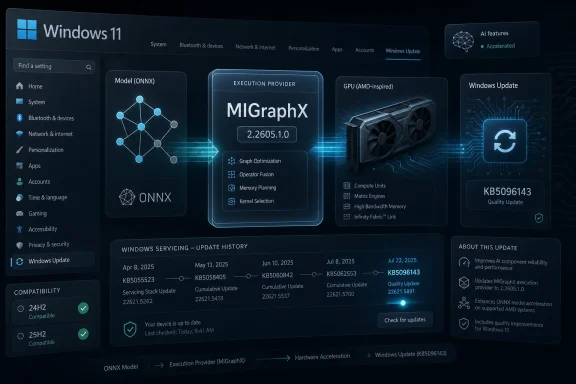 Microsoft Moves AI Acceleration Into the Windows Servicing Machine
For years, local machine-learning acceleration on Windows lived in an awkward space between developer frameworks, GPU vendors, Python packages, driver stacks, and app-specific deployment choices. If an application wanted to run an ONNX model efficiently, it often had to decide which execution provider to ship, which hardware to target, which runtime version to trust, and how much support pain to accept when a user’s machine did not resemble the developer’s test box.Windows ML’s newer model pushes more of that burden toward the operating system. Execution providers become discoverable, downloadable, and serviceable components. Instead of every app dragging around its own copy of the world, Windows can provide a shared path to acceleration across CPU, GPU, and NPU hardware.
KB5096143 fits squarely into that strategy. It updates the AMD MIGraphX Execution Provider, the component that allows supported ONNX model operations to be offloaded to AMD GPUs through AMD’s graph inference engine. The visible change is a version number. The strategic change is that Windows Update is now part of the AI runtime supply chain.
That is a subtle but consequential line to cross. Microsoft has long used Windows Update to service drivers, security fixes, firmware, Defender intelligence, .NET runtimes, and store-delivered system components. AI execution providers now join that club. They are not merely developer conveniences; they are OS-adjacent infrastructure.
The Version Number Is Boring, Which Is Exactly the Point
Version 2.2605.1.0 does not arrive with a consumer-facing feature list, a benchmark chart, or a promise that a particular app will suddenly run twice as fast. Microsoft’s support language is restrained: this update includes improvements to the MIGraphX Execution Provider AI component for Windows 11 version 24H2 and Windows 11 version 25H2. It requires the latest cumulative update for either supported Windows version and is downloaded and installed automatically from Windows Update.That lack of drama is not a sign that nothing is happening. It is a sign that Microsoft wants this layer to behave like any other maintained system component. Users should not have to know which ONNX graph optimizations were touched, which operator coverage improved, or which hardware paths were tuned. Developers should be able to assume that eligible Windows machines are gradually getting fresher provider bits through the same machinery that already keeps the OS patched.
This is also why the update lands as a Knowledge Base article rather than a marketing announcement. Microsoft is documenting the presence of a serviced component, not launching a product. Users who want to verify installation are told to check Settings, Windows Update, and Update history, where the package should appear after installation.
There is a discipline to that approach. AI features tend to be sold with theatrical language, but inference acceleration works best when it becomes mundane. The less an end user has to think about providers, model partitions, fallbacks, and hardware routing, the more credible Windows becomes as a local AI platform.
AMD Gets a Seat at the Windows AI Table
The AMD angle is more than a vendor footnote. NVIDIA has dominated much of the public conversation around accelerated AI, especially in developer and data-center contexts. Intel has pushed hard on NPUs and client-side AI PCs. AMD’s Windows AI story has had to span Ryzen CPUs, Radeon GPUs, Ryzen AI NPUs, ROCm, and vendor-specific optimizations that have not always felt as seamless on Windows as developers would like.MIGraphX is AMD’s graph inference engine, designed to optimize and accelerate machine-learning inference. As an ONNX Runtime execution provider, it can take supported model operations and route them to AMD GPU hardware. In practical terms, that gives Windows applications another path to local acceleration on AMD-equipped systems, assuming the model, hardware, drivers, and runtime support line up.
That last caveat matters. Execution providers are not magic switches. They do not guarantee that every model will run entirely on the GPU, nor that every AMD GPU will behave identically, nor that every AI application will automatically benefit. ONNX Runtime can partition work across providers, fall back when operations are unsupported, and expose performance characteristics that depend heavily on model structure.
Still, the presence of a Windows-serviced MIGraphX provider gives AMD a cleaner integration point. Rather than relying only on individual developers to bundle the right AMD-specific pieces, Microsoft can make the provider part of the Windows AI component ecosystem. That does not solve every compatibility problem, but it reduces the number of places where the chain can break.
Windows 11 24H2 Becomes the AI Runtime Baseline
KB5096143 applies to Windows 11 version 24H2 and Windows 11 version 25H2, and that support boundary is revealing. Windows 11 24H2 has become the baseline for Microsoft’s modern Windows AI stack, including the system-level ONNX Runtime integration and execution-provider catalog model. Older Windows releases may still run ONNX Runtime in traditional ways, but they are not the center of gravity for this new servicing approach.That is a familiar Microsoft move. A capability arrives in one Windows generation as a developer-facing platform shift, then gains momentum as OEMs, silicon vendors, and application teams align around it. The operating system version becomes less about the Start menu and more about the platform contracts beneath the surface.
For IT administrators, this makes Windows 11 version selection more consequential. A device can be “Windows 11 compatible” in the ordinary sense while still missing the newest Windows ML plumbing. Conversely, a 24H2 or 25H2 machine with the right cumulative update installed can receive execution-provider updates like KB5096143 automatically, bringing its AI acceleration layer along with the rest of Windows servicing.
That also means update hygiene becomes part of AI readiness. The KB explicitly requires the latest cumulative update for Windows 11 24H2 or 25H2. In other words, the AI stack is not floating independently above Windows maintenance. It is coupled to the cumulative-update baseline, with all the operational implications that carries in managed environments.
Automatic Delivery Cuts Both Ways for Administrators
Automatic installation through Windows Update is convenient for consumers and small businesses. If a machine qualifies, the update arrives without the user hunting down a package, deciphering GPU support notes, or choosing between runtime builds. For a local AI component whose value depends on broad availability, that is the right default.In enterprise environments, the same convenience can look like a control problem. Administrators increasingly have to distinguish between security patches, feature enablement, driver updates, Store-delivered system apps, and now AI component updates. Each may arrive through Microsoft’s servicing ecosystem, but each carries a different risk profile.
A MIGraphX provider update is unlikely to raise the same alarms as a kernel change or browser zero-day fix. But it can still affect application behavior. If a line-of-business app uses ONNX models and Windows ML APIs, a provider update might change performance, improve compatibility, alter fallback behavior, or expose a previously dormant hardware path.
That does not mean organizations should block it by default. It means they should treat AI runtime components as part of their test matrix. The old assumption that machine-learning libraries are entirely application-owned is becoming less accurate on Windows. When the platform provides and updates the acceleration layer, platform testing has to include the acceleration layer.
The Real Bet Is Shared Infrastructure, Not One AMD Patch
The most important thing about KB5096143 is not that it updates AMD MIGraphX. It is that Microsoft is normalizing a pattern. Windows can host a shared ONNX Runtime layer. Execution providers can be installed dynamically. Vendor-specific acceleration can be serviced through Windows channels. Applications can target Windows ML abstractions instead of individually solving every hardware permutation.That is a bet on scale. No single app developer wants to own the compatibility matrix for Intel NPUs, AMD GPUs, Qualcomm NPUs, NVIDIA GPUs, DirectML, CPU fallback, driver versions, Windows builds, and model-specific quirks. Microsoft cannot erase that complexity, but it can centralize enough of it to make local AI development less punishing.
The benefit is not only smaller app packages, though that matters. It is also consistency. If multiple applications rely on the same system-serviced provider, a fix can benefit the ecosystem rather than being trapped inside one app’s next release. If a provider has a security or stability issue, Microsoft and the vendor have a clearer servicing path.
The danger is that shared infrastructure becomes a shared point of failure. A bad provider update could theoretically affect multiple applications at once. A compatibility regression could be harder for a single app vendor to work around if the provider is managed outside its package. The history of Windows suggests both outcomes are possible: centralized servicing can be a force multiplier for fixes and for bugs.
Local AI Needs Boring Updates More Than Big Demos
The consumer AI conversation still tends to orbit visible features: image generation, recall-style indexing, transcription, code assistants, and chat interfaces bolted into familiar apps. But local AI on Windows will succeed or fail on the unglamorous question of whether models run reliably on real hardware without turning every user into a runtime engineer.That is where execution providers matter. They sit between model intent and silicon capability. They decide, within the rules of the framework, whether a model operation can be accelerated, where it should run, and how to bridge gaps when the hardware path is incomplete.
For AMD systems, MIGraphX gives Windows another route to GPU-backed inference. For Microsoft, it helps fill out a vendor-neutral story in which Windows can route AI work to the best available hardware. For developers, it promises a future where targeting local acceleration does not require shipping a bespoke pile of dependencies for every GPU family.
The promise is still ahead of the reality. Anyone who has worked with GPU-accelerated machine learning on Windows knows that driver versions, package versions, operator support, and hardware capabilities can still turn a simple deployment into a scavenger hunt. KB5096143 does not end that era. It is a sign that Microsoft is trying to civilize it.
The Update History Entry Is the New Device Capability Clue
Microsoft tells users to verify the update through Windows Update history, and that instruction is more useful than it first appears. In the AI PC era, device capability will not be captured by a single sticker, processor name, or GPU model. It will increasingly be reflected in a stack of update history entries, driver packages, runtime components, and optional providers.That is uncomfortable for users who want simple answers. Does my PC support this AI feature? Can this model use my GPU? Is my NPU doing anything? Why is one laptop faster than another with similar silicon? The answers often live in layers of firmware, drivers, Windows builds, and runtime providers that are not easy to summarize.
For WindowsForum readers, the practical advice is to look beyond the headline Windows version. A Windows 11 24H2 or 25H2 system that lacks current cumulative updates may not be in the same AI-runtime state as one that is fully serviced. An AMD GPU in Device Manager does not by itself prove that MIGraphX acceleration is available to a given app. Update history is becoming part of the diagnostic trail.
This is also where Microsoft’s user experience remains thin. Windows can show that an update installed, but it does not yet give ordinary users a clean dashboard explaining which AI execution providers are present, which hardware they target, and which apps are using them. As local AI becomes more common, that opacity will become harder to defend.
Developers Get a Cleaner Target, But Not a Free Pass
For developers building Windows applications around ONNX models, the appeal of system-managed execution providers is obvious. A shared runtime can reduce packaging weight, simplify deployment, and provide a more consistent way to discover hardware acceleration. The Windows ML execution-provider catalog model points toward a world where apps can ask the platform what is available instead of guessing.But developers still have work to do. Models need to be tested across providers. Performance assumptions need to be validated on real hardware. CPU fallback paths need to remain functional. Error handling must account for the fact that an execution provider may be absent, incompatible, or only partially useful for a given model graph.
The temptation will be to treat Windows-serviced providers as a black box and trust the platform to do the right thing. That will work for some applications. It will not work for applications with strict latency, memory, privacy, or determinism requirements. AI acceleration is still acceleration, not a portability guarantee.
The best Windows AI apps will probably behave like well-written graphics applications. They will detect capabilities, choose sensible defaults, expose enough diagnostics for support teams, and degrade gracefully when the ideal path is unavailable. KB5096143 helps by improving the platform layer, but it does not absolve developers from engineering for variance.
AMD’s Windows AI Story Still Has to Prove Itself in the Field
AMD has the hardware footprint to matter enormously in client AI. Ryzen laptops, Radeon graphics, integrated GPUs, and Ryzen AI-branded systems are everywhere across consumer and business channels. The question is whether that installed base can be translated into a predictable developer target.MIGraphX is one piece of that answer. Windows Update servicing is another. But the field experience will determine whether developers and users trust the stack. If apps silently fall back to CPU, if performance varies wildly across machines, or if support forums fill with version-specific failures, the existence of a serviced provider will not be enough.
Microsoft and AMD therefore share the same burden: make the fast path boring. The user should not need to know whether MIGraphX handled a particular subgraph. The developer should not need to write a support article for every GPU family. The administrator should not need to become an AI framework specialist to decide whether an update is safe.
That is a high bar, and it will not be cleared by one KB article. But monthly, incremental, provider-level updates are how that bar gets approached. The ecosystem does not need one perfect release. It needs a reliable servicing cadence that makes local AI less brittle over time.
The Small KB That Reveals Microsoft’s Larger Windows AI Contract
KB5096143 is easy to summarize but harder to dismiss. It updates AMD’s MIGraphX Execution Provider to version 2.2605.1.0, applies to Windows 11 24H2 and 25H2, requires the latest cumulative update, installs automatically through Windows Update, and can be confirmed in Update history. That is the visible administrative surface.The deeper meaning is that Windows AI is becoming a maintained platform stack, not a loose collection of app-bundled components. That is good news for developers who want a stable target, users who want acceleration without manual setup, and AMD systems that need first-class participation in local inference workloads. It also creates new responsibilities for IT teams that must test, inventory, and understand AI components as part of normal Windows management.
The concrete takeaways are straightforward:
- KB5096143 updates the AMD MIGraphX Execution Provider to version 2.2605.1.0 on eligible Windows 11 systems.
- The update applies to Windows 11 version 24H2 and Windows 11 version 25H2, not to older Windows releases.
- The package requires the latest cumulative update before it can be installed through Windows Update.
- The component helps ONNX Runtime and Windows machine-learning workloads offload supported model operations to AMD GPUs.
- Administrators should treat execution-provider updates as part of the Windows AI runtime surface, especially where line-of-business apps depend on ONNX inference.
- Users can verify installation through Settings, Windows Update, and Update history rather than through a standalone AMD utility.
References
- Primary source: Microsoft Support
Published: Tue, 26 May 2026 21:03:08 Z
- Official source: learn.microsoft.com

Windows ML execution providers
Learn which ONNX Runtime execution providers are available in Windows ML for accelerating local AI models across Windows PCs, and see their release history.learn.microsoft.com - Related coverage: onnxruntime.ai
AMD - MIGraphX
Instructions to execute ONNX Runtime with the AMD MIGraphX execution provideronnxruntime.ai
- Related coverage: shalvamist.github.io
AMD - MIGraphX
Instructions to execute ONNX Runtime with the AMD MIGraphX execution providershalvamist.github.io
- Related coverage: runtime.onnx.org.cn
AMD - MIGraphX | onnxruntime - ONNX 运行时
runtime.onnx.org.cn

