

Microsoft has released KB5096566, a May 2026 Phi Silica AI component update that brings version 1.2605.856.0 to AMD-powered Copilot+ PCs running Windows 11 version 24H2 or 25H2 through the normal Windows Update pipeline. The update is small in description but large in implication: Microsoft is now treating on-device AI models as serviced Windows components, not optional demos or app-store curiosities. For AMD Copilot+ PC owners, the practical result is another quiet model refresh; for administrators and developers, it is one more sign that Windows’ AI layer is becoming part of the operating system’s monthly maintenance surface.
KB5096566 is not a traditional Windows cumulative update, and that is precisely why it matters. It does not arrive promising a new Start menu behavior, a security fix, or a visible Settings toggle. Instead, it updates Phi Silica, Microsoft’s small language model designed to run locally on Copilot+ PCs with AMD neural processing hardware.
That framing is easy to underestimate. Windows users are accustomed to drivers, Defender signatures, Store apps, and .NET runtimes updating around the edges of the OS. Phi Silica belongs to a newer category: machine-learning components that sit close enough to Windows features and developer APIs that Microsoft can no longer leave them frozen between annual feature releases.
The version number tells the story. Version 1.2605.856.0 follows the cadence Microsoft has established for AI components across Copilot+ PCs, where model packages and supporting components can be refreshed separately from the headline Windows build. This is not Windows 12 by stealth, but it is Windows changing shape under the feet of users who still think of the operating system as a static platform with occasional feature drops.
For AMD-powered systems, KB5096566 replaces the earlier KB5090933 release. Microsoft says the update applies only to Copilot+ PCs and requires the latest cumulative update for Windows 11 version 24H2 or 25H2. Installation is automatic through Windows Update, and users can verify it under Settings, Windows Update, Update history, where it should appear as “2026-05 Phi Silica version 1.2605.856.0 for AMD-powered systems (KB5096566).”
Microsoft describes Phi Silica as a Transformer-based small language model optimized for the neural processing unit in Copilot+ PCs. In plain English, it is a compact language model built to do useful text work without shipping every prompt to a cloud endpoint. Its advertised strengths are familiar: text understanding, summarization, rewriting, short-form generation, and developer-accessible language processing through Windows AI APIs.
That makes it strategically different from the web-era assistant model. The classic cloud assistant asks the PC to become a terminal for someone else’s compute. Phi Silica asks the PC to become part of the AI compute fabric itself. The pitch is lower latency, lower power use than CPU-heavy local inference, and a better privacy story because more work can happen locally.
The privacy claim deserves careful wording. “On device” is not the same thing as “no data ever leaves the machine,” because the behavior depends on the app, the feature, the account configuration, and the surrounding service. But the model update does support Microsoft’s broader argument that a useful slice of AI should run locally, especially for mundane language operations that do not need the scale or world knowledge of a cloud model.
That is why this update is more than housekeeping. Microsoft is not merely updating an app feature; it is updating the substrate that future Windows apps may depend on.
KB5096566 is explicitly for AMD-powered systems. That specificity is significant because local AI performance is not just a Windows feature flag; it depends on model packaging, runtime support, drivers, and NPU execution paths tuned for a particular hardware stack. In the old Windows model, a feature either ran on your PC or did not. In the Copilot+ era, the feature may exist in principle while the model package arrives in processor-specific waves.
That can be frustrating for users who bought a machine based on the same Copilot+ logo. The label suggests a unified experience, but the implementation is necessarily fragmented beneath the surface. AMD, Intel, and Qualcomm machines may all sit in the same marketing bucket while receiving different KBs, model builds, and timing.
This is not inherently a scandal. Hardware-specific optimization is what makes the NPU story credible in the first place. If Microsoft wants Phi Silica to run quickly and efficiently on AMD silicon, it must do the engineering work to tune, package, and ship the component for that hardware.
The trade-off is transparency. Users and administrators now need to understand that an AI feature’s availability may depend on more than a Windows version number. It may also depend on the installed AI component version, the processor family, the cumulative update baseline, regional availability, and whether a developer-facing feature is still behind limited access controls.
This makes practical sense. Microsoft already has a global servicing system for OS components, drivers, definitions, and feature enablement packages. If Phi Silica is meant to be a dependable platform component rather than a one-off sample model, Windows Update is the obvious delivery path.
But this also changes the administrative bargain. AI models are not merely binaries in the traditional sense. They encode behavior. A model update can affect tone, refusal behavior, summarization quality, formatting consistency, latency, memory use, and edge-case reliability without changing the app that calls it.
That creates a new class of “it changed overnight” troubleshooting. A business app that uses local summarization through Windows AI APIs could behave differently after a model component update even if the application itself was untouched. A support desk may see user complaints about changed rewriting quality, but the root cause may sit in Update history rather than in the app’s release notes.
For consumers, that may be acceptable. Most users want the model to improve silently. For enterprise IT, silent model evolution raises governance questions that Windows Update policy has not historically had to answer in much detail.
The company does not want local AI components floating independently across a chaotic range of OS builds. That would make support, testing, and developer expectations nearly impossible. Instead, the model package rides on top of a current cumulative update, which presumably supplies the right platform plumbing, API behavior, runtime dependencies, and compatibility assumptions.
For administrators, this means AI component currency may become another reason Microsoft pushes hard against deferred patching. Falling behind on cumulative updates may not merely leave a system exposed to security bugs; it may also leave its AI stack stale or incompatible with newer app expectations.
That is an important shift in patch politics. Many organizations delay Windows feature adoption because the visible benefit is not worth the immediate regression risk. But if Microsoft and third-party developers begin depending on current AI components for local features, staying behind may create its own incompatibility tax.
The result is a softer but real pressure toward continuous servicing. Microsoft does not need to force every organization to use every AI feature. It only needs to make the AI substrate part of the supported platform.
That is the dream, anyway. The reality remains more conditional. Copilot+ PC hardware is required. Some Phi Silica APIs have been treated as limited access features, and Microsoft has documented regional restrictions. Apps must still handle unsupported devices, unavailable models, exceptions, and changing capabilities across Windows App SDK versions.
Even so, the direction is obvious. Microsoft wants developers to think of local AI as a Windows capability, not a research project. If the platform can provide summarization, rewriting, image description, OCR, image processing, and language generation through supported APIs, then developers can add AI features without reinventing the stack.
That is good for smaller developers, who cannot afford to tune models for every NPU vendor. It is also good for Microsoft, because it makes Windows itself the broker of local AI. The more apps call Microsoft’s APIs, the more valuable the underlying Windows AI components become.
The risk is lock-in by convenience. A developer who builds around Phi Silica gains a fast path to Copilot+ PCs but also accepts Microsoft’s model behavior, policy layer, update cadence, and hardware definitions. That may be a reasonable bargain for productivity apps. It may be less comfortable for regulated workflows where repeatability matters as much as convenience.
But locality is not a magic wand. A local model can still process sensitive data in ways that create compliance questions. An app can still log prompts. Generated output can still leak into cloud-synced documents. A workflow can still combine local inference with remote telemetry, cloud storage, or account-based services.
The better way to understand Phi Silica is as a privacy-enabling component, not a privacy guarantee. It gives Microsoft and developers the technical ability to keep certain language tasks on the device. Whether they do so in a way that satisfies security teams depends on implementation, policy, documentation, and administrative controls.
That distinction will matter as Windows AI becomes less novel and more normal. The first wave of AI features was judged by whether it worked at all. The next wave will be judged by whether it can be governed.
For now, KB5096566 does not advertise a new admin dashboard, policy template, or audit trail. It is a component update. But the existence of regular AI component servicing increases the need for management tools that can answer basic questions: which model version is installed, which apps can call it, what data classes are permitted, and how updates are approved.
Microsoft’s verification path is consumer-simple: Settings, Windows Update, Update history. That is useful for an individual owner, but enterprises will need inventory at scale. The meaningful question is not whether one laptop shows KB5096566, but whether every supported AMD Copilot+ PC in a fleet has the expected Phi Silica package installed.
This is where Microsoft’s AI servicing model will have to mature. Update history is fine as a receipt. It is not a governance system. IT teams will want reporting through management tools, update rings, deferral controls, and clear documentation of what changed between model versions.
The lack of detailed release notes is also notable. Microsoft’s support article tells us what the component is, what version is being installed, what it replaces, and how it arrives. It does not describe quality improvements, behavioral changes, performance deltas, security fixes, or known issues.
That may be acceptable for a minor model refresh, but it will not scale forever. If organizations are expected to trust local AI components in real workflows, they will need more than a version string and a promise of automatic installation.
That creates a moving target for buyers. A Copilot+ PC purchased in 2024 or 2025 is not defined solely by the capabilities it had on day one. Its usefulness depends on how Microsoft continues to update Windows, the AI runtime, model components, and the apps that use them.
This is good news if the updates deliver improvements. A laptop that gains better local summarization, faster generation, or broader app support over time feels more like a platform investment than a fixed appliance. It is bad news if the experience becomes opaque, inconsistent, or dependent on processor-specific releases users do not understand.
The AMD-specific nature of KB5096566 is a reminder that the Copilot+ ecosystem is not a single monolith. Microsoft has to coordinate with silicon vendors, OEMs, Windows App SDK releases, and its own AI teams. That coordination is invisible when it works and maddening when it does not.
The burden is on Microsoft to make the differences legible. If an AMD Copilot+ PC, an Intel Copilot+ PC, and an Arm-based Copilot+ PC behave differently, users should not have to reverse-engineer the reason from KB numbers.
The concrete points are straightforward:
Microsoft’s challenge now is not simply to ship better local models. It is to make their delivery trustworthy, explainable, manageable, and boring enough for real fleets. KB5096566 is one small AMD-specific update, but it points toward a Windows future in which the question is no longer whether AI belongs in the operating system; it is whether Microsoft can service that AI layer with the same discipline users expect from the rest of Windows.
 Microsoft Moves the AI Model Into the Patch Rhythm
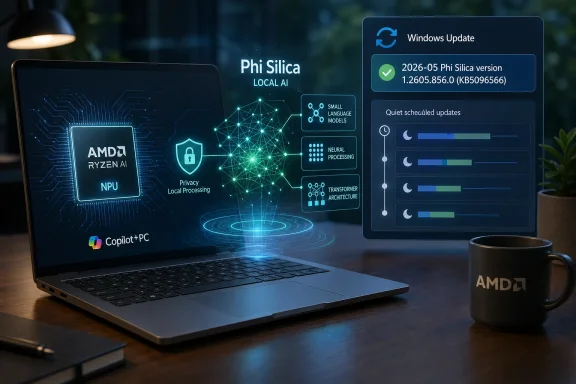
KB5096566 is not a traditional Windows cumulative update, and that is precisely why it matters. It does not arrive promising a new Start menu behavior, a security fix, or a visible Settings toggle. Instead, it updates Phi Silica, Microsoft’s small language model designed to run locally on Copilot+ PCs with AMD neural processing hardware.That framing is easy to underestimate. Windows users are accustomed to drivers, Defender signatures, Store apps, and .NET runtimes updating around the edges of the OS. Phi Silica belongs to a newer category: machine-learning components that sit close enough to Windows features and developer APIs that Microsoft can no longer leave them frozen between annual feature releases.
The version number tells the story. Version 1.2605.856.0 follows the cadence Microsoft has established for AI components across Copilot+ PCs, where model packages and supporting components can be refreshed separately from the headline Windows build. This is not Windows 12 by stealth, but it is Windows changing shape under the feet of users who still think of the operating system as a static platform with occasional feature drops.
For AMD-powered systems, KB5096566 replaces the earlier KB5090933 release. Microsoft says the update applies only to Copilot+ PCs and requires the latest cumulative update for Windows 11 version 24H2 or 25H2. Installation is automatic through Windows Update, and users can verify it under Settings, Windows Update, Update history, where it should appear as “2026-05 Phi Silica version 1.2605.856.0 for AMD-powered systems (KB5096566).”
Phi Silica Is Microsoft’s Local AI Bet, Not Just Another Copilot Feature
Phi Silica is easy to confuse with Copilot, because both sit inside Microsoft’s broader AI branding and both are aimed at making Windows feel more intelligent. But the distinction matters. Copilot is a service and product experience; Phi Silica is a local model component that applications and Windows features can use for language tasks on the device.Microsoft describes Phi Silica as a Transformer-based small language model optimized for the neural processing unit in Copilot+ PCs. In plain English, it is a compact language model built to do useful text work without shipping every prompt to a cloud endpoint. Its advertised strengths are familiar: text understanding, summarization, rewriting, short-form generation, and developer-accessible language processing through Windows AI APIs.
That makes it strategically different from the web-era assistant model. The classic cloud assistant asks the PC to become a terminal for someone else’s compute. Phi Silica asks the PC to become part of the AI compute fabric itself. The pitch is lower latency, lower power use than CPU-heavy local inference, and a better privacy story because more work can happen locally.
The privacy claim deserves careful wording. “On device” is not the same thing as “no data ever leaves the machine,” because the behavior depends on the app, the feature, the account configuration, and the surrounding service. But the model update does support Microsoft’s broader argument that a useful slice of AI should run locally, especially for mundane language operations that do not need the scale or world knowledge of a cloud model.
That is why this update is more than housekeeping. Microsoft is not merely updating an app feature; it is updating the substrate that future Windows apps may depend on.
AMD Copilot+ PCs Are No Longer Second-Class AI Citizens
The first wave of Copilot+ PC marketing leaned heavily on Qualcomm’s Snapdragon X platform, in part because those systems arrived early with the NPU performance Microsoft wanted to showcase. AMD and Intel systems followed into the same category, but Microsoft’s AI component servicing has had to account for silicon differences that traditional Windows users rarely think about.KB5096566 is explicitly for AMD-powered systems. That specificity is significant because local AI performance is not just a Windows feature flag; it depends on model packaging, runtime support, drivers, and NPU execution paths tuned for a particular hardware stack. In the old Windows model, a feature either ran on your PC or did not. In the Copilot+ era, the feature may exist in principle while the model package arrives in processor-specific waves.
That can be frustrating for users who bought a machine based on the same Copilot+ logo. The label suggests a unified experience, but the implementation is necessarily fragmented beneath the surface. AMD, Intel, and Qualcomm machines may all sit in the same marketing bucket while receiving different KBs, model builds, and timing.
This is not inherently a scandal. Hardware-specific optimization is what makes the NPU story credible in the first place. If Microsoft wants Phi Silica to run quickly and efficiently on AMD silicon, it must do the engineering work to tune, package, and ship the component for that hardware.
The trade-off is transparency. Users and administrators now need to understand that an AI feature’s availability may depend on more than a Windows version number. It may also depend on the installed AI component version, the processor family, the cumulative update baseline, regional availability, and whether a developer-facing feature is still behind limited access controls.
Windows Update Becomes the Model Distribution Network
The most important phrase in Microsoft’s support note may be the least dramatic one: the update “will be downloaded and installed automatically from Windows Update.” That sentence marks Windows Update as the distribution channel for local AI model evolution.This makes practical sense. Microsoft already has a global servicing system for OS components, drivers, definitions, and feature enablement packages. If Phi Silica is meant to be a dependable platform component rather than a one-off sample model, Windows Update is the obvious delivery path.
But this also changes the administrative bargain. AI models are not merely binaries in the traditional sense. They encode behavior. A model update can affect tone, refusal behavior, summarization quality, formatting consistency, latency, memory use, and edge-case reliability without changing the app that calls it.
That creates a new class of “it changed overnight” troubleshooting. A business app that uses local summarization through Windows AI APIs could behave differently after a model component update even if the application itself was untouched. A support desk may see user complaints about changed rewriting quality, but the root cause may sit in Update history rather than in the app’s release notes.
For consumers, that may be acceptable. Most users want the model to improve silently. For enterprise IT, silent model evolution raises governance questions that Windows Update policy has not historically had to answer in much detail.
The Prerequisite Is a Hint About Microsoft’s Control Plane
KB5096566 requires the latest cumulative update for Windows 11 version 24H2 or 25H2. That prerequisite is not just procedural; it reveals how tightly Microsoft is coupling AI component delivery to the supported Windows baseline.The company does not want local AI components floating independently across a chaotic range of OS builds. That would make support, testing, and developer expectations nearly impossible. Instead, the model package rides on top of a current cumulative update, which presumably supplies the right platform plumbing, API behavior, runtime dependencies, and compatibility assumptions.
For administrators, this means AI component currency may become another reason Microsoft pushes hard against deferred patching. Falling behind on cumulative updates may not merely leave a system exposed to security bugs; it may also leave its AI stack stale or incompatible with newer app expectations.
That is an important shift in patch politics. Many organizations delay Windows feature adoption because the visible benefit is not worth the immediate regression risk. But if Microsoft and third-party developers begin depending on current AI components for local features, staying behind may create its own incompatibility tax.
The result is a softer but real pressure toward continuous servicing. Microsoft does not need to force every organization to use every AI feature. It only needs to make the AI substrate part of the supported platform.
Developers Get a Platform, But Not Yet a Fully Stable Contract
For developers, Phi Silica is the beginning of a more coherent Windows AI story. Rather than bundling a model, selecting an inference runtime, managing hardware acceleration, and writing fallbacks for every device class, an app can call Windows AI APIs and rely on the platform to expose local capabilities where available.That is the dream, anyway. The reality remains more conditional. Copilot+ PC hardware is required. Some Phi Silica APIs have been treated as limited access features, and Microsoft has documented regional restrictions. Apps must still handle unsupported devices, unavailable models, exceptions, and changing capabilities across Windows App SDK versions.
Even so, the direction is obvious. Microsoft wants developers to think of local AI as a Windows capability, not a research project. If the platform can provide summarization, rewriting, image description, OCR, image processing, and language generation through supported APIs, then developers can add AI features without reinventing the stack.
That is good for smaller developers, who cannot afford to tune models for every NPU vendor. It is also good for Microsoft, because it makes Windows itself the broker of local AI. The more apps call Microsoft’s APIs, the more valuable the underlying Windows AI components become.
The risk is lock-in by convenience. A developer who builds around Phi Silica gains a fast path to Copilot+ PCs but also accepts Microsoft’s model behavior, policy layer, update cadence, and hardware definitions. That may be a reasonable bargain for productivity apps. It may be less comfortable for regulated workflows where repeatability matters as much as convenience.
The Privacy Story Is Stronger Locally, But Not Automatic
Microsoft’s case for Phi Silica leans heavily on locality. A local model can summarize or rewrite text without the obvious privacy exposure of sending every prompt to a remote service. For individual users, that is appealing. For organizations, it could be the difference between allowing an AI feature and blocking it outright.But locality is not a magic wand. A local model can still process sensitive data in ways that create compliance questions. An app can still log prompts. Generated output can still leak into cloud-synced documents. A workflow can still combine local inference with remote telemetry, cloud storage, or account-based services.
The better way to understand Phi Silica is as a privacy-enabling component, not a privacy guarantee. It gives Microsoft and developers the technical ability to keep certain language tasks on the device. Whether they do so in a way that satisfies security teams depends on implementation, policy, documentation, and administrative controls.
That distinction will matter as Windows AI becomes less novel and more normal. The first wave of AI features was judged by whether it worked at all. The next wave will be judged by whether it can be governed.
For now, KB5096566 does not advertise a new admin dashboard, policy template, or audit trail. It is a component update. But the existence of regular AI component servicing increases the need for management tools that can answer basic questions: which model version is installed, which apps can call it, what data classes are permitted, and how updates are approved.
The Version Number Is the New Troubleshooting Clue
Windows administrators have long lived by build numbers, KB identifiers, driver versions, and firmware revisions. AI component versions now join that list. If a local AI feature misbehaves on one Copilot+ PC but not another, the installed Phi Silica version may be one of the first things worth checking.Microsoft’s verification path is consumer-simple: Settings, Windows Update, Update history. That is useful for an individual owner, but enterprises will need inventory at scale. The meaningful question is not whether one laptop shows KB5096566, but whether every supported AMD Copilot+ PC in a fleet has the expected Phi Silica package installed.
This is where Microsoft’s AI servicing model will have to mature. Update history is fine as a receipt. It is not a governance system. IT teams will want reporting through management tools, update rings, deferral controls, and clear documentation of what changed between model versions.
The lack of detailed release notes is also notable. Microsoft’s support article tells us what the component is, what version is being installed, what it replaces, and how it arrives. It does not describe quality improvements, behavioral changes, performance deltas, security fixes, or known issues.
That may be acceptable for a minor model refresh, but it will not scale forever. If organizations are expected to trust local AI components in real workflows, they will need more than a version string and a promise of automatic installation.
Copilot+ PCs Are Becoming a Moving Target
The Copilot+ PC label was always more than a sticker. It signaled a baseline for local AI hardware, especially an NPU capable of handling workloads that would be inefficient on older PCs. KB5096566 shows the other half of that bargain: the hardware only matters if Microsoft keeps feeding it updated software.That creates a moving target for buyers. A Copilot+ PC purchased in 2024 or 2025 is not defined solely by the capabilities it had on day one. Its usefulness depends on how Microsoft continues to update Windows, the AI runtime, model components, and the apps that use them.
This is good news if the updates deliver improvements. A laptop that gains better local summarization, faster generation, or broader app support over time feels more like a platform investment than a fixed appliance. It is bad news if the experience becomes opaque, inconsistent, or dependent on processor-specific releases users do not understand.
The AMD-specific nature of KB5096566 is a reminder that the Copilot+ ecosystem is not a single monolith. Microsoft has to coordinate with silicon vendors, OEMs, Windows App SDK releases, and its own AI teams. That coordination is invisible when it works and maddening when it does not.
The burden is on Microsoft to make the differences legible. If an AMD Copilot+ PC, an Intel Copilot+ PC, and an Arm-based Copilot+ PC behave differently, users should not have to reverse-engineer the reason from KB numbers.
The Quiet KB That Shows Where Windows Is Going
KB5096566 does not deserve panic, and it does not deserve dismissal. It is a routine update in the same way an engine control software update is routine: invisible to most drivers, but central to how the machine performs.The concrete points are straightforward:
- KB5096566 installs Phi Silica version 1.2605.856.0 on supported AMD-powered Copilot+ PCs running Windows 11 version 24H2 or 25H2.
- The update is delivered automatically through Windows Update and requires the latest cumulative update for the relevant Windows version.
- Microsoft says the package replaces KB5090933, making it part of an ongoing AI component servicing chain rather than a one-time release.
- Users can confirm installation in Windows Update history, where the entry should identify the May 2026 Phi Silica update for AMD-powered systems.
- The practical impact is most likely to be felt by Windows features and apps that rely on local language intelligence through Windows AI APIs.
- Administrators should start treating AI component versions as part of endpoint inventory, especially where Copilot+ PCs are being evaluated for managed environments.
Microsoft’s challenge now is not simply to ship better local models. It is to make their delivery trustworthy, explainable, manageable, and boring enough for real fleets. KB5096566 is one small AMD-specific update, but it points toward a Windows future in which the question is no longer whether AI belongs in the operating system; it is whether Microsoft can service that AI layer with the same discipline users expect from the rest of Windows.
References
- Primary source: Microsoft Support
Published: Tue, 26 May 2026 21:02:32 Z
