

Windows 11’s new Point-in-time Restore can use up to 2% of the system drive—capped at 50GB—to maintain rolling snapshots of Windows, applications, settings, and local files. The feature arrives for Windows 11 versions 24H2 and 25H2 through July’s KB5101650 cumulative update, but the alarming “50GB reservation” needs qualification: Microsoft says that space is not preallocated, and most PCs will have a much lower limit.
As highlighted by XDA, Point-in-time Restore is enabled by default on eligible, unmanaged Windows Home PCs and Windows Pro PCs that are not domain-joined or enrolled in endpoint management. Microsoft’s documentation describes it as a short-term recovery mechanism intended to return an unbootable or unstable PC to its state before a defective update, driver, application, or configuration change.
The practical benefit is substantial. Unlike the familiar System Restore, the new feature can roll back personal files alongside Windows, applications, drivers, and settings. The corresponding risk is equally important: files created or modified after the selected snapshot can be lost during recovery.
Point-in-time Restore defaults to a maximum usage limit of 2% of the Windows system volume. Microsoft caps that allowance at 50GB, meaning only sufficiently large system drives can approach the figure appearing in headlines.
The approximate limits work out as follows:
Even those numbers do not show how much storage is currently occupied. They define the upper bound available to Volume Shadow Copy Service, or VSS, for restore points. Microsoft explicitly states that unused capacity remains available to Windows rather than being carved out as an inaccessible 5GB, 20GB, or 50GB partition.
The snapshots also are not full, independent copies of every byte on the SSD. VSS tracks changed blocks after a restore point is captured, allowing successive snapshots to consume less space than repeatedly cloning the entire Windows volume. Actual usage therefore depends on how much data changes, although Microsoft cautions that active systems may eventually use most or all of the configured allowance.
There is another guardrail for lower-capacity devices. Point-in-time Restore is not enabled automatically when the Windows volume is smaller than 200GB, though an administrator can switch it on manually. If free space drops to 20GB or less, Windows begins deleting older snapshots to reduce pressure on the drive.
Point-in-time Restore also shares VSS storage with System Restore and third-party software using the same infrastructure. It does not receive a completely isolated storage pool, which may matter on systems already running local snapshot or rollback products.
Microsoft positions this as a way to recover in minutes rather than spend hours diagnosing a machine that no longer starts correctly. Recovery currently begins in the Windows Recovery Environment by selecting Troubleshoot and then Point-in-time Restore. On an encrypted PC, the user must supply the BitLocker recovery key before choosing a snapshot.
The scope is what separates the feature from traditional System Restore. Point-in-time Restore covers the full state of the Windows volume, including:
Users should consequently treat the feature as an emergency recovery tool, not as a substitute for backup. A backup preserves separate copies from multiple dates and ideally stores them away from the original device. Point-in-time Restore keeps short-lived snapshots on the same SSD as Windows, leaving them vulnerable to drive failure, severe file-system damage, theft, or malware capable of deleting local recovery data.
That enterprise distinction is temporary. Microsoft says the default will change for managed systems with Windows 11 version 26H2, giving administrators a deployment window to test storage behavior, recovery procedures, BitLocker-key access, and compatibility with existing VSS-based tools.
The feature began appearing in Windows Insider builds in November 2025 and reached the Release Preview Channel for Windows 11 24H2 and 25H2 with Builds 26100.8728 and 26200.8728 on June 12, 2026. It moved into production servicing through June’s optional KB5095093 preview and the July 14 KB5101650 security update, which advances supported systems to Builds 26100.8875 and 26200.8875.
Availability can still vary because Microsoft uses gradual feature rollout mechanisms. Installing KB5101650 does not necessarily mean the recovery controls will become visible immediately on every PC.
Local administrators can check under Settings > System > Recovery > Point-in-time Restore and select “View or edit” to inspect existing snapshots and current disk usage. Home and Pro users can change the on/off state and storage allowance, while Microsoft reserves frequency and retention controls for Enterprise edition.
Turning the feature off prevents Windows from creating new snapshots. Microsoft’s support documentation notes that existing restore points can remain until they expire or Windows needs their space, so users should not assume that flipping the toggle will always produce an immediate, matching increase in free capacity.
The company also documents several current limitations and known issues. EFS-encrypted files can prevent restoration, the process needs additional free space equivalent to the size of the stored restore points, and interrupting recovery may leave Windows unbootable. Outlook users may need to rebuild an outdated
For administrators, BitLocker-key availability may be the most immediate operational concern. A recovery option inside WinRE is of little value if the user or help desk cannot retrieve the key protecting the system volume. Enterprises evaluating Point-in-time Restore should test that workflow before allowing the feature to become another recovery button employees cannot complete.
For home users, however, the default trade looks reasonable. A typical 512GB SSD is limited to roughly 10GB of VSS storage, not 50GB, and Windows can evict snapshots when capacity becomes constrained. In exchange, a failed update or driver installation may be recoverable without resetting Windows and rebuilding every application.
Point-in-time Restore does not secretly confiscate 50GB from every Windows 11 PC. It gives qualifying systems a dynamic, capped allowance for a three-day recovery window—and users should decide whether that local safety net complements their backup strategy before disabling it simply to reclaim a few gigabytes.
As highlighted by XDA, Point-in-time Restore is enabled by default on eligible, unmanaged Windows Home PCs and Windows Pro PCs that are not domain-joined or enrolled in endpoint management. Microsoft’s documentation describes it as a short-term recovery mechanism intended to return an unbootable or unstable PC to its state before a defective update, driver, application, or configuration change.
The practical benefit is substantial. Unlike the familiar System Restore, the new feature can roll back personal files alongside Windows, applications, drivers, and settings. The corresponding risk is equally important: files created or modified after the selected snapshot can be lost during recovery.
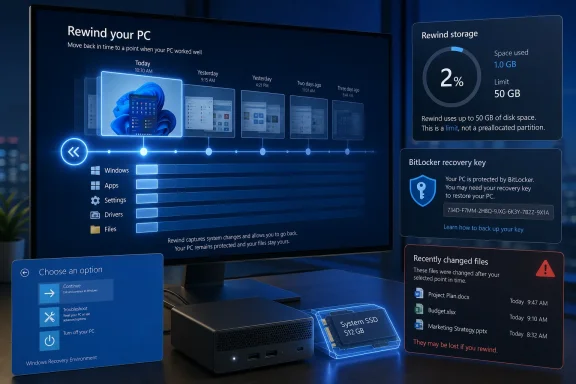 The 50GB Figure Is a Ceiling, Not an Immediate Charge
Point-in-time Restore defaults to a maximum usage limit of 2% of the Windows system volume. Microsoft caps that allowance at 50GB, meaning only sufficiently large system drives can approach the figure appearing in headlines.The approximate limits work out as follows:
| System volume | Default maximum |
|---|---|
| 256GB | 5.1GB |
| 512GB | 10.2GB |
| 1TB | 20.5GB |
| 2TB | 41GB |
| 4TB or larger | 50GB |
The snapshots also are not full, independent copies of every byte on the SSD. VSS tracks changed blocks after a restore point is captured, allowing successive snapshots to consume less space than repeatedly cloning the entire Windows volume. Actual usage therefore depends on how much data changes, although Microsoft cautions that active systems may eventually use most or all of the configured allowance.
There is another guardrail for lower-capacity devices. Point-in-time Restore is not enabled automatically when the Windows volume is smaller than 200GB, though an administrator can switch it on manually. If free space drops to 20GB or less, Windows begins deleting older snapshots to reduce pressure on the drive.
Point-in-time Restore also shares VSS storage with System Restore and third-party software using the same infrastructure. It does not receive a completely isolated storage pool, which may matter on systems already running local snapshot or rollback products.
A Three-Day Undo Button for the Whole PC
Windows automatically attempts to create a restore point approximately every 24 hours and retains each one for up to 72 hours. Old snapshots are removed when they exceed that retention period, when VSS reaches its configured storage limit, or when the system runs short of free space.Microsoft positions this as a way to recover in minutes rather than spend hours diagnosing a machine that no longer starts correctly. Recovery currently begins in the Windows Recovery Environment by selecting Troubleshoot and then Point-in-time Restore. On an encrypted PC, the user must supply the BitLocker recovery key before choosing a snapshot.
The scope is what separates the feature from traditional System Restore. Point-in-time Restore covers the full state of the Windows volume, including:
- It restores Windows, installed applications, drivers, configuration, and local user files.
- It returns passwords, certificates, and keys on the system volume to their earlier state.
- It does not roll back separate data volumes.
- It does not reverse changes to files held in cloud services such as OneDrive.
Users should consequently treat the feature as an emergency recovery tool, not as a substitute for backup. A backup preserves separate copies from multiple dates and ideally stores them away from the original device. Point-in-time Restore keeps short-lived snapshots on the same SSD as Windows, leaving them vulnerable to drive failure, severe file-system damage, theft, or malware capable of deleting local recovery data.
Microsoft Is Making the Consumer Choice by Default
Microsoft’s enablement policy differs between personal and centrally managed PCs. Point-in-time Restore defaults to on for Windows Home and unmanaged Windows Pro installations with system volumes of at least 200GB. Enterprise, Education, domain-joined Pro, and endpoint-managed Pro devices remain opted out by default for now.That enterprise distinction is temporary. Microsoft says the default will change for managed systems with Windows 11 version 26H2, giving administrators a deployment window to test storage behavior, recovery procedures, BitLocker-key access, and compatibility with existing VSS-based tools.
The feature began appearing in Windows Insider builds in November 2025 and reached the Release Preview Channel for Windows 11 24H2 and 25H2 with Builds 26100.8728 and 26200.8728 on June 12, 2026. It moved into production servicing through June’s optional KB5095093 preview and the July 14 KB5101650 security update, which advances supported systems to Builds 26100.8875 and 26200.8875.
Availability can still vary because Microsoft uses gradual feature rollout mechanisms. Installing KB5101650 does not necessarily mean the recovery controls will become visible immediately on every PC.
Local administrators can check under Settings > System > Recovery > Point-in-time Restore and select “View or edit” to inspect existing snapshots and current disk usage. Home and Pro users can change the on/off state and storage allowance, while Microsoft reserves frequency and retention controls for Enterprise edition.
Turning the feature off prevents Windows from creating new snapshots. Microsoft’s support documentation notes that existing restore points can remain until they expire or Windows needs their space, so users should not assume that flipping the toggle will always produce an immediate, matching increase in free capacity.
Recovery Comes With Sharp Edges
A full-system rewind introduces complications that do not exist with the narrower System Restore. Microsoft warns that restoring a snapshot can remove recent security updates and policies, making a fresh Windows Update scan and post-recovery validation necessary.The company also documents several current limitations and known issues. EFS-encrypted files can prevent restoration, the process needs additional free space equivalent to the size of the stored restore points, and interrupting recovery may leave Windows unbootable. Outlook users may need to rebuild an outdated
.ost cache, while Windows Recall can be disabled after restoration until presence is confirmed again.For administrators, BitLocker-key availability may be the most immediate operational concern. A recovery option inside WinRE is of little value if the user or help desk cannot retrieve the key protecting the system volume. Enterprises evaluating Point-in-time Restore should test that workflow before allowing the feature to become another recovery button employees cannot complete.
For home users, however, the default trade looks reasonable. A typical 512GB SSD is limited to roughly 10GB of VSS storage, not 50GB, and Windows can evict snapshots when capacity becomes constrained. In exchange, a failed update or driver installation may be recoverable without resetting Windows and rebuilding every application.
Point-in-time Restore does not secretly confiscate 50GB from every Windows 11 PC. It gives qualifying systems a dynamic, capped allowance for a three-day recovery window—and users should decide whether that local safety net complements their backup strategy before disabling it simply to reclaim a few gigabytes.
References
- Primary source: XDA
Published: 2026-07-15T00:01:18+00:00
Your Windows 11 SSD just lost up to 50GB to a new feature you've never heard of — and that's a good thing
It's not as bad as it sounds www.xda-developers.com
