

Microsoft has released KB5101650 for Windows 11 versions 25H2 and 24H2, moving both platforms to OS builds 26200.8875 and 26100.8875 respectively. The July 14, 2026 cumulative update delivers this month’s security fixes, incorporates changes from the June optional preview, repairs an Office automation regression, and introduces hardening changes that may expose legacy networking and Kerberos dependencies.
Microsoft’s Windows release notes say the update is available through Windows Update, Windows Update for Business, Microsoft Update Catalog, and Windows Server Update Services. The company recommends prompt installation and currently lists no known issues, although administrators have several compatibility changes to assess before broad deployment.
The most consequential change for enterprise environments may sit outside the desktop-facing fixes. Microsoft’s Windows message center says the July 2026 security updates complete the enforcement phase of protections associated with CVE-2026-20833, removing the temporary Audit mode used to identify Active Directory environments that still depend on RC4-based Kerberos service tickets.
Organizations relying on old service accounts, appliances, applications, or non-Windows Kerberos implementations could encounter authentication failures after installing July’s updates on domain controllers. Microsoft has been warning administrators since January 2026 and changed the default ticket behavior in April, but July marks the point at which Audit mode is no longer available as a fallback.
IT teams should review Kerberos events in the System log and identify accounts without explicit encryption settings, particularly services that still expect RC4 tickets. Compatibility testing should also cover storage appliances, Unix and Linux services, Java applications, identity products, and other systems that participate in an Active Directory Kerberos environment.
KB5101650 also enforces registration requirements for third-party Transport Driver Interface transports. Applications that open sockets through an unregistered third-party TDI transport may stop working after the update, while correctly registered transports are unaffected.
TDI is a legacy networking architecture, so this change is unlikely to affect typical consumer software. It could matter in environments running old security agents, specialized network clients, industrial applications, or proprietary protocol stacks that have survived through years of in-place Windows upgrades. Administrators responsible for such software should treat a failure after KB5101650 as a possible compatibility result of the new enforcement rather than an ordinary firewall or Winsock problem.
OLE Automation remains common in line-of-business software that generates Word reports, populates Excel workbooks, produces invoices, or opens Office documents from another application. The failure therefore had the potential to disrupt otherwise stable business workflows even when users could open Word or Excel normally from the Start menu.
Installing July’s cumulative update is Microsoft’s supported resolution. Organizations that paused KB5094126 because of the Office problem can now test KB5101650 against the affected application instead of maintaining a security-update hold.
The update also changes how Windows unregisters and cleans up hotkeys. Microsoft warns that, in rare cases, built-in Windows experiences relying on the previous hotkey lifecycle may temporarily stop responding to some keyboard shortcuts. Restarting the affected application should restore normal behavior; persistent cases should be submitted through Feedback Hub.
That warning is not currently classified as a known issue with the update. It is nevertheless worth including in help-desk guidance because an isolated shortcut failure after patching may look like a keyboard, accessibility, or shell problem.
Microsoft recommends that administrators migrate trusted publisher configurations to SHA-256 or a stronger algorithm as soon as possible. This follows earlier 2026 changes intended to make malicious
Organizations that distribute signed RDP files or use Group Policy to control trusted publishers should inventory configurations containing SHA-1 thumbprints. Waiting until SHA-1 support disappears could leave previously trusted connection files generating warnings or being blocked, depending on policy.
The practical work is straightforward but should not be deferred: generate or obtain the SHA-256 thumbprint for each publisher certificate, update the corresponding policies, and test distributed
Windows’ bundled curl command-line tool has meanwhile been upgraded to version 8.21.0. Because curl is used directly by administrators, scripts, installers, development tools, and automation systems, the in-box upgrade deserves regression testing where output parsing or tightly controlled binary versions are involved.
The certificate transition became urgent because certificates used across much of the Windows ecosystem began reaching expiration dates in June 2026. Microsoft stresses that PCs which have not yet received replacement certificates will continue to boot and install standard Windows updates; the expiration date does not translate into an immediate mass failure on unupdated devices.
The longer-term risk concerns the chain of trust used to validate boot components and recovery or installation media. Microsoft is therefore rolling out the replacements gradually rather than forcing the same firmware-level change onto every eligible PC at once.
Administrators maintaining Windows installation media have a related deployment requirement. When applying Dynamic Update packages to an existing image, the media must contain the correct
Microsoft recommends using its Update WinPE script to update existing Windows images. The alternative is to copy
This is particularly important for teams maintaining custom Windows Preinstallation Environment media, task-sequence boot images, factory recovery media, or offline deployment shares. Updating the cumulative package without validating the Secure Boot support files could produce media that appears to service correctly but fails when used on target hardware.
Windows 11 24H2 Enterprise and Education remain supported until October 12, 2027. The shorter deadline applies specifically to Home and Pro, leaving administrators with roughly three months to move remaining eligible systems to Windows 11 25H2 or another supported release.
The update also raises Copilot+ PC AI components to version 1.2605.856.0, covering Image Search, Content Extraction, Semantic Analysis, and the Settings Model. Those component packages apply only to Copilot+ PCs and do not install on conventional Windows PCs or Windows Server systems.
Servicing stack update KB5120102, build 26100.8872, is integrated with the cumulative package to improve update-installation reliability. Devices already carrying previous cumulative updates will download only the new payload needed for July.
For most users, KB5101650 should arrive automatically through Windows Update. Enterprise administrators have a broader checklist: test old TDI-dependent software, verify that RC4 Kerberos dependencies are gone, replace SHA-1 RDP publisher thumbprints, rebuild deployment media with the correct
Microsoft’s Windows release notes say the update is available through Windows Update, Windows Update for Business, Microsoft Update Catalog, and Windows Server Update Services. The company recommends prompt installation and currently lists no known issues, although administrators have several compatibility changes to assess before broad deployment.
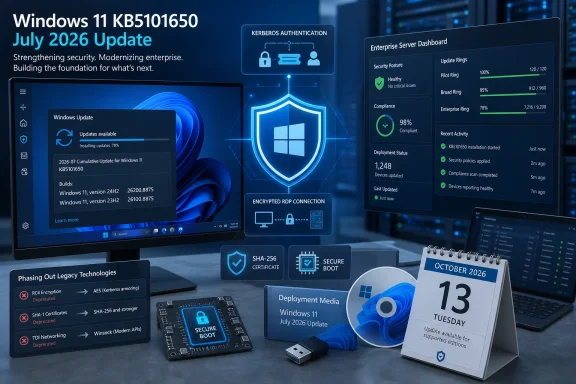 July’s Hardening Reaches Beyond Routine Patching
The most consequential change for enterprise environments may sit outside the desktop-facing fixes. Microsoft’s Windows message center says the July 2026 security updates complete the enforcement phase of protections associated with CVE-2026-20833, removing the temporary Audit mode used to identify Active Directory environments that still depend on RC4-based Kerberos service tickets.Organizations relying on old service accounts, appliances, applications, or non-Windows Kerberos implementations could encounter authentication failures after installing July’s updates on domain controllers. Microsoft has been warning administrators since January 2026 and changed the default ticket behavior in April, but July marks the point at which Audit mode is no longer available as a fallback.
IT teams should review Kerberos events in the System log and identify accounts without explicit encryption settings, particularly services that still expect RC4 tickets. Compatibility testing should also cover storage appliances, Unix and Linux services, Java applications, identity products, and other systems that participate in an Active Directory Kerberos environment.
KB5101650 also enforces registration requirements for third-party Transport Driver Interface transports. Applications that open sockets through an unregistered third-party TDI transport may stop working after the update, while correctly registered transports are unaffected.
TDI is a legacy networking architecture, so this change is unlikely to affect typical consumer software. It could matter in environments running old security agents, specialized network clients, industrial applications, or proprietary protocol stacks that have survived through years of in-place Windows upgrades. Administrators responsible for such software should treat a failure after KB5101650 as a possible compatibility result of the new enforcement rather than an ordinary firewall or Winsock problem.
Microsoft Repairs June’s Office Automation Regression
KB5101650 resolves a known issue introduced by the June 9 security update, KB5094126. Certain third-party applications using OLE Automation to control Microsoft Office could fail to launch an Office program or open a document after the June update was installed.OLE Automation remains common in line-of-business software that generates Word reports, populates Excel workbooks, produces invoices, or opens Office documents from another application. The failure therefore had the potential to disrupt otherwise stable business workflows even when users could open Word or Excel normally from the Start menu.
Installing July’s cumulative update is Microsoft’s supported resolution. Organizations that paused KB5094126 because of the Office problem can now test KB5101650 against the affected application instead of maintaining a security-update hold.
The update also changes how Windows unregisters and cleans up hotkeys. Microsoft warns that, in rare cases, built-in Windows experiences relying on the previous hotkey lifecycle may temporarily stop responding to some keyboard shortcuts. Restarting the affected application should restore normal behavior; persistent cases should be submitted through Feedback Hub.
That warning is not currently classified as a known issue with the update. It is nevertheless worth including in help-desk guidance because an isolated shortcut failure after patching may look like a keyboard, accessibility, or shell problem.
RDP Publishers Move Toward SHA-256
Remote Desktop receives another security-focused change in KB5101650. Windows now supports SHA-2 certificate thumbprints for trusted RDP publishers, while SHA-1 remains available strictly for backward compatibility and is scheduled for removal in a future release.Microsoft recommends that administrators migrate trusted publisher configurations to SHA-256 or a stronger algorithm as soon as possible. This follows earlier 2026 changes intended to make malicious
.rdp files less effective as phishing tools by exposing requested connection settings and local-resource access before Windows establishes a session.Organizations that distribute signed RDP files or use Group Policy to control trusted publishers should inventory configurations containing SHA-1 thumbprints. Waiting until SHA-1 support disappears could leave previously trusted connection files generating warnings or being blocked, depending on policy.
The practical work is straightforward but should not be deferred: generate or obtain the SHA-256 thumbprint for each publisher certificate, update the corresponding policies, and test distributed
.rdp files on patched clients. Administrators should also verify that old deployment scripts are not writing SHA-1 values back into policy or registry settings.Windows’ bundled curl command-line tool has meanwhile been upgraded to version 8.21.0. Because curl is used directly by administrators, scripts, installers, development tools, and automation systems, the in-box upgrade deserves regression testing where output parsing or tightly controlled binary versions are involved.
Secure Boot Certificate Delivery Continues
Microsoft is expanding the pool of devices eligible to receive replacement Secure Boot certificates automatically. The company says KB5101650 adds more high-confidence device targeting data, allowing certificate deployment to continue on systems considered ready for the change.The certificate transition became urgent because certificates used across much of the Windows ecosystem began reaching expiration dates in June 2026. Microsoft stresses that PCs which have not yet received replacement certificates will continue to boot and install standard Windows updates; the expiration date does not translate into an immediate mass failure on unupdated devices.
The longer-term risk concerns the chain of trust used to validate boot components and recovery or installation media. Microsoft is therefore rolling out the replacements gradually rather than forcing the same firmware-level change onto every eligible PC at once.
Administrators maintaining Windows installation media have a related deployment requirement. When applying Dynamic Update packages to an existing image, the media must contain the correct
boot.stl file for that Windows version and architecture. Omitting it can prevent the device from starting from the updated media and produce error code 0xc0430001.Microsoft recommends using its Update WinPE script to update existing Windows images. The alternative is to copy
boot.stl manually from the device’s Windows\Boot\EFI directory into the corresponding location on the installation media.This is particularly important for teams maintaining custom Windows Preinstallation Environment media, task-sequence boot images, factory recovery media, or offline deployment shares. Updating the cumulative package without validating the Secure Boot support files could produce media that appears to service correctly but fails when used on target hardware.
Windows 11 24H2 Home and Pro Near the Exit
KB5101650 arrives with another lifecycle reminder: Windows 11 24H2 Home and Pro reach end of servicing on October 13, 2026. After that date, those editions will stop receiving monthly security updates, preview updates, time-zone changes, fixes for known issues, and Microsoft technical support.Windows 11 24H2 Enterprise and Education remain supported until October 12, 2027. The shorter deadline applies specifically to Home and Pro, leaving administrators with roughly three months to move remaining eligible systems to Windows 11 25H2 or another supported release.
The update also raises Copilot+ PC AI components to version 1.2605.856.0, covering Image Search, Content Extraction, Semantic Analysis, and the Settings Model. Those component packages apply only to Copilot+ PCs and do not install on conventional Windows PCs or Windows Server systems.
Servicing stack update KB5120102, build 26100.8872, is integrated with the cumulative package to improve update-installation reliability. Devices already carrying previous cumulative updates will download only the new payload needed for July.
For most users, KB5101650 should arrive automatically through Windows Update. Enterprise administrators have a broader checklist: test old TDI-dependent software, verify that RC4 Kerberos dependencies are gone, replace SHA-1 RDP publisher thumbprints, rebuild deployment media with the correct
boot.stl, and begin moving Windows 11 24H2 Home and Pro devices before the October 13 servicing deadline.References
- Primary source: Microsoft - Message Center
Published: 2026-07-14 10:00 PT
July 14, 2026—KB5101650 (OS Builds 26200.8870 and 26100.8875) | Microsoft Support
July 14, 2026—KB5101650 (OS Builds 26200.8870 and 26100.8875)support.microsoft.com
