

Microsoft’s July 2026 Patch Tuesday delivers KB5101650 for Windows 11 versions 25H2 and 24H2, moving supported PCs to builds 26200.8875 and 26100.8875 respectively. Windows 11 23H2 receives KB5099414 and build 22631.7376, although Microsoft has temporarily withheld the newer update from a limited number of Dell PCs because of an Intel-related compatibility problem.
The headline figure is extraordinary: security researchers counted 570 vulnerabilities addressed in Microsoft’s July 14 release, including three zero-days. But reports describing these as “570 critical security fixes” overstate the situation. BleepingComputer counted 59 vulnerabilities rated Critical, while Qualys counted 57 under its methodology; the remainder were primarily rated Important.
Nor does every Windows PC contain all 570 flaws. The total spans Windows components and a broad collection of Microsoft products, with hundreds of entries tied to Microsoft Edge and its Chromium foundation. The practical instruction remains the same, however: install the cumulative Windows update, update Edge and other Microsoft applications, and verify that the deployment succeeded rather than assuming automatic updates completed normally.
BleepingComputer reported that two vulnerabilities were already being exploited when Microsoft issued the July updates. CVE-2026-56155 affects Active Directory Federation Services, while CVE-2026-56164 affects Microsoft SharePoint Server.
Those are primarily enterprise concerns, but they are urgent ones. Microsoft has not publicly detailed the attacks, although the ADFS vulnerability was credited to its Detection and Response Team, suggesting that the flaw was identified during incident-response work. The SharePoint vulnerability was credited partly to Mandiant and Google Cloud researchers.
The third zero-day, CVE-2026-50661, is a Windows BitLocker security-feature bypass that had been publicly disclosed before a patch became available. Microsoft rates it Important rather than Critical, but administrators should not interpret that label as permission to defer indefinitely. BitLocker weaknesses are especially relevant to stolen devices, offline attacks and organizations that rely on drive encryption as a central data-loss control.
The broader July release includes fixes across Windows TCP/IP, Windows Media, Hyper-V, NTFS, Bluetooth, Secure Boot, SMB, Win32k, Windows Server Update Services and other components. There are numerous remote-code-execution and elevation-of-privilege issues, making the cumulative update relevant even to PCs that are unaffected by the headline zero-days.
For enterprise administrators, this is a month to prioritize internet-facing SharePoint Server systems, ADFS infrastructure and exposed Windows services before moving through the normal workstation deployment rings. The size of the CVE list does not eliminate the need for prioritization; it makes accurate asset inventory and exposure data more important.
If the update is missing, select Check for updates, reboot the PC and check again. The Windows Update troubleshooter may resolve basic servicing problems, but repeated failures should be investigated through the update history and Event Viewer rather than answered with endless restarts.
Managed devices are different. A PC controlled through Windows Update for Business, Microsoft Intune, Windows Server Update Services or another patch-management platform may be following a deliberate deployment schedule. Employees should not attempt to bypass those controls with manually downloaded packages unless instructed by IT.
Administrators should also verify that Microsoft Edge has restarted and completed its own update cycle. A substantial portion of July’s imposing vulnerability total comes from Edge and Chromium, and installing the Windows cumulative update alone does not prove that every Microsoft application is current.
Microsoft and Dell are working on a resolution and are preventing affected systems from receiving the update in the meantime. This is effectively a targeted protection measure: Windows Update sees the affected hardware and declines to offer the package until the compatibility problem is addressed.
Users should not treat the missing update as evidence that Windows Update is broken. More importantly, they should not use the Microsoft Update Catalog or DISM to force KB5101650 onto a Dell system that is subject to the block. Bypassing a safeguard may trade security exposure for instability, thermal problems or data loss.
For organizations with Dell fleets, the sensible response is to identify affected models, monitor Microsoft’s Windows release-health information and Dell support notices, and maintain other defenses while waiting for the revised update path. Endpoint protection, restricted local administrator access and reduced exposure of vulnerable services matter more during that gap, but none is a permanent replacement for the security update.
Microsoft’s Multi-Model Agentic Scanning Harness, or MDASH, uses more than 100 specialized AI agents and multiple model families to find, debate and validate potential vulnerabilities. Microsoft said the system identified 16 Windows networking and authentication vulnerabilities fixed in May 2026, including four Critical remote-code-execution flaws.
Microsoft has also warned that AI-assisted vulnerability discovery is likely to produce larger security releases as its engineers find more defects before attackers do. That is good news for defenders, even when it makes Patch Tuesday look alarming: a vulnerability found internally and repaired is preferable to one discovered through an active intrusion.
However, Microsoft has not established that MDASH found all—or even most—of July’s 570 vulnerabilities. The total also reflects counting methodology, an unusually large Edge and Chromium cohort, and fixes spread across numerous Microsoft products. The claim that July’s release is massive specifically because criminals are using AI is therefore too strong.
AI is accelerating both vulnerability research and offensive experimentation, but patch volume is not a direct measurement of Windows quality or attacker activity. It shows how many CVEs were assigned and addressed within a particular reporting window, not how many exploitable holes exist on one installation.
Users remaining on Windows 10 should open Windows Update and verify that the device is enrolled in ESU and continues to receive cumulative security updates. Unsupported Windows 10 releases and older Windows versions will not become protected merely because Microsoft published fixes for newer systems.
For most Windows 11 users, the immediate target is unambiguous: KB5101650 with build 26200.8875 or 26100.8875, or KB5099414 with build 22631.7376. Dell owners who encounter Microsoft’s compatibility block should leave it in place; everyone else should treat a failed or missing July update as something to investigate promptly, especially with two zero-days already observed in attacks.
The headline figure is extraordinary: security researchers counted 570 vulnerabilities addressed in Microsoft’s July 14 release, including three zero-days. But reports describing these as “570 critical security fixes” overstate the situation. BleepingComputer counted 59 vulnerabilities rated Critical, while Qualys counted 57 under its methodology; the remainder were primarily rated Important.
Nor does every Windows PC contain all 570 flaws. The total spans Windows components and a broad collection of Microsoft products, with hundreds of entries tied to Microsoft Edge and its Chromium foundation. The practical instruction remains the same, however: install the cumulative Windows update, update Edge and other Microsoft applications, and verify that the deployment succeeded rather than assuming automatic updates completed normally.
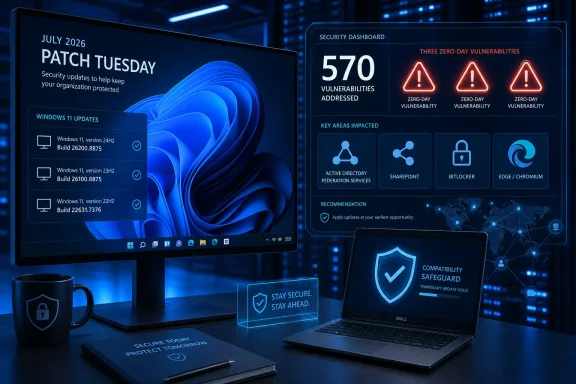 Three Zero-Days Set the Deployment Priority
BleepingComputer reported that two vulnerabilities were already being exploited when Microsoft issued the July updates. CVE-2026-56155 affects Active Directory Federation Services, while CVE-2026-56164 affects Microsoft SharePoint Server.Those are primarily enterprise concerns, but they are urgent ones. Microsoft has not publicly detailed the attacks, although the ADFS vulnerability was credited to its Detection and Response Team, suggesting that the flaw was identified during incident-response work. The SharePoint vulnerability was credited partly to Mandiant and Google Cloud researchers.
The third zero-day, CVE-2026-50661, is a Windows BitLocker security-feature bypass that had been publicly disclosed before a patch became available. Microsoft rates it Important rather than Critical, but administrators should not interpret that label as permission to defer indefinitely. BitLocker weaknesses are especially relevant to stolen devices, offline attacks and organizations that rely on drive encryption as a central data-loss control.
The broader July release includes fixes across Windows TCP/IP, Windows Media, Hyper-V, NTFS, Bluetooth, Secure Boot, SMB, Win32k, Windows Server Update Services and other components. There are numerous remote-code-execution and elevation-of-privilege issues, making the cumulative update relevant even to PCs that are unaffected by the headline zero-days.
For enterprise administrators, this is a month to prioritize internet-facing SharePoint Server systems, ADFS infrastructure and exposed Windows services before moving through the normal workstation deployment rings. The size of the CVE list does not eliminate the need for prioritization; it makes accurate asset inventory and exposure data more important.
The Build Number Is the Simplest Consumer Check
Windows 11 users can confirm the installed release by opening Settings > System > About and checking the OS build under Windows specifications. The expected July 2026 levels are:- Windows 11 25H2 should report OS build 26200.8875 after installing KB5101650.
- Windows 11 24H2 should report OS build 26100.8875 after installing KB5101650.
- Windows 11 23H2 should report OS build 22631.7376 after installing KB5099414.
Win + R, entering winver, and pressing Enter. Update history under Settings > Windows Update > Update history should also show whether the July cumulative update installed successfully or failed with an error.If the update is missing, select Check for updates, reboot the PC and check again. The Windows Update troubleshooter may resolve basic servicing problems, but repeated failures should be investigated through the update history and Event Viewer rather than answered with endless restarts.
Managed devices are different. A PC controlled through Windows Update for Business, Microsoft Intune, Windows Server Update Services or another patch-management platform may be following a deliberate deployment schedule. Employees should not attempt to bypass those controls with manually downloaded packages unless instructed by IT.
Administrators should also verify that Microsoft Edge has restarted and completed its own update cycle. A substantial portion of July’s imposing vulnerability total comes from Edge and Chromium, and installing the Windows cumulative update alone does not prove that every Microsoft application is current.
Dell’s Safeguard Is a Reason to Wait, Not Work Around It
Microsoft says KB5101650 may be unavailable to a limited number of Dell devices with Intel processors. Dell reported an incompatibility that could cause unexpected shutdowns, degraded performance, additional heat and increased battery consumption.Microsoft and Dell are working on a resolution and are preventing affected systems from receiving the update in the meantime. This is effectively a targeted protection measure: Windows Update sees the affected hardware and declines to offer the package until the compatibility problem is addressed.
Users should not treat the missing update as evidence that Windows Update is broken. More importantly, they should not use the Microsoft Update Catalog or DISM to force KB5101650 onto a Dell system that is subject to the block. Bypassing a safeguard may trade security exposure for instability, thermal problems or data loss.
For organizations with Dell fleets, the sensible response is to identify affected models, monitor Microsoft’s Windows release-health information and Dell support notices, and maintain other defenses while waiting for the revised update path. Endpoint protection, restricted local administrator access and reduced exposure of vulnerable services matter more during that gap, but none is a permanent replacement for the security update.
AI Explains Some of the Growth, Not the Entire Number
MakeUseOf attributes the enormous July patch count to attackers increasingly using AI and to Microsoft’s new MDASH security system. That framing compresses two related trends into a cleaner story than the available evidence supports.Microsoft’s Multi-Model Agentic Scanning Harness, or MDASH, uses more than 100 specialized AI agents and multiple model families to find, debate and validate potential vulnerabilities. Microsoft said the system identified 16 Windows networking and authentication vulnerabilities fixed in May 2026, including four Critical remote-code-execution flaws.
Microsoft has also warned that AI-assisted vulnerability discovery is likely to produce larger security releases as its engineers find more defects before attackers do. That is good news for defenders, even when it makes Patch Tuesday look alarming: a vulnerability found internally and repaired is preferable to one discovered through an active intrusion.
However, Microsoft has not established that MDASH found all—or even most—of July’s 570 vulnerabilities. The total also reflects counting methodology, an unusually large Edge and Chromium cohort, and fixes spread across numerous Microsoft products. The claim that July’s release is massive specifically because criminals are using AI is therefore too strong.
AI is accelerating both vulnerability research and offensive experimentation, but patch volume is not a direct measurement of Windows quality or attacker activity. It shows how many CVEs were assigned and addressed within a particular reporting window, not how many exploitable holes exist on one installation.
Windows 10 Needs Enrollment, Not Assumptions
Windows 10 reached the end of its standard support lifecycle on October 14, 2025. PCs still receiving consumer Extended Security Updates can continue obtaining eligible security fixes through October 13, 2026, but that protection is not an automatic blanket extension for every Windows 10 installation.Users remaining on Windows 10 should open Windows Update and verify that the device is enrolled in ESU and continues to receive cumulative security updates. Unsupported Windows 10 releases and older Windows versions will not become protected merely because Microsoft published fixes for newer systems.
For most Windows 11 users, the immediate target is unambiguous: KB5101650 with build 26200.8875 or 26100.8875, or KB5099414 with build 22631.7376. Dell owners who encounter Microsoft’s compatibility block should leave it in place; everyone else should treat a failed or missing July update as something to investigate promptly, especially with two zero-days already observed in attacks.
References
- Primary source: MakeUseOf
Published: 2026-07-15T17:54:21+00:00
Microsoft just offered 570 critical security fixes — is your PC getting them?
It's one of the biggest Windows updates in history. www.makeuseof.com
- Related coverage: pcgamer.com
More Windows security updates to come as Microsoft leverages AI vulnerability detection, but 'only the highest-confidence findings reach the engineering team' | PC Gamer
Humans still make the key decisions and handle fixes, though.www.pcgamer.com - Official source: microsoft.com
Defense at AI speed: Microsoft’s new multi-model agentic security system tops leading industry benchmark | Microsoft Security Blog
Today Microsoft is announcing a major step forward in AI-powered cyber defense: a new multi-model agentic scanning harness (codenamed MDASH).www.microsoft.com - Official source: news.microsoft.com
마이크로소프트, AI 기반 에이전틱 보안 시스템 ‘MDASH’ 공개 - Source Asia
 news.microsoft.com
- Related coverage: gopher.security
Microsoft Releases New Security Framework to Address Autonomous AI Agent Vulnerabilities and Identity Risks | Quantum Safe News Center
Microsoft introduces Agent 365 and the MDASH security harness to secure autonomous AI agents against identity risks and emerging vulnerabilities. Learn more.www.gopher.security - Related coverage: techradar.com
Microsoft unveils MDASH, its AI agent-driven security platform — and it's already spotted a host of new Windows flaws | TechRadar
100 AI agents worked in unison to discover 16 flawswww.techradar.com
