

Microsoft’s July 2026 Windows 11 cumulative update, KB5101650, takes version 25H2 to build 26200.8875 and version 24H2 to build 26100.8875. It arrives during a security release that Windows Central, citing Action1’s tracking, reports addressed 570 vulnerabilities across Microsoft products. That total is not a count of Windows 11 vulnerabilities, and it should not be read as a count of fixes contained solely in KB5101650.
For administrators, the immediate recommendation is straightforward: do not override the Dell Intel Innovation Platform Framework safeguard; pilot the update with legacy networking and RDP publisher configurations; ensure
The larger July total does not automatically mean Windows has become dramatically less secure. A more useful question is whether Microsoft is finding more weaknesses across its broad product estate before attackers can turn them into incidents. Microsoft has said that as AI helps defenders discover more issues, customers may see a higher volume of security updates in each release. That makes raw vulnerability counts a less reliable shorthand for either product risk or the operational risk of one Windows cumulative update.
The July package also makes the practical side of servicing clear. KB5101650 is temporarily unavailable to a limited set of Dell devices with Intel Innovation Platform Framework drivers because of an incompatibility involving an Intel component. Microsoft is using a compatibility safeguard rather than expecting affected users to discover performance, power-consumption, or general system-behavior problems after installation.
The notable change in July is not a user-facing Windows feature. It is the increasingly visible connection between large-scale vulnerability research and the monthly servicing cycle that delivers fixes.
Microsoft calls its system MDASH, short for multi-model agentic security scanning harness. Microsoft has described MDASH as using more than 100 specialized AI agents across multiple models. The company says the system helped researchers discover 16 vulnerabilities in Windows networking and authentication components, including issues affecting the TCP/IP stack and IKEv2 service.
That claim needs an important boundary: Microsoft has not said MDASH found all 570 vulnerabilities reported across its July 2026 product-wide security release. Nor does the Action1 and Windows Central tally establish that all 570 findings were Windows 11 issues or that they all shipped in KB5101650. Microsoft’s estate includes Windows, Office, cloud services, developer tools, identity products, and other software with separate release and servicing paths.
The useful takeaway for IT teams is more limited and more practical. Microsoft expects AI-assisted research to increase the number of issues found by defenders. If that expectation holds, organizations may encounter larger or more frequent security release workloads even when a particular Windows cumulative update contains only a portion of the month’s broader Microsoft fixes.
That does not change the fundamentals of deployment. More findings do not remove the need for pilot rings, hardware segmentation, rollback plans, and clear monitoring. The operational question remains the same: can a given update be deployed safely across the organization’s hardware, drivers, line-of-business applications, remote-access configurations, and installation workflows?
These figures are a Microsoft-products-wide tally attributed to Action1 and reported by Windows Central. They are not a count of Windows 11 vulnerabilities, a measure of Windows 11 exposure alone, or proof that KB5101650 itself contains 570 fixes.
Even so, the table matters for enterprise patch-management planning. A growing volume of disclosed and remediated vulnerabilities can mean broader preventive coverage. It can also mean more work for teams that must determine which updates affect sensitive systems, remote-access infrastructure, specialized endpoints, or devices that cannot be rebooted during ordinary maintenance windows.
The Dell safeguard attached to this release is a useful reminder that security volume and deployment quality are separate issues. A larger monthly release is not necessarily less reliable, but it does increase the importance of testing discipline and targeted compatibility protections.
The update also introduces changes that deserve focused testing in environments with older networking or remote-access configurations.
Starting with Windows security updates released on or after July 14, 2026, Microsoft applies TDI transport-registration requirements. The supplied release information establishes the requirement, but organizations should avoid assuming the impact will be limited to one product type or one application category. Administrators with legacy networking software, middleware, endpoint security tools, or specialized connectivity components should include those systems in pilot deployment rings and confirm vendor support for the new requirement.
Remote Desktop administrators have a second review point. KB5101650 adds SHA-2 certificate-thumbprint support for trusted RDP publishers while retaining SHA-1 for backward compatibility. Microsoft recommends SHA-256 thumbprints or stronger algorithms. The practical action is to identify existing trusted-publisher certificates and policies, document any SHA-1 dependencies, and move managed configurations toward SHA-256 or stronger certificates where the organization’s RDP publishing workflow supports them.
The package also moves Windows’ built-in curl tool to version 8.21.0, expands device-targeting data for Secure Boot certificate deployment, and updates several AI components: Image Search, Content Extraction, Semantic Analysis, and Settings Model. These are different kinds of changes, but they show how one cumulative-update cycle can touch security, trust infrastructure, command-line tooling, AI-enabled experiences, and enterprise deployment processes.
June 9, 2026: KB5094126 releases with builds 26200.8655 and 26100.8655. Its features and quality improvements are later incorporated into KB5101650.
June 23, 2026: KB5095093 Preview releases with builds 26200.8736 and 26100.8736. Its improvements also flow into the July cumulative update.
July 14, 2026: New TDI transport-registration requirements take effect for Windows security updates released on or after this date.
October 13, 2026: Windows 11 version 24H2 Home and Pro editions reach end of updates. Enterprise and Education editions remain supported until October 12, 2027.
Administrators should treat that safeguard as a deployment control, not as an obstacle to work around. A device that does not receive the update through Windows Update may be blocked for a reason that is relevant to its driver and power-management stack. Manually importing or forcing the update onto safeguarded systems can remove the protection that Microsoft has put in place while the compatibility issue is investigated.
The Secure Boot notice is also operationally significant. Microsoft is expanding device-targeting data for Secure Boot certificate deployment, which makes certificate status worth reviewing across managed fleets, especially on intermittently connected devices and systems rebuilt from older media. Secure Boot trust is foundational infrastructure; organizations should make certificate deployment and update compliance visible in their endpoint-management reporting rather than treating the change as background servicing.
For organizations building or updating Windows installation media, Microsoft adds a direct warning: ensure that
The servicing stack update included with the package, KB5120102 at build 26100.8872, is intended to improve update-installation reliability. That does not eliminate the need to validate custom media, task sequences, bootable USB drives, Windows Deployment Services workflows, and other deployment paths before broad use.
It does mean that long update deferrals become harder to justify when Microsoft is reporting a higher pace of vulnerability discovery across its products. Organizations that postpone quality updates for months are not simply delaying maintenance; they may be extending exposure to security issues that have already entered the remediation pipeline.
A sensible approach is to separate systems by risk and compatibility profile. Internet-exposed and remote-access systems should receive particular attention. Devices with known driver sensitivities, specialized networking software, custom RDP publishing arrangements, or nonstandard deployment media should move through a controlled pilot process. The objective is neither blind speed nor indefinite delay. It is evidence-based rollout.
For administrators, the immediate recommendation is straightforward: do not override the Dell Intel Innovation Platform Framework safeguard; pilot the update with legacy networking and RDP publisher configurations; ensure
boot.stl is present in refreshed installation media that uses Dynamic Update; and schedule Windows 11 24H2 Home and Pro upgrades before October 13, 2026.The larger July total does not automatically mean Windows has become dramatically less secure. A more useful question is whether Microsoft is finding more weaknesses across its broad product estate before attackers can turn them into incidents. Microsoft has said that as AI helps defenders discover more issues, customers may see a higher volume of security updates in each release. That makes raw vulnerability counts a less reliable shorthand for either product risk or the operational risk of one Windows cumulative update.
The July package also makes the practical side of servicing clear. KB5101650 is temporarily unavailable to a limited set of Dell devices with Intel Innovation Platform Framework drivers because of an incompatibility involving an Intel component. Microsoft is using a compatibility safeguard rather than expecting affected users to discover performance, power-consumption, or general system-behavior problems after installation.
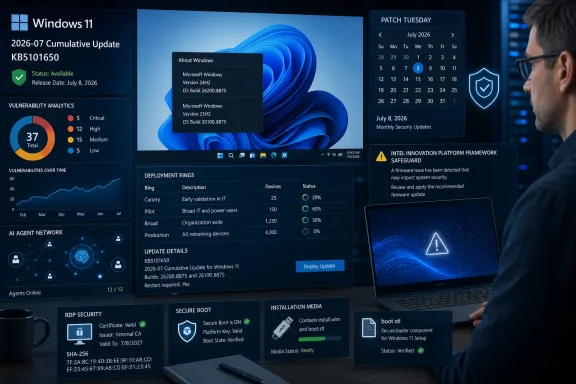 Patch Tuesday and AI-Assisted Security Research
The notable change in July is not a user-facing Windows feature. It is the increasingly visible connection between large-scale vulnerability research and the monthly servicing cycle that delivers fixes.Microsoft calls its system MDASH, short for multi-model agentic security scanning harness. Microsoft has described MDASH as using more than 100 specialized AI agents across multiple models. The company says the system helped researchers discover 16 vulnerabilities in Windows networking and authentication components, including issues affecting the TCP/IP stack and IKEv2 service.
That claim needs an important boundary: Microsoft has not said MDASH found all 570 vulnerabilities reported across its July 2026 product-wide security release. Nor does the Action1 and Windows Central tally establish that all 570 findings were Windows 11 issues or that they all shipped in KB5101650. Microsoft’s estate includes Windows, Office, cloud services, developer tools, identity products, and other software with separate release and servicing paths.
The useful takeaway for IT teams is more limited and more practical. Microsoft expects AI-assisted research to increase the number of issues found by defenders. If that expectation holds, organizations may encounter larger or more frequent security release workloads even when a particular Windows cumulative update contains only a portion of the month’s broader Microsoft fixes.
That does not change the fundamentals of deployment. More findings do not remove the need for pilot rings, hardware segmentation, rollback plans, and clear monitoring. The operational question remains the same: can a given update be deployed safely across the organization’s hardware, drivers, line-of-business applications, remote-access configurations, and installation workflows?
The Numbers Show a Broader Microsoft Trend
July’s reported 570 vulnerabilities stand out, but the tracking data cited by Windows Central suggests a higher 2026 pace than the comparable period in 2025.| Month | Vulnerabilities fixed in 2025 | Vulnerabilities fixed in 2026 | 2026 change |
|---|---|---|---|
| January | 159 | 114 | Down |
| February | 55 | 58 | Up |
| March | 57 | 79 | Up |
| April | 134 | 167 | Up |
| May | 72 | 120 | Up |
| June | 66 | 200 | Up |
| July | 137 | 570 | Up |
| January–July total | 680 | 1,308 | Up 628 |
Even so, the table matters for enterprise patch-management planning. A growing volume of disclosed and remediated vulnerabilities can mean broader preventive coverage. It can also mean more work for teams that must determine which updates affect sensitive systems, remote-access infrastructure, specialized endpoints, or devices that cannot be rebooted during ordinary maintenance windows.
The Dell safeguard attached to this release is a useful reminder that security volume and deployment quality are separate issues. A larger monthly release is not necessarily less reliable, but it does increase the importance of testing discipline and targeted compatibility protections.
The July Package Carries Operational Consequences
KB5101650 is not limited to security changes. It incorporates features and quality improvements previously released in the June 9, 2026 KB5094126 update and the June 23, 2026 KB5095093 Preview. Organizations that deferred optional preview releases can therefore receive those improvements through the normal cumulative-update path alongside the month’s security servicing.The update also introduces changes that deserve focused testing in environments with older networking or remote-access configurations.
Starting with Windows security updates released on or after July 14, 2026, Microsoft applies TDI transport-registration requirements. The supplied release information establishes the requirement, but organizations should avoid assuming the impact will be limited to one product type or one application category. Administrators with legacy networking software, middleware, endpoint security tools, or specialized connectivity components should include those systems in pilot deployment rings and confirm vendor support for the new requirement.
Remote Desktop administrators have a second review point. KB5101650 adds SHA-2 certificate-thumbprint support for trusted RDP publishers while retaining SHA-1 for backward compatibility. Microsoft recommends SHA-256 thumbprints or stronger algorithms. The practical action is to identify existing trusted-publisher certificates and policies, document any SHA-1 dependencies, and move managed configurations toward SHA-256 or stronger certificates where the organization’s RDP publishing workflow supports them.
The package also moves Windows’ built-in curl tool to version 8.21.0, expands device-targeting data for Secure Boot certificate deployment, and updates several AI components: Image Search, Content Extraction, Semantic Analysis, and Settings Model. These are different kinds of changes, but they show how one cumulative-update cycle can touch security, trust infrastructure, command-line tooling, AI-enabled experiences, and enterprise deployment processes.
Timeline
June 2026: Secure Boot certificates used by many Windows devices begin reaching their expiration period, and Microsoft starts delivering newer certificates through Windows Update.June 9, 2026: KB5094126 releases with builds 26200.8655 and 26100.8655. Its features and quality improvements are later incorporated into KB5101650.
June 23, 2026: KB5095093 Preview releases with builds 26200.8736 and 26100.8736. Its improvements also flow into the July cumulative update.
July 14, 2026: New TDI transport-registration requirements take effect for Windows security updates released on or after this date.
October 13, 2026: Windows 11 version 24H2 Home and Pro editions reach end of updates. Enterprise and Education editions remain supported until October 12, 2027.
Microsoft’s Safeguards Are Part of the Deployment Decision
The Dell availability hold provides a clearer operational lesson than any headline vulnerability count. Microsoft says that affected Dell PCs may experience changes in performance, power consumption, or general system behavior because of an incompatibility involving Intel Innovation Platform Framework drivers. The update is being held from those systems through a safeguard rather than broadly withdrawn.Administrators should treat that safeguard as a deployment control, not as an obstacle to work around. A device that does not receive the update through Windows Update may be blocked for a reason that is relevant to its driver and power-management stack. Manually importing or forcing the update onto safeguarded systems can remove the protection that Microsoft has put in place while the compatibility issue is investigated.
The Secure Boot notice is also operationally significant. Microsoft is expanding device-targeting data for Secure Boot certificate deployment, which makes certificate status worth reviewing across managed fleets, especially on intermittently connected devices and systems rebuilt from older media. Secure Boot trust is foundational infrastructure; organizations should make certificate deployment and update compliance visible in their endpoint-management reporting rather than treating the change as background servicing.
For organizations building or updating Windows installation media, Microsoft adds a direct warning: ensure that
boot.stl is included when deploying Dynamic Updates into an existing image. If it is absent, devices may fail to start from that installation media and can return error 0xc0430001. The instruction supported by the release information is inclusion: boot.stl must be present in installation media when Dynamic Updates are deployed.The servicing stack update included with the package, KB5120102 at build 26100.8872, is intended to improve update-installation reliability. That does not eliminate the need to validate custom media, task sequences, bootable USB drives, Windows Deployment Services workflows, and other deployment paths before broad use.
Action checklist for admins
- Do not override the Dell safeguard. In the Intune admin center, review Windows update reporting under Reports > Windows updates and use the quality-update views to identify devices that have not offered or installed the update. In Windows Server Update Services, open the Update Services console, go to Updates, search for KB5101650, and review approval and installation status before approving it for broader computer groups. If Windows Update for Business policies are used through Intune, review the relevant policy under Devices > Windows > Quality updates for Windows 10 and later and confirm that the affected Dell population is not being pushed through an exception process.
- Inventory Dell and Intel IPF systems before deployment. On a test device, open an elevated PowerShell session and run:
Get-CimInstance Win32_PnPSignedDriver | Where-Object {$_.DeviceName -match 'Intel.*Innovation Platform Framework|Intel.*IPF'} | Select-Object DeviceName, DriverVersion, DriverDate, Manufacturer, InfName
This provides a concrete starting inventory of installed Intel Innovation Platform Framework drivers. For Dell-managed fleets, Dell Command | Update and Dell Command | Monitor can also be used to collect model, BIOS, and driver information. Export the affected device names and models, then keep them out of any forced-update collection until Microsoft lifts the safeguard or Dell and Intel provide compatible driver guidance. - Pilot legacy networking software. Build a test ring that includes devices using older networking middleware, specialized security agents, industrial applications, VPN-related components, and other software that may depend on TDI-related behavior. Because the stated change is enforcement of TDI transport-registration requirements, test the business workflow itself: application launch, service startup, authentication, network connectivity, failover, and reconnect behavior.
- Inspect RDP trusted-publisher certificates and thumbprints. On systems that launch signed RemoteApp or RDP content, open
certmgr.mscfor the current user andcertlm.mscfor the local computer. Review the Trusted Publishers > Certificates store and inspect the Thumbprint field on certificates used by the organization’s RDP publishing workflow. Administrators can also use PowerShell:
Get-ChildItem Cert:\CurrentUser\TrustedPublisher, Cert:\LocalMachine\TrustedPublisher | Select-Object PSParentPath, Subject, Thumbprint, NotAfter
Compare the resulting thumbprints with certificates used by published RDP files and any Group Policy-deployed trusted-publisher configuration. Plan replacement of SHA-1-based certificates with SHA-256 or stronger certificates, then validate the new signing chain in a pilot environment before removing legacy trust entries. - Review Secure Boot certificate deployment status. Use endpoint reporting to identify devices that are rarely online, are rebuilt from older media, or have fallen behind on quality updates. Treat those systems as a separate remediation population and validate their update path before any large hardware-refresh or reimaging project.
- Validate refreshed installation media. When integrating Dynamic Updates into an existing image, mount or inspect the final deployment media and confirm that
boot.stlis present before it is released to technicians, branch offices, USB-media workflows, or automated deployment infrastructure. Test a clean boot from the same media rather than relying only on successful image creation. - Schedule Windows 11 24H2 Home and Pro upgrades. Create a device group for 24H2 Home and Pro systems, confirm edition and version through Intune inventory, Configuration Manager inventory, or
winver, and set an upgrade deadline before October 13, 2026. Do not assume Enterprise and Education support dates apply to Home and Pro endpoints.
The Calendar Is a Security Control
The practical conclusion is not that every update should be installed immediately on every machine. The Dell hold shows why staged deployment, hardware-aware rings, monitoring, and tested recovery procedures remain necessary.It does mean that long update deferrals become harder to justify when Microsoft is reporting a higher pace of vulnerability discovery across its products. Organizations that postpone quality updates for months are not simply delaying maintenance; they may be extending exposure to security issues that have already entered the remediation pipeline.
A sensible approach is to separate systems by risk and compatibility profile. Internet-exposed and remote-access systems should receive particular attention. Devices with known driver sensitivities, specialized networking software, custom RDP publishing arrangements, or nonstandard deployment media should move through a controlled pilot process. The objective is neither blind speed nor indefinite delay. It is evidence-based rollout.
What KB5101650 Changes in Practice
KB5101650 is best understood as a Windows 11 cumulative update arriving during an unusually large Microsoft-wide security release, not as proof that all of the month’s reported vulnerabilities belong to Windows 11 or to this one package.- Windows 11 25H2 moves to build 26200.8875, while version 24H2 moves to build 26100.8875.
- Windows Central, citing Action1, reports 570 vulnerabilities addressed across Microsoft products during July 2026.
- The Action1 figures cited by Windows Central show 1,308 vulnerabilities fixed across Microsoft products from January through July 2026, compared with 680 in the equivalent 2025 period.
- MDASH uses more than 100 specialized AI agents, and Microsoft says it helped researchers discover 16 vulnerabilities in Windows networking and authentication components.
- A limited set of Dell PCs with Intel Innovation Platform Framework drivers are temporarily blocked from receiving the update through Microsoft’s compatibility safeguard.
- Windows security updates released on or after July 14, 2026 apply TDI transport-registration requirements.
- Trusted RDP publishers gain SHA-2 certificate-thumbprint support; SHA-1 remains for backward compatibility, while Microsoft recommends SHA-256 or stronger.
- Installation media that deploys Dynamic Updates must include
boot.stl. - Windows 11 24H2 Home and Pro systems should be upgraded before their October 13, 2026 end-of-updates date.
References
- Primary source: Windows Central
Published: 2026-07-18T13:53:15+00:00
Windows 11’s massive July 2026 update fixes 570 vulnerabilities and shows how AI is quietly reshaping Patch Tuesday itself | Windows Central
Microsoft says AI is reshaping Windows security, and the July 2026 Patch Tuesday update is the first major sign of what's coming.www.windowscentral.com - Official source: support.microsoft.com
July 14, 2026—KB5101650 (OS Builds 26200.8870 and 26100.8875) | Microsoft Support
July 14, 2026—KB5101650 (OS Builds 26200.8870 and 26100.8875) support.microsoft.com
- Related coverage: techradar.com
Microsoft unveils MDASH, its AI agent-driven security platform — and it's already spotted a host of new Windows flaws | TechRadar
100 AI agents worked in unison to discover 16 flawswww.techradar.com