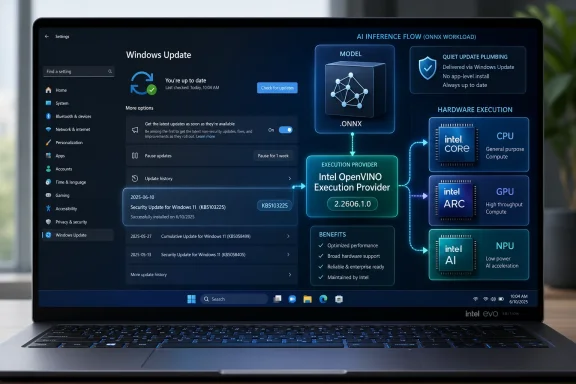
Microsoft has published KB5103225, an automatic Windows Update package for Windows 11 version 24H2 and 25H2 devices with the latest cumulative update installed, updating the Windows ML Runtime Intel OpenVINO Execution Provider to version 2.2606.1.0 for accelerated local AI inference on Intel hardware. The patch is small in appearance but large in implication: Microsoft is now treating AI acceleration plumbing as a normal Windows-serviced component. That changes the operating system from a place where AI apps merely run into a platform that actively brokers which silicon does the work. For users, admins, and developers, KB5103225 is another sign that the AI PC is becoming less about flashy features and more about update discipline.
KB5103225 is not a cumulative update, not a security bulletin, and not a feature drop in the familiar Windows sense. It is an update to an execution provider, the hardware-specific layer that lets ONNX Runtime and Windows ML send inference workloads to Intel CPUs, GPUs, and NPUs. In plain English, it helps Windows and compatible applications decide how to run machine-learning models efficiently on Intel hardware.
That makes it easy to underestimate. The update history entry is dry enough to disappear under the usual parade of drivers, runtime packages, and “quality improvements.” But the important thing is not the prose Microsoft used; it is the servicing model Microsoft has chosen.
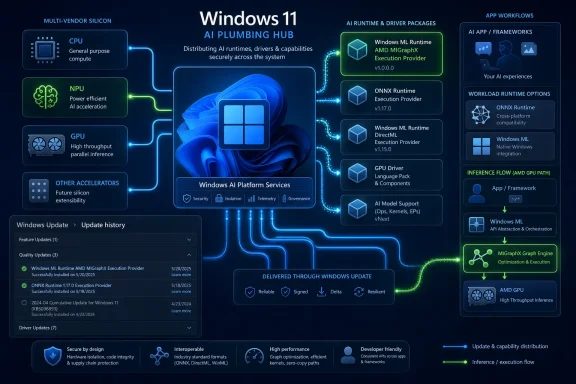
Windows ML is increasingly being positioned as the system-managed copy of ONNX Runtime for Windows applications. Rather than every app bundling its own runtime and vendor acceleration libraries, Microsoft wants Windows to supply a shared layer that can be updated through Windows Update. KB5103225 is one of the mechanical parts of that strategy.
The shift matters because AI acceleration is not like a codec or a printer driver. It is a fast-moving compatibility boundary between applications, models, chip vendors, graphics drivers, NPU firmware, and the operating system scheduler. If Microsoft wants local AI features to feel dependable, it cannot leave that boundary frozen at the version that shipped on day one.
Intel’s OpenVINO Execution Provider is the Intel-tuned route through that maze. OpenVINO has long been Intel’s toolkit for optimizing inference across its hardware portfolio, and in the Windows ML context it becomes a Windows-distributed component that applications can discover and use. That is the practical bridge between “this laptop has an NPU” and “this app can actually use it without shipping a bespoke Intel runtime.”
The important abstraction is not that Windows can run AI models. It has been able to do that in one form or another for years. The important abstraction is that Windows can expose hardware-specific acceleration without making every developer become a silicon compatibility engineer.
That is why KB5103225 is more platform news than app news. No user will install it and suddenly see a new Start menu button. Instead, the update refreshes the substrate beneath apps that use Windows ML and ONNX Runtime paths. If those apps are written to use the system catalog of execution providers, the updated Intel component can become part of their runtime environment without the app itself being replaced.
Microsoft’s answer is to make Windows ML the broker. The operating system offers a common ONNX Runtime-based interface, while vendors provide execution providers that know how to exploit their own silicon. Intel’s OpenVINO provider is the Intel branch of that system, and KB5103225 updates it for Windows 11 24H2 and 25H2.
That version targeting is not accidental. Windows 11 24H2 became the foundation for the current generation of Copilot+ PC and AI PC plumbing, while 25H2 continues the same platform line. Microsoft is not backporting this particular package to every still-supported Windows 11 release because the hardware-optimized execution provider model depends on newer Windows ML infrastructure.
For Intel, this is strategically useful. Intel has CPUs everywhere, integrated GPUs in enormous volume, discrete Arc GPUs in a smaller but relevant slice of the market, and NPUs in Core Ultra systems. A Windows-serviced OpenVINO provider gives Intel a way to keep improving the handoff between Windows applications and Intel compute hardware after the PC has shipped.
That is also useful for Microsoft. Windows has to support a sprawling hardware ecosystem, and the AI PC story collapses if developers must pick a single vendor path or ship multiple acceleration backends. By turning execution providers into discoverable, updateable Windows components, Microsoft can make hardware diversity less visible to application developers.
For consumers, that is probably the right answer. Most users do not know which inference runtime their photo editor, accessibility tool, meeting app, or local assistant uses. They should not have to know. If a vendor-tuned component improves performance, compatibility, or stability, Windows Update is the only realistic distribution channel at PC scale.
For enterprise IT, the story is more nuanced. Automatic updates to AI runtime components can be welcome because they reduce application packaging complexity. They can also be uncomfortable because they introduce another moving part into the baseline image, another version number to audit, and another possible explanation when an application behaves differently after patching.
Microsoft tries to square that circle by allowing developers and organizations to choose between Windows-managed execution providers and bring-your-own binaries. That distinction will become important. A consumer app may prefer evergreen system components, while a regulated enterprise workflow may prefer strict version pinning, even at the cost of larger deployments and slower hardware support.
The problem is that the industry often talks about AI PCs as if the NPU is the product. It is not. The product is the full path from model to runtime to execution provider to driver to silicon, and every segment of that path can change behavior. KB5103225 is a reminder that the AI PC will be patched into existence as much as it is manufactured.
This matters because inference failures can be slippery. An app may still run if hardware acceleration is unavailable, silently falling back to CPU execution. That is good for resilience but bad for diagnosis. A user may experience worse battery life, higher fan noise, or slower response times without any obvious crash or error dialog.
In that context, update history is not just a receipt. It is evidence. If a device is expected to use Intel’s OpenVINO provider and the KB is missing, the troubleshooting path starts with Windows Update readiness, cumulative update prerequisites, device eligibility, and driver state. If the KB is present, attention shifts to application behavior, provider selection, model compatibility, and hardware support.
This is a different kind of Windows troubleshooting than many administrators are used to. The question is not merely “is the driver installed?” or “is the app updated?” The question becomes “which runtime layer selected which execution provider for which model on which device?” That complexity is exactly why Microsoft wants a managed execution provider catalog in the first place.
That cadence tells us Microsoft and Intel expect the component to evolve regularly. There may be operator coverage improvements, performance tuning, stability fixes, compatibility changes, or device-detection refinements. Microsoft’s support text does not enumerate the internal changes, so it would be irresponsible to invent a dramatic changelog. But the existence of a successor package is itself meaningful.
The version number, 2.2606.1.0, also looks like a servicing-era identifier rather than a consumer-facing milestone. It is the sort of number that matters to deployment tools, logs, and support engineers. That is another sign of maturity: AI runtime components are moving from demo-stage branding into inventory-stage administration.
For developers, the cadence cuts both ways. Evergreen execution providers can deliver improvements without forcing app updates, which is exactly what developers want when dealing with fast-moving hardware. But they also require applications to tolerate change. Microsoft’s own guidance warns that available execution provider devices can change as providers and drivers are updated.
That is a subtle but crucial point. If an app assumes yesterday’s provider list will exist forever, it is brittle. If it treats provider discovery as a runtime negotiation, it is aligned with where Windows is going. KB5103225 rewards the second design.
A model still has to be suitable for the target hardware. Operators must be supported, shapes may matter, precision choices can determine whether an NPU is usable, and fallbacks can turn a supposedly accelerated workload into a mixed execution path. Windows can distribute the Intel provider, but it cannot guarantee that every ONNX model will map neatly onto Intel’s CPU, GPU, or NPU.
This is where the AI PC story becomes less glamorous and more practical. Developers need to test across real devices, not just assume that an NPU badge means predictable behavior. They need to measure latency, throughput, memory pressure, and battery impact. They need to decide when to prefer maximum performance and when to prefer efficiency.
The better news is that Windows ML gives developers a more coherent place to make those decisions. Rather than building separate code paths for every vendor stack from scratch, developers can use ONNX Runtime APIs and Windows ML provider discovery. That does not eliminate the engineering work, but it changes its shape.
In the long run, this could make local AI features more common in ordinary Windows applications. If the runtime and provider distribution problem is handled by Windows, smaller developers have fewer reasons to avoid on-device inference. That is the platform argument behind an otherwise unglamorous KB article.
That does not mean admins should panic or block it by default. On the contrary, Windows-managed AI components may reduce the chaos of each vendor and app shipping its own acceleration package. But it does mean organizations should include these components in update rings, validation plans, and incident documentation.
The key practical issue is reproducibility. If a line-of-business application uses Windows ML and behaves differently after an update, support teams will need to know not only the Windows build and app version but also the execution provider state. The update history entry gives them one clue. Device inventory systems will need to catch up with the rest.
There is also a security-adjacent angle. Local AI inference keeps some workloads on the device instead of sending data to the cloud, which can be good for privacy and latency. But it also expands the importance of local runtime integrity. The more apps depend on system AI components, the more those components become part of the trusted computing base users rarely see.
That is not a criticism of KB5103225. It is the cost of making local AI real. Once the runtime layer becomes shared infrastructure, it deserves the same operational seriousness as other shared infrastructure.
Yet the support articles may tell us more about whether the strategy will work. A flashy AI feature can be delayed, rebranded, or redesigned. A runtime servicing model reveals how Microsoft expects the ecosystem to function for years. KB5103225 says Microsoft expects AI acceleration to be modular, vendor-specific, and updated through Windows.
That is a more sober vision than the keynote version. It accepts that Windows PCs are not a single hardware target. Qualcomm, Intel, AMD, Nvidia, and others all matter in different parts of the market. A Windows AI app cannot assume one accelerator, one driver model, or one performance profile.
The execution provider model is Microsoft’s attempt to make that diversity survivable. If it works, developers can write to a common runtime while Windows and hardware vendors handle much of the acceleration plumbing. If it fails, Windows AI becomes another fragmentation story, with apps behaving unpredictably depending on silicon, driver versions, and runtime packages.
KB5103225 is therefore a small test of a large premise. Can Windows Update keep AI infrastructure fresh without making PCs feel unstable? Can vendors improve acceleration without breaking application assumptions? Can Microsoft expose enough control for enterprises while keeping the consumer experience automatic?
Those facts sketch Microsoft’s operating model for local AI. The OS baseline matters. The monthly servicing state matters. Vendor acceleration layers are modular. Updates are expected to supersede earlier packages. Verification happens through ordinary Windows settings rather than a developer-only tool.
That ordinary-ness is the point. Microsoft wants AI acceleration to become boring infrastructure. The irony is that making it boring requires a lot of active work, because the underlying model ecosystem and hardware landscape are anything but settled.
For users with Intel-based Windows 11 24H2 or 25H2 systems, the immediate advice is simple: keep Windows Update current and check update history if an AI-capable app is not behaving as expected. For developers, the advice is sharper: do not hard-code assumptions about provider availability. For admins, the advice is to start tracking these packages before the first helpdesk ticket makes them impossible to ignore.
 Microsoft Moves the AI Stack Into the Servicing Lane
KB5103225 is not a cumulative update, not a security bulletin, and not a feature drop in the familiar Windows sense. It is an update to an execution provider, the hardware-specific layer that lets ONNX Runtime and Windows ML send inference workloads to Intel CPUs, GPUs, and NPUs. In plain English, it helps Windows and compatible applications decide how to run machine-learning models efficiently on Intel hardware.That makes it easy to underestimate. The update history entry is dry enough to disappear under the usual parade of drivers, runtime packages, and “quality improvements.” But the important thing is not the prose Microsoft used; it is the servicing model Microsoft has chosen.
Windows ML is increasingly being positioned as the system-managed copy of ONNX Runtime for Windows applications. Rather than every app bundling its own runtime and vendor acceleration libraries, Microsoft wants Windows to supply a shared layer that can be updated through Windows Update. KB5103225 is one of the mechanical parts of that strategy.
The shift matters because AI acceleration is not like a codec or a printer driver. It is a fast-moving compatibility boundary between applications, models, chip vendors, graphics drivers, NPU firmware, and the operating system scheduler. If Microsoft wants local AI features to feel dependable, it cannot leave that boundary frozen at the version that shipped on day one.
The Execution Provider Is Where the Abstraction Gets Real
The phrase execution provider sounds like architecture-diagram jargon because it is. ONNX Runtime uses execution providers to map parts of a neural network graph onto available hardware. A model may have operations that run best on a CPU, others that benefit from a GPU, and others that can be handed to an NPU for efficient sustained inference.Intel’s OpenVINO Execution Provider is the Intel-tuned route through that maze. OpenVINO has long been Intel’s toolkit for optimizing inference across its hardware portfolio, and in the Windows ML context it becomes a Windows-distributed component that applications can discover and use. That is the practical bridge between “this laptop has an NPU” and “this app can actually use it without shipping a bespoke Intel runtime.”
The important abstraction is not that Windows can run AI models. It has been able to do that in one form or another for years. The important abstraction is that Windows can expose hardware-specific acceleration without making every developer become a silicon compatibility engineer.
That is why KB5103225 is more platform news than app news. No user will install it and suddenly see a new Start menu button. Instead, the update refreshes the substrate beneath apps that use Windows ML and ONNX Runtime paths. If those apps are written to use the system catalog of execution providers, the updated Intel component can become part of their runtime environment without the app itself being replaced.
Intel Gets a Seat in Windows’ AI Control Room
The AI PC market has a simple marketing story and a complicated engineering story. The marketing story is that modern PCs have NPUs and can run AI locally. The engineering story is that every silicon vendor has its own acceleration stack, its own drivers, its own supported operators, and its own performance cliffs.Microsoft’s answer is to make Windows ML the broker. The operating system offers a common ONNX Runtime-based interface, while vendors provide execution providers that know how to exploit their own silicon. Intel’s OpenVINO provider is the Intel branch of that system, and KB5103225 updates it for Windows 11 24H2 and 25H2.
That version targeting is not accidental. Windows 11 24H2 became the foundation for the current generation of Copilot+ PC and AI PC plumbing, while 25H2 continues the same platform line. Microsoft is not backporting this particular package to every still-supported Windows 11 release because the hardware-optimized execution provider model depends on newer Windows ML infrastructure.
For Intel, this is strategically useful. Intel has CPUs everywhere, integrated GPUs in enormous volume, discrete Arc GPUs in a smaller but relevant slice of the market, and NPUs in Core Ultra systems. A Windows-serviced OpenVINO provider gives Intel a way to keep improving the handoff between Windows applications and Intel compute hardware after the PC has shipped.
That is also useful for Microsoft. Windows has to support a sprawling hardware ecosystem, and the AI PC story collapses if developers must pick a single vendor path or ship multiple acceleration backends. By turning execution providers into discoverable, updateable Windows components, Microsoft can make hardware diversity less visible to application developers.
The Silent Update Model Is the Feature and the Risk
KB5103225 installs automatically from Windows Update, assuming the device has the latest cumulative update for Windows 11 24H2 or 25H2. That is the clearest sign of Microsoft’s intent. AI acceleration components are not being treated as optional toys for developers; they are becoming part of the managed Windows servicing surface.For consumers, that is probably the right answer. Most users do not know which inference runtime their photo editor, accessibility tool, meeting app, or local assistant uses. They should not have to know. If a vendor-tuned component improves performance, compatibility, or stability, Windows Update is the only realistic distribution channel at PC scale.
For enterprise IT, the story is more nuanced. Automatic updates to AI runtime components can be welcome because they reduce application packaging complexity. They can also be uncomfortable because they introduce another moving part into the baseline image, another version number to audit, and another possible explanation when an application behaves differently after patching.
Microsoft tries to square that circle by allowing developers and organizations to choose between Windows-managed execution providers and bring-your-own binaries. That distinction will become important. A consumer app may prefer evergreen system components, while a regulated enterprise workflow may prefer strict version pinning, even at the cost of larger deployments and slower hardware support.
The problem is that the industry often talks about AI PCs as if the NPU is the product. It is not. The product is the full path from model to runtime to execution provider to driver to silicon, and every segment of that path can change behavior. KB5103225 is a reminder that the AI PC will be patched into existence as much as it is manufactured.
Update History Becomes a Diagnostic Tool for Local AI
Microsoft says users can verify the installation in Settings under Windows Update and Update history, where the entry should appear as Windows ML Runtime Intel OpenVINO Execution Provider. That sounds mundane, but it gives admins and power users a concrete place to start when local AI acceleration fails to appear.This matters because inference failures can be slippery. An app may still run if hardware acceleration is unavailable, silently falling back to CPU execution. That is good for resilience but bad for diagnosis. A user may experience worse battery life, higher fan noise, or slower response times without any obvious crash or error dialog.
In that context, update history is not just a receipt. It is evidence. If a device is expected to use Intel’s OpenVINO provider and the KB is missing, the troubleshooting path starts with Windows Update readiness, cumulative update prerequisites, device eligibility, and driver state. If the KB is present, attention shifts to application behavior, provider selection, model compatibility, and hardware support.
This is a different kind of Windows troubleshooting than many administrators are used to. The question is not merely “is the driver installed?” or “is the app updated?” The question becomes “which runtime layer selected which execution provider for which model on which device?” That complexity is exactly why Microsoft wants a managed execution provider catalog in the first place.
The Replacement of KB5096140 Shows the Cadence
KB5103225 replaces KB5096140, the previous Intel OpenVINO Execution Provider update. The numbers are easy to skim past, but the replacement relationship is important. This is not a one-off patch; it is a versioned servicing stream.That cadence tells us Microsoft and Intel expect the component to evolve regularly. There may be operator coverage improvements, performance tuning, stability fixes, compatibility changes, or device-detection refinements. Microsoft’s support text does not enumerate the internal changes, so it would be irresponsible to invent a dramatic changelog. But the existence of a successor package is itself meaningful.
The version number, 2.2606.1.0, also looks like a servicing-era identifier rather than a consumer-facing milestone. It is the sort of number that matters to deployment tools, logs, and support engineers. That is another sign of maturity: AI runtime components are moving from demo-stage branding into inventory-stage administration.
For developers, the cadence cuts both ways. Evergreen execution providers can deliver improvements without forcing app updates, which is exactly what developers want when dealing with fast-moving hardware. But they also require applications to tolerate change. Microsoft’s own guidance warns that available execution provider devices can change as providers and drivers are updated.
That is a subtle but crucial point. If an app assumes yesterday’s provider list will exist forever, it is brittle. If it treats provider discovery as a runtime negotiation, it is aligned with where Windows is going. KB5103225 rewards the second design.
Developers Get Convenience, But Not a Free Optimizer
The most tempting misunderstanding around Windows ML is that Microsoft can update an execution provider and magically make every AI model run well everywhere. That is not how this works. Execution providers supply hardware acceleration paths; they do not absolve developers from model optimization.A model still has to be suitable for the target hardware. Operators must be supported, shapes may matter, precision choices can determine whether an NPU is usable, and fallbacks can turn a supposedly accelerated workload into a mixed execution path. Windows can distribute the Intel provider, but it cannot guarantee that every ONNX model will map neatly onto Intel’s CPU, GPU, or NPU.
This is where the AI PC story becomes less glamorous and more practical. Developers need to test across real devices, not just assume that an NPU badge means predictable behavior. They need to measure latency, throughput, memory pressure, and battery impact. They need to decide when to prefer maximum performance and when to prefer efficiency.
The better news is that Windows ML gives developers a more coherent place to make those decisions. Rather than building separate code paths for every vendor stack from scratch, developers can use ONNX Runtime APIs and Windows ML provider discovery. That does not eliminate the engineering work, but it changes its shape.
In the long run, this could make local AI features more common in ordinary Windows applications. If the runtime and provider distribution problem is handled by Windows, smaller developers have fewer reasons to avoid on-device inference. That is the platform argument behind an otherwise unglamorous KB article.
Admins Should Treat AI Components Like Drivers With Application Consequences
For enterprise administrators, KB5103225 belongs in the same mental bucket as graphics drivers, WebView runtimes, and .NET servicing: not the application itself, but capable of changing application behavior. It is part of the dependency stack.That does not mean admins should panic or block it by default. On the contrary, Windows-managed AI components may reduce the chaos of each vendor and app shipping its own acceleration package. But it does mean organizations should include these components in update rings, validation plans, and incident documentation.
The key practical issue is reproducibility. If a line-of-business application uses Windows ML and behaves differently after an update, support teams will need to know not only the Windows build and app version but also the execution provider state. The update history entry gives them one clue. Device inventory systems will need to catch up with the rest.
There is also a security-adjacent angle. Local AI inference keeps some workloads on the device instead of sending data to the cloud, which can be good for privacy and latency. But it also expands the importance of local runtime integrity. The more apps depend on system AI components, the more those components become part of the trusted computing base users rarely see.
That is not a criticism of KB5103225. It is the cost of making local AI real. Once the runtime layer becomes shared infrastructure, it deserves the same operational seriousness as other shared infrastructure.
Copilot+ Branding Is Louder, But This Is the Plumbing That Matters
Microsoft’s consumer AI messaging tends to orbit Copilot, Recall, Click to Do, image features, and the broader Copilot+ PC label. Those features get the screenshots. Execution providers get the support articles.Yet the support articles may tell us more about whether the strategy will work. A flashy AI feature can be delayed, rebranded, or redesigned. A runtime servicing model reveals how Microsoft expects the ecosystem to function for years. KB5103225 says Microsoft expects AI acceleration to be modular, vendor-specific, and updated through Windows.
That is a more sober vision than the keynote version. It accepts that Windows PCs are not a single hardware target. Qualcomm, Intel, AMD, Nvidia, and others all matter in different parts of the market. A Windows AI app cannot assume one accelerator, one driver model, or one performance profile.
The execution provider model is Microsoft’s attempt to make that diversity survivable. If it works, developers can write to a common runtime while Windows and hardware vendors handle much of the acceleration plumbing. If it fails, Windows AI becomes another fragmentation story, with apps behaving unpredictably depending on silicon, driver versions, and runtime packages.
KB5103225 is therefore a small test of a large premise. Can Windows Update keep AI infrastructure fresh without making PCs feel unstable? Can vendors improve acceleration without breaking application assumptions? Can Microsoft expose enough control for enterprises while keeping the consumer experience automatic?
The Useful Clues Are Hiding in the Boring Parts of KB5103225
KB5103225 is worth remembering less for its changelog than for the rules around it. It applies to Windows 11 24H2 and 25H2. It requires the latest cumulative update. It installs automatically. It replaces an earlier Intel OpenVINO provider package. It appears in update history as a Windows ML Runtime component.Those facts sketch Microsoft’s operating model for local AI. The OS baseline matters. The monthly servicing state matters. Vendor acceleration layers are modular. Updates are expected to supersede earlier packages. Verification happens through ordinary Windows settings rather than a developer-only tool.
That ordinary-ness is the point. Microsoft wants AI acceleration to become boring infrastructure. The irony is that making it boring requires a lot of active work, because the underlying model ecosystem and hardware landscape are anything but settled.
For users with Intel-based Windows 11 24H2 or 25H2 systems, the immediate advice is simple: keep Windows Update current and check update history if an AI-capable app is not behaving as expected. For developers, the advice is sharper: do not hard-code assumptions about provider availability. For admins, the advice is to start tracking these packages before the first helpdesk ticket makes them impossible to ignore.
The KB Number Is Small, but the Windows Contract Is Changing
KB5103225 is a useful marker because it shows Microsoft turning AI acceleration into a serviced contract between Windows, silicon vendors, and applications.- Windows 11 version 24H2 and 25H2 are the relevant platform targets for this Intel OpenVINO Execution Provider update.
- The package updates the Windows ML Runtime Intel OpenVINO Execution Provider to version 2.2606.1.0.
- The update installs automatically through Windows Update after the latest cumulative update prerequisite is satisfied.
- The update replaces KB5096140, which shows that Intel’s Windows ML execution provider is now on a recurring servicing path.
- Users and administrators can verify installation in Windows Update history under the Windows ML Runtime Intel OpenVINO Execution Provider entry.
- Developers still need to optimize and test models for real hardware, because an updated execution provider is not a universal performance guarantee.
References
- Primary source: Microsoft Support
Published: Tue, 23 Jun 2026 17:02:55 Z
- Related coverage: onnxruntime.ai
Intel - OpenVINO™ | onnxruntime
Instructions to execute OpenVINO™ Execution Provider for ONNX Runtime.onnxruntime.ai
- Related coverage: wejoncy.github.io
Intel - OpenVINO™ | onnxruntime
Instructions to execute OpenVINO™ Execution Provider for ONNX Runtime.wejoncy.github.io
- Related coverage: runtime.onnx.org.cn
英特尔 - OpenVINO™ | onnxruntime - ONNX 运行时
runtime.onnx.org.cn
- Related coverage: skottmckay.github.io
OpenVINO - onnxruntime
ONNX Runtime: cross-platform, high performance ML inferencing and training acceleratorskottmckay.github.io
- Related coverage: intel.com
Unable to Use Openvino™ 2025.0 With Onnx Runtime Openvino™ Execution...
Supported OpenVINO™ versions for ONNX Runtime OpenVINO™ Execution Provider www.intel.com

- Related coverage: onnx.ubitools.com

- Related coverage: networkbuilders.intel.com
OpenVino Logo
OpenVino Logo. Hi-res image with embedded 1x1, 4x3, and 16x9 renditions for intel.com AEM usage.networkbuilders.intel.com
- Related coverage: builders.intel.com
- Related coverage: cdrdv2-public.intel.com