

KDE Plasma 6.6 landed on February 17, 2026, and with it comes a concentrated set of quality-of-life features, accessibility wins, and foundational improvements that continue to push Plasma’s Wayland-first vision toward maturity for power users, OEMs, and everyday desktops alike.
Plasma 6 represents KDE’s transition to a modern graphics and UI stack built on Qt 6, KDE Frameworks 6, and a Wayland-first architecture. Since the 6.0 mega-release, the project has shipped regular feature releases focused on stabilizing Wayland, tightening hardware support (including HDR and high-refresh panels), and modernizing core UX flows. Plasma 6.6 is the latest step in that cadence: it is explicitly targeted at smoothing first-run experiences, improving accessibility, and delivering practical tools for screenshot workflows, input on touch devices, and multi-device setups.
This release is not a radical redesign; rather, it is a pragmatic update that layers new modules and small-but-powerful features on top of a maturing Wayland compositor and the existing Plasma tooling. For distributions, OEMs, and users deciding whether to adopt Plasma 6.6, the release is important because it includes new standalone modules and device-facing features that change out-of-the-box behavior and deployment scenarios.
Notable expectations:
Key technical improvements:
Strengths:
KDE’s release notes and the Plasma 6.6 changelog show the breadth of smaller commits and refinements behind each headline feature — a reminder that modern desktop engineering is largely about thoughtful iteration. For users who value configurability, accessibility, and a desktop that continues to evolve with modern graphics stacks, Plasma 6.6 is another positive step forward.
Source: TechPowerUp KDE Plasma 6.6 Officially Released | TechPowerUp}
 Background / Overview
Plasma 6 represents KDE’s transition to a modern graphics and UI stack built on Qt 6, KDE Frameworks 6, and a Wayland-first architecture. Since the 6.0 mega-release, the project has shipped regular feature releases focused on stabilizing Wayland, tightening hardware support (including HDR and high-refresh panels), and modernizing core UX flows. Plasma 6.6 is the latest step in that cadence: it is explicitly targeted at smoothing first-run experiences, improving accessibility, and delivering practical tools for screenshot workflows, input on touch devices, and multi-device setups.This release is not a radical redesign; rather, it is a pragmatic update that layers new modules and small-but-powerful features on top of a maturing Wayland compositor and the existing Plasma tooling. For distributions, OEMs, and users deciding whether to adopt Plasma 6.6, the release is important because it includes new standalone modules and device-facing features that change out-of-the-box behavior and deployment scenarios.
What’s new in Plasma 6.6 — headline features
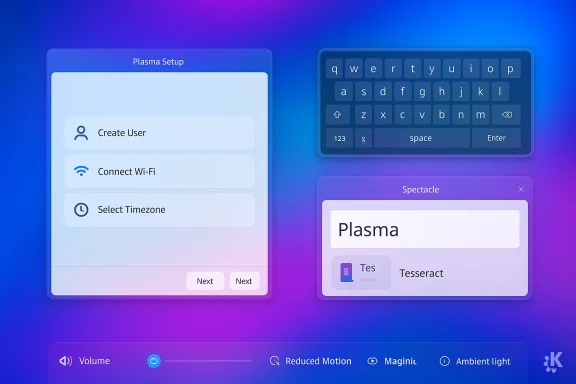
Plasma 6.6 focuses on three headline user-facing areas: input & setup flows, screenshots & accessibility, and Wayland/system polish. The release introduces three new modules that are worth calling out individually:- Plasma Setup — a new first-run wizard to configure user accounts and basic settings after OS installation, enabling device makers and refurbishers to separate installation and user provisioning.
- Plasma Keyboard — a refreshed on-screen keyboard aimed at touch-enabled devices and kiosk-like deployments.
- Plasma Login Manager (optional) — an in-tree, modern login manager created to be an alternative to SDDM; it is optional for distributions to adopt but represents a shift toward an integrated, themable login experience.
- Spectacle gains text recognition (OCR) from screenshots, with multiple-language support and Tesseract as an optional dependency.
- A Hide from Screencast option to exclude windows from screen recordings.
- Accessibility upgrades including additional colorblindness filters, more Zoom tracking modes, and Slow Keys for Wayland.
- Per-device features such as optional automatic screen brightness via ambient light sensors and improved high-refresh-rate animations.
- Small but meaningful UXs: font installation from Discover (on supported OSes), the ability to pin standalone widgets (like volume or a browser widget), and the ability to set process priority in System Monitor.
Deep dive: Plasma Setup — rethinking first-run
What Plasma Setup does
Plasma Setup is a new, system-agnostic first-run wizard that runs after the OS installer has finished. The idea is simple but important: allow installation to be a purely technical step (partitioning, packages) while deferring user-facing setup (creating accounts, connecting Wi‑Fi, setting timezone and keyboard layouts) to a post-installation flow that runs as the end user boots the device for the first time.Why it matters
This separation is particularly useful for:- OEMs shipping devices with Plasma preinstalled who want the end user to create their own account without exposing prior owner data.
- Organizations and charities refurbishing devices — the refurbishing workflow can leave a base OS image without user accounts, and Plasma Setup can create per-recipient accounts at first boot.
- Safer resale and handoff scenarios, where the previous install steps (which may require elevated access) are decoupled from end-user credential creation.
Enterprise/OEM considerations
For IT teams and OEMs, Plasma Setup reduces complexity but raises integration questions. Distributions and installers will need to decide whether to integrate Plasma Setup directly into their images or to maintain their own first-run flows. The good news is Plasma Setup is designed to be modular; however, organizations should test the flow against their provisioning systems (MDM, custom post-install scripts) before broad rollout.Spectacle OCR: extract text from screenshots
Spectacle’s ability to recognize and extract text from images is one of the most user-visible productivity additions. The implementation supports multiple OCR languages and is implemented with an optional dependency on the Tesseract engine. In practice this means:- Users who want OCR inside Spectacle must ensure the optional OCR runtime/engine is installed on their distribution.
- Spectacle exposes preferences to select OCR languages and to manage OCR behavior.
- Use cases include fast copy/paste from images, generating accessible alt text for screenshots, and extracting one-time codes or snippet text without retyping.
Plasma Keyboard: a modern on-screen keyboard
Plasma 6.6 ships a new on-screen keyboard targeted at touch devices and kiosk setups. The replacement of the older input panel is intended to be more maintainable and better integrated into Wayland sessions, including SDDM and the new Plasma Login Manager.Notable expectations:
- Better IME and input method support on Wayland.
- Easier theming and integration with the overall Plasma look-and-feel.
- Smoother integration with hardware-oriented features like ambient light or orientation sensors on convertible devices.
Plasma Login Manager: a path away from SDDM
One of the more strategic changes is the availability of an optional Plasma Login Manager. SDDM has been the de facto display manager for many KDE desktops for years, but SDDM’s maintenance model and theming limitations have been pain points for some. The Plasma Login Manager offers:- A themable, Qt6-based login stack that integrates better with the rest of Plasma.
- Closer integration points for the plasma-keyboard on Wayland.
- Potential for newer features such as richer accessibility at the greeter stage and easier OEM theming.
- It is optional — widespread adoption depends on distributions opting in.
- Display managers touch very sensitive parts of the boot/login chain. Any new login manager requires careful auditing for security and edge-case compatibility (encryption passphrases, fingerprint unlock, custom PAM setups).
- Enterprises and distros should test it extensively, especially on encrypted-boot scenarios, domain/AD integrations, and in environments with custom PAM modules.
Wayland and display pipeline: HDR, NVIDIA, high-refresh polish
Plasma’s Wayland work continues to be a central focus of the release. Plasma 6.6 includes several targeted fixes and improvements across the compositor stack (KWin), color management, and DRM backends.Key technical improvements:
- Better HDR metadata handling and an Hdrcalibrator with settings for Windows HDR application handling.
- Color management fixes and a workaround for specific interactions with browsers like Firefox.
- Precomputation of blur color transforms for consistent visual blur effects and a configurable saturation value for blur (useful for dark themes).
- Fixes aimed at NVIDIA and framebuffer accounting to reduce artifacts and misreported memory usage in GPU stats.
- HDR on Linux is still complex and hardware/driver-dependent, but Plasma 6.6 continues to close gaps — especially for direct-scanout and overlays.
- Users with NVIDIA proprietary drivers should test their day-to-day workloads; while the release includes fixes, vendor driver behavior and Wayland support vary across GPUs and driver versions.
- High-refresh-rate displays should see smoother animations and fewer microstutters after these compositor refinements.
Accessibility and inclusivity: meaningful improvements
Plasma 6.6 steps up in accessibility in multiple small but significant ways:- A new grayscale filter joins other colorblindness correction filters.
- Zoom/Magnifier received a pointer-centered tracking mode.
- Slow Keys support is implemented for Wayland sessions.
- The standardized Reduced Motion setting is now respected.
Privacy, secrets, and system prompts
Two items are worth calling out for privacy-sensitive and security-focused users:- KSecretPrompter integration for oo7 SecretService — the KSecretPrompter has been extended to integrate with the oo7 SecretService provider. This offers an alternative Secret Service implementation that some projects and distributions may prefer.
- USB access prompts and permission prompt refresh — Plasma 6.6 upgrades visibility and UX for device access prompts, making it easier to understand and control what apps and users can access plugged-in hardware.
Packaging, distribution adoption, and the upgrade story
Plasma 6.6’s changes introduce new modules and updated dependencies (notably Qt 6.10 and KDE Frameworks 6.22 compatibility notes in the changelog). That has these implications:- Distribution packaging lag: New modules and updated dependency versions mean that not every mainstream distribution will have Plasma 6.6 available on day one. Expect rolling and KDE-focused distros to pick it up first; stable/distribution-release branches may take longer.
- Dependency bumps: Packagers must ensure Qt and Frameworks versions meet the new minima before enabling Plasma 6.6 packages.
- Optional modules: The Plasma Login Manager is optional; distributions can continue shipping SDDM or switch to the new manager at their discretion.
Risks, limitations, and caveats
No release is risk-free. Plasma 6.6’s main risks and limitations are operational rather than conceptual:- Display manager sensitivity: New login managers operate at a high-privilege layer. Until distributions and ops teams validate it, production deployments should be conservative.
- Driver/firmware variability: HDR, overlays, and direct scanout depend on kernel, Mesa, and vendor driver support. Experiences will vary significantly by GPU vendor and platform.
- Packaging & distro availability: New modules and optional dependencies (e.g., Tesseract for Spectacle OCR) create variance in the out‑of‑the‑box experience across distros.
- Security auditing: Any secret-service integration (oo7) and new prompts should be audited in environments with high compliance requirements.
Testing checklist — how to validate Plasma 6.6 in your environment
- Boot a live image or spin a containerized build of Plasma 6.6 to evaluate default behavior.
- Verify login and boot behavior with your chosen display manager: test both SDDM and the new Plasma Login Manager if available.
- Test encrypted disk unlock and PAM interactions (including smartcards and fingerprint readers).
- Validate GPU workflows: open video playback, HDR-enabled content, and high-refresh gaming or scrolling tests on your hardware.
- Test Spectacle OCR: install the OCR engine (if needed) and validate multiple languages and accuracy.
- Confirm screen recording and Hide from Screencast behavior for privacy-sensitive presentation workflows.
- Audit USB and permission prompts: plug mass storage and input devices to ensure prompts are clear and correct.
- Run accessibility checks: color filters, magnifier modes, Slow Keys, and Reduced Motion should function as expected.
- For OEMs: run Plasma Setup to confirm it integrates with your provisioning and re-tying workflows.
For power users: features you’ll love
- Quick volume control via hovering and scrolling on app icons in the Task Manager.
- Ability to create and reuse global theme snapshots (handy for multi-device theming).
- Pinning standalone widgets such as the Audio Volume or a Browser widget for persistent small tools.
- Discover font installation on systems where packagekit/backends support it — convenient for designers and writers.
- System Monitor allows choosing a process priority directly from the UI, which is a nice desktop-level QoS control.
Final analysis: incremental refinement with strategic moves
Plasma 6.6 is not a blockbuster release, but it is a high-quality one. It concentrates on practical improvements that matter to users every day, while simultaneously introducing modules that have strategic importance: the Plasma Login Manager and Plasma Setup both change how Plasma can be deployed and provisioned.Strengths:
- Focused accessibility and productivity features that improve the experience for a wide range of users.
- Spectacle OCR is a practical, privacy-friendly addition.
- Continued Wayland and HDR polish that reduces real-world friction, especially on modern hardware.
- Adoption of the new login manager will be slow and needs careful security validation.
- Hardware-dependent features (HDR, NVIDIA artifacts) still require vendor cooperation; user experience will vary.
- Distributions’ packaging decisions (optional Tesseract, optional login manager) will create differences in what users actually get.
KDE’s release notes and the Plasma 6.6 changelog show the breadth of smaller commits and refinements behind each headline feature — a reminder that modern desktop engineering is largely about thoughtful iteration. For users who value configurability, accessibility, and a desktop that continues to evolve with modern graphics stacks, Plasma 6.6 is another positive step forward.
Source: TechPowerUp KDE Plasma 6.6 Officially Released | TechPowerUp}
