

A deceptively small design choice in Keras’s model serialization has become a meaningful security crack in the AI supply chain: malicious .keras model archives can direct a victim’s Python process to read arbitrary files or fetch attacker-controlled network resources during model load, bypassing the framework’s intended “safe mode” protections and creating both local file-exposure and SSRF (server-side request forgery) vectors for real-world attacks.
Keras models saved in the modern
In practice, a malicious actor can craft a
What that means for ML practitioners and system operators is straightforward and severe: loading a model from an untrusted source is not purely an ML task — it can be an information-disclosure or network-probing operation.
However, advisory metadata and third-party writeups around which release contains the full fix have varied in wording. Different trackers reference different patched versions (some references cite a short-term point release, while other official advisory listings mark the fix as included in a subsequent stable release). Because package-release and advisory records sometimes diverge across mirrors and timelines, the safest operational posture is:
The modern AI supply chain increasingly distributes pre‑trained models, checkpoints, and fine‑tuned artifacts across public hubs, private registries, and third-party vendors. Each trusted-seeming model can carry unexpected behaviors if deserialization and artifact metadata are not strictly constrained. Attackers who pivot from classic software supply-chain compromises to model-poisoning attacks gain new extreme‑value targets: credentials, cryptographic keys, and access to internal-only resources.
Designing frameworks and operational pipelines with the assumption that models are untrusted until proven otherwise is now essential. That means better artifact hygiene from the framework level (self-contained artifacts, disallow external file admixture during load), and better organizational hygiene at the operational level (scanning, signing, sandboxing).
This vulnerability is a concrete example of the evolving intersection between application security and machine learning operations. As model sharing becomes routine, organizations must assume that model artifacts are not inert and must be authenticated, inspected, and executed under constrained conditions. The fix in the Keras codebase reduces the immediate attack surface for lookup-layer vocabulary loading — but the incident should be a call to action: harden your model ingestion process now, and bake artifact hygiene into the organization's ML supply chain before the next attack vector is found.
Source: MSRC Security Update Guide - Microsoft Security Response Center[/s]
 Background / Overview
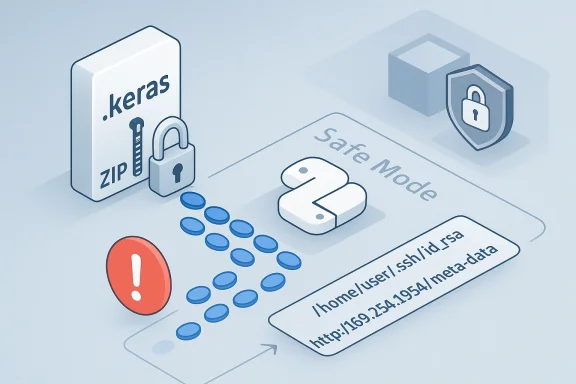
Keras models saved in the modern .keras format are ZIP-style archives that contain a model configuration (config.json), model weights, and ancillary metadata. During deserialization, Keras rebuilds layers from the archived configuration. The vulnerability at the heart of CVE-2025-12058 arises from how the StringLookup, IndexLookup (and similarly implemented lookup layers) handle their vocabulary parameter when that parameter contains a path or URL rather than an inline list.In practice, a malicious actor can craft a
.keras file whose layer configuration points vocabulary at a local filesystem path (for example, /home/deploy/.ssh/id_rsa) or at a network endpoint (for example, an internal cloud metadata endpoint). When the naive victim calls keras.saving.load_model(...), Keras will attempt to open and read those paths at load time, pulling file contents into the reconstructed layer state (and making them retrievable via typical layer APIs such as get_vocabulary()), or making outbound network requests on the host’s behalf. Crucially, this behavior can occur even when safe_mode=True is passed to load_model, defeating the common expectation that safe mode prevents dangerous side effects during deserialization.What that means for ML practitioners and system operators is straightforward and severe: loading a model from an untrusted source is not purely an ML task — it can be an information-disclosure or network-probing operation.
How the vulnerability works — technical anatomy
The .keras archive and reconstruction process
- A
.kerasfile is a ZIP archive that packages model-level JSON and weight blobs. - Keras reconstructs the model by parsing
config.jsonand instantiating layers by calling their constructors and configuration methods. - Layers preserve their initialization arguments in
config.json. For lookup layers thevocabularyargument can be: - an inline list of tokens, or
- a string containing a path or URL to a vocabulary file.
The unsafe step: eager file resolution during load
- When the
vocabularyentry is a string, Keras instructs TensorFlow’s filesystem APIs (tf.io.gfile) to resolve and open that path during deserialization — immediately as the layer is reconstructed. - tf.io.gfile is a filesystem abstraction that supports local paths and, in many builds/environments, remote filesystem handlers or network schemes (file://, http://, https://, cloud storage APIs), particularly when optional libraries such as TensorFlow‑IO are present.
- Because this resolution happens as part of layer construction, it occurs before or despite safe‑mode checks that are intended to block arbitrary code execution. The operation is performed by built-in logic, not by deserializing untrusted callables.
Two attack primitives produced by the same bug
- Arbitrary local file read (data exposure)
A malicious model can specifyvocabulary: "/etc/passwd"(or a user’s SSH private key path). On load, the file’s contents are read and embedded into the model’s vocabulary. The attacker, having distributed the malicious model, can retrieve those tokens from the victim’s copy later (or leverage an environment where the model state is re-exported), allowing exfiltration of sensitive secrets. - Server‑Side Request Forgery (SSRF)
If tf.io.gfile is configured with handlers that support network access (e.g., HTTP, cloud storage schemes), the same mechanism can fetch network resources accessible to the host. In cloud deployments, this can be used to query instance metadata services (for example, the well-known metadata IPs used by cloud providers) and retrieve ephemeral credentials or other internal-only endpoints. The host becomes a blind HTTP client controlled by model content.
Real-world attack scenarios
1) Model hub poisoning and developer machines
Attackers publish a seemingly useful pre‑trained.keras model to a public hub. A developer downloads and loads it locally to run experiments. The malicious model has its StringLookup layer pointing at the developer’s ~/.git-credentials or ~/.ssh/id_rsa. As soon as the developer loads the model for evaluation, their keys or tokens are read into model state, exposing credentials that enable repository compromise or lateral moves.2) CI/CD pipeline compromise
Continuous integration jobs often download pre-trained weights or suppliers’ artifacts for testing or distillation. A malicious model can be loaded by an automated job (which runs with repository access), read internal secrets or cloud metadata, and those secrets are then available to an attacker who re-downloads the modified model artifact or intercepts exported artifacts.3) Cloud-based SSRF to metadata endpoints
A container in a cloud region loads a model that references[url]http://169.254.169.254/latest/meta-data/iam/security-credentials/role-name[/url]. On load the container communicates with the internal metadata service and receives credentials scoped to the container’s role. Those credentials, once exfiltrated, allow the attacker to abuse cloud APIs and pivot into other systems.4) Supply-chain backdoor for broader compromise
A popular model is poisoned once in a shared repository. Downstream teams import and save a derivative model as part of their pipelines; if those derivative artifacts are later pulled or reused in production, the malicious vocabulary content can propagate and enable repeated exfiltration from multiple environments.What Keras changed (and ambiguity in advisory timelines)
Keras maintainers accepted a code change that alters how lookup-layer vocabularies are handled: vocabulary files specified at layer creation are now embedded into the saved.keras archive so that saved models are self-contained, and — importantly — model reloading in safe_mode=True is restricted from fetching arbitrary external vocabulary files. The change makes the saved artifact contain the file content rather than a path that will be re-resolved on load.However, advisory metadata and third-party writeups around which release contains the full fix have varied in wording. Different trackers reference different patched versions (some references cite a short-term point release, while other official advisory listings mark the fix as included in a subsequent stable release). Because package-release and advisory records sometimes diverge across mirrors and timelines, the safest operational posture is:
- Assume that Keras releases older than the first release made after October 17, 2025 include the vulnerable behavior.
- Upgrade to the latest Keras release in your environment that includes the lookup-vocabulary embed fix (prefer the most recent stable release available at the time you read this).
Immediate mitigations you can apply right now
If your organization loads third‑party Keras models or exposes pipelines that fetch and load models automatically, take these steps immediately.- Do not load untrusted models.
Treat any model from external sources as untrusted artifacts until verified. The simplest, most effective mitigation is policy: never callload_model()on artifacts that aren’t vetted. - Upgrade Keras to a fixed release as soon as possible.
Install the latest stable Keras release that includes the lookup-vocabulary embedding fix and associated safe-mode restrictions. Prefer the most recent release available from your package index. - Restrict network and metadata access for model-loading processes.
Run model-loading operations in sandboxes or ephemeral containers with no outbound network access and no access to cloud metadata endpoints. This contains any SSRF attempts. - Run as least-privileged user.
Ensure the process that loads models runs under an account that does not own private keys or tokens and has no direct access to critical files. - Scan model archives before loading.
Inspect.kerasarchives as a zipped file and parseconfig.json. Search for lookup-layervocabularyfields that contain: - absolute local paths (beginning with
/on Unix), file://schemes, or[url]http://[/url]or[url]https://[/url](or other non-empty schemes).
- Use model signing and hash verification.
Maintain a policy where only signed models from known suppliers are allowed to be loaded. Verify signatures and content hashes in CI/CD before an artifact is ever loaded into runtime. - Disable optional filesystem plugins in TensorFlow environments where network-enabled handlers (e.g., TensorFlow‑IO) are not needed. If your environment does not need HTTP or cloud storage handlers in
tf.io.gfile, avoid installing or enabling those components. - Add model-file scanning to your pipeline.
Integrate static inspection (checks described above) into your ingestion pipelines. Prevent automatic ingestion of files failing the checks. - Rotate credentials if you suspect exposure.
If you have loaded an untrusted model prior to applying mitigations, assume potential leakage of local files or metadata. Rotate SSH keys, API keys, and cloud instance role credentials and investigate audit trails.
How to detect potentially malicious models — practical checks
Below are practical, low-friction checks you can run in build pipelines or locally before callingload_model().- Basic inspection (conceptual steps):
- Treat the
.kerasfile as a zip archive. - Extract or read
config.json. - Traverse the JSON object looking for occurrences of
class_namematchingStringLookup,IndexLookup, orIntegerLookup. - For matching layers, inspect
config.vocabulary. If it is a string, flag it for manual review. If it looks like/etc/,~/.ssh/,file://, orhttp[s]://flag it as suspicious. - Automated detection (pseudo-code outline):
- Open the
.kerasarchive with a ZIP reader. - Parse
config.jsoninto a data structure. - Recursively traverse the structure and collect every
vocabularyfield. - For each item that is a string:
- If it starts with
/or contains the substring:\/(scheme indicator), raise an alert. - Otherwise if it’s a list or inline array, consider it safe with respect to this vector.
- Fail the pipeline or require manual approval for flagged artifacts.
- Behavioral detection:
- Run
load_model()inside a sandboxed environment that logs all file opens and network requests. If the process attempts to open unexpected local files or to open HTTP connections, quarantine the model and investigate.
Recommended long-term controls and policies
- Model provenance and attestation: Establish a supply‑chain control where all externally-sourced models must be accompanied by provenance metadata (author, checksum, signature, build record). Automated checks should validate provenance before ingestion.
- Model whitelisting: Only allow specific, whitelisted model repositories or registries to be consumed by internal pipelines. Use private registries with access controls and signing.
- Automated model SAST/AST scanning: Implement static analysis tools for model artifacts that can detect risky config entries, embedded payloads, or suspicious binary blobs.
- Least-privilege runtime: Adopt containers or runtime sandboxes for model loading that have no local secrets mounted and have network access heavily restricted. Use ephemeral credentials with narrow scopes for any operations that require cloud access.
- Audit and observability: Log every model-load operation and include indicators for file accesses performed during load. Correlate such logs with process activity to detect anomalous behavior.
- Rotate secrets frequently: Assume that secrets may be exposed through a future model or pipeline slip; rotating keys and using short-lived credentials reduces the blast radius of any one disclosure.
Practical incident response checklist (if you suspect compromise)
- Immediately isolate the host or container where the model was loaded.
- Preserve artifacts: save copies of the
.kerasfile,config.json, and logs from the load operation. - Scan the model archive for referenced paths and URLs. Note any references to
~/.ssh,~/.gitfiles, or metadata IPs. - Rotate credentials that are possibly implicated: SSH keys, cloud IAM keys, API tokens.
- Review access logs and telemetry for unexpected API calls or outbound connections that align with the window of the model load.
- Rebuild any affected workloads from known-good artifacts and redeploy using least-privilege identities.
- Notify the security team and, if required by policy, customers or stakeholders.
Why this matters: the supply chain and trust in AI artifacts
This vulnerability is a reminder that the ML model artifact — once treated as “data” — has become a first-class attack surface. Model formats carry logic in their structure: configuration fields are code-adjacent, and frameworks that reconstruct runtime structures from persisted JSON must treat those fields as a potential attack vector.The modern AI supply chain increasingly distributes pre‑trained models, checkpoints, and fine‑tuned artifacts across public hubs, private registries, and third-party vendors. Each trusted-seeming model can carry unexpected behaviors if deserialization and artifact metadata are not strictly constrained. Attackers who pivot from classic software supply-chain compromises to model-poisoning attacks gain new extreme‑value targets: credentials, cryptographic keys, and access to internal-only resources.
Designing frameworks and operational pipelines with the assumption that models are untrusted until proven otherwise is now essential. That means better artifact hygiene from the framework level (self-contained artifacts, disallow external file admixture during load), and better organizational hygiene at the operational level (scanning, signing, sandboxing).
Strengths, weaknesses, and risks: critical analysis
Strengths of Keras’ approach (post-fix)
- Embedding vocabulary content in saved artifacts moves models toward self‑containment, which improves portability and avoids fragile external dependencies.
- Explicitly disallowing external path loading in
safe_modeclarifies the security boundary and reduces surprising side effects during model loads. - The fix can be implemented in a backward-compatible way by preserving inline vocabularies and only changing how file-referenced vocabularies are saved and reloaded.
Remaining weaknesses and risk vectors
- The fix addresses the lookup-layer file resolution vector, but Keras and other ML frameworks have a history of multiple deserialization vectors (pickle, lambda layers, framework-specific wrapper logic). A comprehensive supply‑chain defense requires addressing all primitives that can trigger file or network I/O during deserialization.
- Even with the patch, legacy installations and unmanaged environments will remain vulnerable until operators upgrade. The diversity of package mirrors, pinned dependencies, and unmanaged cloud images create a slow patching cadence in many organizations.
- Adversaries can still attempt to craft models that subvert other layers or rely on other deserialization quirks. This vulnerability is one of several in recent months that collectively show model loading is an active attack surface.
Operational risk
- Organizations that allow research or operations teams to freely download models (for speed or convenience) are at elevated risk.
- CI pipelines and automation that automatically ingest models represent high-value attack channels and need structural changes (whitelisting, scanning, and sandboxing).
- Cloud tenants are particularly at risk of SSRF abuse if ephemeral metadata endpoints are reachable during model load.
Final recommendations — a short checklist for teams
- Immediately update Keras to the latest stable release that contains the lookup-vocabulary fix. Then test model-loading workflows in staging before production rollouts.
- Block automatic loading of externally sourced model artifacts until they pass automated scanning and provenance verification.
- Run model loading inside isolated, network-restricted environments that do not have access to local secrets or cloud metadata endpoints.
- Add model-inspection steps to CI/CD that detect
vocabularystrings pointing to local or remote paths; fail builds on detection. - Treat any pre-fix model artifact that has been loaded on a host as potentially compromised and rotate secrets where appropriate.
- Adopt long-term policies for model signing and provenance attestation; make model vetting part of the software bill of materials (SBOM) for ML systems.
This vulnerability is a concrete example of the evolving intersection between application security and machine learning operations. As model sharing becomes routine, organizations must assume that model artifacts are not inert and must be authenticated, inspected, and executed under constrained conditions. The fix in the Keras codebase reduces the immediate attack surface for lookup-layer vocabulary loading — but the incident should be a call to action: harden your model ingestion process now, and bake artifact hygiene into the organization's ML supply chain before the next attack vector is found.
Source: MSRC Security Update Guide - Microsoft Security Response Center[/s]
