

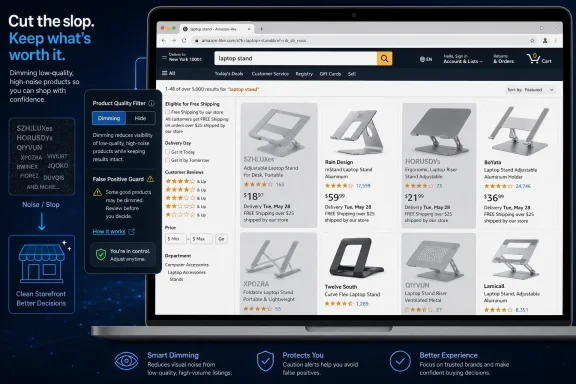
Knockoff Shopping is a new Chrome extension, available from knockoff.shopping and covered by Windows Central, that filters Amazon search results to hide or dim pseudo-brands such as SZHLUXes and HORUSDYs so shoppers see more recognizable sellers instead when browsing the marketplace. Its promise is simple enough to sound like a joke: make Amazon look less like a warehouse of algorithmically named imports and more like a store. But the interest around the tool says something larger about the state of online retail, browser extensions, and the growing amount of decision fatigue users now outsource to filters. Amazon’s problem is not that obscure brands exist; it is that the shopping interface increasingly forces ordinary buyers to become counterfeit detectives, trademark analysts, and supply-chain skeptics before buying a hairdryer or ultrasonic cleaner.
The extension arrives at a moment when “slop” has escaped its AI-only meaning and become a wider consumer complaint. Windows Central framed the tool as a way to “de-slop” Amazon search results, and that phrasing works because many users now understand the feeling before they can define the mechanism. Search for something basic, and the page can become a wall of capitalized names that feel less like brands than shell identities: similar products, similar pricing, similar photos, and very little to distinguish durable sellers from throwaway storefronts. Knockoff Shopping is interesting because it does not try to fix Amazon’s marketplace. It tries to give the shopper a local, browser-level veto.
That is both its strength and its warning label. A browser extension can make a noisy page more usable, but it is also a private layer of judgment placed between the customer and a massive retail platform. The early version, according to Windows Central’s hands-on account and creator Josh Pigford’s own X posts, already has enough edge cases to show why this category is harder than it looks. Filter too weakly, and the junk remains. Filter too aggressively, and legitimate brands such as BIODANCE, LANIEGE, or LANEIGE can get caught in the dragnet.
Amazon has always had third-party sellers, and “unknown brand” has never automatically meant “bad product.” The older bargain of marketplace shopping was that buyers accepted some uncertainty in exchange for selection, speed, and price. What has changed is the volume and presentation of that uncertainty. When a search results page is packed with names that look assembled for trademark availability rather than customer memory, the user’s cognitive load spikes before the product comparison even begins.
Windows Central’s example is deliberately ordinary: shopping for something like a hairdryer or an ultrasonic cleaner, only to find near-identical models sold under different names. That is the crucial detail. The annoyance is not merely aesthetic. If three products look the same, cost roughly the same, and carry three brand names that have no reputational weight with the buyer, then the brand field stops functioning as useful information. It becomes camouflage.
Knockoff Shopping’s pitch is that it filters “trademark-squat pseudo-brands,” with SZHLUXes and HORUSDYs named as examples in the source material. That phrase matters because it identifies the shopper’s suspicion: not simply that a brand is unfamiliar, but that the name exists to occupy a listing, evade comparison, or mimic the shape of legitimacy without the long-term accountability that makes a brand valuable. A brand with a reputation to lose behaves differently from a disposable label. The extension is betting that users would rather risk missing a few obscure sellers than keep wading through the entire flood.
The tool’s appeal also reflects a failure of interface trust. Amazon already has reviews, ratings, badges, filters, sponsored labels, return policies, and seller details. Yet many shoppers still feel they need another layer. That is a remarkable indictment of the marketplace experience: if users install a third-party extension to make search results feel sane, then the platform’s own sorting and trust signals are not doing enough.
This is not just Amazon’s problem, either. The modern web is increasingly shaped by user-side defenses against platform incentives: ad blockers for overloaded pages, password managers for insecure identity habits, script blockers for privacy, coupon extensions for price uncertainty, and now shopping filters for retail slop. Knockoff Shopping belongs to that family. It is a browser add-on born from the gap between what a platform optimizes and what a user wants.
That choice is more important than it looks. A simple “hide everything questionable” button feels satisfying, but shopping data is messy. A capitalized or unfamiliar brand name may indicate a disposable import label, a legitimate overseas company, a specialty manufacturer, or merely a brand the user does not personally know. Dimming gives the extension a training-wheel phase. It lets the shopper build a personal allow list and block list before turning the system loose.
Windows Central’s hands-on account describes adding trusted electronics brands such as ANKER and UGREEN to avoid filtering them out. The source text includes a misspelling, “ANCKER,” in one place, but the underlying example is clear: buyers often trust certain non-household names because they have a history with them. That is precisely why a one-size-fits-all filter will never be perfect. One shopper’s unknown import is another shopper’s go-to USB-C accessory brand.
The extension also supports permanently blocking a brand and adding trusted brands to an allow list. That local customization turns Knockoff Shopping from a moral judgment machine into a preference tool. It does not need to prove that every dimmed seller is bad. It only needs to reduce the number of results a given shopper does not want to consider.
Still, the act of filtering by brand has consequences. If a tool teaches users to equate unfamiliar names with risk, it may reinforce the dominance of already-known brands and make discovery harder for legitimate smaller sellers. The counterargument is that Amazon’s current marketplace design has already poisoned the discovery pool. When too many disposable storefronts crowd the page, shoppers begin distrusting unfamiliar names by default. Knockoff Shopping is not creating that skepticism. It is productizing it.
That list is the whole product challenge in miniature. Some names read exactly like the kind of marketplace clutter the extension is designed to suppress. Others are not so simple. Windows Central’s writer noted that BIODANCE and LANIEGE are reputable Korean skincare brands, and Pigford’s own post separately listed LANEIGE. Whether the spelling appears as LANIEGE in the article or LANEIGE in the embedded post, the point is the same: brand familiarity is local, cultural, category-specific, and easy to misclassify.
This is where Knockoff Shopping becomes more interesting than a novelty add-on. It is doing a job that feels intuitive to humans but becomes difficult at scale. A shopper may instantly distrust “SKIBIDI RIZZ” as a hairdryer brand because the name reads like meme residue. But a filter must make decisions in a structured way, and brand legitimacy is not binary. A seller can be obscure but honest. A known brand can license products of uneven quality. A once-trusted brand can decline. A strange-looking name can belong to a real overseas company with loyal customers outside the United States.
False positives are not just an inconvenience for shoppers. They can harm legitimate sellers if tools like this become popular. A small brand that is algorithmically lumped in with junk loses visibility not because its product is bad, but because its name resembles a pattern associated with low-trust listings. That is not a reason to dismiss Knockoff Shopping; it is a reason to treat transparency and user control as core features, not nice-to-have settings.
The extension’s dimming option is therefore the safer default. It acknowledges uncertainty. Instead of pretending the tool has perfect knowledge, it shows the user what it would suppress and lets the user intervene. In practice, that is the difference between a filter and a blacklist.
For individual users, the risk calculation is straightforward but not trivial. Extensions can read and modify pages, and that power is exactly what makes them useful. A tool that changes Amazon search results must be able to inspect the page, identify brand names, and alter what the user sees. That does not automatically make it dangerous, but it does mean users should treat it as software with meaningful access, not a bookmark.
For IT departments, the issue is sharper. Consumer extensions often enter managed environments through personal browsing habits before anyone in security notices. A staffer installs a tool to make shopping easier, the same browser profile syncs across devices, and suddenly an unreviewed extension is present on a work machine. The extension may be benign. The habit is still risky.
That does not mean admins should reflexively block Knockoff Shopping in particular. The larger lesson is that the browser extension layer deserves the same policy discipline as desktop apps. If an organization allows extensions broadly, it is effectively allowing third-party code to alter web pages employees rely on. That matters for retail, but it matters even more for SaaS dashboards, admin portals, identity pages, and procurement systems.
Knockoff Shopping’s current browser availability also puts Microsoft Edge in an awkward place. The tool is currently only available on Google Chrome, with Safari and Firefox planned, and there is no announced status for Microsoft Edge. Since Edge is Chromium-based, many users will naturally wonder whether support is technically possible, but the source material does not state an Edge release. The absence is notable because Edge is the default browser on modern Windows and the managed browser of choice in many Microsoft-centered organizations.
The table shows why this is not just a compatibility footnote. Chrome gets the experiment first. Safari and Firefox are at least named as future targets. Edge, despite its Windows relevance, remains unmentioned in the source material. For Windows users who live in Edge by policy or preference, the story is therefore less “install this now” than “watch whether this category comes to your browser.”
The shopper’s incentive is different. A buyer looking for a retainer cleaner, a phone case, or a hairdryer generally wants a small set of credible options, not a taxonomy lesson in private-label imports. They want to know which product will work, arrive quickly, last a reasonable amount of time, and not create a return errand. When the page presents dozens of near-duplicates under unfamiliar names, more choice becomes less utility.
That is why the word “slop” lands. It describes not only low-quality content or goods, but also the residue of systems optimized for volume. Slop is what users call output that is abundant, superficially relevant, and exhausting to evaluate. Amazon search results do not have to be fraudulent to feel slopped-up. They only have to make the user suspect that the marketplace has stopped distinguishing between useful variety and noise.
Knockoff Shopping’s thesis is adversarial but narrow: if Amazon will not sufficiently prioritize recognizable brands, the browser can. That approach sidesteps the platform rather than reforming it. It does not demand new rules for sellers, new enforcement from Amazon, or new labeling requirements. It gives the user a personal machete for the search-result jungle.
But personal machetes do not scale cleanly. If every shopper maintains a private trust layer, the web becomes more fragmented. One user sees a marketplace full of dimmed warnings; another sees the unfiltered original; a third hides half the page. That may be empowering, but it also means the shared baseline of what Amazon “shows” begins to dissolve. The more users rely on extensions to repair platforms, the less any single view of the platform tells the whole story.
That analogy is apt. Email spam filters became useful not because they never made mistakes, but because users could rescue legitimate messages and report junk. Over time, the filter became a collaboration between machine judgment and user correction. Knockoff Shopping appears to be operating in a similar spirit at the user level. It flags what looks suspicious, then lets the shopper tune the result.
The allow list is especially important for categories where reputable brands are not universally known. ANKER and UGREEN may be obvious to gadget buyers, but less obvious to shoppers who only recognize Apple, Samsung, or Belkin. BIODANCE and LANIEGE may be meaningful in Korean skincare circles, but not to someone browsing beauty products casually. The same problem repeats across tools, toys, pet supplies, home goods, and accessories.
That means the extension will probably work best for users who are willing to invest a little time in configuration. A fully passive user may either overtrust the filter or become frustrated when legitimate brands are dimmed. A more careful user can turn the first few searches into a calibration session: allow what you know, block what you do not want, and only then consider hiding results completely.
The broader lesson for software designers is that the best anti-slop tools will be explainable and reversible. Users do not merely want less noise; they want confidence that the reduction is not silently removing useful options. A dimmed result with a clear path to “allow this brand” is far more trustworthy than a hidden result the user never knows existed.
That matters because the people most bothered by Amazon marketplace clutter are not only home shoppers. Small businesses, schools, nonprofits, and office managers buy mundane goods through Amazon all the time: cables, labels, cases, batteries, cleaning supplies, replacement parts, desk accessories. In procurement contexts, pseudo-brand clutter is more than annoying. It can lead to inconsistent purchasing, unreliable replacements, and more time spent vetting basic goods.
An Edge version, if one ever appears, would raise policy questions immediately. Should an organization allow a shopping-filter extension because it improves procurement quality? Should it block it because it is consumer software operating on commercial purchasing pages? Should procurement teams standardize trusted brand lists rather than let individual employees decide? The source material gives no announced Edge plan, so those questions are hypothetical. But they are the questions Windows admins will ask if this category grows.
Even without Edge support, admins should pay attention because Chrome is common on Windows endpoints. A Chrome-only extension is still a Windows endpoint concern when users install Chrome for personal preference or departmental workflows. The platform named in the story is Google Chrome, but the operating environment for many users will still be Windows.
This is the recurring paradox of modern Windows administration: Microsoft may own the OS and ship the default browser, but much of the user’s actual risk and productivity lives in cross-platform web tooling. A tiny shopping extension can become part of that governance picture because browsers are now application platforms in their own right.
The weirdness of those names has become part of the consumer internet’s folk knowledge. Shoppers joke about all-caps brands and impossible consonant clusters because humor is a way to process mistrust. The Windows Central headline’s reference to “SKIBIDI RIZZ” works because it exaggerates something real: a feeling that parts of the marketplace have absorbed the grammar of spam, memes, and mass-produced listings.
But there is a danger in treating the name alone as proof. Many legitimate global brands entered Western markets as unfamiliar strings. Some names look odd to English-speaking shoppers because they come from different naming conventions, languages, or trademark constraints. Others look odd because they are, in fact, disposable marketplace labels. The user’s problem is that the interface often does not help distinguish between those cases.
This is where Amazon could do more than any extension. The platform has access to seller history, return rates, complaint patterns, product lineage, business verification, review authenticity signals, and customer service outcomes. A browser extension sees the page from the outside. Amazon sees the machinery underneath. If third-party tools are becoming attractive, it is partly because Amazon’s own presentation of trust has not resolved the ambiguity users feel.
Knockoff Shopping therefore functions as pressure from below. It is a user-side protest wrapped as convenience software. If enough shoppers adopt tools like this, platforms will have to reckon with the fact that “more results” is not always the product users want. Sometimes the killer feature is fewer results with more confidence.
Windows Central’s hands-on account reflects that trade-off. The writer used the tool while shopping for an ultrasonic cleaner after two seemingly identical models under different brand names failed after a week. With dimmed results exposing how many similar listings clustered around the same price, the writer paid a little more for something potentially longer lasting. That is a rational choice, but it is still a choice: less risk, possibly more cost.
For many users, that trade-off will be welcome. The cheapest item is not cheap if it fails quickly, creates a return, or must be replaced. The real price of marketplace slop includes time, frustration, and uncertainty. A filter that helps users spend slightly more once instead of buying twice can be economically sensible.
Still, the extension should not be mistaken for a quality guarantee. Recognizable brands can disappoint. Unknown brands can overperform. A filtered search result page is cleaner, not magically verified. Users should still read recent reviews skeptically, compare warranty and return terms, check seller information, and avoid assuming that a non-dimmed listing is automatically safe.
That nuance matters because anti-slop tools can become overtrusted quickly. The satisfaction of seeing a messy page cleaned up is powerful. But the browser can only judge what it can observe. A product’s long-term reliability, safety, support, and authenticity require evidence beyond the brand name.
That is also why the second embedded X post from July 7, 2026, matters. It reportedly celebrated that someone had “deslopped” Amazon, and the enthusiasm is the signal. Users do not cheer when a normal search filter works. They cheer when a tool appears to restore a sense of control that the platform had eroded.
The language around Knockoff Shopping is almost cleansing: filter, dim, hide, de-slop. That vocabulary tells us users experience the page not just as inefficient, but contaminated. The extension is promising a cleaner surface, a calmer decision, and fewer traps for attention. In a marketplace designed to maximize exposure, that restraint feels radical.
The challenge for Pigford is to preserve that feeling while avoiding the arrogance that kills trust tools. If Knockoff Shopping becomes too opaque, users will wonder what they are missing. If it is too permissive, users will wonder why they installed it. If it is too aggressive with legitimate niche brands, sellers and category-savvy shoppers will push back. The product’s long-term credibility will depend less on how many names it blocks than on how gracefully it handles mistakes.
For home users, the right starting point is conservative. Install only from the named source, begin in dim mode, and spend a few searches teaching the allow list and block list. Add brands you already trust. Rescue brands that are wrongly dimmed. Block labels you know you do not want to see again. After that, hiding can make sense for categories where the junk-to-signal ratio is especially bad.
For power users, the interesting possibility is category-specific curation. A shopper may trust UGREEN for cables, LANEIGE for skincare, and a completely different set of names for tools or toys. A future version of this kind of tool could become more nuanced by category, though the source material does not state such a feature. The current lesson is simpler: trust is not universal across Amazon, so filters should not pretend it is.
For admins, the sensible stance is neither hype nor panic. Knockoff Shopping is a consumer extension addressing a real consumer problem. But in managed environments, every extension is also code with browser privileges. The same feature that improves Amazon search results at home may be inappropriate on a locked-down procurement workstation unless reviewed.
That balance is the Windows story: users want relief from marketplace chaos, while organizations need control over the tools users install to get that relief. The extension may be small, but the pattern is big.
The extension arrives at a moment when “slop” has escaped its AI-only meaning and become a wider consumer complaint. Windows Central framed the tool as a way to “de-slop” Amazon search results, and that phrasing works because many users now understand the feeling before they can define the mechanism. Search for something basic, and the page can become a wall of capitalized names that feel less like brands than shell identities: similar products, similar pricing, similar photos, and very little to distinguish durable sellers from throwaway storefronts. Knockoff Shopping is interesting because it does not try to fix Amazon’s marketplace. It tries to give the shopper a local, browser-level veto.
That is both its strength and its warning label. A browser extension can make a noisy page more usable, but it is also a private layer of judgment placed between the customer and a massive retail platform. The early version, according to Windows Central’s hands-on account and creator Josh Pigford’s own X posts, already has enough edge cases to show why this category is harder than it looks. Filter too weakly, and the junk remains. Filter too aggressively, and legitimate brands such as BIODANCE, LANIEGE, or LANEIGE can get caught in the dragnet.
 Amazon’s Search Problem Has Become a Trust Problem
Amazon has always had third-party sellers, and “unknown brand” has never automatically meant “bad product.” The older bargain of marketplace shopping was that buyers accepted some uncertainty in exchange for selection, speed, and price. What has changed is the volume and presentation of that uncertainty. When a search results page is packed with names that look assembled for trademark availability rather than customer memory, the user’s cognitive load spikes before the product comparison even begins.Windows Central’s example is deliberately ordinary: shopping for something like a hairdryer or an ultrasonic cleaner, only to find near-identical models sold under different names. That is the crucial detail. The annoyance is not merely aesthetic. If three products look the same, cost roughly the same, and carry three brand names that have no reputational weight with the buyer, then the brand field stops functioning as useful information. It becomes camouflage.
Knockoff Shopping’s pitch is that it filters “trademark-squat pseudo-brands,” with SZHLUXes and HORUSDYs named as examples in the source material. That phrase matters because it identifies the shopper’s suspicion: not simply that a brand is unfamiliar, but that the name exists to occupy a listing, evade comparison, or mimic the shape of legitimacy without the long-term accountability that makes a brand valuable. A brand with a reputation to lose behaves differently from a disposable label. The extension is betting that users would rather risk missing a few obscure sellers than keep wading through the entire flood.
The tool’s appeal also reflects a failure of interface trust. Amazon already has reviews, ratings, badges, filters, sponsored labels, return policies, and seller details. Yet many shoppers still feel they need another layer. That is a remarkable indictment of the marketplace experience: if users install a third-party extension to make search results feel sane, then the platform’s own sorting and trust signals are not doing enough.
This is not just Amazon’s problem, either. The modern web is increasingly shaped by user-side defenses against platform incentives: ad blockers for overloaded pages, password managers for insecure identity habits, script blockers for privacy, coupon extensions for price uncertainty, and now shopping filters for retail slop. Knockoff Shopping belongs to that family. It is a browser add-on born from the gap between what a platform optimizes and what a user wants.
Knockoff Shopping Turns Brand Recognition Into a Browser Filter
The extension’s operating model, as described by Windows Central, is not complicated. After installation, users can configure the tool so Amazon results from suspected knockoff or pseudo-brand sellers are dimmed or hidden. Dimming is the more cautious mode because it leaves the result visible, allowing the shopper to inspect what was flagged and correct the filter. Hiding is the more aggressive mode because it removes the noise entirely.That choice is more important than it looks. A simple “hide everything questionable” button feels satisfying, but shopping data is messy. A capitalized or unfamiliar brand name may indicate a disposable import label, a legitimate overseas company, a specialty manufacturer, or merely a brand the user does not personally know. Dimming gives the extension a training-wheel phase. It lets the shopper build a personal allow list and block list before turning the system loose.
Windows Central’s hands-on account describes adding trusted electronics brands such as ANKER and UGREEN to avoid filtering them out. The source text includes a misspelling, “ANCKER,” in one place, but the underlying example is clear: buyers often trust certain non-household names because they have a history with them. That is precisely why a one-size-fits-all filter will never be perfect. One shopper’s unknown import is another shopper’s go-to USB-C accessory brand.
The extension also supports permanently blocking a brand and adding trusted brands to an allow list. That local customization turns Knockoff Shopping from a moral judgment machine into a preference tool. It does not need to prove that every dimmed seller is bad. It only needs to reduce the number of results a given shopper does not want to consider.
Still, the act of filtering by brand has consequences. If a tool teaches users to equate unfamiliar names with risk, it may reinforce the dominance of already-known brands and make discovery harder for legitimate smaller sellers. The counterargument is that Amazon’s current marketplace design has already poisoned the discovery pool. When too many disposable storefronts crowd the page, shoppers begin distrusting unfamiliar names by default. Knockoff Shopping is not creating that skepticism. It is productizing it.
The False Positive Problem Arrived on Day One
The most revealing part of the early story is not that the extension filters odd-looking Amazon brands. It is that Josh Pigford, the creator of Knockoff Shopping, had already acknowledged on X that some brands may be inadvertently filtered out. His July 7, 2026 post listed WNPETHOME, EHEYCIGA, YXYL, LU&MN, JOYIN, TOMY, GODONLIF, YOOJEE, LINGTENG, LANEIGE, VISCOO, BIODANCE, COOFANDY, BALENNZ, TOSY, and LUENX.That list is the whole product challenge in miniature. Some names read exactly like the kind of marketplace clutter the extension is designed to suppress. Others are not so simple. Windows Central’s writer noted that BIODANCE and LANIEGE are reputable Korean skincare brands, and Pigford’s own post separately listed LANEIGE. Whether the spelling appears as LANIEGE in the article or LANEIGE in the embedded post, the point is the same: brand familiarity is local, cultural, category-specific, and easy to misclassify.
This is where Knockoff Shopping becomes more interesting than a novelty add-on. It is doing a job that feels intuitive to humans but becomes difficult at scale. A shopper may instantly distrust “SKIBIDI RIZZ” as a hairdryer brand because the name reads like meme residue. But a filter must make decisions in a structured way, and brand legitimacy is not binary. A seller can be obscure but honest. A known brand can license products of uneven quality. A once-trusted brand can decline. A strange-looking name can belong to a real overseas company with loyal customers outside the United States.
False positives are not just an inconvenience for shoppers. They can harm legitimate sellers if tools like this become popular. A small brand that is algorithmically lumped in with junk loses visibility not because its product is bad, but because its name resembles a pattern associated with low-trust listings. That is not a reason to dismiss Knockoff Shopping; it is a reason to treat transparency and user control as core features, not nice-to-have settings.
The extension’s dimming option is therefore the safer default. It acknowledges uncertainty. Instead of pretending the tool has perfect knowledge, it shows the user what it would suppress and lets the user intervene. In practice, that is the difference between a filter and a blacklist.
The Browser Is Becoming the New Consumer Protection Layer
There is a reason this story belongs on a Windows-focused site even though the extension is currently Chrome-only. Browser extensions are one of the few places where users can still meaningfully reshape hostile or degraded web experiences. On Windows PCs, the browser is where retail, banking, identity, office work, and entertainment increasingly converge. A shopping extension is not just a shopping story; it is a browser governance story.For individual users, the risk calculation is straightforward but not trivial. Extensions can read and modify pages, and that power is exactly what makes them useful. A tool that changes Amazon search results must be able to inspect the page, identify brand names, and alter what the user sees. That does not automatically make it dangerous, but it does mean users should treat it as software with meaningful access, not a bookmark.
For IT departments, the issue is sharper. Consumer extensions often enter managed environments through personal browsing habits before anyone in security notices. A staffer installs a tool to make shopping easier, the same browser profile syncs across devices, and suddenly an unreviewed extension is present on a work machine. The extension may be benign. The habit is still risky.
That does not mean admins should reflexively block Knockoff Shopping in particular. The larger lesson is that the browser extension layer deserves the same policy discipline as desktop apps. If an organization allows extensions broadly, it is effectively allowing third-party code to alter web pages employees rely on. That matters for retail, but it matters even more for SaaS dashboards, admin portals, identity pages, and procurement systems.
Knockoff Shopping’s current browser availability also puts Microsoft Edge in an awkward place. The tool is currently only available on Google Chrome, with Safari and Firefox planned, and there is no announced status for Microsoft Edge. Since Edge is Chromium-based, many users will naturally wonder whether support is technically possible, but the source material does not state an Edge release. The absence is notable because Edge is the default browser on modern Windows and the managed browser of choice in many Microsoft-centered organizations.
| Browser | Status in the source material | Practical implication |
|---|---|---|
| Google Chrome | Currently available | Users can install and test Knockoff Shopping now |
| Safari | Coming soon | Apple users are in the planned expansion path |
| Firefox | Coming soon | Non-Chromium browser support is planned |
| Microsoft Edge | No word yet | Windows admins and Edge-first users have no announced native path |
Amazon’s Incentives Are Not the Shopper’s Incentives
The uncomfortable truth behind Knockoff Shopping is that Amazon benefits from abundance even when shoppers experience it as clutter. A marketplace with many sellers can create price competition, fill every niche, and maximize the chance that a search produces something buyable. Sponsored listings and third-party seller participation also shape what users see. The result can be commercially successful and experientially exhausting at the same time.The shopper’s incentive is different. A buyer looking for a retainer cleaner, a phone case, or a hairdryer generally wants a small set of credible options, not a taxonomy lesson in private-label imports. They want to know which product will work, arrive quickly, last a reasonable amount of time, and not create a return errand. When the page presents dozens of near-duplicates under unfamiliar names, more choice becomes less utility.
That is why the word “slop” lands. It describes not only low-quality content or goods, but also the residue of systems optimized for volume. Slop is what users call output that is abundant, superficially relevant, and exhausting to evaluate. Amazon search results do not have to be fraudulent to feel slopped-up. They only have to make the user suspect that the marketplace has stopped distinguishing between useful variety and noise.
Knockoff Shopping’s thesis is adversarial but narrow: if Amazon will not sufficiently prioritize recognizable brands, the browser can. That approach sidesteps the platform rather than reforming it. It does not demand new rules for sellers, new enforcement from Amazon, or new labeling requirements. It gives the user a personal machete for the search-result jungle.
But personal machetes do not scale cleanly. If every shopper maintains a private trust layer, the web becomes more fragmented. One user sees a marketplace full of dimmed warnings; another sees the unfiltered original; a third hides half the page. That may be empowering, but it also means the shared baseline of what Amazon “shows” begins to dissolve. The more users rely on extensions to repair platforms, the less any single view of the platform tells the whole story.
The Most Useful Feature Is Not Blocking — It Is Teaching the Filter
The early Windows Central experience points to a practical way to use Knockoff Shopping: start with dimming, not hiding. Dimming preserves context. It lets users see the scale of the problem, identify mistaken flags, and decide which brands deserve permanent blocks or allow-list exceptions. In other words, the tool is most useful when treated less like an oracle and more like a spam filter.That analogy is apt. Email spam filters became useful not because they never made mistakes, but because users could rescue legitimate messages and report junk. Over time, the filter became a collaboration between machine judgment and user correction. Knockoff Shopping appears to be operating in a similar spirit at the user level. It flags what looks suspicious, then lets the shopper tune the result.
The allow list is especially important for categories where reputable brands are not universally known. ANKER and UGREEN may be obvious to gadget buyers, but less obvious to shoppers who only recognize Apple, Samsung, or Belkin. BIODANCE and LANIEGE may be meaningful in Korean skincare circles, but not to someone browsing beauty products casually. The same problem repeats across tools, toys, pet supplies, home goods, and accessories.
That means the extension will probably work best for users who are willing to invest a little time in configuration. A fully passive user may either overtrust the filter or become frustrated when legitimate brands are dimmed. A more careful user can turn the first few searches into a calibration session: allow what you know, block what you do not want, and only then consider hiding results completely.
The broader lesson for software designers is that the best anti-slop tools will be explainable and reversible. Users do not merely want less noise; they want confidence that the reduction is not silently removing useful options. A dimmed result with a clear path to “allow this brand” is far more trustworthy than a hidden result the user never knows existed.
The Edge Omission Matters Because Windows Users Live in Managed Browsers
The lack of announced Microsoft Edge support is a small line in the source material, but it carries a larger Windows implication. Edge is not merely another browser icon. In many organizations, it is the browser tied into Microsoft identity, policy management, enterprise defaults, and user training. If Knockoff Shopping remains Chrome-first while Safari and Firefox support arrive later, its natural early audience may skew toward consumer Chrome users rather than managed Windows fleets.That matters because the people most bothered by Amazon marketplace clutter are not only home shoppers. Small businesses, schools, nonprofits, and office managers buy mundane goods through Amazon all the time: cables, labels, cases, batteries, cleaning supplies, replacement parts, desk accessories. In procurement contexts, pseudo-brand clutter is more than annoying. It can lead to inconsistent purchasing, unreliable replacements, and more time spent vetting basic goods.
An Edge version, if one ever appears, would raise policy questions immediately. Should an organization allow a shopping-filter extension because it improves procurement quality? Should it block it because it is consumer software operating on commercial purchasing pages? Should procurement teams standardize trusted brand lists rather than let individual employees decide? The source material gives no announced Edge plan, so those questions are hypothetical. But they are the questions Windows admins will ask if this category grows.
Even without Edge support, admins should pay attention because Chrome is common on Windows endpoints. A Chrome-only extension is still a Windows endpoint concern when users install Chrome for personal preference or departmental workflows. The platform named in the story is Google Chrome, but the operating environment for many users will still be Windows.
This is the recurring paradox of modern Windows administration: Microsoft may own the OS and ship the default browser, but much of the user’s actual risk and productivity lives in cross-platform web tooling. A tiny shopping extension can become part of that governance picture because browsers are now application platforms in their own right.
Action checklist for admins
- Review whether consumer browser extensions are allowed by default on managed Windows devices.
- Decide whether shopping-related extensions require approval, especially on systems used for procurement or finance.
- Encourage users to start with dimming rather than hiding if they test brand-filtering tools, so false positives remain visible.
- Maintain a short internal list of approved vendors or brands for recurring purchases instead of relying only on marketplace search.
- Watch for any announced Microsoft Edge support before considering deployment in Edge-first environments.
- Remind users that unfamiliar does not always mean unsafe, and recognizable does not always mean high quality.
The Name Game Is Bigger Than Amazon
Pseudo-brand fatigue is not unique to Amazon, but Amazon’s scale makes it visible. Marketplace sellers have strong incentives to create names that are available, searchable, and defensible enough to register, even if they are not memorable to humans. That produces the familiar alphabet soup: names that look engineered for databases rather than spoken recommendations.The weirdness of those names has become part of the consumer internet’s folk knowledge. Shoppers joke about all-caps brands and impossible consonant clusters because humor is a way to process mistrust. The Windows Central headline’s reference to “SKIBIDI RIZZ” works because it exaggerates something real: a feeling that parts of the marketplace have absorbed the grammar of spam, memes, and mass-produced listings.
But there is a danger in treating the name alone as proof. Many legitimate global brands entered Western markets as unfamiliar strings. Some names look odd to English-speaking shoppers because they come from different naming conventions, languages, or trademark constraints. Others look odd because they are, in fact, disposable marketplace labels. The user’s problem is that the interface often does not help distinguish between those cases.
This is where Amazon could do more than any extension. The platform has access to seller history, return rates, complaint patterns, product lineage, business verification, review authenticity signals, and customer service outcomes. A browser extension sees the page from the outside. Amazon sees the machinery underneath. If third-party tools are becoming attractive, it is partly because Amazon’s own presentation of trust has not resolved the ambiguity users feel.
Knockoff Shopping therefore functions as pressure from below. It is a user-side protest wrapped as convenience software. If enough shoppers adopt tools like this, platforms will have to reckon with the fact that “more results” is not always the product users want. Sometimes the killer feature is fewer results with more confidence.
A Good Filter Can Still Make Shopping More Narrow
The most obvious criticism of Knockoff Shopping is that it may hide bargains. Some low-cost marketplace items are perfectly adequate. Some unknown brands make good products. Some shoppers cannot afford to pay a premium for names with reputations to lose. If the extension nudges users toward more established brands, it may also nudge them toward higher prices.Windows Central’s hands-on account reflects that trade-off. The writer used the tool while shopping for an ultrasonic cleaner after two seemingly identical models under different brand names failed after a week. With dimmed results exposing how many similar listings clustered around the same price, the writer paid a little more for something potentially longer lasting. That is a rational choice, but it is still a choice: less risk, possibly more cost.
For many users, that trade-off will be welcome. The cheapest item is not cheap if it fails quickly, creates a return, or must be replaced. The real price of marketplace slop includes time, frustration, and uncertainty. A filter that helps users spend slightly more once instead of buying twice can be economically sensible.
Still, the extension should not be mistaken for a quality guarantee. Recognizable brands can disappoint. Unknown brands can overperform. A filtered search result page is cleaner, not magically verified. Users should still read recent reviews skeptically, compare warranty and return terms, check seller information, and avoid assuming that a non-dimmed listing is automatically safe.
That nuance matters because anti-slop tools can become overtrusted quickly. The satisfaction of seeing a messy page cleaned up is powerful. But the browser can only judge what it can observe. A product’s long-term reliability, safety, support, and authenticity require evidence beyond the brand name.
Windows Central’s Report Captures the Vibe, but the Real Story Is Control
Windows Central’s article is written from a user’s perspective, and that is appropriate because Knockoff Shopping is a user-experience tool first. The screenshots and examples matter less as product review than as documentation of a widely shared annoyance. The writer’s frustration with COSLUS, HYCHIKA, and SEANCHEER-style search noise is not presented as a laboratory test. It is presented as the ordinary exasperation of trying to buy something simple and being forced into brand archaeology.That is also why the second embedded X post from July 7, 2026, matters. It reportedly celebrated that someone had “deslopped” Amazon, and the enthusiasm is the signal. Users do not cheer when a normal search filter works. They cheer when a tool appears to restore a sense of control that the platform had eroded.
The language around Knockoff Shopping is almost cleansing: filter, dim, hide, de-slop. That vocabulary tells us users experience the page not just as inefficient, but contaminated. The extension is promising a cleaner surface, a calmer decision, and fewer traps for attention. In a marketplace designed to maximize exposure, that restraint feels radical.
The challenge for Pigford is to preserve that feeling while avoiding the arrogance that kills trust tools. If Knockoff Shopping becomes too opaque, users will wonder what they are missing. If it is too permissive, users will wonder why they installed it. If it is too aggressive with legitimate niche brands, sellers and category-savvy shoppers will push back. The product’s long-term credibility will depend less on how many names it blocks than on how gracefully it handles mistakes.
The Sensible Way to Use Knockoff Shopping Is Skeptically
The best case for Knockoff Shopping is not that it knows the truth about Amazon brands. The best case is that Amazon search has become noisy enough that a customizable suspicion layer is useful. That distinction keeps expectations grounded. The extension is a tool for reducing clutter, not an authority on product legitimacy.For home users, the right starting point is conservative. Install only from the named source, begin in dim mode, and spend a few searches teaching the allow list and block list. Add brands you already trust. Rescue brands that are wrongly dimmed. Block labels you know you do not want to see again. After that, hiding can make sense for categories where the junk-to-signal ratio is especially bad.
For power users, the interesting possibility is category-specific curation. A shopper may trust UGREEN for cables, LANEIGE for skincare, and a completely different set of names for tools or toys. A future version of this kind of tool could become more nuanced by category, though the source material does not state such a feature. The current lesson is simpler: trust is not universal across Amazon, so filters should not pretend it is.
For admins, the sensible stance is neither hype nor panic. Knockoff Shopping is a consumer extension addressing a real consumer problem. But in managed environments, every extension is also code with browser privileges. The same feature that improves Amazon search results at home may be inappropriate on a locked-down procurement workstation unless reviewed.
That balance is the Windows story: users want relief from marketplace chaos, while organizations need control over the tools users install to get that relief. The extension may be small, but the pattern is big.
The Practical Read Before You Install
Knockoff Shopping is worth watching because it turns a widespread complaint into a simple browser action. Its limits are just as important as its promise, and the early facts give users enough to make a cautious decision.- Knockoff Shopping is a Chrome extension designed to filter Amazon search results by dimming or hiding pseudo-brand listings.
- Windows Central reports that users can obtain it from knockoff.shopping, while Safari and Firefox support are planned.
- Microsoft Edge has no announced support status in the source material.
- Josh Pigford has already acknowledged possible inadvertent filtering, with BIODANCE, LANEIGE, and other brands appearing in his July 7, 2026 X post.
- Users should start with dimming and build an allow list for trusted names such as ANKER and UGREEN rather than hiding everything immediately.
- The extension can reduce clutter, but it should not be treated as a product-safety guarantee or a complete substitute for careful buying.
References
- Primary source: Windows Central
Published: 2026-07-07T22:52:07.929241
Amazon has a slop problem and this extension cleans it up | Windows Central
Tired of seeing generic pseudo-brands in your search results? The Knockoff extension fixes thatwww.windowscentral.com
