

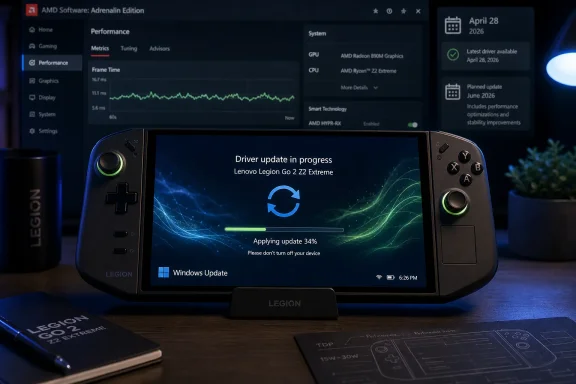
Lenovo’s Legion Go 2 Z2 Extreme began receiving a new AMD graphics driver through Windows Update in early June 2026, moving the handheld to an April 28 driver package and refreshing the accompanying AMD Adrenalin software. The update is not a dramatic performance patch, and that is precisely why it matters. For Windows handhelds, driver delivery is becoming less about headline frame-rate jumps and more about whether the platform can keep pace with the messy cadence of modern PC games. Lenovo’s quiet rollout says a great deal about where handheld gaming PCs are headed: deeper into Windows Update, farther from enthusiast control, and closer to the managed-device model that PC gamers have spent years trying to avoid.
The most important part of this Legion Go 2 update is not the version number. It is the route it took.
According to early user reports and NoobFeed’s testing, the latest GPU package for the Legion Go 2 Z2 Extreme is arriving through Windows Update rather than through Lenovo’s Legion Space utility. That fits the pattern Lenovo has followed since the handheld’s October 2025 launch: key platform updates appear first through Microsoft’s update plumbing, while Lenovo’s support website tends to catch up later.
That distinction sounds bureaucratic until you own one of these devices. A gaming handheld is marketed like a console, used like a PC, and updated like a laptop. The result is an awkward support triangle in which AMD writes the graphics stack, Lenovo validates it for a particular thermal and power envelope, Microsoft distributes it, and the user mostly discovers the change after a reboot.
For a conventional notebook, that is normal. For an enthusiast handheld, it is more complicated. Handheld buyers often want the newest AMD graphics driver because new games routinely ship with driver-specific fixes, shader-cache improvements, or crash workarounds. But OEM-customized AMD drivers can lag behind generic Radeon releases, and handheld vendors frequently tune drivers around device-specific display, sleep, power, controller, and overlay behavior.
The Legion Go 2 update therefore lands in the middle of a familiar Windows gaming tension: users want speed and freshness, while OEMs want validation and predictability. Windows Update is a blunt but effective compromise. It gets the driver onto machines without asking users to browse support pages, unzip installers, or guess whether AMD’s generic package will behave with Lenovo’s handheld controls.
The tradeoff is opacity. Windows Update is good at delivery but bad at storytelling. It can install a driver that changes the feel of a device without giving the user a clear consumer-facing explanation of what changed, what was fixed, or what risks remain.
The update reportedly replaces the previous Lenovo release commonly identified as 1001 and moves the system from an older driver branch to a package dated April 28. The AMD software and driver details seen by users point to the Windows driver version 32.0.23033.1002, tied to AMD’s broader 25.30-era stack. That can look strange if a user expects every visible number to increase in an obvious sequence.
This is not just cosmetic confusion. AMD’s software branding, Windows driver numbering, OEM package labeling, display-driver branch names, and Lenovo’s own support-page naming can all describe overlapping pieces of the same stack. A user may see one number in Device Manager, another in AMD Software, another in Windows Update history, and a different publication date on Lenovo’s support site.
For enthusiasts, that creates a small but persistent trust problem. If the Windows Update package looks numerically “older” in one place and “newer” in another, users understandably start hunting Reddit threads and forum posts to figure out whether they have actually moved forward. A handheld sold as a polished gaming appliance should not require forensic driver archaeology to answer a basic question: “Am I current?”
Still, the practical answer appears to be yes. The June rollout brings the Legion Go 2 onto a newer Lenovo-delivered AMD GPU package than the one many units were previously running. It also updates AMD Adrenalin, which matters because the control panel is not just decoration. It is where users inspect driver details, tune graphics features, manage display options, and check whether the AMD stack is functioning normally.
That last point matters because handheld owners have seen Adrenalin-related friction before. A graphics driver can be technically installed and still leave the companion app broken, mismatched, or stripped of features. For a device that relies heavily on per-game tuning, overlays, scaling options, and power-conscious graphics behavior, the control software is part of the product.
The Legion Go 2 sits in a category where stability is often more valuable than raw speed. These devices operate inside narrow power budgets, use integrated graphics, depend on aggressive power management, and are frequently asked to run games built first for desktop GPUs or consoles. A small driver regression can mean stutter, broken sleep behavior, external display weirdness, or an overlay that stops launching.
The tested games mentioned in the report — including 007 First Light, LEGO Batman, and Forza Horizon 6 — are best understood as practical smoke tests rather than a formal benchmark suite. That is not a criticism. On a handheld, the lived experience often matters more than the average FPS number. A game that produces fewer spikes, fewer hitchy transitions, or fewer driver resets can feel substantially better even if the headline frame rate barely moves.
The reported results fit that pattern. Performance in 007 First Light was described as broadly similar to earlier testing, complicated by the game itself having changed through post-release updates. That is an important caveat. Modern game performance is a moving target, and attributing every change to the GPU driver is a trap. If the game patch, shader compilation behavior, graphics options, and driver all change within the same window, clean comparisons become nearly impossible.
Forza Horizon 6 appears to be the more encouraging case, with smoother frame delivery at 1200p using FSR and the Medium preset. Again, that does not necessarily mean Lenovo or AMD found a magic pile of unused performance. It may mean the driver is handling frame pacing, scheduling, or game-specific behavior a little more gracefully. On a handheld display, that can be the difference between “technically playable” and “actually pleasant.”
A handheld can report a respectable average frame rate while feeling uneven in the hand. Frame-time spikes, shader compilation, asset streaming, background Windows tasks, and power-state transitions all show up as stutter. The user does not experience a spreadsheet average; the user experiences the jerk in the camera pan, the hitch before a corner, or the half-second pause that breaks the illusion.
That is why the early mention of improved frame-time characteristics in Forza Horizon 6 matters more than it might seem. Racing games are especially sensitive to pacing. The player’s eyes are tracking motion constantly, and inconsistent delivery is visible even when the average frame rate looks fine. A small improvement in frame consistency can feel larger than a small increase in raw throughput.
This is also where AMD’s handheld role becomes complicated. The Ryzen Z2 Extreme is a capable chip, but it is still a mobile APU living under strict thermal and battery constraints. Driver improvements can help, but they cannot repeal physics. The best updates will often be incremental: fewer crashes here, better pacing there, updated game profiles, a more reliable control panel, a smoother experience when FSR is enabled.
That makes the driver cadence itself a product feature. A Windows handheld that receives timely, validated graphics updates has a longer useful life than one abandoned to launch-day drivers and generic workaround culture. The silicon is only half the story; the support pipeline determines whether that silicon continues to behave well as the game library changes around it.
That matters because handheld gaming PCs are no longer only hobbyist gadgets. The category has moved beyond the early-adopter crowd that happily sideloads drivers, edits configuration files, and knows exactly how to roll back a broken package. A growing slice of the market expects the device to update itself, much like a console or a phone.
Windows Update is also a useful shield against fragmentation. If every Legion Go 2 owner pulls from the same validated channel, Lenovo’s support burden gets easier. When a user reports a crash, Lenovo has a better chance of knowing which driver stack is actually on the device. That is less true if half the audience is running Lenovo’s package, a quarter is using AMD’s latest generic driver, and the rest are following forum guides from three months ago.
But the anxiety is real. Windows Update has a long history of installing drivers at inconvenient times, replacing user-preferred versions, and offering sparse explanations. Enthusiasts often distrust it not because it always fails, but because when it does fail, it can feel unilateral. The user did not choose the driver; the driver happened to them.
That tension is sharper on a gaming handheld than on a desktop tower. If a desktop GPU driver misbehaves, the user can often roll back, reinstall, or swap to a known-good package with familiar tools. On a handheld, graphics drivers intersect with custom buttons, quick settings panels, display rotation, sleep states, TDP controls, and vendor utilities. A bad package can make the whole device feel unfinished.
Lenovo’s challenge is therefore not only to ship drivers through Windows Update, but to communicate the process like a gaming company rather than a PC OEM. Users want to know what changed, which games were targeted, whether known bugs remain, and whether the update is safe to install today. “It appeared in Windows Update” is delivery, not communication.
Utilities like Legion Space are supposed to be the friendly layer between Windows and the couch. They launch games, expose power modes, manage device-specific controls, and make a handheld PC feel less like a shrunken laptop. For many buyers, that software is part of why they choose an OEM handheld instead of building a portable Windows setup around generic components.
If major drivers bypass that layer, Legion Space becomes less of a command center and more of a dashboard. It may still matter for controls and game launching, but it is not where the most important maintenance action happens. That can confuse users who reasonably assume Lenovo’s own gaming utility should be the place to check for Lenovo-validated gaming updates.
There are reasonable engineering explanations. Windows Update is built for driver distribution. Microsoft’s pipeline can handle device targeting, dependencies, rollback mechanisms, and installation states in ways a gaming launcher should not have to reinvent. Legion Space may be better kept as a front-end experience rather than a driver installer with all the risk that entails.
But product perception does not always care about backend logic. If users must check Windows Update for drivers, Microsoft Store for AMD Software updates, Lenovo’s support site for later manual packages, and Legion Space for device features, the handheld starts to feel fragmented. The promise of these devices is not that they stop being PCs. It is that they make the PC’s complexity manageable in a handheld form factor.
A better model would not necessarily require Legion Space to install every driver itself. It could simply surface update status clearly, explain which Windows Update package is current, point out known issues, and tell users whether the support-site download is behind or ahead. In other words, it could become the translator between OEM driver reality and gamer expectations.
For desktop Radeon users, the answer is usually simple. AMD releases a driver, users install it, and game-specific fixes arrive quickly. For handhelds built around semi-custom or OEM-tuned APUs, the answer is more cautious. Generic drivers may work, partially work, or install while leaving vendor-specific behavior unsupported. Even when they improve one game, they can disturb another part of the device experience.
The Z2 Extreme makes that tension more visible because it sits in a fast-moving product category. New handhelds are competing not only on hardware, but on update cadence. Valve’s Steam Deck benefits from a tightly integrated OS and hardware stack. Windows handhelds counter with broader compatibility and familiar PC gaming access, but they inherit Windows’ driver complexity in exchange.
AMD has incentives to make its driver story cleaner across handhelds. Game developers benefit when the installed driver base is less fragmented. Users benefit when fixes arrive quickly. OEMs benefit when they are not solely responsible for every compatibility gap. But handhelds are not just small desktops. They are thermally constrained, battery-sensitive devices with custom input and display arrangements.
That means Lenovo’s validation still matters. The company is not merely rubber-stamping an AMD package; it is deciding whether that package behaves acceptably on this specific machine. The more console-like these devices become, the more users will expect that validation to happen invisibly and quickly.
The uncomfortable middle ground is where the Legion Go 2 currently lives. Windows Update can deliver a validated package, but not always as fast as AMD’s latest public release. AMD can ship newer generic software, but not always with the confidence that it is the right choice for a specific handheld. Enthusiasts can experiment, but ordinary users need a default path that is boring and dependable.
That lag is irritating because support sites are where users go when something goes wrong. If Windows Update installs a new driver and the manual download is not yet posted, a user who wants to reinstall, compare versions, or recover from a bad state may have fewer obvious options. The support page becomes less a source of truth and more an archive that eventually catches up.
Still, the lag does not automatically mean Lenovo is mishandling the update. OEM driver deployment can be staged. Packages may be targeted by device ID, region, configuration, or rollout ring. Microsoft’s update infrastructure may expose the package to eligible machines before Lenovo’s public download page is refreshed. That is messy, but not unusual.
The problem is that handheld owners interpret silence through the lens of past disappointments. The original Legion Go community spent years worrying about driver cadence, AMD support, and whether its custom hardware would be left behind. When a new device’s support page looks stale, even temporarily, users bring that history with them.
Lenovo can defuse much of this by publishing clearer release notes and maintaining a visible driver chronology. A simple “Windows Update rollout began June 2; manual package to follow” would do more for user confidence than a dozen vague assurances. Handheld buyers do not need every internal detail. They need to know whether the update is official, current, reversible, and worth installing.
But maintenance releases are how Windows handhelds earn trust. A device like the Legion Go 2 is not frozen at launch. Its real-world quality changes as Windows evolves, AMD’s stack matures, new games ship, anti-cheat systems update, and storefronts revise their overlays. The owner’s experience six months after launch depends heavily on whether the vendor continues doing unglamorous work.
This is especially true because PC games in 2026 are not static workloads. A game may perform differently after a content patch, a new shader pipeline, a graphics-options change, or a hotfix aimed at consoles. Driver updates need to keep up with that churn even when they do not deliver photogenic benchmark gains.
The user-facing lesson is simple: if the update appears through Windows Update, it is likely the intended Lenovo-validated path for most Legion Go 2 owners. Users chasing absolute latest AMD releases can still experiment, but they should understand the risk. On a handheld, “newest” and “best for this device” are not always the same thing.
For administrators and support-minded users, the update also reinforces the need to treat gaming handhelds like managed Windows endpoints. They may look like toys, but they carry the same driver-state questions as laptops. If a household, esports program, school lab, or IT department supports several of them, tracking Windows Update history and driver versions is not optional busywork.
 Lenovo Lets Windows Update Become the Handheld’s Real Driver Channel
The most important part of this Legion Go 2 update is not the version number. It is the route it took.According to early user reports and NoobFeed’s testing, the latest GPU package for the Legion Go 2 Z2 Extreme is arriving through Windows Update rather than through Lenovo’s Legion Space utility. That fits the pattern Lenovo has followed since the handheld’s October 2025 launch: key platform updates appear first through Microsoft’s update plumbing, while Lenovo’s support website tends to catch up later.
That distinction sounds bureaucratic until you own one of these devices. A gaming handheld is marketed like a console, used like a PC, and updated like a laptop. The result is an awkward support triangle in which AMD writes the graphics stack, Lenovo validates it for a particular thermal and power envelope, Microsoft distributes it, and the user mostly discovers the change after a reboot.
For a conventional notebook, that is normal. For an enthusiast handheld, it is more complicated. Handheld buyers often want the newest AMD graphics driver because new games routinely ship with driver-specific fixes, shader-cache improvements, or crash workarounds. But OEM-customized AMD drivers can lag behind generic Radeon releases, and handheld vendors frequently tune drivers around device-specific display, sleep, power, controller, and overlay behavior.
The Legion Go 2 update therefore lands in the middle of a familiar Windows gaming tension: users want speed and freshness, while OEMs want validation and predictability. Windows Update is a blunt but effective compromise. It gets the driver onto machines without asking users to browse support pages, unzip installers, or guess whether AMD’s generic package will behave with Lenovo’s handheld controls.
The tradeoff is opacity. Windows Update is good at delivery but bad at storytelling. It can install a driver that changes the feel of a device without giving the user a clear consumer-facing explanation of what changed, what was fixed, or what risks remain.
The Version Numbers Tell a Messier Story Than the Update Dialog
Driver updates on Windows handhelds are rarely as simple as “newer number good.” This release is a good example.The update reportedly replaces the previous Lenovo release commonly identified as 1001 and moves the system from an older driver branch to a package dated April 28. The AMD software and driver details seen by users point to the Windows driver version 32.0.23033.1002, tied to AMD’s broader 25.30-era stack. That can look strange if a user expects every visible number to increase in an obvious sequence.
This is not just cosmetic confusion. AMD’s software branding, Windows driver numbering, OEM package labeling, display-driver branch names, and Lenovo’s own support-page naming can all describe overlapping pieces of the same stack. A user may see one number in Device Manager, another in AMD Software, another in Windows Update history, and a different publication date on Lenovo’s support site.
For enthusiasts, that creates a small but persistent trust problem. If the Windows Update package looks numerically “older” in one place and “newer” in another, users understandably start hunting Reddit threads and forum posts to figure out whether they have actually moved forward. A handheld sold as a polished gaming appliance should not require forensic driver archaeology to answer a basic question: “Am I current?”
Still, the practical answer appears to be yes. The June rollout brings the Legion Go 2 onto a newer Lenovo-delivered AMD GPU package than the one many units were previously running. It also updates AMD Adrenalin, which matters because the control panel is not just decoration. It is where users inspect driver details, tune graphics features, manage display options, and check whether the AMD stack is functioning normally.
That last point matters because handheld owners have seen Adrenalin-related friction before. A graphics driver can be technically installed and still leave the companion app broken, mismatched, or stripped of features. For a device that relies heavily on per-game tuning, overlays, scaling options, and power-conscious graphics behavior, the control software is part of the product.
Stability Is the Headline When the Platform Is This Young
NoobFeed’s early testing is modest but useful: several days of play across recent games reportedly produced no crashes or major problems after installation. That is not the kind of result that wins benchmark charts, but it is exactly the kind of result handheld PC owners should care about.The Legion Go 2 sits in a category where stability is often more valuable than raw speed. These devices operate inside narrow power budgets, use integrated graphics, depend on aggressive power management, and are frequently asked to run games built first for desktop GPUs or consoles. A small driver regression can mean stutter, broken sleep behavior, external display weirdness, or an overlay that stops launching.
The tested games mentioned in the report — including 007 First Light, LEGO Batman, and Forza Horizon 6 — are best understood as practical smoke tests rather than a formal benchmark suite. That is not a criticism. On a handheld, the lived experience often matters more than the average FPS number. A game that produces fewer spikes, fewer hitchy transitions, or fewer driver resets can feel substantially better even if the headline frame rate barely moves.
The reported results fit that pattern. Performance in 007 First Light was described as broadly similar to earlier testing, complicated by the game itself having changed through post-release updates. That is an important caveat. Modern game performance is a moving target, and attributing every change to the GPU driver is a trap. If the game patch, shader compilation behavior, graphics options, and driver all change within the same window, clean comparisons become nearly impossible.
Forza Horizon 6 appears to be the more encouraging case, with smoother frame delivery at 1200p using FSR and the Medium preset. Again, that does not necessarily mean Lenovo or AMD found a magic pile of unused performance. It may mean the driver is handling frame pacing, scheduling, or game-specific behavior a little more gracefully. On a handheld display, that can be the difference between “technically playable” and “actually pleasant.”
Frame Times Are the Handheld Metric That Keeps Humbling FPS
The Legion Go 2 update is a reminder that handheld gaming has made the old benchmark shorthand feel increasingly inadequate. Average FPS is still useful, but it is not the whole story on a small, battery-powered Windows PC.A handheld can report a respectable average frame rate while feeling uneven in the hand. Frame-time spikes, shader compilation, asset streaming, background Windows tasks, and power-state transitions all show up as stutter. The user does not experience a spreadsheet average; the user experiences the jerk in the camera pan, the hitch before a corner, or the half-second pause that breaks the illusion.
That is why the early mention of improved frame-time characteristics in Forza Horizon 6 matters more than it might seem. Racing games are especially sensitive to pacing. The player’s eyes are tracking motion constantly, and inconsistent delivery is visible even when the average frame rate looks fine. A small improvement in frame consistency can feel larger than a small increase in raw throughput.
This is also where AMD’s handheld role becomes complicated. The Ryzen Z2 Extreme is a capable chip, but it is still a mobile APU living under strict thermal and battery constraints. Driver improvements can help, but they cannot repeal physics. The best updates will often be incremental: fewer crashes here, better pacing there, updated game profiles, a more reliable control panel, a smoother experience when FSR is enabled.
That makes the driver cadence itself a product feature. A Windows handheld that receives timely, validated graphics updates has a longer useful life than one abandoned to launch-day drivers and generic workaround culture. The silicon is only half the story; the support pipeline determines whether that silicon continues to behave well as the game library changes around it.
Windows Update Solves Distribution and Creates a New Kind of Anxiety
There is a strong argument for Lenovo using Windows Update as the primary path for Legion Go 2 drivers. It is already present on every Windows device, it can stage updates reliably, and it reduces the odds that less technical users will run dangerously outdated drivers for months.That matters because handheld gaming PCs are no longer only hobbyist gadgets. The category has moved beyond the early-adopter crowd that happily sideloads drivers, edits configuration files, and knows exactly how to roll back a broken package. A growing slice of the market expects the device to update itself, much like a console or a phone.
Windows Update is also a useful shield against fragmentation. If every Legion Go 2 owner pulls from the same validated channel, Lenovo’s support burden gets easier. When a user reports a crash, Lenovo has a better chance of knowing which driver stack is actually on the device. That is less true if half the audience is running Lenovo’s package, a quarter is using AMD’s latest generic driver, and the rest are following forum guides from three months ago.
But the anxiety is real. Windows Update has a long history of installing drivers at inconvenient times, replacing user-preferred versions, and offering sparse explanations. Enthusiasts often distrust it not because it always fails, but because when it does fail, it can feel unilateral. The user did not choose the driver; the driver happened to them.
That tension is sharper on a gaming handheld than on a desktop tower. If a desktop GPU driver misbehaves, the user can often roll back, reinstall, or swap to a known-good package with familiar tools. On a handheld, graphics drivers intersect with custom buttons, quick settings panels, display rotation, sleep states, TDP controls, and vendor utilities. A bad package can make the whole device feel unfinished.
Lenovo’s challenge is therefore not only to ship drivers through Windows Update, but to communicate the process like a gaming company rather than a PC OEM. Users want to know what changed, which games were targeted, whether known bugs remain, and whether the update is safe to install today. “It appeared in Windows Update” is delivery, not communication.
Legion Space Is Not the Control Center Users Expected
The report’s note that Legion Go 2 drivers have not been arriving through Legion Space is more than a footnote. It points to an identity problem for Lenovo’s handheld software.Utilities like Legion Space are supposed to be the friendly layer between Windows and the couch. They launch games, expose power modes, manage device-specific controls, and make a handheld PC feel less like a shrunken laptop. For many buyers, that software is part of why they choose an OEM handheld instead of building a portable Windows setup around generic components.
If major drivers bypass that layer, Legion Space becomes less of a command center and more of a dashboard. It may still matter for controls and game launching, but it is not where the most important maintenance action happens. That can confuse users who reasonably assume Lenovo’s own gaming utility should be the place to check for Lenovo-validated gaming updates.
There are reasonable engineering explanations. Windows Update is built for driver distribution. Microsoft’s pipeline can handle device targeting, dependencies, rollback mechanisms, and installation states in ways a gaming launcher should not have to reinvent. Legion Space may be better kept as a front-end experience rather than a driver installer with all the risk that entails.
But product perception does not always care about backend logic. If users must check Windows Update for drivers, Microsoft Store for AMD Software updates, Lenovo’s support site for later manual packages, and Legion Space for device features, the handheld starts to feel fragmented. The promise of these devices is not that they stop being PCs. It is that they make the PC’s complexity manageable in a handheld form factor.
A better model would not necessarily require Legion Space to install every driver itself. It could simply surface update status clearly, explain which Windows Update package is current, point out known issues, and tell users whether the support-site download is behind or ahead. In other words, it could become the translator between OEM driver reality and gamer expectations.
AMD’s Universal Driver Dream Still Collides With OEM Reality
Every Windows handheld eventually runs into the same question: why not just install the newest AMD driver directly?For desktop Radeon users, the answer is usually simple. AMD releases a driver, users install it, and game-specific fixes arrive quickly. For handhelds built around semi-custom or OEM-tuned APUs, the answer is more cautious. Generic drivers may work, partially work, or install while leaving vendor-specific behavior unsupported. Even when they improve one game, they can disturb another part of the device experience.
The Z2 Extreme makes that tension more visible because it sits in a fast-moving product category. New handhelds are competing not only on hardware, but on update cadence. Valve’s Steam Deck benefits from a tightly integrated OS and hardware stack. Windows handhelds counter with broader compatibility and familiar PC gaming access, but they inherit Windows’ driver complexity in exchange.
AMD has incentives to make its driver story cleaner across handhelds. Game developers benefit when the installed driver base is less fragmented. Users benefit when fixes arrive quickly. OEMs benefit when they are not solely responsible for every compatibility gap. But handhelds are not just small desktops. They are thermally constrained, battery-sensitive devices with custom input and display arrangements.
That means Lenovo’s validation still matters. The company is not merely rubber-stamping an AMD package; it is deciding whether that package behaves acceptably on this specific machine. The more console-like these devices become, the more users will expect that validation to happen invisibly and quickly.
The uncomfortable middle ground is where the Legion Go 2 currently lives. Windows Update can deliver a validated package, but not always as fast as AMD’s latest public release. AMD can ship newer generic software, but not always with the confidence that it is the right choice for a specific handheld. Enthusiasts can experiment, but ordinary users need a default path that is boring and dependable.
The Support Website Lag Is Annoying but Not Necessarily Damning
One of the recurring complaints around OEM driver updates is that the support website often trails the actual rollout. In this case, NoobFeed notes that Lenovo’s support page may receive the package later, matching the company’s apparent pattern for Legion Go 2 updates.That lag is irritating because support sites are where users go when something goes wrong. If Windows Update installs a new driver and the manual download is not yet posted, a user who wants to reinstall, compare versions, or recover from a bad state may have fewer obvious options. The support page becomes less a source of truth and more an archive that eventually catches up.
Still, the lag does not automatically mean Lenovo is mishandling the update. OEM driver deployment can be staged. Packages may be targeted by device ID, region, configuration, or rollout ring. Microsoft’s update infrastructure may expose the package to eligible machines before Lenovo’s public download page is refreshed. That is messy, but not unusual.
The problem is that handheld owners interpret silence through the lens of past disappointments. The original Legion Go community spent years worrying about driver cadence, AMD support, and whether its custom hardware would be left behind. When a new device’s support page looks stale, even temporarily, users bring that history with them.
Lenovo can defuse much of this by publishing clearer release notes and maintaining a visible driver chronology. A simple “Windows Update rollout began June 2; manual package to follow” would do more for user confidence than a dozen vague assurances. Handheld buyers do not need every internal detail. They need to know whether the update is official, current, reversible, and worth installing.
The Update Is Small Because the Stakes Are Large
It is tempting to dismiss this driver as a minor maintenance release. In narrow performance terms, that may be fair. Early testing does not point to a sweeping transformation, and users should not expect the Legion Go 2 to suddenly jump a class in demanding games.But maintenance releases are how Windows handhelds earn trust. A device like the Legion Go 2 is not frozen at launch. Its real-world quality changes as Windows evolves, AMD’s stack matures, new games ship, anti-cheat systems update, and storefronts revise their overlays. The owner’s experience six months after launch depends heavily on whether the vendor continues doing unglamorous work.
This is especially true because PC games in 2026 are not static workloads. A game may perform differently after a content patch, a new shader pipeline, a graphics-options change, or a hotfix aimed at consoles. Driver updates need to keep up with that churn even when they do not deliver photogenic benchmark gains.
The user-facing lesson is simple: if the update appears through Windows Update, it is likely the intended Lenovo-validated path for most Legion Go 2 owners. Users chasing absolute latest AMD releases can still experiment, but they should understand the risk. On a handheld, “newest” and “best for this device” are not always the same thing.
For administrators and support-minded users, the update also reinforces the need to treat gaming handhelds like managed Windows endpoints. They may look like toys, but they carry the same driver-state questions as laptops. If a household, esports program, school lab, or IT department supports several of them, tracking Windows Update history and driver versions is not optional busywork.
The June Driver Says More About Lenovo’s Strategy Than Its Benchmarks
The practical conclusions from this rollout are narrower than the speculation around it, but they are still useful. This is an official-looking update path, not a miracle performance patch, and the safest reading is that Lenovo is continuing to prioritize Windows Update as the Legion Go 2’s main maintenance channel.- The Legion Go 2 Z2 Extreme is receiving a newer AMD graphics driver package through Windows Update, with early reports tying the rollout to June 2, 2026.
- The package moves affected systems to an April 28 driver build and refreshes AMD Adrenalin alongside the underlying graphics driver.
- Early game testing suggests stable behavior and no obvious crash regression, with the most noticeable gains appearing in smoother frame delivery rather than large average-FPS jumps.
- Lenovo’s public support page may lag behind the Windows Update rollout, so the absence of an immediate manual download does not necessarily mean the update is unofficial.
- Legion Space does not appear to be the primary driver-delivery mechanism for this device, which makes Windows Update the place most users should check first.
- Users who install generic AMD drivers should do so with care, because handheld-specific validation still matters for power behavior, display handling, overlays, and vendor utilities.
References
- Primary source: NoobFeed
Published: 2026-06-07T04:16:07.276463
Legion Go 2 Z2 Extreme Gets New AMD GPU Driver Update Through Windows Update | NoobFeed
A new Game Mode update for the Legion Go 2 Z2 Extreme has begun rolling out over Windows Update. Since release, Lenovo has been releasing the updates for the...www.noobfeed.com - Related coverage: techspot.com
Lenovo Legion Go 2 with OLED display and Ryzen Z2 Extreme launches in October, starting at $1,049 | TechSpot
The Legion Go 2 features an 8.8-inch OLED display with a 1,920 × 1,200 resolution and a variable refresh rate ranging from 30 Hz to 144 Hz....www.techspot.com - Related coverage: tomshardware.com
Lenovo’s Legion Go 2 packs Ryzen Z2 Extreme and an OLED display — thick gaming handheld starts at $1,049 | Tom's Hardware
Yes, those are Hall effect joysticks.www.tomshardware.com - Related coverage: windowscentral.com
Has AMD Z1 Extreme driver support ended? | Windows Central
Lenovo Korea suggests the Legion Go will receive no further driver updates, raising concerns about AMD’s Ryzen Z1 Extreme support across multiple popular handheld gaming PCs.www.windowscentral.com - Related coverage: techradar.com
Lenovo reveals Legion Go 2 with OLED display packing 144Hz refresh rate and VRR - and a big boost for battery life | TechRadar
A much bigger battery, plus the resolution on that screen has been dropped, meaning better longevity on-the-gowww.techradar.com - Related coverage: retroflex.games
Lenovo Legion Go 2 driver update is not far away! Players wait until it becomes popular - RetroFlex
If you buy a Windows handheld machine, the biggest fear is not that the performance is insufficient, but that driver updates are like a lag. This time it’s Legion Go 2 that’s being named. The screenshot points out that Lenovo confirmed to players that "the new GPU driver is still being...www.retroflex.games
- Related coverage: gamingonlinux.com
The Lenovo Legion Go 2 launches in October - it's heavier and very pricey | GamingOnLinux
Valve, please save us from these prices with a Steam Deck 2. The Lenovo Legion Go 2 arrives officially in October but it's a bit shocking.www.gamingonlinux.com
- Related coverage: phandroid.com
Lenovo Legion Go 2 Officially Announced: OLED Display, AMD Ryzen Z2 Extreme Starting at $1,049 - Phandroid
Lenovo officially announces Legion Go 2 with 8.8" OLED display, AMD Ryzen Z2 Extreme processor, and 74Whr battery starting at $1,049.phandroid.com - Related coverage: legiongolife.com
