

Lenovo’s IdeaCentre Mini X arrives as one of the most consequential Windows-on-Arm mini PCs yet: compact, quietly powerful for everyday productivity, and priced aggressively enough to force a rethink of compact Windows desktops — especially for organizations and users who want a near-silent, upgrade-friendly alternative to traditional x86 small form-factor systems. The short version: Lenovo’s Mini X pairs Qualcomm’s Snapdragon X-series silicon with a surprisingly premium, serviceable chassis and enough modern I/O to make it a practical primary machine for many users, but it isn’t a magic bullet — there are clear limits around GPU-heavy workloads, software compatibility in some niche apps, and a product lineup that still leaves some buyer choices locked behind regional availability.
Lenovo positioned the IdeaCentre Mini X as part of the first wave of Snapdragon X powered Windows-on-Arm desktops. Announced alongside related business-focused models, the Mini X is the consumer-leaning 1‑liter mini PC intended to demonstrate what Snapdragon X silicon looks like outside laptops: low power, strong efficiency, an on-package NPU for AI features such as Copilot+ shortcuts, and the practical connectivity modern desktops require. Launch pricing started in the high‑$600s in the U.S., making it one of the more affordable mainstream Arm Windows desktops at introduction. Why this matters now: Qualcomm’s Snapdragon X series is the most coordinated attempt yet to push Arm performance into the Windows desktop ecosystem. For years Windows‑on‑Arm has struggled with momentum because of software portability and ecosystem inertia; Snapdragon X, with its Oryon CPU cores, Adreno GPU, and Hexagon NPU, now delivers concrete performance and AI capability that OEMs can package into practical desktops. Lenovo’s Mini X is therefore an important industry litmus test — it shows how those chips behave in a small, actively cooled chassis with desktop-class I/O and user-upgradeable storage.
Important limits:
Lenovo’s IdeaCentre Mini X is more than a product — it’s proof that Windows‑on‑Arm can be practical, quiet, and competitively priced in compact desktop form factors. It won’t erase x86 overnight, but it does real, useful work toward broadening choice in the PC market.
(Verification note: core technical claims and launch details in this article were cross‑checked against contemporary hands‑on reviews and OEM briefings; benchmark numbers quoted are the hands‑on values reported by a major review outlet in their unit testing and reflect that unit’s tested configuration. Buyers should verify SKU specs and local pricing at the point of purchase because Lenovo’s regional SKUs varied at launch.
Source: Windows Central https://www.windowscentral.com/hardware/lenovo/lenovo-ideacentre-mini-x-review/
 Background / Overview
Lenovo positioned the IdeaCentre Mini X as part of the first wave of Snapdragon X powered Windows-on-Arm desktops. Announced alongside related business-focused models, the Mini X is the consumer-leaning 1‑liter mini PC intended to demonstrate what Snapdragon X silicon looks like outside laptops: low power, strong efficiency, an on-package NPU for AI features such as Copilot+ shortcuts, and the practical connectivity modern desktops require. Launch pricing started in the high‑$600s in the U.S., making it one of the more affordable mainstream Arm Windows desktops at introduction. Why this matters now: Qualcomm’s Snapdragon X series is the most coordinated attempt yet to push Arm performance into the Windows desktop ecosystem. For years Windows‑on‑Arm has struggled with momentum because of software portability and ecosystem inertia; Snapdragon X, with its Oryon CPU cores, Adreno GPU, and Hexagon NPU, now delivers concrete performance and AI capability that OEMs can package into practical desktops. Lenovo’s Mini X is therefore an important industry litmus test — it shows how those chips behave in a small, actively cooled chassis with desktop-class I/O and user-upgradeable storage. Design and build: a compact, premium box with practical serviceability
What Lenovo delivered
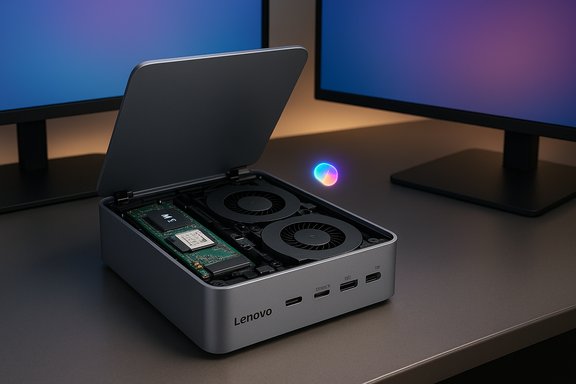
- Size and materials: a low-profile 195 mm × 191 mm × 42.6 mm chassis using aluminum sides with removable plastic top and bottom covers. The device is small but solid, and Lenovo includes a plastic stand so the unit can be positioned vertically if desk space is tight.
- Ports and I/O: a sensible mix of front and rear I/O that targets real desktop workflows:
- Front: USB-A, USB-C (10 Gbps), 3.5 mm headset jack, power button.
- Rear: Ethernet (RJ45), multiple USB-A ports (including USB‑2.0 legacy), a high-speed USB‑C (40 Gbps / USB4), HDMI 2.1 and DisplayPort 1.4a for modern displays.
- Cooling: a dual‑fan cooling arrangement in a 1‑liter chassis keeps the Snapdragon X chip at usable sustained clocks while remaining largely quiet in normal use. Fans are audible only under heavier synthetic loads.
Strengths in design
- Premium look and feel — the Minimalist aluminum sides and subdued Luna Grey finish give the Mini X a near‑Mac‑Mini vibe without sacrificing serviceability.
- Practical serviceability — removable top/bottom panels enable swapping the M.2 SSD and Wi‑Fi card; that’s rare in many tiny OEM mini PCs and extends usable life for storage upgrades.
- Modern, high‑bandwidth ports — USB4/40Gbps and HDMI 2.1 provide flexibility for multi‑display setups and high‑speed external storage. That I/O slate places the Mini X ahead of many competing mini PCs in day-to-day versatility.
Design caveats
- RAM is soldered (32 GB is the base configuration in many markets), so buyers need to choose capacity wisely at purchase.
- There’s no SD card slot, and some buyers may find the front/back port balance could use one extra rear USB‑C.
- Regionally variable SKUs and vendor channels mean the available configurations and prices will differ by market — check local Lenovo SKUs before committing.
Hardware and specifications (what you actually get)
At launch and in early retail configurations, Lenovo offered the IdeaCentre Mini X in two key Snapdragon X family configurations:- Base SKU: Snapdragon X (X1‑26‑100 / 2.97 GHz), 32 GB LPDDR5X (soldered), 512 GB M.2 NVMe PCIe Gen4 SSD (expandable), Wi‑Fi 7/Bluetooth 5.2, discrete I/O including USB4 and HDMI 2.1. Starting pricing in the U.S. quoted near $699.
- Higher SKU: Snapdragon X Plus (X1P‑64‑100 / 3.40 GHz) with similar memory and storage configurations, at a modest premium (commonly around $899 in early channel pricing).
Performance: what the Mini X does well — and where it does not
Everyday productivity and light creative work
The Mini X shines for the sorts of tasks most users actually spend their time on:- Office suites, large multi‑tab web browsing, Teams/Zoom calls, Slack, and email all run smoothly. The combination of an efficient Oryon CPU cluster and 32 GB of fast LPDDR5X memory makes multitasking feel responsive.
- Video streaming and media consumption are well handled: hardware decode support and modern display outputs mean the Mini X is a great HTPC-style desk machine.
- Light photo editing and non‑render heavy video editing are feasible for casual creators. For typical content tasks — cropping, color adjustments, simple timelines — the machine is usable and quick enough for short, iterated workflows.
Benchmarks and how to interpret them
Lenovo’s Mini X, in Windows Central’s testing, produced Cinebench 2024 single‑core and multi‑core scores (96 and 687 respectively) and Geekbench 6 results (single‑core ~2,137; multi‑core ~10,828). These numbers place the base Snapdragon X SoC in rough proximity to Apple’s earlier M1/M2 class — a useful performance benchmark for many productivity workloads — though direct apples‑to‑apples comparisons with Apple Silicon are imperfect due to differing OS optimizations, compiler toolchains, and benchmark behavior on Arm Windows. Practical takeaway: in real‑world productivity the Mini X often feels as responsive as many 10th–12th generation Intel or low‑power desktop chips, particularly for single-threaded interactive tasks. The Hexagon NPU also unlocks on‑device AI-assisted features (Copilot+ experiences) that make certain workflows feel snappier or more integrated.Where it falls short
- Gaming and heavy GPU compute: The integrated Adreno GPU on Snapdragon X is not designed to replace discrete desktop GPUs. Expect significantly reduced performance in 3D gaming, real-time 3D rendering, or large GPU-accelerated creative pipelines.
- Sustained heavy multi‑threaded workloads: In longer, sustained CPU-bound workloads (massive video encodes, long compiles, or heavy VM hosting), the small chassis and power envelope mean thermal and power limits will throttle peak throughput compared to full‑size towers.
- Niche compatibility pitfalls: Some legacy x86 Windows applications, specific enterprise suites, and certain drivers may still exhibit compatibility or performance quirks on Windows‑on‑Arm. The ecosystem has improved dramatically, but enterprise buyers should validate critical software before wide deployment. Community reports in early deployments reflect these edge cases.
Software, drivers and the Arm question
Windows 11 on Arm has matured: many mainstream productivity apps now provide Arm64 native builds or perform well under Microsoft’s x64 emulation layer. Microsoft’s Copilot+ and on‑device AI features have specific hardware prerequisites that the Snapdragon X family helps satisfy (NPU TOPS, memory bandwidth). That said:- Native Arm builds still provide better efficiency and fewer compatibility issues; where possible prefer Arm-native versions of browsers, office apps, and creative tools.
- Emulated legacy apps can and do work, but enterprise IT should test workflows like printing subsystems, specialized drivers, and any software that integrates deeply with OS-level services.
- OEM driver maturity improves over time; keep firmware and driver packages current, and expect occasional BIOS/firmware updates that change power/thermal behavior over the product’s first year on the market.
Upgradability, repairability and TCO
One of the Mini X’s standout features is user-upgradeable storage and a replaceable Wi‑Fi module, accessed by popping off removable panels. For a 1‑liter mini PC this is meaningful: it allows users to upgrade storage capacity and potentially swap the Wi‑Fi card to match local connectivity needs — outcomes that lengthen product lifetime and reduce total cost of ownership.Important limits:
- RAM is soldered and the base model in many markets ships with 32 GB. That’s plenty for many, but if you want a 16 GB variant for lower cost, Lenovo’s channel decisions have made those SKU choices regionally dependent at launch. This is worth flagging because soldered memory cannot be changed after purchase.
Price and value: where the Mini X sits in the market
- Launch U.S. pricing for the base Snapdragon X IdeaCentre Mini X was in the high‑$600s (commonly quoted at $699), with the Snapdragon X Plus variants near $899. That pricing undercuts many comparable Intel or AMD small desktops that offer similar RAM/storage bundles and puts the Mini X in an attractive position for office deployments or prosumers wanting a compact main machine.
- Value drivers:
- Bundled 32 GB RAM and modern I/O at a low headline price.
- On‑device NPU enables Copilot+ features without cloud compute.
- Upgradeable storage and practical port selection increase usable lifetime.
- Buyers seeking game‑level GPU performance, or users that need specific high-end x86 applications, should not expect the same value proposition; a discrete‑GPU tower will still be appropriate for those workloads.
Risks, caveats and what to verify before you buy
- Regional SKU variability: Lenovo’s retail SKUs and included configurations vary by country and retailer. Confirm the exact CPU variant (Snapdragon X vs X Plus), RAM, and storage on the retail page before purchase. Some markets may ship different RAM or SSD sizes as standard.
- Software compatibility: While compatibility has improved, test critical applications under Arm64 or emulation before committing at scale. Some niche enterprise or industry tools retain driver-level or performance quirks. Community reports include isolated cases of domain‑specific apps failing to take advantage of the NPU or showing degraded performance.
- Upgrade path constraints: Storage and Wi‑Fi card upgrades are supported but memory is soldered, and the base 32 GB configuration in many territories eliminates a lower‑cost 16 GB entry-point. That’s a real purchasing decision for value‑sensitive buyers.
- Gaming and GPU‑bound creative tasks: If your daily workflow is GPU‑heavy, the Mini X will be a compromise. The integrated Adreno GPU handles light creative tasks but cannot match discrete GPUs for rendering, real-time effects, or high‑FPS gaming.
- Thermal and firmware variance: Benchmarks and practical throughput are sensitive to firmware tuning (power/thermal profiles). Reviews and early adopters note variance across BIOS/firmware revisions; keep your unit updated and verify reviewer notes for the SKU you plan to buy.
How the Mini X fits into the wider mini‑PC and desktop landscape
- For many everyday users and organizations, the IdeaCentre Mini X finally offers a credible, quiet desktop alternative to the Mac Mini family and low‑power x86 minis. It’s especially compelling where silence, compactness, and modern I/O matter more than raw GPU throughput.
- For enterprises focused on energy use and local AI features, the X-series NPU and efficiency advantages present a compelling option for Copilot+ enabled rollouts — provided software compatibility is validated beforehand.
- Competitors will quickly respond: expect other OEMs to refine their offerings (different chassis, pricing, or variant SKUs) as more Arm Windows desktops enter the market. The Mini X’s arrival accelerates that competitive cycle.
Practical buying guidance (quick checklist)
- Confirm the exact SKU: Snapdragon X vs Snapdragon X Plus and the included RAM/SSD.
- Verify that your critical software is Arm‑ready or performs acceptably under Windows emulation.
- If you need a lower initial price, check for regionally available 16 GB SKUs — Lenovo’s initial channel strategy used 32 GB as common base in many markets.
- Plan for storage expansion: if 512 GB is limiting, take advantage of the M.2 slot or budget for an external NVMe enclosure via the USB4 port.
- Keep firmware updated: early units often receive firmware updates that improve performance curves and thermals.
Final analysis and verdict
Lenovo’s IdeaCentre Mini X is the most convincing Windows‑on‑Arm mini PC available at launch: it blends a premium, serviceable small‑form‑factor chassis with modern I/O, real upgradeability for storage, and Qualcomm’s Snapdragon X silicon that brings both efficiency and on‑device AI capability to the desktop. For mainstream productivity users, prosumers, and IT teams exploring Copilot+ capable endpoints, the Mini X is an unusually well‑balanced offering that deserves serious consideration. That said, the Mini X is not a universal solution. It does not replace discrete‑GPU desktops for gaming or heavy creative pipelines, and buyers must weigh the soldered memory and regional SKU differences when deciding. In short: for the majority of office and home productivity workloads, the Mini X is an excellent, modern all‑rounder. For GPU‑bound work or absolute raw throughput needs, a conventional tower remains the better choice.Lenovo’s IdeaCentre Mini X is more than a product — it’s proof that Windows‑on‑Arm can be practical, quiet, and competitively priced in compact desktop form factors. It won’t erase x86 overnight, but it does real, useful work toward broadening choice in the PC market.
(Verification note: core technical claims and launch details in this article were cross‑checked against contemporary hands‑on reviews and OEM briefings; benchmark numbers quoted are the hands‑on values reported by a major review outlet in their unit testing and reflect that unit’s tested configuration. Buyers should verify SKU specs and local pricing at the point of purchase because Lenovo’s regional SKUs varied at launch.
Source: Windows Central https://www.windowscentral.com/hardware/lenovo/lenovo-ideacentre-mini-x-review/
