

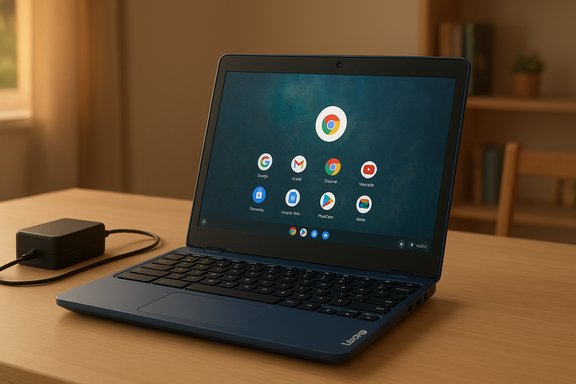
Lenovo’s SmartChoice Chromebook — a compact 11.6‑inch machine powered by an Intel Celeron N4500, 4GB RAM and 64GB eMMC storage — has emerged as one of the most visible entries in the crowded “under ₹15,000” laptop lists circulating in India, promising basic web-first performance for students and light office use without blowing the budget. Multiple retailer trackers and Indian tech roundups list this model at roughly ₹13,490–₹14,990 in recent weeks, and its combination of Chrome OS, low weight and long advertised battery life positions it as the default pick for buyers targeting the absolute entry tier.
The ultra-budget laptop segment in India has matured beyond the “old netbook” stereotype: a new crop of Chromebooks, white‑label Windows notebooks and branded low‑end models have driven prices down to smartphone‑adjacent levels. These machines are marketed for remote schooling, web browsing, basic Office work, video calls and media streaming — tasks that increasingly live in the cloud and therefore need less local horsepower than traditional desktop workflows.
However, the constraints at this price point are real and systemic: manufacturers commonly pair low‑power Jasper Lake or older ARM chips with soldered RAM (often 4GB) and eMMC storage (64GB), trading expandability and raw speed for component cost and battery efficiency. That trade‑off can be a good match for people who live in Google’s ecosystem — Chrome OS offloads a lot of work to the cloud — but it also sets firm limits on what the device will do well and for how long. Recent roundups and price trackers show Lenovo’s SmartChoice Chromebook landing squarely in this category.
For anyone who needs offline Windows apps, local heavy multitasking, or future expandability, the SmartChoice model is not the right primary machine; a refurbished Windows laptop with upgradeable RAM and an SSD, or a higher‑spec new laptop (with 8GB+ and NVMe storage), will be a better long‑term investment even if the upfront cost is higher.
The deciding factors are simple and predictable: accept the limits of 4GB/eMMC and Chrome OS for a low price now, or stretch the budget to secure a more flexible machine that will age better.
Budget buying in 2025 has real choices: the small but effective class of Chromebooks represented by Lenovo’s SmartChoice model proves that acceptable daily performance no longer requires a big wallet — but those savings come with immutable hardware ceilings. Treat sub‑₹15K laptops as targeted tools: excellent for light web‑first work, poor as general‑purpose, long‑term Windows replacements. When the use case and expectations line up, these devices deliver remarkable value; when they don’t, the costs show up later in frustration and wasted productivity. Make the trade‑offs consciously, confirm the SKU, and buy the model that matches your real workflows rather than the headline price.
Source: Techlusive Top Laptops Under Rs 15,000 That Deliver Amazing Performance Without Burning a Hole in Your Pocket
 Background / Overview
The ultra-budget laptop segment in India has matured beyond the “old netbook” stereotype: a new crop of Chromebooks, white‑label Windows notebooks and branded low‑end models have driven prices down to smartphone‑adjacent levels. These machines are marketed for remote schooling, web browsing, basic Office work, video calls and media streaming — tasks that increasingly live in the cloud and therefore need less local horsepower than traditional desktop workflows.However, the constraints at this price point are real and systemic: manufacturers commonly pair low‑power Jasper Lake or older ARM chips with soldered RAM (often 4GB) and eMMC storage (64GB), trading expandability and raw speed for component cost and battery efficiency. That trade‑off can be a good match for people who live in Google’s ecosystem — Chrome OS offloads a lot of work to the cloud — but it also sets firm limits on what the device will do well and for how long. Recent roundups and price trackers show Lenovo’s SmartChoice Chromebook landing squarely in this category.
What the Lenovo SmartChoice Chromebook actually ships with
Core specifications (retailer / roundup consensus)
- Processor: Intel Celeron N4500 (Jasper Lake, 2 cores / 2 threads, 1.1 GHz base, up to 2.8 GHz burst).
- Memory: 4GB LPDDR4x (soldered / non-upgradeable).
- Storage: 64GB eMMC 5.1.
- Display: 11.6‑inch HD (1366×768) anti‑glare panel (~250 nits in some listings).
- OS: Chrome OS (Google’s lightweight, cloud-first operating system).
- Audio / Camera: 2×2W stereo speakers, HD webcam (720p) with built‑in mic.
- Weight & color: ~1.21 kg, available in Blue (Maca Blue / similar).
- Battery: Listings note a 42Wh battery with rapid‑charge claims and Google Power Load test runtimes of ~11–12 hours on light workloads (vendor/retailer claims; real‑world numbers vary).
The Intel Celeron N4500: what to expect in real terms
Architecture and baseline performance
The Intel Celeron N4500 is a low‑power Jasper Lake part introduced in 2021. It uses the Tremont microarchitecture on a 10 nm node, features 2 CPU cores / 2 threads, a small 4MB L3 cache, and a TDP in the 4–6 W range depending on vendor PL1 settings. The integrated GPU is a low‑power Intel UHD variant with 16 execution units — fine for 720p–1080p video playback and simple browser‑accelerated tasks, but not suitable for modern 3D gaming or heavy GPU compute. Benchmarks gathered from public score databases place the N4500 well below modern U‑series or H‑class Intel chips: single‑thread and multi‑thread scores reflect modest throughput that’s adequate for document editing, lightweight web browsing and video streaming, yet noticeably slower when multiple heavy tabs, Linux containers, or Android apps are in play. In short: the CPU is energy efficient and good at light, single‑threaded tasks; it is not a productivity workhorse.Practical implications
- Boot times on Chrome OS remain snappy thanks to the OS design and eMMC caching, but app responsiveness under sustained load is limited by two cores and 4GB RAM. Expect smooth performance only for small tab counts (5–8 tabs) and light web apps.
- Integrated video playback (YouTube, streamed lectures) is handled efficiently, but running simultaneous 1080p streams while editing documents and hosting a video call can push the machine to its limits.
- The low TDP aids battery life and keeps chassis thermals under control; this is the primary design intent of chips like the N4500.
Chrome OS: advantages and the catch for budget buyers
Why Chrome OS makes sense at this price
- Cloud‑first model: Chrome OS offloads storage and much of the heavy lifting to web apps and cloud services, which aligns well with machines that have only 64GB of local storage. This allows modest hardware to deliver acceptable user experience for email, Docs/Sheets, streaming and classroom platforms.
- Security and updates: Automatic updates, sandboxing and verified boot reduce maintenance overhead and help keep devices secure without frequent driver meddling. That’s important for first‑time buyers and families.
- Android & Linux app support: Many Chromebooks support Android apps and a Linux container, which extends versatility for lightweight creative tools and select productivity apps — provided the hardware is up to it. On a 4GB/64GB device, Android apps can run, but multisession use will show limits quickly.
The tradeoffs (what Chrome OS doesn’t hide)
- 4GB is the floor, not the sweet spot. Chrome OS and many Android apps are functional on 4GB, but for comfortable multitasking and any Linux development you should prefer 8GB. Chrome OS Flex’s own compatibility guidance and community testing show 4GB as a minimum, with 8GB recommended for sustained multitasking. Buyers should expect slower tab switching and more frequent memory reclamation on 4GB models.
- eMMC storage is slower and smaller than NVMe SSDs. That limits the number and size of offline files you can comfortably keep, and it slows some local installs and app updates. On Chrome OS most apps are web‑based, but offline usage (local media, large downloads, Android app caches) will feel constrained.
- Not a Windows replacement for legacy apps. Chrome OS runs web apps and Android apps; full Windows desktop applications won’t run natively. Buyers seeking desktop‑only software will need to pursue a refurbished or discounted Windows laptop instead.
Who should buy a ₹15,000 Chromebook — real use cases
- Students attending online classes who primarily use Google Classroom, YouTube lectures and light note‑taking. Chrome OS integrates well with Google Workspace and classroom workflows.
- Users who need a secondary travel device for email, browsing and streaming. The light weight (~1.2 kg) and long battery claims are practical advantages for commuters and holiday travel.
- Families buying for younger children: low cost, simple updates and restricted user profiles (Family Link) make Chromebooks a manageable choice for parental control and durability.
Alternatives under or near ₹15,000 — what else is on the table?
- Other Chromebooks and white‑label brands: During festival sales many outlets show sub‑₹15K Chromebooks from Lenovo, HP and local brands with similar spec sheets (Celeron N‑series, 4GB/64GB). These are interchangeable in real‑world performance, so compare displays, warranty and post‑sale support.
- Refurbished Windows laptops: A refurbished ThinkPad or Dell Latitude with an older Intel Core i3/ i5 and 8GB RAM can sometimes be found near this budget and will run Windows apps natively. This is the route for buyers who need offline desktop applications and local storage. Beware of battery health and warranty limitations.
- Entry Android laptop / tablet + keyboard: For the strictest budgets, Android laptops or 2‑in‑1 tablets with keyboard accessories (some JioBook models, white‑label tablets) can deliver similar browsing and classroom experiences and sometimes include SIM or better connectivity. These often sacrifice keyboard comfort and web browser feature parity.
Buying checklist: what to confirm before you pay
- Exact SKU and seller: Model names hide different configurations — confirm the SKU (model number) before you buy so you actually get 4GB/64GB (or better). Price trackers show frequent divergence between seller offers.
- Warranty & after‑sales: Check whether the warranty is direct from Lenovo or from a marketplace seller and read the fine print on on‑site vs carry‑in service. Cheap devices often have tighter support windows.
- Return policy / exchange: Retailer return windows (7–15 days) and exchange credits during festival sales can change real price-to-value; a faulty unit on sale may be harder to return. Verify returns before purchase.
- Battery and charger specs: Look for published battery capacity (e.g., ~42Wh in some Lenovo listings) and claims about rapid‑charge; treat vendor battery life numbers as best‑case figures derived from light‑use tests.
- Connectivity & ports: Confirm presence of USB‑C, USB‑A, HDMI or microSD slots if you plan to attach external displays or expand storage. Some models offer USB‑C PD and DisplayPort, which broadens usefulness.
Performance tuning and longevity tips for buyers
- Use cloud storage aggressively (Google Drive is integrated), and enable selective offline folders for the small amount of eMMC space. This reduces local storage churn and keeps the system responsive.
- Avoid heavy Linux containers and large Android app caches; reserve Linux/Android installations for occasional use only on 4GB machines. If you plan more development work, opt for 8GB models.
- Disable unnecessary background extensions and limit browser tabs to essential ones during live classes or video calls to keep the N4500 responsive. Two cores and 4GB RAM mean multitasking overhead is real.
Risks and gotchas — what the marketing glosses over
- Short usable life for power users: Soldered RAM and eMMC make future upgrades impossible; what’s sufficient now may feel limiting in 18–36 months as web apps grow in complexity and storage needs accumulate. Buyers should view these machines as consumable devices rather than long‑term primary PCs.
- Price volatility and fake bargains: Price trackers show frequent deep discounts during sales; some marketplace listings have misleading “list prices” that inflate perceived discounts. Confirm the historical low price (trackers like BuyHatke or PriceHunt are useful) and vet seller ratings.
- Limited offline capability: If your work involves large local files, offline databases or Windows‑only applications, a low‑end Chromebook is a poor fit. The device is optimized for online, cloud‑centric workflows.
Verdict — is a Lenovo SmartChoice Chromebook at ~₹13–15K worth it?
For users who live in the cloud, need a light travel laptop, or require an affordable, low‑maintenance device for children and online classes, yes — the SmartChoice Chromebook represents a pragmatic value proposition. It gives you a modern Chromebook experience, reliable battery/thermal behavior and the portability many buyers prioritize.For anyone who needs offline Windows apps, local heavy multitasking, or future expandability, the SmartChoice model is not the right primary machine; a refurbished Windows laptop with upgradeable RAM and an SSD, or a higher‑spec new laptop (with 8GB+ and NVMe storage), will be a better long‑term investment even if the upfront cost is higher.
The deciding factors are simple and predictable: accept the limits of 4GB/eMMC and Chrome OS for a low price now, or stretch the budget to secure a more flexible machine that will age better.
Bottom line: the smart buy approach under ₹15,000
- Buy it if: you want a lightweight, low‑maintenance Chromebook for web apps, online classes and light productivity, and you can live inside Google’s ecosystem.
- Skip it if: you need Windows compatibility, local heavy multitasking or future‑proof upgradeability. Consider refurbished business laptops or a slightly higher budget to get 8GB + NVMe storage.
Budget buying in 2025 has real choices: the small but effective class of Chromebooks represented by Lenovo’s SmartChoice model proves that acceptable daily performance no longer requires a big wallet — but those savings come with immutable hardware ceilings. Treat sub‑₹15K laptops as targeted tools: excellent for light web‑first work, poor as general‑purpose, long‑term Windows replacements. When the use case and expectations line up, these devices deliver remarkable value; when they don’t, the costs show up later in frustration and wasted productivity. Make the trade‑offs consciously, confirm the SKU, and buy the model that matches your real workflows rather than the headline price.
Source: Techlusive Top Laptops Under Rs 15,000 That Deliver Amazing Performance Without Burning a Hole in Your Pocket
