

The Lenovo ThinkCentre M625q Tiny 10TF002WUS is a 1-liter business desktop built around AMD’s dual-core A9-9420e, typically sold with 4GB of DDR4 memory, a 128GB SSD, Windows 10 Pro, dual DisplayPort outputs, Wi-Fi, Bluetooth, Ethernet, and VESA-friendly mounting hardware. That makes it a real PC, but not a modern general-purpose workhorse. In 2026, the more useful way to read this machine is as a quiet endpoint, signage box, kiosk, thin client, or cheap lab node with very specific limits. The danger is mistaking “Tiny” for “miracle.”
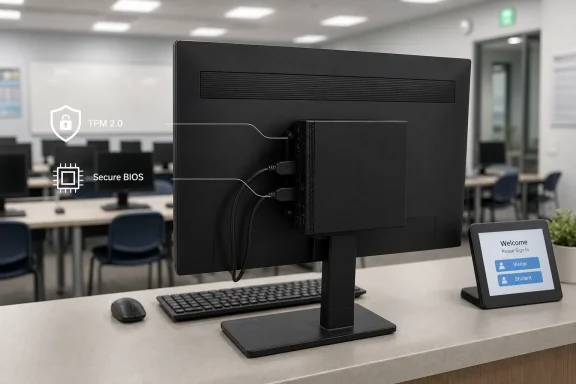
Lenovo’s Tiny machines have always understood something many desktop vendors learned late: in offices, space is infrastructure. A PC that can disappear behind a monitor, tuck under a counter, or sit silently in a reception area solves problems that a faster tower never touches. The M625q’s 7-inch-square footprint is not cosmetic; it is the product.
That matters for front desks, exam rooms, classrooms, call centers, warehouse terminals, and digital signage installations. In those places, the computer is often less important than the workflow around it. If the machine boots reliably, drives a display, connects to the network, and stays out of the way, it has done its job.
The ThinkCentre design language also helps. These systems are business machines, not toy mini PCs dressed up for Amazon search results. They tend to have practical port layouts, mounting options, TPM support, BIOS controls, and serviceable internals within the constraints of the chassis.
But smallness has a politics of its own. Vendors and resellers love to present compact machines as if volume were the only compromise. With the M625q, the compromise is not hidden: the processor, memory ceiling, operating-system future, and expansion limits all matter more than the pleasing physical dimensions.
This is not a CPU for multitasking bravado. It can handle point-of-sale software, remote desktop sessions, signage playback, lightweight office tasks, and thin-client duties. It can also feel surprisingly usable if the workload is narrow and the SSD is healthy.
The trouble starts when “everyday office tasks” is interpreted the way people actually work in 2026. A browser with ten tabs, Teams or Zoom, a cloud document editor, an antivirus scan, and a background update can make a dual-core machine feel old very quickly. The SSD prevents the worst kind of mechanical-drive misery, but it cannot invent CPU headroom.
This is where the marketing phrase “real work” needs discipline. Yes, the M625q does real work. But the real work it does best is repetitive, bounded, and infrastructural: displaying menus, connecting to virtual desktops, running a front-office app, acting as a print station, or serving as a low-cost Linux box. It is not the machine you buy for someone whose job has become a browser-based operating system with meetings attached.
The good news is that the M625q platform supports up to 8GB of DDR4 SO-DIMM memory. The bad news is that 8GB is still a ceiling, not a runway. For a tiny endpoint, 8GB can be enough; for a modern Windows desktop expected to behave like a laptop replacement, it is modest.
If this box is being purchased used or refurbished, the first operational question should not be “Does it have an SSD?” It should be “Can I budget the memory upgrade immediately?” A 4GB Windows machine in 2026 is not automatically useless, but it is usually one bad browser session away from becoming a complaint ticket.
The 128GB SSD is more defensible. For a thin client, kiosk, signage player, or domain-joined utility PC, 128GB is fine if storage discipline exists. It is less fine if users store documents locally, sync large cloud folders, or let Windows update debris accumulate for years.
But fanless does not mean heatless. It means the chassis and heatsink must do quietly what airflow normally does loudly. A fanless tiny PC needs breathing room, sane ambient temperatures, and realistic workloads. Mount it behind a monitor in a warm corner and ask it to decode video all day, and the thermal design becomes part of the deployment plan.
That is not a criticism unique to Lenovo. It is the bargain every passively cooled mini desktop makes. The M625q can be a wonderfully quiet appliance precisely because it is not built around a hot processor. The same low-power silicon that limits performance is what makes the silent design plausible.
This is also why “fanless” should not be treated as an across-the-board upgrade over actively cooled models. For a low-duty endpoint, fanless is elegant. For sustained compute, it can become a throttle-shaped reminder that physics still gets a vote.
The M625q’s AMD A9-9420e is also outside the normal Windows 11 compatibility story. That does not mean hobbyists cannot force Windows 11 onto unsupported hardware, because the Windows enthusiast world has never lacked for workarounds. It does mean a business buyer should not build a deployment plan around unsupported operating-system gymnastics.
For home labs and tinkerers, this may be acceptable. Install Linux, run a lightweight desktop, make it a Pi-hole box, a Home Assistant dashboard, a signage controller, a retro terminal, or a remote access station. In that world, the M625q’s small size and low power draw are charming.
For businesses, the Windows 10 situation changes the accounting. A cheap endpoint that needs ESU coverage, extra admin attention, or replacement within a short window may not be cheap. The purchase price is only the first line in the spreadsheet; lifecycle is the rest of the page.
That mix makes the M625q better suited to real deployments than many no-name mini PCs with flashier processors but poorer manageability. A digital signage box needs reliable display output. A front-desk station needs barcode scanners, receipt printers, keyboards, and sometimes a second screen. A thin client needs networking that does not behave like an afterthought.
The M625q also fits into Lenovo’s broader Tiny ecosystem: VESA mounts, vertical stands, monitor integration options, and physical security accessories. That ecosystem is part of the product. A mini PC that can be mounted cleanly and locked down is more useful in a business than one that merely benchmarks well.
Still, the port story does not erase the compute story. Connectivity expands the number of jobs the M625q can be assigned. It does not make each job equally wise.
None of that is necessarily malicious. The M625q is useful hardware. But the language of refurbished PC listings tends to flatten context, and context is everything here.
The model number matters. The exact configuration matters. Whether it is the desktop variant or thin-client variant matters. Whether the SSD is new or merely wiped matters. Whether the Windows license is valid and activated matters. Whether the power adapter is genuine matters. Whether it ships with 4GB or 8GB matters far more than the listing prose suggests.
The best buyer for this Lenovo is not someone looking for the cheapest possible “computer.” It is someone who can name the workload before buying the box. If the sentence begins, “I need a silent PC to do this one defined thing,” the M625q may make sense. If the sentence begins, “I need a cheap replacement for my main desktop,” the answer is probably no.
But compared with newer Tiny-class systems — especially Lenovo M75q, M70q, M720q, M920q, or comparable Dell and HP business minis — the M625q looks clearly aged. Quad-core and six-core refurbished business minis are widely available now, often with better Windows 11 prospects and more memory headroom. For many buyers, spending a bit more once is smarter than saving a little and living with the constraint every day.
That is especially true for knowledge workers. The cost of a slow PC is not only measured in seconds. It is measured in frustration, help-desk tickets, workarounds, and the gradual normalization of bad tools. A cheap endpoint can become expensive if it sits in front of a person whose time is worth more than the delta to a better machine.
For appliance roles, the equation flips. A signage player does not get annoyed. A print station does not multitask. A thin client’s job is to reach a server that does the heavy lifting. There, the M625q can still be rational.
But endpoint security in 2026 is not simply a hardware feature list. It is patch status, OS support, browser support, remote management, identity policy, application control, and monitoring. A Windows 10 Pro machine after end of support requires a plan, not optimism.
This is where the device’s strongest and weakest arguments collide. As a locked-down appliance, it can be easier to secure because the workload is narrow. As a general Windows desktop, it becomes harder to justify because the operating system and hardware platform sit on the wrong side of Microsoft’s current upgrade path.
Linux can change the picture. A lightweight distribution can give the M625q a longer useful life, particularly for kiosk, signage, and lab roles. But that assumes the organization has the skills and support model to run Linux endpoints. “Install Linux” is a solution for some readers of WindowsForum.com; it is not a procurement policy for every office.
That distinction matters because the used-business-PC market is full of machines that are excellent at the right price and wrong at the wrong expectation. A $60–$100 M625q for a lab, signage, or thin-client role may be a clever buy. The same machine priced like a modern mini PC is a trap.
The useful question is not whether the M625q is “good.” It is whether its limits align with the job. If they do, the hardware’s age becomes less important. If they do not, every boot, every tab, and every update will remind the user why the machine was inexpensive.
Source: kliksolonews.com https://kliksolonews.com/4GB-DDR4-RAM-128GB-SSD-Windows-10-Pro-Fanless-Compact-Design-1026813/
 The Small Box Is the Feature, Not the Spec Sheet
Lenovo’s Tiny machines have always understood something many desktop vendors learned late: in offices, space is infrastructure. A PC that can disappear behind a monitor, tuck under a counter, or sit silently in a reception area solves problems that a faster tower never touches. The M625q’s 7-inch-square footprint is not cosmetic; it is the product.That matters for front desks, exam rooms, classrooms, call centers, warehouse terminals, and digital signage installations. In those places, the computer is often less important than the workflow around it. If the machine boots reliably, drives a display, connects to the network, and stays out of the way, it has done its job.
The ThinkCentre design language also helps. These systems are business machines, not toy mini PCs dressed up for Amazon search results. They tend to have practical port layouts, mounting options, TPM support, BIOS controls, and serviceable internals within the constraints of the chassis.
But smallness has a politics of its own. Vendors and resellers love to present compact machines as if volume were the only compromise. With the M625q, the compromise is not hidden: the processor, memory ceiling, operating-system future, and expansion limits all matter more than the pleasing physical dimensions.
The A9-9420e Draws a Line Around the Work It Can Do
The AMD A9-9420e is a low-power, dual-core, dual-thread chip from an era when “good enough” office computing still meant a handful of browser tabs, a local Office document, and maybe a line-of-business app that had not been redesigned since Windows 7. Its base clock of 1.8GHz and boost up to 2.7GHz sound serviceable until you remember that modern Windows, modern browsers, and modern web apps have grown heavier.This is not a CPU for multitasking bravado. It can handle point-of-sale software, remote desktop sessions, signage playback, lightweight office tasks, and thin-client duties. It can also feel surprisingly usable if the workload is narrow and the SSD is healthy.
The trouble starts when “everyday office tasks” is interpreted the way people actually work in 2026. A browser with ten tabs, Teams or Zoom, a cloud document editor, an antivirus scan, and a background update can make a dual-core machine feel old very quickly. The SSD prevents the worst kind of mechanical-drive misery, but it cannot invent CPU headroom.
This is where the marketing phrase “real work” needs discipline. Yes, the M625q does real work. But the real work it does best is repetitive, bounded, and infrastructural: displaying menus, connecting to virtual desktops, running a front-office app, acting as a print station, or serving as a low-cost Linux box. It is not the machine you buy for someone whose job has become a browser-based operating system with meetings attached.
Four Gigabytes Is the Minimum, Not a Comfort Zone
The 4GB RAM configuration is the single most obvious bottleneck after the processor. Windows 10 Pro can run in 4GB, but “run” is doing a lot of work in that sentence. Once endpoint security, browser memory, update services, print tools, remote agents, and vendor utilities are loaded, the machine has little margin left.The good news is that the M625q platform supports up to 8GB of DDR4 SO-DIMM memory. The bad news is that 8GB is still a ceiling, not a runway. For a tiny endpoint, 8GB can be enough; for a modern Windows desktop expected to behave like a laptop replacement, it is modest.
If this box is being purchased used or refurbished, the first operational question should not be “Does it have an SSD?” It should be “Can I budget the memory upgrade immediately?” A 4GB Windows machine in 2026 is not automatically useless, but it is usually one bad browser session away from becoming a complaint ticket.
The 128GB SSD is more defensible. For a thin client, kiosk, signage player, or domain-joined utility PC, 128GB is fine if storage discipline exists. It is less fine if users store documents locally, sync large cloud folders, or let Windows update debris accumulate for years.
Fanless Silence Is a Real Advantage With a Real Thermal Contract
The fanless claim is not fluff if the unit in question is the fan-free thin-client-style M625q configuration. In signage, healthcare, libraries, classrooms, studios, and reception spaces, silence has value. No fan also means one fewer moving part and one less dust-choked intake to service.But fanless does not mean heatless. It means the chassis and heatsink must do quietly what airflow normally does loudly. A fanless tiny PC needs breathing room, sane ambient temperatures, and realistic workloads. Mount it behind a monitor in a warm corner and ask it to decode video all day, and the thermal design becomes part of the deployment plan.
That is not a criticism unique to Lenovo. It is the bargain every passively cooled mini desktop makes. The M625q can be a wonderfully quiet appliance precisely because it is not built around a hot processor. The same low-power silicon that limits performance is what makes the silent design plausible.
This is also why “fanless” should not be treated as an across-the-board upgrade over actively cooled models. For a low-duty endpoint, fanless is elegant. For sustained compute, it can become a throttle-shaped reminder that physics still gets a vote.
Windows 10 Pro Is Now a Liability Disguised as Familiarity
The listing’s Windows 10 Pro angle would have been a strength a few years ago. In May 2026, it is the part that should make buyers stop and think. Windows 10 reached end of support on October 14, 2025, and while Extended Security Updates can buy time in some scenarios, they do not turn an aging endpoint into a forward-looking Windows fleet asset.The M625q’s AMD A9-9420e is also outside the normal Windows 11 compatibility story. That does not mean hobbyists cannot force Windows 11 onto unsupported hardware, because the Windows enthusiast world has never lacked for workarounds. It does mean a business buyer should not build a deployment plan around unsupported operating-system gymnastics.
For home labs and tinkerers, this may be acceptable. Install Linux, run a lightweight desktop, make it a Pi-hole box, a Home Assistant dashboard, a signage controller, a retro terminal, or a remote access station. In that world, the M625q’s small size and low power draw are charming.
For businesses, the Windows 10 situation changes the accounting. A cheap endpoint that needs ESU coverage, extra admin attention, or replacement within a short window may not be cheap. The purchase price is only the first line in the spreadsheet; lifecycle is the rest of the page.
The Ports Make It More Useful Than Its Processor Suggests
One reason ThinkCentre Tiny machines remain popular on the secondary market is that they are not bare-bones curiosities. Dual DisplayPort outputs are genuinely useful. Gigabit Ethernet matters in corporate environments. Wi-Fi and Bluetooth help where cabling is inconvenient. USB-A ports keep old peripherals alive without dongle theater.That mix makes the M625q better suited to real deployments than many no-name mini PCs with flashier processors but poorer manageability. A digital signage box needs reliable display output. A front-desk station needs barcode scanners, receipt printers, keyboards, and sometimes a second screen. A thin client needs networking that does not behave like an afterthought.
The M625q also fits into Lenovo’s broader Tiny ecosystem: VESA mounts, vertical stands, monitor integration options, and physical security accessories. That ecosystem is part of the product. A mini PC that can be mounted cleanly and locked down is more useful in a business than one that merely benchmarks well.
Still, the port story does not erase the compute story. Connectivity expands the number of jobs the M625q can be assigned. It does not make each job equally wise.
The Refurbished Mini-PC Market Is Where Specs Go to Be Misread
A machine like this often reaches buyers through refurbishers, marketplaces, and SEO-heavy storefronts rather than through the original corporate procurement channel. That changes how it is described. A corporate endpoint becomes a “powerful tiny desktop.” A thin client becomes an “office PC.” A quiet appliance becomes a “space-saving workstation.”None of that is necessarily malicious. The M625q is useful hardware. But the language of refurbished PC listings tends to flatten context, and context is everything here.
The model number matters. The exact configuration matters. Whether it is the desktop variant or thin-client variant matters. Whether the SSD is new or merely wiped matters. Whether the Windows license is valid and activated matters. Whether the power adapter is genuine matters. Whether it ships with 4GB or 8GB matters far more than the listing prose suggests.
The best buyer for this Lenovo is not someone looking for the cheapest possible “computer.” It is someone who can name the workload before buying the box. If the sentence begins, “I need a silent PC to do this one defined thing,” the M625q may make sense. If the sentence begins, “I need a cheap replacement for my main desktop,” the answer is probably no.
The Better Comparison Is Not a Tower, but a Terminal
The fairest way to judge the M625q is against the devices it can replace. Compared with an old tower under a desk, it is smaller, quieter, cleaner, and easier to mount. Compared with a consumer mini PC of uncertain origin, it has a more businesslike design and a better support lineage. Compared with a Raspberry Pi-style board, it brings x86 compatibility, Windows capability, and conventional PC ports.But compared with newer Tiny-class systems — especially Lenovo M75q, M70q, M720q, M920q, or comparable Dell and HP business minis — the M625q looks clearly aged. Quad-core and six-core refurbished business minis are widely available now, often with better Windows 11 prospects and more memory headroom. For many buyers, spending a bit more once is smarter than saving a little and living with the constraint every day.
That is especially true for knowledge workers. The cost of a slow PC is not only measured in seconds. It is measured in frustration, help-desk tickets, workarounds, and the gradual normalization of bad tools. A cheap endpoint can become expensive if it sits in front of a person whose time is worth more than the delta to a better machine.
For appliance roles, the equation flips. A signage player does not get annoyed. A print station does not multitask. A thin client’s job is to reach a server that does the heavy lifting. There, the M625q can still be rational.
Security Is More Than a TPM Checkbox
The M625q includes business-friendly security features such as TPM 2.0 support, BIOS password controls, USB restrictions, and physical lock options. Those are useful, particularly in public or semi-public deployments. A kiosk or reception PC benefits from being locked down at both the firmware and physical level.But endpoint security in 2026 is not simply a hardware feature list. It is patch status, OS support, browser support, remote management, identity policy, application control, and monitoring. A Windows 10 Pro machine after end of support requires a plan, not optimism.
This is where the device’s strongest and weakest arguments collide. As a locked-down appliance, it can be easier to secure because the workload is narrow. As a general Windows desktop, it becomes harder to justify because the operating system and hardware platform sit on the wrong side of Microsoft’s current upgrade path.
Linux can change the picture. A lightweight distribution can give the M625q a longer useful life, particularly for kiosk, signage, and lab roles. But that assumes the organization has the skills and support model to run Linux endpoints. “Install Linux” is a solution for some readers of WindowsForum.com; it is not a procurement policy for every office.
The Right Buyer Sees a Tool, Not a Bargain
The Lenovo ThinkCentre M625q Tiny is best understood as a tool for constrained environments. It is a small, quiet, efficient box that can be mounted almost anywhere and assigned a narrow job. It is not a magical budget workstation hiding inside a paperback-sized case.That distinction matters because the used-business-PC market is full of machines that are excellent at the right price and wrong at the wrong expectation. A $60–$100 M625q for a lab, signage, or thin-client role may be a clever buy. The same machine priced like a modern mini PC is a trap.
The useful question is not whether the M625q is “good.” It is whether its limits align with the job. If they do, the hardware’s age becomes less important. If they do not, every boot, every tab, and every update will remind the user why the machine was inexpensive.
The Tiny Lenovo’s Real Scorecard Is Brutally Specific
The M625q deserves a verdict that is narrower than the listing copy and kinder than a benchmark chart. It is a capable small endpoint when deployed with intent, and a poor modern desktop when bought on vibes.- The M625q is a strong fit for digital signage, kiosks, thin-client work, light point-of-sale roles, and single-purpose office stations.
- The dual-core AMD A9-9420e and 4GB RAM configuration are too constrained for comfortable modern multitasking.
- The 128GB SSD is adequate for controlled endpoint use but should not be treated as generous local storage.
- Windows 10 Pro is no longer a long-term advantage unless the buyer has a security update and lifecycle plan.
- An immediate upgrade to 8GB RAM is the most sensible improvement if the machine will run Windows.
- Buyers who need a daily-driver desktop should compare it against newer refurbished Tiny-class PCs before committing.
Source: kliksolonews.com https://kliksolonews.com/4GB-DDR4-RAM-128GB-SSD-Windows-10-Pro-Fanless-Compact-Design-1026813/
